Modernizing
Data, Applications
& APIs
to the Cloud
Tomasz Wiśniewski
Kamil Mrzygłód
Piotr Rogala
Tomasz Wiśniewski
https://tomaszwisniewski.com
http://djtww.dance
Kamil Mrzygłód
Piotr Rogala
•Currently working in
•Azure Cloud Architect Lead
•MVP Azure
•Blog:
•Group leader:
Sieć: Microsoft Tech Series
Hasło: MStechseries
Państwa identyfikatory
i smycze wykonane są
z materiałów ekologicznych
takich jak papier ryżowy
i materiał z włókien
kukurydzianych
Każdy z uczestników
spotkania za przyniesiony
elektrośmieć otrzyma
w zamian roślinkę
Odbiorem i zagospoda-
rowaniem elektrośmieci
zajmie się ElektroEko
Organizacja Odzysku
Sprzętu Elektrycznego
i Elektronicznego
Nasza scenografia jest
wykonana z drewno-
pochodnych płyt OSB
(powstających z drewnia-
nych odpadów), które
po ostrożnym demontażu,
trafią do warszawskiego
schroniska dla bezdomnych
zwierząt „Na Paluchu”
Rośliny użyte do dekoracji,
wrócą do szkółek skąd
zostały wypożyczone,
aby dalej rosnąć
High Performance DevOps Companies Achieve…
DevOps
Faster
Time to Market
Increased
Revenue
2,604x Faster Mean
Time to Recover
2,555x Faster Lead
Time For Changes
7x Lower Change
Failure Rate
46x Deployment
Frequency
$
Source: 2018 Accelerate: State of DevOps: Strategies for a New Economy." N. Forsgren, J. Humble, G. Kim. DevOps Research and Assessment (DORA)
Microsoft Azure is a powerful and flexible foundation for past, present, and future apps – easily build, manage, and
deploy any application and any stack on a massive, global network using your favorite tools and frameworks.
How Microsoft can help
Choice of IaaS, PaaS, public cloud or
hybrid.
Mirror or modernize app infrastructure
with VMs, containers, microservices or
serverless.
Supports all stages of the app
modernization journey – from lift-and-
shift to Cloud-Native.
Flexible
Instantly improve the performance,
scalability and resiliency of your apps
by moving them to the cloud.
Increase business agility with Cloud-
Native capabilities and built-in
DevOps for continuous innovation.
Powerful
Bring your stack, we bring a cloud that
runs any app, on any platform, and any
language.
Build applications using the language
and tools of your choice - Azure
supports what you already use and love
so you can get up and running fast –
just bring code.
Open
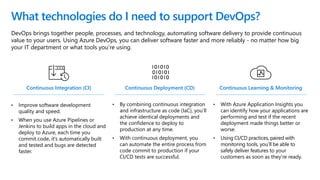
DevOps brings together people, processes, and technology, automating software delivery to provide continuous
value to your users. Using Azure DevOps, you can deliver software faster and more reliably - no matter how big
your IT department or what tools you’re using.
What technologies do I need to support DevOps?
Continuous Integration (CI)
• Improve software development
quality and speed.
• When you use Azure Pipelines or
Jenkins to build apps in the cloud and
deploy to Azure, each time you
commit code, it’s automatically built
and tested and bugs are detected
faster.
Continuous Deployment (CD)
• By combining continuous integration
and infrastructure as code (IaC), you’ll
achieve identical deployments and
the confidence to deploy to
production at any time.
• With continuous deployment, you
can automate the entire process from
code commit to production if your
CI/CD tests are successful.
Continuous Learning & Monitoring
• With Azure Application Insights you
can identify how your applications are
performing and test if the recent
deployment made things better or
worse.
• Using CI/CD practices, paired with
monitoring tools, you’ll be able to
safely deliver features to your
customers as soon as they’re ready.
Introducing Azure DevOps
Deliver value to your users faster
using proven agile tools to plan,
track, and discuss work across
your teams.
Build, test, and deploy with CI/CD that
works with any language, platform,
and cloud. Connect to GitHub or any
other Git provider and deploy
continuously.
Get unlimited, cloud-hosted
private Git repos and collaborate
to build better code with pull
requests and advanced file
management.
Test and ship with confidence
using manual and exploratory
testing tools.
Create, host, and share packages with
your team, and add artifacts to your
CI/CD pipelines with a single click.
Azure Boards Azure ReposAzure Pipelines
Azure Test Plans Azure Artifacts
https://azure.com/devops

2018
2016
.NET Core 1.0
PowerShell Core
Windows Subsystem for
Linux in Windows 10
Microsoft joins
Linux Foundation
GitHub recognizes
Microsoft as a top open
source contributor
2017
Microsoft
Azure Kubernetes
Service launched
Draft, Brigade, Kashti
projects submitted to
Kubernetes community
Microsoft joins Cloud
Native Computing &
Cloud Foundry
Foundations
SQL 2017 on Linux
Windows source code
moved to Git
Azure Databricks
(Apache Spark)
announced
2012
Microsoft Open Source
2018
Azure Pipelines
Free unlimited build minutes for
public projects
Up to 10 free parallel jobs across
Windows, Linux and macOS
Microsoft Open Source
https://azure.com/pipelines
Integrated with GitHub
Azure Pipelines available now to
any developer from the GitHub
Marketplace
Broadening the Azure Ecosystem
Self-Service Dev/Test Environments
Infrastructure and Configuration as Code
Gain full visibility and control of
your cloud security state
Continuous Security
Leverage ML to Proactively
identify and mitigate risks to
reduce exposure to attacks
Quickly detect and respond
to threats with advanced
analytics
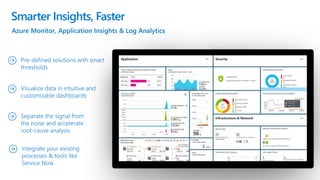
Smarter Insights, Faster
Mix and match
to create
workflows with
tools from
Microsoft, open
source or your
favorite
3rd party tools
Azure DevOps: Choose the tools and clouds you love
Azure
DevOps lets
developers
choose the
tools that
are right for
them
Target any cloud, on-prem or both and deploy to the servers you need
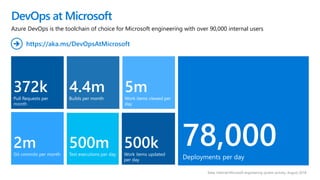
DevOps at Microsoft
Data: Internal Microsoft engineering system activity, August 2018
372k
Pull Requests per
month
2m
Git commits per month
78,000Deployments per day
4.4m
Builds per month
500m
Test executions per day
500k
Work items updated
per day
5m
Work items viewed per
day
Azure DevOps is the toolchain of choice for Microsoft engineering with over 90,000 internal users
https://aka.ms/DevOpsAtMicrosoft
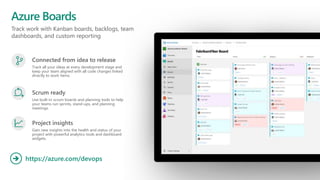
Track work with Kanban boards, backlogs, team
dashboards, and custom reporting
Azure Boards
https://azure.com/devops
Connected from idea to release
Track all your ideas at every development stage and
keep your team aligned with all code changes linked
directly to work items.
Scrum ready
Use built-in scrum boards and planning tools to help
your teams run sprints, stand-ups, and planning
meetings.
Project insights
Gain new insights into the health and status of your
project with powerful analytics tools and dashboard
widgets.
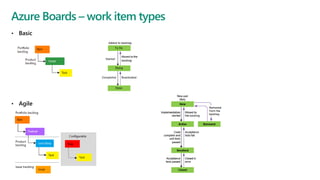
• Basic
• Agile
Azure Boards – work item types
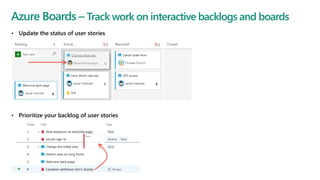
Azure Boards – Track work on interactive backlogs and boards
• Update the status of user stories
• Prioritize your backlog of user stories
Azure Boards – Collaborate
Collaborate with others through the Discussion section of the work item form. Use @mentions
and #ID controls to quickly include others in the conversation or link to other work items. Choose to follow
specific issues to get alerted when they are updated.
Azure Boards – Work in sprints, implement Scrum
Plan sprints by assigning work to current or future sprints. Forecast work that can get completed based on
effort estimates. Determine how much work can be done within a sprint. Bulk assign issues and tasks to team
members and sprints.
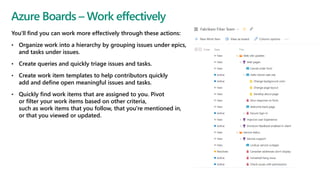
You'll find you can work more effectively through these actions:
• Organize work into a hierarchy by grouping issues under epics,
and tasks under issues.
• Create queries and quickly triage issues and tasks.
• Create work item templates to help contributors quickly
add and define open meaningful issues and tasks.
• Quickly find work items that are assigned to you. Pivot
or filter your work items based on other criteria,
such as work items that you follow, that you're mentioned in,
or that you viewed or updated.
Azure Boards – Work effectively
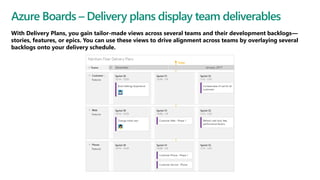
Azure Boards – Delivery plans display team deliverables
With Delivery Plans, you gain tailor-made views across several teams and their development backlogs—
stories, features, or epics. You can use these views to drive alignment across teams by overlaying several
backlogs onto your delivery schedule.
© Microsoft Corporation
HOL:
Agile i zarzadzanie
portfolio za pomocą
Azure Boards
Share information, use markdown, collaborate
Azure Wiki
https://azure.com/devops
Provisioned vs published code
Choose what type of Wiki you want to have in your
project – web-based editor or in code
Searchable
With wiki search, you can search within a project wiki
or across all wikis created for your organization.
Integrated with work items
Create and embed work items in your wiki page
content.
© Microsoft Corporation
HOL:
Współpraca przy
wykorzystaniu Azure
DevOps Wiki
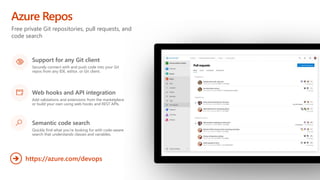
Free private Git repositories, pull requests, and
code search
Azure Repos
https://azure.com/devops
Support for any Git client
Securely connect with and push code into your Git
repos from any IDE, editor, or Git client.
Web hooks and API integration
Add validations and extensions from the marketplace
or build your own using web hooks and REST APIs.
Semantic code search
Quickly find what you’re looking for with code-aware
search that understands classes and variables.
© Microsoft Corporation
HOL:
Kontrola wersji przy
pomocy Git, Visual Studio
Code i Azure Repo
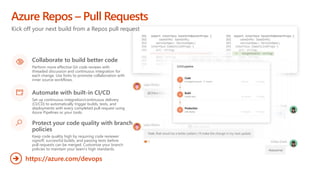
Kick off your next build from a Repos pull request
Azure Repos – Pull Requests
https://azure.com/devops
Collaborate to build better code
Perform more effective Git code reviews with
threaded discussion and continuous integration for
each change. Use forks to promote collaboration with
inner source workflows.
Automate with built-in CI/CD
Set up continuous integration/continuous delivery
(CI/CD) to automatically trigger builds, tests, and
deployments with every completed pull request using
Azure Pipelines or your tools.
Protect your code quality with branch
policies
Keep code quality high by requiring code reviewer
signoff, successful builds, and passing tests before
pull requests can be merged. Customize your branch
policies to maintain your team’s high standards.
© Microsoft Corporation
HOL:
Tworzenie i praca
z Pull Requests w
Azure Repos
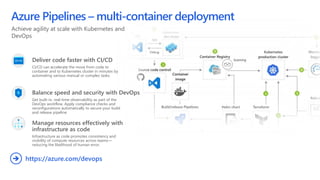
Achieve agility at scale with Kubernetes and
DevOps
Azure Pipelines – multi-container deployment
https://azure.com/devops
Deliver code faster with CI/CD
CI/CD can accelerate the move from code to
container and to Kubernetes cluster in minutes by
automating various manual or complex tasks.
Balance speed and security with DevOps
Get built-in, real-time observability as part of the
DevOps workflow. Apply compliance checks and
reconfigurations automatically to secure your build
and release pipeline
Manage resources effectively with
infrastructure as code
Infrastructure as code promotes consistency and
visibility of compute resources across teams—
reducing the likelihood of human error.
© Microsoft Corporation
HOL:
Continous Integration z
wykorzystaniem Azure Pipelines
HOL: Continous Integration z wykorzystaniem Azure
Pipelines
• https://azuredevopslabs.com/labs/azuredevops/continuousintegration/
• https://azuredevopsdemogenerator.azurewebsites.net/
• Project: PartsUnlimited
© Microsoft Corporation
HOL:
Continous Delivery z
wykorzystanie Azure Pipelines
HOL: Continous Delivery z wykorzystanie Azure Pipelines
• https://azuredevopslabs.com/labs/azuredevops/continuousdeployment/
• https://azuredevopsdemogenerator.azurewebsites.net/
• Project: PartsUnlimited
© Microsoft Corporation
HOL:
Konfiguracja CI/CD w Azure
Pipelines za pomocą YAML
HOL: Konfiguracja CI/CD w Azure Pipelines za pomocą YAML
• https://azuredevopslabs.com/labs/azuredevops/yaml/
• https://azuredevopsdemogenerator.azurewebsites.net/
• Project: SmartHotel360
© Microsoft Corporation
HOL:
Używanie kluczy/sekretów
z Azure KeyVault w Azure
Pipelines
HOL: Używanie kluczy/sekretów z Azure KeyVault w
Azure Pipelines
• https://azuredevopslabs.com/labs/vstsextend/azurekeyvault/
© Microsoft Corporation
HOL:
Wdrażanie aplikacji multi-
container na Azure
Kubernetes Service
Simplify infrastructure management
Azure Pipelines – Terraform and IaC
https://azure.com/devops
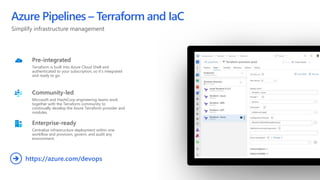
Pre-integrated
Terraform is built into Azure Cloud Shell and
authenticated to your subscription, so it’s integrated
and ready to go.
Community-led
Microsoft and HashiCorp engineering teams work
together with the Terraform community to
continually develop the Azure Terraform provider and
modules.
Enterprise-ready
Centralize infrastructure deployment within one
workflow and provision, govern, and audit any
environment.
© Microsoft Corporation
HOL:
Automatyzacja wdrażania
infrastruktury do chmury z
wykorzystaniem Terraform
i Azure Pipelines
Continuously monitor your DevOps release pipeline
throughout the software development lifecycle
Monitoring with Application Insights
https://azure.com/devops
Enable monitoring
Monitoring for your applications and infrastructure
Quality through Continuous Deployment
Integrate and deploy code changes to your
application based on the results of automated testing
Dashboards and workbooks
Ensuring that your development and operations have
access to the same telemetry and tools allows them
to view patterns across your entire environment and
minimize your Mean Time To Detect (MTTD) and
Mean Time To Restore (MTTR).
© Microsoft Corporation
HOL:
Monitorowanie aplikacji z
wykorzystaniem
Application Insights
aka.ms/DevOpsTS
Wypełnij ankietę i odbierz
prezent ;)

Microsoft Tech Series 2019 - Azure DevOps

  • 1.
    Modernizing Data, Applications & APIs tothe Cloud Tomasz Wiśniewski Kamil Mrzygłód Piotr Rogala
  • 2.
  • 3.
  • 4.
    Piotr Rogala •Currently workingin •Azure Cloud Architect Lead •MVP Azure •Blog: •Group leader:
  • 5.
    Sieć: Microsoft TechSeries Hasło: MStechseries
  • 6.
    Państwa identyfikatory i smyczewykonane są z materiałów ekologicznych takich jak papier ryżowy i materiał z włókien kukurydzianych
  • 7.
    Każdy z uczestników spotkaniaza przyniesiony elektrośmieć otrzyma w zamian roślinkę
  • 8.
    Odbiorem i zagospoda- rowaniemelektrośmieci zajmie się ElektroEko Organizacja Odzysku Sprzętu Elektrycznego i Elektronicznego
  • 9.
    Nasza scenografia jest wykonanaz drewno- pochodnych płyt OSB (powstających z drewnia- nych odpadów), które po ostrożnym demontażu, trafią do warszawskiego schroniska dla bezdomnych zwierząt „Na Paluchu”
  • 10.
    Rośliny użyte dodekoracji, wrócą do szkółek skąd zostały wypożyczone, aby dalej rosnąć
  • 11.
    High Performance DevOpsCompanies Achieve… DevOps Faster Time to Market Increased Revenue 2,604x Faster Mean Time to Recover 2,555x Faster Lead Time For Changes 7x Lower Change Failure Rate 46x Deployment Frequency $ Source: 2018 Accelerate: State of DevOps: Strategies for a New Economy." N. Forsgren, J. Humble, G. Kim. DevOps Research and Assessment (DORA)
  • 12.
    Microsoft Azure isa powerful and flexible foundation for past, present, and future apps – easily build, manage, and deploy any application and any stack on a massive, global network using your favorite tools and frameworks. How Microsoft can help Choice of IaaS, PaaS, public cloud or hybrid. Mirror or modernize app infrastructure with VMs, containers, microservices or serverless. Supports all stages of the app modernization journey – from lift-and- shift to Cloud-Native. Flexible Instantly improve the performance, scalability and resiliency of your apps by moving them to the cloud. Increase business agility with Cloud- Native capabilities and built-in DevOps for continuous innovation. Powerful Bring your stack, we bring a cloud that runs any app, on any platform, and any language. Build applications using the language and tools of your choice - Azure supports what you already use and love so you can get up and running fast – just bring code. Open
  • 13.
    DevOps brings togetherpeople, processes, and technology, automating software delivery to provide continuous value to your users. Using Azure DevOps, you can deliver software faster and more reliably - no matter how big your IT department or what tools you’re using. What technologies do I need to support DevOps? Continuous Integration (CI) • Improve software development quality and speed. • When you use Azure Pipelines or Jenkins to build apps in the cloud and deploy to Azure, each time you commit code, it’s automatically built and tested and bugs are detected faster. Continuous Deployment (CD) • By combining continuous integration and infrastructure as code (IaC), you’ll achieve identical deployments and the confidence to deploy to production at any time. • With continuous deployment, you can automate the entire process from code commit to production if your CI/CD tests are successful. Continuous Learning & Monitoring • With Azure Application Insights you can identify how your applications are performing and test if the recent deployment made things better or worse. • Using CI/CD practices, paired with monitoring tools, you’ll be able to safely deliver features to your customers as soon as they’re ready.
  • 14.
    Introducing Azure DevOps Delivervalue to your users faster using proven agile tools to plan, track, and discuss work across your teams. Build, test, and deploy with CI/CD that works with any language, platform, and cloud. Connect to GitHub or any other Git provider and deploy continuously. Get unlimited, cloud-hosted private Git repos and collaborate to build better code with pull requests and advanced file management. Test and ship with confidence using manual and exploratory testing tools. Create, host, and share packages with your team, and add artifacts to your CI/CD pipelines with a single click. Azure Boards Azure ReposAzure Pipelines Azure Test Plans Azure Artifacts https://azure.com/devops 
  • 15.
  • 16.
    2016 .NET Core 1.0 PowerShellCore Windows Subsystem for Linux in Windows 10 Microsoft joins Linux Foundation GitHub recognizes Microsoft as a top open source contributor 2017 Microsoft Azure Kubernetes Service launched Draft, Brigade, Kashti projects submitted to Kubernetes community Microsoft joins Cloud Native Computing & Cloud Foundry Foundations SQL 2017 on Linux Windows source code moved to Git Azure Databricks (Apache Spark) announced 2012 Microsoft Open Source 2018
  • 17.
    Azure Pipelines Free unlimitedbuild minutes for public projects Up to 10 free parallel jobs across Windows, Linux and macOS Microsoft Open Source https://azure.com/pipelines
  • 18.
    Integrated with GitHub AzurePipelines available now to any developer from the GitHub Marketplace
  • 19.
  • 20.
  • 21.
  • 22.
    Gain full visibilityand control of your cloud security state Continuous Security Leverage ML to Proactively identify and mitigate risks to reduce exposure to attacks Quickly detect and respond to threats with advanced analytics
  • 23.
  • 24.
    Mix and match tocreate workflows with tools from Microsoft, open source or your favorite 3rd party tools Azure DevOps: Choose the tools and clouds you love Azure DevOps lets developers choose the tools that are right for them Target any cloud, on-prem or both and deploy to the servers you need
  • 25.
    DevOps at Microsoft Data:Internal Microsoft engineering system activity, August 2018 372k Pull Requests per month 2m Git commits per month 78,000Deployments per day 4.4m Builds per month 500m Test executions per day 500k Work items updated per day 5m Work items viewed per day Azure DevOps is the toolchain of choice for Microsoft engineering with over 90,000 internal users https://aka.ms/DevOpsAtMicrosoft
  • 26.
    Track work withKanban boards, backlogs, team dashboards, and custom reporting Azure Boards https://azure.com/devops Connected from idea to release Track all your ideas at every development stage and keep your team aligned with all code changes linked directly to work items. Scrum ready Use built-in scrum boards and planning tools to help your teams run sprints, stand-ups, and planning meetings. Project insights Gain new insights into the health and status of your project with powerful analytics tools and dashboard widgets.
  • 27.
    • Basic • Agile AzureBoards – work item types
  • 28.
    Azure Boards –Track work on interactive backlogs and boards • Update the status of user stories • Prioritize your backlog of user stories
  • 29.
    Azure Boards –Collaborate Collaborate with others through the Discussion section of the work item form. Use @mentions and #ID controls to quickly include others in the conversation or link to other work items. Choose to follow specific issues to get alerted when they are updated.
  • 30.
    Azure Boards –Work in sprints, implement Scrum Plan sprints by assigning work to current or future sprints. Forecast work that can get completed based on effort estimates. Determine how much work can be done within a sprint. Bulk assign issues and tasks to team members and sprints.
  • 31.
    You'll find youcan work more effectively through these actions: • Organize work into a hierarchy by grouping issues under epics, and tasks under issues. • Create queries and quickly triage issues and tasks. • Create work item templates to help contributors quickly add and define open meaningful issues and tasks. • Quickly find work items that are assigned to you. Pivot or filter your work items based on other criteria, such as work items that you follow, that you're mentioned in, or that you viewed or updated. Azure Boards – Work effectively
  • 32.
    Azure Boards –Delivery plans display team deliverables With Delivery Plans, you gain tailor-made views across several teams and their development backlogs— stories, features, or epics. You can use these views to drive alignment across teams by overlaying several backlogs onto your delivery schedule.
  • 33.
    © Microsoft Corporation HOL: Agilei zarzadzanie portfolio za pomocą Azure Boards
  • 34.
    Share information, usemarkdown, collaborate Azure Wiki https://azure.com/devops Provisioned vs published code Choose what type of Wiki you want to have in your project – web-based editor or in code Searchable With wiki search, you can search within a project wiki or across all wikis created for your organization. Integrated with work items Create and embed work items in your wiki page content.
  • 35.
    © Microsoft Corporation HOL: Współpracaprzy wykorzystaniu Azure DevOps Wiki
  • 36.
    Free private Gitrepositories, pull requests, and code search Azure Repos https://azure.com/devops Support for any Git client Securely connect with and push code into your Git repos from any IDE, editor, or Git client. Web hooks and API integration Add validations and extensions from the marketplace or build your own using web hooks and REST APIs. Semantic code search Quickly find what you’re looking for with code-aware search that understands classes and variables.
  • 37.
    © Microsoft Corporation HOL: Kontrolawersji przy pomocy Git, Visual Studio Code i Azure Repo
  • 38.
    Kick off yournext build from a Repos pull request Azure Repos – Pull Requests https://azure.com/devops Collaborate to build better code Perform more effective Git code reviews with threaded discussion and continuous integration for each change. Use forks to promote collaboration with inner source workflows. Automate with built-in CI/CD Set up continuous integration/continuous delivery (CI/CD) to automatically trigger builds, tests, and deployments with every completed pull request using Azure Pipelines or your tools. Protect your code quality with branch policies Keep code quality high by requiring code reviewer signoff, successful builds, and passing tests before pull requests can be merged. Customize your branch policies to maintain your team’s high standards.
  • 39.
    © Microsoft Corporation HOL: Tworzeniei praca z Pull Requests w Azure Repos
  • 40.
    Achieve agility atscale with Kubernetes and DevOps Azure Pipelines – multi-container deployment https://azure.com/devops Deliver code faster with CI/CD CI/CD can accelerate the move from code to container and to Kubernetes cluster in minutes by automating various manual or complex tasks. Balance speed and security with DevOps Get built-in, real-time observability as part of the DevOps workflow. Apply compliance checks and reconfigurations automatically to secure your build and release pipeline Manage resources effectively with infrastructure as code Infrastructure as code promotes consistency and visibility of compute resources across teams— reducing the likelihood of human error.
  • 41.
    © Microsoft Corporation HOL: ContinousIntegration z wykorzystaniem Azure Pipelines
  • 43.
    HOL: Continous Integrationz wykorzystaniem Azure Pipelines • https://azuredevopslabs.com/labs/azuredevops/continuousintegration/ • https://azuredevopsdemogenerator.azurewebsites.net/ • Project: PartsUnlimited
  • 44.
    © Microsoft Corporation HOL: ContinousDelivery z wykorzystanie Azure Pipelines
  • 46.
    HOL: Continous Deliveryz wykorzystanie Azure Pipelines • https://azuredevopslabs.com/labs/azuredevops/continuousdeployment/ • https://azuredevopsdemogenerator.azurewebsites.net/ • Project: PartsUnlimited
  • 47.
    © Microsoft Corporation HOL: KonfiguracjaCI/CD w Azure Pipelines za pomocą YAML
  • 49.
    HOL: Konfiguracja CI/CDw Azure Pipelines za pomocą YAML • https://azuredevopslabs.com/labs/azuredevops/yaml/ • https://azuredevopsdemogenerator.azurewebsites.net/ • Project: SmartHotel360
  • 50.
    © Microsoft Corporation HOL: Używaniekluczy/sekretów z Azure KeyVault w Azure Pipelines
  • 52.
    HOL: Używanie kluczy/sekretówz Azure KeyVault w Azure Pipelines • https://azuredevopslabs.com/labs/vstsextend/azurekeyvault/
  • 53.
    © Microsoft Corporation HOL: Wdrażanieaplikacji multi- container na Azure Kubernetes Service
  • 54.
    Simplify infrastructure management AzurePipelines – Terraform and IaC https://azure.com/devops Pre-integrated Terraform is built into Azure Cloud Shell and authenticated to your subscription, so it’s integrated and ready to go. Community-led Microsoft and HashiCorp engineering teams work together with the Terraform community to continually develop the Azure Terraform provider and modules. Enterprise-ready Centralize infrastructure deployment within one workflow and provision, govern, and audit any environment.
  • 55.
    © Microsoft Corporation HOL: Automatyzacjawdrażania infrastruktury do chmury z wykorzystaniem Terraform i Azure Pipelines
  • 56.
    Continuously monitor yourDevOps release pipeline throughout the software development lifecycle Monitoring with Application Insights https://azure.com/devops Enable monitoring Monitoring for your applications and infrastructure Quality through Continuous Deployment Integrate and deploy code changes to your application based on the results of automated testing Dashboards and workbooks Ensuring that your development and operations have access to the same telemetry and tools allows them to view patterns across your entire environment and minimize your Mean Time To Detect (MTTD) and Mean Time To Restore (MTTR).
  • 57.
    © Microsoft Corporation HOL: Monitorowanieaplikacji z wykorzystaniem Application Insights
  • 58.

Editor's Notes

  • #15 So does TFS
  • #17 & at Microsoft we love open source. First OSS project was in 2004 when the Windows Installer Toolkit (WiX) was released to SourceForge. Started contributing to the Linux kernel in 2009 Every year we do more & more in the open source realm. How we embrace the projects the community has embraced… from Linux to Kubernetes. One of the ones I was deeply involved in was whether to compete with Git or become part of it. Today most of MS development is done in Git. The source control system that Linux created. Including Windows. Think about that for a second, the Windows team use the source control system written by Linus Torvalds. Or the ways we increasingly open source the software we work on… from .NET to VS Code & TypeScript. In fact, much of the core tech in Azure Pipelines itself is open source Transition: This week we are adding to this list of giving to open source…
  • #18 All the builds you need, using the power of Azure you get one service that gives you unlimited build minutes where you can build on Windows Mac and Linux in parallel using a single build YAML file.
  • #20 So does TFS
  • #21 Whether you’ve already started implementing DevOps or looking to get started, a common challenge is for IT organizations is keeping up with project demand for development and test environments DevTest Labs simplifies environment management for Dev & Test environments in the Azure cloud Provide self-service access for teams, with policies to control cost and enforce use of appropriate images and artifacts
  • #22 Deploy repeatedly & reliably using Infrastructure as Code Azure Resource Manager provides these capabilities for Azure out of the box, and works across Azure as well as Azure Stack But if you’re already using 3rd party tools such as Terraform, Ansible, Chef, Puppet or SaltStack – we support those too!
  • #23 Just because you’re moving fast, doesn’t mean you have to lose control – even if you have some Shadow-Ops happening Azure security gives you visibility and control of your entire cloud security state Using analytics to provide pro-active recommendations across both Windows and Linux Leverage services like Azure Event Viewer also to track access, see who change what and when. ------ (additional product context) ------ Secure your cloud resources with Azure Security Center With Azure Security Center you can gain full visibility and control of your cloud security state with a single, unified view: Collect security data from multiple sources: Collect, search, and analyze security data from a variety of sources, including connected partner solutions like network firewalls and other Microsoft services. Integration with existing security workflows: Access, integrate, and analyze security information using REST APIs to connect existing tools and processes. Easily onboard cloud resources: Keep pace with rapidly changing cloud workloads. Automatically discover and onboard new resources created in your Azure subscriptions. Continuous security assessment: monitor the security of virtual machines, networks, and Azure services using hundreds of built-in security assessments or create your own. Built-in dashboards provide instant insights into security issues that require attention. Centralized policy management: Ensure compliance with company or regulatory security requirements by centrally managing security policies across all your cloud workloads. Compliance reporting: Use security data and insights to demonstrate compliance and easily generate evidence for auditors. (If asked whether Azure Security Center supports hybrid workloads, the answer is yes: manage security across all your hybrid cloud workloads – on-premises, Azure, and other cloud platforms – in one console.) You can also identify and mitigate risks proactively to reduce your exposure to security threats: Proactive security assessment: Identify software and configurations that are vulnerable to attack. Actionable recommendations: Remediate security vulnerabilities before they can be exploited by attackers with prioritized, actionable security recommendations and built-in automation playbooks. Adaptive application controls: Block malware and other unwanted applications by applying whitelisting recommendations adapted to your specific workloads and powered by machine learning. Controlled network access: Reduce the network attack surface with just-in-time, controlled access to management ports on Azure VMs, drastically reducing exposure to brute force and other network attacks. Azure Security Center has robust capabilities to prevent attacks. When threats do happen, Security Center can quickly detect and respond to threats with advanced analytics and Microsoft Intelligent Security Graph. Industry’s most extensive threat intelligence: Tap into the Microsoft Intelligent Security Graph, which uses trillions of signals from Microsoft services and systems around the globe to identify new and evolving threats. Advanced threat detection: Use built-in behavioral analytics and machine learning to identify attacks and zero-day exploits. Monitor networks, machines, and cloud services for known attack patterns and post-breach activity. Prioritized alerts and incidents: Focus on the most critical threats first with prioritized security alerts and incidents that map alerts of different types into a single attack campaign. Create your own custom security alerts as well. Streamlined investigation: Quickly assess the scope and impact of an attack with a visual, interactive experience. Use predefined or ad hoc queries for deeper exploration of security data. Contextual threat intelligence: Visualize the source of attacks on an interactive world map. Use built-in threat intelligence reports to gain valuable insight into the techniques and objectives of known malicious actors. At Microsoft, we analyze 300 billion user authentications and check 200 billion emails for spam and malware monthly. We also have unprecedented visibility into cloud infrastructure choices, platforms and the activity therein. Such visibility has no precedent in the on-premises world.
  • #24 Azure’s monitoring solutions provide pre-defined solutions with smart thresholds and intuitive dashboards so you can start getting insights straight away Azure Monitor provides metrics for all Azure infrastructure, building upon that you can leverage both Log Analytics and Application Insights to gain greater insights into your Infrastructure and Applications respectively – leveraging Azure to simplify this into standardized dashboards for both your Developer and your Operations teams Spend less time separating the signal from the noise and accelerate you root cause analysis You can also automate and integrate into your existing service desk platforms such as Service Now ------ (additional product context) ------ Monitor your cloud health with Log Analytics Collect and store your data from any source Easily collect, store, and analyze your systems and operational data from any source, both on-premises and in the cloud. Collect data from a wide range of sources including virtual machines, storage accounts, activity logs, Windows, Linux Servers, Java, .NET, legacy and modern apps. Centrally store activity logs, network logs, infrastructure metrics, app data points, diagnostics logs and alerts. Gain deep operational insights Understand CPU disk and memory utilization for your virtual machines. Get a comprehensive view of applications and network dependencies across multiple virtual machines to perform root-cause analysis more quickly. Track configuration changes, system updates, and malware status to improve security & compliance. Visualize data in intuitive and customizable dashboards. Find the information you need quickly using interactive queries and full-text search. Detect, diagnose and fix issues quickly Get notifications and alerts with rich diagnostic information so you can always stay on top of the issues. Separate the signal from the noise and accelerate root-cause analysis across platforms using advanced analytics including machine learning algorithms. Automate the implementation of recommended fixes so you can address issues quickly. Integrate with customer service systems such as your ticketing tool to speed up implementation of fixes.
  • #26 Enterprise scale
  • #27 Combine Kanban boards and drag-and-drop sprint planning with comprehensive
traceability and reporting for the perfect home for all your ideas–big and small.