Azure App Service
API APPS
Panos Tsilopoulos
Software Engineer
p.tsilopoulos@interworkscloud.com
https://gr.linkedin.com/in/panostsilopoulos
https://github.com/Tsilopoulos Global Azure Bootcamp 2015
Agenda
Why Azure App Service
(AAS)?
Platform Changes
What is AAS?
Developing API apps
Architecture & Lifecycle
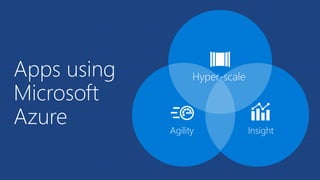
Apps using
Microsoft
Azure Agility Insight
Hyper-scale
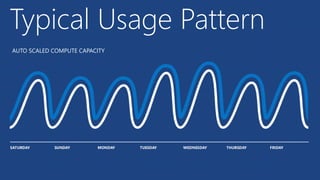
Typical Usage Pattern
TRADITIONAL COMPUTE DEPLOYMENT Unused compute capacity
Typical Usage Pattern
AUTO SCALED COMPUTE CAPACITY
Typical Usage Pattern
Mobile
Services
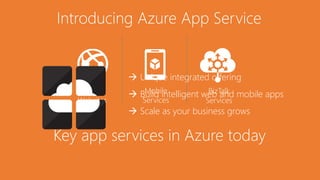
Key app services in Azure today
Azure
Websites
BizTalk
Services
 Unique integrated offering
 Build intelligent web and mobile apps
 Scale as your business grows
Introducing Azure App Service
API APPS
Easily build and consume
APIs in the cloud
WEB APPS
Web apps that scale with your
business
LOGIC APPS
Automate business process
across SaaS and on-premises
MOBILE APPS
Build Mobile apps for any
device
One integrated offering
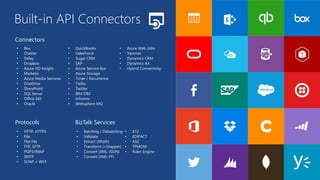
• Box
• Chatter
• Delay
• Dropbox
• Azure HD Insight
• Marketo
• Azure Media Services
• OneDrive
• SharePoint
• SQL Server
• Office 365
• Oracle
• QuickBooks
• SalesForce
• Sugar CRM
• SAP
• Azure Service Bus
• Azure Storage
• Timer / Recurrence
• Twilio
• Twitter
• IBM DB2
• Informix
• Websphere MQ
• Azure Web Jobs
• Yammer
• Dynamics CRM
• Dynamics AX
• Hybrid Connectivity
• HTTP, HTTPS
• File
• Flat File
• FTP, SFTP
• POP3/IMAP
• SMTP
• SOAP + WCF
• Batching / Debatching
• Validate
• Extract (XPath)
• Transform (+Mapper)
• Convert (XML-JSON)
• Convert (XML-FF)
• X12
• EDIFACT
• AS2
• TPMOM
• Rules Engine
Connectors
Protocols BizTalk Services
Built-in API Connectors
What is Azure App Service?
 New application development platform based on
existing proven Azure technologies
 WebSites == WebApps
 Mobile Services == Mobile Apps
 NEW – API Apps
 NEW – Logic Apps
10
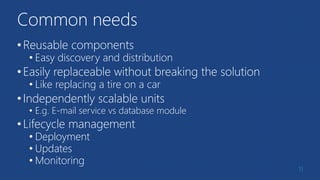
Common needs
•Reusable components
• Easy discovery and distribution
•Easily replaceable without breaking the solution
• Like replacing a tire on a car
•Independently scalable units
• E.g. E-mail service vs database module
•Lifecycle management
• Deployment
• Updates
• Monitoring
11
Azure App Service
API Apps in detail
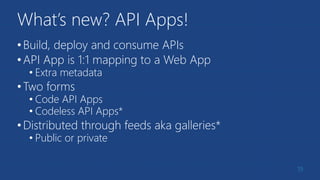
What’s new? API Apps!
•Build, deploy and consume APIs
•API App is 1:1 mapping to a Web App
• Extra metadata
•Two forms
• Code API Apps
• Codeless API Apps*
•Distributed through feeds aka galleries*
• Public or private
19
API Apps – In detail
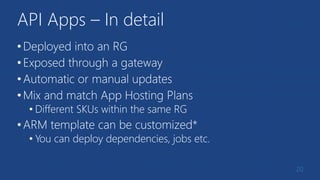
•Deployed into an RG
•Exposed through a gateway
•Automatic or manual updates
•Mix and match App Hosting Plans
• Different SKUs within the same RG
•ARM template can be customized*
• You can deploy dependencies, jobs etc.
20
Building Code API Apps
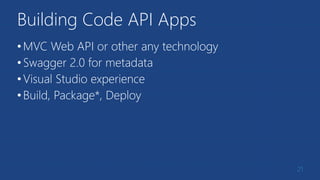
•MVC Web API or other any technology
•Swagger 2.0 for metadata
•Visual Studio experience
•Build, Package*, Deploy
21
Let’s build a code API App
Demo
22
What did we do?
•Created an API App using the template
• This can also be any other technology
•Change some (simple) code
•App Service SDK is already present
• Swashbuckle (Swagger Metadata 2.0)
• Some required metadata files
•Deployed to the API App container
23
Swashbuckling made simple
• Swagger is a standard, language-agnostic interface to REST
APIs which allows both humans and computers to discover and
understand the capabilities of the service without access to
source code, documentation, or through network traffic
inspection.
• A small ISS Express hiccup!
• Run cmd.exe
• cd “C:Program FilesIIS Express”
• .appcmd set config /section:directoryBrowse /enabled:true
• SwaggerConfig.cs
• EnableSwaggerUI
24
Authentication
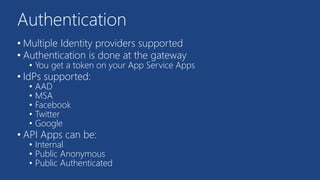
• Multiple Identity providers supported
• Authentication is done at the gateway
• You get a token on your App Service Apps
• IdPs supported:
• AAD
• MSA
• Facebook
• Twitter
• Google
• API Apps can be:
• Internal
• Public Anonymous
• Public Authenticated
Summary of features
•Available now:
• Seamless authentication
• API definition and code generation in Visual Studio
• Integration with Logic Apps
•Coming in the near future:
• Galleries (marketplace)
• Packaging and dependencies with ARM templates
• API management
• Codeless API Apps
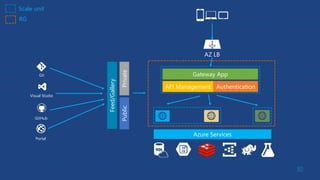
API App Architecture
30
AZ LB
Gateway App
Azure Services
API Management Authentication
Scale unit
RG
Feed/Gallery
GitHub
Visual Studio
Git
Portal
PrivatePublic
Next steps
•Grab the bits
•Start developing
•Feedback!
References, resources & repository
• http://www.kefalidis.me/category/azure-app-service/
• https://azure.microsoft.com/en-us/documentation/videos/azure-
app-service-api-apps-with-scott-hunter/
• http://www.microsoftvirtualacademy.com/product-
training/microsoft-azure
• https://azure.microsoft.com/en-us/documentation/articles/app-
service-api-apps-why-best-platform/
• http://swagger.io/
• https://github.com/ThessalonikiNet-
MeetUp/globalazurebootcamp2015
32
Azure app services API apps

Azure app services API apps

  • 1.
    Azure App Service APIAPPS Panos Tsilopoulos Software Engineer p.tsilopoulos@interworkscloud.com https://gr.linkedin.com/in/panostsilopoulos https://github.com/Tsilopoulos Global Azure Bootcamp 2015
  • 2.
    Agenda Why Azure AppService (AAS)? Platform Changes What is AAS? Developing API apps Architecture & Lifecycle
  • 3.
  • 4.
  • 5.
    TRADITIONAL COMPUTE DEPLOYMENTUnused compute capacity Typical Usage Pattern
  • 6.
    AUTO SCALED COMPUTECAPACITY Typical Usage Pattern
  • 7.
    Mobile Services Key app servicesin Azure today Azure Websites BizTalk Services  Unique integrated offering  Build intelligent web and mobile apps  Scale as your business grows Introducing Azure App Service
  • 8.
    API APPS Easily buildand consume APIs in the cloud WEB APPS Web apps that scale with your business LOGIC APPS Automate business process across SaaS and on-premises MOBILE APPS Build Mobile apps for any device One integrated offering
  • 9.
    • Box • Chatter •Delay • Dropbox • Azure HD Insight • Marketo • Azure Media Services • OneDrive • SharePoint • SQL Server • Office 365 • Oracle • QuickBooks • SalesForce • Sugar CRM • SAP • Azure Service Bus • Azure Storage • Timer / Recurrence • Twilio • Twitter • IBM DB2 • Informix • Websphere MQ • Azure Web Jobs • Yammer • Dynamics CRM • Dynamics AX • Hybrid Connectivity • HTTP, HTTPS • File • Flat File • FTP, SFTP • POP3/IMAP • SMTP • SOAP + WCF • Batching / Debatching • Validate • Extract (XPath) • Transform (+Mapper) • Convert (XML-JSON) • Convert (XML-FF) • X12 • EDIFACT • AS2 • TPMOM • Rules Engine Connectors Protocols BizTalk Services Built-in API Connectors
  • 10.
    What is AzureApp Service?  New application development platform based on existing proven Azure technologies  WebSites == WebApps  Mobile Services == Mobile Apps  NEW – API Apps  NEW – Logic Apps 10
  • 11.
    Common needs •Reusable components •Easy discovery and distribution •Easily replaceable without breaking the solution • Like replacing a tire on a car •Independently scalable units • E.g. E-mail service vs database module •Lifecycle management • Deployment • Updates • Monitoring 11
  • 12.
    Azure App Service APIApps in detail
  • 13.
    What’s new? APIApps! •Build, deploy and consume APIs •API App is 1:1 mapping to a Web App • Extra metadata •Two forms • Code API Apps • Codeless API Apps* •Distributed through feeds aka galleries* • Public or private 19
  • 14.
    API Apps –In detail •Deployed into an RG •Exposed through a gateway •Automatic or manual updates •Mix and match App Hosting Plans • Different SKUs within the same RG •ARM template can be customized* • You can deploy dependencies, jobs etc. 20
  • 15.
    Building Code APIApps •MVC Web API or other any technology •Swagger 2.0 for metadata •Visual Studio experience •Build, Package*, Deploy 21
  • 16.
    Let’s build acode API App Demo 22
  • 17.
    What did wedo? •Created an API App using the template • This can also be any other technology •Change some (simple) code •App Service SDK is already present • Swashbuckle (Swagger Metadata 2.0) • Some required metadata files •Deployed to the API App container 23
  • 18.
    Swashbuckling made simple •Swagger is a standard, language-agnostic interface to REST APIs which allows both humans and computers to discover and understand the capabilities of the service without access to source code, documentation, or through network traffic inspection. • A small ISS Express hiccup! • Run cmd.exe • cd “C:Program FilesIIS Express” • .appcmd set config /section:directoryBrowse /enabled:true • SwaggerConfig.cs • EnableSwaggerUI 24
  • 19.
    Authentication • Multiple Identityproviders supported • Authentication is done at the gateway • You get a token on your App Service Apps • IdPs supported: • AAD • MSA • Facebook • Twitter • Google • API Apps can be: • Internal • Public Anonymous • Public Authenticated
  • 20.
    Summary of features •Availablenow: • Seamless authentication • API definition and code generation in Visual Studio • Integration with Logic Apps •Coming in the near future: • Galleries (marketplace) • Packaging and dependencies with ARM templates • API management • Codeless API Apps
  • 21.
  • 22.
    30 AZ LB Gateway App AzureServices API Management Authentication Scale unit RG Feed/Gallery GitHub Visual Studio Git Portal PrivatePublic
  • 23.
    Next steps •Grab thebits •Start developing •Feedback!
  • 24.
    References, resources &repository • http://www.kefalidis.me/category/azure-app-service/ • https://azure.microsoft.com/en-us/documentation/videos/azure- app-service-api-apps-with-scott-hunter/ • http://www.microsoftvirtualacademy.com/product- training/microsoft-azure • https://azure.microsoft.com/en-us/documentation/articles/app- service-api-apps-why-best-platform/ • http://swagger.io/ • https://github.com/ThessalonikiNet- MeetUp/globalazurebootcamp2015 32

Editor's Notes

  • #3 AAS = Azure App Service
  • #4 Advantages gained by an app using AAS Επεκτασιμότητα (Scalability) -> plus many many different ways/types to handle payments Ευελιξία (Agility -> Minimum downtime/Easy(visual no CLI) deployment tools/Γεωμετρικά κατανεμημένοι πόροι Τηλεμετρία/Ανάλυση δεδομένων της εφαρμογής σε πραγματικό χρόνο
  • #8 Today we are announcing App Service, a new service in Azure, which brings together the functionality of Azure Websites, Azure Mobile Services, and Azure Biztalk Services into a single development experience.
  • #9 App Service has everything you need to build apps that target both web and mobile clients from a single app back-end. Using API Apps, you can connect your app to dozens of popular services like Office 365 and salesforce.com in minutes, and integrate your own APIs so they can be used within any app. And finally with Logic Apps, you can automate business processes using a simple no-code experience.
  • #10 All the connectivity and tools you need to automate your modern business – with over 40 connectors and growing all the time with the ability for any 3rd party to contribute to our gallery.
  • #21 SKUs such us free/basic/standard/shared/premium ARM stands for Azure Resource Management template
  • #28 AAD = Azure Active Directory MSA = Microsoft Account
  • #31 AZ LB = Azure Load Balancer