Amazon Web Services
Elastic Container
Registry
AWS ECR FTW
Who am I?
• Richard Wilson Boyd II but just call me Rich
• Senior DevOps Engineer at Civitas
• https://github.com/richardboydii/
• @richardboydii
• Likes: my family, good beer, animals cooked
expertly, automation, learning new things
• Dislikes: a**holes, manual processes,
stagnant engineering organizations
What is it?
• Amazon’s version of a Docker Registry
• Supports the Docker Registry HTTP API V2
• Full support for Docker CLI commands
Service Basics
• Each AWS Account has a default Registry (each
account only gets one for now)
• The Registry contains Repositories
• Repositories are unique namespaces for
images governed by their own access controls
Why is it special?
• Ability to interact outside of the Docker CLI using
the AWS CLI and SDKs
• Highly available and no need to maintain individual
instances
• Logins generated on demand and with limited
session lengths
•Repositories can be locked down using IAM policies
for more granular control
Why is it special? (cont’d)
• Images can be shared between AWS accounts
•Images are transmitted over HTTPS
• When at rest the images are automatically
encrypted and stored in S3
• Third party integrations (in development)
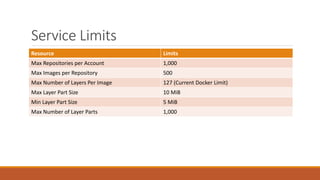
Service Limits
Resource Limits
Max Repositories per Account 1,000
Max Images per Repository 500
Max Number of Layers Per Image 127 (Current Docker Limit)
Max Layer Part Size 10 MiB
Min Layer Part Size 5 MiB
Max Number of Layer Parts 1,000
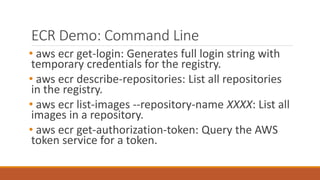
ECR Demo: Command Line
• aws ecr get-login: Generates full login string with
temporary credentials for the registry.
• aws ecr describe-repositories: List all repositories
in the registry.
• aws ecr list-images --repository-name XXXX: List all
images in a repository.
• aws ecr get-authorization-token: Query the AWS
token service for a token.
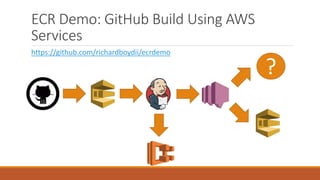
ECR Demo: GitHub Build Using AWS
Services
?
https://github.com/richardboydii/ecrdemo

AWS Elastic Container Registry

  • 1.
    Amazon Web Services ElasticContainer Registry AWS ECR FTW
  • 2.
    Who am I? •Richard Wilson Boyd II but just call me Rich • Senior DevOps Engineer at Civitas • https://github.com/richardboydii/ • @richardboydii • Likes: my family, good beer, animals cooked expertly, automation, learning new things • Dislikes: a**holes, manual processes, stagnant engineering organizations
  • 3.
    What is it? •Amazon’s version of a Docker Registry • Supports the Docker Registry HTTP API V2 • Full support for Docker CLI commands
  • 4.
    Service Basics • EachAWS Account has a default Registry (each account only gets one for now) • The Registry contains Repositories • Repositories are unique namespaces for images governed by their own access controls
  • 5.
    Why is itspecial? • Ability to interact outside of the Docker CLI using the AWS CLI and SDKs • Highly available and no need to maintain individual instances • Logins generated on demand and with limited session lengths •Repositories can be locked down using IAM policies for more granular control
  • 6.
    Why is itspecial? (cont’d) • Images can be shared between AWS accounts •Images are transmitted over HTTPS • When at rest the images are automatically encrypted and stored in S3 • Third party integrations (in development)
  • 7.
    Service Limits Resource Limits MaxRepositories per Account 1,000 Max Images per Repository 500 Max Number of Layers Per Image 127 (Current Docker Limit) Max Layer Part Size 10 MiB Min Layer Part Size 5 MiB Max Number of Layer Parts 1,000
  • 8.
    ECR Demo: CommandLine • aws ecr get-login: Generates full login string with temporary credentials for the registry. • aws ecr describe-repositories: List all repositories in the registry. • aws ecr list-images --repository-name XXXX: List all images in a repository. • aws ecr get-authorization-token: Query the AWS token service for a token.
  • 9.
    ECR Demo: GitHubBuild Using AWS Services ? https://github.com/richardboydii/ecrdemo