VPC Peering
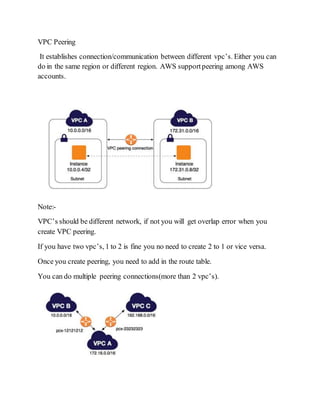
It establishes connection/communication between different vpc’s. Either you can
do in the same region or different region. AWS supportpeering among AWS
accounts.
Note:-
VPC’s should be different network, if not you will get overlap error when you
create VPC peering.
If you have two vpc’s, 1 to 2 is fine you no need to create 2 to 1 or vice versa.
Once you create peering, you need to add in the route table.
You can do multiple peering connections(more than 2 vpc’s).
VPC Peering Configuration
(here iam going to before peering and after peering connection)
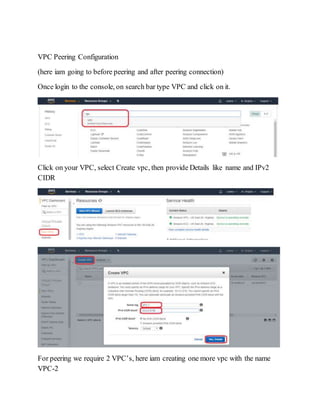
Once login to the console, on search bar type VPC and click on it.
Click on your VPC, select Create vpc, then provide Details like name and IPv2
CIDR
For peering we require 2 VPC’s, here iam creating one more vpc with the name
VPC-2
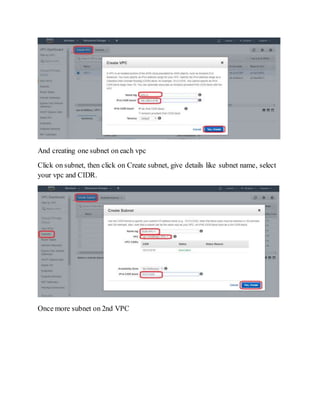
And creating one subnet on each vpc
Click on subnet, then click on Create subnet, give details like subnet name, select
your vpc and CIDR.
Once more subnet on 2nd VPC
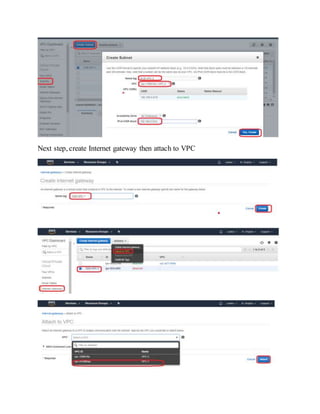
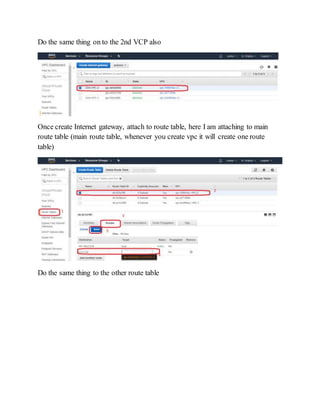
Next step, create Internet gateway then attach to VPC
Do the same thing on to the 2nd VCP also
Once create Internet gateway, attach to route table, here I am attaching to main
route table (main route table, whenever you create vpc it will create one route
table)
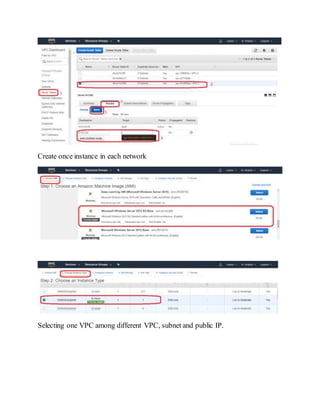
Do the same thing to the other route table
Create once instance in each network
Selecting one VPC among different VPC, subnet and public IP.
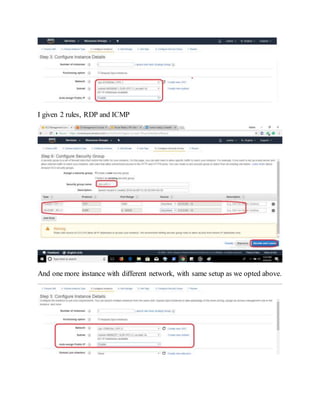
I given 2 rules, RDP and ICMP
And one more instance with different network, with same setup as we opted above.
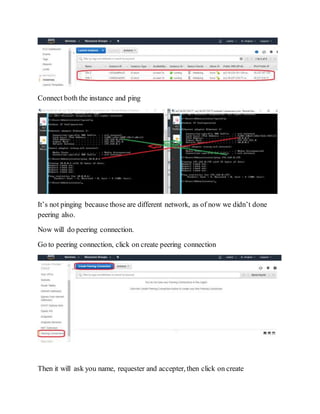
Connect both the instance and ping
It’s not pinging because those are different network, as of now we didn’t done
peering also.
Now will do peering connection.
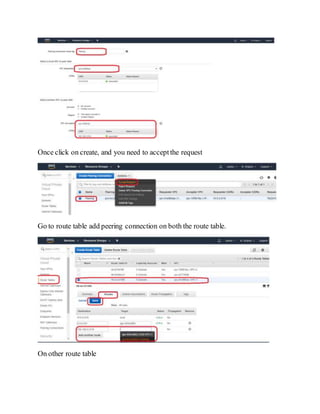
Go to peering connection, click on create peering connection
Then it will ask you name, requester and accepter, then click on create
Once click on create, and you need to acceptthe request
Go to route table add peering connection on both the route table.
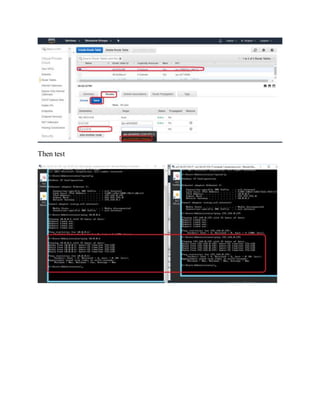
On other route table
Then test

AWS | VPC Peering

  • 1.
    VPC Peering It establishesconnection/communication between different vpc’s. Either you can do in the same region or different region. AWS supportpeering among AWS accounts. Note:- VPC’s should be different network, if not you will get overlap error when you create VPC peering. If you have two vpc’s, 1 to 2 is fine you no need to create 2 to 1 or vice versa. Once you create peering, you need to add in the route table. You can do multiple peering connections(more than 2 vpc’s).
  • 2.
    VPC Peering Configuration (hereiam going to before peering and after peering connection) Once login to the console, on search bar type VPC and click on it. Click on your VPC, select Create vpc, then provide Details like name and IPv2 CIDR For peering we require 2 VPC’s, here iam creating one more vpc with the name VPC-2
  • 3.
    And creating onesubnet on each vpc Click on subnet, then click on Create subnet, give details like subnet name, select your vpc and CIDR. Once more subnet on 2nd VPC
  • 4.
    Next step, createInternet gateway then attach to VPC
  • 5.
    Do the samething on to the 2nd VCP also Once create Internet gateway, attach to route table, here I am attaching to main route table (main route table, whenever you create vpc it will create one route table) Do the same thing to the other route table
  • 6.
    Create once instancein each network Selecting one VPC among different VPC, subnet and public IP.
  • 7.
    I given 2rules, RDP and ICMP And one more instance with different network, with same setup as we opted above.
  • 8.
    Connect both theinstance and ping It’s not pinging because those are different network, as of now we didn’t done peering also. Now will do peering connection. Go to peering connection, click on create peering connection Then it will ask you name, requester and accepter, then click on create
  • 9.
    Once click oncreate, and you need to acceptthe request Go to route table add peering connection on both the route table. On other route table
  • 10.