




©	2017,	Amazon	Web	Services,	Inc.	or	its	Affiliates.	All	rights	reserved.
Heather	Matson,	Senior	Account	Executive	Education
Randy	Ridgley,	Solutions	Architect
February	2017
Cost	Optimization	at	Scale
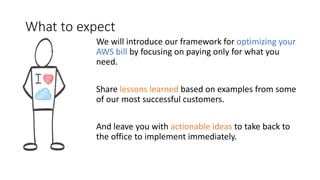
What	to	expect
We	will	introduce	our	framework	for	optimizing	your	
AWS	bill	by	focusing	on	paying	only	for	what	you	
need.	
Share	lessons	learned	based	on	examples	from	some	
of	our	most	successful	customers.	
And	leave	you	with	actionable	ideas to	take	back	to	
the	office	to	implement	immediately.
Chapter	I:	Build	With	Cost	In	Mind	
(Well	Architected)
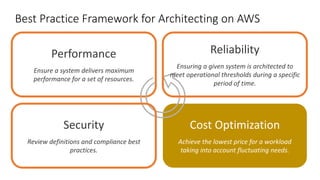
Best	Practice	Framework	for	Architecting	on	AWS
Performance
Ensure	a	system	delivers	maximum	
performance	for	a	set	of	resources.
Cost	Optimization
Achieve	the	lowest	price	for	a	workload	
taking	into	account	fluctuating	needs.
Reliability
Ensuring	a	given	system	is	architected	to	
meet	operational	thresholds	during	a	specific	
period	of	time.
Security
Review	definitions	and	compliance	best	
practices.
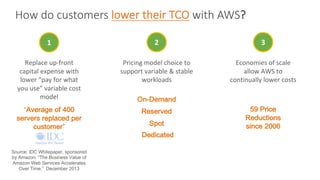
How	do	customers	lower	their	TCO with	AWS?
1
Source: IDC Whitepaper, sponsored
by Amazon, “The Business Value of
Amazon Web Services Accelerates
Over Time.” December 2013
“Average of 400
servers replaced per
customer”
Replace	up-front	
capital	expense	with	
lower	“pay	for	what	
you	use”	variable	cost	
model	
3
59 Price
Reductions
since 2006
Economies	of	scale	
allow	AWS	to	
continually	lower	costs
2
Pricing	model	choice	to	
support	variable	&	stable	
workloads
On-Demand
Reserved
Spot
Dedicated
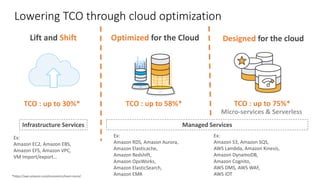
Lowering	TCO	through	cloud	optimization
Lift	and	Shift Optimized for	the	Cloud Designed	for	the	cloud
Micro-services	&	Serverless
Managed	ServicesInfrastructure	Services
TCO	:	up	to	30%* TCO	:	up	to	58%* TCO	:	up	to	75%*
*https://aws.amazon.com/economics/learn-more/	
Ex:
Amazon	EC2,	Amazon	EBS,	
Amazon	EFS,	Amazon	VPC,	
VM	Import/export…
Ex:
Amazon	RDS,	Amazon	Aurora,
Amazon	Elasticache,
Amazon	Redshift,
Amazon	OpsWorks,
Amazon	ElasticSearch,
Amazon	EMR
Ex:
Amazon	S3,	Amazon	SQS,
AWS	Lambda,	Amazon	Kinesis,
Amazon	DynamoDB,
Amazon	Cognito,	
AWS	DMS,	AWS	WAF,
AWS	IOT
Where do you start?
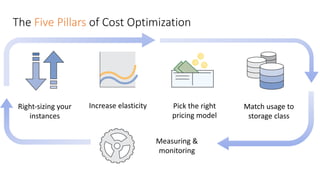
The	Five	Pillars	of	Cost	Optimization
Right-sizing	your	
instances
Pick	the	right	
pricing	model
Increase	elasticity
Measuring	&	
monitoring
Match	usage	to	
storage	class
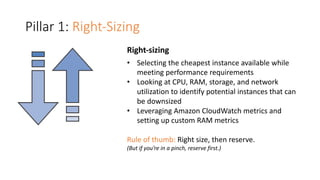
Pillar	1:	Right-Sizing
Right-sizing
• Selecting	the	cheapest	instance	available	while	
meeting	performance	requirements
• Looking	at	CPU,	RAM,	storage,	and	network	
utilization	to	identify	potential	instances	that	can	
be	downsized
• Leveraging	Amazon	CloudWatch	metrics	and	
setting	up	custom	RAM	metrics
Rule	of	thumb:	Right	size,	then	reserve.
(But	if	you’re	in	a	pinch,	reserve	first.)
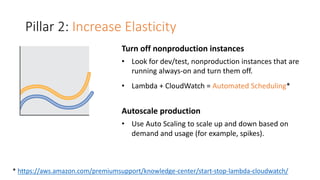
Pillar	2:	Increase	Elasticity
Turn	off	nonproduction	instances
• Look	for	dev/test,	nonproduction	instances	that	are	
running	always-on	and	turn	them	off.
• Lambda	+	CloudWatch =	Automated	Scheduling*
Autoscale	production
• Use	Auto	Scaling	to	scale	up	and	down	based	on	
demand	and	usage	(for	example,	spikes).
*	https://aws.amazon.com/premiumsupport/knowledge-center/start-stop-lambda-cloudwatch/
Pillar	3:	
Leveraging	the	Right	Pricing	
Model
On-Demand	Instances
Reserved	Instances
Spot	Instances
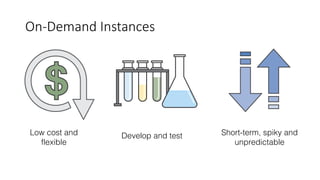
On-Demand	Instances
Short-term, spiky and
unpredictable
Low cost and
flexible
Develop and test
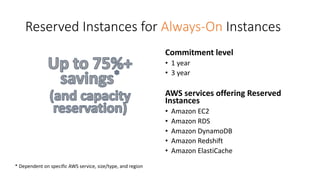
Reserved	Instances	for	Always-On Instances
Commitment	level
• 1	year
• 3	year
AWS	services	offering	Reserved	
Instances
• Amazon	EC2	
• Amazon	RDS
• Amazon	DynamoDB
• Amazon	Redshift
• Amazon	ElastiCache
*	Dependent	on	specific	AWS	service,	size/type,	and	region
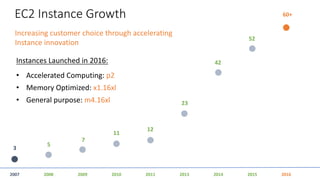
EC2	Instance	Growth
2007 2008 201120102009 20162013 2014 2015
3
60+
Increasing	customer	choice	through	accelerating	
Instance	innovation
Instances	Launched	in	2016:
• Accelerated	Computing:	p2
• Memory	Optimized:	x1.16xl
• General	purpose:	m4.16xl
5
7
11
12
23
42
52
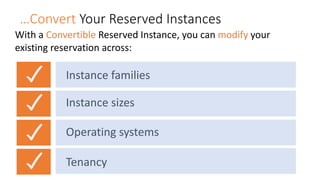
…Convert	Your	Reserved	Instances
With	a	Convertible Reserved	Instance,	you	can	modify your	
existing	reservation	across:
Instance	families	
Instance	sizes
Operating	systems
Tenancy
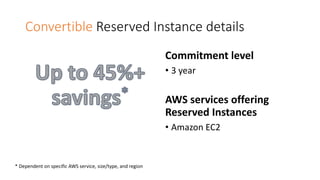
Convertible	Reserved	Instance	details
Commitment	level
• 3	year
AWS	services	offering	
Reserved	Instances
• Amazon	EC2	
*	Dependent	on	specific	AWS	service,	size/type,	and	region
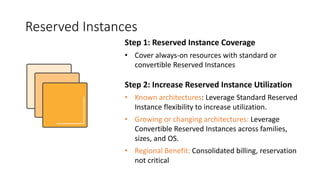
Reserved	Instances
Step	1:	Reserved	Instance	Coverage
• Cover	always-on	resources	with	standard	or	
convertible	Reserved	Instances
Step	2:	Increase	Reserved	Instance	Utilization
• Known	architectures:	Leverage	Standard	Reserved	
Instance	flexibility	to	increase	utilization.
• Growing	or	changing	architectures: Leverage	
Convertible	Reserved	Instances	across	families,	
sizes,	and	OS.
• Regional	Benefit: Consolidated	billing,	reservation	
not	critical
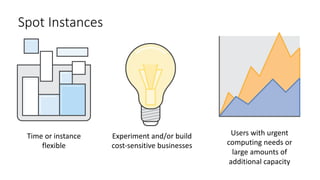
Spot	Instances
Users	with	urgent	
computing	needs	or	
large	amounts	of	
additional	capacity
Time	or	instance	
flexible
Experiment	and/or	build	
cost-sensitive	businesses
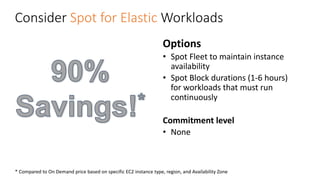
Consider	Spot for Elastic Workloads
Options
• Spot	Fleet	to	maintain	instance	
availability
• Spot	Block	durations	(1-6	hours)	
for	workloads	that	must	run	
continuously
Commitment	level
• None
*	Compared	to	On	Demand	price	based	on	specific	EC2	instance	type,	region,	and	Availability	Zone
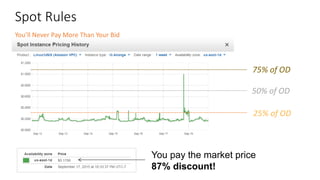
Spot	Rules
50%	of	OD
75%	of	OD
25%	of	OD
You pay the market price
87% discount!
You’ll	Never	Pay	More	Than	Your	Bid
Which	EC2	purchasing	model	is	right	for	me?
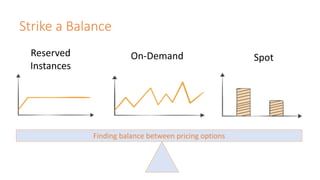
Strike	a	Balance
Finding	balance	between	pricing	options
Reserved	
Instances
On-Demand Spot
“But	my	applications	are
too	small
for	Auto	Scaling!”
Amazon	EC2	Container Service
• Easily	manage	Docker	containers
• Flexible	container placement
• Designed	for	use	with	other	AWS	services
• Extensible
• Performance	at	Scale
• Secure
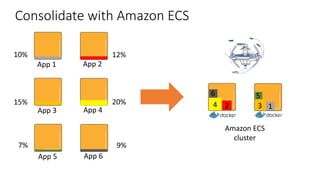
10%
15%
7%
12%
20%
9%
Consolidate	with	Amazon	ECS
App	1 App	2
App	3 App	4
App	5 App	6
6
12 34
5
Amazon	ECS
cluster
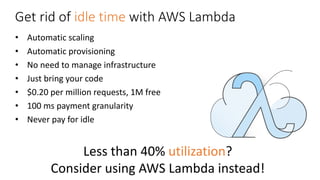
Get	rid	of	idle	time	with	AWS	Lambda
• Automatic	scaling
• Automatic	provisioning
• No	need	to	manage	infrastructure
• Just	bring	your	code
• $0.20	per	million	requests,	1M	free
• 100	ms	payment	granularity
• Never	pay	for	idle
Less	than	40%	utilization?
Consider	using	AWS	Lambda	instead!
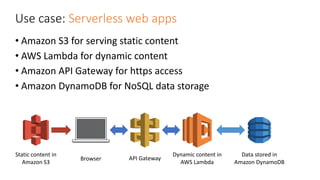
Use	case:	Serverless	web	apps
• Amazon	S3	for	serving	static	content
• AWS	Lambda	for	dynamic	content
• Amazon	API	Gateway	for	https	access
• Amazon	DynamoDB	for	NoSQL	data	storage
Dynamic	content	in	
AWS	Lambda
Data	stored	in	
Amazon	DynamoDB
API	Gateway
Static	content	in	
Amazon	S3
Browser
Pillar	4:	
Leveraging	the	Right	Storage	
Class
Block	Storage
Object	Storage
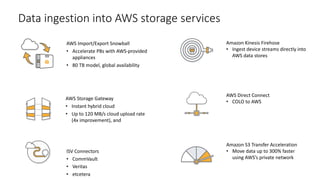
AWS	Import/Export	Snowball
• Accelerate	PBs	with	AWS-provided	
appliances
• 80	TB	model,	global	availability
AWS	Storage	Gateway
• Instant	hybrid	cloud	
• Up	to	120	MB/s	cloud	upload	rate	
(4x	improvement),	and	
Data	ingestion	into	AWS	storage	services
Amazon	Kinesis	Firehose
• Ingest	device	streams	directly	into	
AWS	data	stores
AWS	Direct	Connect
• COLO	to	AWS
ISV	Connectors
• CommVault
• Veritas
• etcetera
Amazon	S3	Transfer	Acceleration
• Move	data	up	to	300%	faster	
using	AWS’s	private	network
AWS	Import/Export	Snowball
• Accelerate	PBs	with	AWS-provided	
appliances
• 80	TB	model,	global	availability
AWS	Storage	Gateway
• Instant	hybrid	cloud	
• Up	to	120	MB/s	cloud	upload	rate	
(4x	improvement),	and	
Data	ingestion	into	AWS	storage	services
Amazon	Kinesis	Firehose
• Ingest	device	streams	directly	into	
AWS	data	stores
AWS	Direct	Connect
• COLO	to	AWS
ISV	Connectors
• CommVault
• Veritas
• etcetera
Amazon	S3	Transfer	Acceleration
• Move	data	up	to	300%	faster	
using	AWS’s	private	network
But	are	you	optimizing your	object	
storage?
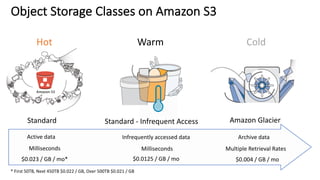
Active	data Archive	dataInfrequently	accessed	data
Milliseconds Multiple	Retrieval	RatesMilliseconds
$0.023	/	GB	/	mo* $0.004	/	GB	/	mo$0.0125	/	GB	/	mo
Object	Storage	Classes	on	Amazon	S3
*	First	50TB,	Next	450TB	$0.022	/	GB,	Over	500TB	$0.021	/	GB
Standard	
Hot
Standard	- Infrequent	Access
Warm
Amazon	Glacier
Cold
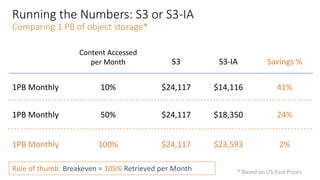
Running	the	Numbers:	S3	or	S3-IA
Comparing	1	PB	of	object	storage*
1PB	Monthly
S3 S3-IA Savings	%
$24,117 $14,116 41%
Rule	of	thumb:	Breakeven	=	105% Retrieved	per	Month	
Content	Accessed	
per	Month
10%
$24,117 $18,350 24%50%1PB	Monthly
$24,117 $23,593 2%100%1PB	Monthly
*	Based	on	US-East	Prices
Case	Study:	Putting	it	Together
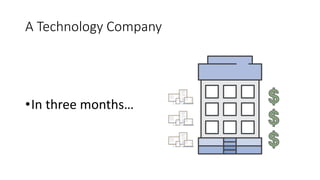
A	Technology	Company
•In	three	months…
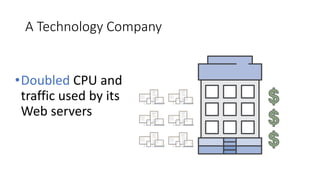
A	Technology	Company
•Doubled CPU	and	
traffic	used	by	its	
Web	servers
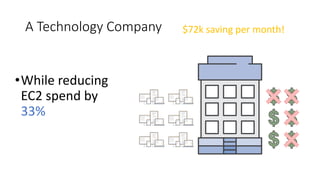
A	Technology	Company
•While	reducing	
EC2	spend	by	
33%
$72k	saving	per	month!
How	did	they	do	it?
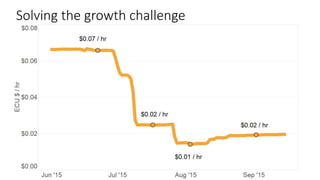
Solving	the	growth	challenge
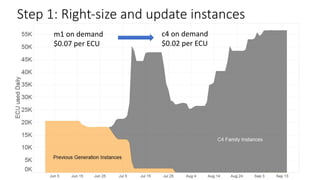
Step	1:	Right-size	and	update	instances
m1	on	demand
$0.07	per	ECU	
c4	on	demand
$0.02	per	ECU
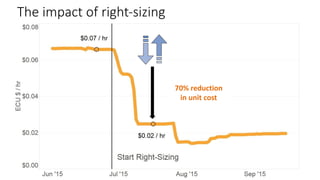
The	impact	of	right-sizing
70%	reduction
in	unit	cost
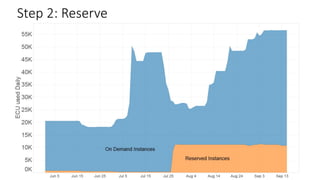
Step	2:	Reserve
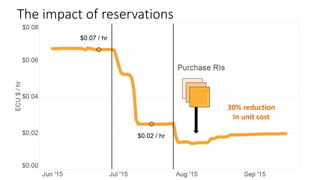
The	impact	of	reservations
30%	reduction
In	unit	cost
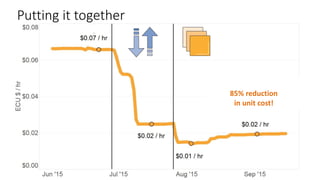
Putting	it	together
85%	reduction
in	unit	cost!
Sounds	pretty	easy,	right?
Not	really.	
In	reality,	it	is	very	complex.	
• Scale
• Behavioral	change
• Visibility
• Ownership
Chapter	II:	Implement	&	Maintain
(Well	Operated)
How	do	you	implement	those	best	
practices	at	scale?	
(Spoiler	Alert:	Remember	the	5th Pillar	of	Cost	Optimization?)
Pillar	5:	Measure	&	Monitor
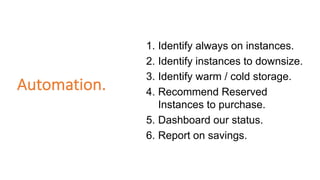
Automation.
1. Identify always on instances.
2. Identify instances to downsize.
3. Identify warm / cold storage.
4. Recommend Reserved
Instances to purchase.
5. Dashboard our status.
6. Report on savings.
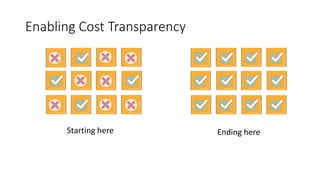
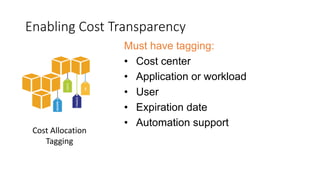
Enabling	Cost	Transparency
Must have tagging:
• Cost center
• Application or workload
• User
• Expiration date
• Automation support
Tools	for	Measuring	&	
Monitoring
Option	1:	DIY
Build	your	own	custom	dashboard
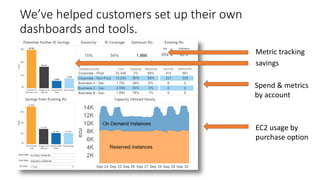
We’ve	helped	customers	set	up	their	own	
dashboards	and	tools.
Metric	tracking
savings
Spend	&	metrics	
by	account
EC2	usage	by	
purchase	option
Option	2:	Use	a	Partner
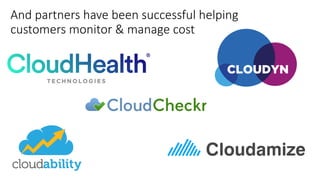
And	partners	have	been	successful	helping	
customers	monitor	&	manage	cost
Option	3:	AWS	Tools
Trusted	Advisor
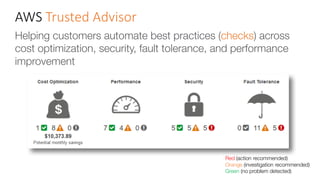
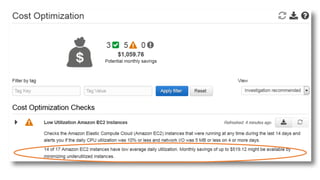
AWS	Trusted	Advisor
Helping customers automate best practices (checks) across
cost optimization, security, fault tolerance, and performance
improvement
Red (action recommended)
Orange (investigation recommended)
Green (no problem detected)
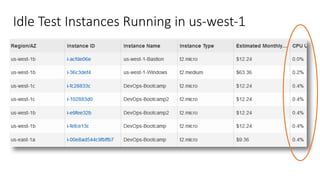
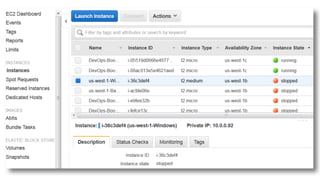
Idle	Test	Instances	Running	in	us-west-1
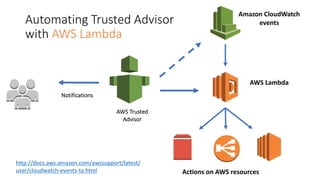
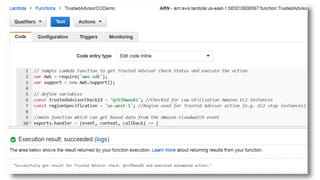
Automating	Trusted	Advisor
with	AWS	Lambda
AWS	Trusted	
Advisor
AWS	Lambda
Actions	on	AWS	resources
Amazon	CloudWatch	
events
Notifications
http://docs.aws.amazon.com/awssupport/latest/
user/cloudwatch-events-ta.html
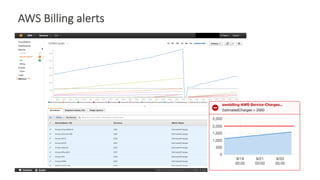
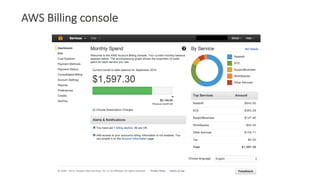
AWS	Billing	alerts
AWS	Billing	console
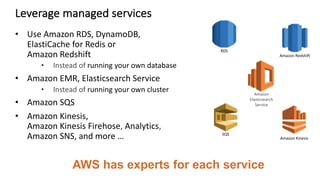
Leverage	managed	services
• Use	Amazon	RDS,	DynamoDB,
ElastiCache	for	Redis	or
Amazon	Redshift
• Instead	of running	your	own	database
• Amazon	EMR,	Elasticsearch Service
• Instead	of running	your	own	cluster
• Amazon	SQS
• Amazon	Kinesis,
Amazon	Kinesis	Firehose,	Analytics,	
Amazon	SNS,	and	more	…
AWS has experts for each service
RDS
Amazon	Redshift
Amazon	
Elasticsearch	
Service
Amazon	Kinesis
SQS
Establish	Clear	Targets	&	Metrics
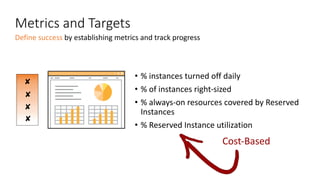
Metrics	and	Targets
• %	instances	turned	off	daily
• %	of	instances	right-sized
• %	always-on	resources	covered	by	Reserved	
Instances
• %	Reserved	Instance	utilization
✔
✔
✔
✔
✘
✘
✘
✘
Define	success	by	establishing	metrics	and	track	progress
Cost-Based
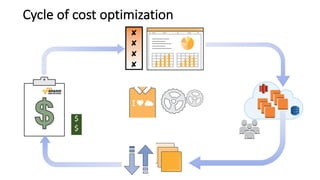
Cycle	of	cost	optimization	
✔
✔
✔
✔✘
✘
✘
✘
$
$
$
$
$
Thank	you!
Heather	Matson	– matsonh@amazon.com
Randy	Ridgley	– rridgley@amazon.com

AWS Cost optimization at scale