Ideas for Managing your AWS Costs
 Top 6 Costs
 Ec2, RDS, SQS, S3, Support, Data Xfer
 Also in Production
 DynamoDB, Elasticache, EMR, Lambda
 On Occasion
 Redshift, Aurora, Kinesis, Data Pipeline
 Of Course
 IAM, Cloudfront, Route53, CloudTrail, SNS, CW
 Planning to Use
 EFS, EC2 Container Service
 Some Useful Services to Gain Visibility
 AWS Cost Explorer
 Netflix ICE (via Teevity)
 CloudYN, Cloudability, Cloudcheckr, CloudHealthTech
 AWS Billing and Detailed Billing CVS Files
 Custom
 Teevity is still building Teevity and welcomes any user that wants to registerto go to
http://teevity.com – they can register for free. More users provides data to help may
Teevity better.
 Teevity does not compete with the OSS version of Ice. They are building on top of it and
around it (adding things to make it better) . The plan is to release a large and rich use-
case oriented documentation on both NetflixOSS/Iceand Teevity in the coming month
(http://docs.teevity.com)
 Teevity plans to release a version on the AWS Marketplace a called "Teevity Incognito"
so users can have their own instances.
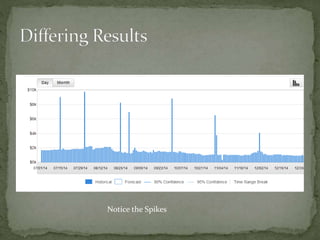
Notice the Spikes
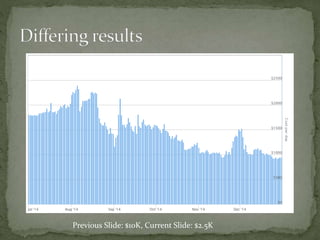
Previous Slide: $10K, Current Slide: $2.5K
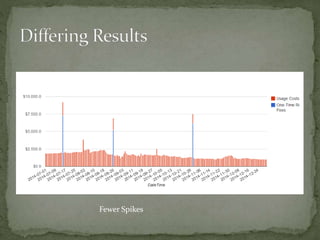
Fewer Spikes
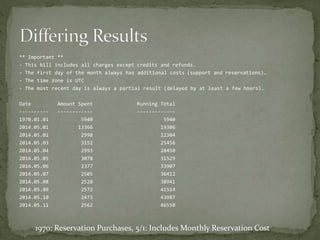
** Important **
- This bill includes all charges except credits and refunds.
- The first day of the month always has additional costs (support and reservations).
- The time zone is UTC
- The most recent day is always a partial result (delayed by at least a few hours).
Date Amount Spent Running Total
---------- ------------ -------------
1970.01.01 5940 5940
2014.05.01 13366 19306
2014.05.02 2998 22304
2014.05.03 3152 25456
2014.05.04 2993 28450
2014.05.05 3078 31529
2014.05.06 2377 33907
2014.05.07 2505 36412
2014.05.08 2528 38941
2014.05.09 2572 41514
2014.05.10 2473 43987
2014.05.11 2562 46550
1970: Reservation Purchases, 5/1: Includes Monthly Reservation Cost
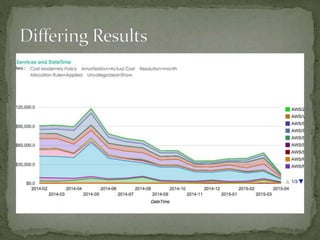
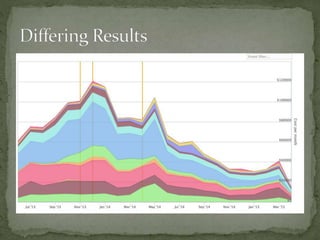
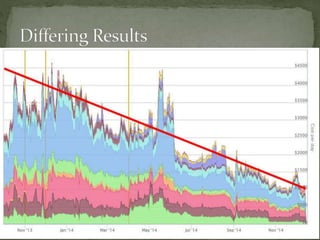
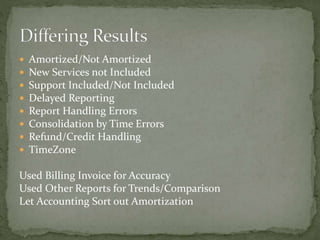
 Amortized/Not Amortized
 New Services not Included
 Support Included/Not Included
 Delayed Reporting
 Report Handling Errors
 Consolidation by Time Errors
 Refund/Credit Handling
 TimeZone
Used Billing Invoice for Accuracy
Used Other Reports for Trends/Comparison
Let Accounting Sort out Amortization
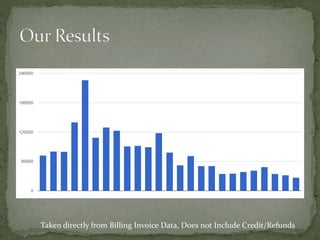
Taken directly from Billing Invoice Data, Does not Include Credit/Refunds
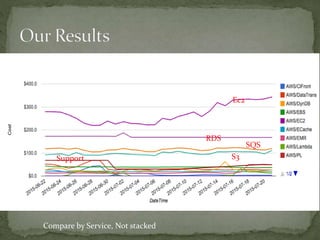
Compare by Service, Not stacked
Ec2
RDS
SQS
S3Support
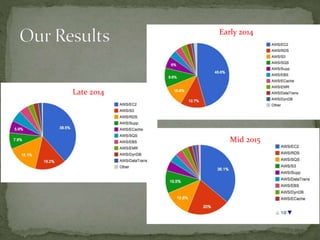
Early 2014
Late 2014
Mid 2015
 Tags are your friend
 Tag by
 Stack
 Environment
 Application
 Scripts based on tag
 Cost Control and Management Reports by Tag
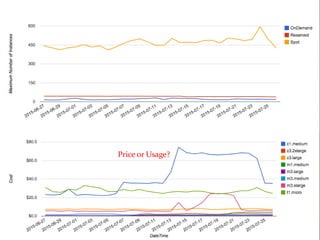
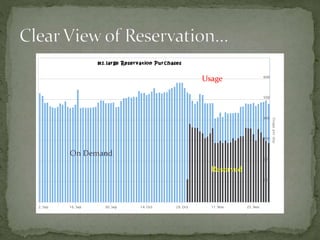
On Demand
Reserved
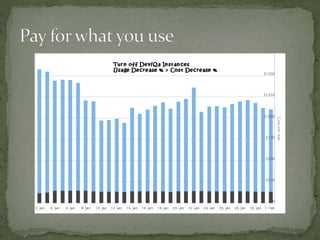
Usage
Cost
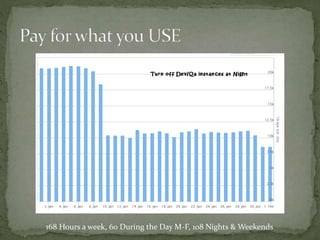
168 Hours a week, 60 During the Day M-F, 108 Nights & Weekends
 We saw the savings in turning off instances
 Wrote a script to turn off and on daily
 Complaints about unavailability to work
 Work from home
 Work late/early
 Data Loss from Instance Shutdowns
 Went from 14 hours off to 3 hours off
 Needed a way allow developers to start stop instances
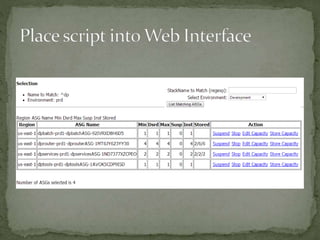
usage: listASGs.py [-h] [-v] [-e ENVIRONMENT] [-n NAME] [-r REGION] [-a {suspend,resume,set,start,stop,store}] [-w]
[-c CAPACITY] [--excludes EXCLUDES] [-k]
List Autoscaling Groups and Act on them
optional arguments:
-h, --help show this help message and exit
-v, --verbose Up the displayed messages or provide more detail
-e ENVIRONMENT, --environment ENVIRONMENT
Set the environment variable for the filter. You can chose 'all' as well as dev/qa/prd/ops/int/...
-n NAME, --name NAME Set the base stack name for the filter. Default is everything
-r REGION, --region REGION
Set the region. Default is everything
-a {suspend,resume,set,start,stop,store}, --action {suspend,resume,set,start,stop,store}
Determines the action for the script to take
-w, --html Print output in HTML format rather than text
-c CAPACITY, --capacity CAPACITY
Specifies the value for capacity. Enter as '#/#/#' in
min, desired, max order
--excludes EXCLUDES Enter a regular expression to exclude matchnames
-k, --kind Display the underlaying Instance Type
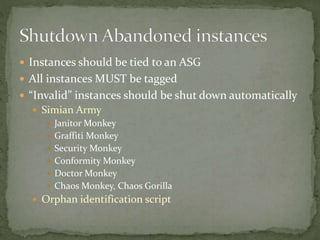
 Instances should be tied to an ASG
 All instances MUST be tagged
 “Invalid” instances should be shut down automatically
 Simian Army
 Janitor Monkey
 Graffiti Monkey
 Security Monkey
 Conformity Monkey
 Doctor Monkey
 Chaos Monkey, Chaos Gorilla
 Orphan identification script
 i-bdf03614 --> ansible-xyz-AnsibleBob (m3.medium)
i-46d4e196 --> edda-ops1-netflixEdda (m3.xlarge)
i-1a5550c9 --> emr-prd1-CORE (m1.medium) [SPOT]
i-1cd2a2b4 --> emr-prd1-CORE (m3.xlarge) [SPOT]
i-36d3a39e --> emr-prd1-CORE (m3.xlarge) [SPOT]
i-37d3a39f --> emr-prd1-CORE (m3.xlarge) [SPOT]
i-38d3a390 --> emr-prd1-CORE (m3.xlarge) [SPOT]
i-41dca992 --> emr-prd1-CORE (m1.medium) [SPOT]
i-1dd3a3b5 --> emr-prd1-MASTER (m3.xlarge)
i-215550f2 --> emr-prd1-MASTER (m1.medium)
i-69dca9ba --> emr-prd1-MASTER (m1.medium)
i-48fbcc9b --> emr-prd1-TASK (m1.medium) [SPOT]
i-62fccbb1 --> emr-prd1-TASK (m1.medium) [SPOT]
i-83f9ce50 --> emr-prd1-TASK (m1.medium) [SPOT]
i-84fccb57 --> emr-prd1-TASK (m1.medium) [SPOT]
i-86f9ce55 --> emr-prd1-TASK (m1.medium) [SPOT]
i-8afccb59 --> emr-prd1-TASK (m1.medium) [SPOT]
i-8df9ce5e --> emr-prd1-TASK (m1.medium) [SPOT]
i-8ef9ce5d --> emr-prd1-TASK (m1.medium) [SPOT]
i-aafbcc79 --> emr-prd1-TASK (m1.medium) [SPOT]
i-acfbcc7f --> emr-prd1-TASK (m1.medium) [SPOT]
i-1058a8fe --> experts-beta-experts (c3.xlarge)
i-f00f1b01 --> ftp-ops1-ftp (m3.medium)
i-a6106f75 --> gene-gene-gene (c3.2xlarge) [SPOT]
i-f1c5510b --> internal-access1a-bubblewrapp (m3.medium)
i-97f6676a --> jenkins-ops1-jenkins (c3.large)
i-945ada7d --> lamp-dev-lamptest (m3.medium)
i-8fd25f66 --> logstash-ops-logstash (m3.xlarge) [SPOT]
i-8c8c8ca3 --> nissolr-prd1-nissolrStandAlone-Cloud1 (i2.xlarge)
i-028f8f2d --> nissolr-prd1-nissolrStandAlone-Cloud2 (i2.xlarge)
i-2be6e504 --> nissolr-prd1-nissolrStandAlone-Cloud3 (i2.xlarge)
i-67d59ab1 --> nissolr-prd1-zookeeper1 (t1.micro)
i-afcbac80 --> recommend-dev2-recommend (m3.medium)
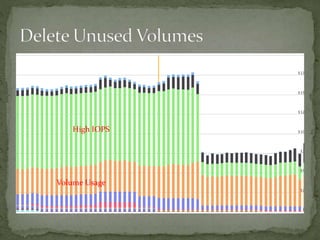
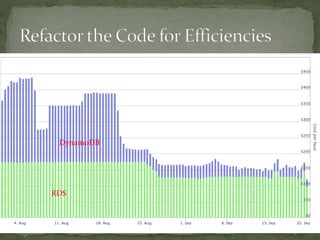
High IOPS
Volume Usage
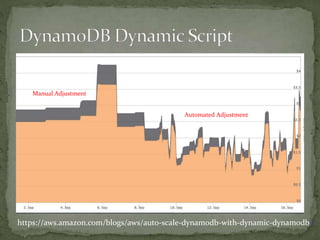
Manual Adjustment
Automated Adjustment
https://aws.amazon.com/blogs/aws/auto-scale-dynamodb-with-dynamic-dynamodb/
RDS
DynamoDB
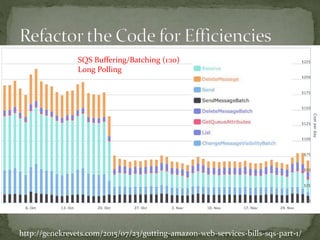
SQS Buffering/Batching (1:10)
Long Polling
http://genekrevets.com/2015/07/23/gutting-amazon-web-services-bills-sqs-part-1/
 Can’t change across Families
 Can’t Sell
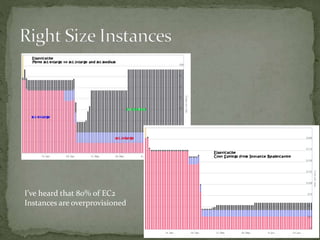
I’ve heard that 80% of EC2
Instances are overprovisioned
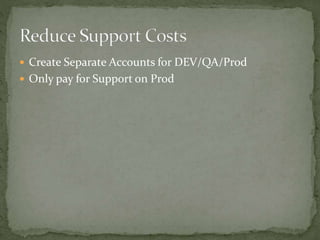
 Create Separate Accounts for DEV/QA/Prod
 Only pay for Support on Prod
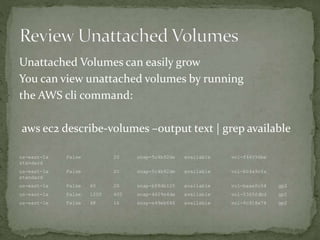
Unattached Volumes can easily grow
You can view unattached volumes by running
the AWS cli command:
aws ec2 describe-volumes –output text | grep available
us-east-1a False 20 snap-5c4b92de available vol-f44096be
standard
us-east-1a False 20 snap-5c4b92de available vol-b04a9cfa
standard
us-east-1a False 60 20 snap-bf8db125 available vol-baae0c54 gp2
us-east-1a False 1200 400 snap-4629e4de available vol-5360fdbd gp2
us-east-1e False 48 16 snap-e49eb646 available vol-6c918e74 gp2
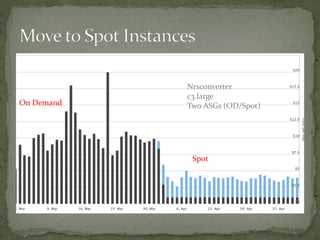
Nrsconverter
c3.large
Two ASGs (OD/Spot)On Demand
Spot
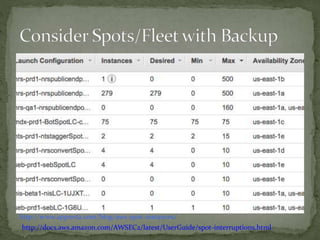
http://www.appneta.com/blog/aws-spot-instances/
http://docs.aws.amazon.com/AWSEC2/latest/UserGuide/spot-interruptions.html
 Initially, Multiple ASGs with Minimum On Demand
 Discovered Spots stay up for long periods
 Move all in to Spots with OnDemand Backup
 Switching to Fleet with OnDemand Backup
 OnDemand Backup (Spots)
 Two Minute Warning Flag
 Separate ASG for On Demand is updated
Price or Usage?
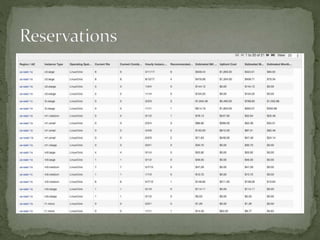
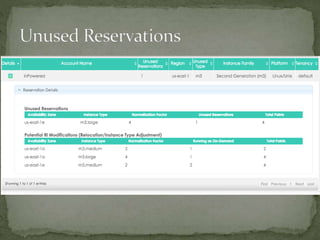
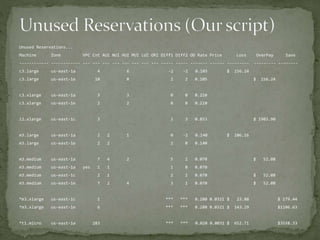
Unused Reservations...
Machine Zone VPC Cnt AUI NUI HUI MUI LUI ORI Diff1 Diff2 OD Rate Price Loss OverPay Save
------------ ------------ --- --- --- --- --- --- --- --- ----- ----- ------- ------ --------- --------- --------
c3.large us-east-1a 4 6 -2 -2 0.105 $ 156.24
c3.large us-east-1e 10 8 2 2 0.105 $ 156.24
c3.xlarge us-east-1a 3 3 0 0 0.210
c3.xlarge us-east-1e 2 2 0 0 0.210
i2.xlarge us-east-1c 3 3 3 0.853 $ 1903.90
m3.large us-east-1a 2 2 1 0 -1 0.140 $ 106.16
m3.large us-east-1e 2 2 2 0 0.140
m3.medium us-east-1a 7 4 2 5 1 0.070 $ 52.08
m3.medium us-east-1a yes 1 1 1 0 0.070
m3.medium us-east-1c 2 1 2 1 0.070 $ 52.08
m3.medium us-east-1e 7 2 4 3 1 0.070 $ 52.08
*m3.xlarge us-east-1c 1 *** *** 0.280 0.0321 $ 23.88 $ 179.44
*m3.xlarge us-east-1e 6 *** *** 0.280 0.0321 $ 143.29 $1106.63
*t1.micro us-east-1a 283 *** *** 0.020 0.0031 $ 652.71 $3558.33
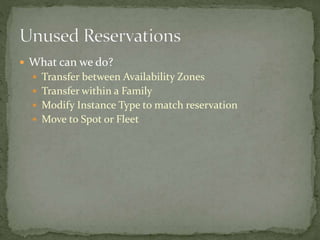
 What can we do?
 Transfer between Availability Zones
 Transfer within a Family
 Modify Instance Type to match reservation
 Move to Spot or Fleet
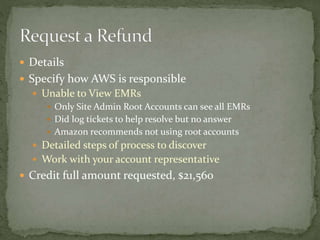
 Details
 Specify how AWS is responsible
 Unable to View EMRs
 Only Site Admin Root Accounts can see all EMRs
 Did log tickets to help resolve but no answer
 Amazon recommends not using root accounts
 Detailed steps of process to discover
 Work with your account representative
 Credit full amount requested, $21,560
1. Set up Standards (Multiple Accounts, Tagging Names)
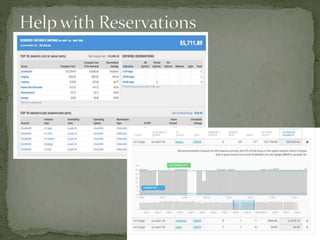
2. Gain Visibility – Get a tool to visualize Costs and Assets
3. Tag Assets (Use CloudFormation, Scripts, Graffiti Monkey)
4. Turn off Unused Instances (We started with QA/Dev)
5. Use ASGs to turn off instances when less traffic
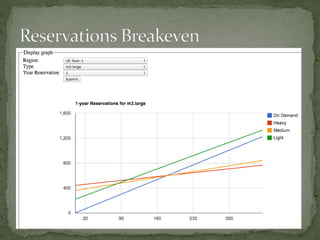
6. Buy EC2 Reservations, not once a year, monthly. Try to use
fewer instance families
7. Give Developers a way to Easily Turn On/Off ASGs/Instances
8. Set Rules - must have tags, must be tied to an ASG
9. Use Simian Army (Janitor Monkey) to automatically handle
cleanup
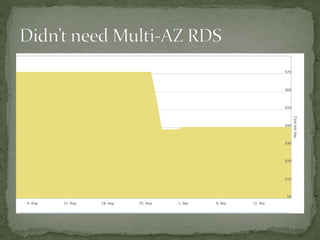
10. Evaluate Price/Time/Need for Failover (Multi-AZ, Instances
across Regions, Geography)
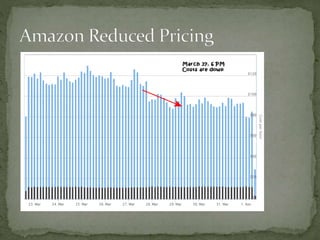
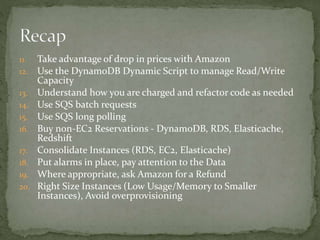
11. Take advantage of drop in prices with Amazon
12. Use the DynamoDB Dynamic Script to manage Read/Write
Capacity
13. Understand how you are charged and refactor code as needed
14. Use SQS batch requests
15. Use SQS long polling
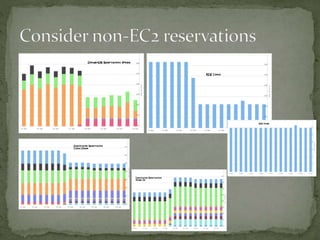
16. Buy non-EC2 Reservations - DynamoDB, RDS, Elasticache,
Redshift
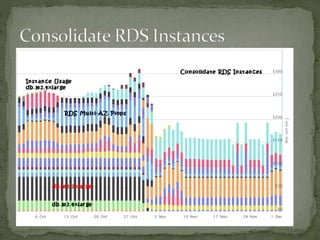
17. Consolidate Instances (RDS, EC2, Elasticache)
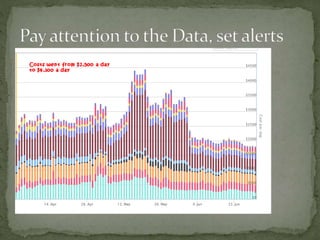
18. Put alarms in place, pay attention to the Data
19. Where appropriate, ask Amazon for a Refund
20. Right Size Instances (Low Usage/Memory to Smaller
Instances), Avoid overprovisioning
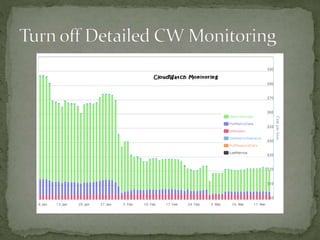
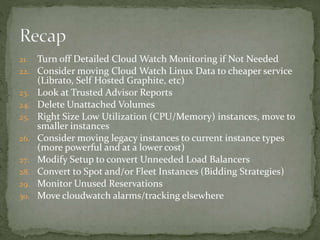
21. Turn off Detailed Cloud Watch Monitoring if Not Needed
22. Consider moving Cloud Watch Linux Data to cheaper service
(Librato, Self Hosted Graphite, etc)
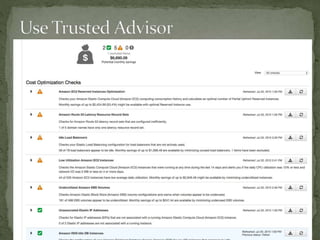
23. Look at Trusted Advisor Reports
24. Delete Unattached Volumes
25. Right Size Low Utilization (CPU/Memory) instances, move to
smaller instances
26. Consider moving legacy instances to current instance types
(more powerful and at a lower cost)
27. Modify Setup to convert Unneeded Load Balancers
28. Convert to Spot and/or Fleet Instances (Bidding Strategies)
29. Monitor Unused Reservations
30. Move cloudwatch alarms/tracking elsewhere
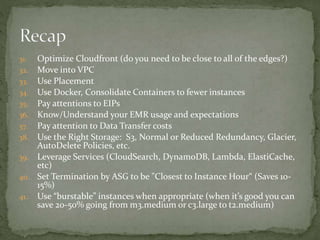
31. Optimize Cloudfront (do you need to be close to all of the edges?)
32. Move into VPC
33. Use Placement
34. Use Docker, Consolidate Containers to fewer instances
35. Pay attentions to EIPs
36. Know/Understand your EMR usage and expectations
37. Pay attention to Data Transfer costs
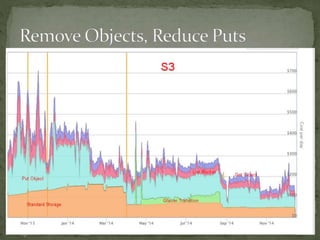
38. Use the Right Storage: S3, Normal or Reduced Redundancy, Glacier,
AutoDelete Policies, etc.
39. Leverage Services (CloudSearch, DynamoDB, Lambda, ElastiCache,
etc)
40. Set Termination by ASG to be "Closest to Instance Hour“ (Saves 10-
15%)
41. Use “burstable” instances when appropriate (when it’s good you can
save 20-50% going from m3.medium or c3.large to t2.medium)
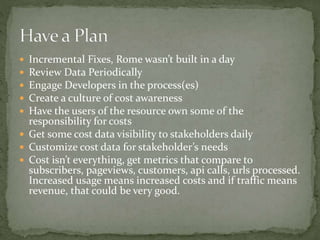
 Incremental Fixes, Rome wasn’t built in a day
 Review Data Periodically
 Engage Developers in the process(es)
 Create a culture of cost awareness
 Have the users of the resource own some of the
responsibility for costs
 Get some cost data visibility to stakeholders daily
 Customize cost data for stakeholder’s needs
 Cost isn’t everything, get metrics that compare to
subscribers, pageviews, customers, api calls, urls processed.
Increased usage means increased costs and if traffic means
revenue, that could be very good.

AWS Cost Control

  • 1.
    Ideas for Managingyour AWS Costs
  • 2.
     Top 6Costs  Ec2, RDS, SQS, S3, Support, Data Xfer  Also in Production  DynamoDB, Elasticache, EMR, Lambda  On Occasion  Redshift, Aurora, Kinesis, Data Pipeline  Of Course  IAM, Cloudfront, Route53, CloudTrail, SNS, CW  Planning to Use  EFS, EC2 Container Service
  • 3.
     Some UsefulServices to Gain Visibility  AWS Cost Explorer  Netflix ICE (via Teevity)  CloudYN, Cloudability, Cloudcheckr, CloudHealthTech  AWS Billing and Detailed Billing CVS Files  Custom
  • 4.
     Teevity isstill building Teevity and welcomes any user that wants to registerto go to http://teevity.com – they can register for free. More users provides data to help may Teevity better.  Teevity does not compete with the OSS version of Ice. They are building on top of it and around it (adding things to make it better) . The plan is to release a large and rich use- case oriented documentation on both NetflixOSS/Iceand Teevity in the coming month (http://docs.teevity.com)  Teevity plans to release a version on the AWS Marketplace a called "Teevity Incognito" so users can have their own instances.
  • 5.
  • 6.
    Previous Slide: $10K,Current Slide: $2.5K
  • 7.
  • 8.
    ** Important ** -This bill includes all charges except credits and refunds. - The first day of the month always has additional costs (support and reservations). - The time zone is UTC - The most recent day is always a partial result (delayed by at least a few hours). Date Amount Spent Running Total ---------- ------------ ------------- 1970.01.01 5940 5940 2014.05.01 13366 19306 2014.05.02 2998 22304 2014.05.03 3152 25456 2014.05.04 2993 28450 2014.05.05 3078 31529 2014.05.06 2377 33907 2014.05.07 2505 36412 2014.05.08 2528 38941 2014.05.09 2572 41514 2014.05.10 2473 43987 2014.05.11 2562 46550 1970: Reservation Purchases, 5/1: Includes Monthly Reservation Cost
  • 12.
     Amortized/Not Amortized New Services not Included  Support Included/Not Included  Delayed Reporting  Report Handling Errors  Consolidation by Time Errors  Refund/Credit Handling  TimeZone Used Billing Invoice for Accuracy Used Other Reports for Trends/Comparison Let Accounting Sort out Amortization
  • 13.
    Taken directly fromBilling Invoice Data, Does not Include Credit/Refunds
  • 14.
    Compare by Service,Not stacked Ec2 RDS SQS S3Support
  • 15.
  • 16.
     Tags areyour friend  Tag by  Stack  Environment  Application  Scripts based on tag  Cost Control and Management Reports by Tag
  • 19.
  • 20.
  • 23.
    168 Hours aweek, 60 During the Day M-F, 108 Nights & Weekends
  • 25.
     We sawthe savings in turning off instances  Wrote a script to turn off and on daily  Complaints about unavailability to work  Work from home  Work late/early  Data Loss from Instance Shutdowns  Went from 14 hours off to 3 hours off  Needed a way allow developers to start stop instances
  • 26.
    usage: listASGs.py [-h][-v] [-e ENVIRONMENT] [-n NAME] [-r REGION] [-a {suspend,resume,set,start,stop,store}] [-w] [-c CAPACITY] [--excludes EXCLUDES] [-k] List Autoscaling Groups and Act on them optional arguments: -h, --help show this help message and exit -v, --verbose Up the displayed messages or provide more detail -e ENVIRONMENT, --environment ENVIRONMENT Set the environment variable for the filter. You can chose 'all' as well as dev/qa/prd/ops/int/... -n NAME, --name NAME Set the base stack name for the filter. Default is everything -r REGION, --region REGION Set the region. Default is everything -a {suspend,resume,set,start,stop,store}, --action {suspend,resume,set,start,stop,store} Determines the action for the script to take -w, --html Print output in HTML format rather than text -c CAPACITY, --capacity CAPACITY Specifies the value for capacity. Enter as '#/#/#' in min, desired, max order --excludes EXCLUDES Enter a regular expression to exclude matchnames -k, --kind Display the underlaying Instance Type
  • 28.
     Instances shouldbe tied to an ASG  All instances MUST be tagged  “Invalid” instances should be shut down automatically  Simian Army  Janitor Monkey  Graffiti Monkey  Security Monkey  Conformity Monkey  Doctor Monkey  Chaos Monkey, Chaos Gorilla  Orphan identification script
  • 29.
     i-bdf03614 -->ansible-xyz-AnsibleBob (m3.medium) i-46d4e196 --> edda-ops1-netflixEdda (m3.xlarge) i-1a5550c9 --> emr-prd1-CORE (m1.medium) [SPOT] i-1cd2a2b4 --> emr-prd1-CORE (m3.xlarge) [SPOT] i-36d3a39e --> emr-prd1-CORE (m3.xlarge) [SPOT] i-37d3a39f --> emr-prd1-CORE (m3.xlarge) [SPOT] i-38d3a390 --> emr-prd1-CORE (m3.xlarge) [SPOT] i-41dca992 --> emr-prd1-CORE (m1.medium) [SPOT] i-1dd3a3b5 --> emr-prd1-MASTER (m3.xlarge) i-215550f2 --> emr-prd1-MASTER (m1.medium) i-69dca9ba --> emr-prd1-MASTER (m1.medium) i-48fbcc9b --> emr-prd1-TASK (m1.medium) [SPOT] i-62fccbb1 --> emr-prd1-TASK (m1.medium) [SPOT] i-83f9ce50 --> emr-prd1-TASK (m1.medium) [SPOT] i-84fccb57 --> emr-prd1-TASK (m1.medium) [SPOT] i-86f9ce55 --> emr-prd1-TASK (m1.medium) [SPOT] i-8afccb59 --> emr-prd1-TASK (m1.medium) [SPOT] i-8df9ce5e --> emr-prd1-TASK (m1.medium) [SPOT] i-8ef9ce5d --> emr-prd1-TASK (m1.medium) [SPOT] i-aafbcc79 --> emr-prd1-TASK (m1.medium) [SPOT] i-acfbcc7f --> emr-prd1-TASK (m1.medium) [SPOT] i-1058a8fe --> experts-beta-experts (c3.xlarge) i-f00f1b01 --> ftp-ops1-ftp (m3.medium) i-a6106f75 --> gene-gene-gene (c3.2xlarge) [SPOT] i-f1c5510b --> internal-access1a-bubblewrapp (m3.medium) i-97f6676a --> jenkins-ops1-jenkins (c3.large) i-945ada7d --> lamp-dev-lamptest (m3.medium) i-8fd25f66 --> logstash-ops-logstash (m3.xlarge) [SPOT] i-8c8c8ca3 --> nissolr-prd1-nissolrStandAlone-Cloud1 (i2.xlarge) i-028f8f2d --> nissolr-prd1-nissolrStandAlone-Cloud2 (i2.xlarge) i-2be6e504 --> nissolr-prd1-nissolrStandAlone-Cloud3 (i2.xlarge) i-67d59ab1 --> nissolr-prd1-zookeeper1 (t1.micro) i-afcbac80 --> recommend-dev2-recommend (m3.medium)
  • 30.
  • 34.
  • 36.
  • 37.
    SQS Buffering/Batching (1:10) LongPolling http://genekrevets.com/2015/07/23/gutting-amazon-web-services-bills-sqs-part-1/
  • 39.
     Can’t changeacross Families  Can’t Sell
  • 41.
    I’ve heard that80% of EC2 Instances are overprovisioned
  • 43.
     Create SeparateAccounts for DEV/QA/Prod  Only pay for Support on Prod
  • 46.
    Unattached Volumes caneasily grow You can view unattached volumes by running the AWS cli command: aws ec2 describe-volumes –output text | grep available us-east-1a False 20 snap-5c4b92de available vol-f44096be standard us-east-1a False 20 snap-5c4b92de available vol-b04a9cfa standard us-east-1a False 60 20 snap-bf8db125 available vol-baae0c54 gp2 us-east-1a False 1200 400 snap-4629e4de available vol-5360fdbd gp2 us-east-1e False 48 16 snap-e49eb646 available vol-6c918e74 gp2
  • 50.
  • 51.
  • 52.
     Initially, MultipleASGs with Minimum On Demand  Discovered Spots stay up for long periods  Move all in to Spots with OnDemand Backup  Switching to Fleet with OnDemand Backup  OnDemand Backup (Spots)  Two Minute Warning Flag  Separate ASG for On Demand is updated
  • 53.
  • 55.
    Unused Reservations... Machine ZoneVPC Cnt AUI NUI HUI MUI LUI ORI Diff1 Diff2 OD Rate Price Loss OverPay Save ------------ ------------ --- --- --- --- --- --- --- --- ----- ----- ------- ------ --------- --------- -------- c3.large us-east-1a 4 6 -2 -2 0.105 $ 156.24 c3.large us-east-1e 10 8 2 2 0.105 $ 156.24 c3.xlarge us-east-1a 3 3 0 0 0.210 c3.xlarge us-east-1e 2 2 0 0 0.210 i2.xlarge us-east-1c 3 3 3 0.853 $ 1903.90 m3.large us-east-1a 2 2 1 0 -1 0.140 $ 106.16 m3.large us-east-1e 2 2 2 0 0.140 m3.medium us-east-1a 7 4 2 5 1 0.070 $ 52.08 m3.medium us-east-1a yes 1 1 1 0 0.070 m3.medium us-east-1c 2 1 2 1 0.070 $ 52.08 m3.medium us-east-1e 7 2 4 3 1 0.070 $ 52.08 *m3.xlarge us-east-1c 1 *** *** 0.280 0.0321 $ 23.88 $ 179.44 *m3.xlarge us-east-1e 6 *** *** 0.280 0.0321 $ 143.29 $1106.63 *t1.micro us-east-1a 283 *** *** 0.020 0.0031 $ 652.71 $3558.33
  • 56.
     What canwe do?  Transfer between Availability Zones  Transfer within a Family  Modify Instance Type to match reservation  Move to Spot or Fleet
  • 59.
     Details  Specifyhow AWS is responsible  Unable to View EMRs  Only Site Admin Root Accounts can see all EMRs  Did log tickets to help resolve but no answer  Amazon recommends not using root accounts  Detailed steps of process to discover  Work with your account representative  Credit full amount requested, $21,560
  • 60.
    1. Set upStandards (Multiple Accounts, Tagging Names) 2. Gain Visibility – Get a tool to visualize Costs and Assets 3. Tag Assets (Use CloudFormation, Scripts, Graffiti Monkey) 4. Turn off Unused Instances (We started with QA/Dev) 5. Use ASGs to turn off instances when less traffic 6. Buy EC2 Reservations, not once a year, monthly. Try to use fewer instance families 7. Give Developers a way to Easily Turn On/Off ASGs/Instances 8. Set Rules - must have tags, must be tied to an ASG 9. Use Simian Army (Janitor Monkey) to automatically handle cleanup 10. Evaluate Price/Time/Need for Failover (Multi-AZ, Instances across Regions, Geography)
  • 61.
    11. Take advantageof drop in prices with Amazon 12. Use the DynamoDB Dynamic Script to manage Read/Write Capacity 13. Understand how you are charged and refactor code as needed 14. Use SQS batch requests 15. Use SQS long polling 16. Buy non-EC2 Reservations - DynamoDB, RDS, Elasticache, Redshift 17. Consolidate Instances (RDS, EC2, Elasticache) 18. Put alarms in place, pay attention to the Data 19. Where appropriate, ask Amazon for a Refund 20. Right Size Instances (Low Usage/Memory to Smaller Instances), Avoid overprovisioning
  • 62.
    21. Turn offDetailed Cloud Watch Monitoring if Not Needed 22. Consider moving Cloud Watch Linux Data to cheaper service (Librato, Self Hosted Graphite, etc) 23. Look at Trusted Advisor Reports 24. Delete Unattached Volumes 25. Right Size Low Utilization (CPU/Memory) instances, move to smaller instances 26. Consider moving legacy instances to current instance types (more powerful and at a lower cost) 27. Modify Setup to convert Unneeded Load Balancers 28. Convert to Spot and/or Fleet Instances (Bidding Strategies) 29. Monitor Unused Reservations 30. Move cloudwatch alarms/tracking elsewhere
  • 63.
    31. Optimize Cloudfront(do you need to be close to all of the edges?) 32. Move into VPC 33. Use Placement 34. Use Docker, Consolidate Containers to fewer instances 35. Pay attentions to EIPs 36. Know/Understand your EMR usage and expectations 37. Pay attention to Data Transfer costs 38. Use the Right Storage: S3, Normal or Reduced Redundancy, Glacier, AutoDelete Policies, etc. 39. Leverage Services (CloudSearch, DynamoDB, Lambda, ElastiCache, etc) 40. Set Termination by ASG to be "Closest to Instance Hour“ (Saves 10- 15%) 41. Use “burstable” instances when appropriate (when it’s good you can save 20-50% going from m3.medium or c3.large to t2.medium)
  • 64.
     Incremental Fixes,Rome wasn’t built in a day  Review Data Periodically  Engage Developers in the process(es)  Create a culture of cost awareness  Have the users of the resource own some of the responsibility for costs  Get some cost data visibility to stakeholders daily  Customize cost data for stakeholder’s needs  Cost isn’t everything, get metrics that compare to subscribers, pageviews, customers, api calls, urls processed. Increased usage means increased costs and if traffic means revenue, that could be very good.

Editor's Notes

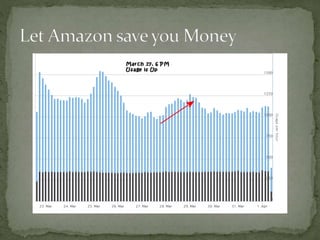
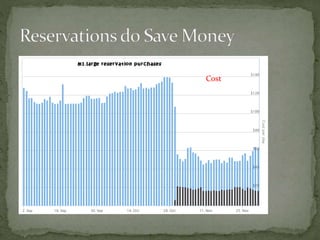
  • #2 The basic goal here is to show some of the things we did to reduce our costs by nearly 90%. We are all in with AWS and so we use quite a few services from AWS. Your mileage may vary.
  • #6 This is AWS Cost Explorer with Subscription Charges
  • #7 Here’s the same Time Period using Netflix ICE (Teevity)
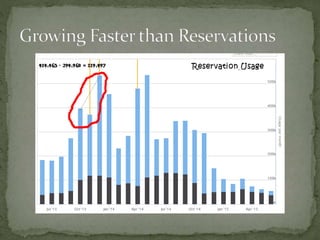
  • #18 You can see we went from a hight of around $226K down to around $25K or $130K to $25K if we don’t include reservation costs.
  • #19 So we are still adding instances at this point but managed to show a decrease of 18%. Also, reservations in wrong AZ in some cases and we had mixed spot and on-demand for similar tasks Also still adding instances
  • #24 While the number of Instances dropped significantly (50%) the cost savings was more like 30% since the larger instances were production.
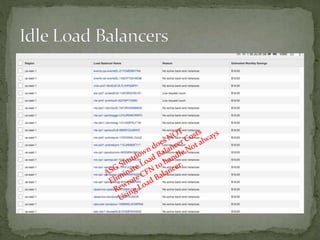
  • #28 Over time the result is now the qa/dev instances are off unless the developer needs to use them Cron job shuts down running instances each night, developer brings back up on demand Shutdown means we stop paying for the instance but since we use ASGs and cloud formation as a setup, load balancers are still being paid for
  • #37 The “usage” image exactly duplicates the total graph. The reads and writes differ, they are much closer together (write ~= reads)
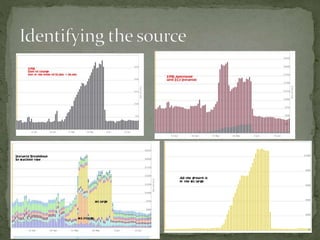
  • #58 This was hard to find because most of the costs were spread across ec2 instances and we had multiple projects going on. We knew there was an increase but not really how much. In the end, we had no visibility into some of the EMR runs because they are only accessible from the site admin root account and not an IAM account. Further, EMR instances were not tagged in a way to easily identify them. Still having issues with setting alerts for a volatile system with large standard deviation. Need to do it by product or event by Stack/EMR/etc.