Avoiding Cybertraps
Incident Response, Computer Forensics,
and Risk Management

Frederick S. Lane
Southern California Schools JPA
Temecula, CA
28 October 2013
www.FrederickLane.com

www.ComputerForensicsDigest.com
Background and Expertise
• Attorney and Author of 7
Books
• Computer Forensics
Expert -- 15 years
• Over 100 criminal cases
• Lecturer on ComputerRelated Topics – 20+
years
• Computer user
(midframes, desktops,
laptops) – 35+ years
• 10 yrs on Burlington VT
School Board
Lecture Overview
Headache-Inducing Headlines
Common Types of Incidents
Electronic Evidence Is Everywhere
Preparing for the Inevitable
Risks for Administrators and
Teachers
• A Quick Intro to Computer
Forensics
•
•
•
•
•
Headache-Inducing Headlines
• “Parents Sue School District After Their
13-Year-Old's Suicide Following Sexting
Bullying” – Hillsborough Cty., Florida
• “Parents sue Lockhart school district
after teacher charged with sexual
assault” – Lockhart, TX
• “School Cyberbullying Victims Fight
Back In Lawsuits” – WV, PA, GA
• “School Employees Sue Cyberbullying
Students” – TX, PA
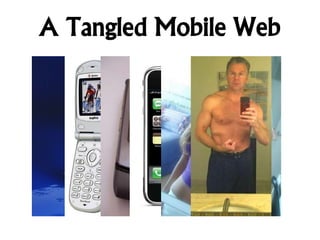
A Tangled Mobile Web
Common Types of Incidents
• Employment Issues
• Harassment/Hostile Work Environment
• Disciplinary Issues

• Student Misconduct
• Cyberbullying & Cyberharassment
• Sexting

• Teacher/Student Misconduct
• Student Attacks on Teachers
• Inappropriate Relationships
E-Evidence Is Everywhere
• Inventory Possible Devices
•
•
•

Computers (Desktops, Laptops, Servers)
Mobile Devices (Phones, Tablets)
Peripherals (USBs, CDs, external drives, etc.)

• Inventory Possible Types of Data
•
•
•
•
•
•

Communication (E-Mail, IMs, Texts, etc.)
Social Media (Facebook, Twitter, etc.)
Web Activity (URLs, cookies, bookmarks, etc.)
Network Logs and Access Data
Cloud Storage (Dropbox, Flickr, Boxy, etc.)
Deleted Data
Whose Data Is It Anyway?
• Where Did the Incident Occur?
•
•

On-Campus vs. Off-Campus
Zone of District Responsibility Is Growing

• Who Owns and Uses the Device?
•
•

Misconduct Using School-Owned Equipment
Misconduct Using Privately-Owned Equipment

• Who Runs the Service?
•
•
•

Evidence Hosted by District
Evidence Created by Teachers/Students
Evidence Hosted by 3rd Parties
Pre-Incident Preparation
• Policies and Procedures
•
•
•

District Decisions re Access, Services, Storage
AUPs for Staff and Students
Data Handling and Response Protocols

• Professional Development for Teachers
and Staff
•
•
•

Typically First Responders
Potential Legal Risks
Technology Is Continually Changing

• Student Education
•

Critical Component of K-12 Curricula
Preparing for the Inevitable
Training, Education, and Prof. Dev.
Follow Established Procedures
Involve Law Enforcement ASAP
Protect and Preserve Data
Hire Computer Forensics Expert?
Consider Privacy Implications of
Discovery Requests
• Some Evidence Is Radioactive
•
•
•
•
•
•
Risks for Admins. & Teachers
• Good Intentions, Bad Outcome
• “Sherlock Holmes” Syndrome
• Forwarding Content for Advice

• The Cover-Up Is Always Worse
• Trying to Protect Colleagues and Friends
• Desire to Protect District by Handling InHouse
• “Delete” Is a Myth
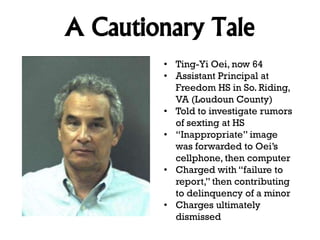
A Cautionary Tale
• Ting-Yi Oei, now 64
• Assistant Principal at
Freedom HS in So. Riding,
VA (Loudoun County)
• Told to investigate rumors
of sexting at HS
• “Inappropriate” image
was forwarded to Oei’s
cellphone, then computer
• Charged with “failure to
report,” then contributing
to delinquency of a minor
• Charges ultimately
dismissed
Computer Forensics 101
• Field Previews
• Acquisition & Mirror Images
• Some Data Are More Fragile Than
Others
• Speed Is Of the Essence
• Powerful Forensics Tools
• Data Recovery and Analysis
• IP Addresses Link to Real World
• 4th Amendment and Privacy
Concerns
Current Projects
• Cybertraps for Educators (2014)
• Safe Student and School Employee
Relationships (2014)
• Cybertraps.wordpress.com
• CPCaseDigest.com
• MessageSafe.com
• Informational Web Sites:
• www.FrederickLane.com
• www.ComputerForensicsDigest.com
• www.CybertrapsfortheYoung.com
Contact Information
• E-Mail:
• FSLane3@gmail.com

• Telephone:
• 802-318-4604

• Twitter
• @Cybertraps, @FSL3

• LinkedIn:
• www.linkedin.com/in/fredericklane/

• SlideShare.net
• www.slideshare.net/FSL3
Avoiding Cybertraps
Incident Response, Computer Forensics,
and Risk Management

Frederick S. Lane
Southern California Schools JPA
Temecula, CA
28 October 2013
www.FrederickLane.com

www.ComputerForensicsDigest.com

Avoiding Cybertraps

  • 1.
    Avoiding Cybertraps Incident Response,Computer Forensics, and Risk Management Frederick S. Lane Southern California Schools JPA Temecula, CA 28 October 2013 www.FrederickLane.com www.ComputerForensicsDigest.com
  • 2.
    Background and Expertise •Attorney and Author of 7 Books • Computer Forensics Expert -- 15 years • Over 100 criminal cases • Lecturer on ComputerRelated Topics – 20+ years • Computer user (midframes, desktops, laptops) – 35+ years • 10 yrs on Burlington VT School Board
  • 3.
    Lecture Overview Headache-Inducing Headlines CommonTypes of Incidents Electronic Evidence Is Everywhere Preparing for the Inevitable Risks for Administrators and Teachers • A Quick Intro to Computer Forensics • • • • •
  • 4.
    Headache-Inducing Headlines • “ParentsSue School District After Their 13-Year-Old's Suicide Following Sexting Bullying” – Hillsborough Cty., Florida • “Parents sue Lockhart school district after teacher charged with sexual assault” – Lockhart, TX • “School Cyberbullying Victims Fight Back In Lawsuits” – WV, PA, GA • “School Employees Sue Cyberbullying Students” – TX, PA
  • 5.
  • 6.
    Common Types ofIncidents • Employment Issues • Harassment/Hostile Work Environment • Disciplinary Issues • Student Misconduct • Cyberbullying & Cyberharassment • Sexting • Teacher/Student Misconduct • Student Attacks on Teachers • Inappropriate Relationships
  • 7.
    E-Evidence Is Everywhere •Inventory Possible Devices • • • Computers (Desktops, Laptops, Servers) Mobile Devices (Phones, Tablets) Peripherals (USBs, CDs, external drives, etc.) • Inventory Possible Types of Data • • • • • • Communication (E-Mail, IMs, Texts, etc.) Social Media (Facebook, Twitter, etc.) Web Activity (URLs, cookies, bookmarks, etc.) Network Logs and Access Data Cloud Storage (Dropbox, Flickr, Boxy, etc.) Deleted Data
  • 8.
    Whose Data IsIt Anyway? • Where Did the Incident Occur? • • On-Campus vs. Off-Campus Zone of District Responsibility Is Growing • Who Owns and Uses the Device? • • Misconduct Using School-Owned Equipment Misconduct Using Privately-Owned Equipment • Who Runs the Service? • • • Evidence Hosted by District Evidence Created by Teachers/Students Evidence Hosted by 3rd Parties
  • 9.
    Pre-Incident Preparation • Policiesand Procedures • • • District Decisions re Access, Services, Storage AUPs for Staff and Students Data Handling and Response Protocols • Professional Development for Teachers and Staff • • • Typically First Responders Potential Legal Risks Technology Is Continually Changing • Student Education • Critical Component of K-12 Curricula
  • 10.
    Preparing for theInevitable Training, Education, and Prof. Dev. Follow Established Procedures Involve Law Enforcement ASAP Protect and Preserve Data Hire Computer Forensics Expert? Consider Privacy Implications of Discovery Requests • Some Evidence Is Radioactive • • • • • •
  • 11.
    Risks for Admins.& Teachers • Good Intentions, Bad Outcome • “Sherlock Holmes” Syndrome • Forwarding Content for Advice • The Cover-Up Is Always Worse • Trying to Protect Colleagues and Friends • Desire to Protect District by Handling InHouse • “Delete” Is a Myth
  • 12.
    A Cautionary Tale •Ting-Yi Oei, now 64 • Assistant Principal at Freedom HS in So. Riding, VA (Loudoun County) • Told to investigate rumors of sexting at HS • “Inappropriate” image was forwarded to Oei’s cellphone, then computer • Charged with “failure to report,” then contributing to delinquency of a minor • Charges ultimately dismissed
  • 13.
    Computer Forensics 101 •Field Previews • Acquisition & Mirror Images • Some Data Are More Fragile Than Others • Speed Is Of the Essence • Powerful Forensics Tools • Data Recovery and Analysis • IP Addresses Link to Real World • 4th Amendment and Privacy Concerns
  • 14.
    Current Projects • Cybertrapsfor Educators (2014) • Safe Student and School Employee Relationships (2014) • Cybertraps.wordpress.com • CPCaseDigest.com • MessageSafe.com • Informational Web Sites: • www.FrederickLane.com • www.ComputerForensicsDigest.com • www.CybertrapsfortheYoung.com
  • 15.
    Contact Information • E-Mail: •FSLane3@gmail.com • Telephone: • 802-318-4604 • Twitter • @Cybertraps, @FSL3 • LinkedIn: • www.linkedin.com/in/fredericklane/ • SlideShare.net • www.slideshare.net/FSL3
  • 16.
    Avoiding Cybertraps Incident Response,Computer Forensics, and Risk Management Frederick S. Lane Southern California Schools JPA Temecula, CA 28 October 2013 www.FrederickLane.com www.ComputerForensicsDigest.com