The Digital Sugar Mill
Seminar on Sugar & Ethanol Automation
PlantPAx Capabilities &
Functional Overview
M. Ali Omer
Technical Project Manager
PlantPAx
Process
Agenda
What is PlantPAx
System Sizing and Characterization
PlantPAx Logic Add-Ons
PlantPAx HMI Functionality
PlantPAx Components
Process Safety
Batch Management
3
It’s a process automation system that
gives you everything you want in a
world-class, contemporary DCS and way
more.
PlantPAx – It’s More
Than a Distributed
Control System (DCS)
PlantPAx
 Plant Process Automation
Excellence
Word Class DCS
 Plant-wide control capabilities
 Open, flexible, scalable,
modular architecture
 Integrated control (process
and machine), power, safety,
and information
 24/7 local support available
through Avanceon
4
PlantPAx
Capabilities
5
Capability PlantPAx
Plant wide Control Disciplines
Discrete 
Motion 
Process & Machine Safety 
Continuous Process 
Batch 
Drives 
6
PlantPAx
Capabilities
Capability PlantPAx
Control System Features
Controller Redundancy 
Remote I/0 
System Scalability with Single
Platform/Control Engine(Single Machine
to Large Plant

Hot swappable I/0 
Broad I/0 capability (Rack mounted, field
based distributed I/0 and hazardous form
factors

Full digital integration with drivers 
7
PlantPAx
Capabilities
Capability PlantPAx
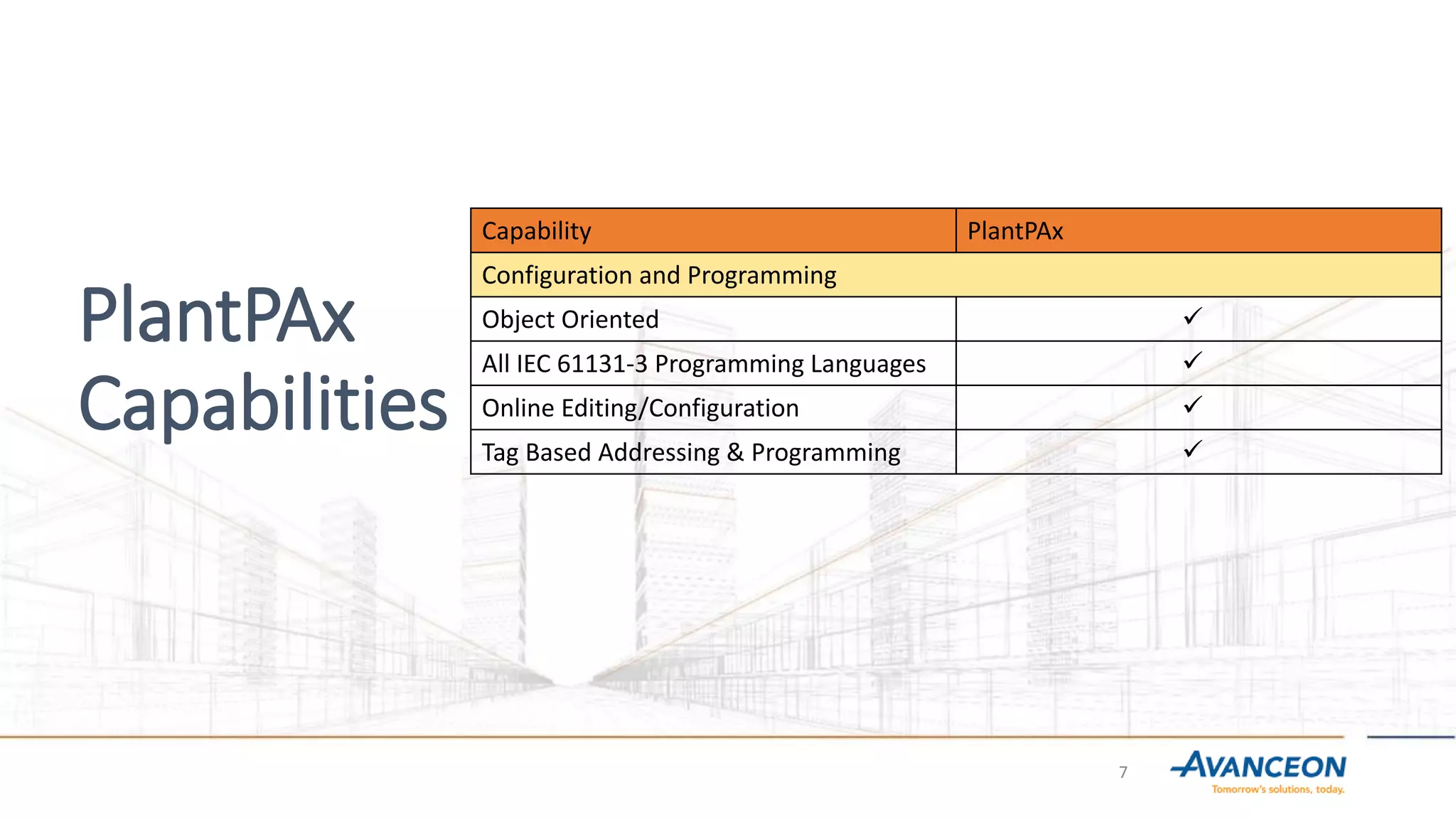
Configuration and Programming
Object Oriented 
All IEC 61131-3 Programming Languages 
Online Editing/Configuration 
Tag Based Addressing & Programming 
8
PlantPAx
Capabilities
Capability PlantPAx
Visualization
Fully Integrated Client/ Server HMI with
Redundancy

Panel Based HMI 
Web based HMI Interface 
Historical Data Collection (SOE, EVENTS,
TRENDING, REPORTS)

Alarms and Events 
9
PlantPAx
Capabilities
Capability PlantPAx
System Communication and Field Buses
Ethernet (I/P) 
Standard Ethernet Infrastructure (Cisco
Alliance)

Control Net 
Device Net 
MODBUS RTU/TCP/IP 
AS/I (Actuator Sensor Interface) 
10
PlantPAx
Capabilities
Capability PlantPAx
Process Control
Regulatory 
Logic Function Block 
Sequence 
Batch 
Controller based ISA-S88 phase support 
11
PlantPAx
Capabilities
Capability PlantPAx
Advanced Control
Fuzzy Logic 
Auto tune technology 
Model predictive control 
12
PlantPAx
Capabilities
Capability PlantPAx
Process Fieldbuses
Foundation fieldbus 
Profibus PA 
HART 
13
PlantPAx
Capabilities
Capability PlantPAx
Process Safety
Scalable Process Safety 
Integrated Process Safety 
14
PlantPAx
Capabilities
Capability PlantPAx
Service and Support
Project Engineering and Solution provider
Network

24 x 7 Technical support 
Configuration Services 
Hardware Maintenance Services 
Installation Services 
Software Support and Upgrade Support 
Training 
Single Source Supplier 
PlantPAx – Distributed Architecture
15
Al Moiz PlantPAx System Architecture
PlantPAx System
Characterization
PlantPAx supports all widely
spread Process Networks I/O
17
PlantPAx Process
Networks I/O
Main goal of PlantPAx System
Characterization is:
 To provide a recommended
architecture and information
[boundaries] regarding a system
operation and/or performance
early in the sales cycle to reduce
 To eliminate perceived risk of the
system being able to provide the
needed performance.
PlantPAx system is carefully tested
and designed to ensure best
possible performance.
Controller Wall
50 + PACs
Distributed System
4 servers
Virtual
System
Centralized
System 1 server
18
Characterizing the System Loading by Using “Control
Strategies”
A control strategy identifies the relationship between the loop
control code and its data requirements. A control strategy can
represent any control code, such as process control, I/O, data flow,
and visualization for a control entity. A control strategy can be a 2-
state device, a PID loop, a sequencing block.
19
Characterizing the
System Loading by
Using “Control
Strategies”
Using the control strategy model, we
are able to estimate these system
parameters:
 HMI server tags on scan (alarm
tags, display tags, data log tags,
event detector tags, and derived
tags)
 Controller memory usage
 Controller execution time
20
1
Display Call up A HMI Display “Paint Time” is the time it takes to call up a new screen
(not cached) and must be operational in less than 2 seconds
2
Display Data Update A change in a active value within any controller is displayed on a
graphic screen on the OWS (HMI client) in less than 1 second.
3
Steady State Alarms The System must support a Steady State alarm condition, consisting
of twenty new alarms being generated every second, with the
difference between the time an alarm is triggered and its timestamp
not exceeding one (1) second (cannot miss any alarm)
4
Alarm Burst The System must support an Alarm Burst condition, consisting of one
thousand (1000) new alarms generated all at once, with the
difference between the time any alarm is triggered and its alarm
timestamp not exceeding three (3) seconds (cannot miss any alarms)
5
System Recovery Within five (5) minutes after a failed System Element is restored, the
system should recover and perform as it did before the system
element failure
System Performance Criteria in “Operational” Terms
21
22
6
Data Logging The system will be capable of continuously data logging a minimum of
200 independent points once a second
7
Paint Time for Datalog Trend A data log trend display will present 12 hours of historical data of any
data logged point on the OWS within 30 seconds of the operators
display request.
8
Operator Control The operator will be able to interact with the process by changing tag
values in the controller within 2 seconds.
9
Control Loop Update Time The system will be capable of supporting 125 Complex Regulatory
Control Loops (cascaded) within a 250ms periodic task. This time is
from instrument to actuator.
10
Batch Server: Operator Action
Time
An operator initiated Batch command will be responded to by the PAC
with 1 second.
11
Batch Server: Server Action
Time
A batch server initiated Batch command will be responded to by to
the PAC with 1 second.
12
Batch Server: Controller
Action Time
A batch Event in the Controller will provide the operator with
feedback in 1 second .
Measuring System
Performance
The Operator Interface is the
Critical Element and has three
main features:
Display Call Up Time
Data Update Rate
Operator Command
The Operator Interface is the
critical element
 Display Call up
 Data Update
 Operator Command
23
Example of PlantPAx Characterization Report
24
PlantPAx Interface
PlantPAx – Harmony between Logic and HMI
26
PlantPAx
Available
Instructions
27
PlantPAx Library of
Logix Diagnostic
Objects L-CPU:
Controller Usage
Monitor
PlantPAx offers extensive CPU
Diagnostics and all
information is available from
within the HMI interface
28
PlantPAx EtherNet/IP
Network Monitoring
• Complete
Information of
Stratix Switches
• Complete
Information of DLR
Network
• Complete
Information of
EtherNet/IP Nodes
29
PlantPAx Process
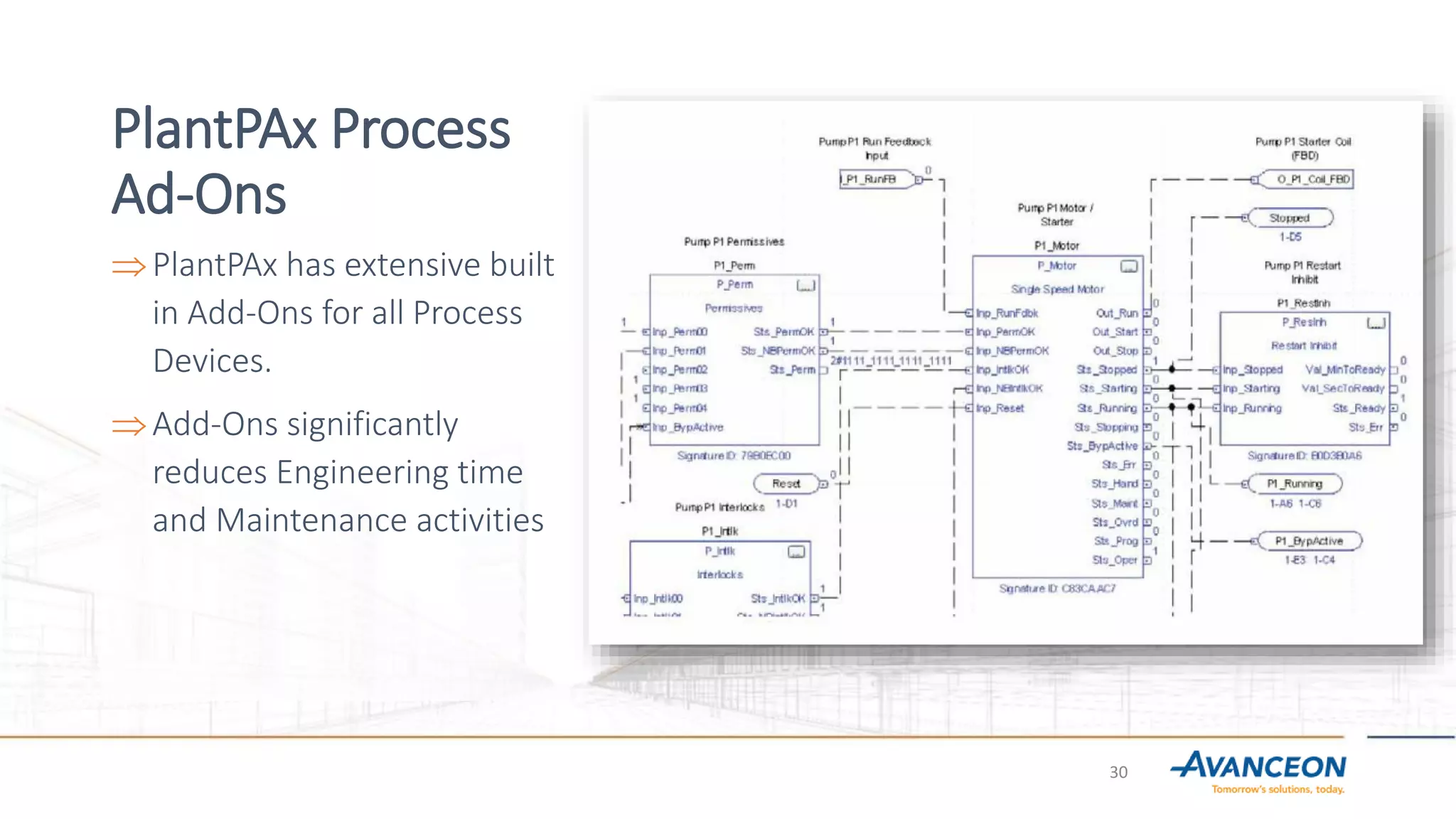
Ad-Ons
PlantPAx has extensive built
in Add-Ons for all Process
Devices.
Add-Ons significantly
reduces Engineering time
and Maintenance activities
30
PlantPAx Process
Faceplates
 PlantPAx has detailed
Faceplates corresponding to
Logic Add-Ons.
 Complete Information
available from within
Faceplates.
 Setting Alarms, Bypassing
Interlocks, Simulating devices,
enabling/disabling alarms,
detailed Help.
31
PlantPAx Modes &
Security
 Operator: .Commanded from the HMI
 Program: Commanded by the application logic
 Override: Commanded by application logic for
abnormal operation, supersedes Program and
Operator modes.
 Maintenance: Commanded from the HMI for
maintenance, bypassable interlocks and
permissive and feedback checks can by bypassed.
 Hand: Tracks controlled by hardwired local
station..
32
Operations Layer
33
Operations: Maintenance
and Troubleshooting
Made Easy!
34
New shelve alarm
capability per
ISA 18.2
Enter shelve time
duration and
comments
Better integration
with PlantPAx Library
Operations: Standards-based alarming
35
Operations: Standards-
based alarming
Provides method for gating threshold
alarms or indications includes:
Gate Input
Gate Delay
On-Delay
Off-Delay
36
Operations:
Standards-based
alarming
Easily navigate from motor
to interlock to cause
Interlocks with first-out
Access to logic for complex
interlocks
Quick Troubleshooting for
improved MTTR
37
Operations:
Automation of
Operator
Procedures
PlantPAx sequencer object:
Easily configurable to
capture critical sequences
Rich visualization provided
to the operator
Built-in Exception Handling
38
Asset Management
&
System Maintenance
Extensive Asset Management
and System Maintenance Tools
Instrument
Diagnostics
Instrument
Management
Instrument Health
Instrumentation
Device Diagnostics Device
Management
Device HealthPowerControl
Operator: “Is it OK?”
Maint: “How bad is it?”
Tech: “How do I fix it?”
39
Batch
Management
 Provides Scalable Platform From
simple, single unit scale to highly
complex, integrated batch
solutions.
 Integrated Analysis Tools Batch
reports, material usage, genealogy,
and solutions to optimize batch
production
 Native ISA-88 Structure Simplify
change management and
regulatory compliance
40
Operations
Productivity
 Scalable Data Collection Chassis-
based, plant-wide or
enterprise-wide historian
 Decision Support Tools Trends,
dashboards, and reports
 Users Collaboration to make
actionable decisions
41
Process
Optimization
 Broad Advanced Control Portfolio
From advanced regulatory to simple
model-based control, soft sensors to
complex model predictive control
 Flexible Deployment From loop and
unit-level optimization in the
controller
to plant-wide economic optimization
at the supervisory layer
IMC_01
IMC ...
Internal Model Control
0.0
PV
0.0
SPProg
0.0
SPCascade
0.0
RatioProg
0.0
CVProg
0.0
HandFB
0
ProgProgReq
0
ProgOperReq
0
ProgCasRatReq
0
ProgAutoReq
0
ProgManualReq
0
ProgOverrideReq
0
ProgHandReq
CVEU
0.0
SP
0.0
ProgOper
0
CasRat
0
Auto
0
Manual
0
Override
0
Hand
0
MMC_01
MMC ...
Modular Multivariable Control
0.0
PV1
0.0
PV2
0.0
SP1Prog
0.0
SP2Prog
0.0
CV1Prog
0.0
CV2Prog
0
CV3Prog
0
ProgProgReq
0
ProgOperReq
0
ProgCV1AutoReq
0
ProgCV2AutoReq
0
ProgCV3AutoReq
0
ProgCV1ManualReq
0
ProgCV2ManualReq
0
ProgCV3ManualReq
0
ProgCV1OverrideReq
0
ProgCV2OverrideReq
0
ProgCV3OverrideReq
CV1EU
0.0
CV2EU
0.0
CV3EU
0.0
SP1
0.0
SP2
0.0
ProgOper
0
CV1Auto
0
CV2Auto
0
CV3Auto
0
CV1Manual
0
CV2Manual
0
CV3Manual
0
CV1Override
0
CV2Override
0
CV3Override
0
CC_01
CC ...
Coordinated Control
0.0
PV
0.0
SPProg
0.0
CV1Prog
0.0
CV2Prog
0
CV3Prog
0
ProgProgReq
0
ProgOperReq
0
ProgCV1AutoReq
0
ProgCV2AutoReq
0
ProgCV3AutoReq
0
ProgCV1ManualReq
0
ProgCV2ManualReq
0
ProgCV3ManualReq
0
ProgCV1OverrideReq
0
ProgCV2OverrideReq
0
ProgCV3OverrideReq
CV1EU
0.0
CV2EU
0.0
CV3EU
0.0
SP
0.0
ProgOper
0
CV1Auto
0
CV2Auto
0
CV3Auto
0
CV1Manual
0
CV2Manual
0
CV3Manual
0
CV1Override
0
CV2Override
0
CV3Override
0
42
Skid & Process
Equipment
Solutions
Overall System Performance
 Proven, tested architectures for not
only DCS
applications, but skid-sized solutions
as well
to ensure total system performance.
 Machine Automation functionality and
full support built in
43
SIL 0
Process
SIL 1
Fail Safe
SIL 2
Fail Safe
SIL 2
Fault Tolerant
SIL 3
Fail Safe
SIL 3
Fault Tolerant
Basic Process Control
System
SafetyInstrumented Systems
(SIS)
PlantPAx
(Logix)
EtherNet/IP communication:
AADvance™ & PlantPAx™ Trusted
TMR
AADvance
Scalable
Safety
Process Safety
 Provides Integrated and scalable
SIS Solutions, including TMR for
the highest availability.
 PlantPAx based on Logix Platform
 Redundant Logix Platform
 Redundant Logix Platform with
Redundant I/Os
 GuardLogix SIL3 Fail Safe
 Aadvance
 Aadvance Trusted TMR
44
Question & Answers
Thank You for Your Valuable Time
45
Lahore, Pakistan
Headquarters South East Asia
19 Km Main Multan Road
Lahore, Punjab 54660
Pakistan
Phone : + 92 42 111 940 940
Dubai, UAE
Headquarters Middle East And Asia
Office FZS1 BD04, Jebel Ali Free Zone
PO Box 18590, Dubai
United Arab Emirates
Phone: +971 4 88 60 277
Exton, USA
Headquarters Americas
180 Sheree Boulevard, Suite 1400
Exton, PA 19341
United States of America
Phone +1 610 458 8700
Regional Offices and Global Headquarters

Avanceon Plant PAx Process

  • 1.
    The Digital SugarMill Seminar on Sugar & Ethanol Automation
  • 2.
    PlantPAx Capabilities & FunctionalOverview M. Ali Omer Technical Project Manager
  • 3.
    PlantPAx Process Agenda What is PlantPAx SystemSizing and Characterization PlantPAx Logic Add-Ons PlantPAx HMI Functionality PlantPAx Components Process Safety Batch Management 3
  • 4.
    It’s a processautomation system that gives you everything you want in a world-class, contemporary DCS and way more. PlantPAx – It’s More Than a Distributed Control System (DCS) PlantPAx  Plant Process Automation Excellence Word Class DCS  Plant-wide control capabilities  Open, flexible, scalable, modular architecture  Integrated control (process and machine), power, safety, and information  24/7 local support available through Avanceon 4
  • 5.
    PlantPAx Capabilities 5 Capability PlantPAx Plant wideControl Disciplines Discrete  Motion  Process & Machine Safety  Continuous Process  Batch  Drives 
  • 6.
    6 PlantPAx Capabilities Capability PlantPAx Control SystemFeatures Controller Redundancy  Remote I/0  System Scalability with Single Platform/Control Engine(Single Machine to Large Plant  Hot swappable I/0  Broad I/0 capability (Rack mounted, field based distributed I/0 and hazardous form factors  Full digital integration with drivers 
  • 7.
    7 PlantPAx Capabilities Capability PlantPAx Configuration andProgramming Object Oriented  All IEC 61131-3 Programming Languages  Online Editing/Configuration  Tag Based Addressing & Programming 
  • 8.
    8 PlantPAx Capabilities Capability PlantPAx Visualization Fully IntegratedClient/ Server HMI with Redundancy  Panel Based HMI  Web based HMI Interface  Historical Data Collection (SOE, EVENTS, TRENDING, REPORTS)  Alarms and Events 
  • 9.
    9 PlantPAx Capabilities Capability PlantPAx System Communicationand Field Buses Ethernet (I/P)  Standard Ethernet Infrastructure (Cisco Alliance)  Control Net  Device Net  MODBUS RTU/TCP/IP  AS/I (Actuator Sensor Interface) 
  • 10.
    10 PlantPAx Capabilities Capability PlantPAx Process Control Regulatory Logic Function Block  Sequence  Batch  Controller based ISA-S88 phase support 
  • 11.
    11 PlantPAx Capabilities Capability PlantPAx Advanced Control FuzzyLogic  Auto tune technology  Model predictive control 
  • 12.
  • 13.
    13 PlantPAx Capabilities Capability PlantPAx Process Safety ScalableProcess Safety  Integrated Process Safety 
  • 14.
    14 PlantPAx Capabilities Capability PlantPAx Service andSupport Project Engineering and Solution provider Network  24 x 7 Technical support  Configuration Services  Hardware Maintenance Services  Installation Services  Software Support and Upgrade Support  Training  Single Source Supplier 
  • 15.
    PlantPAx – DistributedArchitecture 15
  • 16.
    Al Moiz PlantPAxSystem Architecture
  • 17.
    PlantPAx System Characterization PlantPAx supportsall widely spread Process Networks I/O 17
  • 18.
    PlantPAx Process Networks I/O Maingoal of PlantPAx System Characterization is:  To provide a recommended architecture and information [boundaries] regarding a system operation and/or performance early in the sales cycle to reduce  To eliminate perceived risk of the system being able to provide the needed performance. PlantPAx system is carefully tested and designed to ensure best possible performance. Controller Wall 50 + PACs Distributed System 4 servers Virtual System Centralized System 1 server 18
  • 19.
    Characterizing the SystemLoading by Using “Control Strategies” A control strategy identifies the relationship between the loop control code and its data requirements. A control strategy can represent any control code, such as process control, I/O, data flow, and visualization for a control entity. A control strategy can be a 2- state device, a PID loop, a sequencing block. 19
  • 20.
    Characterizing the System Loadingby Using “Control Strategies” Using the control strategy model, we are able to estimate these system parameters:  HMI server tags on scan (alarm tags, display tags, data log tags, event detector tags, and derived tags)  Controller memory usage  Controller execution time 20
  • 21.
    1 Display Call upA HMI Display “Paint Time” is the time it takes to call up a new screen (not cached) and must be operational in less than 2 seconds 2 Display Data Update A change in a active value within any controller is displayed on a graphic screen on the OWS (HMI client) in less than 1 second. 3 Steady State Alarms The System must support a Steady State alarm condition, consisting of twenty new alarms being generated every second, with the difference between the time an alarm is triggered and its timestamp not exceeding one (1) second (cannot miss any alarm) 4 Alarm Burst The System must support an Alarm Burst condition, consisting of one thousand (1000) new alarms generated all at once, with the difference between the time any alarm is triggered and its alarm timestamp not exceeding three (3) seconds (cannot miss any alarms) 5 System Recovery Within five (5) minutes after a failed System Element is restored, the system should recover and perform as it did before the system element failure System Performance Criteria in “Operational” Terms 21
  • 22.
    22 6 Data Logging Thesystem will be capable of continuously data logging a minimum of 200 independent points once a second 7 Paint Time for Datalog Trend A data log trend display will present 12 hours of historical data of any data logged point on the OWS within 30 seconds of the operators display request. 8 Operator Control The operator will be able to interact with the process by changing tag values in the controller within 2 seconds. 9 Control Loop Update Time The system will be capable of supporting 125 Complex Regulatory Control Loops (cascaded) within a 250ms periodic task. This time is from instrument to actuator. 10 Batch Server: Operator Action Time An operator initiated Batch command will be responded to by the PAC with 1 second. 11 Batch Server: Server Action Time A batch server initiated Batch command will be responded to by to the PAC with 1 second. 12 Batch Server: Controller Action Time A batch Event in the Controller will provide the operator with feedback in 1 second .
  • 23.
    Measuring System Performance The OperatorInterface is the Critical Element and has three main features: Display Call Up Time Data Update Rate Operator Command The Operator Interface is the critical element  Display Call up  Data Update  Operator Command 23
  • 24.
    Example of PlantPAxCharacterization Report 24
  • 25.
  • 26.
    PlantPAx – Harmonybetween Logic and HMI 26
  • 27.
  • 28.
    PlantPAx Library of LogixDiagnostic Objects L-CPU: Controller Usage Monitor PlantPAx offers extensive CPU Diagnostics and all information is available from within the HMI interface 28
  • 29.
    PlantPAx EtherNet/IP Network Monitoring •Complete Information of Stratix Switches • Complete Information of DLR Network • Complete Information of EtherNet/IP Nodes 29
  • 30.
    PlantPAx Process Ad-Ons PlantPAx hasextensive built in Add-Ons for all Process Devices. Add-Ons significantly reduces Engineering time and Maintenance activities 30
  • 31.
    PlantPAx Process Faceplates  PlantPAxhas detailed Faceplates corresponding to Logic Add-Ons.  Complete Information available from within Faceplates.  Setting Alarms, Bypassing Interlocks, Simulating devices, enabling/disabling alarms, detailed Help. 31
  • 32.
    PlantPAx Modes & Security Operator: .Commanded from the HMI  Program: Commanded by the application logic  Override: Commanded by application logic for abnormal operation, supersedes Program and Operator modes.  Maintenance: Commanded from the HMI for maintenance, bypassable interlocks and permissive and feedback checks can by bypassed.  Hand: Tracks controlled by hardwired local station.. 32
  • 33.
  • 34.
  • 35.
    New shelve alarm capabilityper ISA 18.2 Enter shelve time duration and comments Better integration with PlantPAx Library Operations: Standards-based alarming 35
  • 36.
    Operations: Standards- based alarming Providesmethod for gating threshold alarms or indications includes: Gate Input Gate Delay On-Delay Off-Delay 36
  • 37.
    Operations: Standards-based alarming Easily navigate frommotor to interlock to cause Interlocks with first-out Access to logic for complex interlocks Quick Troubleshooting for improved MTTR 37
  • 38.
    Operations: Automation of Operator Procedures PlantPAx sequencerobject: Easily configurable to capture critical sequences Rich visualization provided to the operator Built-in Exception Handling 38
  • 39.
    Asset Management & System Maintenance ExtensiveAsset Management and System Maintenance Tools Instrument Diagnostics Instrument Management Instrument Health Instrumentation Device Diagnostics Device Management Device HealthPowerControl Operator: “Is it OK?” Maint: “How bad is it?” Tech: “How do I fix it?” 39
  • 40.
    Batch Management  Provides ScalablePlatform From simple, single unit scale to highly complex, integrated batch solutions.  Integrated Analysis Tools Batch reports, material usage, genealogy, and solutions to optimize batch production  Native ISA-88 Structure Simplify change management and regulatory compliance 40
  • 41.
    Operations Productivity  Scalable DataCollection Chassis- based, plant-wide or enterprise-wide historian  Decision Support Tools Trends, dashboards, and reports  Users Collaboration to make actionable decisions 41
  • 42.
    Process Optimization  Broad AdvancedControl Portfolio From advanced regulatory to simple model-based control, soft sensors to complex model predictive control  Flexible Deployment From loop and unit-level optimization in the controller to plant-wide economic optimization at the supervisory layer IMC_01 IMC ... Internal Model Control 0.0 PV 0.0 SPProg 0.0 SPCascade 0.0 RatioProg 0.0 CVProg 0.0 HandFB 0 ProgProgReq 0 ProgOperReq 0 ProgCasRatReq 0 ProgAutoReq 0 ProgManualReq 0 ProgOverrideReq 0 ProgHandReq CVEU 0.0 SP 0.0 ProgOper 0 CasRat 0 Auto 0 Manual 0 Override 0 Hand 0 MMC_01 MMC ... Modular Multivariable Control 0.0 PV1 0.0 PV2 0.0 SP1Prog 0.0 SP2Prog 0.0 CV1Prog 0.0 CV2Prog 0 CV3Prog 0 ProgProgReq 0 ProgOperReq 0 ProgCV1AutoReq 0 ProgCV2AutoReq 0 ProgCV3AutoReq 0 ProgCV1ManualReq 0 ProgCV2ManualReq 0 ProgCV3ManualReq 0 ProgCV1OverrideReq 0 ProgCV2OverrideReq 0 ProgCV3OverrideReq CV1EU 0.0 CV2EU 0.0 CV3EU 0.0 SP1 0.0 SP2 0.0 ProgOper 0 CV1Auto 0 CV2Auto 0 CV3Auto 0 CV1Manual 0 CV2Manual 0 CV3Manual 0 CV1Override 0 CV2Override 0 CV3Override 0 CC_01 CC ... Coordinated Control 0.0 PV 0.0 SPProg 0.0 CV1Prog 0.0 CV2Prog 0 CV3Prog 0 ProgProgReq 0 ProgOperReq 0 ProgCV1AutoReq 0 ProgCV2AutoReq 0 ProgCV3AutoReq 0 ProgCV1ManualReq 0 ProgCV2ManualReq 0 ProgCV3ManualReq 0 ProgCV1OverrideReq 0 ProgCV2OverrideReq 0 ProgCV3OverrideReq CV1EU 0.0 CV2EU 0.0 CV3EU 0.0 SP 0.0 ProgOper 0 CV1Auto 0 CV2Auto 0 CV3Auto 0 CV1Manual 0 CV2Manual 0 CV3Manual 0 CV1Override 0 CV2Override 0 CV3Override 0 42
  • 43.
    Skid & Process Equipment Solutions OverallSystem Performance  Proven, tested architectures for not only DCS applications, but skid-sized solutions as well to ensure total system performance.  Machine Automation functionality and full support built in 43
  • 44.
    SIL 0 Process SIL 1 FailSafe SIL 2 Fail Safe SIL 2 Fault Tolerant SIL 3 Fail Safe SIL 3 Fault Tolerant Basic Process Control System SafetyInstrumented Systems (SIS) PlantPAx (Logix) EtherNet/IP communication: AADvance™ & PlantPAx™ Trusted TMR AADvance Scalable Safety Process Safety  Provides Integrated and scalable SIS Solutions, including TMR for the highest availability.  PlantPAx based on Logix Platform  Redundant Logix Platform  Redundant Logix Platform with Redundant I/Os  GuardLogix SIL3 Fail Safe  Aadvance  Aadvance Trusted TMR 44
  • 45.
    Question & Answers ThankYou for Your Valuable Time 45
  • 46.
    Lahore, Pakistan Headquarters SouthEast Asia 19 Km Main Multan Road Lahore, Punjab 54660 Pakistan Phone : + 92 42 111 940 940 Dubai, UAE Headquarters Middle East And Asia Office FZS1 BD04, Jebel Ali Free Zone PO Box 18590, Dubai United Arab Emirates Phone: +971 4 88 60 277 Exton, USA Headquarters Americas 180 Sheree Boulevard, Suite 1400 Exton, PA 19341 United States of America Phone +1 610 458 8700 Regional Offices and Global Headquarters