NETAPP CLUSTER MODE-:
“Autosupport issue- unable to send the Autosupport message"
Autosupport issue- unable to send the Autosupport message
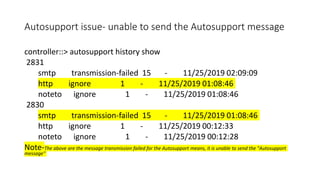
controller::> autosupport history show
2831
smtp transmission-failed 15 - 11/25/2019 02:09:09
http ignore 1 - 11/25/2019 01:08:46
noteto ignore 1 - 11/25/2019 01:08:46
2830
smtp transmission-failed 15 - 11/25/2019 01:08:46
http ignore 1 - 11/25/2019 00:12:33
noteto ignore 1 - 11/25/2019 00:12:28
Note-The above are the message transmission failed for the Autosupport means, it is unable to send the "Autosupport
message"
Autosupport issue- unable to send the Autosupport message
Solution-:
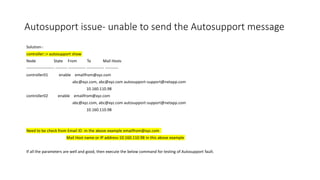
controller::> autosupport show
Node State From To Mail Hosts
--------------------- --------- ------------- ------------- ----------
controller01 enable emailfrom@xyz.com
abc@xyz.com, abc@xyz.com autosupport-support@netapp.com
10.160.110.98
controller02 enable emailfrom@xyz.com
abc@xyz.com, abc@xyz.com autosupport-support@netapp.com
10.160.110.98
Need to be check from Email ID -in the above example emailfrom@xyz.com
Mail Host name or IP address-10.160.110.98 in this above example
If all the parameters are well and good, then execute the below command for testing of Autosupport fault.
Autosupport issue- unable to send the Autosupport message
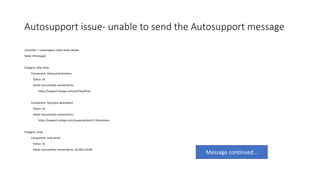
controller::> autosupport check show-details
Node: liftnetappb
Category: http-https
Component: http-put-destination
Status: ok
Detail: Successfully connected to:
https://support.netapp.com/put/AsupPut/.
Component: http-post-destination
Status: ok
Detail: Successfully connected to:
https://support.netapp.com/asupprod/post/1.0/postAsup.
Category: smtp
Component: mail-server
Status: ok
Detail: Successfully connected to: 10.160.110.98.
Message continued…
Autosupport issue- unable to send the Autosupport message
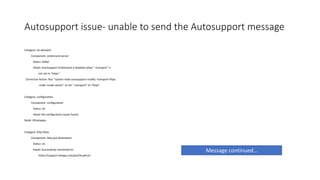
Category: on-demand
Component: ondemand-server
Status: failed
Detail: AutoSupport OnDemand is disabled when "-transport" is
not set to "https".
Corrective Action: Run "system node autosupport modify -transport https
-node <node name>" to set "-transport" to "https".
Category: configuration
Component: configuration
Status: ok
Detail: No configuration issues found.
Node: liftnetappa
Category: http-https
Component: http-put-destination
Status: ok
Detail: Successfully connected to:
https://support.netapp.com/put/AsupPut/.
Message continued…
Autosupport issue- unable to send the Autosupport message
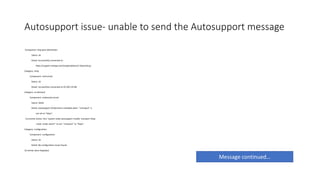
Component: http-post-destination
Status: ok
Detail: Successfully connected to:
https://support.netapp.com/asupprod/post/1.0/postAsup.
Category: smtp
Component: mail-server
Status: ok
Detail: Successfully connected to:10.160.110.98.
Category: on-demand
Component: ondemand-server
Status: failed
Detail: AutoSupport OnDemand is disabled when "-transport" is
not set to "https".
Corrective Action: Run "system node autosupport modify -transport https
-node <node name>" to set "-transport" to "https".
Category: configuration
Component: configuration
Status: ok
Detail: No configuration issues found.
10 entries were displayed.
Message continued…
Autosupport issue- unable to send the Autosupport message
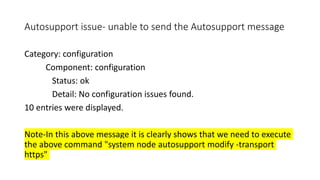
Category: configuration
Component: configuration
Status: ok
Detail: No configuration issues found.
10 entries were displayed.
Note-In this above message it is clearly shows that we need to execute
the above command "system node autosupport modify -transport
https"
Autosupport issue- unable to send the Autosupport message
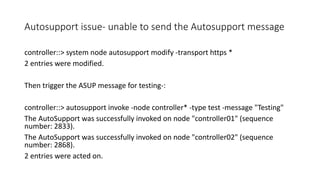
controller::> system node autosupport modify -transport https *
2 entries were modified.
Then trigger the ASUP message for testing-:
controller::> autosupport invoke -node controller* -type test -message "Testing"
The AutoSupport was successfully invoked on node "controller01" (sequence
number: 2833).
The AutoSupport was successfully invoked on node "controller02" (sequence
number: 2868).
2 entries were acted on.
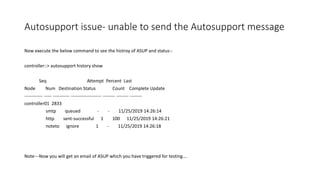
Autosupport issue- unable to send the Autosupport message
Now execute the below command to see the histroy of ASUP and status-:
controller::> autosupport history show
Seq Attempt Percent Last
Node Num Destination Status Count Complete Update
------------ ----- ----------- -------------------- -------- -------- --------
controller01 2833
smtp queued - - 11/25/2019 14:26:14
http sent-successful 1 100 11/25/2019 14:26:21
noteto ignore 1 - 11/25/2019 14:26:18
Note---Now you will get an email of ASUP which you have triggered for testing….
Thank you
Saroj
NDCA Certified
AWS Certified
Hadoop Administration Trainer

Autosupport email sending failed issue netapp cluster mode-

  • 1.
    NETAPP CLUSTER MODE-: “Autosupportissue- unable to send the Autosupport message"
  • 2.
    Autosupport issue- unableto send the Autosupport message controller::> autosupport history show 2831 smtp transmission-failed 15 - 11/25/2019 02:09:09 http ignore 1 - 11/25/2019 01:08:46 noteto ignore 1 - 11/25/2019 01:08:46 2830 smtp transmission-failed 15 - 11/25/2019 01:08:46 http ignore 1 - 11/25/2019 00:12:33 noteto ignore 1 - 11/25/2019 00:12:28 Note-The above are the message transmission failed for the Autosupport means, it is unable to send the "Autosupport message"
  • 3.
    Autosupport issue- unableto send the Autosupport message Solution-: controller::> autosupport show Node State From To Mail Hosts --------------------- --------- ------------- ------------- ---------- controller01 enable emailfrom@xyz.com abc@xyz.com, abc@xyz.com autosupport-support@netapp.com 10.160.110.98 controller02 enable emailfrom@xyz.com abc@xyz.com, abc@xyz.com autosupport-support@netapp.com 10.160.110.98 Need to be check from Email ID -in the above example emailfrom@xyz.com Mail Host name or IP address-10.160.110.98 in this above example If all the parameters are well and good, then execute the below command for testing of Autosupport fault.
  • 4.
    Autosupport issue- unableto send the Autosupport message controller::> autosupport check show-details Node: liftnetappb Category: http-https Component: http-put-destination Status: ok Detail: Successfully connected to: https://support.netapp.com/put/AsupPut/. Component: http-post-destination Status: ok Detail: Successfully connected to: https://support.netapp.com/asupprod/post/1.0/postAsup. Category: smtp Component: mail-server Status: ok Detail: Successfully connected to: 10.160.110.98. Message continued…
  • 5.
    Autosupport issue- unableto send the Autosupport message Category: on-demand Component: ondemand-server Status: failed Detail: AutoSupport OnDemand is disabled when "-transport" is not set to "https". Corrective Action: Run "system node autosupport modify -transport https -node <node name>" to set "-transport" to "https". Category: configuration Component: configuration Status: ok Detail: No configuration issues found. Node: liftnetappa Category: http-https Component: http-put-destination Status: ok Detail: Successfully connected to: https://support.netapp.com/put/AsupPut/. Message continued…
  • 6.
    Autosupport issue- unableto send the Autosupport message Component: http-post-destination Status: ok Detail: Successfully connected to: https://support.netapp.com/asupprod/post/1.0/postAsup. Category: smtp Component: mail-server Status: ok Detail: Successfully connected to:10.160.110.98. Category: on-demand Component: ondemand-server Status: failed Detail: AutoSupport OnDemand is disabled when "-transport" is not set to "https". Corrective Action: Run "system node autosupport modify -transport https -node <node name>" to set "-transport" to "https". Category: configuration Component: configuration Status: ok Detail: No configuration issues found. 10 entries were displayed. Message continued…
  • 7.
    Autosupport issue- unableto send the Autosupport message Category: configuration Component: configuration Status: ok Detail: No configuration issues found. 10 entries were displayed. Note-In this above message it is clearly shows that we need to execute the above command "system node autosupport modify -transport https"
  • 8.
    Autosupport issue- unableto send the Autosupport message controller::> system node autosupport modify -transport https * 2 entries were modified. Then trigger the ASUP message for testing-: controller::> autosupport invoke -node controller* -type test -message "Testing" The AutoSupport was successfully invoked on node "controller01" (sequence number: 2833). The AutoSupport was successfully invoked on node "controller02" (sequence number: 2868). 2 entries were acted on.
  • 9.
    Autosupport issue- unableto send the Autosupport message Now execute the below command to see the histroy of ASUP and status-: controller::> autosupport history show Seq Attempt Percent Last Node Num Destination Status Count Complete Update ------------ ----- ----------- -------------------- -------- -------- -------- controller01 2833 smtp queued - - 11/25/2019 14:26:14 http sent-successful 1 100 11/25/2019 14:26:21 noteto ignore 1 - 11/25/2019 14:26:18 Note---Now you will get an email of ASUP which you have triggered for testing….
  • 10.
    Thank you Saroj NDCA Certified AWSCertified Hadoop Administration Trainer