J o zs ef Ottucs a k
Threat
Modeling
101
OWASP Santa Barbara
12/07/18
NAME OR LOGO
What will you learn from this presentation?
2
○ What threat modeling is.
○ Why threat modeling is useful.
○ Good tools for threat modeling.
○ Challenges you will face during threat modeling.
○ … other things? Ask questions!
NAME OR LOGO
Speaker Bio
3
Jozsef Ottucsak
@fuzboxz
Former developer, former penetration tester
SBCTF #1 Place 2018
Passionate about everything security related
Cert hoarder: OSCP, MCP, CCSK, CPPT, eMAPT…
Senior Security
Engineer at LogMeIn
NAME OR LOGO
Everyone does threat modeling differently,
there is no right or wrong.
Doing threat modeling “wrong” is probably better
than not doing it at all.
4
Disclaimer
NAME OR LOGO
Application Security at LogMeIn
5
Lot of offices and products.
Very diverse tech stack.
Custom SDL based on MS SDL for Agile.
“Satellite” based approach.
Heavy emphasis on threat modeling.
NAME OR LOGO
What is threat modeling?
Threat modeling is an activity that helps you identify,
enumerate and understand various threats and
mitigations within a defined scope.
6
NAME OR LOGO
Why do threat modeling?
7
Doing it early makes vulnerabilities easier/cheaper to fix.
Fast security feedback.
Teaches security mindset to participants.
Works well with business logic vulnerabilities.
NAME OR LOGO
What’s in scope?
8
Depends on the application.
Could be the same thing on multiple platforms.
May contain cloud environment, APIs, infrastructure, etc.
Not everything must be in scope.
NAME OR LOGO
How does threat modeling work?
The development team and the security team sits
down, they discuss how the application works, what
assets are there and how they are protected.
The goal of the session is to identify threats.
9
NAME OR LOGO
Who attends a threat modeling session?
10
Architects, developers (maybe QA) and the security team.
If you are doing it alone, you are doing it wrong.
Works best with roughly six (∓2) participants.
May include members from multiple component teams.
NAME OR LOGO
How should you prepare?
11
Request documentation from the dev team and read it.
Look up the tech stack and known threats.
Understand the business angle.
Clarify the scope.
NAME OR LOGO
Threat modeling time!
12
NAME OR LOGO
What to do first?
13
Explain the purpose of threat modeling.
Walk through the process, so everyone is on the same page.
Clarify what actions will be taken based on the findings.
Answer any questions before you start.
Ask someone to take notes.
NAME OR LOGO
Mapping out the application
14
Project the architecture diagram during the session.
Clarify changes between the docs and implementation.
Ask for a high level overview on what the application does.
NAME OR LOGO
Findings threats
15
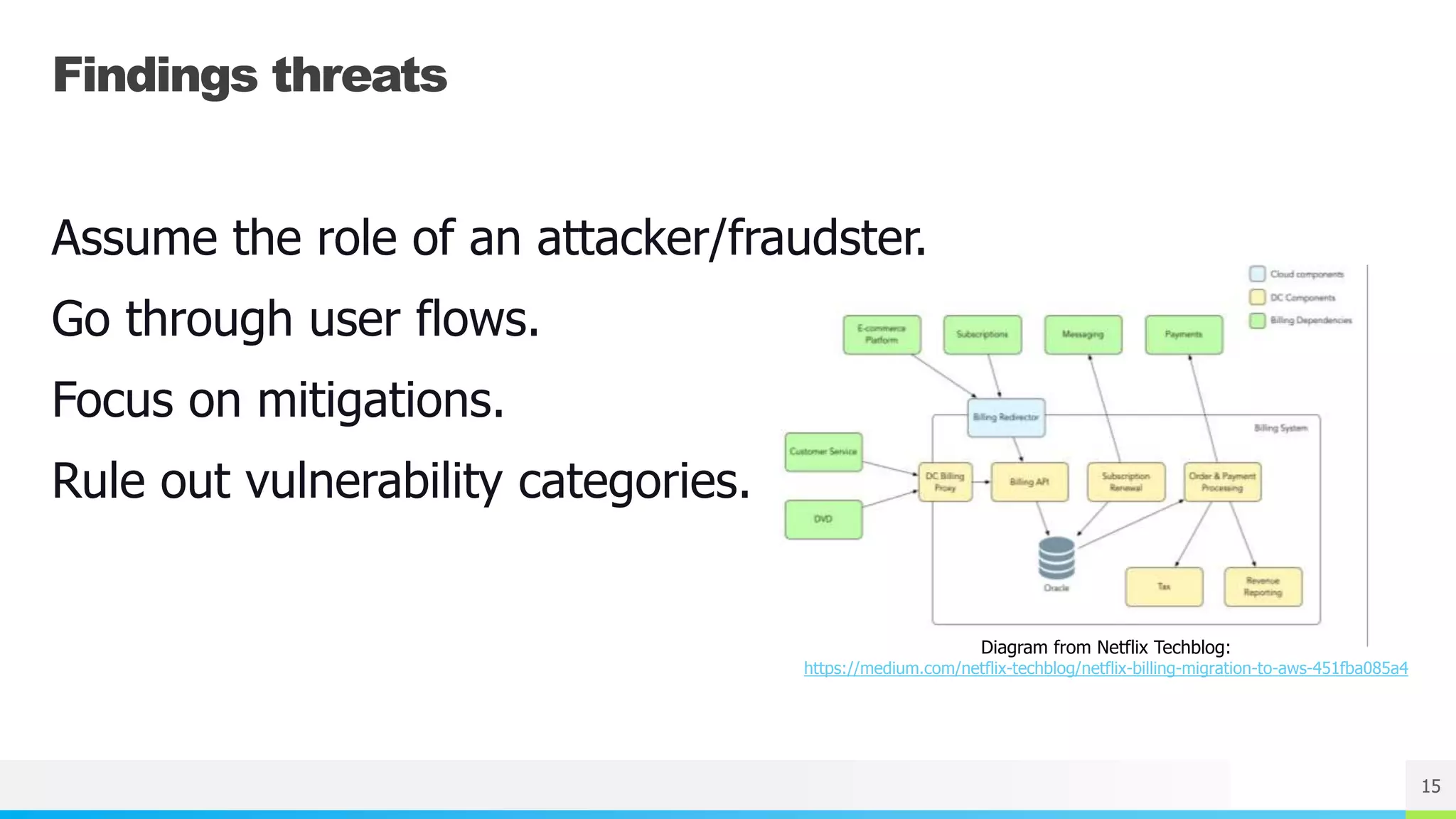
Diagram from Netflix Techblog:
https://medium.com/netflix-techblog/netflix-billing-migration-to-aws-451fba085a4
Assume the role of an attacker/fraudster.
Go through user flows.
Focus on mitigations.
Rule out vulnerability categories.
NAME OR LOGO
Ways to find threats
16
STRIDE
Attack Libraries (CAPEC, CWE)
Elevation of Privilege / Cornucopia
NAME OR LOGO 17
NAME OR LOGO 18
Dev Team
Documentation
Security Engineer
Security BugsData Flow Diagram
Attack Tree
Wiki Page
Threat Modeling
Session
NAME OR LOGO
Attack Tree Example
19
Diagram from O’Reilly:
https://www.oreilly.com/library/view/building-
secure-servers/0596002173/ch01s03.html
Contains only the threats.
Useful for security requirements.
Hard to visualize.
Gets complex really fast.
NAME OR LOGO 20
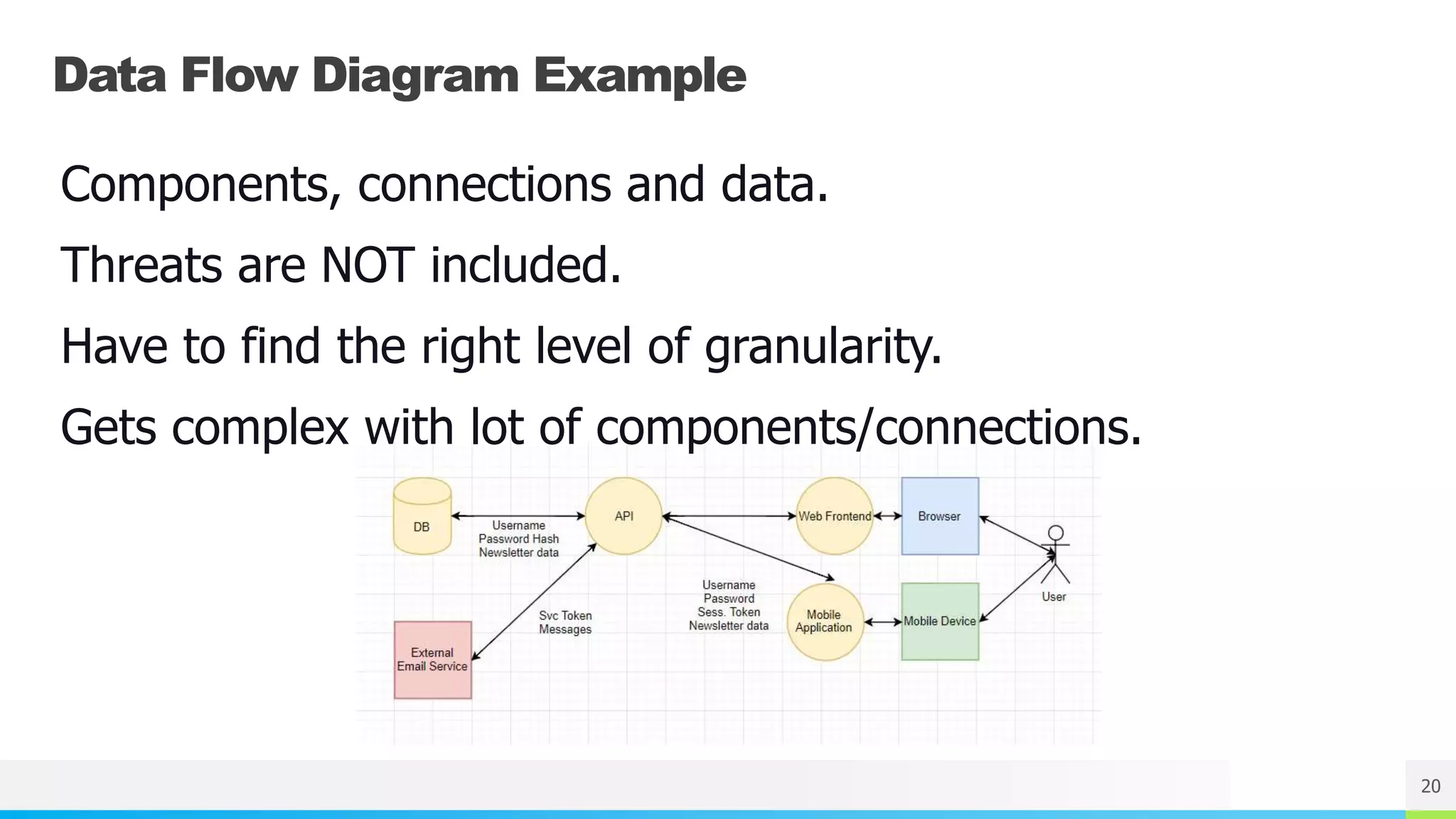
Data Flow Diagram Example
Components, connections and data.
Threats are NOT included.
Have to find the right level of granularity.
Gets complex with lot of components/connections.
NAME OR LOGO
Wiki Page
21
Custom templates are very useful!
Contains all the notes, follow up items, etc.
Threats – JIRA Security Bug tickets.
Notifications on changes.
NAME OR LOGO 22
Security Bugs / Follow Up Items
Find owner(!) and set deadline for follow up tasks.
Assign severity to the vulnerabilities.
Handle security bugs according to SLA.
Track progress and follow up if necessary.
NAME OR LOGO 23
Remote Threat Modeling
Remote meeting challenges still apply.
Threat modeling is fast paced and interactive.
Online whiteboarding is far from perfect.
Non-verbal communication translates poorly.
NAME OR LOGO 24
Gamification
Can be used to improve engagement/reward,
EoP/OWASP Cornucopia.
Reward for findings.
Doesn’t mix well with remote sessions.
NAME OR LOGO 25
Threat Modeling Tools
Microsoft Threat Modeling Tool
OWASP Threat Dragon
Draw.io, Lucidchart
LibreOffice Draw
NAME OR LOGO
Would you like to know more?
26
Adam Shostack - Threat modeling (!!!)
Lot of hands-on practice
Everything about agile AppSec:
J. Bird, L. Bell, ... – Agile Application Security
NAME OR LOGO
Questions?
27
NAME OR LOGO
Thank you!
28

OWASP SB -Threat modeling 101

  • 1.
    J o zsef Ottucs a k Threat Modeling 101 OWASP Santa Barbara 12/07/18
  • 2.
    NAME OR LOGO Whatwill you learn from this presentation? 2 ○ What threat modeling is. ○ Why threat modeling is useful. ○ Good tools for threat modeling. ○ Challenges you will face during threat modeling. ○ … other things? Ask questions!
  • 3.
    NAME OR LOGO SpeakerBio 3 Jozsef Ottucsak @fuzboxz Former developer, former penetration tester SBCTF #1 Place 2018 Passionate about everything security related Cert hoarder: OSCP, MCP, CCSK, CPPT, eMAPT… Senior Security Engineer at LogMeIn
  • 4.
    NAME OR LOGO Everyonedoes threat modeling differently, there is no right or wrong. Doing threat modeling “wrong” is probably better than not doing it at all. 4 Disclaimer
  • 5.
    NAME OR LOGO ApplicationSecurity at LogMeIn 5 Lot of offices and products. Very diverse tech stack. Custom SDL based on MS SDL for Agile. “Satellite” based approach. Heavy emphasis on threat modeling.
  • 6.
    NAME OR LOGO Whatis threat modeling? Threat modeling is an activity that helps you identify, enumerate and understand various threats and mitigations within a defined scope. 6
  • 7.
    NAME OR LOGO Whydo threat modeling? 7 Doing it early makes vulnerabilities easier/cheaper to fix. Fast security feedback. Teaches security mindset to participants. Works well with business logic vulnerabilities.
  • 8.
    NAME OR LOGO What’sin scope? 8 Depends on the application. Could be the same thing on multiple platforms. May contain cloud environment, APIs, infrastructure, etc. Not everything must be in scope.
  • 9.
    NAME OR LOGO Howdoes threat modeling work? The development team and the security team sits down, they discuss how the application works, what assets are there and how they are protected. The goal of the session is to identify threats. 9
  • 10.
    NAME OR LOGO Whoattends a threat modeling session? 10 Architects, developers (maybe QA) and the security team. If you are doing it alone, you are doing it wrong. Works best with roughly six (∓2) participants. May include members from multiple component teams.
  • 11.
    NAME OR LOGO Howshould you prepare? 11 Request documentation from the dev team and read it. Look up the tech stack and known threats. Understand the business angle. Clarify the scope.
  • 12.
    NAME OR LOGO Threatmodeling time! 12
  • 13.
    NAME OR LOGO Whatto do first? 13 Explain the purpose of threat modeling. Walk through the process, so everyone is on the same page. Clarify what actions will be taken based on the findings. Answer any questions before you start. Ask someone to take notes.
  • 14.
    NAME OR LOGO Mappingout the application 14 Project the architecture diagram during the session. Clarify changes between the docs and implementation. Ask for a high level overview on what the application does.
  • 15.
    NAME OR LOGO Findingsthreats 15 Diagram from Netflix Techblog: https://medium.com/netflix-techblog/netflix-billing-migration-to-aws-451fba085a4 Assume the role of an attacker/fraudster. Go through user flows. Focus on mitigations. Rule out vulnerability categories.
  • 16.
    NAME OR LOGO Waysto find threats 16 STRIDE Attack Libraries (CAPEC, CWE) Elevation of Privilege / Cornucopia
  • 17.
  • 18.
    NAME OR LOGO18 Dev Team Documentation Security Engineer Security BugsData Flow Diagram Attack Tree Wiki Page Threat Modeling Session
  • 19.
    NAME OR LOGO AttackTree Example 19 Diagram from O’Reilly: https://www.oreilly.com/library/view/building- secure-servers/0596002173/ch01s03.html Contains only the threats. Useful for security requirements. Hard to visualize. Gets complex really fast.
  • 20.
    NAME OR LOGO20 Data Flow Diagram Example Components, connections and data. Threats are NOT included. Have to find the right level of granularity. Gets complex with lot of components/connections.
  • 21.
    NAME OR LOGO WikiPage 21 Custom templates are very useful! Contains all the notes, follow up items, etc. Threats – JIRA Security Bug tickets. Notifications on changes.
  • 22.
    NAME OR LOGO22 Security Bugs / Follow Up Items Find owner(!) and set deadline for follow up tasks. Assign severity to the vulnerabilities. Handle security bugs according to SLA. Track progress and follow up if necessary.
  • 23.
    NAME OR LOGO23 Remote Threat Modeling Remote meeting challenges still apply. Threat modeling is fast paced and interactive. Online whiteboarding is far from perfect. Non-verbal communication translates poorly.
  • 24.
    NAME OR LOGO24 Gamification Can be used to improve engagement/reward, EoP/OWASP Cornucopia. Reward for findings. Doesn’t mix well with remote sessions.
  • 25.
    NAME OR LOGO25 Threat Modeling Tools Microsoft Threat Modeling Tool OWASP Threat Dragon Draw.io, Lucidchart LibreOffice Draw
  • 26.
    NAME OR LOGO Wouldyou like to know more? 26 Adam Shostack - Threat modeling (!!!) Lot of hands-on practice Everything about agile AppSec: J. Bird, L. Bell, ... – Agile Application Security
  • 27.
  • 28.