

Automating the consumption of
Eclipse for internal use
Pascal Rapicault
Emilio Palmiero
› Building Eclipse distros
› Creating an aggregated update site
› End-2-end automation
Outline
Building Eclipse Distros
› Key concepts
– Product file
– Product extension
– .eclipseproduct
– Plugin customization (aka default preferences)
– p2.inf
› Tools used
– Tycho
– PDE
– JBehave
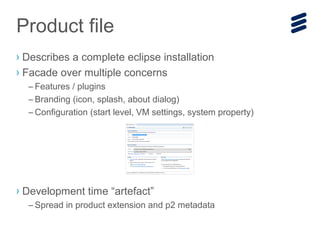
› Describes a complete eclipse installation
› Facade over multiple concerns
– Features / plugins
– Branding (icon, splash, about dialog)
– Configuration (start level, VM settings, system property)
› Development time “artefact”
– Spread in product extension and p2 metadata
Product file
› Product extension (extends org.eclipse.core.runtime.products xpt)
– Reference branding images
– Default preferences
– Default application
– Extensible set of key/value pairs
› Available at runtime (e.g. accessed by the workbench, see IProduct API)
Note: There can be multiple products in an installation, but only one runs.
Product extension
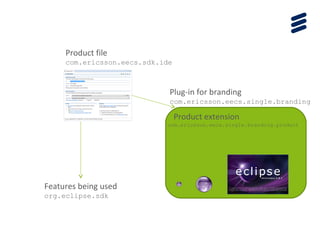
Plug-in for branding
com.ericsson.eecs.single.branding
Product extension
com.ericsson.eecs.single.branding.product
Features being used
org.eclipse.sdk
Product file
com.ericsson.eecs.sdk.ide
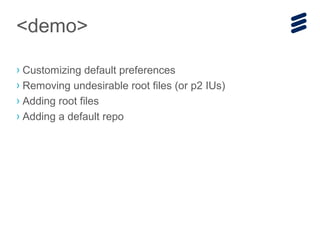
› Customizing default preferences
› Removing undesirable root files (or p2 IUs)
› Adding root files
› Adding a default repo
<demo>
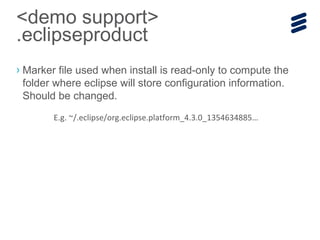
› Marker file used when install is read-only to compute the
folder where eclipse will store configuration information.
Should be changed.
<demo support>
.eclipseproduct
E.g. ~/.eclipse/org.eclipse.platform_4.3.0_1354634885…
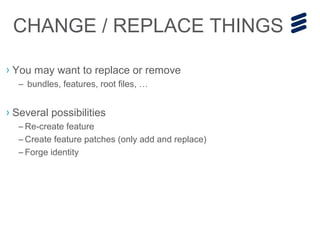
› You may want to replace or remove
– bundles, features, root files, …
› Several possibilities
– Re-create feature
– Create feature patches (only add and replace)
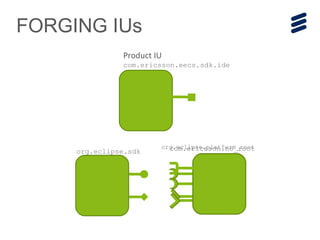
– Forge identity
CHANGE / REPLACE THINGS
FORGING IUs
org.eclipse.sdk
org.eclipse.platform_root
Product IU
com.ericsson.eecs.sdk.ide
com.ericsson.no_root
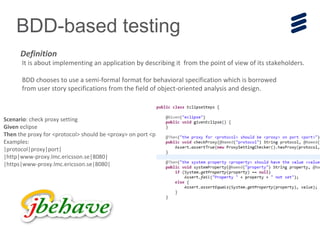
BDD-based testing
It is about implementing an application by describing it from the point of view of its stakeholders.
BDD chooses to use a semi-formal format for behavioral specification which is borrowed
from user story specifications from the field of object-oriented analysis and design.
Definition
Scenario: check proxy setting
Given eclipse
Then the proxy for <protocol> should be <proxy> on port <port>
Examples:
|protocol|proxy|port|
|http|www-proxy.lmc.ericsson.se|8080|
|https|www-proxy.lmc.ericsson.se|8080|
Lessons learnED
› Building a product is a detail oriented task
– Start by the details! Prototype in the IDE using product editor and
export from there. Adding all the plugins will slow down the feedback
loop because the export will be slower.
› Production build with Tycho
› BDD is great way to get readable tests
– Positive experience with JBehave community
› Problems
– Discrepancies between the real exported product and PDE and Tycho
– The product file could use some improvements.
› What we build?
– Standalone repository
– Pre-validated for a given stream
– Categorized for our users
› Key concepts
– p2 repository
– Category
› Tools used
– b3
– p2 mirror
– p2 category publisher
One Update site to RULE
tHEM ALL
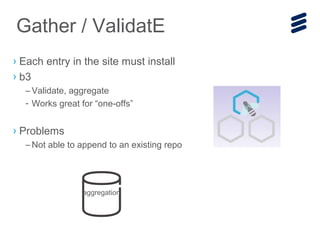
› Each entry in the site must install
› b3
– Validate, aggregate
- Works great for “one-offs”
› Problems
– Not able to append to an existing repo
Gather / ValidatE
aggregation
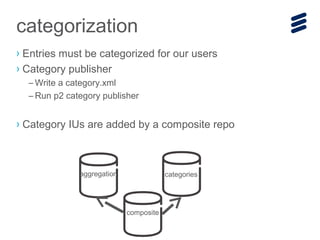
› Entries must be categorized for our users
› Category publisher
– Write a category.xml
– Run p2 category publisher
› Category IUs are added by a composite repo
categorization
categories
composite
aggregation
› Don’t assume anything about repos
(unless being told otherwise)
› Completely isolate yourself from external repos
–Mirror internally
–Remove references
› Problems
–Duplication of the feature IDs between categories and aggregation
Lessons LEARNED
› Key concepts
– CI
– Matrix jobs
› Tool used
– Jenkins + plugins
End-2-end automation
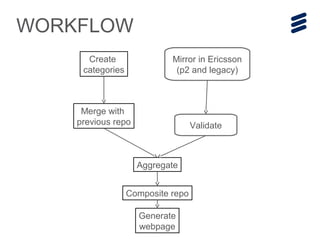
WORKFLOW
Merge with
previous repo
Create
categories
Mirror in Ericsson
(p2 and legacy)
Validate
Aggregate
Generate
webpage
Composite repo
› Jenkins is not an SCM
– Keep the list of sites to mirror in your SCM
› Minimize the number of jobs
– E.g. we use Matrix builds
› Work on a shared drive or specific Jenkins workspace
– Save time by saving on files copy
– Does not clutter slaves
› Problems
– Some duplication of URLs between what the b3 files refers to and our
list of sites.
– Build avoidance not supported on p2 metadata
LESSONS LEARNED
Future WORK
Future WoRK
› Contribute where there are limitations
– B3 to generate the categories separately
– Product file
– Build avoidance
› Express workflows using Jenkins’ Jenkow plug-in
› “Standardize” structure of Eclipse repos to make discovery
more easy.
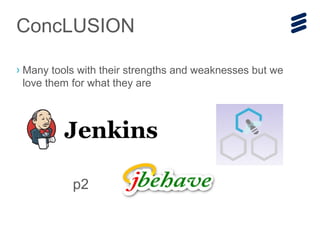
› Many tools with their strengths and weaknesses but we
love them for what they are
ConcLUSION
p2
Automating the consumption of Eclipse for internal use

Automating the consumption of Eclipse for internal use

  • 1.
    Automating the consumptionof Eclipse for internal use Pascal Rapicault Emilio Palmiero
  • 3.
    › Building Eclipsedistros › Creating an aggregated update site › End-2-end automation Outline
  • 4.
    Building Eclipse Distros ›Key concepts – Product file – Product extension – .eclipseproduct – Plugin customization (aka default preferences) – p2.inf › Tools used – Tycho – PDE – JBehave
  • 5.
    › Describes acomplete eclipse installation › Facade over multiple concerns – Features / plugins – Branding (icon, splash, about dialog) – Configuration (start level, VM settings, system property) › Development time “artefact” – Spread in product extension and p2 metadata Product file
  • 6.
    › Product extension(extends org.eclipse.core.runtime.products xpt) – Reference branding images – Default preferences – Default application – Extensible set of key/value pairs › Available at runtime (e.g. accessed by the workbench, see IProduct API) Note: There can be multiple products in an installation, but only one runs. Product extension
  • 7.
    Plug-in for branding com.ericsson.eecs.single.branding Productextension com.ericsson.eecs.single.branding.product Features being used org.eclipse.sdk Product file com.ericsson.eecs.sdk.ide
  • 8.
    › Customizing defaultpreferences › Removing undesirable root files (or p2 IUs) › Adding root files › Adding a default repo <demo>
  • 9.
    › Marker fileused when install is read-only to compute the folder where eclipse will store configuration information. Should be changed. <demo support> .eclipseproduct E.g. ~/.eclipse/org.eclipse.platform_4.3.0_1354634885…
  • 10.
    › You maywant to replace or remove – bundles, features, root files, … › Several possibilities – Re-create feature – Create feature patches (only add and replace) – Forge identity CHANGE / REPLACE THINGS
  • 11.
  • 12.
    BDD-based testing It isabout implementing an application by describing it from the point of view of its stakeholders. BDD chooses to use a semi-formal format for behavioral specification which is borrowed from user story specifications from the field of object-oriented analysis and design. Definition Scenario: check proxy setting Given eclipse Then the proxy for <protocol> should be <proxy> on port <port> Examples: |protocol|proxy|port| |http|www-proxy.lmc.ericsson.se|8080| |https|www-proxy.lmc.ericsson.se|8080|
  • 13.
    Lessons learnED › Buildinga product is a detail oriented task – Start by the details! Prototype in the IDE using product editor and export from there. Adding all the plugins will slow down the feedback loop because the export will be slower. › Production build with Tycho › BDD is great way to get readable tests – Positive experience with JBehave community › Problems – Discrepancies between the real exported product and PDE and Tycho – The product file could use some improvements.
  • 14.
    › What webuild? – Standalone repository – Pre-validated for a given stream – Categorized for our users › Key concepts – p2 repository – Category › Tools used – b3 – p2 mirror – p2 category publisher One Update site to RULE tHEM ALL
  • 15.
    › Each entryin the site must install › b3 – Validate, aggregate - Works great for “one-offs” › Problems – Not able to append to an existing repo Gather / ValidatE aggregation
  • 16.
    › Entries mustbe categorized for our users › Category publisher – Write a category.xml – Run p2 category publisher › Category IUs are added by a composite repo categorization categories composite aggregation
  • 17.
    › Don’t assumeanything about repos (unless being told otherwise) › Completely isolate yourself from external repos –Mirror internally –Remove references › Problems –Duplication of the feature IDs between categories and aggregation Lessons LEARNED
  • 18.
    › Key concepts –CI – Matrix jobs › Tool used – Jenkins + plugins End-2-end automation
  • 19.
    WORKFLOW Merge with previous repo Create categories Mirrorin Ericsson (p2 and legacy) Validate Aggregate Generate webpage Composite repo
  • 20.
    › Jenkins isnot an SCM – Keep the list of sites to mirror in your SCM › Minimize the number of jobs – E.g. we use Matrix builds › Work on a shared drive or specific Jenkins workspace – Save time by saving on files copy – Does not clutter slaves › Problems – Some duplication of URLs between what the b3 files refers to and our list of sites. – Build avoidance not supported on p2 metadata LESSONS LEARNED
  • 21.
  • 22.
    Future WoRK › Contributewhere there are limitations – B3 to generate the categories separately – Product file – Build avoidance › Express workflows using Jenkins’ Jenkow plug-in › “Standardize” structure of Eclipse repos to make discovery more easy.
  • 23.
    › Many toolswith their strengths and weaknesses but we love them for what they are ConcLUSION p2

Editor's Notes

  • #2 Introduce ourselves, describe our roles, what Ericsson does. Introduce the talk and mention that we have a more technical talk tomorrow.
  • #8 To build IDE, the org.eclipse.platform plugin is a good starting point for the branding plugin
  • #9 To customize preferences the hardest is to figure out the actual key to use. To Help with this you can try the “export preferences” or “workspace mechaniscs” recorder
  • #16 B3 is also able to categorize but we don’t use it. We use b3 to also mirror the legacy update sites because it has the smarts to do it properly