Владимир Илибман  , Cisco Automating Network Security Assessment
What we will cover Traditional approach What ’s new: Automation Case study: Network modeling - Cisco ’s global infrastructure Case study: Zone defense - Scrub down of border PoP ’s Case study: Defending critical assets - Isolating PKI Case study:  “Surprise!” Handling new infrastructure Case study: Managing change day to day - The Carnac moment
Today ’s network security audits Typically, network and hosts treated  separately Network: Elbow grease and eye strain Gather configs; print configs; read configs Similar to proof-reading the phone book Hosts: Level 1: Leave the admins to patch Problem:  hope  is not a strategy Level 2: Scan for unpatched systems Problem:  more data  than you can handle Level 3: Drive cleanup based on risk Problem:  prioritization  easier said than done
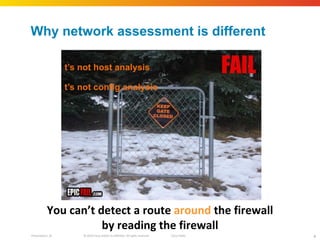
Why network assessment is different It ’s not host analysis It ’s not config analysis You can ’t detect a route  around  the firewall by reading the firewall
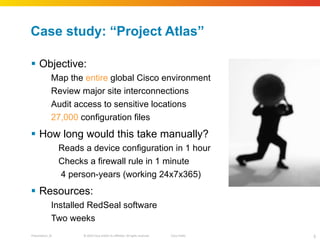
Case study:  “Project Atlas” Objective: Map the  entire  global Cisco environment Review major site interconnections Audit access to sensitive locations 27,000  configuration files How long would this take manually? Reads a device configuration in 1 hour Checks a firewall rule in 1 minute 4 person‐years (working 24x7x365) Resources: Installed RedSeal software Two weeks
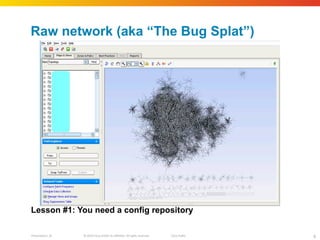
Raw network (aka  “The Bug Splat”) Lesson #1: You need a config repository
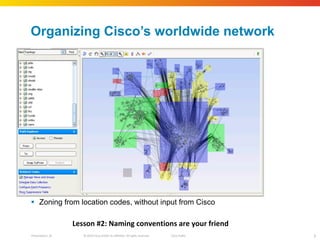
Organizing Cisco ’s worldwide network Zoning from location codes, without input from Cisco Lesson #2: Naming conventions are your friend
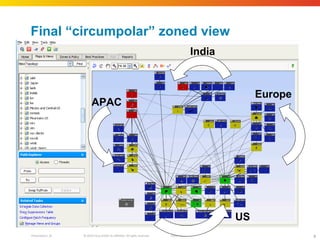
Final  “circumpolar” zoned view US Europe India APAC US
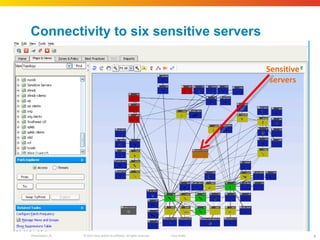
Connectivity to six sensitive servers Sensitive servers
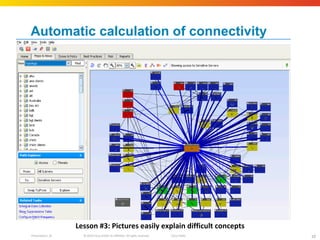
Automatic calculation of connectivity Blue lines show open access paths to sensitive servers Clearly shows the need for segmentation Lesson #3: Pictures easily explain difficult concepts
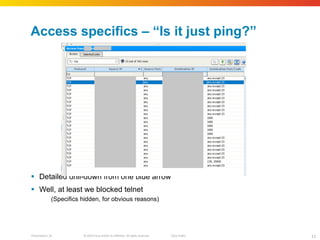
Access specifics –  “Is it just ping?” Detailed drill-down from one blue arrow Well, at least we blocked telnet (Specifics hidden, for obvious reasons)
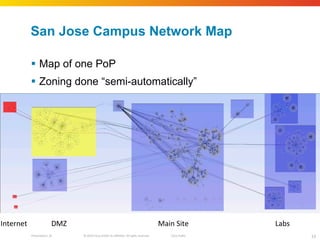
Case Study: Zone defense Cisco has 15 major PoP ’s for external connections Typical manual assessment: 90 days per PoP Target: Build map Record major zones  Internet, DMZ, Inside, Labs, etc Analyze for Best Practice violations Add host vulnerabilities from scans Run penetration test
San Jose Campus Network Map Map of one PoP Zoning done  “semi-automatically” Internet DMZ Main Site Labs
Offline penetration testing Next level of analysis is penetration testing Combine  network  map with  host  scans Add access calculation Software automatically evaluates attack paths Identify high risk defensive weaknesses
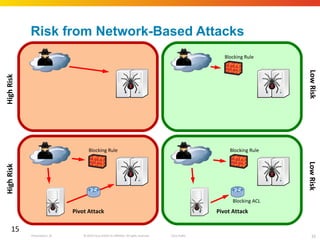
Risk from Network-Based Attacks High Risk Low Risk Blocking Rule Blocking Rule High Risk Low Risk Blocking Rule Pivot Attack Blocking ACL Pivot Attack
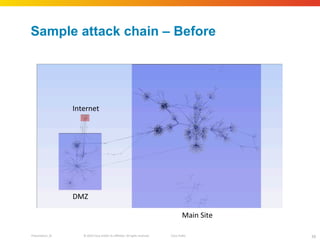
Sample attack chain – Before Internet DMZ Main Site
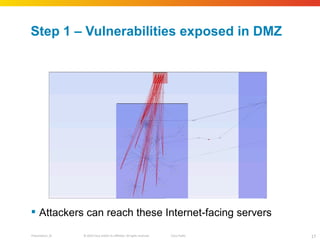
Step 1 – Vulnerabilities exposed in DMZ Attackers can reach these Internet-facing servers
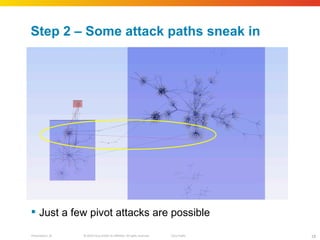
Step 2 – Some attack paths sneak in Just a few pivot attacks are possible
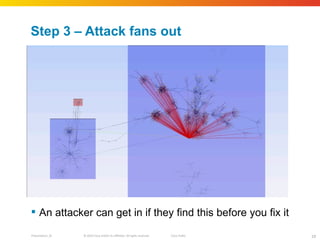
Step 3 – Attack fans out An attacker can get in if they find this before you fix it
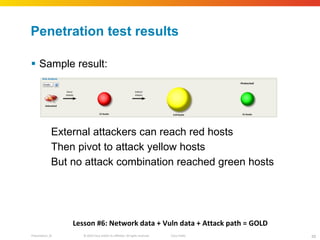
Penetration test results Sample result: External attackers can reach red hosts Then pivot to attack yellow hosts But no attack combination reached green hosts Lesson #6: Network data + Vuln data + Attack path = GOLD
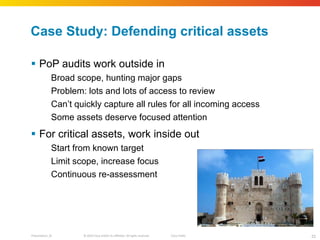
Case Study: Defending critical assets PoP audits work outside in Broad scope, hunting major gaps Problem: lots and lots of access to review Can ’t quickly capture all rules for all incoming access Some assets deserve focused attention For critical assets, work inside out Start from known target Limit scope, increase focus Continuous re-assessment
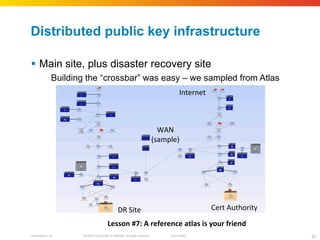
Distributed public key infrastructure Main site, plus disaster recovery site Building the  “crossbar” was easy – we sampled from Atlas Internet Cert Authority WAN (sample) DR Site Lesson #7: A reference atlas is your friend
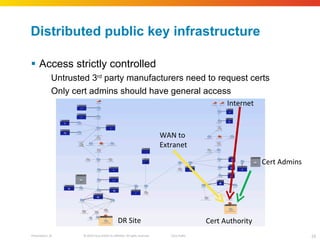
Distributed public key infrastructure Access strictly controlled Untrusted 3 rd  party manufacturers need to request certs Only cert admins should have general access Internet Cert Authority Cert Admins WAN to  Extranet DR Site
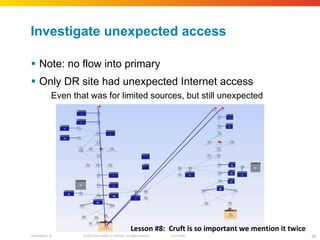
Investigate unexpected access Note: no flow into primary Only DR site had unexpected Internet access Even that was for limited sources, but still unexpected Lesson #8:  Cruft is so important we mention it twice
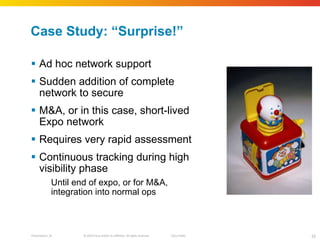
Case Study:  “Surprise!” Ad hoc network support Sudden addition of complete network to secure M&A, or in this case, short-lived Expo network Requires very rapid assessment Continuous tracking during high visibility phase Until end of expo, or for M&A, integration into normal ops
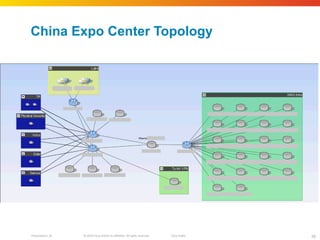
China Expo Center Topology
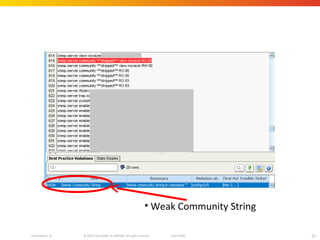
Weak Community String
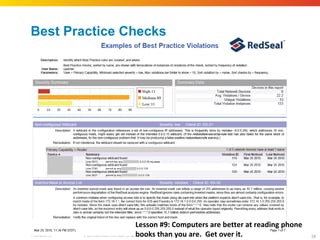
Best Practice Checks Lesson #9: Computers are better at reading phone  books than you are.  Get over it.
Case Study: Managing daily change Business change requests come thick & fast Security teams are asked to approve No standard basis to approve Can ’t position security team as “Dr No” Need clear, unequivocal reasons when rejecting changes Causes  “the Carnac moment”
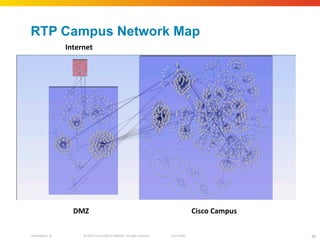
RTP Campus Network Map Sensitive servers DMZ Internet Cisco Campus
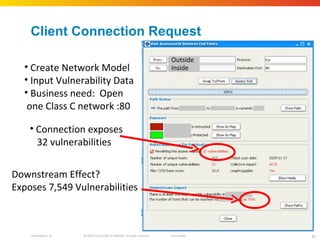
Client Connection Request Create Network Model Input Vulnerability Data Business need:  Open one Class C network :80 Inside Outside Connection exposes 32 vulnerabilities Downstream Effect? Exposes 7,549 Vulnerabilities
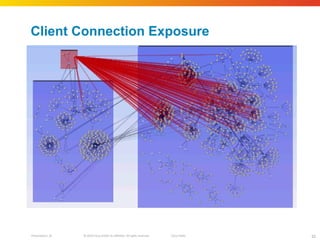
Client Connection Exposure Blue lines show open access paths to sensitive servers Clearly shows the need for segmentation
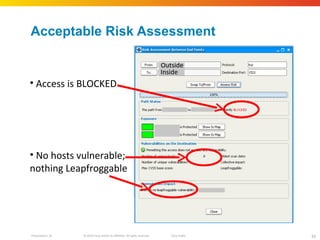
Acceptable Risk Assessment Outside Inside Access is BLOCKED No hosts vulnerable; nothing Leapfroggable
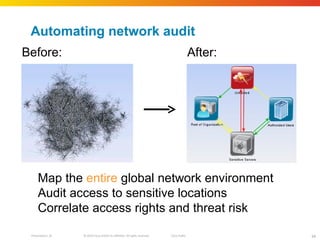
Automating network audit Before: After: Map the  entire  global network environment Audit access to sensitive locations Correlate access rights and threat risk
Полезно ! Видеозапись   презентации  http ://www.redseal.net/news-and-events/Cisco-Live-Presentation-6- 2010 The Security Content Automation Protocol (SCAP)  is a method for using specific standards to enable automated vulnerability management, measurement, and policy compliance evaluation http ://scap.nist.gov/ index.html The Security Content Automation Protocol (SCAP) combines a number of open standards that are used to enumerate software flaws and configuration issues related to security.  Cisco Proactive Automation of Change Execution (PACE) http://www.cisco.com/en/US/netsol/ns661/ index.html
 

Automating networksecurityassessment

  • 1.
    Владимир Илибман , Cisco Automating Network Security Assessment
  • 2.
    What we willcover Traditional approach What ’s new: Automation Case study: Network modeling - Cisco ’s global infrastructure Case study: Zone defense - Scrub down of border PoP ’s Case study: Defending critical assets - Isolating PKI Case study: “Surprise!” Handling new infrastructure Case study: Managing change day to day - The Carnac moment
  • 3.
    Today ’s networksecurity audits Typically, network and hosts treated separately Network: Elbow grease and eye strain Gather configs; print configs; read configs Similar to proof-reading the phone book Hosts: Level 1: Leave the admins to patch Problem: hope is not a strategy Level 2: Scan for unpatched systems Problem: more data than you can handle Level 3: Drive cleanup based on risk Problem: prioritization easier said than done
  • 4.
    Why network assessmentis different It ’s not host analysis It ’s not config analysis You can ’t detect a route around the firewall by reading the firewall
  • 5.
    Case study: “Project Atlas” Objective: Map the entire global Cisco environment Review major site interconnections Audit access to sensitive locations 27,000 configuration files How long would this take manually? Reads a device configuration in 1 hour Checks a firewall rule in 1 minute 4 person‐years (working 24x7x365) Resources: Installed RedSeal software Two weeks
  • 6.
    Raw network (aka “The Bug Splat”) Lesson #1: You need a config repository
  • 7.
    Organizing Cisco ’sworldwide network Zoning from location codes, without input from Cisco Lesson #2: Naming conventions are your friend
  • 8.
    Final “circumpolar”zoned view US Europe India APAC US
  • 9.
    Connectivity to sixsensitive servers Sensitive servers
  • 10.
    Automatic calculation ofconnectivity Blue lines show open access paths to sensitive servers Clearly shows the need for segmentation Lesson #3: Pictures easily explain difficult concepts
  • 11.
    Access specifics – “Is it just ping?” Detailed drill-down from one blue arrow Well, at least we blocked telnet (Specifics hidden, for obvious reasons)
  • 12.
    Case Study: Zonedefense Cisco has 15 major PoP ’s for external connections Typical manual assessment: 90 days per PoP Target: Build map Record major zones Internet, DMZ, Inside, Labs, etc Analyze for Best Practice violations Add host vulnerabilities from scans Run penetration test
  • 13.
    San Jose CampusNetwork Map Map of one PoP Zoning done “semi-automatically” Internet DMZ Main Site Labs
  • 14.
    Offline penetration testingNext level of analysis is penetration testing Combine network map with host scans Add access calculation Software automatically evaluates attack paths Identify high risk defensive weaknesses
  • 15.
    Risk from Network-BasedAttacks High Risk Low Risk Blocking Rule Blocking Rule High Risk Low Risk Blocking Rule Pivot Attack Blocking ACL Pivot Attack
  • 16.
    Sample attack chain– Before Internet DMZ Main Site
  • 17.
    Step 1 –Vulnerabilities exposed in DMZ Attackers can reach these Internet-facing servers
  • 18.
    Step 2 –Some attack paths sneak in Just a few pivot attacks are possible
  • 19.
    Step 3 –Attack fans out An attacker can get in if they find this before you fix it
  • 20.
    Penetration test resultsSample result: External attackers can reach red hosts Then pivot to attack yellow hosts But no attack combination reached green hosts Lesson #6: Network data + Vuln data + Attack path = GOLD
  • 21.
    Case Study: Defendingcritical assets PoP audits work outside in Broad scope, hunting major gaps Problem: lots and lots of access to review Can ’t quickly capture all rules for all incoming access Some assets deserve focused attention For critical assets, work inside out Start from known target Limit scope, increase focus Continuous re-assessment
  • 22.
    Distributed public keyinfrastructure Main site, plus disaster recovery site Building the “crossbar” was easy – we sampled from Atlas Internet Cert Authority WAN (sample) DR Site Lesson #7: A reference atlas is your friend
  • 23.
    Distributed public keyinfrastructure Access strictly controlled Untrusted 3 rd party manufacturers need to request certs Only cert admins should have general access Internet Cert Authority Cert Admins WAN to Extranet DR Site
  • 24.
    Investigate unexpected accessNote: no flow into primary Only DR site had unexpected Internet access Even that was for limited sources, but still unexpected Lesson #8: Cruft is so important we mention it twice
  • 25.
    Case Study: “Surprise!” Ad hoc network support Sudden addition of complete network to secure M&A, or in this case, short-lived Expo network Requires very rapid assessment Continuous tracking during high visibility phase Until end of expo, or for M&A, integration into normal ops
  • 26.
  • 27.
  • 28.
    Best Practice ChecksLesson #9: Computers are better at reading phone books than you are. Get over it.
  • 29.
    Case Study: Managingdaily change Business change requests come thick & fast Security teams are asked to approve No standard basis to approve Can ’t position security team as “Dr No” Need clear, unequivocal reasons when rejecting changes Causes “the Carnac moment”
  • 30.
    RTP Campus NetworkMap Sensitive servers DMZ Internet Cisco Campus
  • 31.
    Client Connection RequestCreate Network Model Input Vulnerability Data Business need: Open one Class C network :80 Inside Outside Connection exposes 32 vulnerabilities Downstream Effect? Exposes 7,549 Vulnerabilities
  • 32.
    Client Connection ExposureBlue lines show open access paths to sensitive servers Clearly shows the need for segmentation
  • 33.
    Acceptable Risk AssessmentOutside Inside Access is BLOCKED No hosts vulnerable; nothing Leapfroggable
  • 34.
    Automating network auditBefore: After: Map the entire global network environment Audit access to sensitive locations Correlate access rights and threat risk
  • 35.
    Полезно ! Видеозапись презентации http ://www.redseal.net/news-and-events/Cisco-Live-Presentation-6- 2010 The Security Content Automation Protocol (SCAP) is a method for using specific standards to enable automated vulnerability management, measurement, and policy compliance evaluation http ://scap.nist.gov/ index.html The Security Content Automation Protocol (SCAP) combines a number of open standards that are used to enumerate software flaws and configuration issues related to security. Cisco Proactive Automation of Change Execution (PACE) http://www.cisco.com/en/US/netsol/ns661/ index.html
  • 36.

Editor's Notes

  • #5 It is not Host analysis Classic Hardening Guides; CVE; CVSS; CPE It is not Network Device analysis Manual Firewall ACL Scrub; Vulnerability Patching Network Devices are (slightly) different “ Vulnerabilities” more often mis-configurations, not software defects