Download to read offline

![AutoCAD Workbook II
Lesson 01
Polyline Command
You may select this command from pull-down menu, draw-toolbar, or type alias “PL”
from the command line.
Command: pl <Enter>
Specify start point: 2,2 <Enter>
Current line-width is 0.0000
Specify next point or [Arc/Close/Halfwidth/Length/Undo/Width]: w <Enter>
Specify starting width <0.0000>: 0.1 <Enter>
Specify ending width <0.1000>: <Enter>
Specify next point or [Arc/Close/Halfwidth/Length/Undo/Width]: 5,1 <Enter>
Specify next point or [Arc/Close/Halfwidth/Length/Undo/Width]: @1.5<90 <Enter>
Specify next point or [Arc/Close/Halfwidth/Length/Undo/Width]: @3.5,0 <Enter>
Specify next point or [Arc/Close/Halfwidth/Length/Undo/Width]: @2.5<120 <Enter>
Specify next point or [Arc/Close/Halfwidth/Length/Undo/Width]: @5<180 <Enter>
2](https://image.slidesharecdn.com/autocadworkbook2d-hartnellcollegeengineeringtechnology-210928054047/85/Auto-cad-workbook2d-hartnell-college-engineering-technology-2-320.jpg)
![AutoCAD Workbook II
Specify next point or [Arc/Close/Halfwidth/Length/Undo/Width]: C
<Enter>
Exercise Polyline (ARC)
Start AutoCAD and open the my_template52 file.
Command: pl <Enter>
PLINE
Specify start point: 5.25,4 <Enter>
Current line-width is 0.0000
Specify next point or [Arc/Close/Halfwidth/Length/Undo/Width]: w <Enter>
Specify starting width <0.0000>: 0.1 <Enter>
Specify ending width <0.1000>: <Enter>
Specify next point or [Arc/Halfwidth/Length/Undo/Width]: @2<0 <Enter>
Specify next point or [Arc/Close/Halfwidth/Length/Undo/Width]: a <Enter>
Specify endpoint of arc or
[Angle/CEnter/CLose/Direction/Halfwidth/Line/Radius/Second pt/Undo/Width]: @1<90
<Enter>
Specify endpoint of arc or
[Angle/CEnter/CLose/Direction/Halfwidth/Line/Radius/Second pt/Undo/Width]: @2.5<90
<<Enter>
Specify endpoint of arc or
[Angle/CEnter/CLose/Direction/Halfwidth/Line/Radius/Second pt/Undo/Width]: L <Enter>
Specify next point or [Arc/Close/Halfwidth/Length/Undo/Width]: @.5<90 <Enter>
Specify next point or [Arc/Close/Halfwidth/Length/Undo/Width]: @2<180 <Enter>
Specify next point or [Arc/Close/Halfwidth/Length/Undo/Width]: <Enter>
3](https://image.slidesharecdn.com/autocadworkbook2d-hartnellcollegeengineeringtechnology-210928054047/85/Auto-cad-workbook2d-hartnell-college-engineering-technology-3-320.jpg)
![AutoCAD Workbook II
Figure 1 Figure 2
Use the MIRROR Command to complete the figure.
Command: mirror <Enter>
Select objects: {Pick the polyline} 1 found
Select objects: <Enter>
Specify first point of mirror line: {Snap to point 1} Specify second point of mirror line: {Snap
to point 2}
Erase source objects? [Yes/No] <N>: <Enter>
4](https://image.slidesharecdn.com/autocadworkbook2d-hartnellcollegeengineeringtechnology-210928054047/85/Auto-cad-workbook2d-hartnell-college-engineering-technology-4-320.jpg)
![AutoCAD Workbook II
Command: ml <Enter>
MLINE
Current settings: Justification = Top, Scale = 1.00, Style =
STANDARD
Specify start point or [Justification/Scale/STyle]:J<Enter>
Enter justification type [Top/Zero/Bottom] <top>:Z <Enter>
Current settings: Justification = Zero, Scale = 1.00, Style =
STANDARD
Specify start point or [Justification/Scale/STyle]: {Pick any
point on screen}
Specify next point: <Ortho on> 1.5 <Enter>
Specify next point or [Undo]: 2.5 <Enter>
Specify next point or [Close/Undo]: 1.5 <Enter>
Specify next point or [Close/Undo]: C <Enter> (Figure 4)
Command: ml <Enter>
MLINE
Current settings: Justification = Zero, Scale = 1.00, Style =
STANDARD
Specify start point or [Justification/Scale/STyle]: j <Enter>
Enter justification type [Top/Zero/Bottom] <zero>: b <Enter>
Current settings: Justification = Bottom, Scale = 1.00, Style =
STANDARD
Specify start point or [Justification/Scale/STyle]:
Specify next point: <Ortho on> 1.5 <Enter>
Specify next point or [Undo]: 2.5 <Enter>
Specify next point or [Close/Undo]: 1.5 <Enter>
Specify next point or [Close/Undo]: c <Enter> (Figure 5)
Figure 4
Zero Justification
Figure 5
Bottom Justification
8](https://image.slidesharecdn.com/autocadworkbook2d-hartnellcollegeengineeringtechnology-210928054047/85/Auto-cad-workbook2d-hartnell-college-engineering-technology-8-320.jpg)
![AutoCAD Workbook II
Command: ml
MLINE
Current settings: Justification = Bottom, Scale = 1.00,
Style = STANDARD
Specify start point or [Justification/Scale/STyle]: j
Enter justification type [Top/Zero/Bottom] <bottom>: t
Current settings: Justification = Top, Scale = 1.00,
Style = STANDARD
Specify start point or [Justification/Scale/STyle]:
Specify next point: 1.5
Specify next point or [Undo]: 2.5
Specify next point or [Close/Undo]: 1.5
Specify next point or [Close/Undo]: c
Exercise 2-1
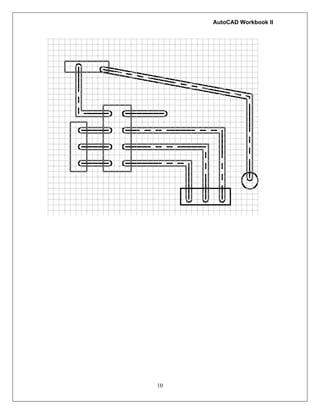
Draw the proposed electrical circuit using multilane commands. Establish a line offset
proportional to the given layout. Use t5he phantom linetype for the center of each run. Do not
draw the grid, which is provided as a drawing aid.
Note: Create a new Multiline Style with the following settings:
9](https://image.slidesharecdn.com/autocadworkbook2d-hartnellcollegeengineeringtechnology-210928054047/85/Auto-cad-workbook2d-hartnell-college-engineering-technology-9-320.jpg)
![AutoCAD Workbook II
Command: ml <Enter>
MLINE
Current settings: Justification = Top, Scale = 1.00, Style =
EX_WALL
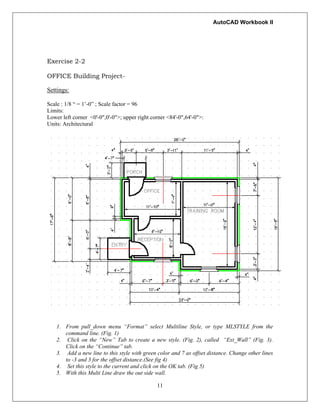
Specify start point or [Justification/Scale/STyle]: 31’,41’
<Enter>
Specify next point: 25' <Enter> {Make sure that ORTHO
mode is set to ON.
Specify next point or [Undo]: 19'8 <Enter>
Specify next point or [Close/Undo]: 12'8 <Enter>
Specify next point or [Close/Undo]: 2'4 <Enter>
Specify next point or [Close/Undo]: 10'4 <Enter>
Specify next point or [Close/Undo]: 8'8 <Enter>
Specify next point or [Close/Undo]: 2' <Enter>
Specify next point or [Close/Undo]: c <Enter>
Command:
Figure 6
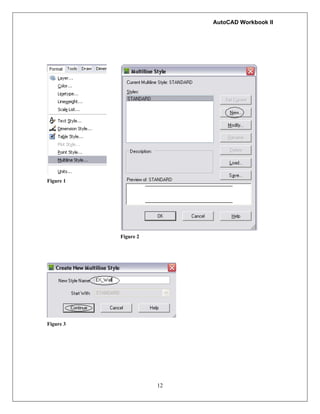
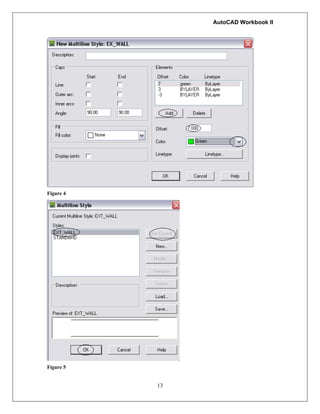
6. Create a new multi line style
called INT_Wall. (Fig. 6) For
this style, delete the third line
(green). Fig 7.
Figure 6
14
Figure 7](https://image.slidesharecdn.com/autocadworkbook2d-hartnellcollegeengineeringtechnology-210928054047/85/Auto-cad-workbook2d-hartnell-college-engineering-technology-14-320.jpg)
![AutoCAD Workbook II
7. Add the two interior walls (Fig. 8)
Command: ml <Enter>
MLINE
Current settings: Justification = Top, Scale =
1.00, Style = INT_WALL
Specify start point or
[Justification/Scale/STyle]: j <Enter>
Enter justification type [Top/Zero/Bottom]
<top>: b <Enter>
Current settings: Justification = Bottom, Scale
= 1.00, Style = INT_WALL
Specify start point or
[Justification/Scale/STyle]: {snap to the END
point A} Fig. 8
Specify next point: _per to {snap to the
Perpendicular to line B}
Specify next point or [Undo]:
Command: ml <Enter>
MLINE
Current settings: Justification = Bottom, Scale
= 1.00, Style = INT_WALL
Specify start point or
[Justification/Scale/STyle]: j <Enter>
Enter justification type [Top/Zero/Bottom]
<bottom>: t <Enter>
Current settings: Justification = Top, Scale =
1.00, Style = INT_WALL
Specify start point or
[Justification/Scale/STyle]: {snap to the End to
line C}
Specify next point: _per to {snap to the
Perpendicular to line D}
Figure 8
7. From the “Modify” pul;_down
menu, Object, select the
multiline. Fig 9.
8. Select the “Open Tee” option.
Fig 10.
Figure 9
15](https://image.slidesharecdn.com/autocadworkbook2d-hartnellcollegeengineeringtechnology-210928054047/85/Auto-cad-workbook2d-hartnell-college-engineering-technology-15-320.jpg)
![AutoCAD Workbook II
16
Figure 10
Command: _mledit <Enter>
Select first mline or [Undo]: {Select the wall C}
Select second mline: {Select the wall D}
Select first mline or [Undo]: {Select the wall D}
Select second mline: {Select the wall B}
Select first mline or [Undo]: <Enter>
9. Using the insert command or through the “Design center” add
the doors and window shown in figure 11. Use the “Cut All”
or “Cut Single” from multiline edit to complete the project.
10. Add dimensions as shown.
Figure 16](https://image.slidesharecdn.com/autocadworkbook2d-hartnellcollegeengineeringtechnology-210928054047/85/Auto-cad-workbook2d-hartnell-college-engineering-technology-16-320.jpg)
![AutoCAD Workbook II
18
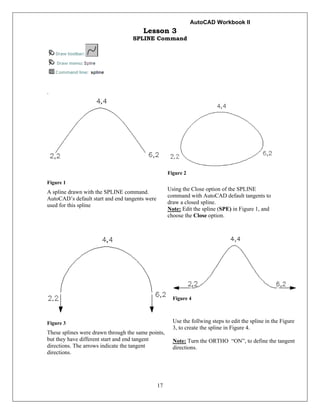
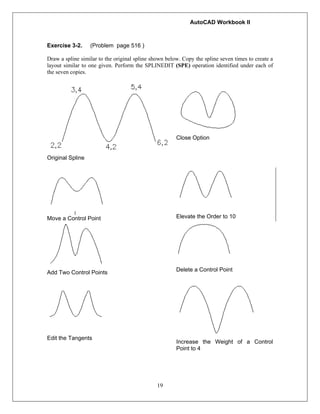
SPLINEDIT Command
Command: spe <Enter>
SPLINEDIT
Select spline:
Enter an option [Fit data/Close/Move vertex/Refine/rEverse/Undo]: F <Enter>
Enter a fit data option
[Add/Close/Delete/Move/Purge/Tangents/toLerance/eXit] <eXit>: T <Enter>
Specify start tangent or [System default]: <Ortho on> {pick a point to define a new direction}
Specify end tangent or [System default]: {pick a point to define a new direction}
Enter a fit data option
[Add/Close/Delete/Move/Purge/Tangents/toLerance/eXit] <eXit>: X <Enter>
Enter an option [Fit data/Close/Move vertex/Refine/rEverse/Undo]: <Enter>
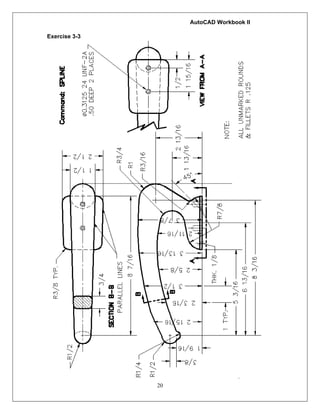
Exercise 3-1.
Use SPILNE and other commands, such as ELLIPSE, MIRROR, and OFFSET, to design an
architectural door knocker similar to the one shown. Use an appropriate text font to place your
initials in the center.](https://image.slidesharecdn.com/autocadworkbook2d-hartnellcollegeengineeringtechnology-210928054047/85/Auto-cad-workbook2d-hartnell-college-engineering-technology-18-320.jpg)
![AutoCAD Workbook II
23
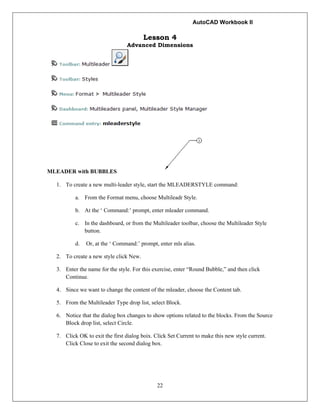
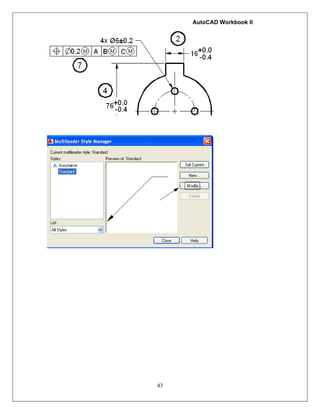
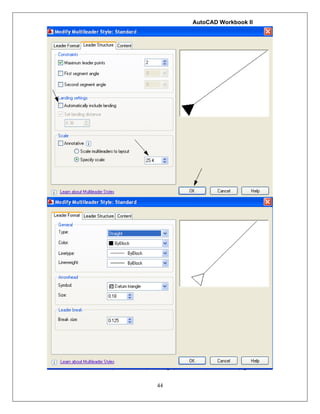
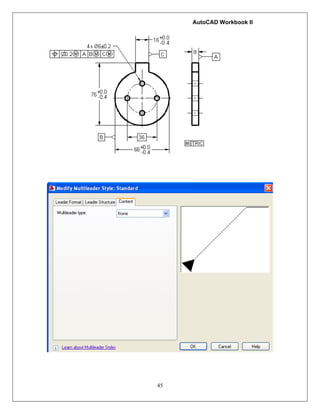
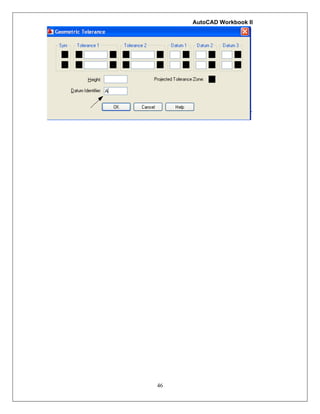
8. Use the MLEADER command to place muliteader with the new style.
Command: mleader <Enter>
Specify leader arrowhead location or [leader Landing first/Content
first/Options] <Options>: {pick a point.}
Specify leader landing location: {pick another point}
Enter attribute values
Enter tag number <TAGNUMBER>: 1 <Enter>
ALTERNATIVE METHOD:
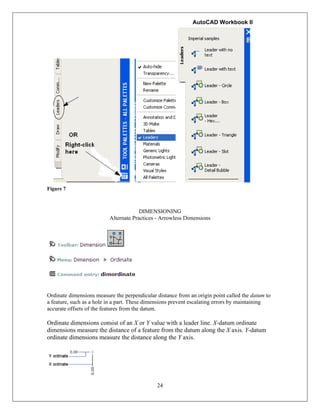
9. Press Ctrl + 3 to open the Tool Palettes window.
10. Pick the leaders Tab from the left of the tool palettes set. (Figure 10)
11. Construct the following figures:](https://image.slidesharecdn.com/autocadworkbook2d-hartnellcollegeengineeringtechnology-210928054047/85/Auto-cad-workbook2d-hartnell-college-engineering-technology-23-320.jpg)
![AutoCAD Workbook II
48
Lesson 7
Isometric Drawings
The keyboard entry to enable isometric mode is as follows:
Command: snap <Enter>
Specify snap spacing or [ON/OFF/Aspect/Style/Type] <0.5000>: s
<Enter>
Enter snap grid style [Standard/Isometric] <S>: i
Specify vertical spacing <0.5000>: <Enter>
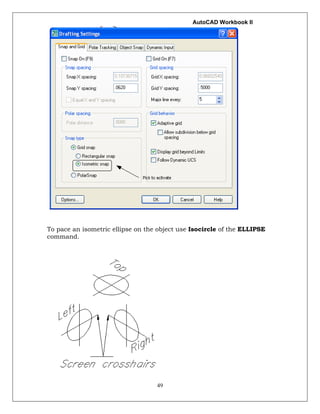
Or, the Drafting Settings dialog box allows you to make settings needed
for isometric drawing:
Note:
To switch between the isometric planes, use the F5 Key, or the
[Ctrl] + [E] key combinations.](https://image.slidesharecdn.com/autocadworkbook2d-hartnellcollegeengineeringtechnology-210928054047/85/Auto-cad-workbook2d-hartnell-college-engineering-technology-48-320.jpg)

This document provides instructions for using AutoCAD's polyline, multiline, and spline commands to create geometric shapes and architectural drawings. The polyline command is used to create shapes with variable widths. The multiline command is used to draw shapes with offset lines, and different justifications. The spline command draws curved shapes, and the splinedit command edits the control points and tangents of splines. Exercises demonstrate using these commands to design geometric objects, electrical circuits, building walls and openings, and decorative door knockers.


![Basic english usage_[oxford]](https://cdn.slidesharecdn.com/ss_thumbnails/basicenglishusageoxford-190831015347-thumbnail.jpg?width=640&height=640&fit=bounds)


