By Sanjay and Arvind Seshan
EV3 Classroom: Basic Turning
BEGINNER
PROGRAMMING
LESSON
LESSON OBJECTIVES
1. Learn to turn the robot a desired number of degrees
2. Learn the differences between Spin and Pivot Turns
3. Learn how to program two different type of turns
4. Learn to write pseudocode
Copyright © EV3Lessons.com 2020 (Last edit:
12/21/2019)
PIVOT VS. SPIN TURNS
Copyright © EV3Lessons.com 2020 (Last edit:
12/21/2019)
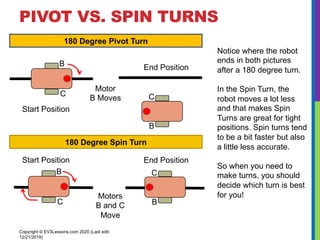
180 Degree Pivot Turn
180 Degree Spin Turn
Notice where the robot
ends in both pictures
after a 180 degree turn.
In the Spin Turn, the
robot moves a lot less
and that makes Spin
Turns are great for tight
positions. Spin turns tend
to be a bit faster but also
a little less accurate.
So when you need to
make turns, you should
decide which turn is best
for you!
B
C
Start Position End Position
Motors
B and C
Move
B
C
Motor
B Moves
Start Position
End Position
B
C
B
C
HOW TO MAKE PIVOT AND SPIN
TURNS
Steering Value
50 -50 100 -100
Pivot Turn Right Pivot Turn Left Spin Turn Right Spin Turn Left
Copyright © EV3Lessons.com 2020 (Last edit:
12/21/2019)
Change Steering value here
B
C
B
C
B
C
B
C
Move Steering
Block
MOVE STEERING
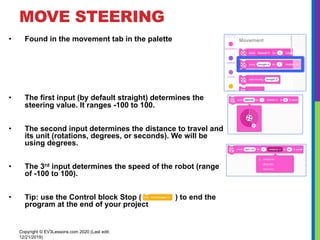
• Found in the movement tab in the palette
• The first input (by default straight) determines the
steering value. It ranges -100 to 100.
• The second input determines the distance to travel and
its unit (rotations, degrees, or seconds). We will be
using degrees.
• The 3rd input determines the speed of the robot (range
of -100 to 100).
• Tip: use the Control block Stop ( ) to end the
program at the end of your project
Copyright © EV3Lessons.com 2020 (Last edit:
12/21/2019)
MAKING A PIVOT TURN FOR 90
DEGREES
Copyright © EV3Lessons.com 2020 (Last edit:
12/21/2019)
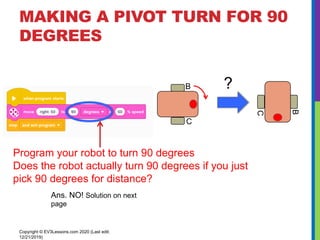
Program your robot to turn 90 degrees
Does the robot actually turn 90 degrees if you just
pick 90 degrees for distance?
B
C
B
C
?
Ans. NO! Solution on next
page
HOW DO YOU MAKE THE ROBOT
TURN 90 DEGREES?
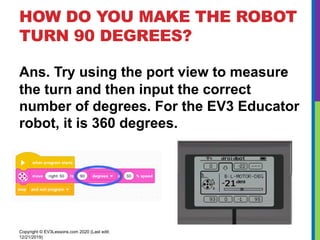
Ans. Try using the port view to measure
the turn and then input the correct
number of degrees. For the EV3 Educator
robot, it is 360 degrees.
Copyright © EV3Lessons.com 2020 (Last edit:
12/21/2019)
TEACHER INSTRUCTIONS
• Split up class into groups as needed
• Give each team a copy of the Turning Challenge Worksheet
• Challenge Details are on Slide 9
• Discussion Page Slide 10
• Challenge Solution on Slide 11
Copyright © EV3Lessons.com 2020 (Last edit:
12/21/2019)
TURNING CHALLENGES
Challenge 2
• Your robot baseball player must
run to second base, turn
around and come back to first.
• Go straight. Turn 180 degrees
and return to the same spot.
Copyright © EV3Lessons.com 2020 (Last edit:
12/21/2019)
B
C
Challenge 1
• Your robot is a baseball player
who has to run to all the bases
and go back to home plate.
• Can you program your robot to
move forward and then turn left?
• Use a square box or tape
Start and
End
position
First
Base
B
C
Second
Base
CLASS DISCUSSION GUIDE
Did you try PIVOT and SPIN turns? What did you discover?
Pivot turns were fine for Challenge 1, but for Challenge 2, if we used
Pivot turns, we were farther away from the base.
What situations would one work better than the other?
Spin turns are better for tight turns (places where there is not enough
space) and you stay closer to your original position.
What is PSEUDOCODE? Why do you think programmers find it
useful? (pseudocode is from the worksheet)
Pseudocode allows programmers to write out their code in plain
English before you code in a programming language. It lets you plan
and think before you sit down to code. It lets you share your ideas
with others you are working with in a common language.
Copyright © EV3Lessons.com 2020 (Last edit:
12/21/2019)
CHALLENGE SOLUTIONS
Challenge 2
You probably used a spin turn
because it is better for tighter turns
and gets you closer to the starting
point!
Copyright © EV3Lessons.com 2020 (Last edit:
12/21/2019)
Challenge 1
You probably used a
combination of move steering to
go straight and do pivot turns to
go around the box.
B
C
Start and
End
position
First
Base
B
C
Second
Base
CREDITS
• This tutorial was created by Sanjay Seshan and Arvind Seshan
• More lessons are available at www.ev3lessons.com
Copyright © EV3Lessons.com 2020 (Last edit:
12/21/2019)
This work is licensed under a Creative Commons Attribution-
NonCommercial-ShareAlike 4.0 International License.

AULA DE EV3 CLASSRROM UTILIZANDO SCRATCH

  • 1.
    By Sanjay andArvind Seshan EV3 Classroom: Basic Turning BEGINNER PROGRAMMING LESSON
  • 2.
    LESSON OBJECTIVES 1. Learnto turn the robot a desired number of degrees 2. Learn the differences between Spin and Pivot Turns 3. Learn how to program two different type of turns 4. Learn to write pseudocode Copyright © EV3Lessons.com 2020 (Last edit: 12/21/2019)
  • 3.
    PIVOT VS. SPINTURNS Copyright © EV3Lessons.com 2020 (Last edit: 12/21/2019) 180 Degree Pivot Turn 180 Degree Spin Turn Notice where the robot ends in both pictures after a 180 degree turn. In the Spin Turn, the robot moves a lot less and that makes Spin Turns are great for tight positions. Spin turns tend to be a bit faster but also a little less accurate. So when you need to make turns, you should decide which turn is best for you! B C Start Position End Position Motors B and C Move B C Motor B Moves Start Position End Position B C B C
  • 4.
    HOW TO MAKEPIVOT AND SPIN TURNS Steering Value 50 -50 100 -100 Pivot Turn Right Pivot Turn Left Spin Turn Right Spin Turn Left Copyright © EV3Lessons.com 2020 (Last edit: 12/21/2019) Change Steering value here B C B C B C B C Move Steering Block
  • 5.
    MOVE STEERING • Foundin the movement tab in the palette • The first input (by default straight) determines the steering value. It ranges -100 to 100. • The second input determines the distance to travel and its unit (rotations, degrees, or seconds). We will be using degrees. • The 3rd input determines the speed of the robot (range of -100 to 100). • Tip: use the Control block Stop ( ) to end the program at the end of your project Copyright © EV3Lessons.com 2020 (Last edit: 12/21/2019)
  • 6.
    MAKING A PIVOTTURN FOR 90 DEGREES Copyright © EV3Lessons.com 2020 (Last edit: 12/21/2019) Program your robot to turn 90 degrees Does the robot actually turn 90 degrees if you just pick 90 degrees for distance? B C B C ? Ans. NO! Solution on next page
  • 7.
    HOW DO YOUMAKE THE ROBOT TURN 90 DEGREES? Ans. Try using the port view to measure the turn and then input the correct number of degrees. For the EV3 Educator robot, it is 360 degrees. Copyright © EV3Lessons.com 2020 (Last edit: 12/21/2019)
  • 8.
    TEACHER INSTRUCTIONS • Splitup class into groups as needed • Give each team a copy of the Turning Challenge Worksheet • Challenge Details are on Slide 9 • Discussion Page Slide 10 • Challenge Solution on Slide 11 Copyright © EV3Lessons.com 2020 (Last edit: 12/21/2019)
  • 9.
    TURNING CHALLENGES Challenge 2 •Your robot baseball player must run to second base, turn around and come back to first. • Go straight. Turn 180 degrees and return to the same spot. Copyright © EV3Lessons.com 2020 (Last edit: 12/21/2019) B C Challenge 1 • Your robot is a baseball player who has to run to all the bases and go back to home plate. • Can you program your robot to move forward and then turn left? • Use a square box or tape Start and End position First Base B C Second Base
  • 10.
    CLASS DISCUSSION GUIDE Didyou try PIVOT and SPIN turns? What did you discover? Pivot turns were fine for Challenge 1, but for Challenge 2, if we used Pivot turns, we were farther away from the base. What situations would one work better than the other? Spin turns are better for tight turns (places where there is not enough space) and you stay closer to your original position. What is PSEUDOCODE? Why do you think programmers find it useful? (pseudocode is from the worksheet) Pseudocode allows programmers to write out their code in plain English before you code in a programming language. It lets you plan and think before you sit down to code. It lets you share your ideas with others you are working with in a common language. Copyright © EV3Lessons.com 2020 (Last edit: 12/21/2019)
  • 11.
    CHALLENGE SOLUTIONS Challenge 2 Youprobably used a spin turn because it is better for tighter turns and gets you closer to the starting point! Copyright © EV3Lessons.com 2020 (Last edit: 12/21/2019) Challenge 1 You probably used a combination of move steering to go straight and do pivot turns to go around the box. B C Start and End position First Base B C Second Base
  • 12.
    CREDITS • This tutorialwas created by Sanjay Seshan and Arvind Seshan • More lessons are available at www.ev3lessons.com Copyright © EV3Lessons.com 2020 (Last edit: 12/21/2019) This work is licensed under a Creative Commons Attribution- NonCommercial-ShareAlike 4.0 International License.