ADVANCED EV3
PROGRAMMING LESSON
Line Followers: Basic to PID
By Sanjay and Arvind Seshan
ì Evaluate and compare different line followers
ì Prerequisites: Complete all Line Follower lessons on
EV3Lessons.com, Calibration
ì Videos will not play in PDF
© 2019 EV3Lessons.com, Last edit 7/19/2019 2
Lesson Objectives
© 2019 EV3Lessons.com, Last edit 7/19/2019 3
Which Program Works Best for Which
Situation?
Smooth Line Follower
• Almost the same as simple
• Turns are less sharp
• Has trouble on sharp curves
• Good for rookie teams à need to know
loops and switches
Simple Line Follower
• Most basic line follower
• Wiggles a lot due to sharp turns
• Good for rookie teams à need to
know loops and switches
Proportional Follower
• Uses the “P” in PID
• Makes proportional turns
• Works well on both straight and curved
lines
• Good for intermediate to advanced
teams à need to know math blocks and
data wires
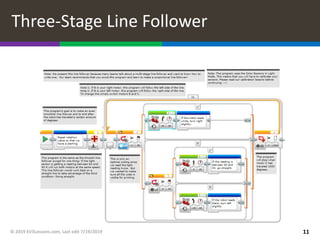
3-Stage Follower
• Best for straight lines
• Droids do not recommend this.
Just learn the proportional line
follower.
• Need to know nested switches
Watch the videos on the next 2 slides to see all four.
© 2019 EV3Lessons.com, Last edit 7/19/2019 4
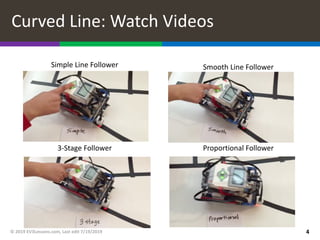
Curved Line: Watch Videos
Smooth Line Follower
Simple Line Follower
Proportional Follower
3-Stage Follower
Straight Line: Watch Videos
© 2019 EV3Lessons.com, Last edit 7/19/2019 5
Smooth Line Follower
Simple Line Follower
Proportional Follower
3-Stage Follower
© 2019 EV3Lessons.com, Last edit 7/19/2019 6
Watch Videos
Proportional Follower PID Follower
ì Challenge 1: Can you write a simple line follower? Hint: Review
Beginner: Basic Line Follower lesson
ì Challenge 2: Can you write a smoother line follower? Hint:
Change how sharp the turns are in a simple line follower.
ì Challenge 3: Can you write a three-stage line follower where
the robot moves different 3 different ways (left, right or
straight) based on the reading from the color sensor?
© 2019 EV3Lessons.com, Last edit 7/19/2019 7
3 Line Follower Challenges
ì CALIBRATE:
ì The programs use the EV3 Color Sensor in Light Sensor mode
ì You will have to calibrate your sensors.
ì Please refer to Intermediate: Color Sensor Calibration Lesson
ì PORTS:
ì The Color Sensor is connected to Port 3.
ì Please change this for your robot.
ì WHICH SIDE OF THE LINE:
ì Please take note of which side of the line the code is written for
© 2019 EV3Lessons.com, Last edit 7/19/2019 8
A Note About Our Solutions
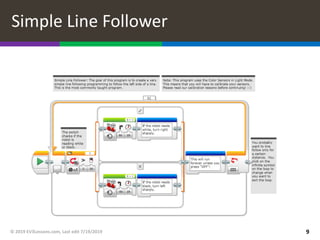
Simple Line Follower
© 2019 EV3Lessons.com, Last edit 7/19/2019 9
Smooth Line Follower
© 2019 EV3Lessons.com, Last edit 7/19/2019 10
Three-Stage Line Follower
© 2019 EV3Lessons.com, Last edit 7/19/2019 11
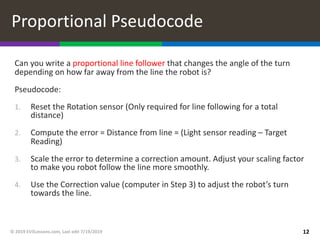
Can you write a proportional line follower that changes the angle of the turn
depending on how far away from the line the robot is?
Pseudocode:
1. Reset the Rotation sensor (Only required for line following for a total
distance)
2. Compute the error = Distance from line = (Light sensor reading – Target
Reading)
3. Scale the error to determine a correction amount. Adjust your scaling factor
to make you robot follow the line more smoothly.
4. Use the Correction value (computer in Step 3) to adjust the robot’s turn
towards the line.
© 2019 EV3Lessons.com, Last edit 7/19/2019 12
Proportional Pseudocode
© 2019 EV3Lessons.com, Last edit 7/19/2019 13
Proportional Line Follower
Note: This program uses the color sensor in
reflected light mode. You will need to
calibrate your color sensor. If you do not know
how to calibrate, please refer to our
Calibration lesson.
Part 1: Compute the Error
Our goal is to stay at the edge of
the line (light sensor = 50)
Part 2: Apply the correction
The error in part 1 is multiplied by
a Constant of Proportionality
(0.7). This will be different for
each robot/application. See slides
9-11 to learn how to tune this
number.
This line follower
ends after 1000
degrees. Change
this to suit your
needs.
Reset
the
rotation
sensor
Please refer to Proportional Control Lesson
for more details
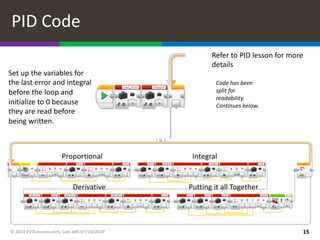
1. Take a new light sensor reading
2. Compute the “error”
3. Scale error to determine contribution to steering update (proportional control)
4. Use error to update integral (sum of all past errors)
5. Scale integral to determine contribution to steering update (integral control)
6. Use error to update derivative (difference from last error)
7. Scale derivative to determine contribution to steering update (derivative control)
8. Combine P, I, and D feedback and steer robot
© 2019 EV3Lessons.com, Last edit 7/19/2019 14
PID Pseudocode
© 2019 EV3Lessons.com, Last edit 07/10/2019 15
PID Code
Proportional Integral
Derivative Putting it all Together
Set up the variables for
the last error and integral
before the loop and
initialize to 0 because
they are read before
being written.
Code has been
split for
readability.
Continues below.
Refer to PID lesson for more
details
Evaluating Line followers
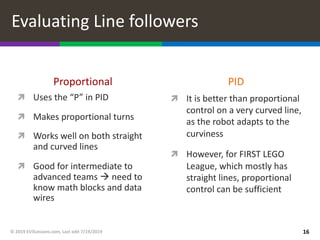
Proportional
ì Uses the “P” in PID
ì Makes proportional turns
ì Works well on both straight
and curved lines
ì Good for intermediate to
advanced teams à need to
know math blocks and data
wires
PID
ì It is better than proportional
control on a very curved line,
as the robot adapts to the
curviness
ì However, for FIRST LEGO
League, which mostly has
straight lines, proportional
control can be sufficient
© 2019 EV3Lessons.com, Last edit 7/19/2019 16
ì This tutorial was created by Sanjay Seshan and Arvind Seshan
ì More lessons at www.ev3lessons.com
© 2019 EV3Lessons.com, Last edit 7/19/2019 17
Credits
This work is licensed under a Creative Commons Attribution-
NonCommercial-ShareAlike 4.0 International License.

LineFollower.pdf

  • 1.
    ADVANCED EV3 PROGRAMMING LESSON LineFollowers: Basic to PID By Sanjay and Arvind Seshan
  • 2.
    ì Evaluate andcompare different line followers ì Prerequisites: Complete all Line Follower lessons on EV3Lessons.com, Calibration ì Videos will not play in PDF © 2019 EV3Lessons.com, Last edit 7/19/2019 2 Lesson Objectives
  • 3.
    © 2019 EV3Lessons.com,Last edit 7/19/2019 3 Which Program Works Best for Which Situation? Smooth Line Follower • Almost the same as simple • Turns are less sharp • Has trouble on sharp curves • Good for rookie teams à need to know loops and switches Simple Line Follower • Most basic line follower • Wiggles a lot due to sharp turns • Good for rookie teams à need to know loops and switches Proportional Follower • Uses the “P” in PID • Makes proportional turns • Works well on both straight and curved lines • Good for intermediate to advanced teams à need to know math blocks and data wires 3-Stage Follower • Best for straight lines • Droids do not recommend this. Just learn the proportional line follower. • Need to know nested switches Watch the videos on the next 2 slides to see all four.
  • 4.
    © 2019 EV3Lessons.com,Last edit 7/19/2019 4 Curved Line: Watch Videos Smooth Line Follower Simple Line Follower Proportional Follower 3-Stage Follower
  • 5.
    Straight Line: WatchVideos © 2019 EV3Lessons.com, Last edit 7/19/2019 5 Smooth Line Follower Simple Line Follower Proportional Follower 3-Stage Follower
  • 6.
    © 2019 EV3Lessons.com,Last edit 7/19/2019 6 Watch Videos Proportional Follower PID Follower
  • 7.
    ì Challenge 1:Can you write a simple line follower? Hint: Review Beginner: Basic Line Follower lesson ì Challenge 2: Can you write a smoother line follower? Hint: Change how sharp the turns are in a simple line follower. ì Challenge 3: Can you write a three-stage line follower where the robot moves different 3 different ways (left, right or straight) based on the reading from the color sensor? © 2019 EV3Lessons.com, Last edit 7/19/2019 7 3 Line Follower Challenges
  • 8.
    ì CALIBRATE: ì Theprograms use the EV3 Color Sensor in Light Sensor mode ì You will have to calibrate your sensors. ì Please refer to Intermediate: Color Sensor Calibration Lesson ì PORTS: ì The Color Sensor is connected to Port 3. ì Please change this for your robot. ì WHICH SIDE OF THE LINE: ì Please take note of which side of the line the code is written for © 2019 EV3Lessons.com, Last edit 7/19/2019 8 A Note About Our Solutions
  • 9.
    Simple Line Follower ©2019 EV3Lessons.com, Last edit 7/19/2019 9
  • 10.
    Smooth Line Follower ©2019 EV3Lessons.com, Last edit 7/19/2019 10
  • 11.
    Three-Stage Line Follower ©2019 EV3Lessons.com, Last edit 7/19/2019 11
  • 12.
    Can you writea proportional line follower that changes the angle of the turn depending on how far away from the line the robot is? Pseudocode: 1. Reset the Rotation sensor (Only required for line following for a total distance) 2. Compute the error = Distance from line = (Light sensor reading – Target Reading) 3. Scale the error to determine a correction amount. Adjust your scaling factor to make you robot follow the line more smoothly. 4. Use the Correction value (computer in Step 3) to adjust the robot’s turn towards the line. © 2019 EV3Lessons.com, Last edit 7/19/2019 12 Proportional Pseudocode
  • 13.
    © 2019 EV3Lessons.com,Last edit 7/19/2019 13 Proportional Line Follower Note: This program uses the color sensor in reflected light mode. You will need to calibrate your color sensor. If you do not know how to calibrate, please refer to our Calibration lesson. Part 1: Compute the Error Our goal is to stay at the edge of the line (light sensor = 50) Part 2: Apply the correction The error in part 1 is multiplied by a Constant of Proportionality (0.7). This will be different for each robot/application. See slides 9-11 to learn how to tune this number. This line follower ends after 1000 degrees. Change this to suit your needs. Reset the rotation sensor Please refer to Proportional Control Lesson for more details
  • 14.
    1. Take anew light sensor reading 2. Compute the “error” 3. Scale error to determine contribution to steering update (proportional control) 4. Use error to update integral (sum of all past errors) 5. Scale integral to determine contribution to steering update (integral control) 6. Use error to update derivative (difference from last error) 7. Scale derivative to determine contribution to steering update (derivative control) 8. Combine P, I, and D feedback and steer robot © 2019 EV3Lessons.com, Last edit 7/19/2019 14 PID Pseudocode
  • 15.
    © 2019 EV3Lessons.com,Last edit 07/10/2019 15 PID Code Proportional Integral Derivative Putting it all Together Set up the variables for the last error and integral before the loop and initialize to 0 because they are read before being written. Code has been split for readability. Continues below. Refer to PID lesson for more details
  • 16.
    Evaluating Line followers Proportional ìUses the “P” in PID ì Makes proportional turns ì Works well on both straight and curved lines ì Good for intermediate to advanced teams à need to know math blocks and data wires PID ì It is better than proportional control on a very curved line, as the robot adapts to the curviness ì However, for FIRST LEGO League, which mostly has straight lines, proportional control can be sufficient © 2019 EV3Lessons.com, Last edit 7/19/2019 16
  • 17.
    ì This tutorialwas created by Sanjay Seshan and Arvind Seshan ì More lessons at www.ev3lessons.com © 2019 EV3Lessons.com, Last edit 7/19/2019 17 Credits This work is licensed under a Creative Commons Attribution- NonCommercial-ShareAlike 4.0 International License.