Inventory to Insight to
Action
Content Auditing Workshop
Paula Land
Content Insight
Introductions
Paula Land
Co-founder and CEO of Content Insight
Owner and Principal Consultant at Strategic Content
Today’s goal
Introduce the concepts and value of the content inventory and audit and get practical,
tactical tools and experience in conducting an audit, extracting insights, and
presenting the findings
Introduction to content
inventories and audits
What we’re going to talk about
The
Who
What
When
Where
Why*
How
What next?
*Not quite in that order
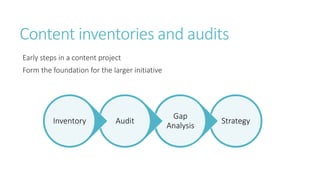
Content inventories and audits
Early steps in a content project
Form the foundation for the larger initiative
Strategy
Gap
Analysis
AuditInventory
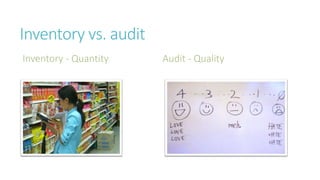
Inventory vs. audit
Inventory - Quantity Audit - Quality
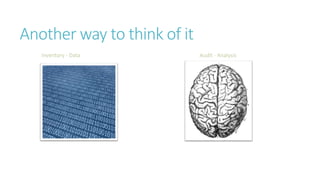
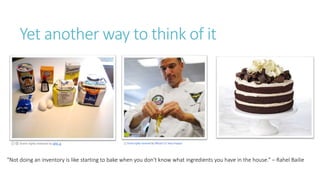
Another way to think of it
Inventory - Data Audit - Analysis
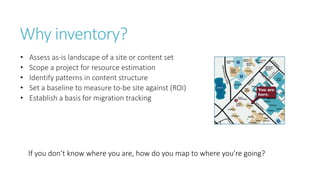
Yet another way to think of it
Some rights reserved by phil_g
"Not doing an inventory is like starting to bake when you don't know what ingredients you have in the house.“ – Rahel Bailie
Why?
Why inventory?
• Assess as-is landscape of a site or content set
• Scope a project for resource estimation
• Identify patterns in content structure
• Set a baseline to measure to-be site against (ROI)
• Establish a basis for migration tracking
If you don’t know where you are, how do you map to where you’re going?
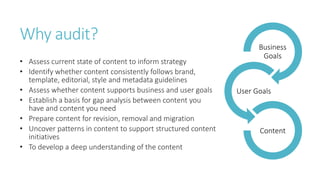
Why audit?
• Assess current state of content to inform strategy
• Identify whether content consistently follows brand,
template, editorial, style and metadata guidelines
• Assess whether content supports business and user goals
• Establish a basis for gap analysis between content you
have and content you need
• Prepare content for revision, removal and migration
• Uncover patterns in content to support structured content
initiatives
• To develop a deep understanding of the content
Business
Goals
User Goals
Content
“When you take the time to understand the content
that already exists, not only will you be able to
ensure that it’s supported in the new design, but
you’ll actually make the entire design stronger
because you’ll have realistic scenarios to design
with and for…. chances are there’ll be stuff out
there that you’ve never thought about, much less
designed for. ”
–Sara Wachter-Boettcher
Organizational value of audits
Become the content expert
Be the content advocate
Drive change forward
Image by Thibault fr (Own work) [CC-BY-SA-3.0 (http://creativecommons.org/licenses/by-sa/3.0) or GFDL (http://www.gnu.org/copyleft/fdl.html)], via Wikimedia Commons
“[Use] the content audit as a platform for facilitating
often-difficult conversations with stakeholders about
the purpose of the site, the priorities of users, and the
operational constraints and opportunities.”
– Christopher Detzi
When?
When do we inventory and audit?
• Planning and executing a content strategy
• Website redesign
• CMS implementation
• To guide a governance initiative
• Ongoing
Who?
Audits aren’t just for content strategists
Content strategists
Information architects
Project managers
Site managers
Everyone who interacts with your content
Where?
Where do we look?
How?
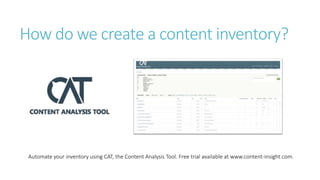
How do we create a content inventory?
Automate your inventory using CAT, the Content Analysis Tool. Free trial available at www.content-insight.com.
What goes into a content inventory?
Data captured by CAT:
• URLs — How many pages are there on the site?
• File types — What are all of the formats?
• File size — How large are the files?
• Level — How deep does the site go?
• Images — How many of them, what format, where do they live?
• Media — How many audio and video files exist, what format, where do they live?
• Documents — How many, what format, where do they live?
• Metadata — What title, description, and keyword metadata is on each page?
• Links in and out — What links to and from each page?
• H1s — What is the H1 text (matters for SEO)
• Analytics — What traffic is each page getting?
How do we turn an inventory into an
audit?
Scope the audit
Gather information
Analyze
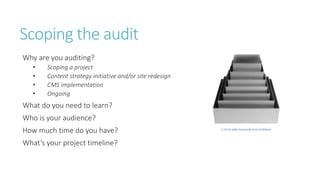
Scoping the audit
Why are you auditing?
• Scoping a project
• Content strategy initiative and/or site redesign
• CMS implementation
• Ongoing
What do you need to learn?
Who is your audience?
How much time do you have?
What’s your project timeline?
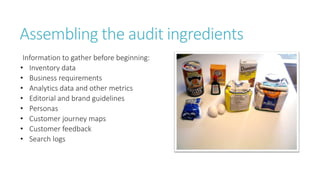
Assembling the audit ingredients
Information to gather before beginning:
• Inventory data
• Business requirements
• Analytics data and other metrics
• Editorial and brand guidelines
• Personas
• Customer journey maps
• Customer feedback
• Search logs
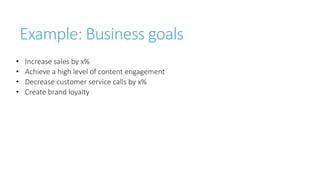
Example: Business goals
• Increase sales by x%
• Achieve a high level of content engagement
• Decrease customer service calls by x%
• Create brand loyalty
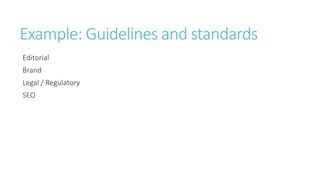
Example: Guidelines and standards
Editorial
Brand
Legal / Regulatory
SEO
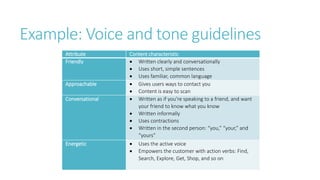
Example: Voice and tone guidelines
Attribute Content characteristic
Friendly  Written clearly and conversationally
 Uses short, simple sentences
 Uses familiar, common language
Approachable  Gives users ways to contact you
 Content is easy to scan
Conversational  Written as if you’re speaking to a friend, and want
your friend to know what you know
 Written informally
 Uses contractions
 Written in the second person: “you,” “your,” and
“yours”
Energetic  Uses the active voice
 Empowers the customer with action verbs: Find,
Search, Explore, Get, Shop, and so on
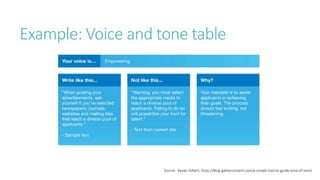
Example: Voice and tone table
Source: Kevan Gilbert, https://blog.gathercontent.com/a-simple-tool-to-guide-tone-of-voice
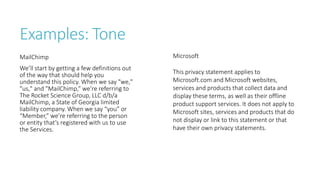
Examples: Tone
MailChimp
We’ll start by getting a few definitions out
of the way that should help you
understand this policy. When we say "we,"
"us," and "MailChimp,” we’re referring to
The Rocket Science Group, LLC d/b/a
MailChimp, a State of Georgia limited
liability company. When we say “you” or
“Member,” we’re referring to the person
or entity that’s registered with us to use
the Services.
Microsoft
This privacy statement applies to
Microsoft.com and Microsoft websites,
services and products that collect data and
display these terms, as well as their offline
product support services. It does not apply to
Microsoft sites, services and products that do
not display or link to this statement or that
have their own privacy statements.
Personas
Fictional characters based on real users
Represent key characteristics, motivations, goals
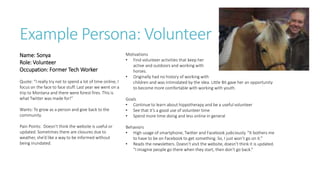
Example Persona: Volunteer
Name: Sonya
Role: Volunteer
Occupation: Former Tech Worker
Quote: “I really try not to spend a lot of time online, I
focus on the face to face stuff. Last year we went on a
trip to Montana and there were forest fires. This is
what Twitter was made for!”
Wants: To grow as a person and give back to the
community.
Pain Points: Doesn’t think the website is useful or
updated. Sometimes there are closures due to
weather, she’d like a way to be informed without
being inundated.
Motivations
• Find volunteer activities that keep her
active and outdoors and working with
horses.
• Originally had no history of working with
children and was intimidated by the idea. Little Bit gave her an opportunity
to become more comfortable with working with youth.
Goals
• Continue to learn about hippotherapy and be a useful volunteer
• See that it’s a good use of volunteer time
• Spend more time doing and less online in general
Behaviors
• High usage of smartphone, Twitter and Facebook judiciously. “It bothers me
to have to be on Facebook to get something. So, I just won’t go on it.”
• Reads the newsletters. Doesn’t visit the website, doesn’t think it is updated.
“I imagine people go there when they start, then don’t go back.”
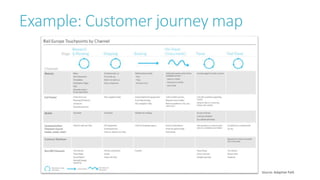
Example: Customer journey map
Source: Adaptive Path
Customer actions
Content engagement
Customer feedback
Search logs
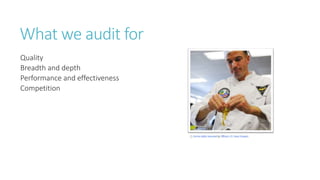
What we audit for
Quality
Breadth and depth
Performance and effectiveness
Competition
Auditing for content quality
What to assess:
• Content is relevant
• Content is current
• Content is accurate
• It is easy-to-read/scan
• Tone is audience-appropriate
• Content communicates key messages
• Content facilitates key user activities
• Content is engaging
• Content presentation is consistent
• Nomenclature is clear and consistent
What to assess against:
• Editorial style guide
• Brand guidelines
• Voice / tone guidelines
• User research
• Personas
• Customer tasks
Auditing for structure and function
What content elements and interactions exist on the site?
How well do they perform?
What are the implications for redesign or migration?
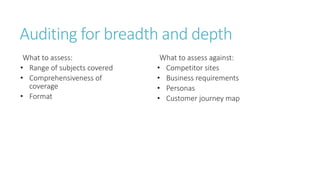
Auditing for breadth and depth
What to assess:
• Range of subjects covered
• Comprehensiveness of
coverage
• Format
What to assess against:
• Competitor sites
• Business requirements
• Personas
• Customer journey map
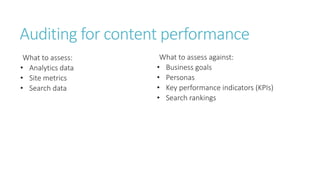
Auditing for content performance
What to assess:
• Analytics data
• Site metrics
• Search data
What to assess against:
• Business goals
• Personas
• Key performance indicators (KPIs)
• Search rankings
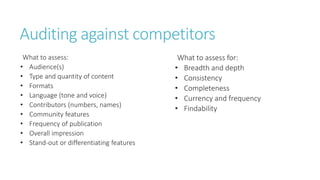
Auditing against competitors
What to assess:
• Audience(s)
• Type and quantity of content
• Formats
• Language (tone and voice)
• Contributors (numbers, names)
• Community features
• Frequency of publication
• Overall impression
• Stand-out or differentiating features
What to assess for:
• Breadth and depth
• Consistency
• Completeness
• Currency and frequency
• Findability
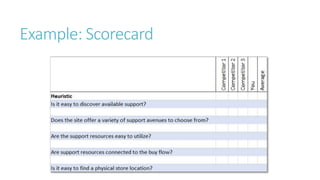
Example: Scorecard
Turning insights into
action
Presenting audit findings
Know your audience
Choose your focus
Select format
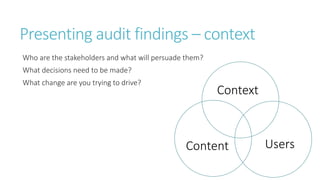
Presenting audit findings – context
Who are the stakeholders and what will persuade them?
What decisions need to be made?
What change are you trying to drive?
Context
Content Users
Presenting audit findings – focus
What are the most compelling data points?
What is the call to action?
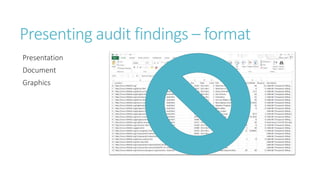
Presenting audit findings – format
Presentation
Document
Graphics
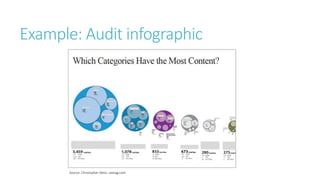
Example: Audit infographic
Source: Christopher Detzi, uxmag.com
Delivering the news
Stay in touch
pland@content-insight.com
@content_insight https://www.facebook.com/content.insight Content Analysis Tool (CAT)
www.content-insight.com

Inventory to Insight to Action with Paula Land

  • 1.
    Inventory to Insightto Action Content Auditing Workshop Paula Land Content Insight
  • 2.
    Introductions Paula Land Co-founder andCEO of Content Insight Owner and Principal Consultant at Strategic Content
  • 3.
    Today’s goal Introduce theconcepts and value of the content inventory and audit and get practical, tactical tools and experience in conducting an audit, extracting insights, and presenting the findings
  • 4.
  • 5.
    What we’re goingto talk about The Who What When Where Why* How What next? *Not quite in that order
  • 6.
    Content inventories andaudits Early steps in a content project Form the foundation for the larger initiative Strategy Gap Analysis AuditInventory
  • 7.
    Inventory vs. audit Inventory- Quantity Audit - Quality
  • 8.
    Another way tothink of it Inventory - Data Audit - Analysis
  • 9.
    Yet another wayto think of it Some rights reserved by phil_g "Not doing an inventory is like starting to bake when you don't know what ingredients you have in the house.“ – Rahel Bailie
  • 10.
  • 11.
    Why inventory? • Assessas-is landscape of a site or content set • Scope a project for resource estimation • Identify patterns in content structure • Set a baseline to measure to-be site against (ROI) • Establish a basis for migration tracking If you don’t know where you are, how do you map to where you’re going?
  • 12.
    Why audit? • Assesscurrent state of content to inform strategy • Identify whether content consistently follows brand, template, editorial, style and metadata guidelines • Assess whether content supports business and user goals • Establish a basis for gap analysis between content you have and content you need • Prepare content for revision, removal and migration • Uncover patterns in content to support structured content initiatives • To develop a deep understanding of the content Business Goals User Goals Content
  • 13.
    “When you takethe time to understand the content that already exists, not only will you be able to ensure that it’s supported in the new design, but you’ll actually make the entire design stronger because you’ll have realistic scenarios to design with and for…. chances are there’ll be stuff out there that you’ve never thought about, much less designed for. ” –Sara Wachter-Boettcher
  • 14.
    Organizational value ofaudits Become the content expert Be the content advocate Drive change forward Image by Thibault fr (Own work) [CC-BY-SA-3.0 (http://creativecommons.org/licenses/by-sa/3.0) or GFDL (http://www.gnu.org/copyleft/fdl.html)], via Wikimedia Commons
  • 15.
    “[Use] the contentaudit as a platform for facilitating often-difficult conversations with stakeholders about the purpose of the site, the priorities of users, and the operational constraints and opportunities.” – Christopher Detzi
  • 16.
  • 17.
    When do weinventory and audit? • Planning and executing a content strategy • Website redesign • CMS implementation • To guide a governance initiative • Ongoing
  • 18.
  • 19.
    Audits aren’t justfor content strategists Content strategists Information architects Project managers Site managers Everyone who interacts with your content
  • 20.
  • 21.
  • 22.
  • 23.
    How do wecreate a content inventory? Automate your inventory using CAT, the Content Analysis Tool. Free trial available at www.content-insight.com.
  • 24.
    What goes intoa content inventory? Data captured by CAT: • URLs — How many pages are there on the site? • File types — What are all of the formats? • File size — How large are the files? • Level — How deep does the site go? • Images — How many of them, what format, where do they live? • Media — How many audio and video files exist, what format, where do they live? • Documents — How many, what format, where do they live? • Metadata — What title, description, and keyword metadata is on each page? • Links in and out — What links to and from each page? • H1s — What is the H1 text (matters for SEO) • Analytics — What traffic is each page getting?
  • 25.
    How do weturn an inventory into an audit? Scope the audit Gather information Analyze
  • 26.
    Scoping the audit Whyare you auditing? • Scoping a project • Content strategy initiative and/or site redesign • CMS implementation • Ongoing What do you need to learn? Who is your audience? How much time do you have? What’s your project timeline?
  • 27.
    Assembling the auditingredients Information to gather before beginning: • Inventory data • Business requirements • Analytics data and other metrics • Editorial and brand guidelines • Personas • Customer journey maps • Customer feedback • Search logs
  • 28.
    Example: Business goals •Increase sales by x% • Achieve a high level of content engagement • Decrease customer service calls by x% • Create brand loyalty
  • 29.
    Example: Guidelines andstandards Editorial Brand Legal / Regulatory SEO
  • 30.
    Example: Voice andtone guidelines Attribute Content characteristic Friendly  Written clearly and conversationally  Uses short, simple sentences  Uses familiar, common language Approachable  Gives users ways to contact you  Content is easy to scan Conversational  Written as if you’re speaking to a friend, and want your friend to know what you know  Written informally  Uses contractions  Written in the second person: “you,” “your,” and “yours” Energetic  Uses the active voice  Empowers the customer with action verbs: Find, Search, Explore, Get, Shop, and so on
  • 31.
    Example: Voice andtone table Source: Kevan Gilbert, https://blog.gathercontent.com/a-simple-tool-to-guide-tone-of-voice
  • 32.
    Examples: Tone MailChimp We’ll startby getting a few definitions out of the way that should help you understand this policy. When we say "we," "us," and "MailChimp,” we’re referring to The Rocket Science Group, LLC d/b/a MailChimp, a State of Georgia limited liability company. When we say “you” or “Member,” we’re referring to the person or entity that’s registered with us to use the Services. Microsoft This privacy statement applies to Microsoft.com and Microsoft websites, services and products that collect data and display these terms, as well as their offline product support services. It does not apply to Microsoft sites, services and products that do not display or link to this statement or that have their own privacy statements.
  • 33.
    Personas Fictional characters basedon real users Represent key characteristics, motivations, goals
  • 34.
    Example Persona: Volunteer Name:Sonya Role: Volunteer Occupation: Former Tech Worker Quote: “I really try not to spend a lot of time online, I focus on the face to face stuff. Last year we went on a trip to Montana and there were forest fires. This is what Twitter was made for!” Wants: To grow as a person and give back to the community. Pain Points: Doesn’t think the website is useful or updated. Sometimes there are closures due to weather, she’d like a way to be informed without being inundated. Motivations • Find volunteer activities that keep her active and outdoors and working with horses. • Originally had no history of working with children and was intimidated by the idea. Little Bit gave her an opportunity to become more comfortable with working with youth. Goals • Continue to learn about hippotherapy and be a useful volunteer • See that it’s a good use of volunteer time • Spend more time doing and less online in general Behaviors • High usage of smartphone, Twitter and Facebook judiciously. “It bothers me to have to be on Facebook to get something. So, I just won’t go on it.” • Reads the newsletters. Doesn’t visit the website, doesn’t think it is updated. “I imagine people go there when they start, then don’t go back.”
  • 35.
    Example: Customer journeymap Source: Adaptive Path
  • 36.
  • 37.
    What we auditfor Quality Breadth and depth Performance and effectiveness Competition
  • 38.
    Auditing for contentquality What to assess: • Content is relevant • Content is current • Content is accurate • It is easy-to-read/scan • Tone is audience-appropriate • Content communicates key messages • Content facilitates key user activities • Content is engaging • Content presentation is consistent • Nomenclature is clear and consistent What to assess against: • Editorial style guide • Brand guidelines • Voice / tone guidelines • User research • Personas • Customer tasks
  • 39.
    Auditing for structureand function What content elements and interactions exist on the site? How well do they perform? What are the implications for redesign or migration?
  • 40.
    Auditing for breadthand depth What to assess: • Range of subjects covered • Comprehensiveness of coverage • Format What to assess against: • Competitor sites • Business requirements • Personas • Customer journey map
  • 41.
    Auditing for contentperformance What to assess: • Analytics data • Site metrics • Search data What to assess against: • Business goals • Personas • Key performance indicators (KPIs) • Search rankings
  • 42.
    Auditing against competitors Whatto assess: • Audience(s) • Type and quantity of content • Formats • Language (tone and voice) • Contributors (numbers, names) • Community features • Frequency of publication • Overall impression • Stand-out or differentiating features What to assess for: • Breadth and depth • Consistency • Completeness • Currency and frequency • Findability
  • 43.
  • 44.
  • 45.
    Presenting audit findings Knowyour audience Choose your focus Select format
  • 46.
    Presenting audit findings– context Who are the stakeholders and what will persuade them? What decisions need to be made? What change are you trying to drive? Context Content Users
  • 47.
    Presenting audit findings– focus What are the most compelling data points? What is the call to action?
  • 48.
    Presenting audit findings– format Presentation Document Graphics
  • 49.
    Example: Audit infographic Source:Christopher Detzi, uxmag.com
  • 50.
  • 51.
    Stay in touch pland@content-insight.com @content_insighthttps://www.facebook.com/content.insight Content Analysis Tool (CAT) www.content-insight.com