www.researchdesignlab.com Page 1
ISP ATMEL PROGRAMMERREV1.0
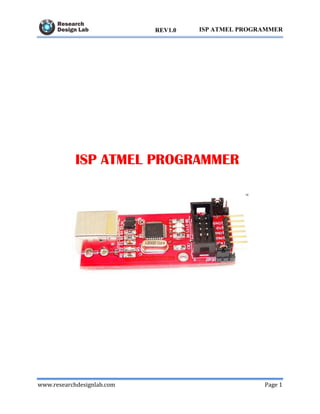
ISP ATMEL PROGRAMMER
www.researchdesignlab.com Page 2
ISP ATMEL PROGRAMMERREV1.0
Contents
OVERVIEW ................................................................................................................................... 3
ISP ATMEL PROGRAMMER .................................................................................................. 3
FEATURES ................................................................................................................................ 4
ABOUT ISP ATMEL PROGRAMMER.................................................................................... 4
HARDWARE DESIGN CONSIDERATIONS .......................................................................... 4
INSTALLATION PROCEDURE............................................................................................... 5
PROGISP PROGRAMMER APPLICATION ......................................................................... 15
CONNECTING WITH 8051 DEVELOPMENT BOARD....................................................... 19
RELATED PRODUCTS .......................................................................................................... 20
www.researchdesignlab.com Page 3
ISP ATMEL PROGRAMMERREV1.0
OVERVIEW
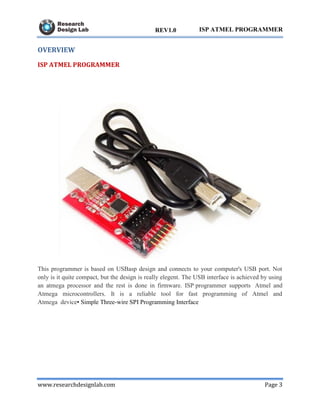
ISP ATMEL PROGRAMMER
This programmer is based on USBasp design and connects to your computer's USB port. Not
only is it quite compact, but the design is really elegent. The USB interface is achieved by using
an atmega processor and the rest is done in firmware. ISP programmer supports Atmel and
Atmega microcontrollers. It is a reliable tool for fast programming of Atmel and
Atmega device• Simple Three-wire SPI Programming Interface
www.researchdesignlab.com Page 4
ISP ATMEL PROGRAMMERREV1.0
FEATURES
 Allows you to read or write the microcontroller EEPROM, firmware, fuse bits and lock
bits
 Support for Windows, Mac OS X and Linux
 5 KB/sec maximum write speed
 10 pin ISP interface
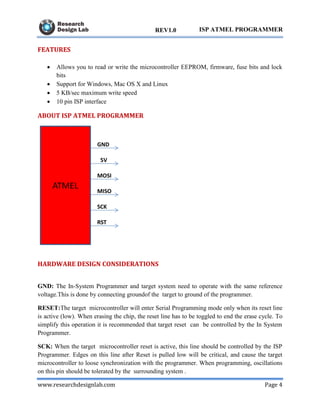
ABOUT ISP ATMEL PROGRAMMER
HARDWARE DESIGN CONSIDERATIONS
GND: The In-System Programmer and target system need to operate with the same reference
voltage.This is done by connecting groundof the target to ground of the programmer.
RESET:The target microcontroller will enter Serial Programming mode only when its reset line
is active (low). When erasing the chip, the reset line has to be toggled to end the erase cycle. To
simplify this operation it is recommended that target reset can be controlled by the In System
Programmer.
SCK: When the target microcontroller reset is active, this line should be controlled by the ISP
Programmer. Edges on this line after Reset is pulled low will be critical, and cause the target
microcontroller to loose synchronization with the programmer. When programming, oscillations
on this pin should be tolerated by the surrounding system .
www.researchdesignlab.com Page 5
ISP ATMEL PROGRAMMERREV1.0
MOSI: When the target microcontroller Reset is active, this line should be controlled by the ISP
Programmer. When programming, oscillations on this pin should be tolerated by the surrounding
system when the Reset is active.
MISO: When the target microcontroller Reset is active, this line should be allowed to become
an output. When programming, oscillations on this pin should be tolerated by the surrounding
system when the Reset is active.
VCC: Allow the In-System Programmer to draw power from the target system, to adapt to any
allowed target voltage. The maximum current needed to power the programmer will vary
depending on the programmer being used.
INSTALLATION PROCEDURE
Download the driverfor windows XP
http://www.fischl.de/usbasp/usbasp.2009-02-28.tar.gz
1) Insert the programmer into the USB port
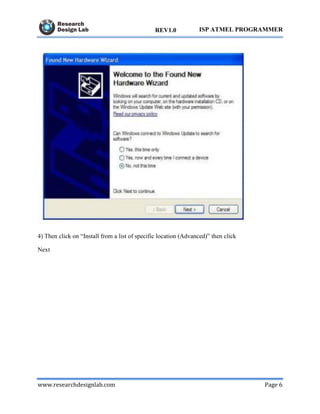
2) When the “New Hardware Wizard” dialog box is displayed, select “No, not this time”
3) Then click Next
www.researchdesignlab.com Page 6
ISP ATMEL PROGRAMMERREV1.0
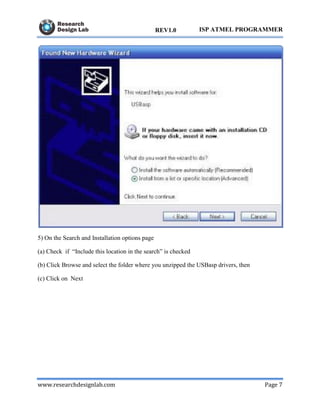
4) Then click on “Install from a list of specific location (Advanced)” then click
Next
www.researchdesignlab.com Page 7
ISP ATMEL PROGRAMMERREV1.0
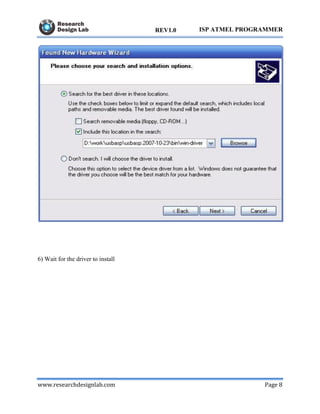
5) On the Search and Installation options page
(a) Check if “Include this location in the search” is checked
(b) Click Browse and select the folder where you unzipped the USBasp drivers, then
(c) Click on Next
www.researchdesignlab.com Page 8
ISP ATMEL PROGRAMMERREV1.0
6) Wait for the driver to install
www.researchdesignlab.com Page 9
ISP ATMEL PROGRAMMERREV1.0
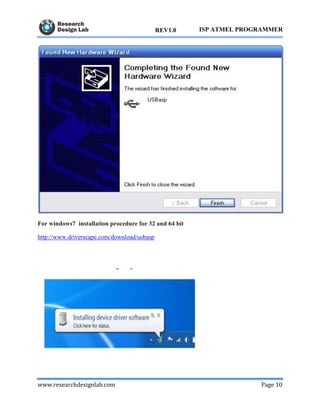
7)When the installation is complete, click on finish
www.researchdesignlab.com Page 10
ISP ATMEL PROGRAMMERREV1.0
For windows7 installation procedure for 32 and 64 bit
http://www.driverscape.com/download/usbasp
www.researchdesignlab.com Page 11
ISP ATMEL PROGRAMMERREV1.0
2)Windows will attempt to install a driver from Windows Update and will fail
3)Right click on the device and select “Update Driver Software”
www.researchdesignlab.com Page 12
ISP ATMEL PROGRAMMERREV1.0
4) When prompted “How do you want to search for driver software”, select “Browse my
computer for driver software”
www.researchdesignlab.com Page 13
ISP ATMEL PROGRAMMERREV1.0
5) Select the folder where you unzipped the driver files then click “Next”
www.researchdesignlab.com Page 14
ISP ATMEL PROGRAMMERREV1.0
6)When the installation is complete, click on close
www.researchdesignlab.com Page 15
ISP ATMEL PROGRAMMERREV1.0
PROGISP PROGRAMMER APPLICATION
Click on ->
Choose chip AT89S52
www.researchdesignlab.com Page 16
ISP ATMEL PROGRAMMERREV1.0
Click on Load Flash ,choose the hex file and click on open.
www.researchdesignlab.com Page 17
ISP ATMEL PROGRAMMERREV1.0
www.researchdesignlab.com Page 18
ISP ATMEL PROGRAMMERREV1.0
Click on Auto
www.researchdesignlab.com Page 19
ISP ATMEL PROGRAMMERREV1.0
CONNECTING WITH 8051 DEVELOPMENT BOARD
www.researchdesignlab.com Page 20
ISP ATMEL PROGRAMMERREV1.0
RELATED PRODUCTS
8051 ATMEL DEVELOPMENT BOARD
ATMEGA 16/32/64 DEVELOPMENT BOARD
www.researchdesignlab.com Page 21
ISP ATMEL PROGRAMMERREV1.0
ATMEGA MINI PROJECT BOARD WITH ISP ATMEL PROGRAMMER
ATMEL MINI PROJECT BOARD WITH ISP ATMEL PROGRAMMER

ATMEL ISP Programmer

  • 1.
    www.researchdesignlab.com Page 1 ISPATMEL PROGRAMMERREV1.0 ISP ATMEL PROGRAMMER
  • 2.
    www.researchdesignlab.com Page 2 ISPATMEL PROGRAMMERREV1.0 Contents OVERVIEW ................................................................................................................................... 3 ISP ATMEL PROGRAMMER .................................................................................................. 3 FEATURES ................................................................................................................................ 4 ABOUT ISP ATMEL PROGRAMMER.................................................................................... 4 HARDWARE DESIGN CONSIDERATIONS .......................................................................... 4 INSTALLATION PROCEDURE............................................................................................... 5 PROGISP PROGRAMMER APPLICATION ......................................................................... 15 CONNECTING WITH 8051 DEVELOPMENT BOARD....................................................... 19 RELATED PRODUCTS .......................................................................................................... 20
  • 3.
    www.researchdesignlab.com Page 3 ISPATMEL PROGRAMMERREV1.0 OVERVIEW ISP ATMEL PROGRAMMER This programmer is based on USBasp design and connects to your computer's USB port. Not only is it quite compact, but the design is really elegent. The USB interface is achieved by using an atmega processor and the rest is done in firmware. ISP programmer supports Atmel and Atmega microcontrollers. It is a reliable tool for fast programming of Atmel and Atmega device• Simple Three-wire SPI Programming Interface
  • 4.
    www.researchdesignlab.com Page 4 ISPATMEL PROGRAMMERREV1.0 FEATURES  Allows you to read or write the microcontroller EEPROM, firmware, fuse bits and lock bits  Support for Windows, Mac OS X and Linux  5 KB/sec maximum write speed  10 pin ISP interface ABOUT ISP ATMEL PROGRAMMER HARDWARE DESIGN CONSIDERATIONS GND: The In-System Programmer and target system need to operate with the same reference voltage.This is done by connecting groundof the target to ground of the programmer. RESET:The target microcontroller will enter Serial Programming mode only when its reset line is active (low). When erasing the chip, the reset line has to be toggled to end the erase cycle. To simplify this operation it is recommended that target reset can be controlled by the In System Programmer. SCK: When the target microcontroller reset is active, this line should be controlled by the ISP Programmer. Edges on this line after Reset is pulled low will be critical, and cause the target microcontroller to loose synchronization with the programmer. When programming, oscillations on this pin should be tolerated by the surrounding system .
  • 5.
    www.researchdesignlab.com Page 5 ISPATMEL PROGRAMMERREV1.0 MOSI: When the target microcontroller Reset is active, this line should be controlled by the ISP Programmer. When programming, oscillations on this pin should be tolerated by the surrounding system when the Reset is active. MISO: When the target microcontroller Reset is active, this line should be allowed to become an output. When programming, oscillations on this pin should be tolerated by the surrounding system when the Reset is active. VCC: Allow the In-System Programmer to draw power from the target system, to adapt to any allowed target voltage. The maximum current needed to power the programmer will vary depending on the programmer being used. INSTALLATION PROCEDURE Download the driverfor windows XP http://www.fischl.de/usbasp/usbasp.2009-02-28.tar.gz 1) Insert the programmer into the USB port 2) When the “New Hardware Wizard” dialog box is displayed, select “No, not this time” 3) Then click Next
  • 6.
    www.researchdesignlab.com Page 6 ISPATMEL PROGRAMMERREV1.0 4) Then click on “Install from a list of specific location (Advanced)” then click Next
  • 7.
    www.researchdesignlab.com Page 7 ISPATMEL PROGRAMMERREV1.0 5) On the Search and Installation options page (a) Check if “Include this location in the search” is checked (b) Click Browse and select the folder where you unzipped the USBasp drivers, then (c) Click on Next
  • 8.
    www.researchdesignlab.com Page 8 ISPATMEL PROGRAMMERREV1.0 6) Wait for the driver to install
  • 9.
    www.researchdesignlab.com Page 9 ISPATMEL PROGRAMMERREV1.0 7)When the installation is complete, click on finish
  • 10.
    www.researchdesignlab.com Page 10 ISPATMEL PROGRAMMERREV1.0 For windows7 installation procedure for 32 and 64 bit http://www.driverscape.com/download/usbasp
  • 11.
    www.researchdesignlab.com Page 11 ISPATMEL PROGRAMMERREV1.0 2)Windows will attempt to install a driver from Windows Update and will fail 3)Right click on the device and select “Update Driver Software”
  • 12.
    www.researchdesignlab.com Page 12 ISPATMEL PROGRAMMERREV1.0 4) When prompted “How do you want to search for driver software”, select “Browse my computer for driver software”
  • 13.
    www.researchdesignlab.com Page 13 ISPATMEL PROGRAMMERREV1.0 5) Select the folder where you unzipped the driver files then click “Next”
  • 14.
    www.researchdesignlab.com Page 14 ISPATMEL PROGRAMMERREV1.0 6)When the installation is complete, click on close
  • 15.
    www.researchdesignlab.com Page 15 ISPATMEL PROGRAMMERREV1.0 PROGISP PROGRAMMER APPLICATION Click on -> Choose chip AT89S52
  • 16.
    www.researchdesignlab.com Page 16 ISPATMEL PROGRAMMERREV1.0 Click on Load Flash ,choose the hex file and click on open.
  • 17.
  • 18.
    www.researchdesignlab.com Page 18 ISPATMEL PROGRAMMERREV1.0 Click on Auto
  • 19.
    www.researchdesignlab.com Page 19 ISPATMEL PROGRAMMERREV1.0 CONNECTING WITH 8051 DEVELOPMENT BOARD
  • 20.
    www.researchdesignlab.com Page 20 ISPATMEL PROGRAMMERREV1.0 RELATED PRODUCTS 8051 ATMEL DEVELOPMENT BOARD ATMEGA 16/32/64 DEVELOPMENT BOARD
  • 21.
    www.researchdesignlab.com Page 21 ISPATMEL PROGRAMMERREV1.0 ATMEGA MINI PROJECT BOARD WITH ISP ATMEL PROGRAMMER ATMEL MINI PROJECT BOARD WITH ISP ATMEL PROGRAMMER