Gia Johnson
February 26, 2012
All students are able to learn, as teachers we need to asses the strengths
and weaknesses of the students in our classrooms and incorporate
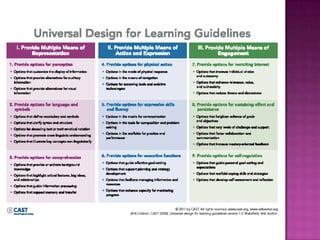
Universal Design for Learning into our lessons and classroom. UDI
suggests that teachers can remove barriers to learning by providing
flexibility in terms of options for materials, methods and assessments
(Rose & Meyer, 2002)


This flexibility and customization is especially important for students
with disabilities. These students benefit greatly when assistive
technology and teaching strategies are incorporated into the classroom.
These students are not intellectually impaired, they just learn in
different ways or need to have hurdles to learning cleared, so that they
can have the same educational opportunities as their fellow classmates.
Our goal should be to create a learning environment that is inclusive for
the disabled student and allows the student to be in a regular classroom
as much as possible. Studies have indicated that students without
disabilities also benefit from inclusive classrooms.
 Least  Restrictive Environment (LRE) - A
  learning plan that provides the most possible
  time in the regular classroom setting.
 Inclusion – A term which involves bringing
  the support services to the child in the
  classroom, instead of separating the child
  from the other students.
 Learning Disability - a neurological disorder
  that affects one or more of the basic
  psychological processes involved in
  understanding or in using spoken or written
  language
 Auditory   Disability –a disorder that effects
  the way auditory information is processed by
  the brain
 Assistive technology or adaptive technology
  (AT) is a term that includes assistive,
  adaptive, and rehabilitative devices for
  people with disabilities and also includes the
  process used in selecting, locating, and using
  them.
 Work to determine what type of help each
  student needs
 Communicate verbally, in writing and displayed
  in the classroom the rules, classroom
  expectations, schedules and assignments.
 Teach study skills and learning strategies
 Schedule breaks, allow student to work standing
  at the board
 Provide step by step directions, both verbally
  and in writing.
 Allow the student to complete assignments on a
  computer.
   Lee Swanson (1999) and his colleagues          Show rather than explain
    found two major intervention practices         Supplement with more intact senses (use
    that produced large outcomes. One is            visual cues, signals, handouts,
    direct instruction. The other is learning       manipulatives)
    strategy instruction.
                                                   Reduce or space directions, give cues
   Teachers who were applying those kinds          such as “ready?”
    of intervention:
   broke learning into small steps;               Reword or help decipher confusing oral
                                                    and/or written directions
   administered probes;                           Teach abstract vocabulary, word roots,
   supplied regular quality feedback;              synonyms/antonyms
   used diagrams, graphics and pictures to        Vary pitch and tone of voice, alter pace,
    augment what they were saying in                stress key words
    words;                                         Ask specific questions as you teach to
   provided ample independent, well-               find out if they do understand
    designed, intensive practice;                  Allow them 5-6 seconds to respond
   modeled instructional practices that            (“think time”)
    they wanted students to follow;                Have the student constantly verbalize
   provided prompts of strategies to use;          concepts, vocabulary words, rules, etc.
    and                                            Avoid asking the child to listen and write
   engaged students in process type                at the same time
    questions like “How is that strategy           Excerpted from the LDA of California and
    working? Where else might you apply it?”        UC Davis M.I.N.D. Institute "Q.U.I.L.T.S."
                                                    Calendar 2001-2002
 Web  application/e-reader to read stories
  aloud
 Icommunicator
 Digi-wave personal listening system
 Windows XP Assistive Software
 Computer/Laptop
 Spell check, grammar and thesaurus software
 I-Pad/I-Pod Touch
 Software – Tap to Talk, Easy Speech Pro,
  Vanguard Springboard, Proloquo2go, Vmax,
  Verbally and Lingraphica
 For students with auditory disabilities a
  printed calendar listings assignments and
  class activities is a helpful tool.
 Providing written outlines and notes on class
  lessons will support students with both
  auditory and mild learning disabilities.
 Break down information into small parts for
  the student to understand and grasp.
 Incorporate memory tricks like mnemonics
  into your instruction.
 Use visual, auditory and tactile cues to
  augments teaching concepts.
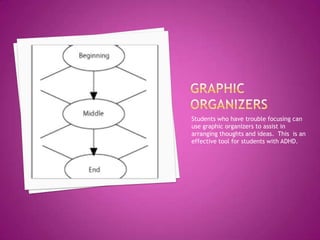
Students who have trouble focusing can
use graphic organizers to assist in
arranging thoughts and ideas. This is an
effective tool for students with ADHD.
 www.lessonbuilder.cast.org/
 www.readingrockets.org
 www.signedstories.com/index.cfm
References
Cennamo, Katherine S., Ross, John D., and Ertmer, Peggy A, (2010). Technology
Integration for Meaningful Classroom Use; A Standards-Based Approach. Belmont, CA:
Wadsworth.

Retrieved from http://www.cabrini.edu/communications/ProfDev/cardevC
hickering.html

Behrmann, Michael M., (1995). ERIC Clearinghouse on Disabilities and Gifted Education
Reston VA. Retrieved from http://www.ericdigests.org/1995-2/mild.htm

Retrieved from http://lessonbuilder.cast.org/

Retrieved from
http://www.ldaamerica.org/aboutld/teachers/understanding/strategies.asp

Behrmann, Michael M., (2011). ERIC Clearinghouse on Disabilities and Gifted Education
Reston VA. Retrieved from http://www.ericdigests.org/1995-2/mild.htm

Retrieved from http://www.ldonline.org/article/Checklists_for_Teachers©

Retrieved from
http://weac.org/Issues_Advocacy/Resource_Pages_On_Issues_one/Special_Education/sp
ecial_education_inclusion.aspx

CAST (2008), Retrieved from www.cast.org, www.udlcenter.org

Wakeeld, MA (N.D.). Universal design for learning guidelines version 1.0. Retrieved from
http://nichcy.org/disability/specific/adhd/

Assistive technology web quest gia johnson

  • 1.
  • 2.
    All students areable to learn, as teachers we need to asses the strengths and weaknesses of the students in our classrooms and incorporate Universal Design for Learning into our lessons and classroom. UDI suggests that teachers can remove barriers to learning by providing flexibility in terms of options for materials, methods and assessments (Rose & Meyer, 2002) This flexibility and customization is especially important for students with disabilities. These students benefit greatly when assistive technology and teaching strategies are incorporated into the classroom. These students are not intellectually impaired, they just learn in different ways or need to have hurdles to learning cleared, so that they can have the same educational opportunities as their fellow classmates. Our goal should be to create a learning environment that is inclusive for the disabled student and allows the student to be in a regular classroom as much as possible. Studies have indicated that students without disabilities also benefit from inclusive classrooms.
  • 4.
     Least Restrictive Environment (LRE) - A learning plan that provides the most possible time in the regular classroom setting.  Inclusion – A term which involves bringing the support services to the child in the classroom, instead of separating the child from the other students.  Learning Disability - a neurological disorder that affects one or more of the basic psychological processes involved in understanding or in using spoken or written language
  • 5.
     Auditory Disability –a disorder that effects the way auditory information is processed by the brain  Assistive technology or adaptive technology (AT) is a term that includes assistive, adaptive, and rehabilitative devices for people with disabilities and also includes the process used in selecting, locating, and using them.
  • 6.
     Work todetermine what type of help each student needs  Communicate verbally, in writing and displayed in the classroom the rules, classroom expectations, schedules and assignments.  Teach study skills and learning strategies  Schedule breaks, allow student to work standing at the board  Provide step by step directions, both verbally and in writing.  Allow the student to complete assignments on a computer.
  • 7.
    Lee Swanson (1999) and his colleagues  Show rather than explain found two major intervention practices  Supplement with more intact senses (use that produced large outcomes. One is visual cues, signals, handouts, direct instruction. The other is learning manipulatives) strategy instruction.  Reduce or space directions, give cues  Teachers who were applying those kinds such as “ready?” of intervention:  broke learning into small steps;  Reword or help decipher confusing oral and/or written directions  administered probes;  Teach abstract vocabulary, word roots,  supplied regular quality feedback; synonyms/antonyms  used diagrams, graphics and pictures to  Vary pitch and tone of voice, alter pace, augment what they were saying in stress key words words;  Ask specific questions as you teach to  provided ample independent, well- find out if they do understand designed, intensive practice;  Allow them 5-6 seconds to respond  modeled instructional practices that (“think time”) they wanted students to follow;  Have the student constantly verbalize  provided prompts of strategies to use; concepts, vocabulary words, rules, etc. and  Avoid asking the child to listen and write  engaged students in process type at the same time questions like “How is that strategy  Excerpted from the LDA of California and working? Where else might you apply it?” UC Davis M.I.N.D. Institute "Q.U.I.L.T.S." Calendar 2001-2002
  • 8.
     Web application/e-reader to read stories aloud  Icommunicator  Digi-wave personal listening system  Windows XP Assistive Software  Computer/Laptop  Spell check, grammar and thesaurus software  I-Pad/I-Pod Touch  Software – Tap to Talk, Easy Speech Pro, Vanguard Springboard, Proloquo2go, Vmax, Verbally and Lingraphica
  • 9.
     For studentswith auditory disabilities a printed calendar listings assignments and class activities is a helpful tool.  Providing written outlines and notes on class lessons will support students with both auditory and mild learning disabilities.  Break down information into small parts for the student to understand and grasp.  Incorporate memory tricks like mnemonics into your instruction.  Use visual, auditory and tactile cues to augments teaching concepts.
  • 10.
    Students who havetrouble focusing can use graphic organizers to assist in arranging thoughts and ideas. This is an effective tool for students with ADHD.
  • 11.
  • 12.
    References Cennamo, Katherine S.,Ross, John D., and Ertmer, Peggy A, (2010). Technology Integration for Meaningful Classroom Use; A Standards-Based Approach. Belmont, CA: Wadsworth. Retrieved from http://www.cabrini.edu/communications/ProfDev/cardevC hickering.html Behrmann, Michael M., (1995). ERIC Clearinghouse on Disabilities and Gifted Education Reston VA. Retrieved from http://www.ericdigests.org/1995-2/mild.htm Retrieved from http://lessonbuilder.cast.org/ Retrieved from http://www.ldaamerica.org/aboutld/teachers/understanding/strategies.asp Behrmann, Michael M., (2011). ERIC Clearinghouse on Disabilities and Gifted Education Reston VA. Retrieved from http://www.ericdigests.org/1995-2/mild.htm Retrieved from http://www.ldonline.org/article/Checklists_for_Teachers© Retrieved from http://weac.org/Issues_Advocacy/Resource_Pages_On_Issues_one/Special_Education/sp ecial_education_inclusion.aspx CAST (2008), Retrieved from www.cast.org, www.udlcenter.org Wakeeld, MA (N.D.). Universal design for learning guidelines version 1.0. Retrieved from http://nichcy.org/disability/specific/adhd/