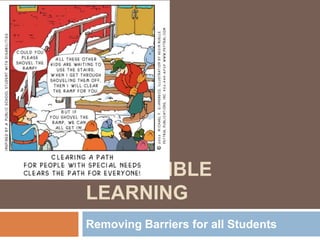
ACCESSIBLE
LEARNING
Removing Barriers for all Students
Who is a typical ADLC student?
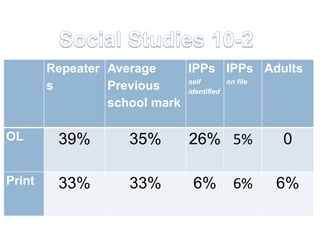
Repeater Average     IPPs IPPs Adults
                             self       on file
        s        Previous    identified
                 school mark

OL       39%        35%      26% 5%         0

Print    33%        33%       6%    6%    6%
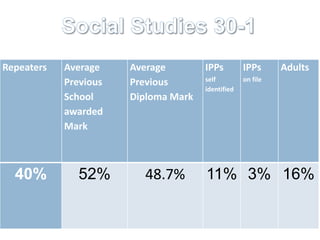
Repeaters   Average    Average        IPPs         IPPs      Adults
                                      self         on file
            Previous   Previous
                                      identified
            School     Diploma Mark
            awarded
            Mark


  40%         52%        48.7%        11% 3% 16%
Why Assistive Tech?
          The fairness debate.
UDL Overview: http://youtu.be/bDvKnY0g6e4
Rick Lavoie on Fairness
http://www.youtube.com/watch?v=6G9--
  hUQDwY
This 8 month old baby was born deaf, watch the
moment as his cochlear implant is activated and
  he
hears sound for the first time, and his mother's
  voice.
http://www.youtube.com/watch?v=HTzTt1VnHR
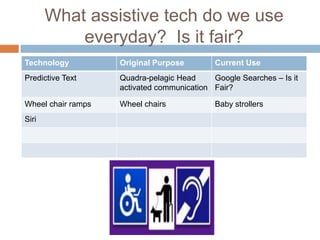
What assistive tech do we use
           everyday? Is it fair?
Technology          Original Purpose         Current Use
Predictive Text     Quadra-pelagic Head     Google Searches – Is it
                    activated communication Fair?

Wheel chair ramps   Wheel chairs             Baby strollers
Siri
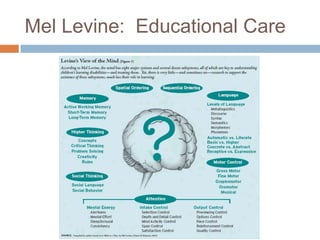
Mel Levine: Educational Care
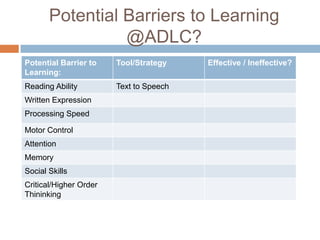
Potential Barriers to Learning
                 @ADLC?
Potential Barrier to    Tool/Strategy    Effective / Ineffective?
Learning:
Reading Ability         Text to Speech
Written Expression
Processing Speed

Motor Control
Attention
Memory
Social Skills
Critical/Higher Order
Thininking
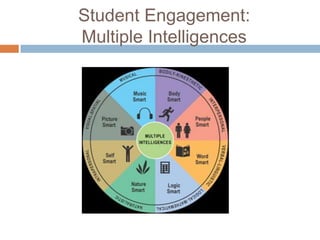
Student Engagement:
Multiple Intelligences
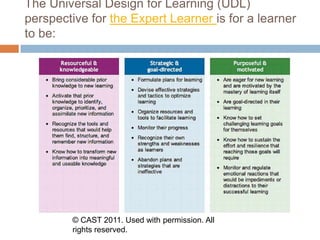
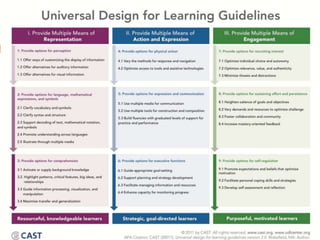
The Universal Design for Learning (UDL)
perspective for the Expert Learner is for a learner
to be:


        © CAST 2011. Used with permission. All
        rights reserved.
Expert Learning:
A shared responsibility
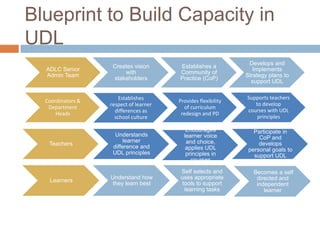
Blueprint to Build Capacity in
UDL
                                                                Develops and
                    Creates vision      Establishes a
  ADLC Senior                                                     Implements
                        with            Community of
  Admin Team                                                   Strategy plans to
                    stakeholders        Practice (CoP)
                                                                 support UDL

                       Establishes                             Supports teachers
  Coordinators &                        Provides flexibility
                   respect of learner                             to develop
   Department                             of curriculum
                     differences as                            courses with UDL
      Heads                              redesign and PD
                     school culture                                principles

                                           Encourages             Participate in
                     Understands          learner voice             CoP and
                         learner           and choice,
   Teachers                                                         develops
                    difference and         applies UDL          personal goals to
                    UDL principles         principles in          support UDL
                                             courses

                                        Self selects and          Becomes a self
                   Understand how       uses appropriate           directed and
   Learners
                    they learn best      tools to support          independent
                                          learning tasks              learner
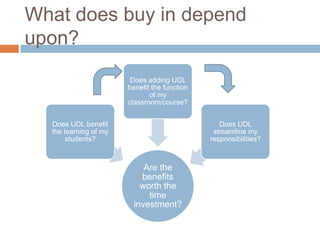
What does buy in depend
upon?
                        Does adding UDL
                       benefit the function
                              of my
                       classroom/course?


  Does UDL benefit                               Does UDL
  the learning of my                           streamline my
       students?                              responsibilities?


                            Are the
                           benefits
                           worth the
                             time
                         investment?
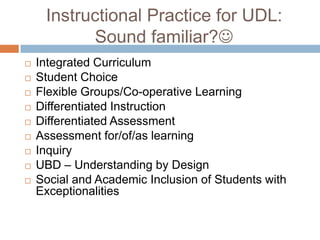
Instructional Practice for UDL:
           Sound familiar?
   Integrated Curriculum
   Student Choice
   Flexible Groups/Co-operative Learning
   Differentiated Instruction
   Differentiated Assessment
   Assessment for/of/as learning
   Inquiry
   UBD – Understanding by Design
   Social and Academic Inclusion of Students with
    Exceptionalities
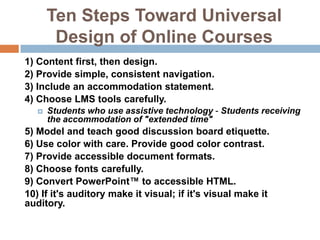
Ten Steps Toward Universal
        Design of Online Courses
1) Content first, then design.
2) Provide simple, consistent navigation.
3) Include an accommodation statement.
4) Choose LMS tools carefully.
   ï‚€   Students who use assistive technology - Students receiving
       the accommodation of "extended time"
5) Model and teach good discussion board etiquette.
6) Use color with care. Provide good color contrast.
7) Provide accessible document formats.
8) Choose fonts carefully.
9) Convert PowerPointℱ to accessible HTML.
10) If it's auditory make it visual; if it's visual make it
auditory.
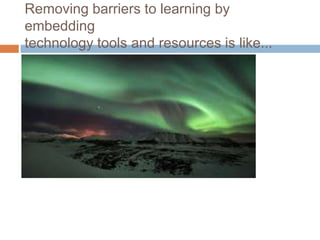
Removing barriers to learning by
embedding
technology tools and resources is like...
Resources:
http://share.snacktools.com/597AE797C6F/fzc5
6jip
Discussions in D2L
   Speech to Text Option
Audio Feedback in Assignments

   Audacity
   Voicethread
Accessibility in Microsoft
Documents
   Accessibility Features in Office 2010
   Find and Fix Accessibility Issues in Word 2010
    ï‚€ DemoWordDoc

   Creating Accessible Documents - Word,
    PowerPoint and Adobe
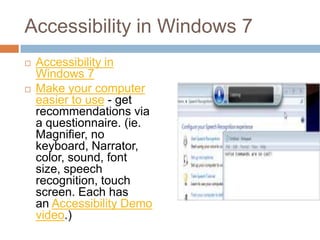
Accessibility in Windows 7
   Accessibility in
    Windows 7
   Make your computer
    easier to use - get
    recommendations via
    a questionnaire. (ie.
    Magnifier, no
    keyboard, Narrator,
    color, sound, font
    size, speech
    recognition, touch
    screen. Each has
    an Accessibility Demo
    video.)
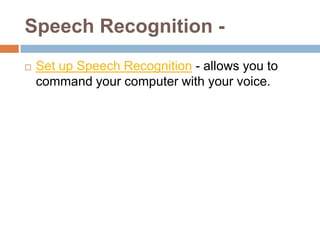
Speech Recognition -
   Set up Speech Recognition - allows you to
    command your computer with your voice.
Apple Accessibility
   Apple includes assistive technology in its products as
    standard features — at no additional cost.
    ï‚€   For example, iPhone, iPad, iPod, and OS X include screen
        magnification and VoiceOver, a screen-access technology,
        for the blind and visually impaired.
    ï‚€   To assist those with cognitive and learning disabilities,
        every Mac includes an alternative, simplified user interface
        that rewards exploration and learning. And, for those who
        find it difficult to use a mouse, every Mac computer
        includes Mouse Keys, Slow Keys, and Sticky Keys, which
        adapt the computer to the user’s needs and capabilities.
   Apple Assistive Tech for Diverse Learners
    http://images.apple.com/education/docs/L360989C-
    US_L360989C_DiverseLearners_ff_acc.pdf
Siri
   1) Settings - General - Accessibility - Vision -
    Speak Auto-text ON and set Speaking Rate.
   2) Settings - General - Siri - ON (available for
    iPhone 5/4S, iPad2/3, iPad mini, iPod Touch
   - to activate Siri, hold down the iPad Home button
    for 2 seconds
   - use to open apps, set up reminders “Remind me
    to call my mom”, weather “What will the weather
    be like tomorrow?” for local or ask for a specific
    city (great for Social Studies and calendar work
    with students), send a tweet, do a web search,
    etc. Also, Siri with VoiceOver can speak any
    response texts from Siri.
Readability
   takes away the clutter of the web and saves
    info in a personalized format. CBC News.
MyStudyBar
"MyStudyBar is a tool which helps overcome
problems that students commonly experience
with studying, reading and writing. The tool
consists of a set of portable open source and
freeware applications....MyStudyBar puts a
whole range of individual and essential tools at
your fingertips. Together, these...
http://eduapps.org/?page_id=7
Audacity

   Audacity is a free, easy-to-use
    and multilingual audio editor and recorder for
    Windows, Mac OS X, GNU/Linux and other
    operating systems. Can use it to record live
    audio, convert old recordings, edit .mp3/.wav
    sound files, cut-copy-splice-mix sounds
    together, change speed/pitch, etc.
   Easy to attach to an email or put into a
    website.
   How - to use
Dragon Naturally Speaking -
software and app

   Dragon speech recognition software makes it
    easier for anyone to use a computer. You talk,
    and it types. Use your voice to create and edit
    documents or emails, lunch applications, open
    files, control your mouse, and more. Quickly
    and easily capture your thoughts and ideas.
Paperport Notes App

   Take note taking to a whole new level by
    leveraging your iPad to capture hand written
    notes, dictation notes, typed text, images, web
    content and audio.
   Video example
Evernote partners with Ispeech
   http://thenextweb.com/apps/2012/11/27/everno
    te-partners-with-ispeech-adds-text-to-speech-
    reading-to-its-clearly-extension-for-chrome/
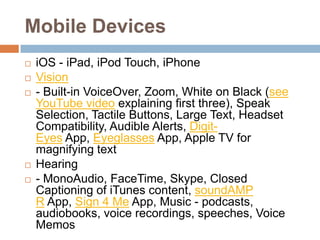
Mobile Devices
   iOS - iPad, iPod Touch, iPhone
   Vision
   - Built-in VoiceOver, Zoom, White on Black (see
    YouTube video explaining first three), Speak
    Selection, Tactile Buttons, Large Text, Headset
    Compatibility, Audible Alerts, Digit-
    Eyes App, Eyeglasses App, Apple TV for
    magnifying text
   Hearing
   - MonoAudio, FaceTime, Skype, Closed
    Captioning of iTunes content, soundAMP
    R App, Sign 4 Me App, Music - podcasts,
    audiobooks, voice recordings, speeches, Voice
    Memos
   Internet Explorer
   Accessibility in IE9
   Google Chrome
   Chrome Vox - screen reader for visually impaired
    users. Video example.
   Chrome Vis - magnifies any selected text on a
    webpage for users with low vision. Video
    example.
   SpeakIt! - converts text into speech.
   DEMO
   Readability - takes away the clutter of the web
    and saves info in a personalized format. CBC
    News.
10 Apps that can enhance your
lessons through UDL
   http://dmourlam.wordpress.com/2012/11/29/10
    -apps-that-can-enhance-your-lessons-through-
    udl/

Accessible Learning - UDL

  • 1.
  • 3.
    Who is atypical ADLC student?
  • 4.
    Repeater Average IPPs IPPs Adults self on file s Previous identified school mark OL 39% 35% 26% 5% 0 Print 33% 33% 6% 6% 6%
  • 5.
    Repeaters Average Average IPPs IPPs Adults self on file Previous Previous identified School Diploma Mark awarded Mark 40% 52% 48.7% 11% 3% 16%
  • 6.
    Why Assistive Tech? The fairness debate. UDL Overview: http://youtu.be/bDvKnY0g6e4 Rick Lavoie on Fairness http://www.youtube.com/watch?v=6G9-- hUQDwY This 8 month old baby was born deaf, watch the moment as his cochlear implant is activated and he hears sound for the first time, and his mother's voice. http://www.youtube.com/watch?v=HTzTt1VnHR
  • 7.
    What assistive techdo we use everyday? Is it fair? Technology Original Purpose Current Use Predictive Text Quadra-pelagic Head Google Searches – Is it activated communication Fair? Wheel chair ramps Wheel chairs Baby strollers Siri
  • 8.
  • 9.
    Potential Barriers toLearning @ADLC? Potential Barrier to Tool/Strategy Effective / Ineffective? Learning: Reading Ability Text to Speech Written Expression Processing Speed Motor Control Attention Memory Social Skills Critical/Higher Order Thininking
  • 10.
  • 11.
    The Universal Designfor Learning (UDL) perspective for the Expert Learner is for a learner to be: © CAST 2011. Used with permission. All rights reserved.
  • 12.
  • 13.
    Blueprint to BuildCapacity in UDL Develops and Creates vision Establishes a ADLC Senior Implements with Community of Admin Team Strategy plans to stakeholders Practice (CoP) support UDL Establishes Supports teachers Coordinators & Provides flexibility respect of learner to develop Department of curriculum differences as courses with UDL Heads redesign and PD school culture principles Encourages Participate in Understands learner voice CoP and learner and choice, Teachers develops difference and applies UDL personal goals to UDL principles principles in support UDL courses Self selects and Becomes a self Understand how uses appropriate directed and Learners they learn best tools to support independent learning tasks learner
  • 14.
    What does buyin depend upon? Does adding UDL benefit the function of my classroom/course? Does UDL benefit Does UDL the learning of my streamline my students? responsibilities? Are the benefits worth the time investment?
  • 16.
    Instructional Practice forUDL: Sound familiar?  Integrated Curriculum  Student Choice  Flexible Groups/Co-operative Learning  Differentiated Instruction  Differentiated Assessment  Assessment for/of/as learning  Inquiry  UBD – Understanding by Design  Social and Academic Inclusion of Students with Exceptionalities
  • 17.
    Ten Steps TowardUniversal Design of Online Courses 1) Content first, then design. 2) Provide simple, consistent navigation. 3) Include an accommodation statement. 4) Choose LMS tools carefully. ï‚€ Students who use assistive technology - Students receiving the accommodation of "extended time" 5) Model and teach good discussion board etiquette. 6) Use color with care. Provide good color contrast. 7) Provide accessible document formats. 8) Choose fonts carefully. 9) Convert PowerPointℱ to accessible HTML. 10) If it's auditory make it visual; if it's visual make it auditory.
  • 18.
    Removing barriers tolearning by embedding technology tools and resources is like...
  • 19.
  • 20.
    Discussions in D2L  Speech to Text Option
  • 21.
    Audio Feedback inAssignments  Audacity  Voicethread
  • 22.
    Accessibility in Microsoft Documents  Accessibility Features in Office 2010  Find and Fix Accessibility Issues in Word 2010 ï‚€ DemoWordDoc  Creating Accessible Documents - Word, PowerPoint and Adobe
  • 23.
    Accessibility in Windows7  Accessibility in Windows 7  Make your computer easier to use - get recommendations via a questionnaire. (ie. Magnifier, no keyboard, Narrator, color, sound, font size, speech recognition, touch screen. Each has an Accessibility Demo video.)
  • 24.
    Speech Recognition -  Set up Speech Recognition - allows you to command your computer with your voice.
  • 25.
    Apple Accessibility  Apple includes assistive technology in its products as standard features — at no additional cost. ï‚€ For example, iPhone, iPad, iPod, and OS X include screen magnification and VoiceOver, a screen-access technology, for the blind and visually impaired. ï‚€ To assist those with cognitive and learning disabilities, every Mac includes an alternative, simplified user interface that rewards exploration and learning. And, for those who find it difficult to use a mouse, every Mac computer includes Mouse Keys, Slow Keys, and Sticky Keys, which adapt the computer to the user’s needs and capabilities.  Apple Assistive Tech for Diverse Learners http://images.apple.com/education/docs/L360989C- US_L360989C_DiverseLearners_ff_acc.pdf
  • 26.
    Siri  1) Settings - General - Accessibility - Vision - Speak Auto-text ON and set Speaking Rate.  2) Settings - General - Siri - ON (available for iPhone 5/4S, iPad2/3, iPad mini, iPod Touch  - to activate Siri, hold down the iPad Home button for 2 seconds  - use to open apps, set up reminders “Remind me to call my mom”, weather “What will the weather be like tomorrow?” for local or ask for a specific city (great for Social Studies and calendar work with students), send a tweet, do a web search, etc. Also, Siri with VoiceOver can speak any response texts from Siri.
  • 27.
    Readability  takes away the clutter of the web and saves info in a personalized format. CBC News.
  • 28.
    MyStudyBar "MyStudyBar is atool which helps overcome problems that students commonly experience with studying, reading and writing. The tool consists of a set of portable open source and freeware applications....MyStudyBar puts a whole range of individual and essential tools at your fingertips. Together, these... http://eduapps.org/?page_id=7
  • 29.
    Audacity  Audacity is a free, easy-to-use and multilingual audio editor and recorder for Windows, Mac OS X, GNU/Linux and other operating systems. Can use it to record live audio, convert old recordings, edit .mp3/.wav sound files, cut-copy-splice-mix sounds together, change speed/pitch, etc.  Easy to attach to an email or put into a website.  How - to use
  • 30.
    Dragon Naturally Speaking- software and app  Dragon speech recognition software makes it easier for anyone to use a computer. You talk, and it types. Use your voice to create and edit documents or emails, lunch applications, open files, control your mouse, and more. Quickly and easily capture your thoughts and ideas.
  • 31.
    Paperport Notes App  Take note taking to a whole new level by leveraging your iPad to capture hand written notes, dictation notes, typed text, images, web content and audio.  Video example
  • 32.
    Evernote partners withIspeech  http://thenextweb.com/apps/2012/11/27/everno te-partners-with-ispeech-adds-text-to-speech- reading-to-its-clearly-extension-for-chrome/
  • 33.
    Mobile Devices  iOS - iPad, iPod Touch, iPhone  Vision  - Built-in VoiceOver, Zoom, White on Black (see YouTube video explaining first three), Speak Selection, Tactile Buttons, Large Text, Headset Compatibility, Audible Alerts, Digit- Eyes App, Eyeglasses App, Apple TV for magnifying text  Hearing  - MonoAudio, FaceTime, Skype, Closed Captioning of iTunes content, soundAMP R App, Sign 4 Me App, Music - podcasts, audiobooks, voice recordings, speeches, Voice Memos
  • 34.
     Internet Explorer  Accessibility in IE9  Google Chrome  Chrome Vox - screen reader for visually impaired users. Video example.  Chrome Vis - magnifies any selected text on a webpage for users with low vision. Video example.  SpeakIt! - converts text into speech.  DEMO  Readability - takes away the clutter of the web and saves info in a personalized format. CBC News.
  • 35.
    10 Apps thatcan enhance your lessons through UDL  http://dmourlam.wordpress.com/2012/11/29/10 -apps-that-can-enhance-your-lessons-through- udl/

Editor's Notes

  • #13 learn about Universal Design for Learning (UDL) to understand how your learners learn best.redesign the learning activities so learners have access to multiple strategies that best meet their needs and the way they learn best.encourage learners to create learning goals and a plan describing the strategies and resources that are appropriate to meet their learning goals.encourage learners to select how they choose to access and engage with content.