Mastering Assertions & Waits:
Clear Communication for
Impactful Presentations
Transform your presentations from forgettable to unforgettable by mastering
two powerful techniques that separate amateur speakers from communication
experts.
FUNDAMENTALS
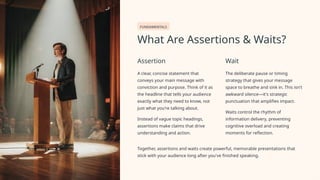
What Are Assertions & Waits?
Assertion
A clear, concise statement that
conveys your main message with
conviction and purpose. Think of it as
the headline that tells your audience
exactly what they need to know, not
just what you're talking about.
Instead of vague topic headings,
assertions make claims that drive
understanding and action.
Wait
The deliberate pause or timing
strategy that gives your message
space to breathe and sink in. This isn't
awkward silence—it's strategic
punctuation that amplifies impact.
Waits control the rhythm of
information delivery, preventing
cognitive overload and creating
moments for reflection.
Together, assertions and waits create powerful, memorable presentations that
stick with your audience long after you've finished speaking.
BENEFITS
Why Use Assertions & Waits?
Laser-Focused Messaging
Assertions direct your audience's attention
to one key idea per slide, eliminating
confusion and ensuring everyone follows
your narrative thread.
Reduced Cognitive Load
Waits give your audience time to process
complex visuals and data, preventing the
mental fatigue that comes from
information overload.
Enhanced Retention
This powerful combination boosts comprehension and long-term retention by creating clear
mental anchors for key concepts.
Research consistently shows that audiences remember presentations built on assertions and
strategic pauses far better than traditional slide decks packed with bullet points and rushed
delivery.
FRAMEWORK
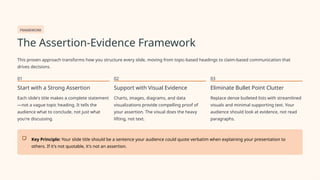
The Assertion-Evidence Framework
This proven approach transforms how you structure every slide, moving from topic-based headings to claim-based communication that
drives decisions.
01
Start with a Strong Assertion
Each slide's title makes a complete statement
—not a vague topic heading. It tells the
audience what to conclude, not just what
you're discussing.
02
Support with Visual Evidence
Charts, images, diagrams, and data
visualizations provide compelling proof of
your assertion. The visual does the heavy
lifting, not text.
03
Eliminate Bullet Point Clutter
Replace dense bulleted lists with streamlined
visuals and minimal supporting text. Your
audience should look at evidence, not read
paragraphs.
Key Principle: Your slide title should be a sentence your audience could quote verbatim when explaining your presentation to
others. If it's not quotable, it's not an assertion.
Example: Weak vs. Strong Assertion Slide
The difference between mediocre and exceptional presentations often comes down to how you frame your message. Here's a side-by-side
comparison that illustrates the power of the assertion-evidence approach.
❌ Weak Approach
Sales Growth in Q4
• New marketing campaign launched
• Customer acquisition improved
• Revenue exceeded targets
• Team performance strong
This slide forces the audience to connect the dots themselves. The
title is merely a topic, and bullets leave the key insight buried.
✓ Strong Approach
Q4 Sales Increased 25% Due to New Marketing
Strategy
[Compelling graph showing growth trajectory with clear before/after
comparison]
The assertion tells the complete story immediately. Visual evidence
proves the claim instantly, making the insight unmissable and
memorable.
Notice how the strong assertion leaves no ambiguity—it states exactly what happened and why. The audience knows the conclusion before
examining the evidence, making comprehension effortless.
TECHNIQUE
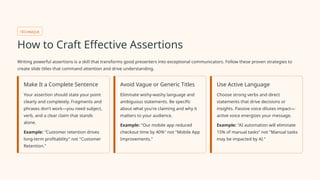
How to Craft Effective Assertions
Writing powerful assertions is a skill that transforms good presenters into exceptional communicators. Follow these proven strategies to
create slide titles that command attention and drive understanding.
Make It a Complete Sentence
Your assertion should state your point
clearly and completely. Fragments and
phrases don't work—you need subject,
verb, and a clear claim that stands
alone.
Example: "Customer retention drives
long-term profitability" not "Customer
Retention."
Avoid Vague or Generic Titles
Eliminate wishy-washy language and
ambiguous statements. Be specific
about what you're claiming and why it
matters to your audience.
Example: "Our mobile app reduced
checkout time by 40%" not "Mobile App
Improvements."
Use Active Language
Choose strong verbs and direct
statements that drive decisions or
insights. Passive voice dilutes impact—
active voice energizes your message.
Example: "AI automation will eliminate
15% of manual tasks" not "Manual tasks
may be impacted by AI."
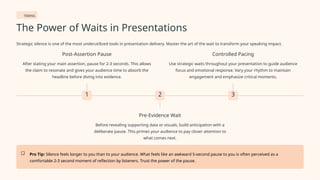
TIMING
The Power of Waits in Presentations
Strategic silence is one of the most underutilized tools in presentation delivery. Master the art of the wait to transform your speaking impact.
1
Post-Assertion Pause
After stating your main assertion, pause for 2-3 seconds. This allows
the claim to resonate and gives your audience time to absorb the
headline before diving into evidence.
2
Pre-Evidence Wait
Before revealing supporting data or visuals, build anticipation with a
deliberate pause. This primes your audience to pay closer attention to
what comes next.
3
Controlled Pacing
Use strategic waits throughout your presentation to guide audience
focus and emotional response. Vary your rhythm to maintain
engagement and emphasize critical moments.
Pro Tip: Silence feels longer to you than to your audience. What feels like an awkward 5-second pause to you is often perceived as a
comfortable 2-3 second moment of reflection by listeners. Trust the power of the pause.
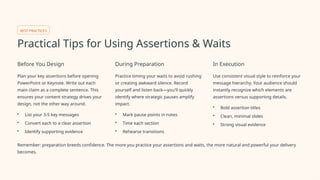
BEST PRACTICES
Practical Tips for Using Assertions & Waits
Before You Design
Plan your key assertions before opening
PowerPoint or Keynote. Write out each
main claim as a complete sentence. This
ensures your content strategy drives your
design, not the other way around.
• List your 3-5 key messages
• Convert each to a clear assertion
• Identify supporting evidence
During Preparation
Practice timing your waits to avoid rushing
or creating awkward silence. Record
yourself and listen back—you'll quickly
identify where strategic pauses amplify
impact.
• Mark pause points in notes
• Time each section
• Rehearse transitions
In Execution
Use consistent visual style to reinforce your
message hierarchy. Your audience should
instantly recognize which elements are
assertions versus supporting details.
• Bold assertion titles
• Clean, minimal slides
• Strong visual evidence
Remember: preparation breeds confidence. The more you practice your assertions and waits, the more natural and powerful your delivery
becomes.
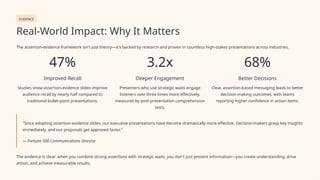
EVIDENCE
Real-World Impact: Why It Matters
The assertion-evidence framework isn't just theory—it's backed by research and proven in countless high-stakes presentations across industries.
47%
Improved Recall
Studies show assertion-evidence slides improve
audience recall by nearly half compared to
traditional bullet-point presentations.
3.2x
Deeper Engagement
Presenters who use strategic waits engage
listeners over three times more effectively,
measured by post-presentation comprehension
tests.
68%
Better Decisions
Clear, assertion-based messaging leads to better
decision-making outcomes, with teams
reporting higher confidence in action items.
"Since adopting assertion-evidence slides, our executive presentations have become dramatically more effective. Decision-makers grasp key insights
immediately, and our proposals get approved faster."
— Fortune 500 Communications Director
The evidence is clear: when you combine strong assertions with strategic waits, you don't just present information—you create understanding, drive
action, and achieve measurable results.
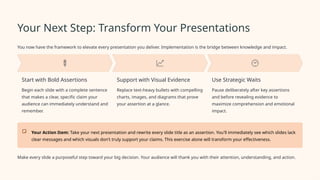
Your Next Step: Transform Your Presentations
You now have the framework to elevate every presentation you deliver. Implementation is the bridge between knowledge and impact.
Start with Bold Assertions
Begin each slide with a complete sentence
that makes a clear, specific claim your
audience can immediately understand and
remember.
Support with Visual Evidence
Replace text-heavy bullets with compelling
charts, images, and diagrams that prove
your assertion at a glance.
Use Strategic Waits
Pause deliberately after key assertions
and before revealing evidence to
maximize comprehension and emotional
impact.
Your Action Item: Take your next presentation and rewrite every slide title as an assertion. You'll immediately see which slides lack
clear messages and which visuals don't truly support your claims. This exercise alone will transform your effectiveness.
Make every slide a purposeful step toward your big decision. Your audience will thank you with their attention, understanding, and action.

Assertions & Waits in Playwright – Writing Stable & Reliable Tests

  • 1.
    Mastering Assertions &Waits: Clear Communication for Impactful Presentations Transform your presentations from forgettable to unforgettable by mastering two powerful techniques that separate amateur speakers from communication experts.
  • 2.
    FUNDAMENTALS What Are Assertions& Waits? Assertion A clear, concise statement that conveys your main message with conviction and purpose. Think of it as the headline that tells your audience exactly what they need to know, not just what you're talking about. Instead of vague topic headings, assertions make claims that drive understanding and action. Wait The deliberate pause or timing strategy that gives your message space to breathe and sink in. This isn't awkward silence—it's strategic punctuation that amplifies impact. Waits control the rhythm of information delivery, preventing cognitive overload and creating moments for reflection. Together, assertions and waits create powerful, memorable presentations that stick with your audience long after you've finished speaking.
  • 3.
    BENEFITS Why Use Assertions& Waits? Laser-Focused Messaging Assertions direct your audience's attention to one key idea per slide, eliminating confusion and ensuring everyone follows your narrative thread. Reduced Cognitive Load Waits give your audience time to process complex visuals and data, preventing the mental fatigue that comes from information overload. Enhanced Retention This powerful combination boosts comprehension and long-term retention by creating clear mental anchors for key concepts. Research consistently shows that audiences remember presentations built on assertions and strategic pauses far better than traditional slide decks packed with bullet points and rushed delivery.
  • 4.
    FRAMEWORK The Assertion-Evidence Framework Thisproven approach transforms how you structure every slide, moving from topic-based headings to claim-based communication that drives decisions. 01 Start with a Strong Assertion Each slide's title makes a complete statement —not a vague topic heading. It tells the audience what to conclude, not just what you're discussing. 02 Support with Visual Evidence Charts, images, diagrams, and data visualizations provide compelling proof of your assertion. The visual does the heavy lifting, not text. 03 Eliminate Bullet Point Clutter Replace dense bulleted lists with streamlined visuals and minimal supporting text. Your audience should look at evidence, not read paragraphs. Key Principle: Your slide title should be a sentence your audience could quote verbatim when explaining your presentation to others. If it's not quotable, it's not an assertion.
  • 5.
    Example: Weak vs.Strong Assertion Slide The difference between mediocre and exceptional presentations often comes down to how you frame your message. Here's a side-by-side comparison that illustrates the power of the assertion-evidence approach. ❌ Weak Approach Sales Growth in Q4 • New marketing campaign launched • Customer acquisition improved • Revenue exceeded targets • Team performance strong This slide forces the audience to connect the dots themselves. The title is merely a topic, and bullets leave the key insight buried. ✓ Strong Approach Q4 Sales Increased 25% Due to New Marketing Strategy [Compelling graph showing growth trajectory with clear before/after comparison] The assertion tells the complete story immediately. Visual evidence proves the claim instantly, making the insight unmissable and memorable. Notice how the strong assertion leaves no ambiguity—it states exactly what happened and why. The audience knows the conclusion before examining the evidence, making comprehension effortless.
  • 6.
    TECHNIQUE How to CraftEffective Assertions Writing powerful assertions is a skill that transforms good presenters into exceptional communicators. Follow these proven strategies to create slide titles that command attention and drive understanding. Make It a Complete Sentence Your assertion should state your point clearly and completely. Fragments and phrases don't work—you need subject, verb, and a clear claim that stands alone. Example: "Customer retention drives long-term profitability" not "Customer Retention." Avoid Vague or Generic Titles Eliminate wishy-washy language and ambiguous statements. Be specific about what you're claiming and why it matters to your audience. Example: "Our mobile app reduced checkout time by 40%" not "Mobile App Improvements." Use Active Language Choose strong verbs and direct statements that drive decisions or insights. Passive voice dilutes impact— active voice energizes your message. Example: "AI automation will eliminate 15% of manual tasks" not "Manual tasks may be impacted by AI."
  • 7.
    TIMING The Power ofWaits in Presentations Strategic silence is one of the most underutilized tools in presentation delivery. Master the art of the wait to transform your speaking impact. 1 Post-Assertion Pause After stating your main assertion, pause for 2-3 seconds. This allows the claim to resonate and gives your audience time to absorb the headline before diving into evidence. 2 Pre-Evidence Wait Before revealing supporting data or visuals, build anticipation with a deliberate pause. This primes your audience to pay closer attention to what comes next. 3 Controlled Pacing Use strategic waits throughout your presentation to guide audience focus and emotional response. Vary your rhythm to maintain engagement and emphasize critical moments. Pro Tip: Silence feels longer to you than to your audience. What feels like an awkward 5-second pause to you is often perceived as a comfortable 2-3 second moment of reflection by listeners. Trust the power of the pause.
  • 8.
    BEST PRACTICES Practical Tipsfor Using Assertions & Waits Before You Design Plan your key assertions before opening PowerPoint or Keynote. Write out each main claim as a complete sentence. This ensures your content strategy drives your design, not the other way around. • List your 3-5 key messages • Convert each to a clear assertion • Identify supporting evidence During Preparation Practice timing your waits to avoid rushing or creating awkward silence. Record yourself and listen back—you'll quickly identify where strategic pauses amplify impact. • Mark pause points in notes • Time each section • Rehearse transitions In Execution Use consistent visual style to reinforce your message hierarchy. Your audience should instantly recognize which elements are assertions versus supporting details. • Bold assertion titles • Clean, minimal slides • Strong visual evidence Remember: preparation breeds confidence. The more you practice your assertions and waits, the more natural and powerful your delivery becomes.
  • 9.
    EVIDENCE Real-World Impact: WhyIt Matters The assertion-evidence framework isn't just theory—it's backed by research and proven in countless high-stakes presentations across industries. 47% Improved Recall Studies show assertion-evidence slides improve audience recall by nearly half compared to traditional bullet-point presentations. 3.2x Deeper Engagement Presenters who use strategic waits engage listeners over three times more effectively, measured by post-presentation comprehension tests. 68% Better Decisions Clear, assertion-based messaging leads to better decision-making outcomes, with teams reporting higher confidence in action items. "Since adopting assertion-evidence slides, our executive presentations have become dramatically more effective. Decision-makers grasp key insights immediately, and our proposals get approved faster." — Fortune 500 Communications Director The evidence is clear: when you combine strong assertions with strategic waits, you don't just present information—you create understanding, drive action, and achieve measurable results.
  • 10.
    Your Next Step:Transform Your Presentations You now have the framework to elevate every presentation you deliver. Implementation is the bridge between knowledge and impact. Start with Bold Assertions Begin each slide with a complete sentence that makes a clear, specific claim your audience can immediately understand and remember. Support with Visual Evidence Replace text-heavy bullets with compelling charts, images, and diagrams that prove your assertion at a glance. Use Strategic Waits Pause deliberately after key assertions and before revealing evidence to maximize comprehension and emotional impact. Your Action Item: Take your next presentation and rewrite every slide title as an assertion. You'll immediately see which slides lack clear messages and which visuals don't truly support your claims. This exercise alone will transform your effectiveness. Make every slide a purposeful step toward your big decision. Your audience will thank you with their attention, understanding, and action.