ASP.NET習得の最短経路を考察する
~ Razor記法とASP.NET Web Pages、そして、WebMatrix ~


日本マイクロソフト株式会社
デベロッパー & プラットフォーム統括本部
エバンジェリスト
武田 正樹 (たけだ まさき)              井上 章     (いのうえ あきら)
http://blogs.msdn.com/web_   http://blogs.msdn.com/chack
Session Takeaways
 ASP.NET 習得の ステップを理解する

 Razor 記法と ASP.NET Web Pages の概要を学ぶ

 WebMatrix の位置づけを理解する
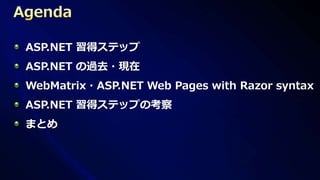
ASP.NET 習得ステップ
ASP.NET の過去・現在
WebMatrix・ASP.NET Web Pages with Razor syntax
ASP.NET 習得ステップの考察
まとめ
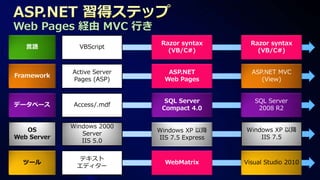
Web Pages 経由 MVC 行き
                              Razor syntax       Razor syntax
   言語          VBScript
                                (VB/C#)            (VB/C#)


             Active Server      ASP.NET          ASP.NET MVC
Framework
             Pages (ASP)       Web Pages            (View)


                               SQL Server         SQL Server
データベース       Access/.mdf
                              Compact 4.0          2008 R2


             Windows 2000
   OS                        Windows XP 以降     Windows XP 以降
                Server
Web Server                   IIS 7.5 Express       IIS 7.5
                IIS 5.0

               テキスト
  ツール                          WebMatrix       Visual Studio 2010
              エディター
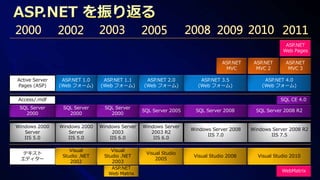
ASP.NET
                                                                                                    Web Pages

                                                                              ASP.NET    ASP.NET     ASP.NET
                                                                               MVC        MVC 2       MVC 3

Active Server    ASP.NET 1.0    ASP.NET 1.1      ASP.NET 2.0         ASP.NET 3.5             ASP.NET 4.0
Pages (ASP)     (Web フォーム)     (Web フォーム)       (Web フォーム)          (Web フォーム)              (Web フォーム)

Access/.mdf                                                                                        SQL CE 4.0
 SQL Server      SQL Server      SQL Server
                                                SQL Server 2005    SQL Server 2008        SQL Server 2008 R2
   2000            2000            2000

Windows 2000    Windows 2000   Windows Server   Windows Server
                                                                  Windows Server 2008   Windows Server 2008 R2
   Server          Server           2003           2003 R2
                                                                        IIS 7.0                IIS 7.5
   IIS 5.0         IIS 5.0         IIS 6.0          IIS 6.0

                    Visual         Visual
 テキスト                                            Visual Studio
                 Studio .NET    Studio .NET                        Visual Studio 2008     Visual Studio 2010
 エディター                                               2005
                    2002           2003
                                   ASP.NET
                                                                                                    WebMatrix
                                  Web Matrix
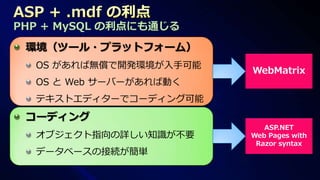
PHP + MySQL の利点にも通じる
 環境(ツール・プラットフォーム)
  OS があれば無償で開発環境が入手可能
                        WebMatrix
  OS と Web サーバーがあれば動く
  テキストエディターでコーディング可能
 コーディング
                           ASP.NET
  オブジェクト指向の詳しい知識が不要     Web Pages with
                         Razor syntax
  データベースの接続が簡単
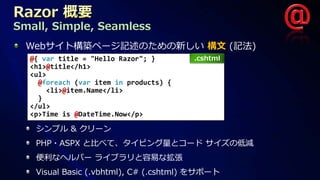
Small, Simple, Seamless
  Webサイト構築ページ記述のための新しい 構文 (記法)
  @{ var title = "Hello Razor"; }       .cshtml
  <h1>@title</h1>
  <ul>
    @foreach (var item in products) {
      <li>@item.Name</li>
    }
  </ul>
  <p>Time is @DateTime.Now</p>

   シンプル & クリーン
   PHP・ASPX と比べて、タイピング量とコード サイズの低減
   便利なヘルパー ライブラリと容易な拡張
   Visual Basic (.vbhtml), C# (.cshtml) をサポート
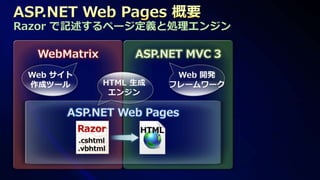
Razor で記述するページ定義と処理エンジン
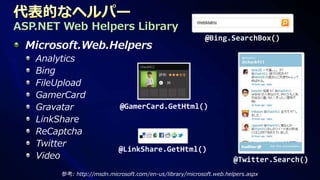
ASP.NET Web Helpers Library
                                                           @Bing.SearchBox()
 Microsoft.Web.Helpers
   Analytics
   Bing
   FileUpload
   GamerCard
   Gravatar                 @GamerCard.GetHtml()
   LinkShare
   ReCaptcha
   Twitter
                            @LinkShare.GetHtml()
   Video                                                             @Twitter.Search()
        参考: http://msdn.microsoft.com/en-us/library/microsoft.web.helpers.aspx
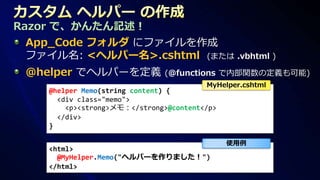
Razor で、かんたん記述!
 App_Code フォルダ にファイルを作成
 ファイル名: <ヘルパー名>.cshtml (または .vbhtml )
 @helper でヘルパーを定義             (@functions で内部関数の定義も可能)
                                        MyHelper.cshtml
    @helper Memo(string content) {
      <div class="memo">
        <p><strong>メモ:</strong>@content</p>
      </div>
    }

                                              使用例
    <html>
      @MyHelper.Memo("ヘルパーを作りました!")
    </html>
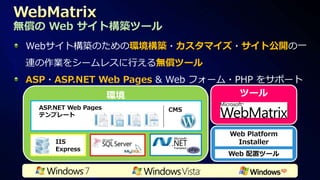
無償の Web サイト構築ツール
 Webサイト構築のための環境構築・カスタマイズ・サイト公開の一
 連の作業をシームレスに行える無償ツール
 ASP・ASP.NET Web Pages & Web フォーム・PHP をサポート
              環境                   ツール
   ASP.NET Web Pages   CMS
   テンプレート


                               Web Platform
       IIS                       Installer
       Express
                               Web 配置ツール
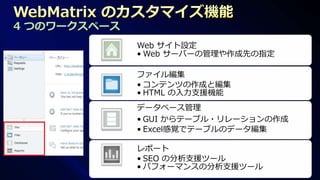
4 つのワークスペース
              Web サイト設定
              • Web サーバーの管理や作成先の指定

              ファイル編集
              • コンテンツの作成と編集
              • HTML の入力支援機能
              データベース管理
              • GUI からテーブル・リレーションの作成
              • Excel感覚でテーブルのデータ編集

              レポート
              • SEO の分析支援ツール
              • パフォーマンスの分析支援ツール
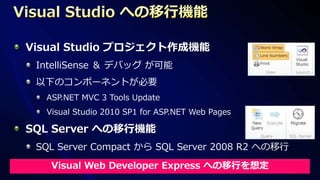
Visual Studio プロジェクト作成機能
 IntelliSense & デバッグ が可能
 以下のコンポーネントが必要
  ASP.NET MVC 3 Tools Update
  Visual Studio 2010 SP1 for ASP.NET Web Pages

SQL Server への移行機能
 SQL Server Compact から SQL Server 2008 R2 への移行

   Visual Web Developer Express への移行を想定
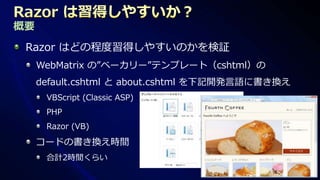
概要
 Razor はどの程度習得しやすいのかを検証
     WebMatrix の”ベーカリー”テンプレート(cshtml)の
     default.cshtml と about.cshtml を下記開発言語に書き換え
      VBScript (Classic ASP)
      PHP
      Razor (VB)

     コードの書き換え時間
      合計2時間くらい
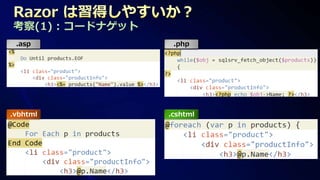
考察(1) : コードナゲット
 .asp              .php


.vbhtml           .cshtml
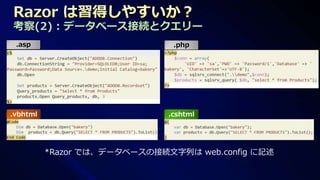
考察(2) : データベース接続とクエリー
 .asp                          .php


.vbhtml                       .cshtml


          *Razor では、データベースの接続文字列は web.config に記述
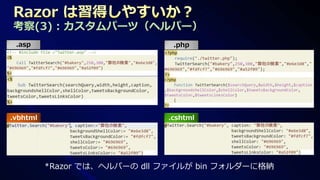
考察(3) : カスタムパーツ(ヘルパー)
 .asp                          .php


.vbhtml                       .cshtml


          *Razor では、ヘルパーの dll ファイルが bin フォルダーに格納
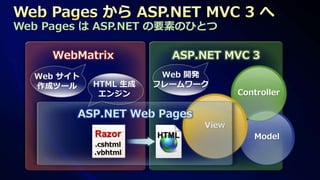
Web Pages は ASP.NET の要素のひとつ

     WebMatrix          ASP.NET MVC 3
  Web サイト              Web 開発
  作成ツール     HTML 生成   フレームワーク
             エンジン                   Controller

        ASP.NET Web Pages
                             View
            Razor     HTML             Model
            .cshtml
            .vbhtml
ASP → Web Pages → ASP.NET MVC 3

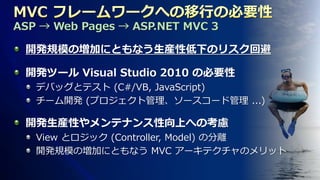
 開発規模の増加にともなう生産性低下のリスク回避

 開発ツール Visual Studio 2010 の必要性
   デバッグとテスト (C#/VB, JavaScript)
   チーム開発 (プロジェクト管理、ソースコード管理 ...)

 開発生産性やメンテナンス性向上への考慮
   View とロジック (Controller, Model) の分離
   開発規模の増加にともなう MVC アーキテクチャのメリット
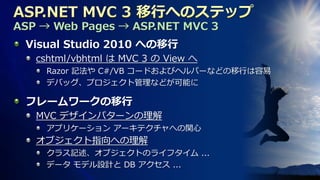
ASP → Web Pages → ASP.NET MVC 3
 Visual Studio 2010 への移行
   cshtml/vbhtml は MVC 3 の View へ
     Razor 記法や C#/VB コードおよびヘルパーなどの移行は容易
     デバッグ、プロジェクト管理などが可能に

 フレームワークの移行
   MVC デザインパターンの理解
     アプリケーション アーキテクチャへの関心
   オブジェクト指向への理解
     クラス記述、オブジェクトのライフタイム ...
     データ モデル設計と DB アクセス ...
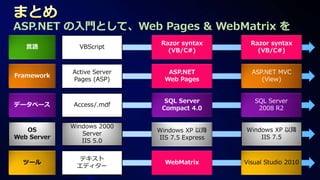
ASP.NET の入門として、Web Pages & WebMatrix を
                              Razor syntax       Razor syntax
   言語          VBScript
                                (VB/C#)            (VB/C#)


             Active Server      ASP.NET          ASP.NET MVC
Framework
             Pages (ASP)       Web Pages            (View)


                               SQL Server         SQL Server
データベース       Access/.mdf
                              Compact 4.0          2008 R2


             Windows 2000
   OS                        Windows XP 以降     Windows XP 以降
                Server
Web Server                   IIS 7.5 Express       IIS 7.5
                IIS 5.0

               テキスト
  ツール                          WebMatrix       Visual Studio 2010
              エディター
Razor 構文と ASP.NET Web ページ
http://msdn.microsoft.com/ja-jp/asp.net/gg193039

「簡単、簡潔、スピーディー! WebMatrix を使った ASP.NET Web ページ開発手法」
Tech Fielders セミナー http://www.microsoft.com/japan/powerpro/TF/seminar.mspx#s122

MSDN ASP.NET デベロッパー センター
http://msdn.microsoft.com/ja-jp/asp.net/default.aspx

ASP.NET: The Official Microsoft ASP.NET Site (英語)
http://www.asp.net/

ScottGu's Blog (英語)
http://weblogs.asp.net/scottgu/default.aspx

ASP.NET MVC 3 開発入門 ~ Microsoft MVP - ASP.NET/IIS 芝村氏のブログ ~
http://d.hatena.ne.jp/shiba-yan/20110208/1297096899
ご清聴、誠ににありがとうございました!


                                   © 2012 Microsoft Corporation. All rights reserved. Microsoft, Windows, Windows Vista and other product names are or may be registered trademarks and/or trademarks in the U.S. and/or other countries.
The information herein is for informational purposes only and represents the current view of Microsoft Corporation as of the date of this presentation. Because Microsoft must respond to changing market conditions, it should not be interpreted to be a commitment on the
          part of Microsoft, and Microsoft cannot guarantee the accuracy of any information provided after the date of this presentation. MICROSOFT MAKES NO WARRANTIES, EXPRESS, IMPLIED OR STATUTORY, AS TO THE INFORMATION IN THIS PRESENTATION.

ASP.NET習得の最短経路を考察する

  • 1.
    ASP.NET習得の最短経路を考察する ~ Razor記法とASP.NET WebPages、そして、WebMatrix ~ 日本マイクロソフト株式会社 デベロッパー & プラットフォーム統括本部 エバンジェリスト 武田 正樹 (たけだ まさき) 井上 章 (いのうえ あきら) http://blogs.msdn.com/web_ http://blogs.msdn.com/chack
  • 2.
    Session Takeaways ASP.NET習得の ステップを理解する Razor 記法と ASP.NET Web Pages の概要を学ぶ WebMatrix の位置づけを理解する
  • 3.
    ASP.NET 習得ステップ ASP.NET の過去・現在 WebMatrix・ASP.NETWeb Pages with Razor syntax ASP.NET 習得ステップの考察 まとめ
  • 4.
    Web Pages 経由MVC 行き Razor syntax Razor syntax 言語 VBScript (VB/C#) (VB/C#) Active Server ASP.NET ASP.NET MVC Framework Pages (ASP) Web Pages (View) SQL Server SQL Server データベース Access/.mdf Compact 4.0 2008 R2 Windows 2000 OS Windows XP 以降 Windows XP 以降 Server Web Server IIS 7.5 Express IIS 7.5 IIS 5.0 テキスト ツール WebMatrix Visual Studio 2010 エディター
  • 6.
    ASP.NET Web Pages ASP.NET ASP.NET ASP.NET MVC MVC 2 MVC 3 Active Server ASP.NET 1.0 ASP.NET 1.1 ASP.NET 2.0 ASP.NET 3.5 ASP.NET 4.0 Pages (ASP) (Web フォーム) (Web フォーム) (Web フォーム) (Web フォーム) (Web フォーム) Access/.mdf SQL CE 4.0 SQL Server SQL Server SQL Server SQL Server 2005 SQL Server 2008 SQL Server 2008 R2 2000 2000 2000 Windows 2000 Windows 2000 Windows Server Windows Server Windows Server 2008 Windows Server 2008 R2 Server Server 2003 2003 R2 IIS 7.0 IIS 7.5 IIS 5.0 IIS 5.0 IIS 6.0 IIS 6.0 Visual Visual テキスト Visual Studio Studio .NET Studio .NET Visual Studio 2008 Visual Studio 2010 エディター 2005 2002 2003 ASP.NET WebMatrix Web Matrix
  • 7.
    PHP + MySQLの利点にも通じる 環境(ツール・プラットフォーム) OS があれば無償で開発環境が入手可能 WebMatrix OS と Web サーバーがあれば動く テキストエディターでコーディング可能 コーディング ASP.NET オブジェクト指向の詳しい知識が不要 Web Pages with Razor syntax データベースの接続が簡単
  • 9.
    Small, Simple, Seamless Webサイト構築ページ記述のための新しい 構文 (記法) @{ var title = "Hello Razor"; } .cshtml <h1>@title</h1> <ul> @foreach (var item in products) { <li>@item.Name</li> } </ul> <p>Time is @DateTime.Now</p> シンプル & クリーン PHP・ASPX と比べて、タイピング量とコード サイズの低減 便利なヘルパー ライブラリと容易な拡張 Visual Basic (.vbhtml), C# (.cshtml) をサポート
  • 10.
  • 11.
    ASP.NET Web HelpersLibrary @Bing.SearchBox() Microsoft.Web.Helpers Analytics Bing FileUpload GamerCard Gravatar @GamerCard.GetHtml() LinkShare ReCaptcha Twitter @LinkShare.GetHtml() Video @Twitter.Search() 参考: http://msdn.microsoft.com/en-us/library/microsoft.web.helpers.aspx
  • 12.
    Razor で、かんたん記述! App_Codeフォルダ にファイルを作成 ファイル名: <ヘルパー名>.cshtml (または .vbhtml ) @helper でヘルパーを定義 (@functions で内部関数の定義も可能) MyHelper.cshtml @helper Memo(string content) { <div class="memo"> <p><strong>メモ:</strong>@content</p> </div> } 使用例 <html> @MyHelper.Memo("ヘルパーを作りました!") </html>
  • 14.
    無償の Web サイト構築ツール Webサイト構築のための環境構築・カスタマイズ・サイト公開の一 連の作業をシームレスに行える無償ツール ASP・ASP.NET Web Pages & Web フォーム・PHP をサポート 環境 ツール ASP.NET Web Pages CMS テンプレート Web Platform IIS Installer Express Web 配置ツール
  • 15.
    4 つのワークスペース Web サイト設定 • Web サーバーの管理や作成先の指定 ファイル編集 • コンテンツの作成と編集 • HTML の入力支援機能 データベース管理 • GUI からテーブル・リレーションの作成 • Excel感覚でテーブルのデータ編集 レポート • SEO の分析支援ツール • パフォーマンスの分析支援ツール
  • 16.
    Visual Studio プロジェクト作成機能 IntelliSense & デバッグ が可能 以下のコンポーネントが必要 ASP.NET MVC 3 Tools Update Visual Studio 2010 SP1 for ASP.NET Web Pages SQL Server への移行機能 SQL Server Compact から SQL Server 2008 R2 への移行 Visual Web Developer Express への移行を想定
  • 18.
    概要 Razor はどの程度習得しやすいのかを検証 WebMatrix の”ベーカリー”テンプレート(cshtml)の default.cshtml と about.cshtml を下記開発言語に書き換え VBScript (Classic ASP) PHP Razor (VB) コードの書き換え時間 合計2時間くらい
  • 19.
    考察(1) : コードナゲット .asp .php .vbhtml .cshtml
  • 20.
    考察(2) : データベース接続とクエリー .asp .php .vbhtml .cshtml *Razor では、データベースの接続文字列は web.config に記述
  • 21.
    考察(3) : カスタムパーツ(ヘルパー) .asp .php .vbhtml .cshtml *Razor では、ヘルパーの dll ファイルが bin フォルダーに格納
  • 22.
    Web Pages はASP.NET の要素のひとつ WebMatrix ASP.NET MVC 3 Web サイト Web 開発 作成ツール HTML 生成 フレームワーク エンジン Controller ASP.NET Web Pages View Razor HTML Model .cshtml .vbhtml
  • 23.
    ASP → WebPages → ASP.NET MVC 3 開発規模の増加にともなう生産性低下のリスク回避 開発ツール Visual Studio 2010 の必要性 デバッグとテスト (C#/VB, JavaScript) チーム開発 (プロジェクト管理、ソースコード管理 ...) 開発生産性やメンテナンス性向上への考慮 View とロジック (Controller, Model) の分離 開発規模の増加にともなう MVC アーキテクチャのメリット
  • 24.
    ASP → WebPages → ASP.NET MVC 3 Visual Studio 2010 への移行 cshtml/vbhtml は MVC 3 の View へ Razor 記法や C#/VB コードおよびヘルパーなどの移行は容易 デバッグ、プロジェクト管理などが可能に フレームワークの移行 MVC デザインパターンの理解 アプリケーション アーキテクチャへの関心 オブジェクト指向への理解 クラス記述、オブジェクトのライフタイム ... データ モデル設計と DB アクセス ...
  • 25.
    ASP.NET の入門として、Web Pages& WebMatrix を Razor syntax Razor syntax 言語 VBScript (VB/C#) (VB/C#) Active Server ASP.NET ASP.NET MVC Framework Pages (ASP) Web Pages (View) SQL Server SQL Server データベース Access/.mdf Compact 4.0 2008 R2 Windows 2000 OS Windows XP 以降 Windows XP 以降 Server Web Server IIS 7.5 Express IIS 7.5 IIS 5.0 テキスト ツール WebMatrix Visual Studio 2010 エディター
  • 26.
    Razor 構文と ASP.NETWeb ページ http://msdn.microsoft.com/ja-jp/asp.net/gg193039 「簡単、簡潔、スピーディー! WebMatrix を使った ASP.NET Web ページ開発手法」 Tech Fielders セミナー http://www.microsoft.com/japan/powerpro/TF/seminar.mspx#s122 MSDN ASP.NET デベロッパー センター http://msdn.microsoft.com/ja-jp/asp.net/default.aspx ASP.NET: The Official Microsoft ASP.NET Site (英語) http://www.asp.net/ ScottGu's Blog (英語) http://weblogs.asp.net/scottgu/default.aspx ASP.NET MVC 3 開発入門 ~ Microsoft MVP - ASP.NET/IIS 芝村氏のブログ ~ http://d.hatena.ne.jp/shiba-yan/20110208/1297096899

  • 27.
    ご清聴、誠ににありがとうございました! © 2012 Microsoft Corporation. All rights reserved. Microsoft, Windows, Windows Vista and other product names are or may be registered trademarks and/or trademarks in the U.S. and/or other countries. The information herein is for informational purposes only and represents the current view of Microsoft Corporation as of the date of this presentation. Because Microsoft must respond to changing market conditions, it should not be interpreted to be a commitment on the part of Microsoft, and Microsoft cannot guarantee the accuracy of any information provided after the date of this presentation. MICROSOFT MAKES NO WARRANTIES, EXPRESS, IMPLIED OR STATUTORY, AS TO THE INFORMATION IN THIS PRESENTATION.