Visual Studio 2010 Shortcuts
Platform: Windows/English

Manage Visual Studio

Undo, Redo, Copy, Paste

Ctrl+S

Save current file
Save all files

Ctrl+x, Ctrl+c, Ctrl+
V

Cut, copy, paste

Ctrl+Shift+S
Ctrl+Shift+N

Create new project

Ctrl+Shift+V

Pastes an item from the Clipboard ring

Ctrl+Z

Undo

Ctrl+Y

Redo (or Shift+Alt+Backspace, or Ctrl+Shift+Z)

Ctrl+O

Open file

Ctrl+Shift+O

Open project

Ctrl+Shift+A

Add item to project

Esc

Close menu or dialog

Ctrl+P

Print

Shift+Alt+Enter

Select Text
Shift+Arrow Keys

Extend selection one character/one line

Toggle full screen mode

Ctrl+Shift+End/Ctrl
+Shift+Home

Extend selection to end / to beginning of document

Ctrl+F4

Close current tab

Ctrl+Shift+[[]

Extend selection to nexst brace

Ctrl+F6/Ctrl+Shift+
F6

Go to next / go to previous window

Shift+End/Shift+Ho
me

Extend selection to end / to beginning of line

Ctrl+Tab, then
Arrow keys

Press and hold Ctrl+Tab, then using arrow keys gives
a small task manager with all open files and views

Shift+Page Down/S
hift+Page Up

Extends selection down one page / up one page

Ctrl+W

Select current word

Esc

Cancel Selection

Ctrl+Shift+Page
Down/Page Up

Moves cursor and extend selection to the last line /
first line in view.

Bookmarks
For keystrokes with two keys such as Ctrl+k+k, keep holding the Ctrl key
until releasing the last key.
Ctrl+K+K

Toogle bookmark

Ctrl+K+N

Goto next bookmark

Ctrl+Shift+Arrow
Right/Arrow Left

Extend selection one word to the right / one word to
the left

Ctrl+K+P

Goto previous bookmark

Ctrl+A

Select All

Ctrl+Shift+K+N

Goto next bookmark in folder

Ctrl+Shift+K+P

Goto previous bookmark in folder

Ctrl+K+W

Put focus on bookmark window

Esc

Leave bookmark window and focus on editor

Ctrl+K+H

Toggle code shortcut at current line*

Ctrl+K+L

Clear all bookmarks

Coding
Collapse Items

Ctrl+M+H

Collpase / hide current selection

Ctrl+M+O

Collapse declaration bodies

Ctrl+M+A

Collapse all
Uncollapse all

Ctrl+m, ctrl+T

Code Editor

Collapse / un-collapse current preset area (e.g.
method)

Ctrl+M+X

Ctrl++T
Show Task List (including code shortcuts)
*if somebody figures out additional shortut keys on how to use code
shortcuts, please edit this page and add.

Ctrl+M+M

Collapse Html tag

Find, Replace, and Goto

Edit Code

Ctrl+F

Find and replace dialog box

Ctrl+L

F3/Shift+F3

Find next / find previous

Delete current line or selection of lines to and add to
clipboard

Ctrl+H

Display Replace options on the quick tab

Ctrl+Shift+L

Delete current line or selection of lines

Find all references for selected symbol

Ctrl+Delete

Delete word to right of cursor

Find in files

Ctrl+Backspace

Delete word to left of cursor

Stop current find in files operation

Ctrl+Enter

Enter blank line above cursor

Ctrl+F3/Ctrl+Shift+
F3

Find next / find previous in selected text

Ctrl+Shift+Enter

Enter blank line below cursor

Ctrl+Shift+U

Make uppercase

Alt+F12

Find symbol

Ctrl+U

Make lowercase (reverse upercase)

Ctrl+D

Put cursor in find/command box of the toolbar. Use
ctrl+/ in Visual C#

Ctrl+K+C

Comment selected text

Ctrl+K+U

Uncomment selected text

Ctrl+K+

Remove white space and tabs in selection or around
current cursor position

Shift+F12
Ctrl+Shift+F
Alt+F3, s

Ctrl+I/Ctrl+Shift+I

Incremental search / reverse incremental search

Shift+Alt+F12

Quick find symbol

Ctrl+,

Display Navigate-To dialog box

Ctrl+K+D

Format document to code formatting settings

Ctrl+G

Goto line number

Ctrl+K+F

Format selection to code formatting settings

Ctrl+[[]

Go to matching brace in source file

Ctrl+Shift+Space

Display parameter required for selected method

Shift+Ctrl+Arrow
down

Jump to next occurrence of highlighted symbol

Ctrl+Shift+8

Visualize whitespace (or press Ctrl+r, then Ctrl+w)

Shift+Ctrl+Arrow
up

Jump to previous occurrence of highlighted symbol

Ctrl+K+D

Format document to code formatting settings

Ctrl+K+F

Format selection to code formatting settings

Ctrl+Shift+T

Transpose word to right of cursor; makes b=a out of
a=b if cursor was in front of a

Ctrl+T

Transpose character left and right of cursor; cursor
between ab would make ba

Shift+Alt+T

Transpose line: Move line below cursor up and
current line down.

http://www.shortcutworld.com/en/win/Visual-Studio_2010.pdf
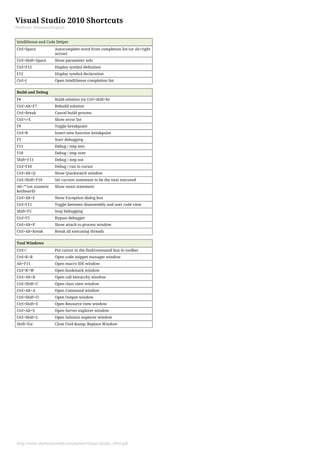
Visual Studio 2010 Shortcuts
Platform: Windows/English

IntelliSense and Code Helper
Ctrl+Space

Autocomplete word from completion list (or alt+right
arrow)

Ctrl+Shift+Space

Show parameter info

Ctrl+F12

Display symbol definition

F12

Display symbol declaration

Ctrl+J

Open IntelliSense completion list

Build and Debug
F6

Build solution (or Ctrl+shift+b)

Ctrl+Alt+F7

Rebuild solution

Ctrl+Break

Cancel build process

Ctrl++E

Show error list

F9

Toggle breakpoint

Ctrl+B

Insert new function breakpoint

F5

Start debugging

F11

Debug / step into

F10

Debug / step over

Shift+F11

Debug / step out

Ctrl+F10

Debug / run to cursor

Ctrl+Alt+Q

Show Quickwatch window

Ctrl+Shift+F10

Set current statement to be the next executed

Alt+* (on numeric
keyboard)

Show nexst statement

Ctrl+Alt+E

Show Exception dialog box

Ctrl+F11

Toggle between disassembly and user code view

Shift+F5

Stop Debugging

Ctrl+F5

Bypass debugger

Ctrl+Alt+P

Show attach to process window

Ctrl+Alt+break

Break all executing threads

Tool Windows
Ctrl+/

Put cursor in the find/command box in toolbar

Ctrl+K+B

Open code snippet manager window

Alt+F11

Open macro IDE window

Ctrl+K+W

Open bookmark window

Ctrl+Alt+K

Open call hierarchy window

Ctrl+Shift+C

Open class view window

Ctrl+Alt+A

Open Command window

Ctrl+Shift+O

Open Output window

Ctrl+Shift+E

Open Resource view window

Ctrl+Alt+S

Open Server explorer window

Ctrl+Shift+L

Open Solution explorer window

Shift+Esc

Close Find & Replace Window

http://www.shortcutworld.com/en/win/Visual-Studio_2010.pdf

Asp key shortcut

  • 1.
    Visual Studio 2010Shortcuts Platform: Windows/English Manage Visual Studio Undo, Redo, Copy, Paste Ctrl+S Save current file Save all files Ctrl+x, Ctrl+c, Ctrl+ V Cut, copy, paste Ctrl+Shift+S Ctrl+Shift+N Create new project Ctrl+Shift+V Pastes an item from the Clipboard ring Ctrl+Z Undo Ctrl+Y Redo (or Shift+Alt+Backspace, or Ctrl+Shift+Z) Ctrl+O Open file Ctrl+Shift+O Open project Ctrl+Shift+A Add item to project Esc Close menu or dialog Ctrl+P Print Shift+Alt+Enter Select Text Shift+Arrow Keys Extend selection one character/one line Toggle full screen mode Ctrl+Shift+End/Ctrl +Shift+Home Extend selection to end / to beginning of document Ctrl+F4 Close current tab Ctrl+Shift+[[] Extend selection to nexst brace Ctrl+F6/Ctrl+Shift+ F6 Go to next / go to previous window Shift+End/Shift+Ho me Extend selection to end / to beginning of line Ctrl+Tab, then Arrow keys Press and hold Ctrl+Tab, then using arrow keys gives a small task manager with all open files and views Shift+Page Down/S hift+Page Up Extends selection down one page / up one page Ctrl+W Select current word Esc Cancel Selection Ctrl+Shift+Page Down/Page Up Moves cursor and extend selection to the last line / first line in view. Bookmarks For keystrokes with two keys such as Ctrl+k+k, keep holding the Ctrl key until releasing the last key. Ctrl+K+K Toogle bookmark Ctrl+K+N Goto next bookmark Ctrl+Shift+Arrow Right/Arrow Left Extend selection one word to the right / one word to the left Ctrl+K+P Goto previous bookmark Ctrl+A Select All Ctrl+Shift+K+N Goto next bookmark in folder Ctrl+Shift+K+P Goto previous bookmark in folder Ctrl+K+W Put focus on bookmark window Esc Leave bookmark window and focus on editor Ctrl+K+H Toggle code shortcut at current line* Ctrl+K+L Clear all bookmarks Coding Collapse Items Ctrl+M+H Collpase / hide current selection Ctrl+M+O Collapse declaration bodies Ctrl+M+A Collapse all Uncollapse all Ctrl+m, ctrl+T Code Editor Collapse / un-collapse current preset area (e.g. method) Ctrl+M+X Ctrl++T Show Task List (including code shortcuts) *if somebody figures out additional shortut keys on how to use code shortcuts, please edit this page and add. Ctrl+M+M Collapse Html tag Find, Replace, and Goto Edit Code Ctrl+F Find and replace dialog box Ctrl+L F3/Shift+F3 Find next / find previous Delete current line or selection of lines to and add to clipboard Ctrl+H Display Replace options on the quick tab Ctrl+Shift+L Delete current line or selection of lines Find all references for selected symbol Ctrl+Delete Delete word to right of cursor Find in files Ctrl+Backspace Delete word to left of cursor Stop current find in files operation Ctrl+Enter Enter blank line above cursor Ctrl+F3/Ctrl+Shift+ F3 Find next / find previous in selected text Ctrl+Shift+Enter Enter blank line below cursor Ctrl+Shift+U Make uppercase Alt+F12 Find symbol Ctrl+U Make lowercase (reverse upercase) Ctrl+D Put cursor in find/command box of the toolbar. Use ctrl+/ in Visual C# Ctrl+K+C Comment selected text Ctrl+K+U Uncomment selected text Ctrl+K+ Remove white space and tabs in selection or around current cursor position Shift+F12 Ctrl+Shift+F Alt+F3, s Ctrl+I/Ctrl+Shift+I Incremental search / reverse incremental search Shift+Alt+F12 Quick find symbol Ctrl+, Display Navigate-To dialog box Ctrl+K+D Format document to code formatting settings Ctrl+G Goto line number Ctrl+K+F Format selection to code formatting settings Ctrl+[[] Go to matching brace in source file Ctrl+Shift+Space Display parameter required for selected method Shift+Ctrl+Arrow down Jump to next occurrence of highlighted symbol Ctrl+Shift+8 Visualize whitespace (or press Ctrl+r, then Ctrl+w) Shift+Ctrl+Arrow up Jump to previous occurrence of highlighted symbol Ctrl+K+D Format document to code formatting settings Ctrl+K+F Format selection to code formatting settings Ctrl+Shift+T Transpose word to right of cursor; makes b=a out of a=b if cursor was in front of a Ctrl+T Transpose character left and right of cursor; cursor between ab would make ba Shift+Alt+T Transpose line: Move line below cursor up and current line down. http://www.shortcutworld.com/en/win/Visual-Studio_2010.pdf
  • 2.
    Visual Studio 2010Shortcuts Platform: Windows/English IntelliSense and Code Helper Ctrl+Space Autocomplete word from completion list (or alt+right arrow) Ctrl+Shift+Space Show parameter info Ctrl+F12 Display symbol definition F12 Display symbol declaration Ctrl+J Open IntelliSense completion list Build and Debug F6 Build solution (or Ctrl+shift+b) Ctrl+Alt+F7 Rebuild solution Ctrl+Break Cancel build process Ctrl++E Show error list F9 Toggle breakpoint Ctrl+B Insert new function breakpoint F5 Start debugging F11 Debug / step into F10 Debug / step over Shift+F11 Debug / step out Ctrl+F10 Debug / run to cursor Ctrl+Alt+Q Show Quickwatch window Ctrl+Shift+F10 Set current statement to be the next executed Alt+* (on numeric keyboard) Show nexst statement Ctrl+Alt+E Show Exception dialog box Ctrl+F11 Toggle between disassembly and user code view Shift+F5 Stop Debugging Ctrl+F5 Bypass debugger Ctrl+Alt+P Show attach to process window Ctrl+Alt+break Break all executing threads Tool Windows Ctrl+/ Put cursor in the find/command box in toolbar Ctrl+K+B Open code snippet manager window Alt+F11 Open macro IDE window Ctrl+K+W Open bookmark window Ctrl+Alt+K Open call hierarchy window Ctrl+Shift+C Open class view window Ctrl+Alt+A Open Command window Ctrl+Shift+O Open Output window Ctrl+Shift+E Open Resource view window Ctrl+Alt+S Open Server explorer window Ctrl+Shift+L Open Solution explorer window Shift+Esc Close Find & Replace Window http://www.shortcutworld.com/en/win/Visual-Studio_2010.pdf