Download to read offline
![Visit us on http://www.techietanks.com/ to keep yourself updated, find more resources and stay tuned with
technology always from anywhere.
Effective Eclipse- Part A: Shortcut keys for fast coder- Ver 1.0 Page 3 of 6
Ctrl+S Save current file
Ctrl+Shift+S Save all files
Ctrl+W Close current file
Ctrl+Shift+W Close all files
F5
Refresh content of selected element with local file
system
2. Editor Window
Focus/ cursor must be in Editor Window for these to work.
F12 Jump to Editor Window
Ctrl+Page Down/Ctrl+Page Up Switch to next editor / switch to previous editor
Ctrl+M
Maximize or un-maximize current Editor Window
(also works for other Windows)
Ctrl+E
Show list of open Editors. Use arrow
keys and enter to switch
Ctrl+F6/Ctrl+Shift+F6
Show list of open Editors. Similar to ctrl+e but
switches immediately upon release of ctrl
Alt+Arrow Left/Alt+Arrow Right Go to previous / go to next Editor Window
Alt+- Open Editor Window Option menu
Ctrl+F10
Show view menu (features available on left vertical
bar: breakpoints, bookmarks, line numbers, …)
Ctrl+F10, then n Show or hide line numbers
Ctrl+Shift+Q
Show or hide the diff column on the left (indicates
changes since last save)
Ctrl+Shift++/- Zoom text in/ out
3. Navigate in Editor
Home/End
Jump to beginning / jump to end of indention.
Press home twice to jump to beginning of line
Ctrl+Home/End Jump to beginning / jump to end of source
Ctrl+Arrow Right/Arrow Left Jump one word to the left / one word to the right
Ctrl+Shift+Arrow Down/Arrow Up Jump to previous / jump to next method
Ctrl+L
Jump to Line Number. To hide/show line numbers,
press ctrl+F10 and select 'Show Line Numbers'
Ctrl+Q Jump to last location edited
Ctrl+./Ctrl+,
Jump to next / jump to previous compiler syntax
warning or error
Ctrl+Shift+P
With a bracket selected: jump to the matching
closing or opening bracket
Ctrl+[+]/Ctrl+- on numeric keyboard Collapse / Expand current method or class
Ctrl+[/]/Ctrl+* on numeric keyboard Collapse / Expand all methods or classes
Ctrl+Arrow Down/Ctrl+Arrow Up Scroll Editor without changing cursor position
Alt+Page Up/Alt+Page Down Next Sub-Tab / Previous Sub-Tab](https://image.slidesharecdn.com/using-eclipse-shortcuts-key-for-fast-coding-170427111803/85/Using-eclipse-shortcuts-key-for-fast-coding-3-320.jpg)
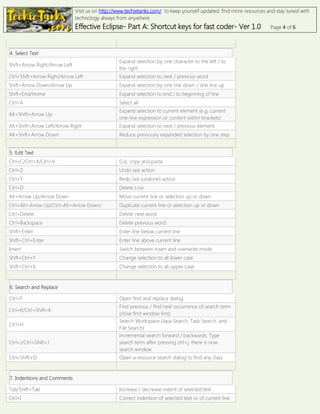
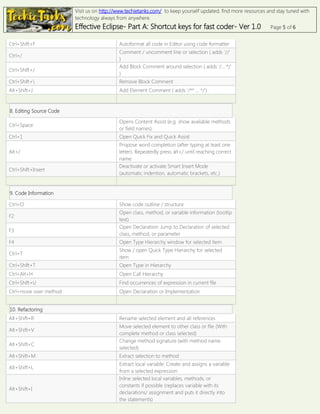
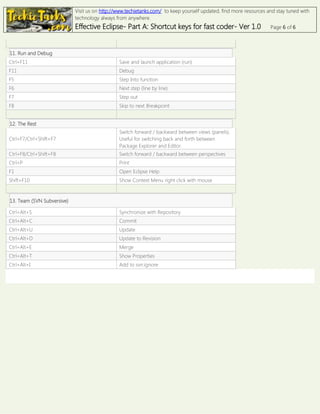

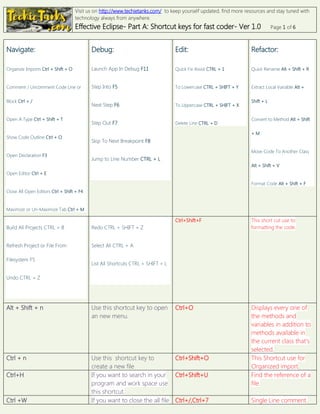
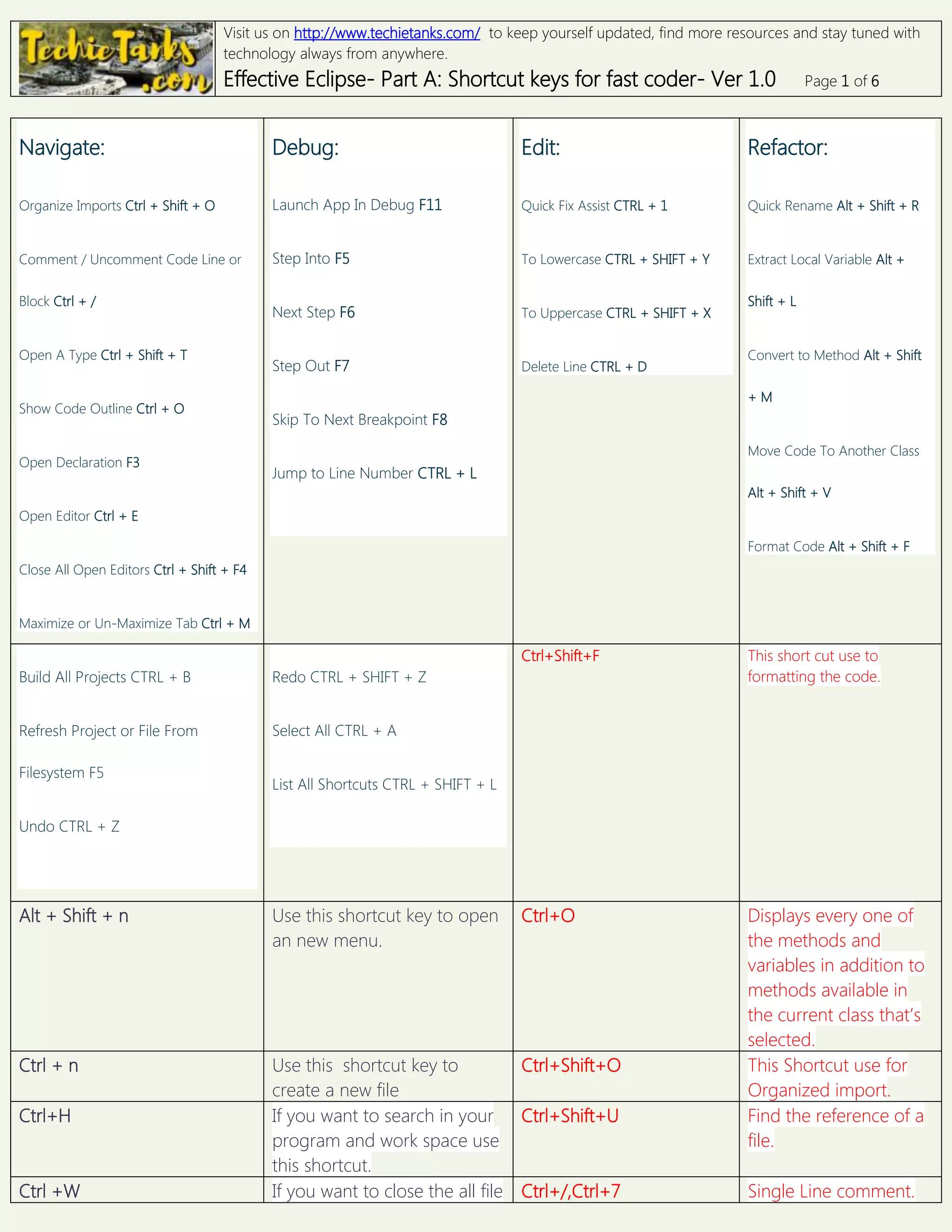
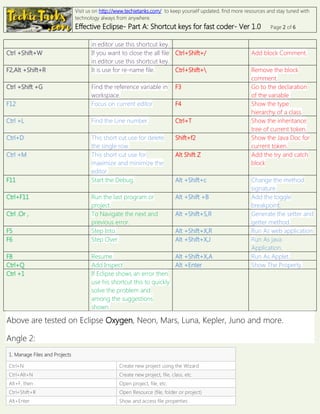
1. Visit techietanks.com to keep updated on technology resources from anywhere. 2. The document provides over 100 keyboard shortcuts for the Eclipse IDE to help coders work faster. Shortcuts are provided for navigating, debugging, editing, formatting code, searching, refactoring, and more. 3. Examples include Ctrl+O to show the code outline, F5 to step into a function during debugging, Ctrl+/ to comment or uncomment code, and Alt+Shift+R to rename a selected element and all its references.


![Eclipse shortcut[most usuage]](https://cdn.slidesharecdn.com/ss_thumbnails/eclipseshortcutmostusuage-120329190934-phpapp01-thumbnail.jpg?width=640&height=640&fit=bounds)


