Portfolio Asset Management

        Client Search:
        The System allows for various types of client searches. You can search by clients name; full or
        partial, clients account number, or by your own special code you supply to customers.
        You can also have any other search criteria customized for your company’s needs.

                                                 Client Profile


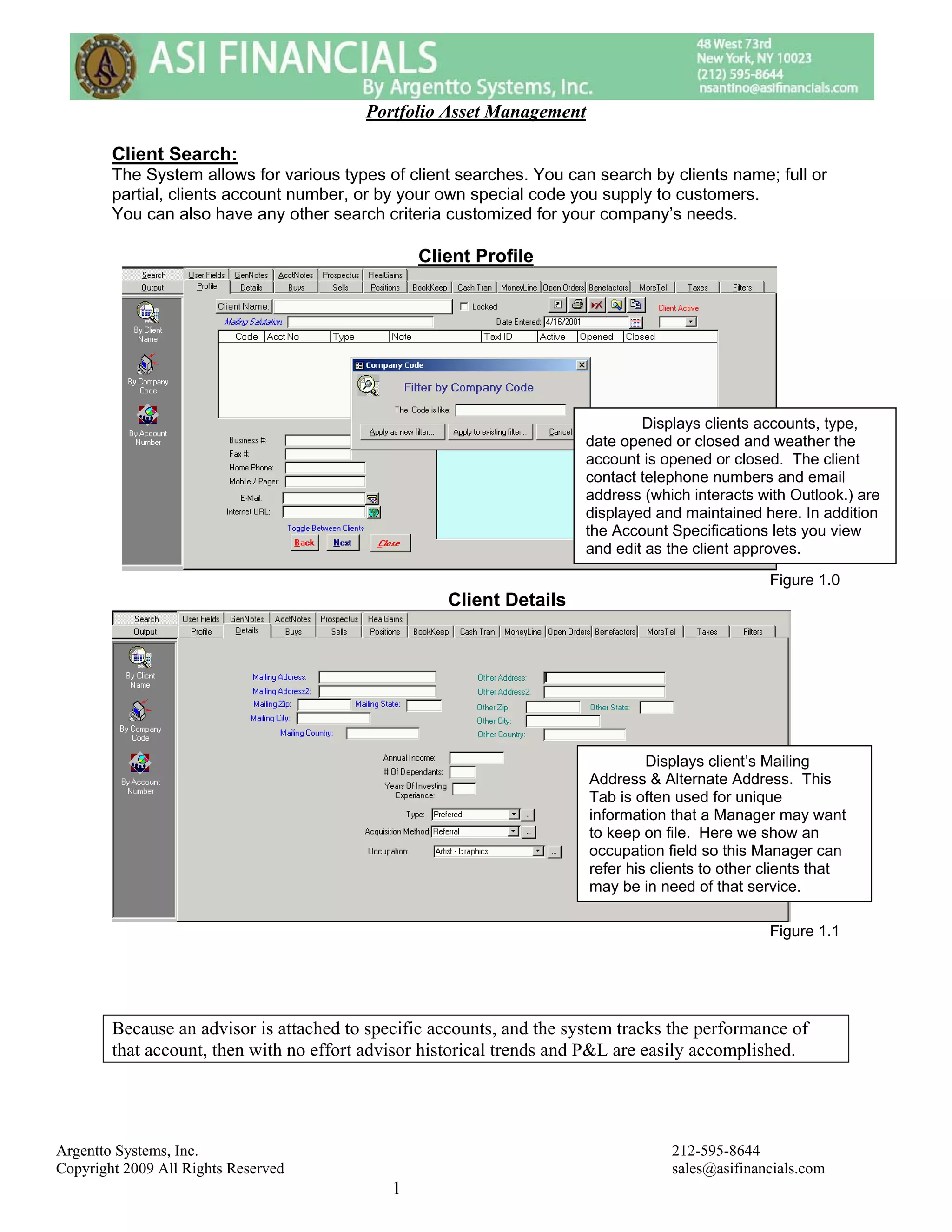
                                                                               Displays clients accounts, type,
                                                                       date opened or closed and weather the
                                                                       account is opened or closed. The client
                                                                       contact telephone numbers and email
                                                                       address (which interacts with Outlook.) are
                                                                       displayed and maintained here. In addition
                                                                       the Account Specifications lets you view
                                                                       and edit as the client approves.

                                                                                                  Figure 1.0
                                                    Client Details


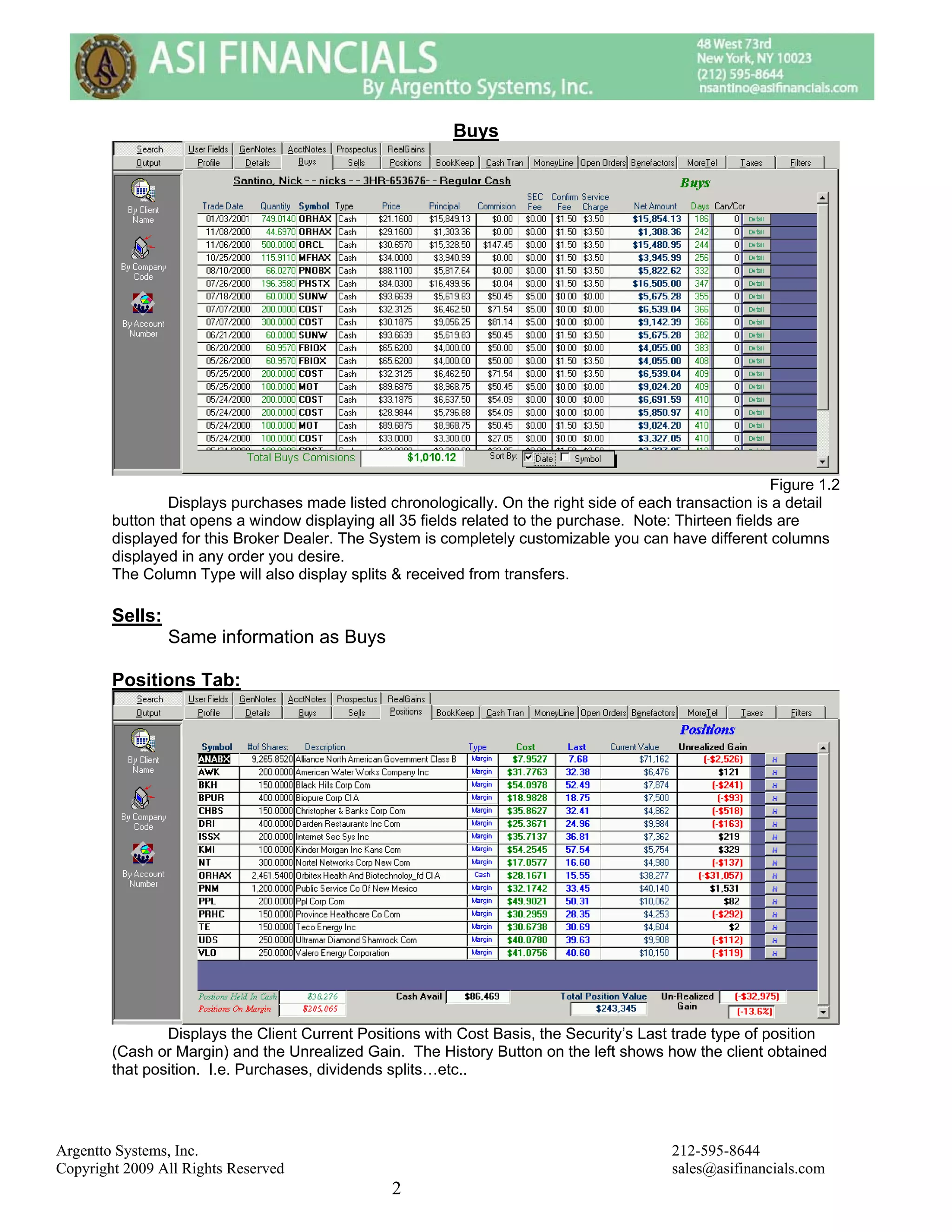
                                                                                Displays client’s Mailing
                                                                       Address & Alternate Address. This
                                                                       Tab is often used for unique
                                                                       information that a Manager may want
                                                                       to keep on file. Here we show an
                                                                       occupation field so this Manager can
                                                                       refer his clients to other clients that
                                                                       may be in need of that service.

                                                                                                  Figure 1.1


        Because an advisor is attached to specific accounts, and the system tracks the performance of
        that account, then with no effort advisor historical trends and P&L are easily accomplished.


Argentto Systems, Inc.                                                             212-595-8644
Copyright 2009 All Rights Reserved                                                 sales@asifinancials.com
                                             1
Buys


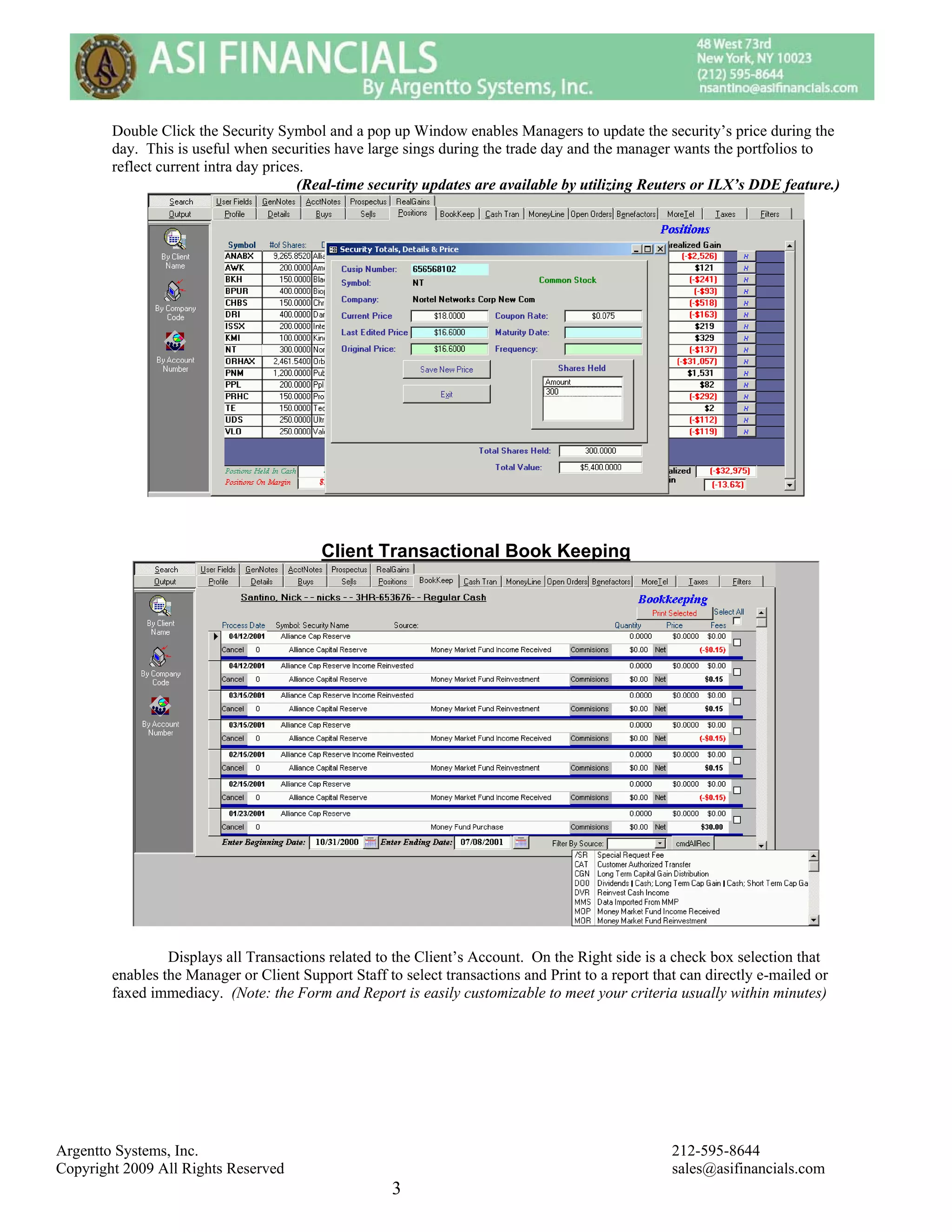
                                                                                                          Figure 1.2
                Displays purchases made listed chronologically. On the right side of each transaction is a detail
        button that opens a window displaying all 35 fields related to the purchase. Note: Thirteen fields are
        displayed for this Broker Dealer. The System is completely customizable you can have different columns
        displayed in any order you desire.
        The Column Type will also display splits & received from transfers.

        Sells:
                 Same information as Buys

        Positions Tab:


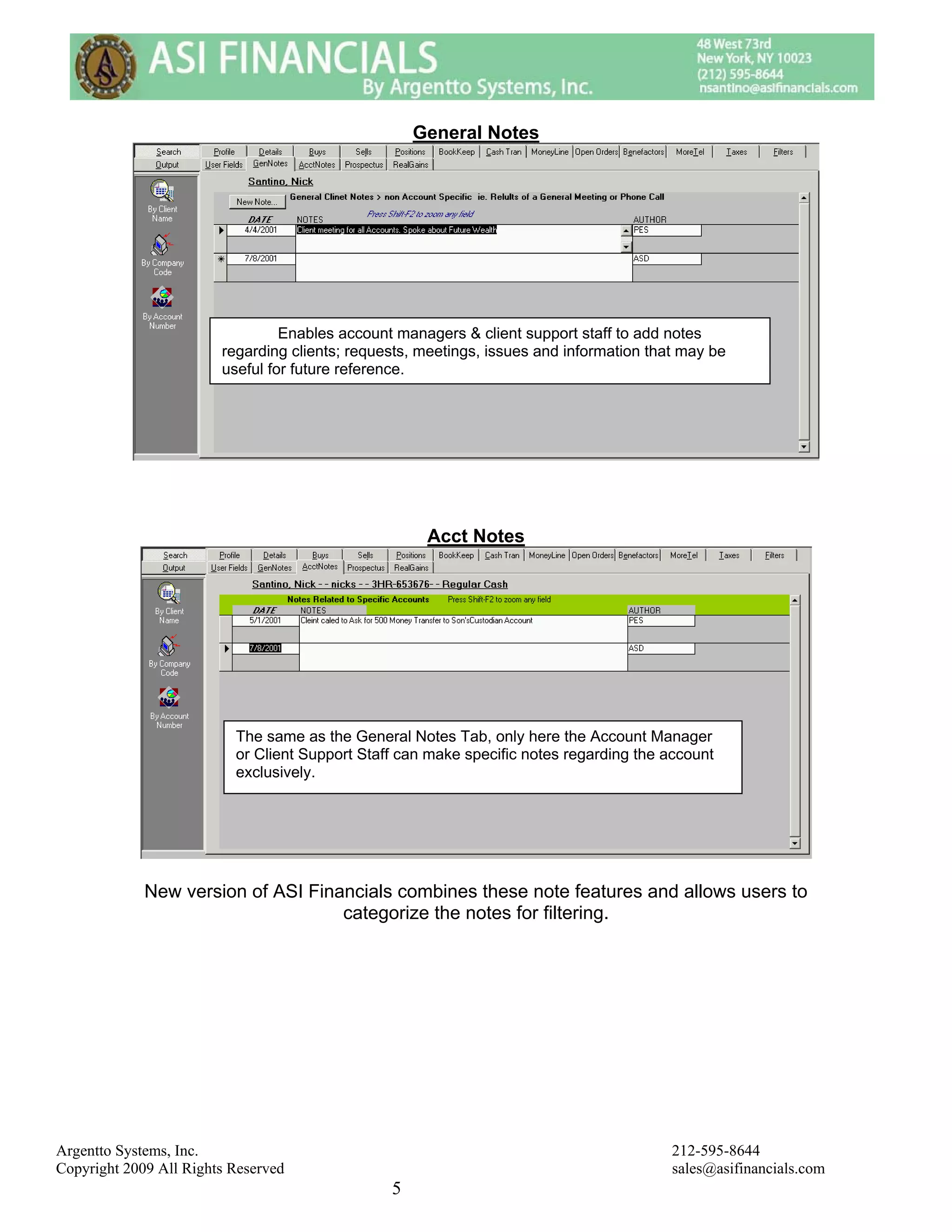
                Displays the Client Current Positions with Cost Basis, the Security’s Last trade type of position
        (Cash or Margin) and the Unrealized Gain. The History Button on the left shows how the client obtained
        that position. I.e. Purchases, dividends splits…etc..


Argentto Systems, Inc.                                                                     212-595-8644
Copyright 2009 All Rights Reserved                                                         sales@asifinancials.com
                                                 2
Double Click the Security Symbol and a pop up Window enables Managers to update the security’s price during the
        day. This is useful when securities have large sings during the trade day and the manager wants the portfolios to
        reflect current intra day prices.
                                       (Real-time security updates are available by utilizing Reuters or ILX’s DDE feature.)


                                          Client Transactional Book Keeping


                 Displays all Transactions related to the Client’s Account. On the Right side is a check box selection that
        enables the Manager or Client Support Staff to select transactions and Print to a report that can directly e-mailed or
        faxed immediacy. (Note: the Form and Report is easily customizable to meet your criteria usually within minutes)


Argentto Systems, Inc.                                                                              212-595-8644
Copyright 2009 All Rights Reserved                                                                  sales@asifinancials.com
                                                      3
Cash Transactions


                This displays the Bookkeeping Data as well, with a filter on it to show just cash transactions.

                                                      Money Line


                  The Money Line Tab Displays client account balance calculated on a trade and settlement date
                  basis, and computes the available cash and Special Memorandum Account (SMA). In addition,
                  the MMF (Money Market Balance) is displayed with the Last Sweep Date.

                                                             Note: Different Clearing Houses Represent Data Differently.


Argentto Systems, Inc.                                                                       212-595-8644
Copyright 2009 All Rights Reserved                                                           sales@asifinancials.com
                                                 4
General Notes


                                 Enables account managers & client support staff to add notes
                        regarding clients; requests, meetings, issues and information that may be
                        useful for future reference.


                                                     Acct Notes


                          The same as the General Notes Tab, only here the Account Manager
                          or Client Support Staff can make specific notes regarding the account
                          exclusively.


             New version of ASI Financials combines these note features and allows users to
                                    categorize the notes for filtering.


Argentto Systems, Inc.                                                                   212-595-8644
Copyright 2009 All Rights Reserved                                                       sales@asifinancials.com
                                                5
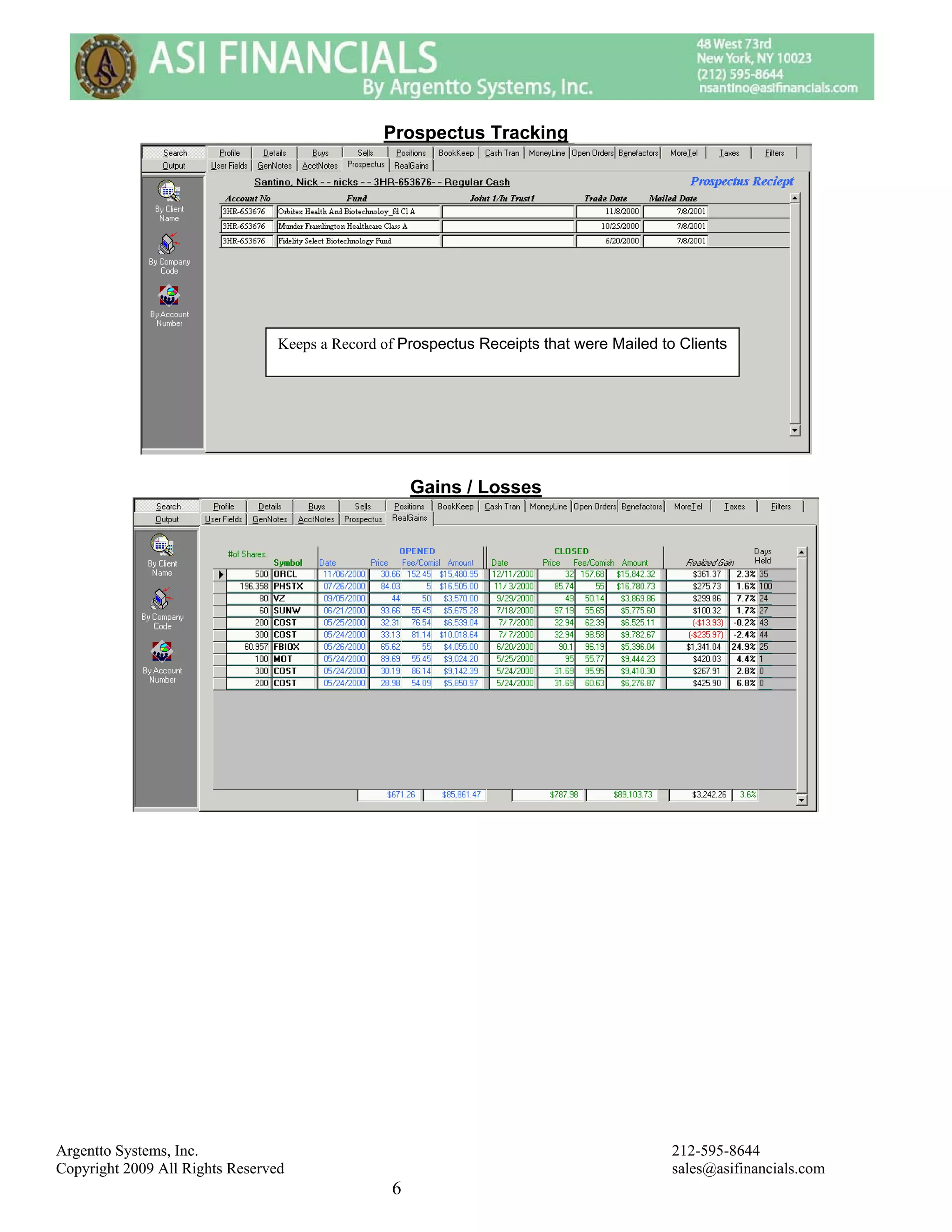
Prospectus Tracking


                                 Keeps a Record of Prospectus Receipts that were Mailed to Clients


                                                     Gains / Losses


Argentto Systems, Inc.                                                                    212-595-8644
Copyright 2009 All Rights Reserved                                                        sales@asifinancials.com
                                                 6
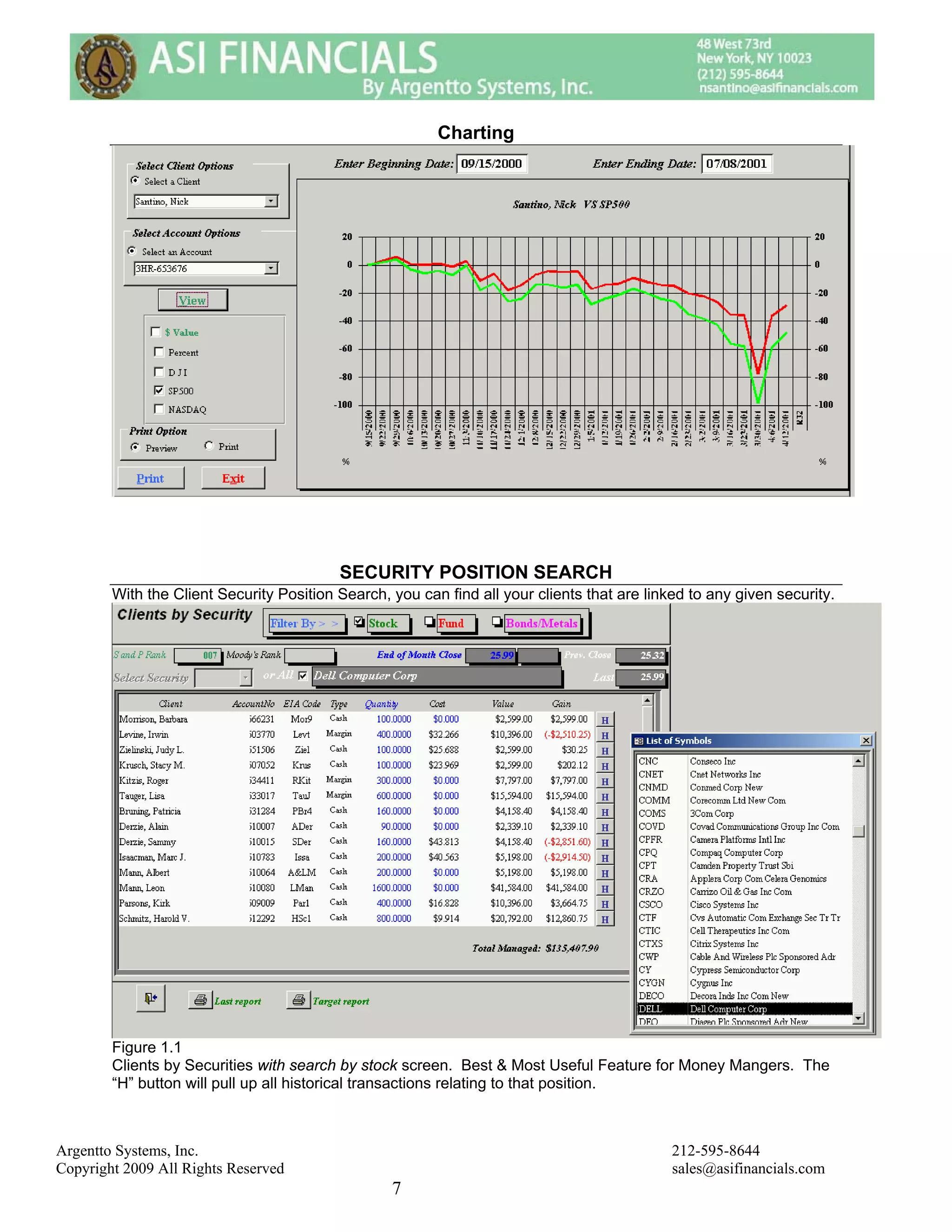
Charting


                                          SECURITY POSITION SEARCH
        With the Client Security Position Search, you can find all your clients that are linked to any given security.


        Figure 1.1
        Clients by Securities with search by stock screen. Best & Most Useful Feature for Money Mangers. The
        “H” button will pull up all historical transactions relating to that position.


Argentto Systems, Inc.                                                                       212-595-8644
Copyright 2009 All Rights Reserved                                                           sales@asifinancials.com
                                                  7
Client Web Portal


        One Login Gives you access to all accounts.


Argentto Systems, Inc.                                           212-595-8644
Copyright 2009 All Rights Reserved                               sales@asifinancials.com
                                            8
Main Account Information Screen


Argentto Systems, Inc.                        212-595-8644
Copyright 2009 All Rights Reserved            sales@asifinancials.com
                                          9
Transactions


        Cash Balances


Argentto Systems, Inc.                    212-595-8644
Copyright 2009 All Rights Reserved        sales@asifinancials.com
                                     10
Realized Gains & Year Tax Reporting


        Charting


Argentto Systems, Inc.                         212-595-8644
Copyright 2009 All Rights Reserved             sales@asifinancials.com
                                          11

Asi Portfolio Manager

  • 1.
    Portfolio Asset Management Client Search: The System allows for various types of client searches. You can search by clients name; full or partial, clients account number, or by your own special code you supply to customers. You can also have any other search criteria customized for your company’s needs. Client Profile Displays clients accounts, type, date opened or closed and weather the account is opened or closed. The client contact telephone numbers and email address (which interacts with Outlook.) are displayed and maintained here. In addition the Account Specifications lets you view and edit as the client approves. Figure 1.0 Client Details Displays client’s Mailing Address & Alternate Address. This Tab is often used for unique information that a Manager may want to keep on file. Here we show an occupation field so this Manager can refer his clients to other clients that may be in need of that service. Figure 1.1 Because an advisor is attached to specific accounts, and the system tracks the performance of that account, then with no effort advisor historical trends and P&L are easily accomplished. Argentto Systems, Inc. 212-595-8644 Copyright 2009 All Rights Reserved sales@asifinancials.com 1
  • 2.
    Buys Figure 1.2 Displays purchases made listed chronologically. On the right side of each transaction is a detail button that opens a window displaying all 35 fields related to the purchase. Note: Thirteen fields are displayed for this Broker Dealer. The System is completely customizable you can have different columns displayed in any order you desire. The Column Type will also display splits & received from transfers. Sells: Same information as Buys Positions Tab: Displays the Client Current Positions with Cost Basis, the Security’s Last trade type of position (Cash or Margin) and the Unrealized Gain. The History Button on the left shows how the client obtained that position. I.e. Purchases, dividends splits…etc.. Argentto Systems, Inc. 212-595-8644 Copyright 2009 All Rights Reserved sales@asifinancials.com 2
  • 3.
    Double Click theSecurity Symbol and a pop up Window enables Managers to update the security’s price during the day. This is useful when securities have large sings during the trade day and the manager wants the portfolios to reflect current intra day prices. (Real-time security updates are available by utilizing Reuters or ILX’s DDE feature.) Client Transactional Book Keeping Displays all Transactions related to the Client’s Account. On the Right side is a check box selection that enables the Manager or Client Support Staff to select transactions and Print to a report that can directly e-mailed or faxed immediacy. (Note: the Form and Report is easily customizable to meet your criteria usually within minutes) Argentto Systems, Inc. 212-595-8644 Copyright 2009 All Rights Reserved sales@asifinancials.com 3
  • 4.
    Cash Transactions This displays the Bookkeeping Data as well, with a filter on it to show just cash transactions. Money Line The Money Line Tab Displays client account balance calculated on a trade and settlement date basis, and computes the available cash and Special Memorandum Account (SMA). In addition, the MMF (Money Market Balance) is displayed with the Last Sweep Date. Note: Different Clearing Houses Represent Data Differently. Argentto Systems, Inc. 212-595-8644 Copyright 2009 All Rights Reserved sales@asifinancials.com 4
  • 5.
    General Notes Enables account managers & client support staff to add notes regarding clients; requests, meetings, issues and information that may be useful for future reference. Acct Notes The same as the General Notes Tab, only here the Account Manager or Client Support Staff can make specific notes regarding the account exclusively. New version of ASI Financials combines these note features and allows users to categorize the notes for filtering. Argentto Systems, Inc. 212-595-8644 Copyright 2009 All Rights Reserved sales@asifinancials.com 5
  • 6.
    Prospectus Tracking Keeps a Record of Prospectus Receipts that were Mailed to Clients Gains / Losses Argentto Systems, Inc. 212-595-8644 Copyright 2009 All Rights Reserved sales@asifinancials.com 6
  • 7.
    Charting SECURITY POSITION SEARCH With the Client Security Position Search, you can find all your clients that are linked to any given security. Figure 1.1 Clients by Securities with search by stock screen. Best & Most Useful Feature for Money Mangers. The “H” button will pull up all historical transactions relating to that position. Argentto Systems, Inc. 212-595-8644 Copyright 2009 All Rights Reserved sales@asifinancials.com 7
  • 8.
    Client Web Portal One Login Gives you access to all accounts. Argentto Systems, Inc. 212-595-8644 Copyright 2009 All Rights Reserved sales@asifinancials.com 8
  • 9.
    Main Account InformationScreen Argentto Systems, Inc. 212-595-8644 Copyright 2009 All Rights Reserved sales@asifinancials.com 9
  • 10.
    Transactions Cash Balances Argentto Systems, Inc. 212-595-8644 Copyright 2009 All Rights Reserved sales@asifinancials.com 10
  • 11.
    Realized Gains &Year Tax Reporting Charting Argentto Systems, Inc. 212-595-8644 Copyright 2009 All Rights Reserved sales@asifinancials.com 11