66                                                                      Technique


      Flash CS3 or later
        Create
      organic
      3D ribbon
      effects
          Go with the flow to
      generate a series of
      stunning, colourful Flash
      patterns, writes Stewart
      Hamilton-Arrandale
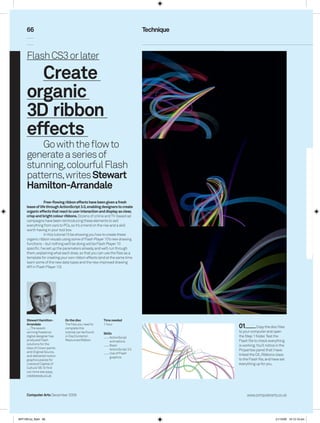
                   Free-flowing ribbon effects have been given a fresh
      lease of life through ActionScript 3.0, enabling designers to create
      organic effects that react to user interaction and display as clear,
      crisp and bright colour ribbons. Dozens of online and TV-based ad
      campaigns have been reintroducing these elements to sell
      everything from cars to PCs, so it’s a trend on the rise and a skill
      worth having in your tool box.
                   In this tutorial I’ll be showing you how to create these
      organic ribbon visuals using some of Flash Player 10’s new drawing
      functions – but nothing we’ll be doing will be Flash Player 10
      specific. I’ve set up the parameters already, and we’ll run through
      them, explaining what each does, so that you can use the files as a
      template for creating your own ribbon effects (and at the same time
      learn some of the new data types and the new improved drawing
      API in Flash Player 10).


      Stewart Hamilton-       On the disc              Time needed
      Arrandale
         The award-
                              The files you need to
                              complete this
                                                       1 hour
                                                                                          01          Copy the disc files
      winning freelance       tutorial can be found    Skills
                                                                                          to your computer and open
      digital designer has    in DiscContents             ActionScript                   the Step 1 folder. Test the
      produced Flash          ResourcesRibbon             animations                     Flash file to check everything
      solutions for the                                    Basic                          is working. You’ll notice in the
      likes of Crown paints                                ActionScript 3.0
      and Original Source,
                                                                                          Properties panel that I have
                                                           Use of Flash                   linked the CA_Ribbons class
      and delivered motion                                 graphics
      graphics pieces for                                                                 to the Flash file, and have set
      Liverpool Capital of                                                                everything up for you.
      Culture ‘08. To find
      out more see www.
      creativewax.co.uk


      Computer Arts December 2009                                                              www.computerarts.co.uk


ART169.tut_flash 66                                                                                                21/10/09 10:12:16 am
67


                                                                                                            03         Now open the Ribbons.as from the same folder.
                                                                                                            You can see all our variable declarations on lines 8-37. The
          02         Take a look at the RibbonParticle class in the comcreativewaxribbons                 particles:Vector<RibbonParticle> line is an Array that only
          folder. You’ll notice that this is a very simple class, the sole purpose of which is to act       excepts the data type we specify, while __drawCommands and
          as a pointer to a virtual position, storing a few variables to let the ribbon system know         __drawCoords are two vectors that are used via the new
          how to draw the ribbons.                                                                          drawing commands in Flash 10.


                                                           05          In the moveParticles method, we set a reference      06         In the drawRibbon method, we loop
                                                           to the first particle in our ribbon and then update its          through the all the particles and get a
                                                           position closer to the sprite it’s following. We then loop       reference to the current particle. Calculate the
                                                           through the rest of the particles and add forces and friction    midpoint of the ribbon by finding the halfway
                                                           to its velocity, updating its X and Y positions. Then we check   value between the first and last virtual points.
                                                           the distance between the current particle and the one            Next, add the drawing point values to the
                                                           before it.                                                       __drawCoords vector, then draw this ribbon
          04         In the Constructor, set the                                                                            segment out.
          variables and initialise the
          __drawCommands vector. The
          createParticles method loops through
          the maximum amount of particles set
          and then creates them. We can also
          increment the radius of the particles
          and then store a reference in our
          particles vector. Below this is the render
          method that moves the particles and
          then draws around them to create the
          ribbon effect.


                            Go bite-sized
                             When faced with a
                 coding problem that seems too
                 big to tackle, always try to break
                                                                                                                            08        The next method – setMidPoints
                                                                                                                            – sets a point at a position based halfway
                 it down into smaller, logical
                 parts that are more manageable.           07         In setRadiusPoints method, we work out two            between the two points passed in Steps 1 and
                 This way, even the most difficult         virtual points around the particle passed in. This is based      2. Between the information generated in this
                 tasks are easily accomplished.            on the particle’s virtual radius and its current angle, which    and the setRadiusPoints methods, we now
                                                           is offset by the pAngle variable we set up. We end up with       have enough data to draw the current ribbon
                                                           two virtual points both sitting at 90-degree offsets.            segment with a nice flowing curve.


          www.computerarts.co.uk                                                                                                             Computer Arts December 2009


ART169.tut_flash 67                                                                                                                                              21/10/09 10:12:17 am
68


                                                                10         When we repeat Step 1 we          11          Next in createRibbons, we loop through
                                                                see a vector holding the Ribbon classes      the __total variable to create our ribbons. For this
      09          CheckParticleDistance sets the distance       we have created. In the Constructor,         tutorial I have set up random parameters for the
      and angle between two particles. If the distance is       call the __resize method to set the          ribbons. When creating the ribbon, I have set its start
      greater than the maximum value we set earlier, the        stage width and height variables,            position off stage and then stored a reference to it in
      particle is repositioned based on its neighbour’s         create the ribbons, set up the Timer to      the __ribbons vector to add it to the display.
      position and angle. Set the velocity and tolerance        once every 30th of a second, and add
      quite high to give the ribbons an elastic feel.           the main sprite to the display.


      12        The final methods are very simple. The render
      method updates the fake camera movement and ribbons;
      moveCamera updates the forces that are supplied to the
      ribbons, and updates the __follower sprite position based on        13         Now look at the CA_Ribbons.as file in the Final folder. You’ll notice a couple
      the mouse position; updateRibbons applies the new forces to         of variables: getRandomPoint is called in the Constructor and uses the TweenMax
      each ribbon before rendering; and the resize method updates         class to animate the __follower sprite to a random position on a Bezier curve, creating
      the stage width and height references.                              the ribbon effect.


                                                                                                  15         Open and export the CA_Ribbons.fla to test it. Now
                                                                                                  we’ve run through the file, have a mess around with the
                                                                                                  parameters on the ribbons to create your own. By tweaking the
                                                                                                  code slightly you could turn the ribbons into a music visualiser or
                                                                                                  even add multiple follower sprites. Have fun experimenting!
      14        The last update is the moveCamera method, which tracks the position of the
      __follower sprite. Forces are worked out with the difference between the __follower’s
      current and previous positions, and then the previous position point is updated to
      generate the random ribbon effects.


      Computer Arts December 2009                                                                                                           www.computerarts.co.uk


ART169.tut_flash 68                                                                                                                                           21/10/09 10:12:19 am

ART169_tut_flash

  • 1.
    66 Technique Flash CS3 or later Create organic 3D ribbon effects Go with the flow to generate a series of stunning, colourful Flash patterns, writes Stewart Hamilton-Arrandale Free-flowing ribbon effects have been given a fresh lease of life through ActionScript 3.0, enabling designers to create organic effects that react to user interaction and display as clear, crisp and bright colour ribbons. Dozens of online and TV-based ad campaigns have been reintroducing these elements to sell everything from cars to PCs, so it’s a trend on the rise and a skill worth having in your tool box. In this tutorial I’ll be showing you how to create these organic ribbon visuals using some of Flash Player 10’s new drawing functions – but nothing we’ll be doing will be Flash Player 10 specific. I’ve set up the parameters already, and we’ll run through them, explaining what each does, so that you can use the files as a template for creating your own ribbon effects (and at the same time learn some of the new data types and the new improved drawing API in Flash Player 10). Stewart Hamilton- On the disc Time needed Arrandale The award- The files you need to complete this 1 hour 01 Copy the disc files winning freelance tutorial can be found Skills to your computer and open digital designer has in DiscContents ActionScript the Step 1 folder. Test the produced Flash ResourcesRibbon animations Flash file to check everything solutions for the Basic is working. You’ll notice in the likes of Crown paints ActionScript 3.0 and Original Source, Properties panel that I have Use of Flash linked the CA_Ribbons class and delivered motion graphics graphics pieces for to the Flash file, and have set Liverpool Capital of everything up for you. Culture ‘08. To find out more see www. creativewax.co.uk Computer Arts December 2009 www.computerarts.co.uk ART169.tut_flash 66 21/10/09 10:12:16 am
  • 2.
    67 03 Now open the Ribbons.as from the same folder. You can see all our variable declarations on lines 8-37. The 02 Take a look at the RibbonParticle class in the comcreativewaxribbons particles:Vector<RibbonParticle> line is an Array that only folder. You’ll notice that this is a very simple class, the sole purpose of which is to act excepts the data type we specify, while __drawCommands and as a pointer to a virtual position, storing a few variables to let the ribbon system know __drawCoords are two vectors that are used via the new how to draw the ribbons. drawing commands in Flash 10. 05 In the moveParticles method, we set a reference 06 In the drawRibbon method, we loop to the first particle in our ribbon and then update its through the all the particles and get a position closer to the sprite it’s following. We then loop reference to the current particle. Calculate the through the rest of the particles and add forces and friction midpoint of the ribbon by finding the halfway to its velocity, updating its X and Y positions. Then we check value between the first and last virtual points. the distance between the current particle and the one Next, add the drawing point values to the before it. __drawCoords vector, then draw this ribbon 04 In the Constructor, set the segment out. variables and initialise the __drawCommands vector. The createParticles method loops through the maximum amount of particles set and then creates them. We can also increment the radius of the particles and then store a reference in our particles vector. Below this is the render method that moves the particles and then draws around them to create the ribbon effect. Go bite-sized When faced with a coding problem that seems too big to tackle, always try to break 08 The next method – setMidPoints – sets a point at a position based halfway it down into smaller, logical parts that are more manageable. 07 In setRadiusPoints method, we work out two between the two points passed in Steps 1 and This way, even the most difficult virtual points around the particle passed in. This is based 2. Between the information generated in this tasks are easily accomplished. on the particle’s virtual radius and its current angle, which and the setRadiusPoints methods, we now is offset by the pAngle variable we set up. We end up with have enough data to draw the current ribbon two virtual points both sitting at 90-degree offsets. segment with a nice flowing curve. www.computerarts.co.uk Computer Arts December 2009 ART169.tut_flash 67 21/10/09 10:12:17 am
  • 3.
    68 10 When we repeat Step 1 we 11 Next in createRibbons, we loop through see a vector holding the Ribbon classes the __total variable to create our ribbons. For this 09 CheckParticleDistance sets the distance we have created. In the Constructor, tutorial I have set up random parameters for the and angle between two particles. If the distance is call the __resize method to set the ribbons. When creating the ribbon, I have set its start greater than the maximum value we set earlier, the stage width and height variables, position off stage and then stored a reference to it in particle is repositioned based on its neighbour’s create the ribbons, set up the Timer to the __ribbons vector to add it to the display. position and angle. Set the velocity and tolerance once every 30th of a second, and add quite high to give the ribbons an elastic feel. the main sprite to the display. 12 The final methods are very simple. The render method updates the fake camera movement and ribbons; moveCamera updates the forces that are supplied to the ribbons, and updates the __follower sprite position based on 13 Now look at the CA_Ribbons.as file in the Final folder. You’ll notice a couple the mouse position; updateRibbons applies the new forces to of variables: getRandomPoint is called in the Constructor and uses the TweenMax each ribbon before rendering; and the resize method updates class to animate the __follower sprite to a random position on a Bezier curve, creating the stage width and height references. the ribbon effect. 15 Open and export the CA_Ribbons.fla to test it. Now we’ve run through the file, have a mess around with the parameters on the ribbons to create your own. By tweaking the code slightly you could turn the ribbons into a music visualiser or even add multiple follower sprites. Have fun experimenting! 14 The last update is the moveCamera method, which tracks the position of the __follower sprite. Forces are worked out with the difference between the __follower’s current and previous positions, and then the previous position point is updated to generate the random ribbon effects. Computer Arts December 2009 www.computerarts.co.uk ART169.tut_flash 68 21/10/09 10:12:19 am