Array
Array allow you to store groups of related data
in one variable.
For example, if you have a list of items, which
are to be stored in single variables, looks like:
$Company1=“Reliance”;
$Company2= “Tata”;
$Company3= “Birla”;
Each element in the array has its own index so
that it can be easily accessed.
There are three kinds of arrays in PHP:
• Numeric array
• Associative array
• Multidimensional array
Numeric Array
Numeric array can store numbers, strings and
any object but their index will be represented by
numbers.
By default array index starts from 0.
Example:
There are two methods of creating a numeric
array
$Companies=array(“Reliance”,“Tata”, “Bajaj”,
“Birla”);
or
$companies[0]=“Reliance”;
$companies[1]=“Tata”;
$companies[2]=“Bajaj”;
$companies[3]=“Birla";
echo $companies[0]. “and” .$companies[1].
“are India’s biggest corporate groups.”;
Associative Arrays
Associative arrays are very similar to numeric
arrays in term of functionality but they are
different in terms of their index.
Associative array will have their index as string
so that you can establish a strong association
between key and values.
Example
$salaries = array( “john" => 2000, “qadir" =>
1000, "zara" => 500 );
echo “salary of john is”. $salaries[‘john’];
echo “salary of qadir is”. $salaries[‘qadir’];
echo “salary of zara is”. $salaries[‘zara’];
$salaries[‘john'] = 2000;
$salaries['qadir'] = 1000;
$salaries['zara'] = 500;
echo “salary of john is”. $salaries[‘john’];
echo “salary of qadir is”. $salaries[‘qadir’];
echo “salary of zara is”. $salaries[‘zara’];
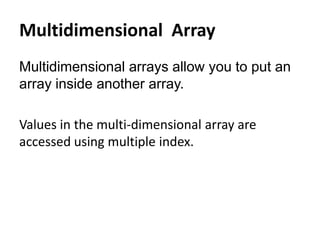
Multidimensional Array
Multidimensional arrays allow you to put an
array inside another array.
Values in the multi-dimensional array are
accessed using multiple index.
Example:
$marks = array(
“john" => array
(
"physics" => 35,
"maths" => 30,
"chemistry" => 39
),
"zara" => array
(
"physics" => 31,
"maths" => 22,
"chemistry" => 39
) );
echo "Marks for john in physics:” . $marks ['john']['physics'] ;
echo "Marks for zara in maths:” . $marks ['zara']['maths'] ;
Example:
$array1 = array(“first_name” => “kevin”,
“last_name” => “sweet”);
echo $array1[“first_name”]. “ ” .
$array1[“last_name”];
$array1[“first_name”] = “larry”;
echo $array1[“first_name”]. “ ” .
$array1[“last_name”];
Array Functions
$array1 = array(4,34,87,54,12);
print_r($array1);
Output:
Array ( [0] => 4 [1] => 34 [2] => 87 [3] => 54 [4] => 12 )
<pre> print_r($array1); </pre>
Output:
Array
(
[0] => 4
[1] => 34
[2] => 87
[3] => 54
[4] => 12
)
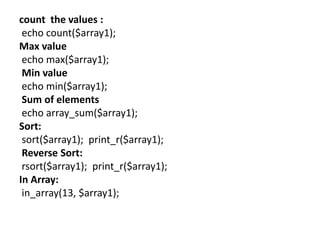
count the values :
echo count($array1);
Max value
echo max($array1);
Min value
echo min($array1);
Sum of elements
echo array_sum($array1);
Sort:
sort($array1); print_r($array1);
Reverse Sort:
rsort($array1); print_r($array1);
In Array:
in_array(13, $array1);
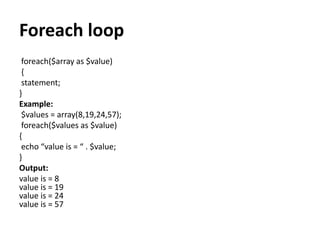
Foreach loop
foreach($array as $value)
{
statement;
}
Example:
$values = array(8,19,24,57);
foreach($values as $value)
{
echo “value is = “ . $value;
}
Output:
value is = 8
value is = 19
value is = 24
value is = 57
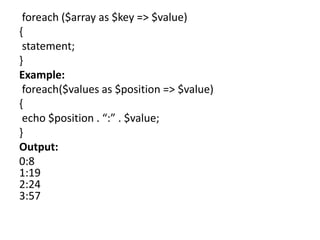
foreach ($array as $key => $value)
{
statement;
}
Example:
foreach($values as $position => $value)
{
echo $position . “:” . $value;
}
Output:
0:8
1:19
2:24
3:57
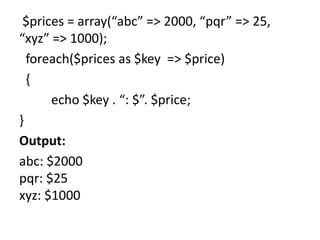
$prices = array(“abc” => 2000, “pqr” => 25,
“xyz” => 1000);
foreach($prices as $key => $price)
{
echo $key . “: $”. $price;
}
Output:
abc: $2000
pqr: $25
xyz: $1000

Array

  • 1.
    Array Array allow youto store groups of related data in one variable. For example, if you have a list of items, which are to be stored in single variables, looks like: $Company1=“Reliance”; $Company2= “Tata”; $Company3= “Birla”;
  • 2.
    Each element inthe array has its own index so that it can be easily accessed. There are three kinds of arrays in PHP: • Numeric array • Associative array • Multidimensional array
  • 3.
    Numeric Array Numeric arraycan store numbers, strings and any object but their index will be represented by numbers. By default array index starts from 0. Example: There are two methods of creating a numeric array
  • 4.
  • 5.
    Associative Arrays Associative arraysare very similar to numeric arrays in term of functionality but they are different in terms of their index. Associative array will have their index as string so that you can establish a strong association between key and values.
  • 6.
    Example $salaries = array(“john" => 2000, “qadir" => 1000, "zara" => 500 ); echo “salary of john is”. $salaries[‘john’]; echo “salary of qadir is”. $salaries[‘qadir’]; echo “salary of zara is”. $salaries[‘zara’];
  • 7.
    $salaries[‘john'] = 2000; $salaries['qadir']= 1000; $salaries['zara'] = 500; echo “salary of john is”. $salaries[‘john’]; echo “salary of qadir is”. $salaries[‘qadir’]; echo “salary of zara is”. $salaries[‘zara’];
  • 8.
    Multidimensional Array Multidimensional arraysallow you to put an array inside another array. Values in the multi-dimensional array are accessed using multiple index.
  • 9.
    Example: $marks = array( “john"=> array ( "physics" => 35, "maths" => 30, "chemistry" => 39 ), "zara" => array ( "physics" => 31, "maths" => 22, "chemistry" => 39 ) ); echo "Marks for john in physics:” . $marks ['john']['physics'] ; echo "Marks for zara in maths:” . $marks ['zara']['maths'] ;
  • 10.
    Example: $array1 = array(“first_name”=> “kevin”, “last_name” => “sweet”); echo $array1[“first_name”]. “ ” . $array1[“last_name”]; $array1[“first_name”] = “larry”; echo $array1[“first_name”]. “ ” . $array1[“last_name”];
  • 11.
    Array Functions $array1 =array(4,34,87,54,12); print_r($array1); Output: Array ( [0] => 4 [1] => 34 [2] => 87 [3] => 54 [4] => 12 ) <pre> print_r($array1); </pre> Output: Array ( [0] => 4 [1] => 34 [2] => 87 [3] => 54 [4] => 12 )
  • 12.
    count the values: echo count($array1); Max value echo max($array1); Min value echo min($array1); Sum of elements echo array_sum($array1); Sort: sort($array1); print_r($array1); Reverse Sort: rsort($array1); print_r($array1); In Array: in_array(13, $array1);
  • 13.
    Foreach loop foreach($array as$value) { statement; } Example: $values = array(8,19,24,57); foreach($values as $value) { echo “value is = “ . $value; } Output: value is = 8 value is = 19 value is = 24 value is = 57
  • 14.
    foreach ($array as$key => $value) { statement; } Example: foreach($values as $position => $value) { echo $position . “:” . $value; } Output: 0:8 1:19 2:24 3:57
  • 15.
    $prices = array(“abc”=> 2000, “pqr” => 25, “xyz” => 1000); foreach($prices as $key => $price) { echo $key . “: $”. $price; } Output: abc: $2000 pqr: $25 xyz: $1000