PHP ARRAYS
PHP arrays
• Arrays are complex variables that allow us to store more
than one value or a group of values under a single
variable name.
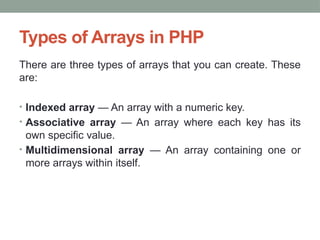
Types of Arrays in PHP
There are three types of arrays that you can create. These
are:
• Indexed array — An array with a numeric key.
• Associative array — An array where each key has its
own specific value.
• Multidimensional array — An array containing one or
more arrays within itself.
Indexed Arrays
• An indexed or numeric array stores each array element with a
numeric index.
<?php
$courses = array("PHP", "Laravel", "Node js");
echo "I like " . $courses[0] . ", " . $courses[1] . " and " . $courses[2];
echo "<br>";
echo count($courses);
?>
OUTPUT:
I like PHP, Laravel and Node js
3
Loop Through an Indexed Array(for loop)
<?php
$courses = array("PHP", "Laravel", "Node js");
$courseslength = count($courses);
for($x = 0; $x <$courseslength; $x++) {
echo $courses[$x];
echo "<br>";
}
?>
OUTPUT:
PHP
Laravel
Node js
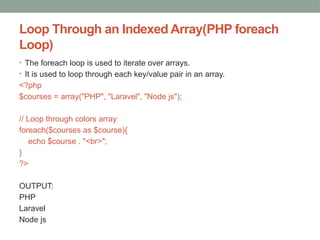
Loop Through an Indexed Array(PHP foreach
Loop)
• The foreach loop is used to iterate over arrays.
• It is used to loop through each key/value pair in an array.
<?php
$courses = array("PHP", "Laravel", "Node js");
// Loop through colors array
foreach($courses as $course){
echo $course . "<br>";
}
?>
OUTPUT:
PHP
Laravel
Node js
Associative Array
• Associative arrays are arrays that use named keys that
you assign to them.
• We can associate name with each array elements in PHP
using => symbol.
• The keys assigned to values can be arbitrary and user
defined strings.
Associative Array(contd.)
<?php
$courses = array("INT220"=>"PHP", "INT221"=>"Laravel",
"INT222"=>"Node js");
echo "INT 220 is ".$courses['INT220'].". INT 221 is ".
$courses['INT221'].". INT222 is ".$courses['INT222'];
?>
OUTPUT:
INT 220 is PHP. INT 221 is Laravel. INT222 is Node js
Associative Array(contd.)
<?php
$courses["INT220"] = "PHP";
$courses["INT221"] = "Laravel";
$courses["INT222"] = "Node js";
// Printing array structure
print_r($courses);
?>
OUTPUT:
Array ( [INT220] => PHP [INT221] => Laravel [INT222] =>
Node js )
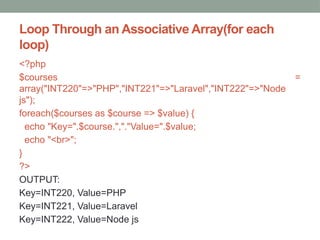
Loop Through an Associative Array(for each
loop)
<?php
$courses =
array("INT220"=>"PHP","INT221"=>"Laravel","INT222"=>"Node
js");
foreach($courses as $course => $value) {
echo "Key=".$course.","."Value=".$value;
echo "<br>";
}
?>
OUTPUT:
Key=INT220, Value=PHP
Key=INT221, Value=Laravel
Key=INT222, Value=Node js
Loop Through an Associative Array(for loop)
<?php
$courses = array('INT220'=>'PHP','INT221'=>'Laravel','INT222'=>'N
ode js');
$keys = array_keys($courses);
$values = array_values($courses);
for($x=0; $x<count($courses); $x++) {
echo "Key=".$keys[$x].','."Value=".$values[$x]. "<br>";
}
?>
OUTPUT:
Key=INT220,Value=PHP
Key=INT221,Value=Laravel
Key=INT222,Value=Node js
Multidimensional Arrays
• The multidimensional array is an array in which each
element can also be an array and each element in the
sub-array can be an array or further contain array within
itself and so on.
Multidimensional Arrays(contd.)
<?php
$result = array(
array("Manoj",7.8,"pass"),
array("Aditya",8.5,"pass"),
array("Anuj",4.9,"fail")
);
echo $result[0][0]. "----CGPA is: " . $result[0][1]." and his status is ".
$result[0][2]."<br>";
echo $result[1][0]. "----CGPA is: " . $result[1][1]." and his status is ".
$result[1][2]."<br>";
echo $result[2][0]. "----CGPA is: " . $result[2][1]." and his status is ".
$result[2][2];
?>
OUTPUT:
Manoj----CGPA is: 7.8 and his status is
pass
Aditya----CGPA is: 8.5 and his status is
pass
Anuj----CGPA is: 4.9 and his status is fail
Multidimensional Arrays(contd.)
<?php
$result = array(
array(
"name" => "Manoj",
"cgpa" => 7.8,
"status" => "pass"
),
array(
"name" => "Aditya",
"cgpa" => 8.5,
"status" => "pass"
),
array(
"name" => "Anuj",
"cgpa" => 4.9,
"status" => "fail"
)
);
echo $result[0]["name"]. "----CGPA is: " . $result[0]["cgpa"]." and his status is ".$result[0]["status"]."<br>";
echo $result[1]["name"]. "----CGPA is: " . $result[1]["cgpa"]." and his status is ".$result[1]["status"]."<br>";
echo $result[2]["name"]. "----CGPA is: " . $result[2]["cgpa"]." and his status is ".$result[2]["status"];
?>
OUTPUT:
Manoj----CGPA is: 7.8 and his status is pass
Aditya----CGPA is: 8.5 and his status is pass
Anuj----CGPA is: 4.9 and his status is fail
Loop Through an Multidimensional Array(for
loop)
<?php
$result = array (
array("Manoj",7.8,"pass"),
array("Aditya",8.5,"pass"),
array("Anuj",4.9,"fail")
);
for ($row = 0; $row < 3; $row++) {
echo "<h4>Row number $row</h4>";
for ($col = 0; $col < 3; $col++) {
echo $result[$row][$col]."<br>";
}
}
?>
OUTPUT:
Row number 0
Manoj
7.8
Pass
Row number 1
Aditya
8.5
Pass
Row number 2
Anuj
4.9
fail
Loop Through an Multidimensional Array(foreach
loop)
<?php
$result = array (
array("Manoj",7.8,"pass"),
array("Aditya",8.5,"pass"),
array("Anuj",4.9,"fail")
);
for($row = 0; $row < 3; $row++) {
echo "<h4>Row number $row</h4>";
foreach ($result[$row] as $resul) {
echo $resul."<br>";
}
}
?>
OUTPUT:
Row number 0
Manoj
7.8
Pass
Row number 1
Aditya
8.5
Pass
Row number 2
Anuj
4.9
fail
Loop Through an Multidimensional Array(foreach
loop)
<?php
$books =
array("C++" => array("name" => "Beginning with C","copies" =>8),
"PHP" => array("name" => "Basics of PHP","copies" => 10),
"Laravel" => array("name" => "MVC","copies" => 3)
);
$keys = array_keys($books);
for($i = 0; $i < count($books); $i++) {
echo "<h1>$keys[$i]</h1>";
foreach($books[$keys[$i]] as $key => $value) {
echo $key . " = " . $value . "<br>";
}
}
?>
C++
name = Beginning with C
copies = 8
PHP
name = Basics of PHP
copies = 10
Laravel
name = MVC
copies = 3
Strings
• A string is a sequence of letters, numbers, special
characters and arithmetic values or combination of all.
• The simplest way to create a string is to enclose the string
literal (i.e. string characters) in single quotation marks ('),
like this: $str= “Hello World”;
• The escape-sequence replacements are:
• n is replaced by the newline character
• r is replaced by the carriage-return character
• t is replaced by the tab character
• $ is replaced by the dollar sign itself ($)
• " is replaced by a single double-quote (")
•  is replaced by a single backslash ()
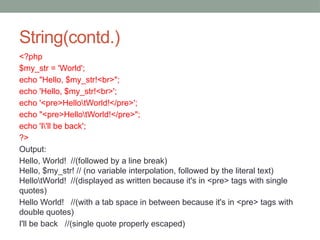
String(contd.)
<?php
$my_str = 'World';
echo "Hello, $my_str!<br>";
echo 'Hello, $my_str!<br>';
echo '<pre>HellotWorld!</pre>';
echo "<pre>HellotWorld!</pre>";
echo 'I'll be back';
?>
Output:
Hello, World! //(followed by a line break)
Hello, $my_str! // (no variable interpolation, followed by the literal text)
HellotWorld! //(displayed as written because it's in <pre> tags with single
quotes)
Hello World! //(with a tab space in between because it's in <pre> tags with
double quotes)
I'll be back //(single quote properly escaped)
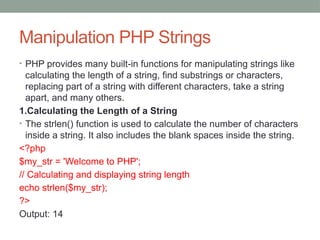
Manipulation PHP Strings
• PHP provides many built-in functions for manipulating strings like
calculating the length of a string, find substrings or characters,
replacing part of a string with different characters, take a string
apart, and many others.
1.Calculating the Length of a String
• The strlen() function is used to calculate the number of characters
inside a string. It also includes the blank spaces inside the string.
<?php
$my_str = 'Welcome to PHP';
// Calculating and displaying string length
echo strlen($my_str);
?>
Output: 14
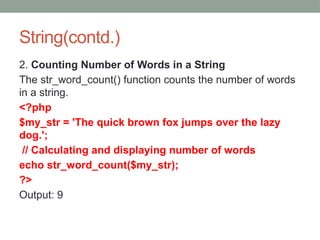
String(contd.)
2. Counting Number of Words in a String
The str_word_count() function counts the number of words
in a string.
<?php
$my_str = 'The quick brown fox jumps over the lazy
dog.';
// Calculating and displaying number of words
echo str_word_count($my_str);
?>
Output: 9
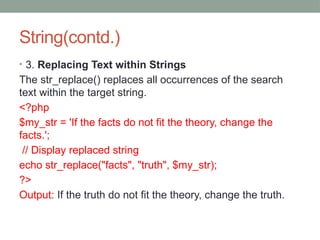
String(contd.)
• 3. Replacing Text within Strings
The str_replace() replaces all occurrences of the search
text within the target string.
<?php
$my_str = 'If the facts do not fit the theory, change the
facts.';
// Display replaced string
echo str_replace("facts", "truth", $my_str);
?>
Output: If the truth do not fit the theory, change the truth.
Contd.
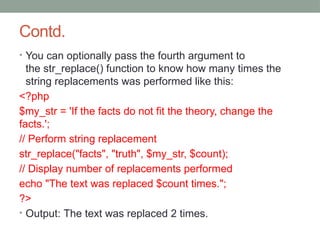
• You can optionally pass the fourth argument to
the str_replace() function to know how many times the
string replacements was performed like this:
<?php
$my_str = 'If the facts do not fit the theory, change the
facts.';
// Perform string replacement
str_replace("facts", "truth", $my_str, $count);
// Display number of replacements performed
echo "The text was replaced $count times.";
?>
• Output: The text was replaced 2 times.
String(contd.)
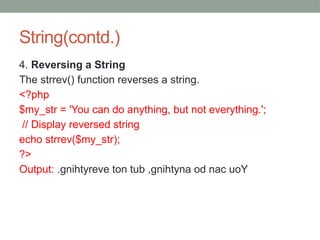
4. Reversing a String
The strrev() function reverses a string.
<?php
$my_str = 'You can do anything, but not everything.';
// Display reversed string
echo strrev($my_str);
?>
Output: .gnihtyreve ton tub ,gnihtyna od nac uoY

Arrays syntax and it's functions in php.pptx

  • 1.
  • 2.
    PHP arrays • Arraysare complex variables that allow us to store more than one value or a group of values under a single variable name.
  • 3.
    Types of Arraysin PHP There are three types of arrays that you can create. These are: • Indexed array — An array with a numeric key. • Associative array — An array where each key has its own specific value. • Multidimensional array — An array containing one or more arrays within itself.
  • 4.
    Indexed Arrays • Anindexed or numeric array stores each array element with a numeric index. <?php $courses = array("PHP", "Laravel", "Node js"); echo "I like " . $courses[0] . ", " . $courses[1] . " and " . $courses[2]; echo "<br>"; echo count($courses); ?> OUTPUT: I like PHP, Laravel and Node js 3
  • 5.
    Loop Through anIndexed Array(for loop) <?php $courses = array("PHP", "Laravel", "Node js"); $courseslength = count($courses); for($x = 0; $x <$courseslength; $x++) { echo $courses[$x]; echo "<br>"; } ?> OUTPUT: PHP Laravel Node js
  • 6.
    Loop Through anIndexed Array(PHP foreach Loop) • The foreach loop is used to iterate over arrays. • It is used to loop through each key/value pair in an array. <?php $courses = array("PHP", "Laravel", "Node js"); // Loop through colors array foreach($courses as $course){ echo $course . "<br>"; } ?> OUTPUT: PHP Laravel Node js
  • 7.
    Associative Array • Associativearrays are arrays that use named keys that you assign to them. • We can associate name with each array elements in PHP using => symbol. • The keys assigned to values can be arbitrary and user defined strings.
  • 8.
    Associative Array(contd.) <?php $courses =array("INT220"=>"PHP", "INT221"=>"Laravel", "INT222"=>"Node js"); echo "INT 220 is ".$courses['INT220'].". INT 221 is ". $courses['INT221'].". INT222 is ".$courses['INT222']; ?> OUTPUT: INT 220 is PHP. INT 221 is Laravel. INT222 is Node js
  • 9.
    Associative Array(contd.) <?php $courses["INT220"] ="PHP"; $courses["INT221"] = "Laravel"; $courses["INT222"] = "Node js"; // Printing array structure print_r($courses); ?> OUTPUT: Array ( [INT220] => PHP [INT221] => Laravel [INT222] => Node js )
  • 10.
    Loop Through anAssociative Array(for each loop) <?php $courses = array("INT220"=>"PHP","INT221"=>"Laravel","INT222"=>"Node js"); foreach($courses as $course => $value) { echo "Key=".$course.","."Value=".$value; echo "<br>"; } ?> OUTPUT: Key=INT220, Value=PHP Key=INT221, Value=Laravel Key=INT222, Value=Node js
  • 11.
    Loop Through anAssociative Array(for loop) <?php $courses = array('INT220'=>'PHP','INT221'=>'Laravel','INT222'=>'N ode js'); $keys = array_keys($courses); $values = array_values($courses); for($x=0; $x<count($courses); $x++) { echo "Key=".$keys[$x].','."Value=".$values[$x]. "<br>"; } ?> OUTPUT: Key=INT220,Value=PHP Key=INT221,Value=Laravel Key=INT222,Value=Node js
  • 12.
    Multidimensional Arrays • Themultidimensional array is an array in which each element can also be an array and each element in the sub-array can be an array or further contain array within itself and so on.
  • 13.
    Multidimensional Arrays(contd.) <?php $result =array( array("Manoj",7.8,"pass"), array("Aditya",8.5,"pass"), array("Anuj",4.9,"fail") ); echo $result[0][0]. "----CGPA is: " . $result[0][1]." and his status is ". $result[0][2]."<br>"; echo $result[1][0]. "----CGPA is: " . $result[1][1]." and his status is ". $result[1][2]."<br>"; echo $result[2][0]. "----CGPA is: " . $result[2][1]." and his status is ". $result[2][2]; ?> OUTPUT: Manoj----CGPA is: 7.8 and his status is pass Aditya----CGPA is: 8.5 and his status is pass Anuj----CGPA is: 4.9 and his status is fail
  • 14.
    Multidimensional Arrays(contd.) <?php $result =array( array( "name" => "Manoj", "cgpa" => 7.8, "status" => "pass" ), array( "name" => "Aditya", "cgpa" => 8.5, "status" => "pass" ), array( "name" => "Anuj", "cgpa" => 4.9, "status" => "fail" ) ); echo $result[0]["name"]. "----CGPA is: " . $result[0]["cgpa"]." and his status is ".$result[0]["status"]."<br>"; echo $result[1]["name"]. "----CGPA is: " . $result[1]["cgpa"]." and his status is ".$result[1]["status"]."<br>"; echo $result[2]["name"]. "----CGPA is: " . $result[2]["cgpa"]." and his status is ".$result[2]["status"]; ?> OUTPUT: Manoj----CGPA is: 7.8 and his status is pass Aditya----CGPA is: 8.5 and his status is pass Anuj----CGPA is: 4.9 and his status is fail
  • 15.
    Loop Through anMultidimensional Array(for loop) <?php $result = array ( array("Manoj",7.8,"pass"), array("Aditya",8.5,"pass"), array("Anuj",4.9,"fail") ); for ($row = 0; $row < 3; $row++) { echo "<h4>Row number $row</h4>"; for ($col = 0; $col < 3; $col++) { echo $result[$row][$col]."<br>"; } } ?> OUTPUT: Row number 0 Manoj 7.8 Pass Row number 1 Aditya 8.5 Pass Row number 2 Anuj 4.9 fail
  • 16.
    Loop Through anMultidimensional Array(foreach loop) <?php $result = array ( array("Manoj",7.8,"pass"), array("Aditya",8.5,"pass"), array("Anuj",4.9,"fail") ); for($row = 0; $row < 3; $row++) { echo "<h4>Row number $row</h4>"; foreach ($result[$row] as $resul) { echo $resul."<br>"; } } ?> OUTPUT: Row number 0 Manoj 7.8 Pass Row number 1 Aditya 8.5 Pass Row number 2 Anuj 4.9 fail
  • 17.
    Loop Through anMultidimensional Array(foreach loop) <?php $books = array("C++" => array("name" => "Beginning with C","copies" =>8), "PHP" => array("name" => "Basics of PHP","copies" => 10), "Laravel" => array("name" => "MVC","copies" => 3) ); $keys = array_keys($books); for($i = 0; $i < count($books); $i++) { echo "<h1>$keys[$i]</h1>"; foreach($books[$keys[$i]] as $key => $value) { echo $key . " = " . $value . "<br>"; } } ?> C++ name = Beginning with C copies = 8 PHP name = Basics of PHP copies = 10 Laravel name = MVC copies = 3
  • 18.
    Strings • A stringis a sequence of letters, numbers, special characters and arithmetic values or combination of all. • The simplest way to create a string is to enclose the string literal (i.e. string characters) in single quotation marks ('), like this: $str= “Hello World”; • The escape-sequence replacements are: • n is replaced by the newline character • r is replaced by the carriage-return character • t is replaced by the tab character • $ is replaced by the dollar sign itself ($) • " is replaced by a single double-quote (") • is replaced by a single backslash ()
  • 19.
    String(contd.) <?php $my_str = 'World'; echo"Hello, $my_str!<br>"; echo 'Hello, $my_str!<br>'; echo '<pre>HellotWorld!</pre>'; echo "<pre>HellotWorld!</pre>"; echo 'I'll be back'; ?> Output: Hello, World! //(followed by a line break) Hello, $my_str! // (no variable interpolation, followed by the literal text) HellotWorld! //(displayed as written because it's in <pre> tags with single quotes) Hello World! //(with a tab space in between because it's in <pre> tags with double quotes) I'll be back //(single quote properly escaped)
  • 20.
    Manipulation PHP Strings •PHP provides many built-in functions for manipulating strings like calculating the length of a string, find substrings or characters, replacing part of a string with different characters, take a string apart, and many others. 1.Calculating the Length of a String • The strlen() function is used to calculate the number of characters inside a string. It also includes the blank spaces inside the string. <?php $my_str = 'Welcome to PHP'; // Calculating and displaying string length echo strlen($my_str); ?> Output: 14
  • 21.
    String(contd.) 2. Counting Numberof Words in a String The str_word_count() function counts the number of words in a string. <?php $my_str = 'The quick brown fox jumps over the lazy dog.'; // Calculating and displaying number of words echo str_word_count($my_str); ?> Output: 9
  • 22.
    String(contd.) • 3. ReplacingText within Strings The str_replace() replaces all occurrences of the search text within the target string. <?php $my_str = 'If the facts do not fit the theory, change the facts.'; // Display replaced string echo str_replace("facts", "truth", $my_str); ?> Output: If the truth do not fit the theory, change the truth.
  • 23.
    Contd. • You canoptionally pass the fourth argument to the str_replace() function to know how many times the string replacements was performed like this: <?php $my_str = 'If the facts do not fit the theory, change the facts.'; // Perform string replacement str_replace("facts", "truth", $my_str, $count); // Display number of replacements performed echo "The text was replaced $count times."; ?> • Output: The text was replaced 2 times.
  • 24.
    String(contd.) 4. Reversing aString The strrev() function reverses a string. <?php $my_str = 'You can do anything, but not everything.'; // Display reversed string echo strrev($my_str); ?> Output: .gnihtyreve ton tub ,gnihtyna od nac uoY