


S. Mahbub - Uz - Zaman (09301004)!
          BRAC UNIVERSITY!
 Department of Computer Science and Engineering!


                       http://mahbubzaman.wordpress.com/
INTRODUCTION

Arduino is an open-source electronics prototyping platform based
 on flexible, easy-to-use hardware and software. It's intended for
 artists, designers, hobbyists, and anyone interested in creating
               interactive objects or environments.


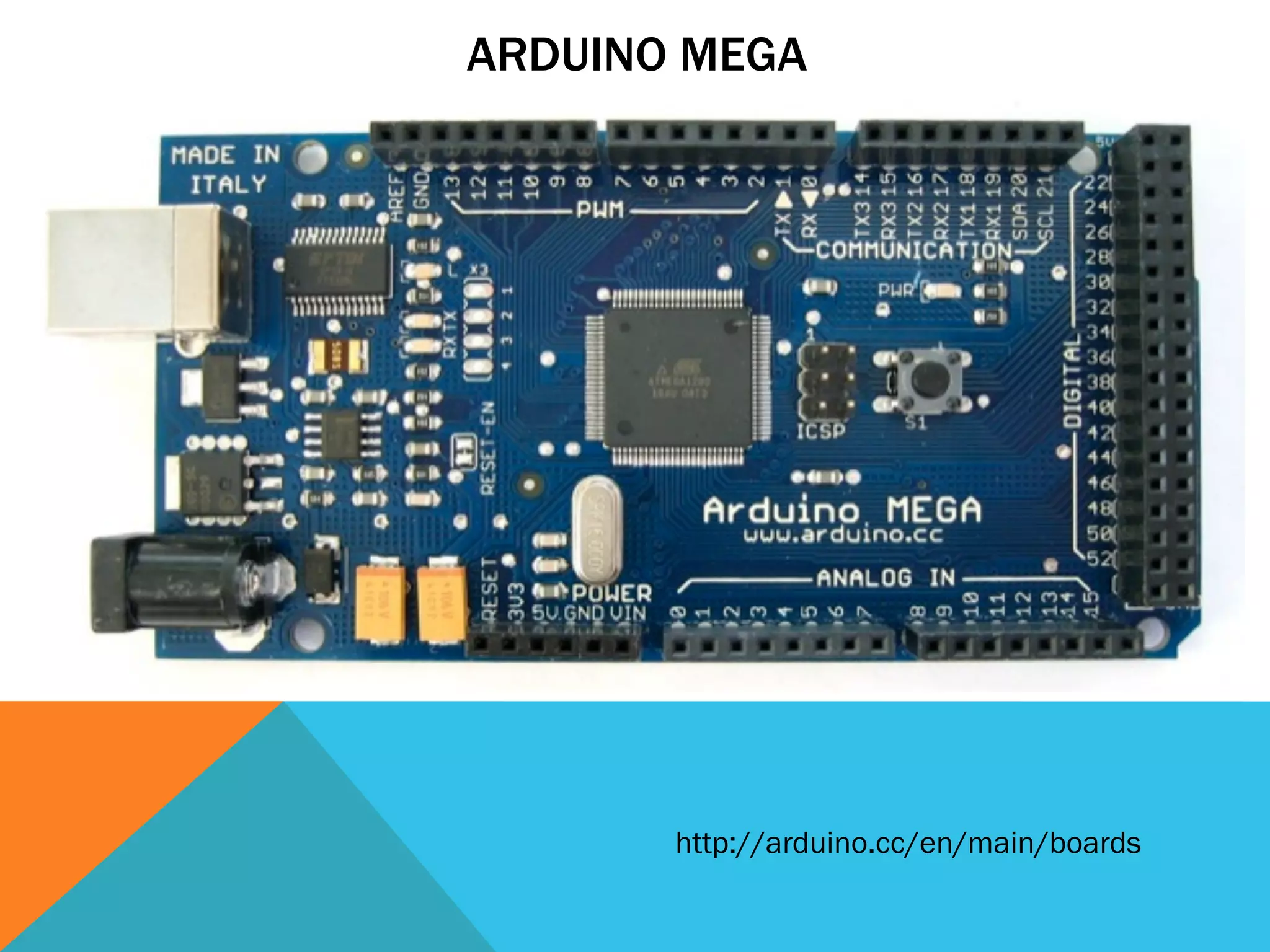
 In this presentation we are going to learn about Arduino Mega
ARDUINO MEGA


       http://arduino.cc/en/main/boards
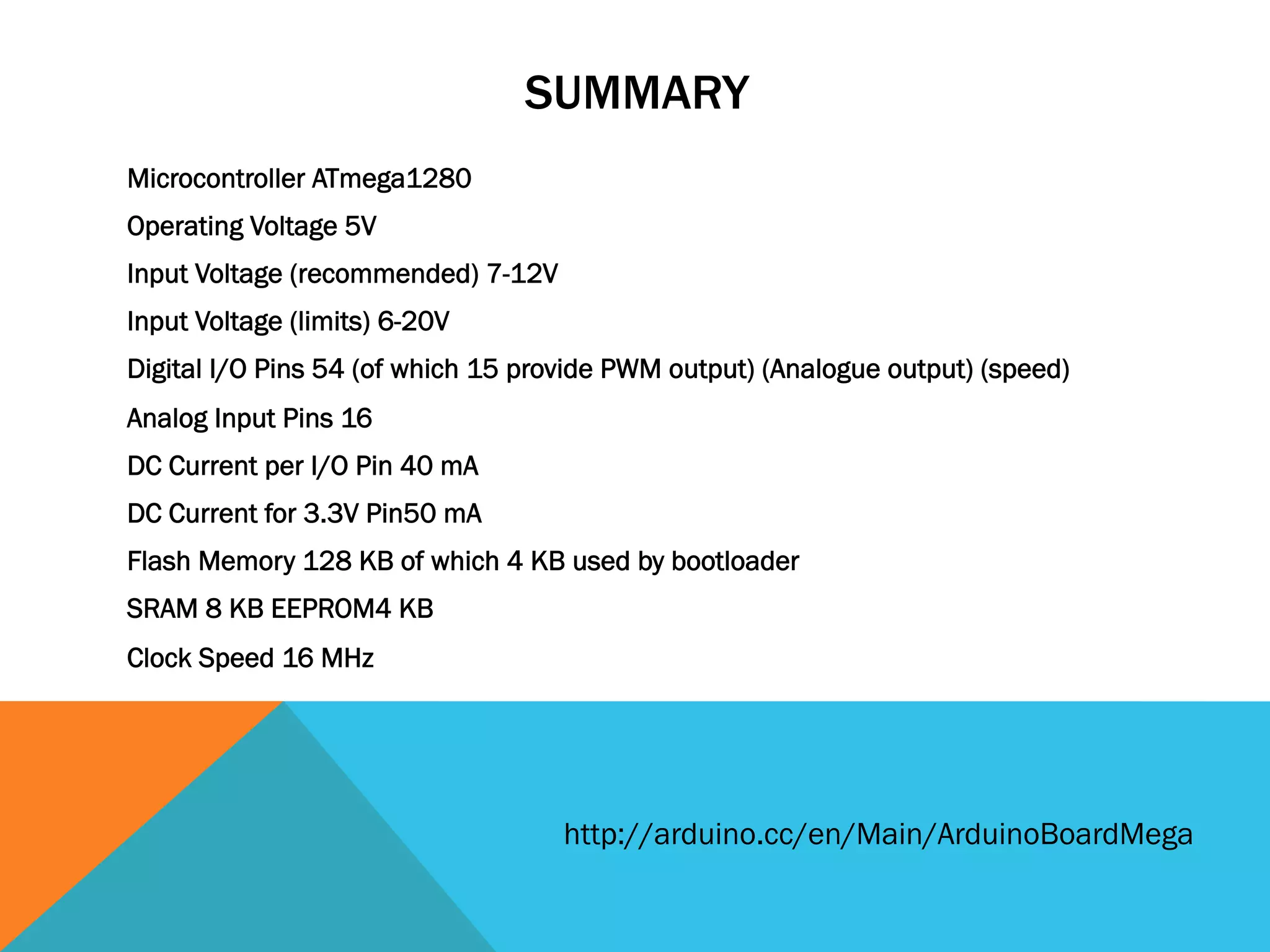
SUMMARY
Microcontroller ATmega1280
Operating Voltage 5V
Input Voltage (recommended) 7-12V
Input Voltage (limits) 6-20V
Digital I/O Pins 54 (of which 15 provide PWM output) (Analogue output) (speed)
Analog Input Pins 16
DC Current per I/O Pin 40 mA
DC Current for 3.3V Pin50 mA
Flash Memory 128 KB of which 4 KB used by bootloader
SRAM 8 KB EEPROM4 KB
Clock Speed 16 MHz


                                    http://arduino.cc/en/Main/ArduinoBoardMega
LETS START
       1.  Arduino Mega
       2.  Arduino environment (http://arduino.cc/en/Main/Software)
       3.  Arduino programming language (based on Wiring http://wiring.org.co/)
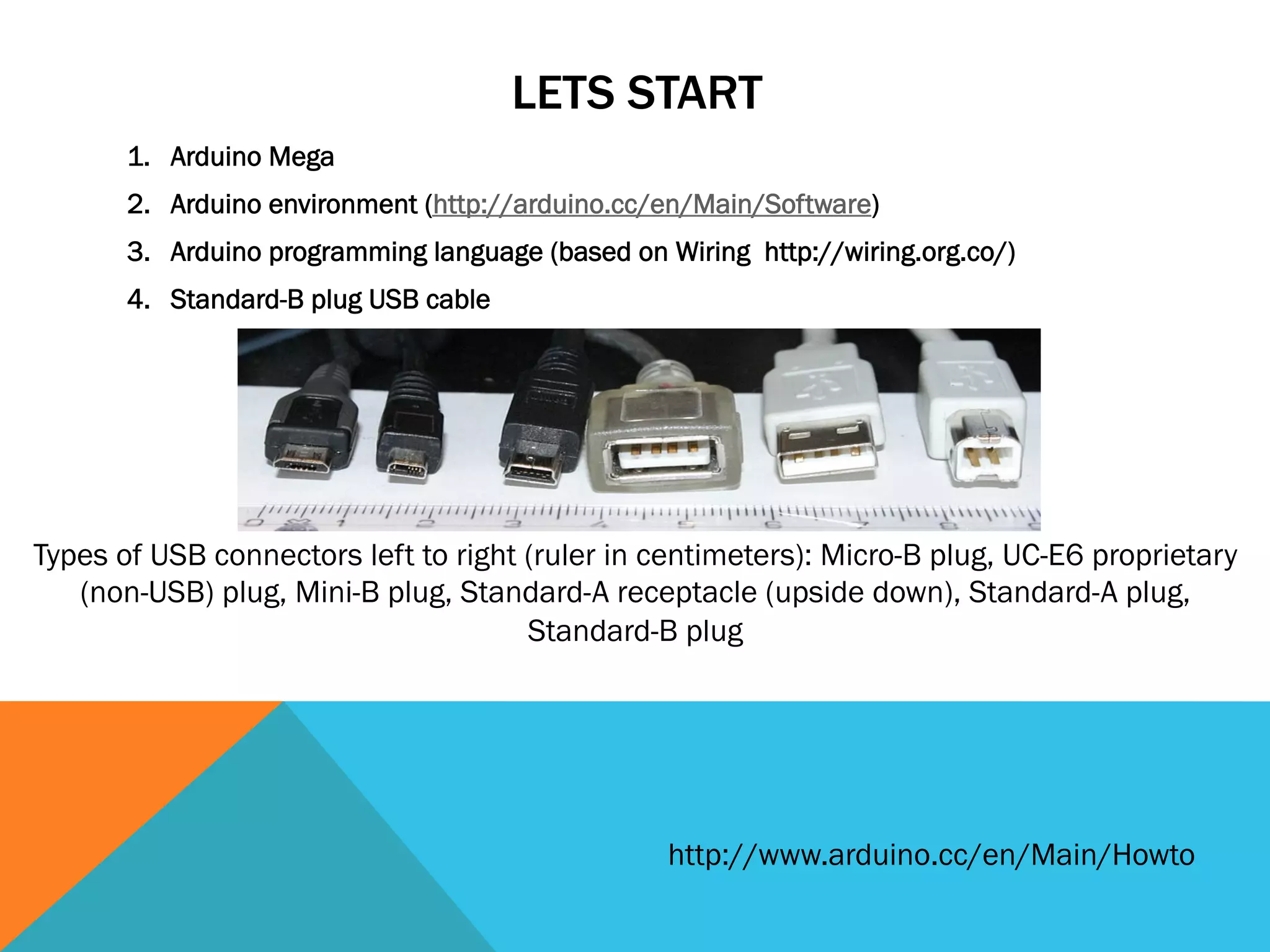
       4.  Standard-B plug USB cable


Types of USB connectors left to right (ruler in centimeters): Micro-B plug, UC-E6 proprietary
   (non-USB) plug, Mini-B plug, Standard-A receptacle (upside down), Standard-A plug,
                                      Standard-B plug


                                                  http://www.arduino.cc/en/Main/Howto
THINGS YOU NEED TO KNOW


1.  Arduino Shield (GSM, WiFi, Ethernet etc)
2.  Arduino Libraries (You can add more libraries to Library folder)
3.  How do I make one (http://arduino.cc/blog/category/schematics/)
4.  Android (http://labs.arduino.cc/ADK/Index)
5.  OUTPUT == 1, HIGH == 1
6.  INPUT == 0, LOW == 1
7.  Analog value (PWM wave) [between 0 (always off) and 255 (always on) ]
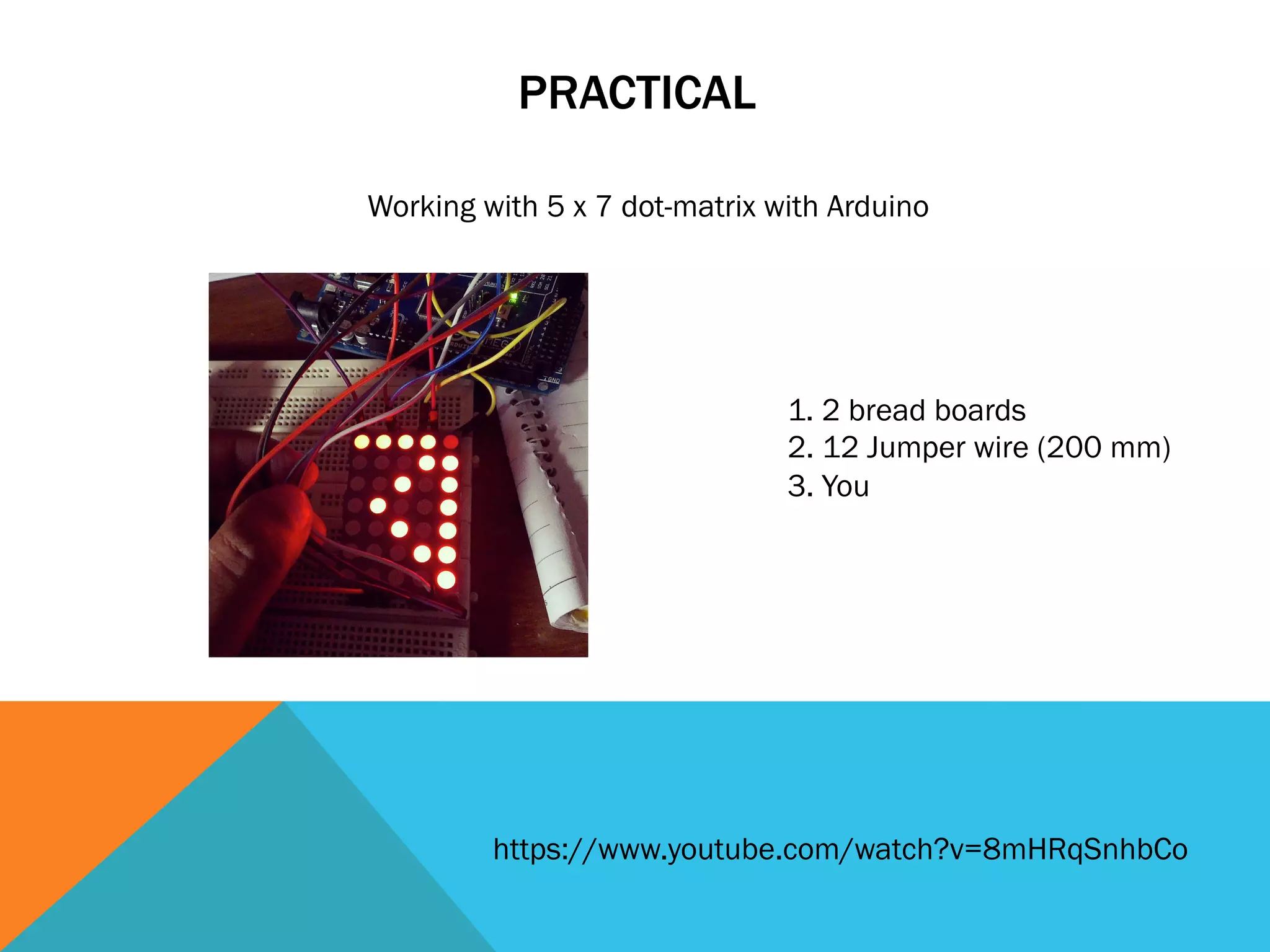
PRACTICAL

Working with 5 x 7 dot-matrix with Arduino


                               1. 2 bread boards
                               2. 12 Jumper wire (200 mm)
                               3. You


         https://www.youtube.com/watch?v=8mHRqSnhbCo
REFERENCES

1.  http://en.wikipedia.org/wiki/File:Usb_connectors.JPG
2.  http://arduino.cc/

WorkShop on Arduino

  • 2.
    S. Mahbub -Uz - Zaman (09301004)! BRAC UNIVERSITY! Department of Computer Science and Engineering! http://mahbubzaman.wordpress.com/
  • 4.
    INTRODUCTION Arduino is anopen-source electronics prototyping platform based on flexible, easy-to-use hardware and software. It's intended for artists, designers, hobbyists, and anyone interested in creating interactive objects or environments. In this presentation we are going to learn about Arduino Mega
  • 5.
    ARDUINO MEGA http://arduino.cc/en/main/boards
  • 6.
    SUMMARY Microcontroller ATmega1280 Operating Voltage5V Input Voltage (recommended) 7-12V Input Voltage (limits) 6-20V Digital I/O Pins 54 (of which 15 provide PWM output) (Analogue output) (speed) Analog Input Pins 16 DC Current per I/O Pin 40 mA DC Current for 3.3V Pin50 mA Flash Memory 128 KB of which 4 KB used by bootloader SRAM 8 KB EEPROM4 KB Clock Speed 16 MHz http://arduino.cc/en/Main/ArduinoBoardMega
  • 7.
    LETS START 1.  Arduino Mega 2.  Arduino environment (http://arduino.cc/en/Main/Software) 3.  Arduino programming language (based on Wiring http://wiring.org.co/) 4.  Standard-B plug USB cable Types of USB connectors left to right (ruler in centimeters): Micro-B plug, UC-E6 proprietary (non-USB) plug, Mini-B plug, Standard-A receptacle (upside down), Standard-A plug, Standard-B plug http://www.arduino.cc/en/Main/Howto
  • 8.
    THINGS YOU NEEDTO KNOW 1.  Arduino Shield (GSM, WiFi, Ethernet etc) 2.  Arduino Libraries (You can add more libraries to Library folder) 3.  How do I make one (http://arduino.cc/blog/category/schematics/) 4.  Android (http://labs.arduino.cc/ADK/Index) 5.  OUTPUT == 1, HIGH == 1 6.  INPUT == 0, LOW == 1 7.  Analog value (PWM wave) [between 0 (always off) and 255 (always on) ]
  • 9.
    PRACTICAL Working with 5x 7 dot-matrix with Arduino 1. 2 bread boards 2. 12 Jumper wire (200 mm) 3. You https://www.youtube.com/watch?v=8mHRqSnhbCo
  • 10.