Arduino
Arduino
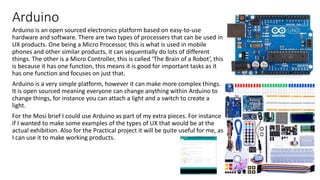
Arduino is an open sourced electronics platform based on easy-to-use
hardware and software. There are two types of processers that can be used in
UX products. One being a Micro Processor, this is what is used in mobile
phones and other similar products, it can sequentially do lots of different
things. The other is a Micro Controller, this is called ‘The Brain of a Robot’, this
is because it has one function, this means it is good for important tasks as it
has one function and focuses on just that.
Arduino is a very simple platform, however it can make more complex things.
It is open sourced meaning everyone can change anything within Arduino to
change things, for instance you can attach a light and a switch to create a
light.
For the Mosi brief I could use Arduino as part of my extra pieces. For instance
if I wanted to make some examples of the types of UX that would be at the
actual exhibition. Also for the Practical project it will be quite useful for me, as
I can use it to make working products.
Light
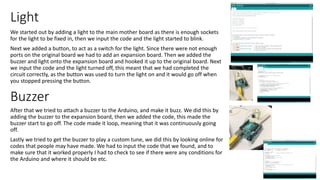
We started out by adding a light to the main mother board as there is enough sockets
for the light to be fixed in, then we input the code and the light started to blink.
Next we added a button, to act as a switch for the light. Since there were not enough
ports on the original board we had to add an expansion board. Then we added the
buzzer and light onto the expansion board and hooked it up to the original board. Next
we input the code and the light turned off, this meant that we had completed the
circuit correctly, as the button was used to turn the light on and it would go off when
you stopped pressing the button.
After that we tried to attach a buzzer to the Arduino, and make it buzz. We did this by
adding the buzzer to the expansion board, then we added the code, this made the
buzzer start to go off. The code made it loop, meaning that it was continuously going
off.
Lastly we tried to get the buzzer to play a custom tune, we did this by looking online for
codes that people may have made. We had to input the code that we found, and to
make sure that it worked properly I had to check to see if there were any conditions for
the Arduino and where it should be etc.
Buzzer

Arduino

  • 1.
  • 2.
    Arduino Arduino is anopen sourced electronics platform based on easy-to-use hardware and software. There are two types of processers that can be used in UX products. One being a Micro Processor, this is what is used in mobile phones and other similar products, it can sequentially do lots of different things. The other is a Micro Controller, this is called ‘The Brain of a Robot’, this is because it has one function, this means it is good for important tasks as it has one function and focuses on just that. Arduino is a very simple platform, however it can make more complex things. It is open sourced meaning everyone can change anything within Arduino to change things, for instance you can attach a light and a switch to create a light. For the Mosi brief I could use Arduino as part of my extra pieces. For instance if I wanted to make some examples of the types of UX that would be at the actual exhibition. Also for the Practical project it will be quite useful for me, as I can use it to make working products.
  • 3.
    Light We started outby adding a light to the main mother board as there is enough sockets for the light to be fixed in, then we input the code and the light started to blink. Next we added a button, to act as a switch for the light. Since there were not enough ports on the original board we had to add an expansion board. Then we added the buzzer and light onto the expansion board and hooked it up to the original board. Next we input the code and the light turned off, this meant that we had completed the circuit correctly, as the button was used to turn the light on and it would go off when you stopped pressing the button. After that we tried to attach a buzzer to the Arduino, and make it buzz. We did this by adding the buzzer to the expansion board, then we added the code, this made the buzzer start to go off. The code made it loop, meaning that it was continuously going off. Lastly we tried to get the buzzer to play a custom tune, we did this by looking online for codes that people may have made. We had to input the code that we found, and to make sure that it worked properly I had to check to see if there were any conditions for the Arduino and where it should be etc. Buzzer