

Version 22.0: Summer '11


                       Apex REST Developer's Guide


Note: Any unreleased services or features referenced in this or other press releases or public statements are not currently available and may
not be delivered on time or at all. Customers who purchase our services should make their purchase decisions based upon features that are
                                                             currently available.

                                                         Last updated: May 9, 2011
© Copyright 2000-2011 salesforce.com, inc. All rights reserved. Salesforce.com is a registered trademark of salesforce.com, inc., as are other
                      names and marks. Other marks appearing herein may be trademarks of their respective owners.
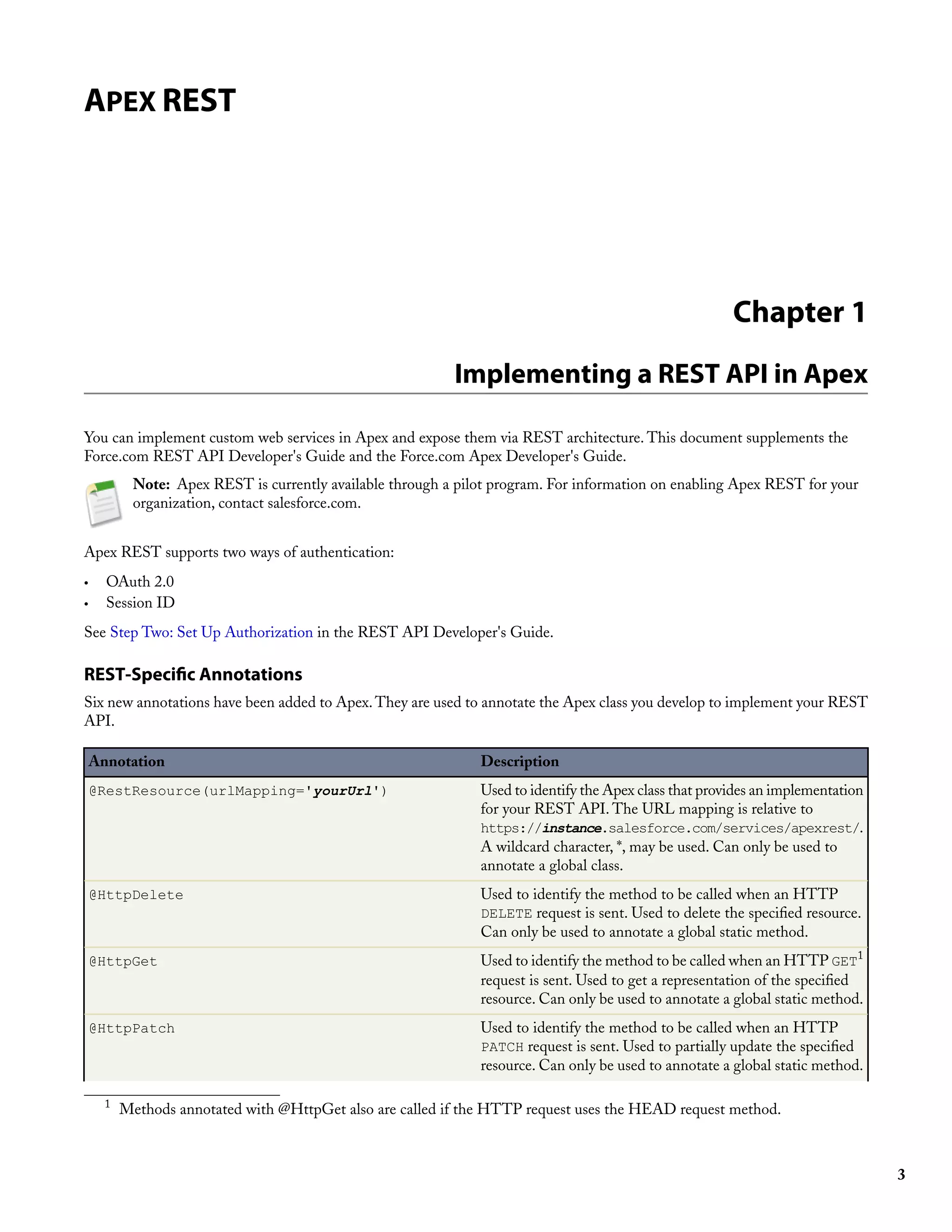
Table of Contents


Table of Contents

       Apex REST.................................................................................................................................3

               Chapter 1: Implementing a REST API in Apex...................................................................3

               Chapter 2: RestRequest Object...........................................................................................8

               Chapter 3: RestResponse Object.........................................................................................9


                                                                                                                                                     i
Table of Contents


                ii
APEX REST


                                                                                                        Chapter 1
                                                           Implementing a REST API in Apex

You can implement custom web services in Apex and expose them via REST architecture. This document supplements the
Force.com REST API Developer's Guide and the Force.com Apex Developer's Guide.
           Note: Apex REST is currently available through a pilot program. For information on enabling Apex REST for your
           organization, contact salesforce.com.


Apex REST supports two ways of authentication:
•     OAuth 2.0
•     Session ID
See Step Two: Set Up Authorization in the REST API Developer's Guide.

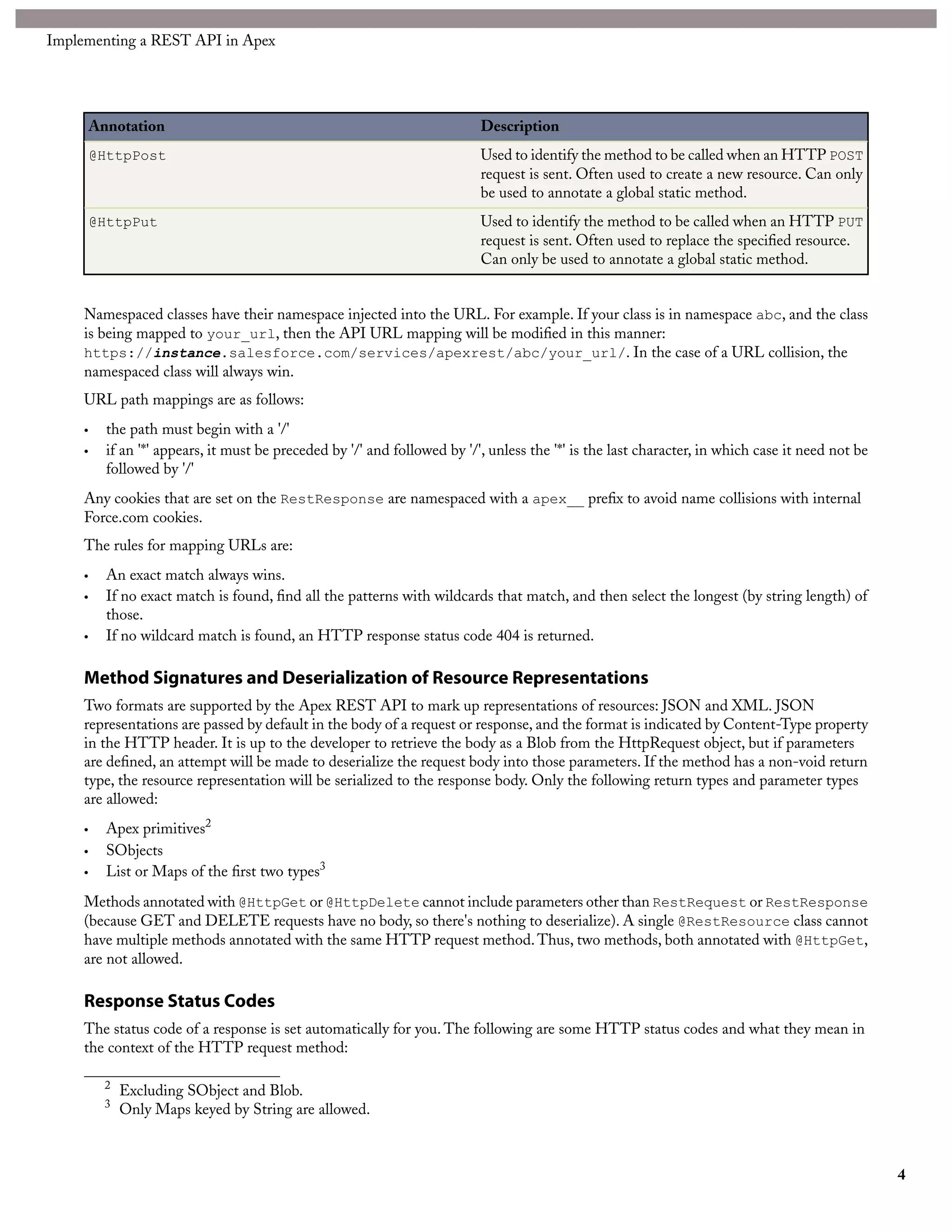
REST-Specific Annotations
Six new annotations have been added to Apex. They are used to annotate the Apex class you develop to implement your REST
API.

    Annotation                                                 Description
    @RestResource(urlMapping='yourUrl')                        Used to identify the Apex class that provides an implementation
                                                               for your REST API. The URL mapping is relative to
                                                               https://instance.salesforce.com/services/apexrest/.
                                                               A wildcard character, *, may be used. Can only be used to
                                                               annotate a global class.
    @HttpDelete                                                Used to identify the method to be called when an HTTP
                                                               DELETE request is sent. Used to delete the specified resource.
                                                               Can only be used to annotate a global static method.
    @HttpGet                                                   Used to identify the method to be called when an HTTP GET1
                                                               request is sent. Used to get a representation of the specified
                                                               resource. Can only be used to annotate a global static method.
    @HttpPatch                                                 Used to identify the method to be called when an HTTP
                                                               PATCH request is sent. Used to partially update the specified
                                                               resource. Can only be used to annotate a global static method.

      1
          Methods annotated with @HttpGet also are called if the HTTP request uses the HEAD request method.


                                                                                                                                 3
Implementing a REST API in Apex


         Annotation                                                         Description
         @HttpPost                                                          Used to identify the method to be called when an HTTP POST
                                                                            request is sent. Often used to create a new resource. Can only
                                                                            be used to annotate a global static method.
         @HttpPut                                                           Used to identify the method to be called when an HTTP PUT
                                                                            request is sent. Often used to replace the specified resource.
                                                                            Can only be used to annotate a global static method.


     Namespaced classes have their namespace injected into the URL. For example. If your class is in namespace abc, and the class
     is being mapped to your_url, then the API URL mapping will be modified in this manner:
     https://instance.salesforce.com/services/apexrest/abc/your_url/. In the case of a URL collision, the
     namespaced class will always win.
     URL path mappings are as follows:
     •     the path must begin with a '/'
     •     if an '*' appears, it must be preceded by '/' and followed by '/', unless the '*' is the last character, in which case it need not be
           followed by '/'
     Any cookies that are set on the RestResponse are namespaced with a apex__ prefix to avoid name collisions with internal
     Force.com cookies.
     The rules for mapping URLs are:
     •     An exact match always wins.
     •     If no exact match is found, find all the patterns with wildcards that match, and then select the longest (by string length) of
           those.
     •     If no wildcard match is found, an HTTP response status code 404 is returned.

     Method Signatures and Deserialization of Resource Representations
     Two formats are supported by the Apex REST API to mark up representations of resources: JSON and XML. JSON
     representations are passed by default in the body of a request or response, and the format is indicated by Content-Type property
     in the HTTP header. It is up to the developer to retrieve the body as a Blob from the HttpRequest object, but if parameters
     are defined, an attempt will be made to deserialize the request body into those parameters. If the method has a non-void return
     type, the resource representation will be serialized to the response body. Only the following return types and parameter types
     are allowed:
     •     Apex primitives2
     •     SObjects
     •     List or Maps of the first two types3
     Methods annotated with @HttpGet or @HttpDelete cannot include parameters other than RestRequest or RestResponse
     (because GET and DELETE requests have no body, so there's nothing to deserialize). A single @RestResource class cannot
     have multiple methods annotated with the same HTTP request method. Thus, two methods, both annotated with @HttpGet,
     are not allowed.

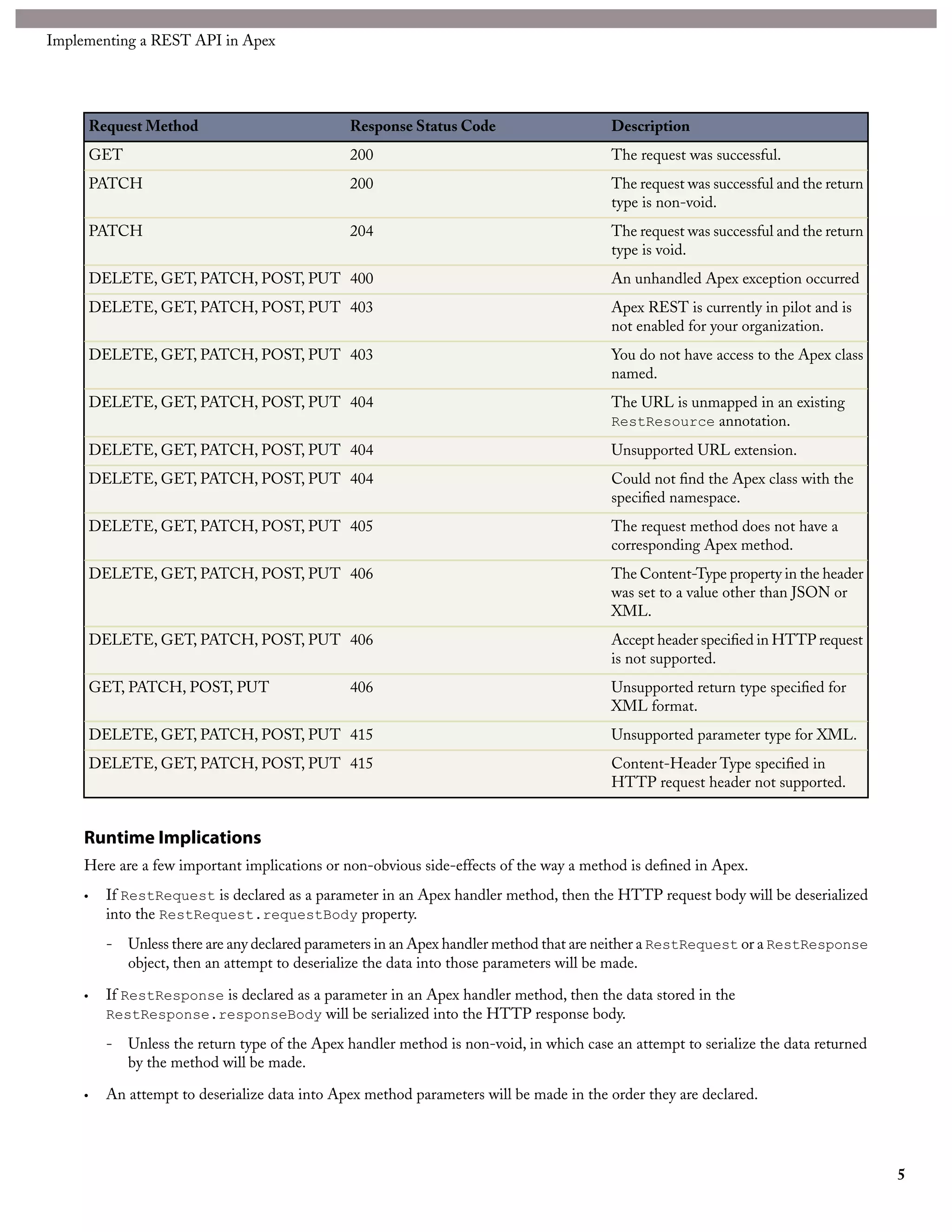
     Response Status Codes
     The status code of a response is set automatically for you. The following are some HTTP status codes and what they mean in
     the context of the HTTP request method:

           2
               Excluding SObject and Blob.
           3
               Only Maps keyed by String are allowed.


                                                                                                                                                   4
Implementing a REST API in Apex


         Request Method                           Response Status Code                      Description
         GET                                      200                                       The request was successful.
         PATCH                                    200                                       The request was successful and the return
                                                                                            type is non-void.
         PATCH                                    204                                       The request was successful and the return
                                                                                            type is void.
         DELETE, GET, PATCH, POST, PUT 400                                                  An unhandled Apex exception occurred
         DELETE, GET, PATCH, POST, PUT 403                                                  Apex REST is currently in pilot and is
                                                                                            not enabled for your organization.
         DELETE, GET, PATCH, POST, PUT 403                                                  You do not have access to the Apex class
                                                                                            named.
         DELETE, GET, PATCH, POST, PUT 404                                                  The URL is unmapped in an existing
                                                                                            RestResource annotation.

         DELETE, GET, PATCH, POST, PUT 404                                                  Unsupported URL extension.
         DELETE, GET, PATCH, POST, PUT 404                                                  Could not find the Apex class with the
                                                                                            specified namespace.
         DELETE, GET, PATCH, POST, PUT 405                                                  The request method does not have a
                                                                                            corresponding Apex method.
         DELETE, GET, PATCH, POST, PUT 406                                                  The Content-Type property in the header
                                                                                            was set to a value other than JSON or
                                                                                            XML.
         DELETE, GET, PATCH, POST, PUT 406                                                  Accept header specified in HTTP request
                                                                                            is not supported.
         GET, PATCH, POST, PUT                    406                                       Unsupported return type specified for
                                                                                            XML format.
         DELETE, GET, PATCH, POST, PUT 415                                                  Unsupported parameter type for XML.
         DELETE, GET, PATCH, POST, PUT 415                                                  Content-Header Type specified in
                                                                                            HTTP request header not supported.


     Runtime Implications
     Here are a few important implications or non-obvious side-effects of the way a method is defined in Apex.
     •     If RestRequest is declared as a parameter in an Apex handler method, then the HTTP request body will be deserialized
           into the RestRequest.requestBody property.
           -   Unless there are any declared parameters in an Apex handler method that are neither a RestRequest or a RestResponse
               object, then an attempt to deserialize the data into those parameters will be made.

     •     If RestResponse is declared as a parameter in an Apex handler method, then the data stored in the
           RestResponse.responseBody will be serialized into the HTTP response body.

           -   Unless the return type of the Apex handler method is non-void, in which case an attempt to serialize the data returned
               by the method will be made.

     •     An attempt to deserialize data into Apex method parameters will be made in the order they are declared.


                                                                                                                                        5
Implementing a REST API in Apex


     •   The name of the Apex parameters matter. For example, valid requests in both XML and JSON would look like:

          @HttpPost
          global static void myPostMethod(String s1, Integer i1, String s2, Boolean b1)

          {
              "s1"   :   "my first string",
              "i1"   :   123,
              "s2"   :   "my second string",
              "b1"   :   false
          }

          <request>
            <s1>my first string</s1>
            <i1>123</i1>
            <s2>my second string</s2>
            <b1>false</b1>
          </request>

     •   Certain parameter types or return types mean that the method cannot be used with XML as the Content-Type for the
         request or as the accepted format for the response. Maps or Collections of Collections (for example, List<List<String>>)
         are not supported. These types are usable with JSON, however. If the parameter list includes a type invalid for XML and
         XML is sent, an HTTP 415 status code is returned. If the return type is a type invalid for XML and XML is the asked for
         response format, an HTTP 406 status code is returned.

     Apex REST API Sample
     The following sample shows how to implement a simple REST API in Apex that handles threw different HTTP request
     methods. For more information on authenticating with cURL, see the Quick Start section of the REST API Developer's Guide.
     1. Create an Apex class in your instance, by clicking Your Name ➤ Setup ➤ Develop ➤ Apex Classes and adding the
        following code to your new class:

          @RestResource(urlMapping='/Account/*')
          global class MyRestResource {
            @HttpDelete
            global static void doDelete(RestRequest req, RestResponse res) {
              String accountId = req.requestURI.substring(req.requestURI.lastIndexOf('/')+1);
              Account account = [SELECT Id, Name FROM Account WHERE Id = :accountId];
              delete account;
            }

              @HttpGet
              global static Account doGet(RestRequest req, RestResponse res) {
                String accountId = req.requestURI.substring(req.requestURI.lastIndexOf('/')+1);
                Account result = [SELECT Id, Name FROM Account WHERE Id = :accountId];
                return result;
              }

              @HttpPost
              global static String doPost(RestRequest req, RestResponse res, String name,
                  String phone, String website) {
                Account account = new Account();
                account.Name = name;
                account.phone = phone;
                account.website = website;
                insert account;
                return account.Id;
              }
          }

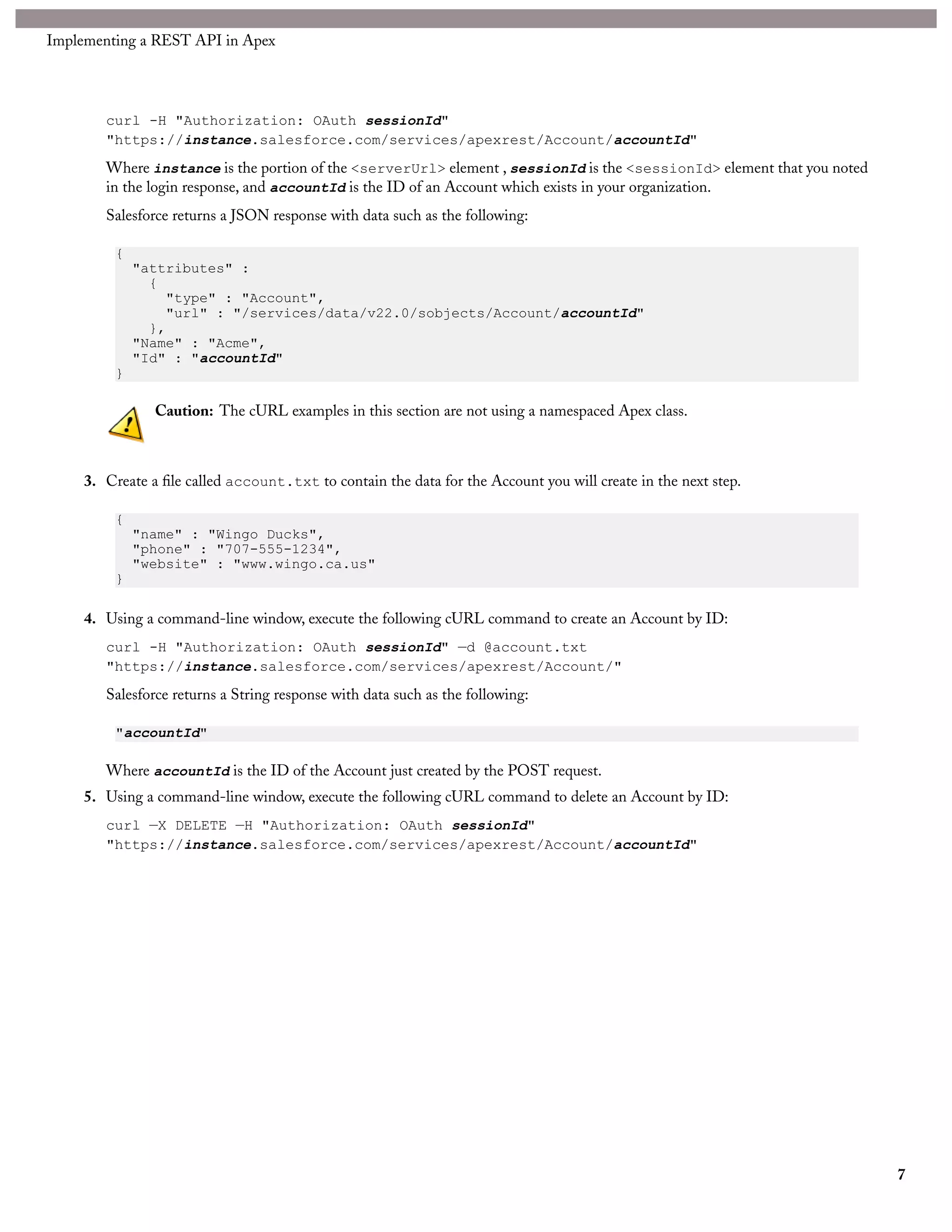
     2. Using a command-line window, execute the following cURL command to get an Account by ID:


                                                                                                                                    6
Implementing a REST API in Apex


        curl -H "Authorization: OAuth sessionId"
        "https://instance.salesforce.com/services/apexrest/Account/accountId"
        Where instance is the portion of the <serverUrl> element , sessionId is the <sessionId> element that you noted
        in the login response, and accountId is the ID of an Account which exists in your organization.
        Salesforce returns a JSON response with data such as the following:

          {
              "attributes" :
                {
                  "type" : "Account",
                  "url" : "/services/data/v22.0/sobjects/Account/accountId"
                },
              "Name" : "Acme",
              "Id" : "accountId"
          }

                Caution: The cURL examples in this section are not using a namespaced Apex class.


     3. Create a file called account.txt to contain the data for the Account you will create in the next step.

          {
              "name" : "Wingo Ducks",
              "phone" : "707-555-1234",
              "website" : "www.wingo.ca.us"
          }

     4. Using a command-line window, execute the following cURL command to create an Account by ID:
        curl -H "Authorization: OAuth sessionId" —d @account.txt
        "https://instance.salesforce.com/services/apexrest/Account/"
        Salesforce returns a String response with data such as the following:

          "accountId"

        Where accountId is the ID of the Account just created by the POST request.
     5. Using a command-line window, execute the following cURL command to delete an Account by ID:
        curl —X DELETE —H "Authorization: OAuth sessionId"
        "https://instance.salesforce.com/services/apexrest/Account/accountId"


                                                                                                                         7
Chapter 2
                                                                               RestRequest Object

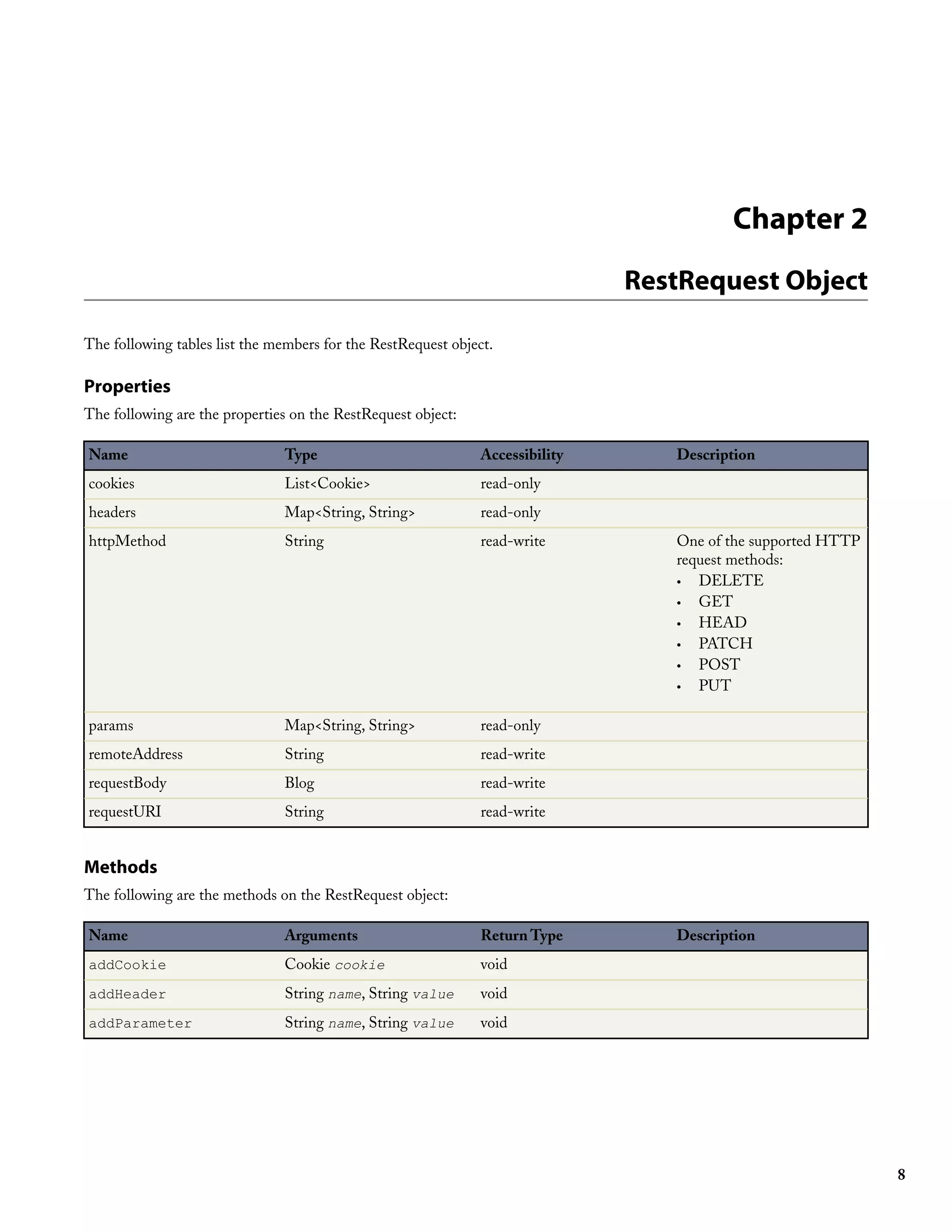
The following tables list the members for the RestRequest object.

Properties
The following are the properties on the RestRequest object:

Name                           Type                            Accessibility      Description
cookies                        List<Cookie>                    read-only
headers                        Map<String, String>             read-only
httpMethod                     String                          read-write         One of the supported HTTP
                                                                                  request methods:
                                                                                  • DELETE
                                                                                  • GET
                                                                                  • HEAD
                                                                                  • PATCH
                                                                                  • POST
                                                                                  • PUT

params                         Map<String, String>             read-only
remoteAddress                  String                          read-write
requestBody                    Blog                            read-write
requestURI                     String                          read-write


Methods
The following are the methods on the RestRequest object:

Name                           Arguments                       Return Type        Description
addCookie                      Cookie cookie                   void
addHeader                      String name, String value       void
addParameter                   String name, String value       void


                                                                                                              8
Chapter 3
                                                                                  RestResponse Object

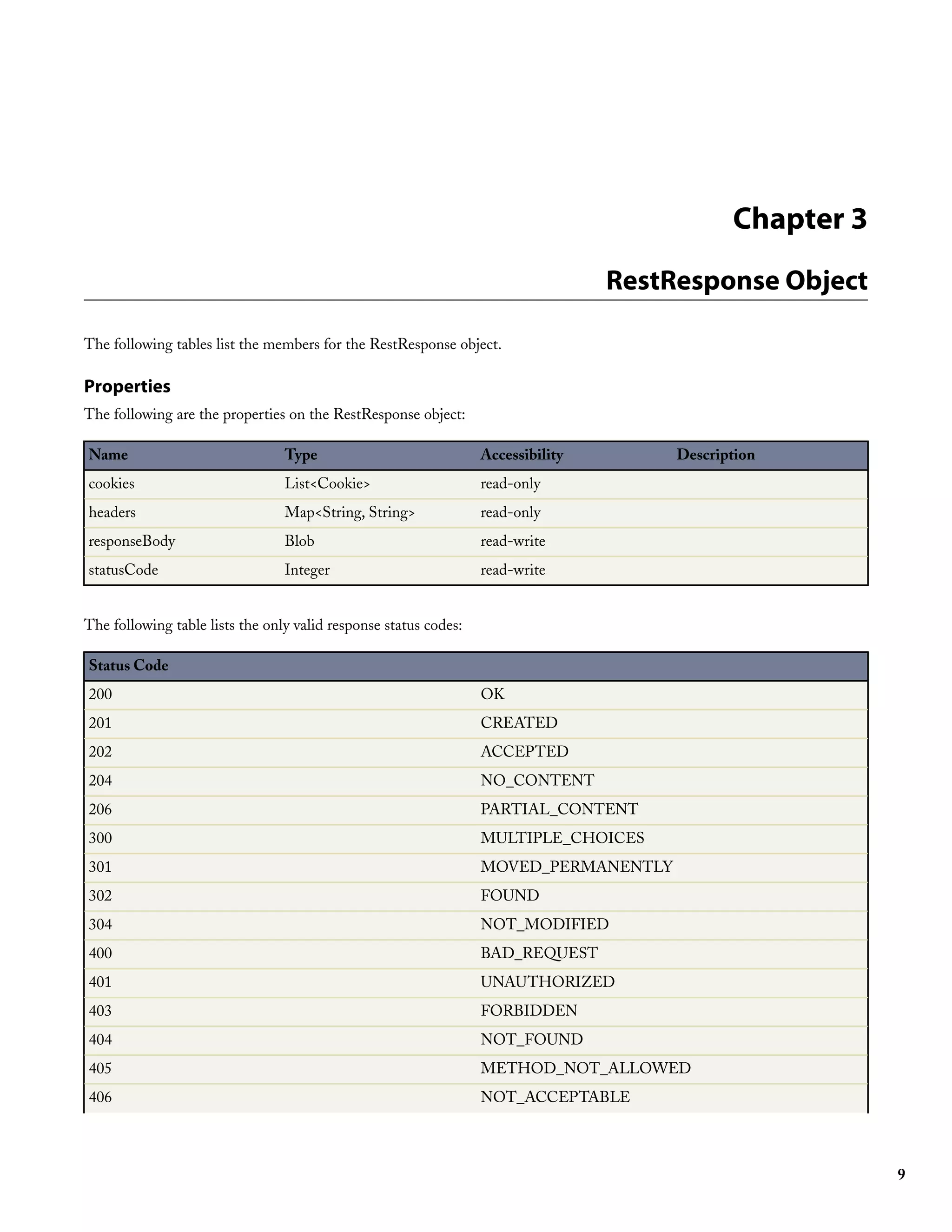
The following tables list the members for the RestResponse object.

Properties
The following are the properties on the RestResponse object:

Name                             Type                             Accessibility        Description
cookies                          List<Cookie>                     read-only
headers                          Map<String, String>              read-only
responseBody                     Blob                             read-write
statusCode                       Integer                          read-write


The following table lists the only valid response status codes:

Status Code
200                                                               OK
201                                                               CREATED
202                                                               ACCEPTED
204                                                               NO_CONTENT
206                                                               PARTIAL_CONTENT
300                                                               MULTIPLE_CHOICES
301                                                               MOVED_PERMANENTLY
302                                                               FOUND
304                                                               NOT_MODIFIED
400                                                               BAD_REQUEST
401                                                               UNAUTHORIZED
403                                                               FORBIDDEN
404                                                               NOT_FOUND
405                                                               METHOD_NOT_ALLOWED
406                                                               NOT_ACCEPTABLE


                                                                                                          9
RestResponse Object


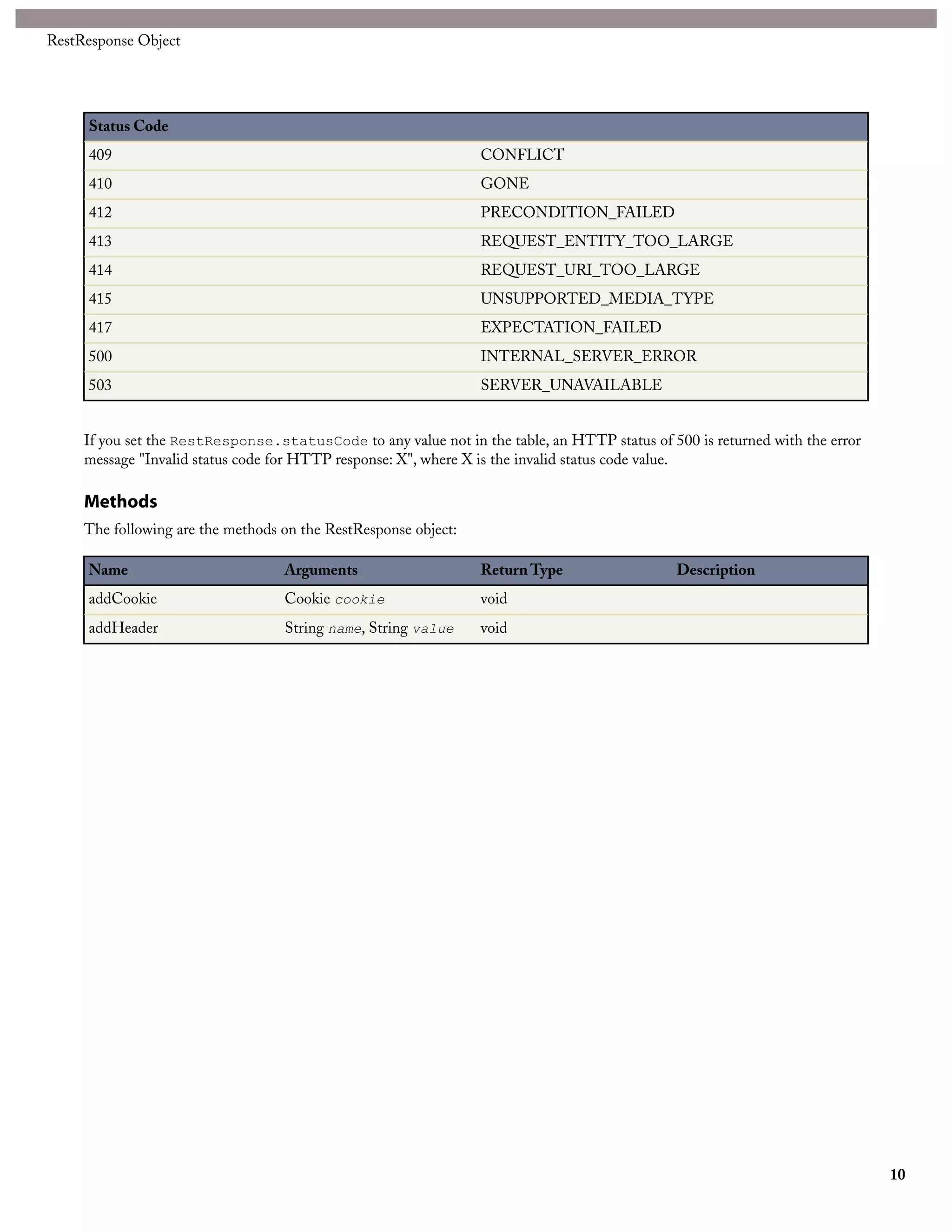
     Status Code
     409                                                         CONFLICT
     410                                                         GONE
     412                                                         PRECONDITION_FAILED
     413                                                         REQUEST_ENTITY_TOO_LARGE
     414                                                         REQUEST_URI_TOO_LARGE
     415                                                         UNSUPPORTED_MEDIA_TYPE
     417                                                         EXPECTATION_FAILED
     500                                                         INTERNAL_SERVER_ERROR
     503                                                         SERVER_UNAVAILABLE


     If you set the RestResponse.statusCode to any value not in the table, an HTTP status of 500 is returned with the error
     message "Invalid status code for HTTP response: X", where X is the invalid status code value.

     Methods
     The following are the methods on the RestResponse object:

     Name                          Arguments                     Return Type                   Description
     addCookie                     Cookie cookie                 void
     addHeader                     String name, String value     void


                                                                                                                              10

Api apex rest

  • 1.
    Version 22.0: Summer'11 Apex REST Developer's Guide Note: Any unreleased services or features referenced in this or other press releases or public statements are not currently available and may not be delivered on time or at all. Customers who purchase our services should make their purchase decisions based upon features that are currently available. Last updated: May 9, 2011 © Copyright 2000-2011 salesforce.com, inc. All rights reserved. Salesforce.com is a registered trademark of salesforce.com, inc., as are other names and marks. Other marks appearing herein may be trademarks of their respective owners.
  • 3.
    Table of Contents Tableof Contents Apex REST.................................................................................................................................3 Chapter 1: Implementing a REST API in Apex...................................................................3 Chapter 2: RestRequest Object...........................................................................................8 Chapter 3: RestResponse Object.........................................................................................9 i
  • 4.
  • 5.
    APEX REST Chapter 1 Implementing a REST API in Apex You can implement custom web services in Apex and expose them via REST architecture. This document supplements the Force.com REST API Developer's Guide and the Force.com Apex Developer's Guide. Note: Apex REST is currently available through a pilot program. For information on enabling Apex REST for your organization, contact salesforce.com. Apex REST supports two ways of authentication: • OAuth 2.0 • Session ID See Step Two: Set Up Authorization in the REST API Developer's Guide. REST-Specific Annotations Six new annotations have been added to Apex. They are used to annotate the Apex class you develop to implement your REST API. Annotation Description @RestResource(urlMapping='yourUrl') Used to identify the Apex class that provides an implementation for your REST API. The URL mapping is relative to https://instance.salesforce.com/services/apexrest/. A wildcard character, *, may be used. Can only be used to annotate a global class. @HttpDelete Used to identify the method to be called when an HTTP DELETE request is sent. Used to delete the specified resource. Can only be used to annotate a global static method. @HttpGet Used to identify the method to be called when an HTTP GET1 request is sent. Used to get a representation of the specified resource. Can only be used to annotate a global static method. @HttpPatch Used to identify the method to be called when an HTTP PATCH request is sent. Used to partially update the specified resource. Can only be used to annotate a global static method. 1 Methods annotated with @HttpGet also are called if the HTTP request uses the HEAD request method. 3
  • 6.
    Implementing a RESTAPI in Apex Annotation Description @HttpPost Used to identify the method to be called when an HTTP POST request is sent. Often used to create a new resource. Can only be used to annotate a global static method. @HttpPut Used to identify the method to be called when an HTTP PUT request is sent. Often used to replace the specified resource. Can only be used to annotate a global static method. Namespaced classes have their namespace injected into the URL. For example. If your class is in namespace abc, and the class is being mapped to your_url, then the API URL mapping will be modified in this manner: https://instance.salesforce.com/services/apexrest/abc/your_url/. In the case of a URL collision, the namespaced class will always win. URL path mappings are as follows: • the path must begin with a '/' • if an '*' appears, it must be preceded by '/' and followed by '/', unless the '*' is the last character, in which case it need not be followed by '/' Any cookies that are set on the RestResponse are namespaced with a apex__ prefix to avoid name collisions with internal Force.com cookies. The rules for mapping URLs are: • An exact match always wins. • If no exact match is found, find all the patterns with wildcards that match, and then select the longest (by string length) of those. • If no wildcard match is found, an HTTP response status code 404 is returned. Method Signatures and Deserialization of Resource Representations Two formats are supported by the Apex REST API to mark up representations of resources: JSON and XML. JSON representations are passed by default in the body of a request or response, and the format is indicated by Content-Type property in the HTTP header. It is up to the developer to retrieve the body as a Blob from the HttpRequest object, but if parameters are defined, an attempt will be made to deserialize the request body into those parameters. If the method has a non-void return type, the resource representation will be serialized to the response body. Only the following return types and parameter types are allowed: • Apex primitives2 • SObjects • List or Maps of the first two types3 Methods annotated with @HttpGet or @HttpDelete cannot include parameters other than RestRequest or RestResponse (because GET and DELETE requests have no body, so there's nothing to deserialize). A single @RestResource class cannot have multiple methods annotated with the same HTTP request method. Thus, two methods, both annotated with @HttpGet, are not allowed. Response Status Codes The status code of a response is set automatically for you. The following are some HTTP status codes and what they mean in the context of the HTTP request method: 2 Excluding SObject and Blob. 3 Only Maps keyed by String are allowed. 4
  • 7.
    Implementing a RESTAPI in Apex Request Method Response Status Code Description GET 200 The request was successful. PATCH 200 The request was successful and the return type is non-void. PATCH 204 The request was successful and the return type is void. DELETE, GET, PATCH, POST, PUT 400 An unhandled Apex exception occurred DELETE, GET, PATCH, POST, PUT 403 Apex REST is currently in pilot and is not enabled for your organization. DELETE, GET, PATCH, POST, PUT 403 You do not have access to the Apex class named. DELETE, GET, PATCH, POST, PUT 404 The URL is unmapped in an existing RestResource annotation. DELETE, GET, PATCH, POST, PUT 404 Unsupported URL extension. DELETE, GET, PATCH, POST, PUT 404 Could not find the Apex class with the specified namespace. DELETE, GET, PATCH, POST, PUT 405 The request method does not have a corresponding Apex method. DELETE, GET, PATCH, POST, PUT 406 The Content-Type property in the header was set to a value other than JSON or XML. DELETE, GET, PATCH, POST, PUT 406 Accept header specified in HTTP request is not supported. GET, PATCH, POST, PUT 406 Unsupported return type specified for XML format. DELETE, GET, PATCH, POST, PUT 415 Unsupported parameter type for XML. DELETE, GET, PATCH, POST, PUT 415 Content-Header Type specified in HTTP request header not supported. Runtime Implications Here are a few important implications or non-obvious side-effects of the way a method is defined in Apex. • If RestRequest is declared as a parameter in an Apex handler method, then the HTTP request body will be deserialized into the RestRequest.requestBody property. - Unless there are any declared parameters in an Apex handler method that are neither a RestRequest or a RestResponse object, then an attempt to deserialize the data into those parameters will be made. • If RestResponse is declared as a parameter in an Apex handler method, then the data stored in the RestResponse.responseBody will be serialized into the HTTP response body. - Unless the return type of the Apex handler method is non-void, in which case an attempt to serialize the data returned by the method will be made. • An attempt to deserialize data into Apex method parameters will be made in the order they are declared. 5
  • 8.
    Implementing a RESTAPI in Apex • The name of the Apex parameters matter. For example, valid requests in both XML and JSON would look like: @HttpPost global static void myPostMethod(String s1, Integer i1, String s2, Boolean b1) { "s1" : "my first string", "i1" : 123, "s2" : "my second string", "b1" : false } <request> <s1>my first string</s1> <i1>123</i1> <s2>my second string</s2> <b1>false</b1> </request> • Certain parameter types or return types mean that the method cannot be used with XML as the Content-Type for the request or as the accepted format for the response. Maps or Collections of Collections (for example, List<List<String>>) are not supported. These types are usable with JSON, however. If the parameter list includes a type invalid for XML and XML is sent, an HTTP 415 status code is returned. If the return type is a type invalid for XML and XML is the asked for response format, an HTTP 406 status code is returned. Apex REST API Sample The following sample shows how to implement a simple REST API in Apex that handles threw different HTTP request methods. For more information on authenticating with cURL, see the Quick Start section of the REST API Developer's Guide. 1. Create an Apex class in your instance, by clicking Your Name ➤ Setup ➤ Develop ➤ Apex Classes and adding the following code to your new class: @RestResource(urlMapping='/Account/*') global class MyRestResource { @HttpDelete global static void doDelete(RestRequest req, RestResponse res) { String accountId = req.requestURI.substring(req.requestURI.lastIndexOf('/')+1); Account account = [SELECT Id, Name FROM Account WHERE Id = :accountId]; delete account; } @HttpGet global static Account doGet(RestRequest req, RestResponse res) { String accountId = req.requestURI.substring(req.requestURI.lastIndexOf('/')+1); Account result = [SELECT Id, Name FROM Account WHERE Id = :accountId]; return result; } @HttpPost global static String doPost(RestRequest req, RestResponse res, String name, String phone, String website) { Account account = new Account(); account.Name = name; account.phone = phone; account.website = website; insert account; return account.Id; } } 2. Using a command-line window, execute the following cURL command to get an Account by ID: 6
  • 9.
    Implementing a RESTAPI in Apex curl -H "Authorization: OAuth sessionId" "https://instance.salesforce.com/services/apexrest/Account/accountId" Where instance is the portion of the <serverUrl> element , sessionId is the <sessionId> element that you noted in the login response, and accountId is the ID of an Account which exists in your organization. Salesforce returns a JSON response with data such as the following: { "attributes" : { "type" : "Account", "url" : "/services/data/v22.0/sobjects/Account/accountId" }, "Name" : "Acme", "Id" : "accountId" } Caution: The cURL examples in this section are not using a namespaced Apex class. 3. Create a file called account.txt to contain the data for the Account you will create in the next step. { "name" : "Wingo Ducks", "phone" : "707-555-1234", "website" : "www.wingo.ca.us" } 4. Using a command-line window, execute the following cURL command to create an Account by ID: curl -H "Authorization: OAuth sessionId" —d @account.txt "https://instance.salesforce.com/services/apexrest/Account/" Salesforce returns a String response with data such as the following: "accountId" Where accountId is the ID of the Account just created by the POST request. 5. Using a command-line window, execute the following cURL command to delete an Account by ID: curl —X DELETE —H "Authorization: OAuth sessionId" "https://instance.salesforce.com/services/apexrest/Account/accountId" 7
  • 10.
    Chapter 2 RestRequest Object The following tables list the members for the RestRequest object. Properties The following are the properties on the RestRequest object: Name Type Accessibility Description cookies List<Cookie> read-only headers Map<String, String> read-only httpMethod String read-write One of the supported HTTP request methods: • DELETE • GET • HEAD • PATCH • POST • PUT params Map<String, String> read-only remoteAddress String read-write requestBody Blog read-write requestURI String read-write Methods The following are the methods on the RestRequest object: Name Arguments Return Type Description addCookie Cookie cookie void addHeader String name, String value void addParameter String name, String value void 8
  • 11.
    Chapter 3 RestResponse Object The following tables list the members for the RestResponse object. Properties The following are the properties on the RestResponse object: Name Type Accessibility Description cookies List<Cookie> read-only headers Map<String, String> read-only responseBody Blob read-write statusCode Integer read-write The following table lists the only valid response status codes: Status Code 200 OK 201 CREATED 202 ACCEPTED 204 NO_CONTENT 206 PARTIAL_CONTENT 300 MULTIPLE_CHOICES 301 MOVED_PERMANENTLY 302 FOUND 304 NOT_MODIFIED 400 BAD_REQUEST 401 UNAUTHORIZED 403 FORBIDDEN 404 NOT_FOUND 405 METHOD_NOT_ALLOWED 406 NOT_ACCEPTABLE 9
  • 12.
    RestResponse Object Status Code 409 CONFLICT 410 GONE 412 PRECONDITION_FAILED 413 REQUEST_ENTITY_TOO_LARGE 414 REQUEST_URI_TOO_LARGE 415 UNSUPPORTED_MEDIA_TYPE 417 EXPECTATION_FAILED 500 INTERNAL_SERVER_ERROR 503 SERVER_UNAVAILABLE If you set the RestResponse.statusCode to any value not in the table, an HTTP status of 500 is returned with the error message "Invalid status code for HTTP response: X", where X is the invalid status code value. Methods The following are the methods on the RestResponse object: Name Arguments Return Type Description addCookie Cookie cookie void addHeader String name, String value void 10