Simplified Cluster Operation &
Troubleshooting
Alejandro Fernandez + Jayush Luniya
Speakers
Alejandro Fernandez
Sr. Software Engineer @ Hortonworks
Apache Ambari PMC
alejandro@apache.org
Jayush Luniya
Staff Engineer @ Hortonworks
Apache Ambari PMC
jluniya@apache.org
What is Apache Ambari?
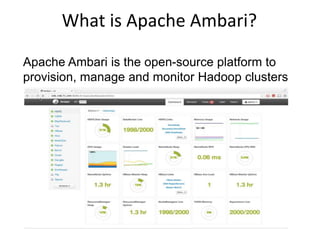
Apache Ambari is the open-source platform to
provision, manage and monitor Hadoop clusters
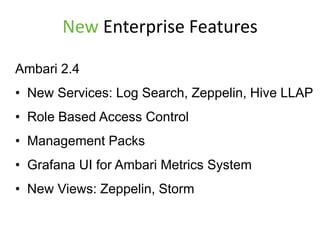
New Enterprise Features
Ambari 2.4
• New Services: Log Search, Zeppelin, Hive LLAP
• Role Based Access Control
• Management Packs
• Grafana UI for Ambari Metrics System
• New Views: Zeppelin, Storm
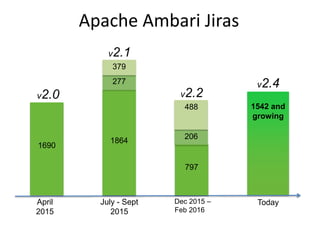
Apache Ambari Jiras
April
2015
1690
1864
277
379
797
206
488
July - Sept
2015
Dec 2015 –
Feb 2016
Today
v2.0
v2.1
v2.2
v2.4
1542 and
growing
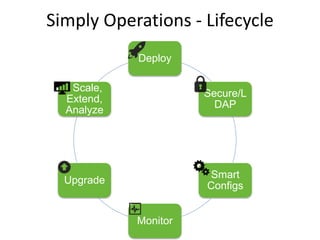
Deploy
Secure/L
DAP
Smart
Configs
Monitor
Upgrade
Scale,
Extend,
Analyze
Simply Operations - Lifecycle
Ease-of-Use Deploy
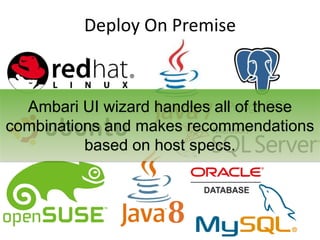
Deploy On Premise
Ambari UI wizard handles all of these
combinations and makes recommendations
based on host specs.
Deploy On The Cloud
Certified environments
Sysprepped VMs
Hundreds of similar clusters
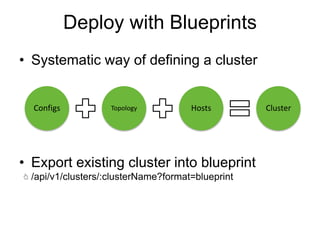
Deploy with Blueprints
• Systematic way of defining a cluster
• Export existing cluster into blueprint
/api/v1/clusters/:clusterName?format=blueprint
Configs Topology Hosts Cluster
Create a cluster with Blueprints
{
"configurations" : [
{
"hdfs-site" : {
"dfs.datanode.data.dir" : "/hadoop/1,
/hadoop/2,/hadoop/3"
}
}
],
"host_groups" : [
{
"name" : "master-host",
"components" : [
{ "name" : "NAMENODE” },
{ "name" : "RESOURCEMANAGER” },
…
],
"cardinality" : "1"
},
{
"name" : "worker-host",
"components" : [
{ "name" : "DATANODE" },
{ "name" : "NODEMANAGER” },
…
],
"cardinality" : "1+"
},
],
"Blueprints" : {
"stack_name" : "HDP",
"stack_version" : "2.5"
}
}
{
"blueprint" : "my-blueprint",
"host_groups" :[
{
"name" : "master-host",
"hosts" : [
{
"fqdn" : "master001.ambari.apache.org"
}
]
},
{
"name" : "worker-host",
"hosts" : [
{
"fqdn" : "worker001.ambari.apache.org"
},
{
"fqdn" : "worker002.ambari.apache.org"
},
…
{
"fqdn" : "worker099.ambari.apache.org"
}
]
}
]
}
1. POST /api/v1/blueprints/my-blueprint 2. POST /api/v1/clusters/my-cluster
Create a cluster with Blueprints
{
"configurations" : [
{
"hdfs-site" : {
"dfs.datanode.data.dir" : "/hadoop/1,
/hadoop/2,/hadoop/3"
}
}
],
"host_groups" : [
{
"name" : "master-host",
"components" : [
{ "name" : "NAMENODE” },
{ "name" : "RESOURCEMANAGER” },
…
],
"cardinality" : "1"
},
{
"name" : "worker-host",
"components" : [
{ "name" : "DATANODE" },
{ "name" : "NODEMANAGER” },
…
],
"cardinality" : "1+"
},
],
"Blueprints" : {
"stack_name" : "HDP",
"stack_version" : "2.5"
}
}
{
"blueprint" : "my-blueprint",
"host_groups" :[
{
"name" : "master-host",
"hosts" : [
{
"fqdn" : "master001.ambari.apache.org"
}
]
},
{
"name" : "worker-host",
"hosts" : [
{
"fqdn" : "worker001.ambari.apache.org"
},
{
"fqdn" : "worker002.ambari.apache.org"
},
…
{
"fqdn" : "worker099.ambari.apache.org"
}
]
}
]
}
1. POST /api/v1/blueprints/my-blueprint 2. POST /api/v1/clusters/my-cluster
Create a cluster with Blueprints
{
"configurations" : [
{
"hdfs-site" : {
"dfs.datanode.data.dir" : "/hadoop/1,
/hadoop/2,/hadoop/3"
}
}
],
"host_groups" : [
{
"name" : "master-host",
"components" : [
{ "name" : "NAMENODE” },
{ "name" : "RESOURCEMANAGER” },
…
],
"cardinality" : "1"
},
{
"name" : "worker-host",
"components" : [
{ "name" : "DATANODE" },
{ "name" : "NODEMANAGER” },
…
],
"cardinality" : "1+"
},
],
"Blueprints" : {
"stack_name" : "HDP",
"stack_version" : "2.5"
}
}
{
"blueprint" : "my-blueprint",
"host_groups" :[
{
"name" : "master-host",
"hosts" : [
{
"fqdn" : "master001.ambari.apache.org"
}
]
},
{
"name" : "worker-host",
"hosts" : [
{
"fqdn" : "worker001.ambari.apache.org"
},
{
"fqdn" : "worker002.ambari.apache.org"
},
…
{
"fqdn" : "worker099.ambari.apache.org"
}
]
}
]
}
1. POST /api/v1/blueprints/my-blueprint 2. POST /api/v1/clusters/my-cluster
Create a cluster with Blueprints
{
"configurations" : [
{
"hdfs-site" : {
"dfs.datanode.data.dir" : "/hadoop/1,
/hadoop/2,/hadoop/3"
}
}
],
"host_groups" : [
{
"name" : "master-host",
"components" : [
{ "name" : "NAMENODE” },
{ "name" : "RESOURCEMANAGER” },
…
],
"cardinality" : "1"
},
{
"name" : "worker-host",
"components" : [
{ "name" : "DATANODE" },
{ "name" : "NODEMANAGER” },
…
],
"cardinality" : "1+"
},
],
"Blueprints" : {
"stack_name" : "HDP",
"stack_version" : "2.5"
}
}
{
"blueprint" : "my-blueprint",
"host_groups" :[
{
"name" : "master-host",
"hosts" : [
{
"fqdn" : "master001.ambari.apache.org"
}
]
},
{
"name" : "worker-host",
"hosts" : [
{
"fqdn" : "worker001.ambari.apache.org"
},
{
"fqdn" : "worker002.ambari.apache.org"
},
…
{
"fqdn" : "worker099.ambari.apache.org"
}
]
}
]
}
1. POST /api/v1/blueprints/my-blueprint 2. POST /api/v1/clusters/my-cluster
Blueprints for Large Scale
• Kerberos, secure out-of-the-box
• High Availability is setup initially for
NameNode, YARN, Hive, Oozie, etc
• Host Discovery allows Ambari to
automatically install services for a Host
when it comes online
• Stack Advisor recommendations
POST /api/v1/clusters/MyCluster/hosts
[
{
"blueprint" : "single-node-hdfs-test2",
"host_groups" :[
{
"host_group" : "slave",
"host_count" : 3,
"host_predicate" : "Hosts/cpu_count>1”
}, {
"host_group" : "super-slave",
"host_count" : 5,
"host_predicate" : "Hosts/cpu_count>2&
Hosts/total_mem>3000000"
}
]
}
]
Blueprint Host Discovery
Kerberos
Available since Ambari 2.0
• Ambari manages Kerberos principals and keytabs
• Works with existing MIT KDC or Active Directory
• Once Kerberized, handles
• Adding hosts
• Adding components to existing hosts
• Adding services
• Moving components to different hosts
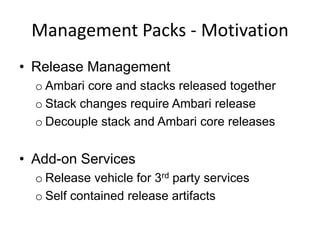
Management Packs - Motivation
• Release Management
o Ambari core and stacks released together
o Stack changes require Ambari release
o Decouple stack and Ambari core releases
• Add-on Services
o Release vehicle for 3rd party services
o Self contained release artifacts
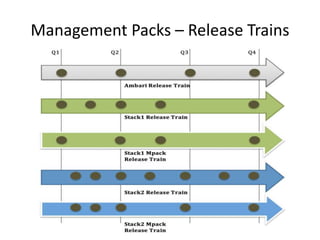
Management Packs – Release Trains
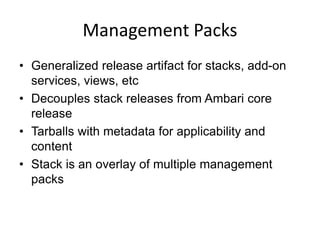
Management Packs
• Generalized release artifact for stacks, add-on
services, views, etc
• Decouples stack releases from Ambari core
release
• Tarballs with metadata for applicability and
content
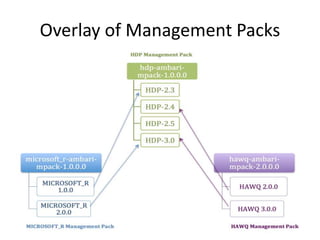
• Stack is an overlay of multiple management
packs
Overlay of Management Packs
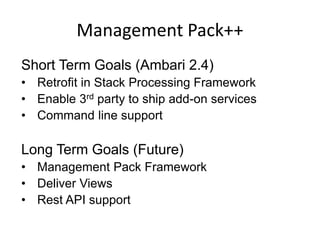
Management Pack++
Short Term Goals (Ambari 2.4)
• Retrofit in Stack Processing Framework
• Enable 3rd party to ship add-on services
• Command line support
Long Term Goals (Future)
• Management Pack Framework
• Deliver Views
• Rest API support
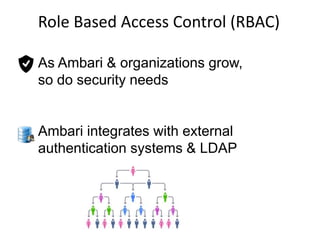
Role Based Access Control (RBAC)
As Ambari & organizations grow,
so do security needs
Ambari integrates with external
authentication systems & LDAP
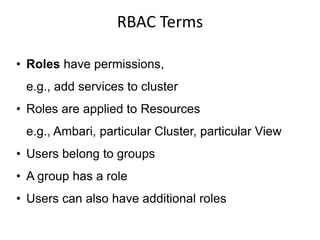
RBAC Terms
• Roles have permissions,
e.g., add services to cluster
• Roles are applied to Resources
e.g., Ambari, particular Cluster, particular View
• Users belong to groups
• A group has a role
• Users can also have additional roles
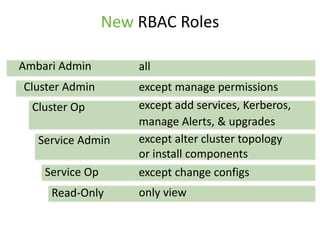
New RBAC Roles
allAmbari Admin
Cluster Admin except manage permissions
Cluster Op except add services, Kerberos,
manage Alerts, & upgrades
Service Admin except alter cluster topology
or install components
Service Op except change configs
Read-Only only view
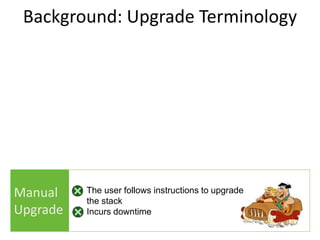
Background: Upgrade Terminology
Manual
Upgrade
The user follows instructions to upgrade
the stack
Incurs downtime
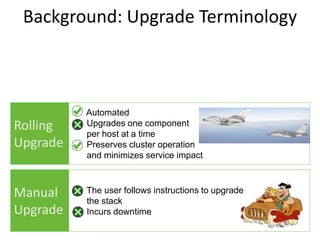
Background: Upgrade Terminology
Manual
Upgrade
The user follows instructions to upgrade
the stack
Incurs downtime
Rolling
Upgrade
Automated
Upgrades one component
per host at a time
Preserves cluster operation
and minimizes service impact
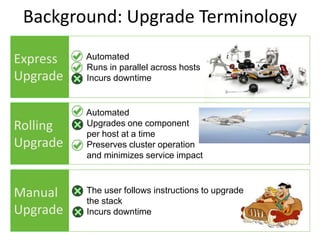
Background: Upgrade Terminology
Express
Upgrade
Automated
Runs in parallel across hosts
Incurs downtime
Manual
Upgrade
The user follows instructions to upgrade
the stack
Incurs downtime
Rolling
Upgrade
Automated
Upgrades one component
per host at a time
Preserves cluster operation
and minimizes service impact
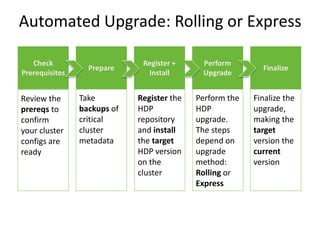
Automated Upgrade: Rolling or Express
Check
Prerequisites
Review the
prereqs to
confirm
your cluster
configs are
ready
Prepare
Take
backups of
critical
cluster
metadata
Perform
Upgrade
Perform the
HDP
upgrade.
The steps
depend on
upgrade
method:
Rolling or
Express
Register +
Install
Register the
HDP
repository
and install
the target
HDP version
on the
cluster
Finalize
Finalize the
upgrade,
making the
target
version the
current
version
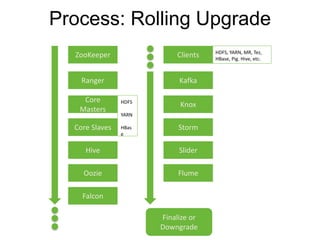
Process: Rolling Upgrade
ZooKeeper
Ranger
Core
Masters
Core Slaves
Hive
Oozie
Falcon
Clients
Kafka
Knox
Storm
Slider
Flume
Finalize or
Downgrade
HDFS, YARN, MR, Tez,
HBase, Pig. Hive, etc.
HDFS
YARN
HBas
e
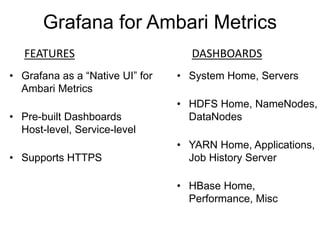
Grafana for Ambari Metrics
• Grafana as a “Native UI” for
Ambari Metrics
• Pre-built Dashboards
Host-level, Service-level
• Supports HTTPS
• System Home, Servers
• HDFS Home, NameNodes,
DataNodes
• YARN Home, Applications,
Job History Server
• HBase Home,
Performance, Misc
FEATURES DASHBOARDS
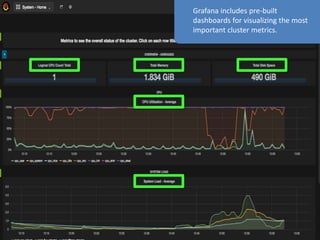
Grafana includes pre-built
dashboards for visualizing the most
important cluster metrics.
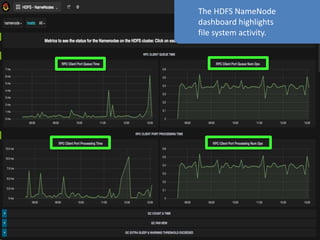
The HDFS NameNode
dashboard highlights
file system activity.
Demo
• Grafana
• LogSearch
Future of Ambari
• Cloud features
• Multiple instances of same service at different
versions, e.g., Spark 1.6 & Spark 2.0
• YARN assemblies
• Component & Patch Upgrades: upgrade individual
components in the same stack version, e.g., just
DN and RM in HDP 2.4.*.* with zero downtime

Apache Ambari: Simplified Hadoop Cluster Operation & Troubleshooting

  • 1.
    Simplified Cluster Operation& Troubleshooting Alejandro Fernandez + Jayush Luniya
  • 2.
    Speakers Alejandro Fernandez Sr. SoftwareEngineer @ Hortonworks Apache Ambari PMC alejandro@apache.org Jayush Luniya Staff Engineer @ Hortonworks Apache Ambari PMC jluniya@apache.org
  • 3.
    What is ApacheAmbari? Apache Ambari is the open-source platform to provision, manage and monitor Hadoop clusters
  • 4.
    New Enterprise Features Ambari2.4 • New Services: Log Search, Zeppelin, Hive LLAP • Role Based Access Control • Management Packs • Grafana UI for Ambari Metrics System • New Views: Zeppelin, Storm
  • 5.
    Apache Ambari Jiras April 2015 1690 1864 277 379 797 206 488 July- Sept 2015 Dec 2015 – Feb 2016 Today v2.0 v2.1 v2.2 v2.4 1542 and growing
  • 6.
  • 7.
    Deploy On Premise AmbariUI wizard handles all of these combinations and makes recommendations based on host specs.
  • 8.
    Deploy On TheCloud Certified environments Sysprepped VMs Hundreds of similar clusters
  • 9.
    Deploy with Blueprints •Systematic way of defining a cluster • Export existing cluster into blueprint /api/v1/clusters/:clusterName?format=blueprint Configs Topology Hosts Cluster
  • 10.
    Create a clusterwith Blueprints { "configurations" : [ { "hdfs-site" : { "dfs.datanode.data.dir" : "/hadoop/1, /hadoop/2,/hadoop/3" } } ], "host_groups" : [ { "name" : "master-host", "components" : [ { "name" : "NAMENODE” }, { "name" : "RESOURCEMANAGER” }, … ], "cardinality" : "1" }, { "name" : "worker-host", "components" : [ { "name" : "DATANODE" }, { "name" : "NODEMANAGER” }, … ], "cardinality" : "1+" }, ], "Blueprints" : { "stack_name" : "HDP", "stack_version" : "2.5" } } { "blueprint" : "my-blueprint", "host_groups" :[ { "name" : "master-host", "hosts" : [ { "fqdn" : "master001.ambari.apache.org" } ] }, { "name" : "worker-host", "hosts" : [ { "fqdn" : "worker001.ambari.apache.org" }, { "fqdn" : "worker002.ambari.apache.org" }, … { "fqdn" : "worker099.ambari.apache.org" } ] } ] } 1. POST /api/v1/blueprints/my-blueprint 2. POST /api/v1/clusters/my-cluster
  • 11.
    Create a clusterwith Blueprints { "configurations" : [ { "hdfs-site" : { "dfs.datanode.data.dir" : "/hadoop/1, /hadoop/2,/hadoop/3" } } ], "host_groups" : [ { "name" : "master-host", "components" : [ { "name" : "NAMENODE” }, { "name" : "RESOURCEMANAGER” }, … ], "cardinality" : "1" }, { "name" : "worker-host", "components" : [ { "name" : "DATANODE" }, { "name" : "NODEMANAGER” }, … ], "cardinality" : "1+" }, ], "Blueprints" : { "stack_name" : "HDP", "stack_version" : "2.5" } } { "blueprint" : "my-blueprint", "host_groups" :[ { "name" : "master-host", "hosts" : [ { "fqdn" : "master001.ambari.apache.org" } ] }, { "name" : "worker-host", "hosts" : [ { "fqdn" : "worker001.ambari.apache.org" }, { "fqdn" : "worker002.ambari.apache.org" }, … { "fqdn" : "worker099.ambari.apache.org" } ] } ] } 1. POST /api/v1/blueprints/my-blueprint 2. POST /api/v1/clusters/my-cluster
  • 12.
    Create a clusterwith Blueprints { "configurations" : [ { "hdfs-site" : { "dfs.datanode.data.dir" : "/hadoop/1, /hadoop/2,/hadoop/3" } } ], "host_groups" : [ { "name" : "master-host", "components" : [ { "name" : "NAMENODE” }, { "name" : "RESOURCEMANAGER” }, … ], "cardinality" : "1" }, { "name" : "worker-host", "components" : [ { "name" : "DATANODE" }, { "name" : "NODEMANAGER” }, … ], "cardinality" : "1+" }, ], "Blueprints" : { "stack_name" : "HDP", "stack_version" : "2.5" } } { "blueprint" : "my-blueprint", "host_groups" :[ { "name" : "master-host", "hosts" : [ { "fqdn" : "master001.ambari.apache.org" } ] }, { "name" : "worker-host", "hosts" : [ { "fqdn" : "worker001.ambari.apache.org" }, { "fqdn" : "worker002.ambari.apache.org" }, … { "fqdn" : "worker099.ambari.apache.org" } ] } ] } 1. POST /api/v1/blueprints/my-blueprint 2. POST /api/v1/clusters/my-cluster
  • 13.
    Create a clusterwith Blueprints { "configurations" : [ { "hdfs-site" : { "dfs.datanode.data.dir" : "/hadoop/1, /hadoop/2,/hadoop/3" } } ], "host_groups" : [ { "name" : "master-host", "components" : [ { "name" : "NAMENODE” }, { "name" : "RESOURCEMANAGER” }, … ], "cardinality" : "1" }, { "name" : "worker-host", "components" : [ { "name" : "DATANODE" }, { "name" : "NODEMANAGER” }, … ], "cardinality" : "1+" }, ], "Blueprints" : { "stack_name" : "HDP", "stack_version" : "2.5" } } { "blueprint" : "my-blueprint", "host_groups" :[ { "name" : "master-host", "hosts" : [ { "fqdn" : "master001.ambari.apache.org" } ] }, { "name" : "worker-host", "hosts" : [ { "fqdn" : "worker001.ambari.apache.org" }, { "fqdn" : "worker002.ambari.apache.org" }, … { "fqdn" : "worker099.ambari.apache.org" } ] } ] } 1. POST /api/v1/blueprints/my-blueprint 2. POST /api/v1/clusters/my-cluster
  • 14.
    Blueprints for LargeScale • Kerberos, secure out-of-the-box • High Availability is setup initially for NameNode, YARN, Hive, Oozie, etc • Host Discovery allows Ambari to automatically install services for a Host when it comes online • Stack Advisor recommendations
  • 15.
    POST /api/v1/clusters/MyCluster/hosts [ { "blueprint" :"single-node-hdfs-test2", "host_groups" :[ { "host_group" : "slave", "host_count" : 3, "host_predicate" : "Hosts/cpu_count>1” }, { "host_group" : "super-slave", "host_count" : 5, "host_predicate" : "Hosts/cpu_count>2& Hosts/total_mem>3000000" } ] } ] Blueprint Host Discovery
  • 16.
    Kerberos Available since Ambari2.0 • Ambari manages Kerberos principals and keytabs • Works with existing MIT KDC or Active Directory • Once Kerberized, handles • Adding hosts • Adding components to existing hosts • Adding services • Moving components to different hosts
  • 17.
    Management Packs -Motivation • Release Management o Ambari core and stacks released together o Stack changes require Ambari release o Decouple stack and Ambari core releases • Add-on Services o Release vehicle for 3rd party services o Self contained release artifacts
  • 18.
    Management Packs –Release Trains
  • 19.
    Management Packs • Generalizedrelease artifact for stacks, add-on services, views, etc • Decouples stack releases from Ambari core release • Tarballs with metadata for applicability and content • Stack is an overlay of multiple management packs
  • 20.
  • 21.
    Management Pack++ Short TermGoals (Ambari 2.4) • Retrofit in Stack Processing Framework • Enable 3rd party to ship add-on services • Command line support Long Term Goals (Future) • Management Pack Framework • Deliver Views • Rest API support
  • 22.
    Role Based AccessControl (RBAC) As Ambari & organizations grow, so do security needs Ambari integrates with external authentication systems & LDAP
  • 23.
    RBAC Terms • Roleshave permissions, e.g., add services to cluster • Roles are applied to Resources e.g., Ambari, particular Cluster, particular View • Users belong to groups • A group has a role • Users can also have additional roles
  • 24.
    New RBAC Roles allAmbariAdmin Cluster Admin except manage permissions Cluster Op except add services, Kerberos, manage Alerts, & upgrades Service Admin except alter cluster topology or install components Service Op except change configs Read-Only only view
  • 25.
    Background: Upgrade Terminology Manual Upgrade Theuser follows instructions to upgrade the stack Incurs downtime
  • 26.
    Background: Upgrade Terminology Manual Upgrade Theuser follows instructions to upgrade the stack Incurs downtime Rolling Upgrade Automated Upgrades one component per host at a time Preserves cluster operation and minimizes service impact
  • 27.
    Background: Upgrade Terminology Express Upgrade Automated Runsin parallel across hosts Incurs downtime Manual Upgrade The user follows instructions to upgrade the stack Incurs downtime Rolling Upgrade Automated Upgrades one component per host at a time Preserves cluster operation and minimizes service impact
  • 28.
    Automated Upgrade: Rollingor Express Check Prerequisites Review the prereqs to confirm your cluster configs are ready Prepare Take backups of critical cluster metadata Perform Upgrade Perform the HDP upgrade. The steps depend on upgrade method: Rolling or Express Register + Install Register the HDP repository and install the target HDP version on the cluster Finalize Finalize the upgrade, making the target version the current version
  • 29.
    Process: Rolling Upgrade ZooKeeper Ranger Core Masters CoreSlaves Hive Oozie Falcon Clients Kafka Knox Storm Slider Flume Finalize or Downgrade HDFS, YARN, MR, Tez, HBase, Pig. Hive, etc. HDFS YARN HBas e
  • 30.
    Grafana for AmbariMetrics • Grafana as a “Native UI” for Ambari Metrics • Pre-built Dashboards Host-level, Service-level • Supports HTTPS • System Home, Servers • HDFS Home, NameNodes, DataNodes • YARN Home, Applications, Job History Server • HBase Home, Performance, Misc FEATURES DASHBOARDS
  • 31.
    Grafana includes pre-built dashboardsfor visualizing the most important cluster metrics.
  • 32.
    The HDFS NameNode dashboardhighlights file system activity.
  • 33.
  • 34.
    Future of Ambari •Cloud features • Multiple instances of same service at different versions, e.g., Spark 1.6 & Spark 2.0 • YARN assemblies • Component & Patch Upgrades: upgrade individual components in the same stack version, e.g., just DN and RM in HDP 2.4.*.* with zero downtime

Editor's Notes

  • #5 Log Search : Solr, Logfeeder (similar to Logstash), and Grafana UI Zeppelin for data exploration and visualization that can plugin to multiple data backends Role Based Access Control
  • #6 2.3.0 was not used 2.4.0 is slated with a ton of new features Cadence is 2-3 major releases per year, with follow up maintenance releases in the months after.
  • #7 Deploy: Blueprints with Host Discovery Secure: Kerberos, LDAP sync Smart Configs: stack advisor, painful to configure a thousand related knobs Monitor: Ambari Alerts, Ambari Metrics Upgrade: Rolling and Express Upgrade, get patches Analyze, Scale, Extend: Views, Management Packs
  • #9 Cloudbreak can install on Amazon EC2, MSFT Azure, Cluster install takes 5-10 mins, mostly downloading packages, installing bits, and starting services.
  • #10 Used by HDInsight (Microsoft Azure) and Hortonworks QA Allow cluster creation or scaling to be started via the REST API prior to all/any hosts being available. As hosts register with Ambari server they will be matched to request host groups and provisioned according to the requested topology Allow host predicates to be specified along with host count to provide more flexibility in matching hosts to host groups. This will allow for host flavors where different host groups are matched to different host flavors Break up the current monolithic provisioning request into a request for each host operation. For example, install on host A, start on host A, install on hostB, etc. This will allow hosts to make progress even when another host encounters a failure. Allow a host count to be specified in the cluster creation template instead of host names. This is documented in https://issues.apache.org/jira/browse/AMBARI-6275 Install a cluster with two API calls
  • #11 The blueprint contains the configs, assignment of topology to host group, stack version The creation actually assigns hosts to each host group.
  • #12 The blueprint contains the configs, assignment of topology to host group, stack version The creation actually assigns hosts to each host group.
  • #13 The blueprint contains the configs, assignment of topology to host group, stack version The creation actually assigns hosts to each host group.
  • #14 The blueprint contains the configs, assignment of topology to host group, stack version The creation actually assigns hosts to each host group.
  • #15 Dynamic availability Allow host_count to be specified instead of host_names As hosts register, they will be matched to the request host groups and provisioned according to to the requested topology When specifying a host_count, a predicate can also be specified for finer-grained control
  • #16 Dynamic availability Allow host_count to be specified instead of host_names As hosts register, they will be matched to the request host groups and provisioned according to to the requested topology When specifying a host_count, a predicate can also be specified for finer-grained control 3 Terabytes since units is in MB
  • #23 As Ambari grows and organizations grow, so do security needs Users have fine-grained roles over the cluster and individual views. Granular authorization checks to distribute the responsibilities and privileges of authenticated users
  • #26 Express Upgrade: fasted method to upgrade the stack since upgrades an entire component in batches of 100 hosts at a time Rolling Upgrade, one component at a time per host, which can take up to 1 min. For a 100 node cluster with
  • #27 Express Upgrade: fasted method to upgrade the stack since upgrades an entire component in batches of 100 hosts at a time Rolling Upgrade, one component at a time per host, which can take up to 1 min. For a 100 node cluster with
  • #28 Express Upgrade: fasted method to upgrade the stack since upgrades an entire component in batches of 100 hosts at a time Rolling Upgrade, one component at a time per host, which can take up to 1 min. For a 100 node cluster with
  • #31 This Grafana instance is specifically for AMS, not meant to be general-purpose If customer is already using Grafana, this is not a replacement. Grafana will support read-only access for anonymous users, and HTTPS
  • #34 2 major themes.
  • #35 2 major themes.