






Error Handling With MuleSoft
Surat MuleSoft Meetup Group
Sept 2, 2022
Safe Harbour Statement
● Both the speaker and the host are organizing this meet-up in individual capacity only. We are
not representing our companies here.
● This presentation is strictly for learning purposes only. Organizer/Presenter do not hold any
responsibility that same solution will work for your business requirements.
● This presentation is not meant for any promotional activities.
2
A recording of this meetup will be uploaded to events page within 24 hours.
Questions can be submitted/asked at any time in the Chat/Questions & AnswersTab.
Make it more Interactive!!!
Give us feedback! Rate this meetup session by filling feedback form at the end of theday.
We Love Feedbacks!!! Its Bread & Butter for Meetup.
Housekeeping
3
Organizers
4
Jitendra Bafna
Senior Solution Architect
EPAM Systems
Nitish Jain
Application Developer
Accenture
Speaker
Nikhil Kunkulol
Lead Engineer, Apisero Inc.
About the Speaker:
● Working as Senior Lead Engineer at Apisero Inc.
● 4+ year of Total Experience. 3+ years in MuleSoft.
● Certified MuleSoft Developer and Integration Architect.
● Kolhapur Meetup Leader
6
Contents:
●Error Types
●Error Components
●Try-Catch Scope
●Error Handling in Private Flow vs Sub flow
●Raise Custom Errors
●Error Handling in Parallel- For-Each/For-Each
●Error Handling in Batch-Processing, Scatter Gather
●Error Handling in Dataweave
Error Handling
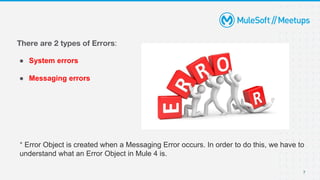
There are 2 types of Errors:
● System errors
● Messaging errors
* Error Object is created when a Messaging Error occurs. In order to do this, we have to
understand what an Error Object in Mule 4 is.
7
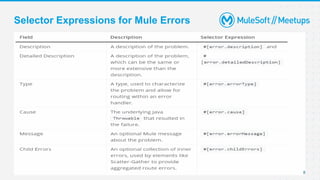
Selector Expressions for Mule Errors
8
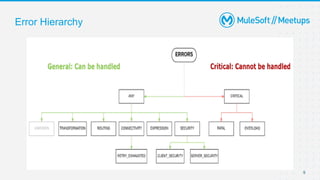
Error Hierarchy
9
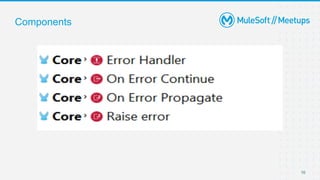
Components
10
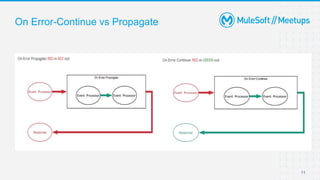
On Error-Continue vs Propagate
11
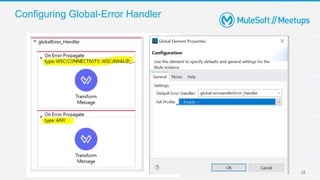
Configuring Global-Error Handler
12
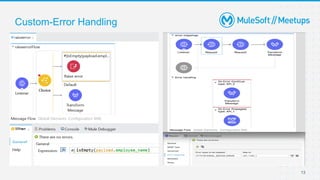
Custom-Error Handling
13
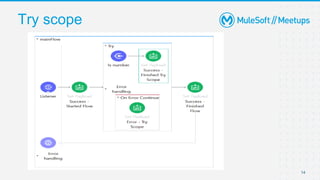
Try scope
14
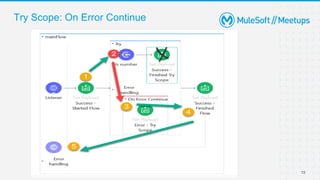
Try Scope: On Error Continue
15
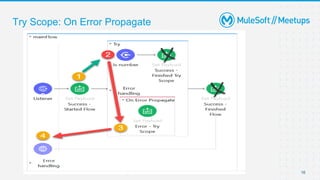
Try Scope: On Error Propagate
16
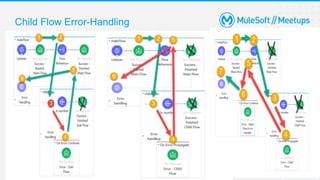
Child Flow Error-Handling
17
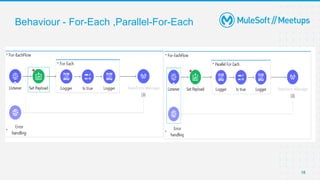
Behaviour - For-Each ,Parallel-For-Each
18
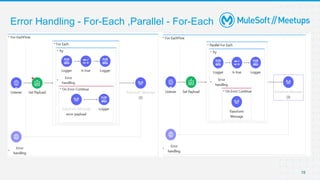
Error Handling - For-Each ,Parallel - For-Each
19
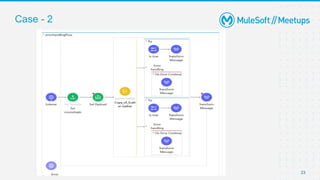
Error Handling-Scatter Gather
When to use Scatter Gather :
● Scatter-Gather is best suited for Multicast scenarios.
● The Scatter-Gather messages are processed in-parallel with aggregate responses.
● More than one process is required for Scatter-Gather to function according to its discussed
merits.
● The MuleSoft Scatter-Gather has many features to control the execution flow in case of route
failures.
20
Error Handling-Scatter Gather
Points to remember:
● What happens to the initial payload, when one of the processes in the Scatter-Gather
fails?
● What happens if the variable in one process is modified and not in the other?
● What would be the result of Scatter-Gather if “On-Error propagates” is used instead of
“On-Error continue” when one of the routes fails?
21
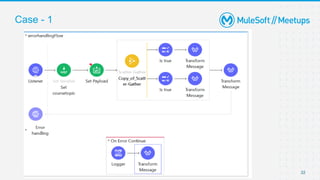
Case - 1
22
Case - 2
23
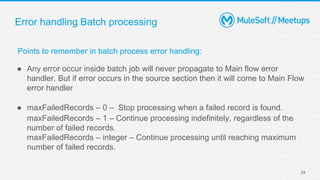
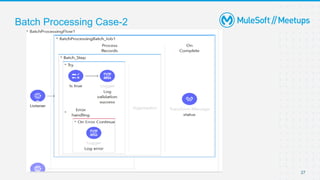
Error handling Batch processing
Points to remember in batch process error handling:
● Any error occur inside batch job will never propagate to Main flow error
handler. But if error occurs in the source section then it will come to Main Flow
error handler
● maxFailedRecords – 0 – Stop processing when a failed record is found.
maxFailedRecords – 1 – Continue processing indefinitely, regardless of the
number of failed records.
maxFailedRecords – integer – Continue processing until reaching maximum
number of failed records.
24
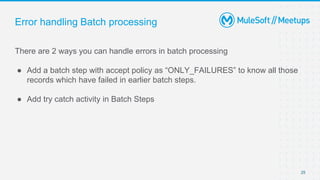
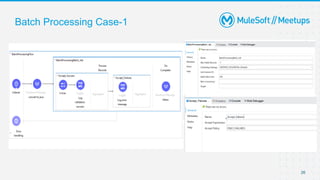
Error handling Batch processing
There are 2 ways you can handle errors in batch processing
● Add a batch step with accept policy as “ONLY_FAILURES” to know all those
records which have failed in earlier batch steps.
● Add try catch activity in Batch Steps
25
Batch Processing Case-1
26
Batch Processing Case-2
27
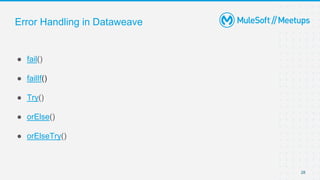
Error Handling in Dataweave
● fail()
● failIf()
● Try()
● orElse()
● orElseTry()
28
Q & A
Take a stand !
18
●Nominate yourself for the next meetup speaker and suggest a topic as well.
20
● Share:
○ Tweet using the hashtag #MuleSoftMeetups
○ Invite your network to join: https://meetups.mulesoft.com/engineering-student-
group/
● Feedback:
○ Fill out the survey feedback and suggest topics for upcoming events
○ Contact MuleSoft at meetups@mulesoft.com for ways to improve the program
What’s next?
20
● 21st May 2022 - Understanding the Anypoint Flex Gateway
● 11th June 2022 - Implementing and Understanding SAGA (Orchestration and
Choreography) Patterns With MuleSoft
● 24th June 2022 - Combine Service Mesh With Anypoint API Management to
power Microservices
● 30th June 2022 - Understanding EKS/RTF Architecture and Components
● 9th July 2022 - Driving Digital Transformation in Banking Industries With
MuleSoft
Upcoming Meetups
Quiz Time
Get ready to WIN a Special Gift from MuleSoft Community
Thank you

MuleSoft Surat Meetup#47 - Error Handling With MuleSoft

  • 1.
    Error Handling WithMuleSoft Surat MuleSoft Meetup Group Sept 2, 2022
  • 2.
    Safe Harbour Statement ●Both the speaker and the host are organizing this meet-up in individual capacity only. We are not representing our companies here. ● This presentation is strictly for learning purposes only. Organizer/Presenter do not hold any responsibility that same solution will work for your business requirements. ● This presentation is not meant for any promotional activities. 2
  • 3.
    A recording ofthis meetup will be uploaded to events page within 24 hours. Questions can be submitted/asked at any time in the Chat/Questions & AnswersTab. Make it more Interactive!!! Give us feedback! Rate this meetup session by filling feedback form at the end of theday. We Love Feedbacks!!! Its Bread & Butter for Meetup. Housekeeping 3
  • 4.
    Organizers 4 Jitendra Bafna Senior SolutionArchitect EPAM Systems Nitish Jain Application Developer Accenture
  • 5.
    Speaker Nikhil Kunkulol Lead Engineer,Apisero Inc. About the Speaker: ● Working as Senior Lead Engineer at Apisero Inc. ● 4+ year of Total Experience. 3+ years in MuleSoft. ● Certified MuleSoft Developer and Integration Architect. ● Kolhapur Meetup Leader
  • 6.
    6 Contents: ●Error Types ●Error Components ●Try-CatchScope ●Error Handling in Private Flow vs Sub flow ●Raise Custom Errors ●Error Handling in Parallel- For-Each/For-Each ●Error Handling in Batch-Processing, Scatter Gather ●Error Handling in Dataweave Error Handling
  • 7.
    There are 2types of Errors: ● System errors ● Messaging errors * Error Object is created when a Messaging Error occurs. In order to do this, we have to understand what an Error Object in Mule 4 is. 7
  • 8.
  • 9.
  • 10.
  • 11.
  • 12.
  • 13.
  • 14.
  • 15.
    Try Scope: OnError Continue 15
  • 16.
    Try Scope: OnError Propagate 16
  • 17.
  • 18.
    Behaviour - For-Each,Parallel-For-Each 18
  • 19.
    Error Handling -For-Each ,Parallel - For-Each 19
  • 20.
    Error Handling-Scatter Gather Whento use Scatter Gather : ● Scatter-Gather is best suited for Multicast scenarios. ● The Scatter-Gather messages are processed in-parallel with aggregate responses. ● More than one process is required for Scatter-Gather to function according to its discussed merits. ● The MuleSoft Scatter-Gather has many features to control the execution flow in case of route failures. 20
  • 21.
    Error Handling-Scatter Gather Pointsto remember: ● What happens to the initial payload, when one of the processes in the Scatter-Gather fails? ● What happens if the variable in one process is modified and not in the other? ● What would be the result of Scatter-Gather if “On-Error propagates” is used instead of “On-Error continue” when one of the routes fails? 21
  • 22.
  • 23.
  • 24.
    Error handling Batchprocessing Points to remember in batch process error handling: ● Any error occur inside batch job will never propagate to Main flow error handler. But if error occurs in the source section then it will come to Main Flow error handler ● maxFailedRecords – 0 – Stop processing when a failed record is found. maxFailedRecords – 1 – Continue processing indefinitely, regardless of the number of failed records. maxFailedRecords – integer – Continue processing until reaching maximum number of failed records. 24
  • 25.
    Error handling Batchprocessing There are 2 ways you can handle errors in batch processing ● Add a batch step with accept policy as “ONLY_FAILURES” to know all those records which have failed in earlier batch steps. ● Add try catch activity in Batch Steps 25
  • 26.
  • 27.
  • 28.
    Error Handling inDataweave ● fail() ● failIf() ● Try() ● orElse() ● orElseTry() 28
  • 29.
  • 30.
    Take a stand! 18 ●Nominate yourself for the next meetup speaker and suggest a topic as well.
  • 31.
    20 ● Share: ○ Tweetusing the hashtag #MuleSoftMeetups ○ Invite your network to join: https://meetups.mulesoft.com/engineering-student- group/ ● Feedback: ○ Fill out the survey feedback and suggest topics for upcoming events ○ Contact MuleSoft at meetups@mulesoft.com for ways to improve the program What’s next?
  • 32.
    20 ● 21st May2022 - Understanding the Anypoint Flex Gateway ● 11th June 2022 - Implementing and Understanding SAGA (Orchestration and Choreography) Patterns With MuleSoft ● 24th June 2022 - Combine Service Mesh With Anypoint API Management to power Microservices ● 30th June 2022 - Understanding EKS/RTF Architecture and Components ● 9th July 2022 - Driving Digital Transformation in Banking Industries With MuleSoft Upcoming Meetups
  • 33.
    Quiz Time Get readyto WIN a Special Gift from MuleSoft Community
  • 34.