Anthony Bowes 
The task that was given to us is to make a basic level within the unity engine, making our own assets 
and textures. The game is based on aesthetic looks allowing us to be creative and focus more on 
looks rather then technicalities. 
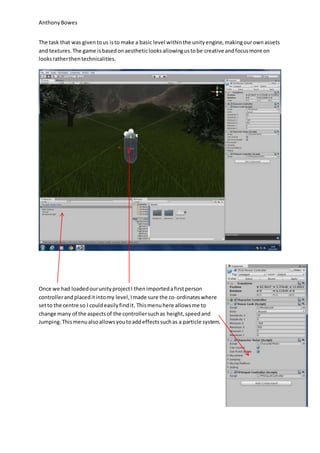
Once we had loaded our unity project I then imported a first person 
controller and placed it into my level, I made sure the co-ordinates where 
set to the centre so I could easily find it. This menu here allows me to 
change many of the aspects of the controller such as height, speed and 
Jumping. This menu also allows you to add effects such as a particle system.
Anthony Bowes 
The next job was to create a terrain and with the terrain editor I morphed the landscape to create 
mountaines, flat play areas and passages. There was many different tools that allowed different 
shaped tools to create a veriaty of bumps and edges. There was a lot of shapes and sizes that can 
you adjust as well being able adjust the strength.
Anthony Bowes 
I then added a skybox, this whould surround the map and have a 360 degree texture. I used an 
overcast skybox to match the snow setting I want to imply in my map. The sky box was added in the 
render settings and once the sky box was added it provided a imersive scene.
Anthony Bowes 
Next I started to texture my terrain to fit the games asthetics, I went with a snowy map, firstly I 
added basic fucking textures like grass and rock and then added a weak iopacity texture of snow 
over the top. I used a veriaty of textures using the paint tool I added a thick opacity texture.
Anthony Bowes 
To add to thye snow thme I then created a particle system to add the effect of snowflakes, I found a 
snowflake particle that I could add and made the particle stystem strech over the entire map. I then 
copyied and pasted it over the entire map so the particle system has an even ammount of particles 
all over the map.
Anthony Bowes 
I then added individual trees as separate objects this allowed me to minipulate the size of the trees 
and vary tree sizes along the path way. This also let me add an easy mesh colider to the trees. I 
added the trees along the patrh way as this would be a main play area and the player would not 
wander past the tree lines. With a few large trees hey filled out the area and the forrest looked more 
dense.
Anthony Bowes 
I then decided to surround my terrain in water to create an island effect this has worked well for my 
map and has created a greater asthetic feel. The water I used was a nigh shade texture as this would 
also match my snow theme. I enlarged the water to fill out the map and the water has a small wave 
effect on the water texture to make it more realistic.
Anthony Bowes 
My next job was too add the main play area this is the largest component on the map with multiple 
houses and streets creating a player path to lead you out the city. All the buildings have mesh 
colliders on them meaning when I walk in to them. I created a street system that centred the town 
square there was many gaps I left lout on the map as theses areas where not acceible.
Anthony Bowes 
I added walls around the city to restrict movement to other parts of the maps that have not got as 
much level of detail. The walls were made from smaller walls that were enlarged, this texture 
streched a little. I added a gates on either side of the city to acces it and add a better asthetic look 
to the city walls.
Anthony Bowes 
My next move was to create a starting are for this I created a ship harbour that allowed a very 
qsthectic start to the game, you start on a oat and walk on the the peer and then in the city. I also 
added a whale hunting area where a dead whale lies surrounded by whale meat. This was pure 
asthetics. There are boats surrounding the port to create a feel of poppulation.
Anthony Bowes 
Outside The city is a collection of tents that I have imported with a mixture of tables I have created a 
war styled theme with a map on the table. I used photoshop to save the image and place it as a 
texture on a cube. I surrounded the map with books and tthis could possibly be a mssion point or 
cutscene area.
Anthony Bowes 
The end of the level is when you reach the camp which is a main play area for the game. This 
consists of tents, logs and a fire. I added a few carts and horses to make it look more like a traveller’s 
camp. This is where my level ends and could possibly be a boss area or a cut scene to the next level.
Anthony Bowes 
Finally I have added a torch and sword to the player’s controller giving the effect of the player 
holding these items. The torch emits a light to compensate for there being no directional light. I 
changed the strength of my light and emitter in the light menu.

Anthony Bowes Work flow 3D Game

  • 1.
    Anthony Bowes Thetask that was given to us is to make a basic level within the unity engine, making our own assets and textures. The game is based on aesthetic looks allowing us to be creative and focus more on looks rather then technicalities. Once we had loaded our unity project I then imported a first person controller and placed it into my level, I made sure the co-ordinates where set to the centre so I could easily find it. This menu here allows me to change many of the aspects of the controller such as height, speed and Jumping. This menu also allows you to add effects such as a particle system.
  • 2.
    Anthony Bowes Thenext job was to create a terrain and with the terrain editor I morphed the landscape to create mountaines, flat play areas and passages. There was many different tools that allowed different shaped tools to create a veriaty of bumps and edges. There was a lot of shapes and sizes that can you adjust as well being able adjust the strength.
  • 3.
    Anthony Bowes Ithen added a skybox, this whould surround the map and have a 360 degree texture. I used an overcast skybox to match the snow setting I want to imply in my map. The sky box was added in the render settings and once the sky box was added it provided a imersive scene.
  • 4.
    Anthony Bowes NextI started to texture my terrain to fit the games asthetics, I went with a snowy map, firstly I added basic fucking textures like grass and rock and then added a weak iopacity texture of snow over the top. I used a veriaty of textures using the paint tool I added a thick opacity texture.
  • 5.
    Anthony Bowes Toadd to thye snow thme I then created a particle system to add the effect of snowflakes, I found a snowflake particle that I could add and made the particle stystem strech over the entire map. I then copyied and pasted it over the entire map so the particle system has an even ammount of particles all over the map.
  • 6.
    Anthony Bowes Ithen added individual trees as separate objects this allowed me to minipulate the size of the trees and vary tree sizes along the path way. This also let me add an easy mesh colider to the trees. I added the trees along the patrh way as this would be a main play area and the player would not wander past the tree lines. With a few large trees hey filled out the area and the forrest looked more dense.
  • 7.
    Anthony Bowes Ithen decided to surround my terrain in water to create an island effect this has worked well for my map and has created a greater asthetic feel. The water I used was a nigh shade texture as this would also match my snow theme. I enlarged the water to fill out the map and the water has a small wave effect on the water texture to make it more realistic.
  • 8.
    Anthony Bowes Mynext job was too add the main play area this is the largest component on the map with multiple houses and streets creating a player path to lead you out the city. All the buildings have mesh colliders on them meaning when I walk in to them. I created a street system that centred the town square there was many gaps I left lout on the map as theses areas where not acceible.
  • 9.
    Anthony Bowes Iadded walls around the city to restrict movement to other parts of the maps that have not got as much level of detail. The walls were made from smaller walls that were enlarged, this texture streched a little. I added a gates on either side of the city to acces it and add a better asthetic look to the city walls.
  • 10.
    Anthony Bowes Mynext move was to create a starting are for this I created a ship harbour that allowed a very qsthectic start to the game, you start on a oat and walk on the the peer and then in the city. I also added a whale hunting area where a dead whale lies surrounded by whale meat. This was pure asthetics. There are boats surrounding the port to create a feel of poppulation.
  • 11.
    Anthony Bowes OutsideThe city is a collection of tents that I have imported with a mixture of tables I have created a war styled theme with a map on the table. I used photoshop to save the image and place it as a texture on a cube. I surrounded the map with books and tthis could possibly be a mssion point or cutscene area.
  • 12.
    Anthony Bowes Theend of the level is when you reach the camp which is a main play area for the game. This consists of tents, logs and a fire. I added a few carts and horses to make it look more like a traveller’s camp. This is where my level ends and could possibly be a boss area or a cut scene to the next level.
  • 13.
    Anthony Bowes FinallyI have added a torch and sword to the player’s controller giving the effect of the player holding these items. The torch emits a light to compensate for there being no directional light. I changed the strength of my light and emitter in the light menu.