PARALAMAHARAJAENGINEERINGCOLLEGE
INTERNSHIP PRESENTATION ON AUTOCAD
SUBMITTED BY,
ANSHITA TRIPATHY
CIVIL ENGINEERING
SEC-’A’
REGD NO:-2201109384
GUIDED BY,
MR.SURESH CHANDRA SARANGI
MR.SAMIR KUMAR ACHARYA
ABSTRACT OF AUTOCAD:
• AutoCAD is the Automatic Computer Aided Design (AutoCAD 2D)
engineering drawing .
• . This software is commonly practiced by students for product design
process as part of the project development.
• AutoCAD is a computer-aided draftsmanship software program used for
creating pattern for buildings bridges.
• With AutoCAD you can easily change and manipulate designs.
CONTENT:
1.What is AutoCAD?
2.History of AutoCAD
3.Autocad screen
4.Unit and UCS settings
5.What is OSNAP?
6.Creating drawing using some basic commands.
6.Modifying drawing using some basic commands.
7.What are Hatching tools?
8.Command shortcuts
9.Advantage and disadvantages of AutoCAD
10.Conclusion
WHAT IS AUTOCAD?
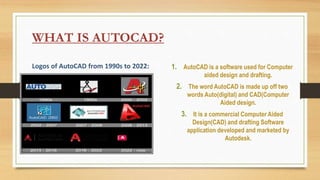
Logos of AutoCAD from 1990s to 2022: 1. AutoCAD is a software used for Computer
aided design and drafting.
2. The word AutoCAD is made up off two
words Auto(digital) and CAD(Computer
Aided design.
3. It is a commercial Computer Aided
Design(CAD) and drafting Software
application developed and marketed by
Autodesk.
HISTORY OF AUTOCAD:
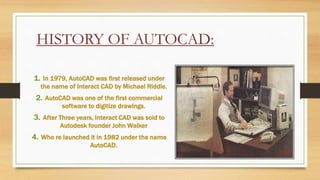
1. In 1979, AutoCAD was first released under
the name of Interact CAD by Michael Riddle.
2. AutoCAD was one of the first commercial
software to digitize drawings.
3. After Three years, Interact CAD was sold to
Autodesk founder John Walker
4. Who re launched it in 1982 under the name
AutoCAD.
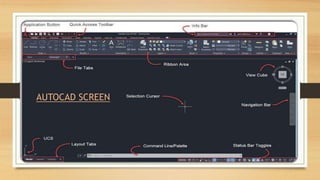
AUTOCAD SCREEN
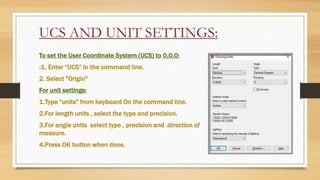
UCS AND UNIT SETTINGS:
To set the User Coordinate System (UCS) to 0,0,0:
:1. Enter “UCS” in the command line.
2. Select "Origin"
For unit settings:
1.Type “units” from keyboard On the command line.
2.For length units , select the type and precision.
3.For angle units select type , precision and .direction of
measure.
4.Press OK button when done.
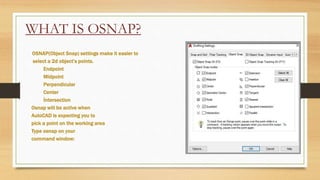
WHAT IS OSNAP?
OSNAP(Object Snap) settings make it easier to
select a 2d object’s points.
Endpoint
Midpoint
Perpendicular
Center
İntersection
Osnap will be active when
AutoCAD is expecting you to
pick a point on the working area
Type osnap on your
command window:
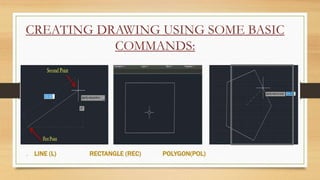
CREATING DRAWING USING SOME BASIC
COMMANDS:
. LINE (L) RECTANGLE (REC) POLYGON(POL)
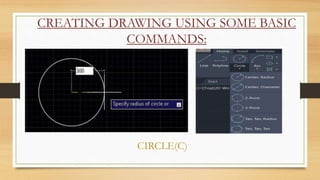
CREATING DRAWING USING SOME BASIC
COMMANDS:
CIRCLE(C)
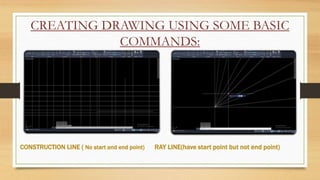
CREATING DRAWING USING SOME BASIC
COMMANDS:
CONSTRUCTION LINE ( No start and end point) RAY LINE(have start point but not end point)
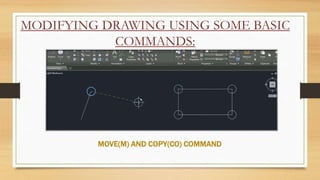
MODIFYING DRAWING USING SOME BASIC
COMMANDS:
MOVE(M) AND COPY(CO) COMMAND
MODIFYING DRAWING USING SOME BASIC
COMMANDS:
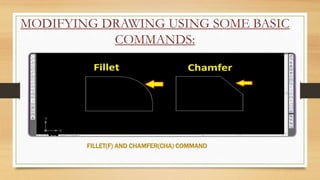
FILLET(F) AND CHAMFER(CHA) COMMAND
MODFYING DRAWING USING SOME BASIC
COMMANDS:
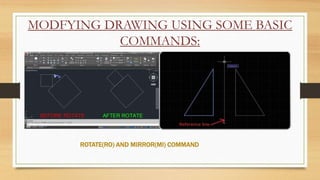
ROTATE(RO) AND MIRROR(MI) COMMAND
MODFYING DRAWING USING SOME BASIC
COMMANDS:
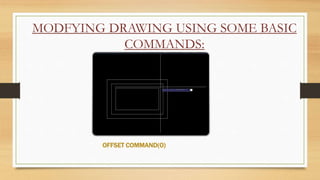
OFFSET COMMAND(O)
WHAT ARE
HATCHING TOOLS?
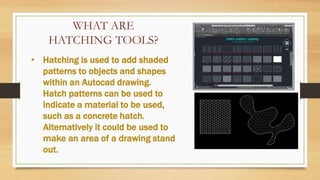
• Hatching is used to add shaded
patterns to objects and shapes
within an Autocad drawing.
Hatch patterns can be used to
indicate a material to be used,
such as a concrete hatch.
Alternatively it could be used to
make an area of a drawing stand
out.
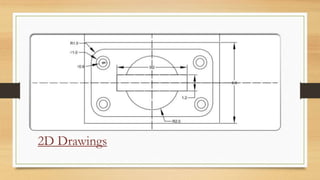
2D Drawings
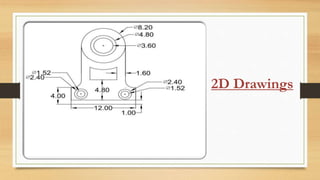
2D Drawings
 Cost Efficiency
 Easier data transfer
 Less hard work
 High precision and accuracy
 Efficiency and speed
 Ease of editing
 Learning could be complex for
beginners.
 Powerful System requirements leads to
additional expenses.
 High beginning up costs
 Dependency on computer performance
 There are restricted record designs.
CONCLUSION:
• This presentation covered the preview of our learning. The use of
AutoCAD has many advantages as compared to it’s demerits.
• AutoCAD software is considered as most amazing tool of all time ,
undoubtedly it saves time, energy and money.
CERTIFICATE OF INTERNSHIP
REFERENCES:
• AutoCAD 2018 and AutoCAD LT 2018 essentials.
• Autodesk AutoCAD 2018 and inventor 2018 tutorial by tutorial
books.
• www.wikipedia.com
• www.studymaphia.org
• www.udemy.com
• www.google.com
Anshita_Tripathy_(2201109384)-presentation_on_autocad[1].pptx

Anshita_Tripathy_(2201109384)-presentation_on_autocad[1].pptx

  • 1.
    PARALAMAHARAJAENGINEERINGCOLLEGE INTERNSHIP PRESENTATION ONAUTOCAD SUBMITTED BY, ANSHITA TRIPATHY CIVIL ENGINEERING SEC-’A’ REGD NO:-2201109384 GUIDED BY, MR.SURESH CHANDRA SARANGI MR.SAMIR KUMAR ACHARYA
  • 2.
    ABSTRACT OF AUTOCAD: •AutoCAD is the Automatic Computer Aided Design (AutoCAD 2D) engineering drawing . • . This software is commonly practiced by students for product design process as part of the project development. • AutoCAD is a computer-aided draftsmanship software program used for creating pattern for buildings bridges. • With AutoCAD you can easily change and manipulate designs.
  • 3.
    CONTENT: 1.What is AutoCAD? 2.Historyof AutoCAD 3.Autocad screen 4.Unit and UCS settings 5.What is OSNAP? 6.Creating drawing using some basic commands. 6.Modifying drawing using some basic commands. 7.What are Hatching tools? 8.Command shortcuts 9.Advantage and disadvantages of AutoCAD 10.Conclusion
  • 4.
    WHAT IS AUTOCAD? Logosof AutoCAD from 1990s to 2022: 1. AutoCAD is a software used for Computer aided design and drafting. 2. The word AutoCAD is made up off two words Auto(digital) and CAD(Computer Aided design. 3. It is a commercial Computer Aided Design(CAD) and drafting Software application developed and marketed by Autodesk.
  • 5.
    HISTORY OF AUTOCAD: 1.In 1979, AutoCAD was first released under the name of Interact CAD by Michael Riddle. 2. AutoCAD was one of the first commercial software to digitize drawings. 3. After Three years, Interact CAD was sold to Autodesk founder John Walker 4. Who re launched it in 1982 under the name AutoCAD.
  • 6.
  • 7.
    UCS AND UNITSETTINGS: To set the User Coordinate System (UCS) to 0,0,0: :1. Enter “UCS” in the command line. 2. Select "Origin" For unit settings: 1.Type “units” from keyboard On the command line. 2.For length units , select the type and precision. 3.For angle units select type , precision and .direction of measure. 4.Press OK button when done.
  • 8.
    WHAT IS OSNAP? OSNAP(ObjectSnap) settings make it easier to select a 2d object’s points. Endpoint Midpoint Perpendicular Center İntersection Osnap will be active when AutoCAD is expecting you to pick a point on the working area Type osnap on your command window:
  • 9.
    CREATING DRAWING USINGSOME BASIC COMMANDS: . LINE (L) RECTANGLE (REC) POLYGON(POL)
  • 10.
    CREATING DRAWING USINGSOME BASIC COMMANDS: CIRCLE(C)
  • 11.
    CREATING DRAWING USINGSOME BASIC COMMANDS: CONSTRUCTION LINE ( No start and end point) RAY LINE(have start point but not end point)
  • 12.
    MODIFYING DRAWING USINGSOME BASIC COMMANDS: MOVE(M) AND COPY(CO) COMMAND
  • 13.
    MODIFYING DRAWING USINGSOME BASIC COMMANDS: FILLET(F) AND CHAMFER(CHA) COMMAND
  • 14.
    MODFYING DRAWING USINGSOME BASIC COMMANDS: ROTATE(RO) AND MIRROR(MI) COMMAND
  • 15.
    MODFYING DRAWING USINGSOME BASIC COMMANDS: OFFSET COMMAND(O)
  • 16.
    WHAT ARE HATCHING TOOLS? •Hatching is used to add shaded patterns to objects and shapes within an Autocad drawing. Hatch patterns can be used to indicate a material to be used, such as a concrete hatch. Alternatively it could be used to make an area of a drawing stand out.
  • 17.
  • 18.
  • 19.
     Cost Efficiency Easier data transfer  Less hard work  High precision and accuracy  Efficiency and speed  Ease of editing
  • 20.
     Learning couldbe complex for beginners.  Powerful System requirements leads to additional expenses.  High beginning up costs  Dependency on computer performance  There are restricted record designs.
  • 21.
    CONCLUSION: • This presentationcovered the preview of our learning. The use of AutoCAD has many advantages as compared to it’s demerits. • AutoCAD software is considered as most amazing tool of all time , undoubtedly it saves time, energy and money.
  • 22.
  • 23.
    REFERENCES: • AutoCAD 2018and AutoCAD LT 2018 essentials. • Autodesk AutoCAD 2018 and inventor 2018 tutorial by tutorial books. • www.wikipedia.com • www.studymaphia.org • www.udemy.com • www.google.com