AutoCAD
Commands
Prepared by: Raymond S. Quidasol
AutoCAD
Commands
Raymond S. Quidasol
Objectives:
Identify appropriate drawing tools as
per job requirements
Understand the definition and uses of
each drawing tool
Create illustrations using basic CAD
drawing tools
Autocad
commonly known as
computer aided design is a
software application for
writing and design 2D and
3D.
How do we give a command?
 Command line
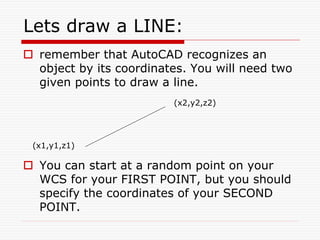
Lets draw a LINE:
 remember that AutoCAD recognizes an
object by its coordinates. You will need two
given points to draw a line.
 You can start at a random point on your
WCS for your FIRST POINT, but you should
specify the coordinates of your SECOND
POINT.
(x1,y1,z1)
(x2,y2,z2)
Lets draw a LINE (2):
1. Hit F8 (ortho on)
2. Give the command
3. Specify the first point
4. Specify the second point in
relation to the first point
a b
7 units
 Rectangle: two diagonal lines
(pick first point, select the second
one with relation to the first.
 Circle/Arc: center and radius
a
b
a
d
editing…
 COPY
 MOVE
 MIRROR
- Used to create one or
more duplicates of any
drawing object.
- Moves an object or
objects
- Allows you to mirror
selected objects
editing…
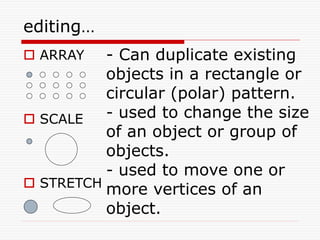
 ARRAY
 SCALE
 STRETCH
- Can duplicate existing
objects in a rectangle or
circular (polar) pattern.
- used to change the size
of an object or group of
objects.
- used to move one or
more vertices of an
object.
More editing…
 OFFSET
 ROTATE
 ERASE
- creates a new object
parallel to or concentric
with a selected object.
- allows an object or
objects to be rotated
about a point selected by
the user
- erases (deletes) any
selected object(s) from
the drawing.
More editing…
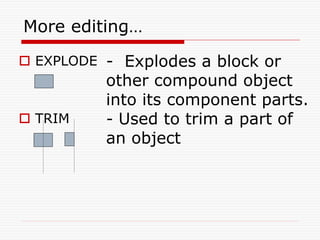
 EXPLODE
 TRIM
- Explodes a block or
other compound object
into its component parts.
- Used to trim a part of
an object
What is OSNAP?
 Osnap (Object Snap) settings make it easier
to select a 2d object’s points
 Endpoint
 Midpoint
 Perpendicular
 Center
 İntersection
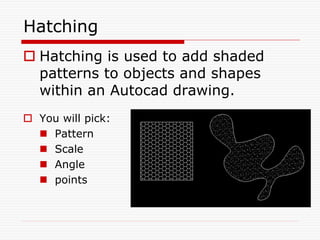
Hatching
 Hatching is used to add shaded
patterns to objects and shapes
within an Autocad drawing.
 You will pick:
 Pattern
 Scale
 Angle
 points
VIDEO TUTORIAL:
Performance Task:
Directions: With the suggested
command, draft a Foundation
plan of Quarantine Facility or
Poultry.
Suggested Commands:
OFFSET, LINE, ROTATE,
ERASE, TRIM, OSNAP, &
ORTHO, REC
Performance Task:
Directions: Draft a Foundation
plan of Quarantine Facility or
Poultry.
Suggested Tools and Materials:
Bond Paper, Pencil, Eraser,
Ruler, Drawing Pen, tape
Performance Rubrics
Criteria 5 points 3 points 1 point
Line Technique Application of (all) various
lines was used according
to standards
At least 3-5 lines were
used not according to
standards
More than 5 lines
were used not
according to
standards
Accuracy All measurements and
notations needed were
accurately done
At least 3-5
measurements and
notations needed were
inaccurately done
More than 5
measurements and
notations needed
were inaccurately
done
Layout/Proportio
n
All drawings were drawn
proportionately and was
layout properly
Layout was good but 1-2
drawing were out of
proportion
More than 2
drawings were
drawn out of
proportion and
improperly layout
Neatness Finished output was
neatly done, no erasures
nor any smudges
Erasures/smudges are
observable on the finished
output
Finished output has
so many erasures/
smudges present
Time
Management
Finish the task ahead of
the given time/date
Finish the task on the
given time/date
Unable to finish the
task on the given
time/date
RATING SCALE:
Points earned Numerical Rating Descriptive Rating
21 - 25 91 - 100 Outstanding
16 - 20 86 - 90 Very Good
11- 15 81 - 85 Good
6 - 10 76 - 80 Fair
1 - 5 71 - 75 Needs Improvement
Teacher’s Comments:
Teacher’s Signature: _____________________
Date: _____________
Learner’s Presentation
Manual
Hands On
Thank you for listening…
- End -

AUTOCAD COMMAND AUTOCAD COMMANDAUTOCAD COMMAND

  • 1.
  • 4.
  • 5.
    Objectives: Identify appropriate drawingtools as per job requirements Understand the definition and uses of each drawing tool Create illustrations using basic CAD drawing tools
  • 6.
    Autocad commonly known as computeraided design is a software application for writing and design 2D and 3D.
  • 7.
    How do wegive a command?  Command line
  • 8.
    Lets draw aLINE:  remember that AutoCAD recognizes an object by its coordinates. You will need two given points to draw a line.  You can start at a random point on your WCS for your FIRST POINT, but you should specify the coordinates of your SECOND POINT. (x1,y1,z1) (x2,y2,z2)
  • 9.
    Lets draw aLINE (2): 1. Hit F8 (ortho on) 2. Give the command 3. Specify the first point 4. Specify the second point in relation to the first point a b 7 units
  • 10.
     Rectangle: twodiagonal lines (pick first point, select the second one with relation to the first.  Circle/Arc: center and radius a b a d
  • 11.
    editing…  COPY  MOVE MIRROR - Used to create one or more duplicates of any drawing object. - Moves an object or objects - Allows you to mirror selected objects
  • 12.
    editing…  ARRAY  SCALE STRETCH - Can duplicate existing objects in a rectangle or circular (polar) pattern. - used to change the size of an object or group of objects. - used to move one or more vertices of an object.
  • 13.
    More editing…  OFFSET ROTATE  ERASE - creates a new object parallel to or concentric with a selected object. - allows an object or objects to be rotated about a point selected by the user - erases (deletes) any selected object(s) from the drawing.
  • 14.
    More editing…  EXPLODE TRIM - Explodes a block or other compound object into its component parts. - Used to trim a part of an object
  • 15.
    What is OSNAP? Osnap (Object Snap) settings make it easier to select a 2d object’s points  Endpoint  Midpoint  Perpendicular  Center  İntersection
  • 16.
    Hatching  Hatching isused to add shaded patterns to objects and shapes within an Autocad drawing.  You will pick:  Pattern  Scale  Angle  points
  • 17.
  • 18.
    Performance Task: Directions: Withthe suggested command, draft a Foundation plan of Quarantine Facility or Poultry. Suggested Commands: OFFSET, LINE, ROTATE, ERASE, TRIM, OSNAP, & ORTHO, REC
  • 19.
    Performance Task: Directions: Drafta Foundation plan of Quarantine Facility or Poultry. Suggested Tools and Materials: Bond Paper, Pencil, Eraser, Ruler, Drawing Pen, tape
  • 20.
    Performance Rubrics Criteria 5points 3 points 1 point Line Technique Application of (all) various lines was used according to standards At least 3-5 lines were used not according to standards More than 5 lines were used not according to standards Accuracy All measurements and notations needed were accurately done At least 3-5 measurements and notations needed were inaccurately done More than 5 measurements and notations needed were inaccurately done Layout/Proportio n All drawings were drawn proportionately and was layout properly Layout was good but 1-2 drawing were out of proportion More than 2 drawings were drawn out of proportion and improperly layout Neatness Finished output was neatly done, no erasures nor any smudges Erasures/smudges are observable on the finished output Finished output has so many erasures/ smudges present Time Management Finish the task ahead of the given time/date Finish the task on the given time/date Unable to finish the task on the given time/date
  • 21.
    RATING SCALE: Points earnedNumerical Rating Descriptive Rating 21 - 25 91 - 100 Outstanding 16 - 20 86 - 90 Very Good 11- 15 81 - 85 Good 6 - 10 76 - 80 Fair 1 - 5 71 - 75 Needs Improvement Teacher’s Comments: Teacher’s Signature: _____________________ Date: _____________
  • 22.
  • 23.
    Thank you forlistening… - End -