Android in the Cloud
Chromebooks, BYOD and Wearables
Joel Isaacson
Copyright 2014 Joel Isaacson
joel@ascender.com
Android and Chromebooks
 Android is not likely to be eclipsed in the
foreseeable future, with over 75% share of the
worldwide mobile phone market.
 Google has succeeded in attracting a very
large number of developers to Android.
 Chromebooks are becoming increasingly
popular. Despite their common Google origin
there is as yet no “convergence” between
Chrome OS and Android.
2Android in the CloudAscender Technologies Ltd.
Use Cases
 Ascender’s technology is enabling, and is thus
applicable to different use cases.
 We examine select use cases.
1. Android in the Cloud, Chromebook convergence
2. BYOD, Mobile Enterprise Security
3. Wearable Devices
3Android in the CloudAscender Technologies Ltd.
Use Case 1: Android in the Cloud
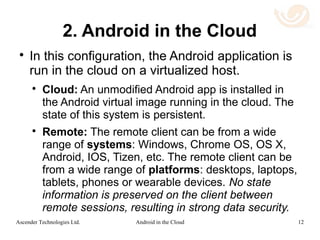
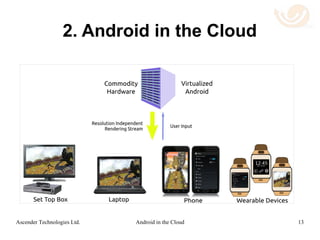
 In this use case, the Android application is run
in the cloud on a virtualized host.
 Cloud: An unmodified Android app is installed in
the Android virtual image running in the cloud. The
state of this system is persistent.
 Remote: The remote client can be from a wide
range of systems: Chrome OS, Windows, OS X,
Android, IOS, Tizen, etc. The remote client can be
from a wide range of platforms: desktops,
chromebooks, laptops, tablets, phones or
wearable devices. No data is persistent, resulting
in strong security.
4Android in the CloudAscender Technologies Ltd.
Use Case 1: Android in the Cloud
5Android in the CloudAscender Technologies Ltd.
Use Case 2: BYOD
Mobile Enterprise Security
 Ascender's technology levels the playing field
for the adoption of BYOD devices.
 Cloud: Applications can be written once, for
Android only, and can be run in the cloud under
the control of the enterprise. Hosting in the cloud
intrinsically solves many security problems.
 Mobile Device: Android applications can be
viewed on a wide range of platforms: desktops,
laptops, tablets, phones and even wearable
devices. Windows Phone can be supported by
enterprises as easily as more popular platforms.
6Android in the CloudAscender Technologies Ltd.
Use Case 2: BYOD
Mobile Enterprise Security
 Security is simple to provide since the data
resides in the enterprise cloud.
 Responsibility for mobile device management
rests with the employee since the enterprise
data security management is done in the
cloud.
 Complex device dependent mobile device
management (MDM) is not needed.
7Android in the CloudAscender Technologies Ltd.
Use Case 3: Wearable Devices
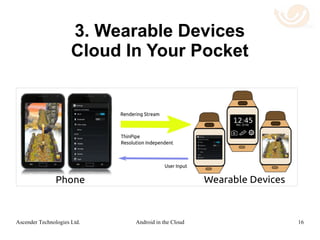
 In this configuration, devices that are carried
on the person, or are in close proximity to the
person, communicate.
 The wearable device might have constraints of
computational power, network connectivity
and/or OS compatibility that will make it
difficult to run a desired application.
8Android in the CloudAscender Technologies Ltd.
Use Case 3: Wearable Devices
 Mobile Device: This is a device running the
Android OS, either tablet or phone. Android
Wear apps can be run on the mobile devices.
 Wearable Device: This might be a device
connected to the mobile device via a low
bandwidth connection such as Bluetooth. With
Ascender's technology, even devices that
cannot natively run Android applications, can
use remote Android apps.
9Android in the CloudAscender Technologies Ltd.
Use Case 3: Wearable Devices
A Cloud In Your Pocket
10Android in the CloudAscender Technologies Ltd.
Other Use Cases
 Cloud gaming
 App Library / Subscription Model
 Set-Top Boxes
 Automated Testing
 WebGL Browser Based Implementations
11Android in the CloudAscender Technologies Ltd.
Android VDI
 While there is much experience in Virtual
Desktop Infrastructure (VDI) for Windows,
there is no comparable infrastructure for
remote Android access.
 Most modern VDI technologies use host side
rendering with a codec that compresses
graphic frames at the pixel level.
12Android in the CloudAscender Technologies Ltd.
Ascender Technologies’ Solution
 In contrast to the pixel based approach,
Ascender's remote Android technology
renders at the client side using remote
rendering commands.
 Transmitting the remote graphics at the
rendering level is intrinsically more efficient
than transmitting pixels.
 The resulting data stream is very compressible
while using low computational resources.
13Android in the CloudAscender Technologies Ltd.
Benefits of Ascender's Solution
 Enables cost and computer resource efficient
remote execution of unmodified Android apps
on multiple platforms.
 Enables viewing on the remote client without
performance compromise.
 Enables remote access to a large number of
the 1,000,000+ available Android apps.
14Android in the CloudAscender Technologies Ltd.
Benefits of Ascender's Solution
 Provides a high graphical frame rate using low
network bandwidth.
 Expands the applicability of Android apps to
many platforms, including Chromebooks.
 Solves the BYOD problem of managing
multiple systems and platforms.
 Reduces cost of cloud hosting:
 Rendering is done on the client side,
 GPU's are not needed on the remote host.
15Android in the CloudAscender Technologies Ltd.
Benefits of Ascender's Solution
 Typically uses less than 40 KBytes/sec of
network bandwidth:
 full resolution
 low latency
 lossless
 60 frames per second graphic stream.
16Android in the CloudAscender Technologies Ltd.
Links
 Main repository on the technology and FAQ.
 Remote Android rendering
 Short summary
 Full length talk
 The challenge of mobile devices in the
enterprise
 Remote WebGL demo
17Android in the CloudAscender Technologies Ltd.

Android in the Cloud

  • 1.
    Android in theCloud Chromebooks, BYOD and Wearables Joel Isaacson Copyright 2014 Joel Isaacson joel@ascender.com
  • 2.
    Android and Chromebooks Android is not likely to be eclipsed in the foreseeable future, with over 75% share of the worldwide mobile phone market.  Google has succeeded in attracting a very large number of developers to Android.  Chromebooks are becoming increasingly popular. Despite their common Google origin there is as yet no “convergence” between Chrome OS and Android. 2Android in the CloudAscender Technologies Ltd.
  • 3.
    Use Cases  Ascender’stechnology is enabling, and is thus applicable to different use cases.  We examine select use cases. 1. Android in the Cloud, Chromebook convergence 2. BYOD, Mobile Enterprise Security 3. Wearable Devices 3Android in the CloudAscender Technologies Ltd.
  • 4.
    Use Case 1:Android in the Cloud  In this use case, the Android application is run in the cloud on a virtualized host.  Cloud: An unmodified Android app is installed in the Android virtual image running in the cloud. The state of this system is persistent.  Remote: The remote client can be from a wide range of systems: Chrome OS, Windows, OS X, Android, IOS, Tizen, etc. The remote client can be from a wide range of platforms: desktops, chromebooks, laptops, tablets, phones or wearable devices. No data is persistent, resulting in strong security. 4Android in the CloudAscender Technologies Ltd.
  • 5.
    Use Case 1:Android in the Cloud 5Android in the CloudAscender Technologies Ltd.
  • 6.
    Use Case 2:BYOD Mobile Enterprise Security  Ascender's technology levels the playing field for the adoption of BYOD devices.  Cloud: Applications can be written once, for Android only, and can be run in the cloud under the control of the enterprise. Hosting in the cloud intrinsically solves many security problems.  Mobile Device: Android applications can be viewed on a wide range of platforms: desktops, laptops, tablets, phones and even wearable devices. Windows Phone can be supported by enterprises as easily as more popular platforms. 6Android in the CloudAscender Technologies Ltd.
  • 7.
    Use Case 2:BYOD Mobile Enterprise Security  Security is simple to provide since the data resides in the enterprise cloud.  Responsibility for mobile device management rests with the employee since the enterprise data security management is done in the cloud.  Complex device dependent mobile device management (MDM) is not needed. 7Android in the CloudAscender Technologies Ltd.
  • 8.
    Use Case 3:Wearable Devices  In this configuration, devices that are carried on the person, or are in close proximity to the person, communicate.  The wearable device might have constraints of computational power, network connectivity and/or OS compatibility that will make it difficult to run a desired application. 8Android in the CloudAscender Technologies Ltd.
  • 9.
    Use Case 3:Wearable Devices  Mobile Device: This is a device running the Android OS, either tablet or phone. Android Wear apps can be run on the mobile devices.  Wearable Device: This might be a device connected to the mobile device via a low bandwidth connection such as Bluetooth. With Ascender's technology, even devices that cannot natively run Android applications, can use remote Android apps. 9Android in the CloudAscender Technologies Ltd.
  • 10.
    Use Case 3:Wearable Devices A Cloud In Your Pocket 10Android in the CloudAscender Technologies Ltd.
  • 11.
    Other Use Cases Cloud gaming  App Library / Subscription Model  Set-Top Boxes  Automated Testing  WebGL Browser Based Implementations 11Android in the CloudAscender Technologies Ltd.
  • 12.
    Android VDI  Whilethere is much experience in Virtual Desktop Infrastructure (VDI) for Windows, there is no comparable infrastructure for remote Android access.  Most modern VDI technologies use host side rendering with a codec that compresses graphic frames at the pixel level. 12Android in the CloudAscender Technologies Ltd.
  • 13.
    Ascender Technologies’ Solution In contrast to the pixel based approach, Ascender's remote Android technology renders at the client side using remote rendering commands.  Transmitting the remote graphics at the rendering level is intrinsically more efficient than transmitting pixels.  The resulting data stream is very compressible while using low computational resources. 13Android in the CloudAscender Technologies Ltd.
  • 14.
    Benefits of Ascender'sSolution  Enables cost and computer resource efficient remote execution of unmodified Android apps on multiple platforms.  Enables viewing on the remote client without performance compromise.  Enables remote access to a large number of the 1,000,000+ available Android apps. 14Android in the CloudAscender Technologies Ltd.
  • 15.
    Benefits of Ascender'sSolution  Provides a high graphical frame rate using low network bandwidth.  Expands the applicability of Android apps to many platforms, including Chromebooks.  Solves the BYOD problem of managing multiple systems and platforms.  Reduces cost of cloud hosting:  Rendering is done on the client side,  GPU's are not needed on the remote host. 15Android in the CloudAscender Technologies Ltd.
  • 16.
    Benefits of Ascender'sSolution  Typically uses less than 40 KBytes/sec of network bandwidth:  full resolution  low latency  lossless  60 frames per second graphic stream. 16Android in the CloudAscender Technologies Ltd.
  • 17.
    Links  Main repositoryon the technology and FAQ.  Remote Android rendering  Short summary  Full length talk  The challenge of mobile devices in the enterprise  Remote WebGL demo 17Android in the CloudAscender Technologies Ltd.