Android Things
Smart Home
#cododajnia
Bartosz Kosarzycki
@bkosarzycki
Michał Radtke
Feb 22, 2018
Operating System
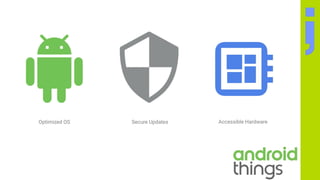
- Customized version of Android OS
- announced at Google I/O 2015, codename: “Brillo”
- based on Android 7.0+ (currently 8.0+)
- “kiosk” mode
- theoretically supports devices with 64 MB RAM
- Bluetooth Low Energy support*
- custom Launcher for IoT configuration
- Single application mode
automatically boots into main application
* Feb 2018 - Android Things is still in beta
Operating System
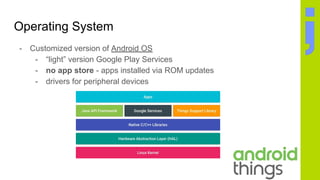
- Customized version of Android OS
- “light” version Google Play Services
- no app store - apps installed via ROM updates
- drivers for peripheral devices
Operating System
Android Things
Thinned down Android OS with a custom
launcher and KIOSK mode
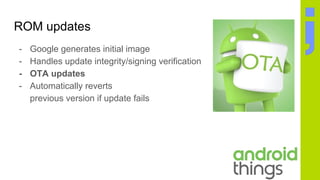
ROM updates
- Google generates initial image
- Handles update integrity/signing verification
- OTA updates
- Automatically reverts
previous version if update fails
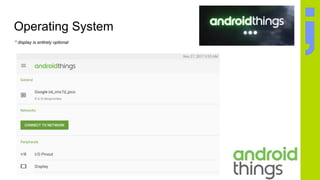
Operating System
* display is entirely optional
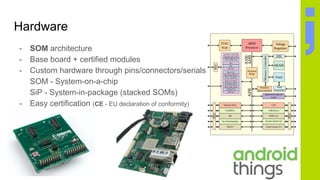
Hardware
- SOM architecture
- Base board + certified modules
- Custom hardware through pins/connectors/serials
SOM - System-on-a-chip
SiP - System-in-package (stacked SOMs)
- Easy certification (CE - EU declaration of conformity)
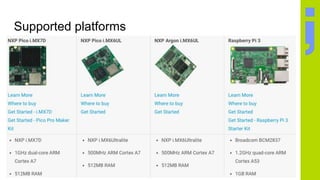
Supported platforms
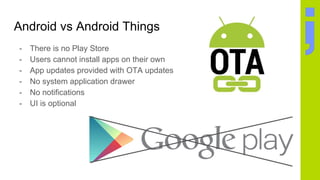
Android vs Android Things
- There is no Play Store
- Users cannot install apps on their own
- App updates provided with OTA updates
- No system application drawer
- No notifications
- UI is optional
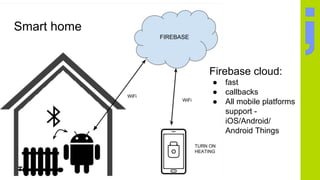
Smart home
Firebase cloud:
● fast
● callbacks
● All mobile platforms
support -
iOS/Android/
Android Things
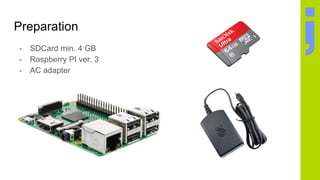
Preparation
- SDCard min. 4 GB
- Raspberry PI ver. 3
- AC adapter
ACa
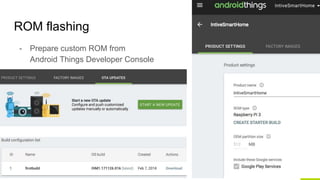
ROM flashing
- Prepare custom ROM from
Android Things Developer Console
ACa
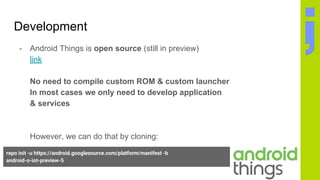
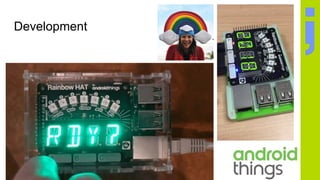
Development
- Android Things is open source (still in preview)
link
No need to compile custom ROM & custom launcher
In most cases we only need to develop application
& services
However, we can do that by cloning:
repo init -u https://android.googlesource.com/platform/manifest -b
android-o-iot-preview-5
repo sync
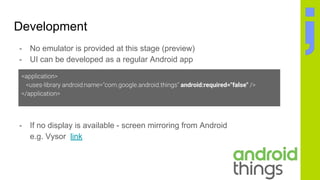
Development
- No emulator is provided at this stage (preview)
- UI can be developed as a regular Android app
- If no display is available - screen mirroring from Android
e.g. Vysor link
android:required="false"
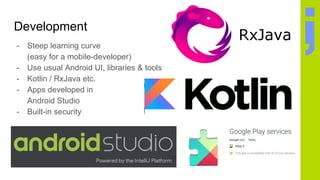
Development
- Steep learning curve
(easy for a mobile-developer)
- Use usual Android UI, libraries & tools
- Kotlin / RxJava etc.
- Apps developed in
Android Studio
- Built-in security
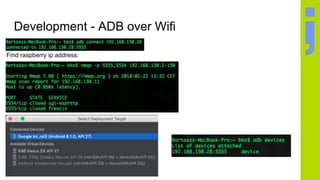
Development - ADB over Wifi
Find raspberry ip address:
Development - Permissions / Wifi
- Permissions are granted at app boot
(no Android 6.0+ runtime permission support)
- Usually you need to restart the device after adding a new
permission
- After connecting to a WiFi network - AT reconnects that network on
boot
You need to restart the device if WiFi network is unavailable on
device boot (or go to AT launcher)
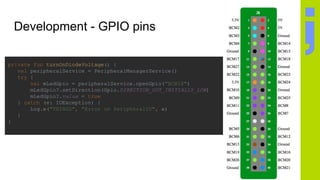
Development - GPIO pins
private fun turnOnDiodeVoltage() {
val peripheralService = PeripheralManagerService()
try {
val mLedGpio = peripheralService.openGpio("BCM18")
mLedGpio?.setDirection(Gpio.DIRECTION_OUT_INITIALLY_LOW)
mLedGpio?.value = true
} catch (e: IOException) {
Log.e("THINGS", "Error on PeripheralIO", e)
}
}
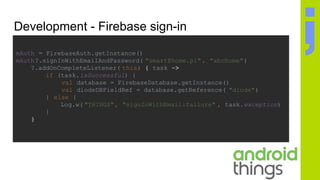
Development - Firebase sign-in
mAuth = FirebaseAuth.getInstance()
mAuth?.signInWithEmailAndPassword( "smart@home.pl" , "abchome")
?.addOnCompleteListener( this) { task ->
if (task.isSuccessful) {
val database = FirebaseDatabase.getInstance()
val diodeDBFieldRef = database.getReference( "diode")
} else {
Log.w( "THINGS", "signInWithEmail:failure" , task.exception)
}
}
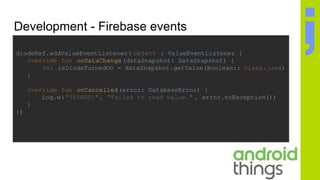
Development - Firebase events
diodeRef.addValueEventListener( object : ValueEventListener {
override fun onDataChange(dataSnapshot: DataSnapshot) {
val isDiodeTurnedOn = dataSnapshot.getValue(Boolean:: class.java)
}
override fun onCancelled(error: DatabaseError) {
Log.w("THINGS!", "Failed to read value." , error.toException())
}
})
Development
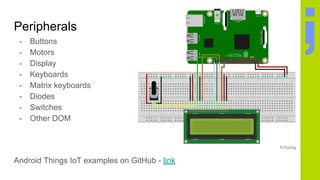
Peripherals
- Buttons
- Motors
- Display
- Keyboards
- Matrix keyboards
- Diodes
- Switches
- Other DOM
Android Things IoT examples on GitHub - link
Peripherals - matrix keypad
CONTRIB DRIVERS - matrixkeypad
sample
public class BoardDefaults {
private static final String DEVICE_RPI3 = "rpi3";
public static String[] getRowPins() {
return new String[]
{"BCM27", "BCM5", "BCM6", "BCM26"};
}
public static String[] getColPins() {
return new String[] {"BCM16", "BCM24", "BCM23"};
}
}
public class MatrixKeypadActivity extends Activity {
@Override
protected void onCreate(Bundle savedInstanceState) {
mMatrixKeypadDriver = new MatrixKeypadInputDriver(
BoardDefaults.getRowPins(),
BoardDefaults.getColPins(),
new int[] {KeyEvent.KEYCODE_NUMPAD_1, KeyEvent.KEYCODE_NUMPAD_2,
KeyEvent.KEYCODE_NUMPAD_3, KeyEvent.KEYCODE_NUMPAD_4,
KeyEvent.KEYCODE_NUMPAD_5, KeyEvent.KEYCODE_NUMPAD_6,
KeyEvent.KEYCODE_NUMPAD_7, KeyEvent.KEYCODE_NUMPAD_8,
KeyEvent.KEYCODE_NUMPAD_9, KeyEvent.KEYCODE_NUMPAD_MULTIPLY,
KeyEvent.KEYCODE_NUMPAD_0, KeyEvent.KEYCODE_NUMPAD_ENTER});
mMatrixKeypadDriver.register();
}
@Override public boolean onKeyDown(int keyCode, KeyEvent event) { ... }
@Override public boolean onKeyUp(int keyCode, KeyEvent event) { ... }
@Override protected void onDestroy() {
mMatrixKeypadDriver.close();
}
}
Drivers
- Contrib drivers open source (link)
- GPS drivers
- Human Input Device (HID) drivers
- Sensor drivers
- Custom drivers written in C/C++
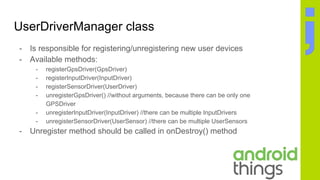
UserDriverManager class
- Is responsible for registering/unregistering new user devices
- Available methods:
- registerGpsDriver(GpsDriver)
- registerInputDriver(InputDriver)
- registerSensorDriver(UserDriver)
- unregisterGpsDriver() //without arguments, because there can be only one
GPSDriver
- unregisterInputDriver(InputDriver) //there can be multiple InputDrivers
- unregisterSensorDriver(UserSensor) //there can be multiple UserSensors
- Unregister method should be called in onDestroy() method
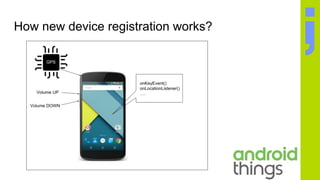
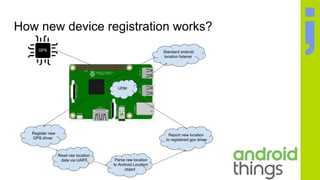
How new device registration works?
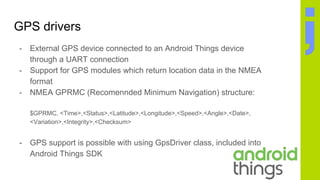
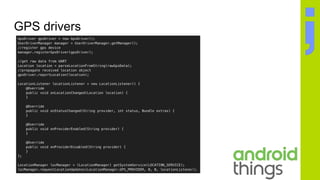
GPS drivers
- External GPS device connected to an Android Things device
through a UART connection
- Support for GPS modules which return location data in the NMEA
format
- NMEA GPRMC (Recomennded Minimum Navigation) structure:
$GPRMC, <Time>,<Status>,<Latitude>,<Longitude>,<Speed>,<Angle>,<Date>,
<Variation>,<Integrity>,<Checksum>
- GPS support is possible with using GpsDriver class, included into
Android Things SDK
GPS drivers
Human Input Device (HID) drivers
- Support for peripherals like buttons, controller joysticks and
keyboards
- Peripherals can be connected to the board via UART, GPIO, I2C,
etc.
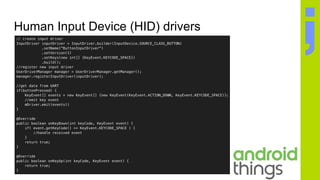
- InputDriver class allows to tie own human interactions to the
standard Android input
Human Input Device (HID) drivers
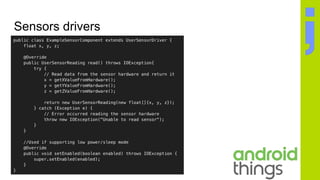
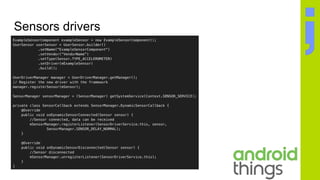
Sensors drivers
- Support for multiple types of sensors, like accelerometer,
gyroscope, magnetic field, etc.
- UserSensorDriver class contains methods for handling low power
and sleep mode
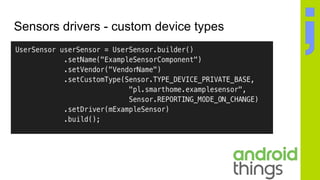
- Support for custom sensors types which are not already supported
in Android (wind speed, water pH levels, motion detection, etc.)
Sensors drivers
Sensors drivers
Sensors drivers - custom device types
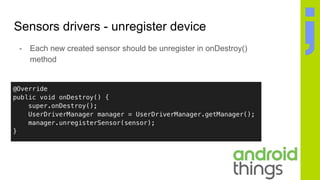
Sensors drivers - unregister device
- Each new created sensor should be unregister in onDestroy()
method
Custom C/C++ drivers
- The native PIO APIs let you write C/C++ code to control GPIO,
PWM, I2C, SPI, UART peripherals
- Native drivers can be used in a Java code
- The Native PIO API contains the same classes as Standard
Android Things API
- Android Things application can be write purely in C/C++
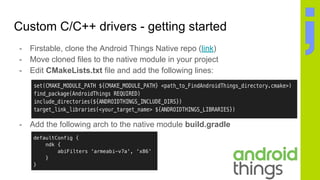
Custom C/C++ drivers - getting started
- Firstable, clone the Android Things Native repo (link)
- Move cloned files to the native module in your project
- Edit CMakeLists.txt file and add the following lines:
- Add the following arch to the native module build.gradle
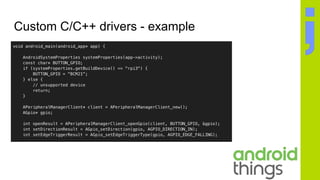
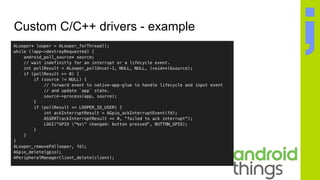
Custom C/C++ drivers - example
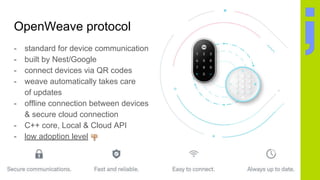
OpenWeave protocol
- standard for device communication
- built by Nest/Google
- connect devices via QR codes
- weave automatically takes care
of updates
- offline connection between devices
& secure cloud connection
- C++ core, Local & Cloud API
- low adoption level
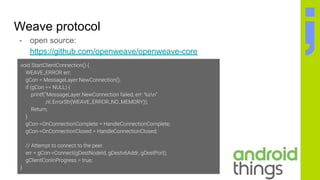
Weave protocol
- open source:
https://github.com/openweave/openweave-core
Links
- Android Things - link, supported hardware - link
- Weave protocol - link, nest weave - link, source - link
- Developer console - link, releases (currently preview - 6.1)
- Raspberry Pi AT docs - link
- Android Things Native - link
- Android Things Native examples - link
Android things introduction - Development for IoT

Android things introduction - Development for IoT

  • 1.
    Android Things Smart Home #cododajnia BartoszKosarzycki @bkosarzycki Michał Radtke Feb 22, 2018
  • 3.
    Operating System - Customizedversion of Android OS - announced at Google I/O 2015, codename: “Brillo” - based on Android 7.0+ (currently 8.0+) - “kiosk” mode - theoretically supports devices with 64 MB RAM - Bluetooth Low Energy support* - custom Launcher for IoT configuration - Single application mode automatically boots into main application * Feb 2018 - Android Things is still in beta
  • 4.
    Operating System - Customizedversion of Android OS - “light” version Google Play Services - no app store - apps installed via ROM updates - drivers for peripheral devices
  • 5.
    Operating System Android Things Thinneddown Android OS with a custom launcher and KIOSK mode
  • 6.
    ROM updates - Googlegenerates initial image - Handles update integrity/signing verification - OTA updates - Automatically reverts previous version if update fails
  • 7.
    Operating System * displayis entirely optional
  • 8.
    Hardware - SOM architecture -Base board + certified modules - Custom hardware through pins/connectors/serials SOM - System-on-a-chip SiP - System-in-package (stacked SOMs) - Easy certification (CE - EU declaration of conformity)
  • 9.
  • 10.
    Android vs AndroidThings - There is no Play Store - Users cannot install apps on their own - App updates provided with OTA updates - No system application drawer - No notifications - UI is optional
  • 11.
    Smart home Firebase cloud: ●fast ● callbacks ● All mobile platforms support - iOS/Android/ Android Things
  • 12.
    Preparation - SDCard min.4 GB - Raspberry PI ver. 3 - AC adapter ACa
  • 13.
    ROM flashing - Preparecustom ROM from Android Things Developer Console ACa
  • 14.
    Development - Android Thingsis open source (still in preview) link No need to compile custom ROM & custom launcher In most cases we only need to develop application & services However, we can do that by cloning: repo init -u https://android.googlesource.com/platform/manifest -b android-o-iot-preview-5 repo sync
  • 15.
    Development - No emulatoris provided at this stage (preview) - UI can be developed as a regular Android app - If no display is available - screen mirroring from Android e.g. Vysor link android:required="false"
  • 16.
    Development - Steep learningcurve (easy for a mobile-developer) - Use usual Android UI, libraries & tools - Kotlin / RxJava etc. - Apps developed in Android Studio - Built-in security
  • 17.
    Development - ADBover Wifi Find raspberry ip address:
  • 18.
    Development - Permissions/ Wifi - Permissions are granted at app boot (no Android 6.0+ runtime permission support) - Usually you need to restart the device after adding a new permission - After connecting to a WiFi network - AT reconnects that network on boot You need to restart the device if WiFi network is unavailable on device boot (or go to AT launcher)
  • 19.
    Development - GPIOpins private fun turnOnDiodeVoltage() { val peripheralService = PeripheralManagerService() try { val mLedGpio = peripheralService.openGpio("BCM18") mLedGpio?.setDirection(Gpio.DIRECTION_OUT_INITIALLY_LOW) mLedGpio?.value = true } catch (e: IOException) { Log.e("THINGS", "Error on PeripheralIO", e) } }
  • 20.
    Development - Firebasesign-in mAuth = FirebaseAuth.getInstance() mAuth?.signInWithEmailAndPassword( "smart@home.pl" , "abchome") ?.addOnCompleteListener( this) { task -> if (task.isSuccessful) { val database = FirebaseDatabase.getInstance() val diodeDBFieldRef = database.getReference( "diode") } else { Log.w( "THINGS", "signInWithEmail:failure" , task.exception) } }
  • 21.
    Development - Firebaseevents diodeRef.addValueEventListener( object : ValueEventListener { override fun onDataChange(dataSnapshot: DataSnapshot) { val isDiodeTurnedOn = dataSnapshot.getValue(Boolean:: class.java) } override fun onCancelled(error: DatabaseError) { Log.w("THINGS!", "Failed to read value." , error.toException()) } })
  • 22.
  • 23.
    Peripherals - Buttons - Motors -Display - Keyboards - Matrix keyboards - Diodes - Switches - Other DOM Android Things IoT examples on GitHub - link
  • 24.
    Peripherals - matrixkeypad CONTRIB DRIVERS - matrixkeypad sample public class BoardDefaults { private static final String DEVICE_RPI3 = "rpi3"; public static String[] getRowPins() { return new String[] {"BCM27", "BCM5", "BCM6", "BCM26"}; } public static String[] getColPins() { return new String[] {"BCM16", "BCM24", "BCM23"}; } }
  • 25.
    public class MatrixKeypadActivityextends Activity { @Override protected void onCreate(Bundle savedInstanceState) { mMatrixKeypadDriver = new MatrixKeypadInputDriver( BoardDefaults.getRowPins(), BoardDefaults.getColPins(), new int[] {KeyEvent.KEYCODE_NUMPAD_1, KeyEvent.KEYCODE_NUMPAD_2, KeyEvent.KEYCODE_NUMPAD_3, KeyEvent.KEYCODE_NUMPAD_4, KeyEvent.KEYCODE_NUMPAD_5, KeyEvent.KEYCODE_NUMPAD_6, KeyEvent.KEYCODE_NUMPAD_7, KeyEvent.KEYCODE_NUMPAD_8, KeyEvent.KEYCODE_NUMPAD_9, KeyEvent.KEYCODE_NUMPAD_MULTIPLY, KeyEvent.KEYCODE_NUMPAD_0, KeyEvent.KEYCODE_NUMPAD_ENTER}); mMatrixKeypadDriver.register(); } @Override public boolean onKeyDown(int keyCode, KeyEvent event) { ... } @Override public boolean onKeyUp(int keyCode, KeyEvent event) { ... } @Override protected void onDestroy() { mMatrixKeypadDriver.close(); } }
  • 26.
    Drivers - Contrib driversopen source (link) - GPS drivers - Human Input Device (HID) drivers - Sensor drivers - Custom drivers written in C/C++
  • 27.
    UserDriverManager class - Isresponsible for registering/unregistering new user devices - Available methods: - registerGpsDriver(GpsDriver) - registerInputDriver(InputDriver) - registerSensorDriver(UserDriver) - unregisterGpsDriver() //without arguments, because there can be only one GPSDriver - unregisterInputDriver(InputDriver) //there can be multiple InputDrivers - unregisterSensorDriver(UserSensor) //there can be multiple UserSensors - Unregister method should be called in onDestroy() method
  • 28.
    How new deviceregistration works?
  • 29.
    How new deviceregistration works?
  • 30.
    GPS drivers - ExternalGPS device connected to an Android Things device through a UART connection - Support for GPS modules which return location data in the NMEA format - NMEA GPRMC (Recomennded Minimum Navigation) structure: $GPRMC, <Time>,<Status>,<Latitude>,<Longitude>,<Speed>,<Angle>,<Date>, <Variation>,<Integrity>,<Checksum> - GPS support is possible with using GpsDriver class, included into Android Things SDK
  • 31.
  • 32.
    Human Input Device(HID) drivers - Support for peripherals like buttons, controller joysticks and keyboards - Peripherals can be connected to the board via UART, GPIO, I2C, etc. - InputDriver class allows to tie own human interactions to the standard Android input
  • 33.
    Human Input Device(HID) drivers
  • 34.
    Sensors drivers - Supportfor multiple types of sensors, like accelerometer, gyroscope, magnetic field, etc. - UserSensorDriver class contains methods for handling low power and sleep mode - Support for custom sensors types which are not already supported in Android (wind speed, water pH levels, motion detection, etc.)
  • 35.
  • 36.
  • 37.
    Sensors drivers -custom device types
  • 38.
    Sensors drivers -unregister device - Each new created sensor should be unregister in onDestroy() method
  • 39.
    Custom C/C++ drivers -The native PIO APIs let you write C/C++ code to control GPIO, PWM, I2C, SPI, UART peripherals - Native drivers can be used in a Java code - The Native PIO API contains the same classes as Standard Android Things API - Android Things application can be write purely in C/C++
  • 40.
    Custom C/C++ drivers- getting started - Firstable, clone the Android Things Native repo (link) - Move cloned files to the native module in your project - Edit CMakeLists.txt file and add the following lines: - Add the following arch to the native module build.gradle
  • 41.
  • 42.
  • 43.
    OpenWeave protocol - standardfor device communication - built by Nest/Google - connect devices via QR codes - weave automatically takes care of updates - offline connection between devices & secure cloud connection - C++ core, Local & Cloud API - low adoption level
  • 44.
    Weave protocol - opensource: https://github.com/openweave/openweave-core
  • 45.
    Links - Android Things- link, supported hardware - link - Weave protocol - link, nest weave - link, source - link - Developer console - link, releases (currently preview - 6.1) - Raspberry Pi AT docs - link - Android Things Native - link - Android Things Native examples - link