Android Studio
Build Variants
About me
Édipo Souza
● Work at GREat/UFC in SeDAn project.
● Édipo Souza has over 3 years experience in android development with degree in
Sistemas e Mídias Digitais by Federal University of Ceará.
● He has certifications Oracle Certified Associate Java SE 8 Programmer and
Microsoft Programming in HTML5 with JavaScript and CSS3 Specialist.
http://www.ediposouza.com
● What’s Build Variant?
● Build Variant Advantages
● How to Use Create
● Build Variant and Build Type
● How to Use It
● References
Schedule
It’s a feature of build system that allows you to create
different versions of same app in a single project.
What’s Build Variant?
● Demo version (incomplete app)
● Free version (full app advertising)
● Pro version (full app without advertising)
● Trial version (full app for a limited time)
● Specific version for devices with physical buttons
What’s Build Variant?
● Centralize and organize all code related to your application
● Avoid code duplication in separate projects
● Facilitate the implementation of maintenance
● Keep all versions always updated
Build Variant Advantages
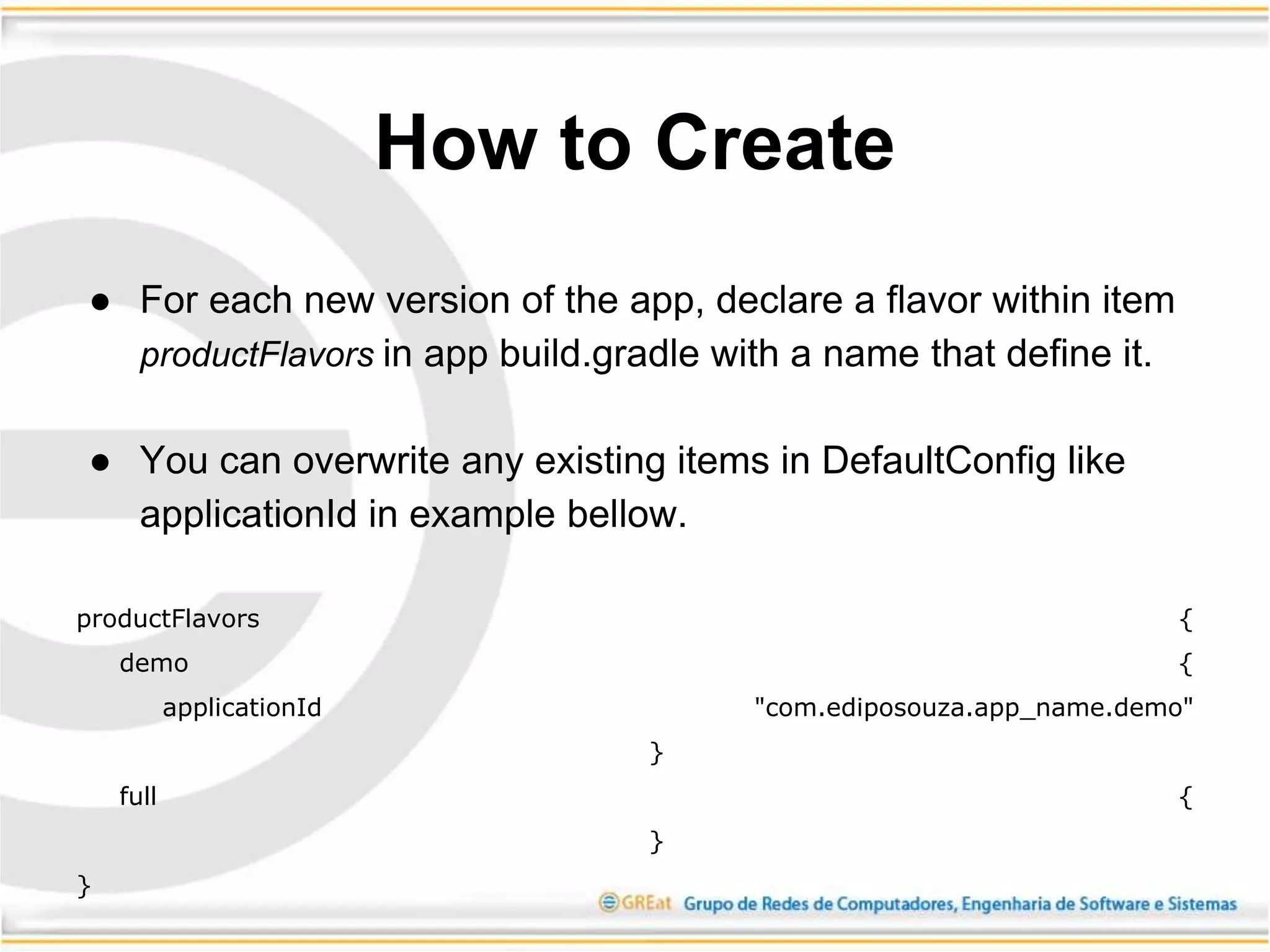
● For each new version of the app, declare a flavor within item
productFlavors in app build.gradle with a name that define it.
● You can overwrite any existing items in DefaultConfig like
applicationId in example bellow.
productFlavors {
demo {
applicationId "com.ediposouza.app_name.demo"
}
full {
}
}
How to Create
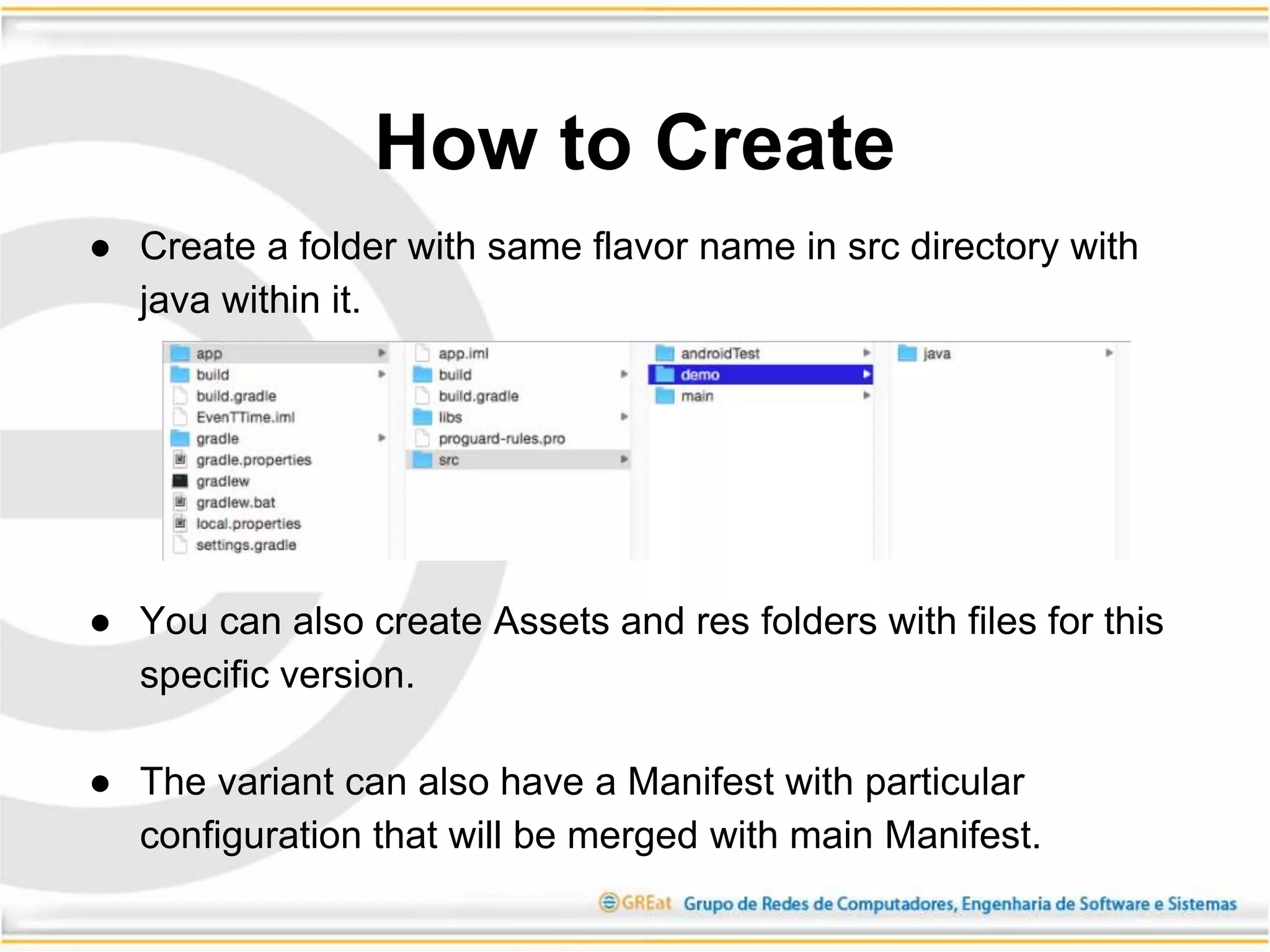
● Create a folder with same flavor name in src directory with
java within it.
● You can also create Assets and res folders with files for this
specific version.
● The variant can also have a Manifest with particular
configuration that will be merged with main Manifest.
How to Create
● Each build variant is a formed with combination of a flavor
and a build type.
● All versions can be builded as debug or release type.
● You can still use BuildConfig.DEBUG boolean value to make
adaptations between test version and production version.
Ex: boolean serverUrl = BuildConfig.DEBUG ? testUrl : prodUrl;
Build Variant and Build
Type
● The classes and resources of active build variant will be
merged with the main files.
● You can’t have a class in any variant with same name of one
in main folder. However between two variant you often have
classes with same name. The same is valid for resources.
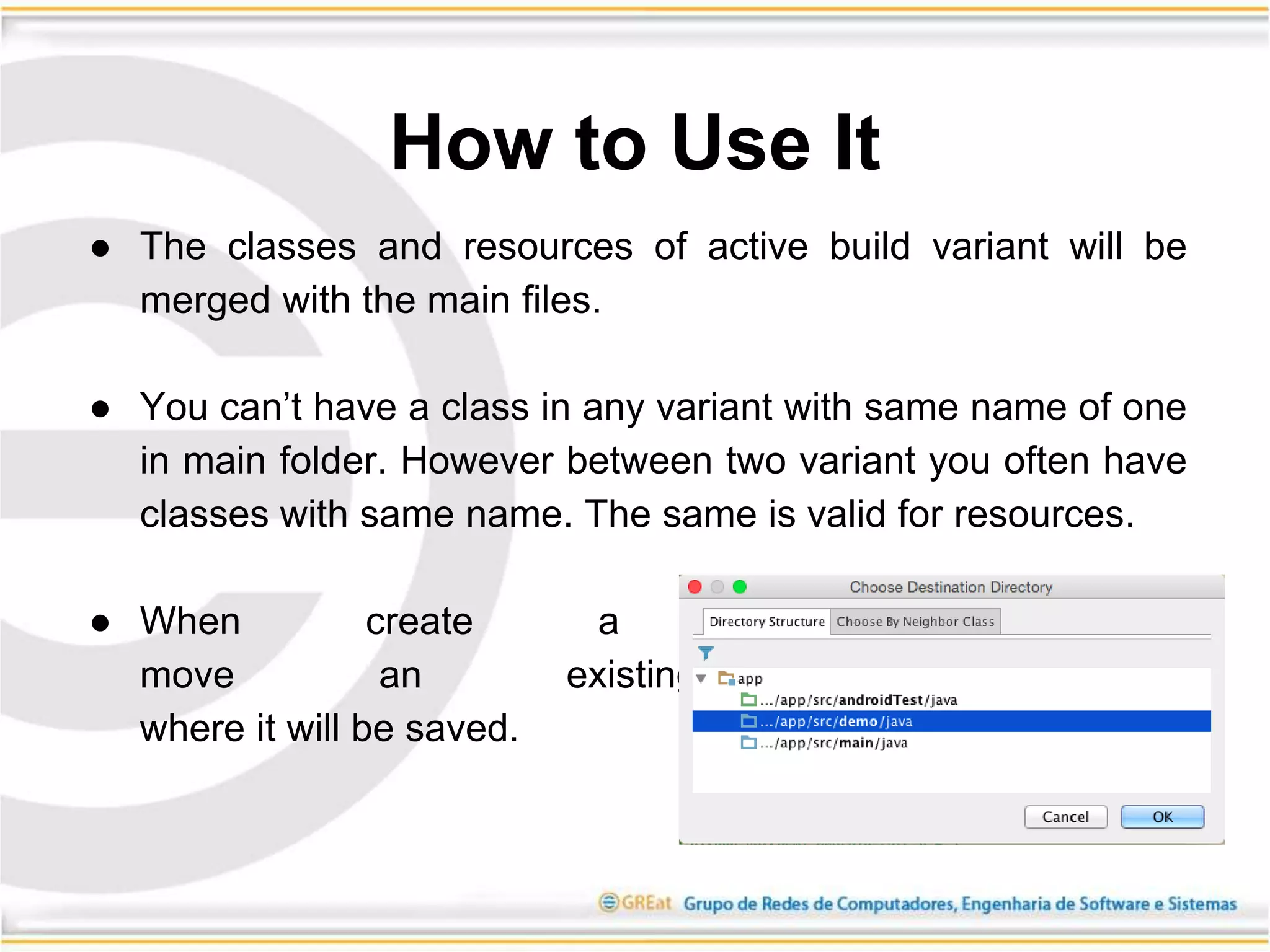
● When create a new class or
move an existing one, choose
where it will be saved.
How to Use It
● You can work only with a Build Variant at time and if have
some flavor declared, at lest one have to be active.
● Does make sense to define just one flavor, because you
main files will always be merged with same Variant files.
● To create test classes for a Build Variant, create a folder
androidTest***flavor name***.
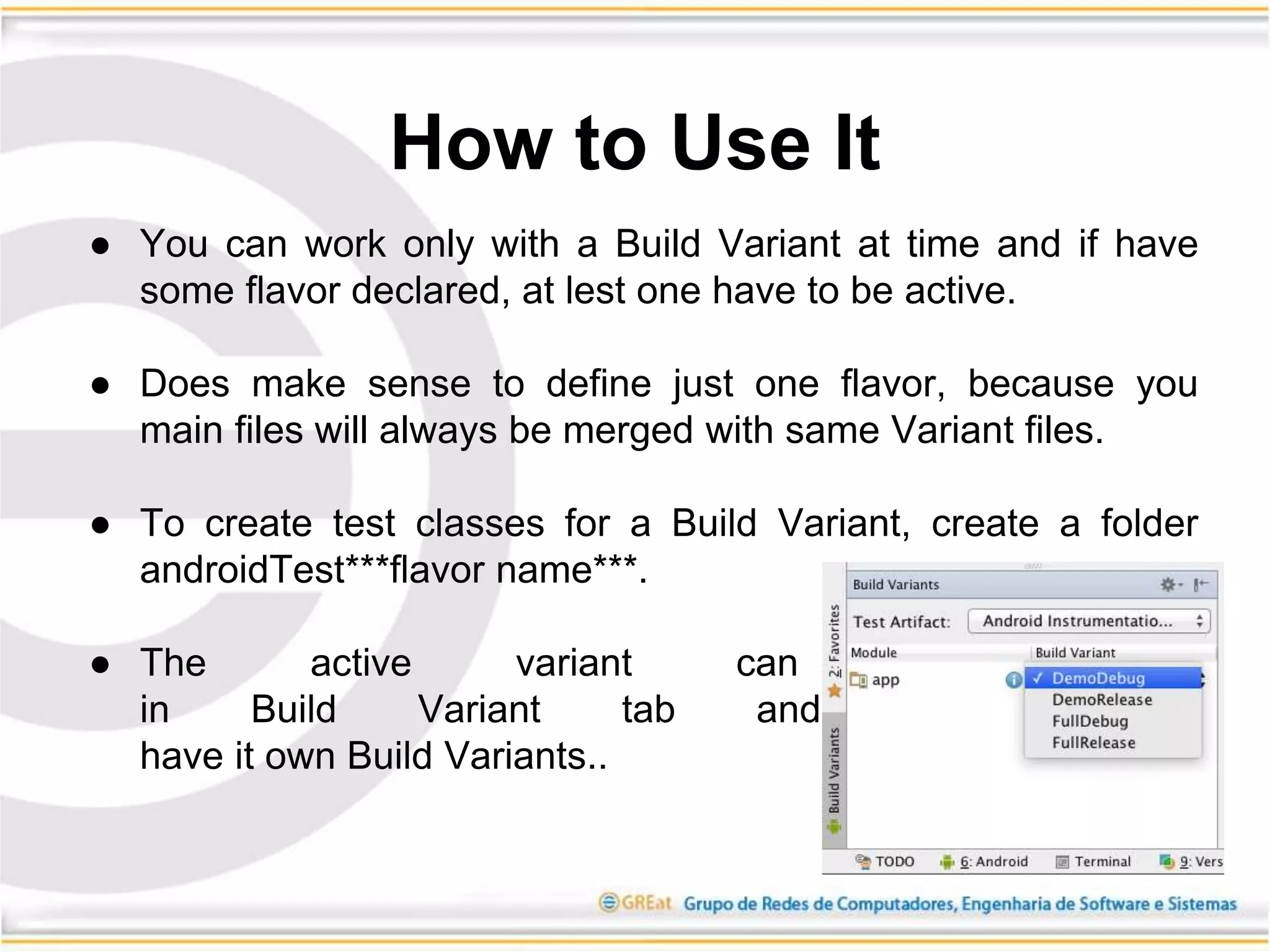
● The active variant can be changed
in Build Variant tab and Each module
have it own Build Variants..
How to Use It
Demo
Cool Links:
● http://ediposouza.com/android-studio-build-variant
● https://developer.android.com/tools/building/configuring-gradle.html#workBuildVariants
Questions?
Contato:
edipo2s@gmail.com
www.great.ufc.br
THANKS!!!

Android studio build variants

  • 1.
  • 2.
    About me Édipo Souza ●Work at GREat/UFC in SeDAn project. ● Édipo Souza has over 3 years experience in android development with degree in Sistemas e Mídias Digitais by Federal University of Ceará. ● He has certifications Oracle Certified Associate Java SE 8 Programmer and Microsoft Programming in HTML5 with JavaScript and CSS3 Specialist. http://www.ediposouza.com
  • 3.
    ● What’s BuildVariant? ● Build Variant Advantages ● How to Use Create ● Build Variant and Build Type ● How to Use It ● References Schedule
  • 4.
    It’s a featureof build system that allows you to create different versions of same app in a single project. What’s Build Variant?
  • 5.
    ● Demo version(incomplete app) ● Free version (full app advertising) ● Pro version (full app without advertising) ● Trial version (full app for a limited time) ● Specific version for devices with physical buttons What’s Build Variant?
  • 6.
    ● Centralize andorganize all code related to your application ● Avoid code duplication in separate projects ● Facilitate the implementation of maintenance ● Keep all versions always updated Build Variant Advantages
  • 7.
    ● For eachnew version of the app, declare a flavor within item productFlavors in app build.gradle with a name that define it. ● You can overwrite any existing items in DefaultConfig like applicationId in example bellow. productFlavors { demo { applicationId "com.ediposouza.app_name.demo" } full { } } How to Create
  • 8.
    ● Create afolder with same flavor name in src directory with java within it. ● You can also create Assets and res folders with files for this specific version. ● The variant can also have a Manifest with particular configuration that will be merged with main Manifest. How to Create
  • 9.
    ● Each buildvariant is a formed with combination of a flavor and a build type. ● All versions can be builded as debug or release type. ● You can still use BuildConfig.DEBUG boolean value to make adaptations between test version and production version. Ex: boolean serverUrl = BuildConfig.DEBUG ? testUrl : prodUrl; Build Variant and Build Type
  • 10.
    ● The classesand resources of active build variant will be merged with the main files. ● You can’t have a class in any variant with same name of one in main folder. However between two variant you often have classes with same name. The same is valid for resources. ● When create a new class or move an existing one, choose where it will be saved. How to Use It
  • 11.
    ● You canwork only with a Build Variant at time and if have some flavor declared, at lest one have to be active. ● Does make sense to define just one flavor, because you main files will always be merged with same Variant files. ● To create test classes for a Build Variant, create a folder androidTest***flavor name***. ● The active variant can be changed in Build Variant tab and Each module have it own Build Variants.. How to Use It
  • 12.
  • 13.
    Cool Links: ● http://ediposouza.com/android-studio-build-variant ●https://developer.android.com/tools/building/configuring-gradle.html#workBuildVariants Questions?
  • 14.