Tips to HelpYou Migrate
to Android Studio 3.0
3
After a long period of expectation, Android
Studio 3.0 is almost here.
After 7 alpha versions of Android Studio 2.4,
Google announced that changes are far too great
and they will be incorporated into Android Studio
3.0. And then 9 alphas later, the new and
improved Android Studio was born. So overall,
there are quite a few changes.
Before you start googling your way just to end up where you
started, I’ve assembled some tips that helped me get from a
project that compiled on Android Studio 2.3 to a project that
compiled on Android Studio 3.0.
BREAKING REPOSITORIES
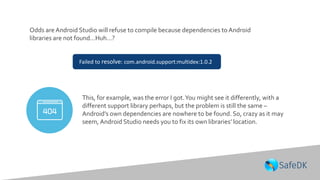
Odds are Android Studio will refuse to compile because dependencies to Android
libraries are not found…Huh…?
Failed to resolve: com.android.support:multidex:1.0.2
This, for example, was the error I got.You might see it differently, with a
different support library perhaps, but the problem is still the same –
Android’s own dependencies are nowhere to be found. So, crazy as it may
seem, Android Studio needs you to fix its own libraries’ location.
This is because Android moved all of its
repositories from jcenter to its own
repository. And since Google is working
closely with Gradle, Gradle 4.0 has
introduced a shortcut to said repository.
Good thing Android Studio 3.0 forced
you to update to Gradle 4.1, so that new
shortcut is available.
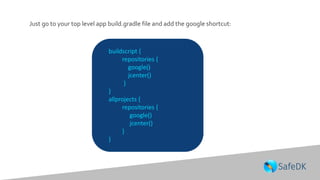
Just go to your top level app build.gradle file and add the google shortcut:
buildscript {
repositories {
google()
jcenter()
}
}
allprojects {
repositories {
google()
jcenter()
}
}
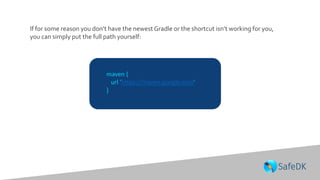
If for some reason you don’t have the newest Gradle or the shortcut isn’t working for you,
you can simply put the full path yourself:
maven {
url 'https://maven.google.com'
}
IN A FLAVORDIMENSION
FAR FAR AWAY
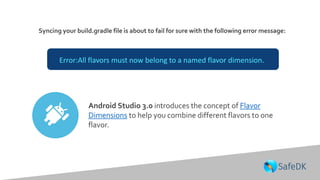
Syncing your build.gradle file is about to fail for sure with the following error message:
Error:All flavors must now belong to a named flavor dimension.
Android Studio 3.0 introduces the concept of Flavor
Dimensions to help you combine different flavors to one
flavor.
Suppose you have an arsenal of apps, each pretty much doing the same but
having their own themes.You use a flavor for each theme, get different APKs
with different application ids and therefore upload different apps to the store.
But what do you do when you want to merge two themes
together?
Or add functionality to only a subset of themes?
Or create one base theme from which all can derive?
Well, you have flavor dimensions.
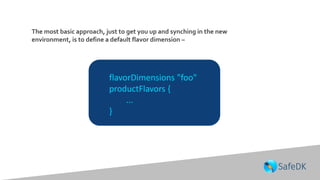
The most basic approach, just to get you up and synching in the new
environment, is to define a default flavor dimension –
flavorDimensions "foo"
productFlavors {
...
}
If you don’t do much else, each one of your existing flavors would
be assigned the one flavor dimension you gave and everything will
be as it was. So really, your only problem here is choosing the name
for your default flavor (so it should take you no more than a couple
of hours to resolve this issue 🙂 )
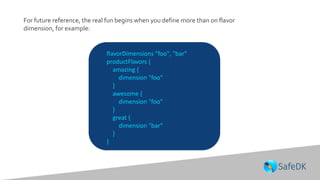
For future reference, the real fun begins when you define more than on flavor
dimension, for example:
flavorDimensions "foo", "bar"
productFlavors {
amazing {
dimension "foo"
}
awesome {
dimension "foo"
}
great {
dimension "bar"
}
}
In this case, while we have defined 3
product flavors, we have actually only
defined 2 – amazingGreat and
awesomeGreat. Their sources, resources
etc. are all combined giving precedence to
those combing from ‘foo’ dimension (since
it is mentioned first).
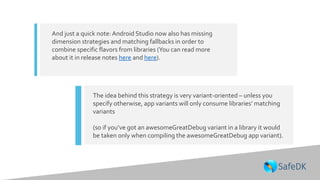
And just a quick note: Android Studio now also has missing
dimension strategies and matching fallbacks in order to
combine specific flavors from libraries (You can read more
about it in release notes here and here).
The idea behind this strategy is very variant-oriented – unless you
specify otherwise, app variants will only consume libraries’ matching
variants
(so if you’ve got an awesomeGreatDebug variant in a library it would
be taken only when compiling the awesomeGreatDebug app variant).
LETTHE DEPRECATION
WARNINGS BEGIN
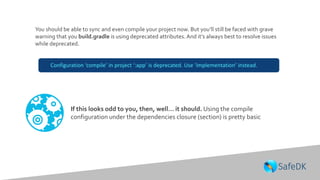
You should be able to sync and even compile your project now. But you’ll still be faced with grave
warning that you build.gradle is using deprecated attributes. And it’s always best to resolve issues
while deprecated.
If this looks odd to you, then, well… it should. Using the compile
configuration under the dependencies closure (section) is pretty basic
Configuration ‘compile’ in project ‘:app’ is deprecated. Use ‘implementation’ instead.
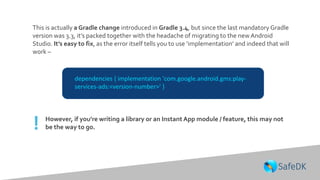
dependencies { implementation 'com.google.android.gms:play-
services-ads:<version-number>' }
This is actually a Gradle change introduced in Gradle 3.4, but since the last mandatory Gradle
version was 3.3, it’s packed together with the headache of migrating to the newAndroid
Studio. It’s easy to fix, as the error itself tells you to use ‘implementation’ and indeed that will
work –
However, if you’re writing a library or an Instant App module / feature, this may not
be the way to go.!
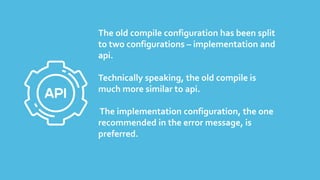
The old compile configuration has been split
to two configurations – implementation and
api.
Technically speaking, the old compile is
much more similar to api.
The implementation configuration, the one
recommended in the error message, is
preferred.
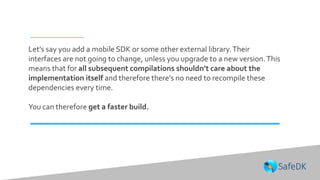
Let’s say you add a mobile SDK or some other external library.Their
interfaces are not going to change, unless you upgrade to a new version.This
means that for all subsequent compilations shouldn’t care about the
implementation itself and therefore there’s no need to recompile these
dependencies every time.
You can therefore get a faster build.
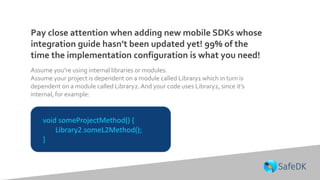
Pay close attention when adding new mobile SDKs whose
integration guide hasn’t been updated yet! 99% of the
time the implementation configuration is what you need!
void someProjectMethod() {
Library2.someL2Method();
}
Assume you’re using internal libraries or modules.
Assume your project is dependent on a module called Library1 which in turn is
dependent on a module called Library2. And your code uses Library2, since it’s
internal, for example:
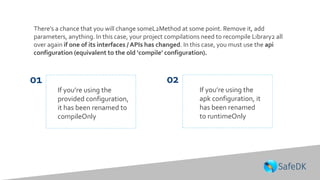
There’s a chance that you will change someL2Method at some point. Remove it, add
parameters, anything. In this case, your project compilations need to recompile Library2 all
over again if one of its interfaces / APIs has changed. In this case, you must use the api
configuration (equivalent to the old ‘compile’ configuration).
If you’re using the
apk configuration, it
has been renamed
to runtimeOnly
If you’re using the
provided configuration,
it has been renamed to
compileOnly
01 02
BUT THAT’S JUST THE BASICS
And of course…
Instant Apps SDK is
finally here.
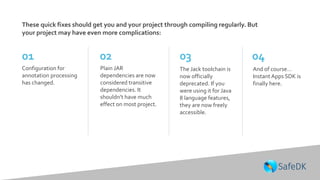
These quick fixes should get you and your project through compiling regularly. But
your project may have even more complications:
Configuration for
annotation processing
has changed.
Plain JAR
dependencies are now
considered transitive
dependencies. It
shouldn’t have much
effect on most project.
The Jack toolchain is
now officially
deprecated. If you
were using it for Java
8 language features,
they are now freely
accessible.
01 02 03 04
To fix any or more of these changes
take a look at the official
documentation here.
Icons source: www.flaticon.com
Drop us a note to contact@safedk.com and
we will consider adding them!
in-app protection
Ask us anything over email or in the social.We are listening!
THANKYOU!
contact@safedk.com

3 Tips to Help You Migrate to Android Studio 3.0

  • 1.
    Tips to HelpYouMigrate to Android Studio 3.0 3
  • 2.
    After a longperiod of expectation, Android Studio 3.0 is almost here. After 7 alpha versions of Android Studio 2.4, Google announced that changes are far too great and they will be incorporated into Android Studio 3.0. And then 9 alphas later, the new and improved Android Studio was born. So overall, there are quite a few changes.
  • 3.
    Before you startgoogling your way just to end up where you started, I’ve assembled some tips that helped me get from a project that compiled on Android Studio 2.3 to a project that compiled on Android Studio 3.0.
  • 4.
  • 5.
    Odds are AndroidStudio will refuse to compile because dependencies to Android libraries are not found…Huh…? Failed to resolve: com.android.support:multidex:1.0.2 This, for example, was the error I got.You might see it differently, with a different support library perhaps, but the problem is still the same – Android’s own dependencies are nowhere to be found. So, crazy as it may seem, Android Studio needs you to fix its own libraries’ location.
  • 6.
    This is becauseAndroid moved all of its repositories from jcenter to its own repository. And since Google is working closely with Gradle, Gradle 4.0 has introduced a shortcut to said repository. Good thing Android Studio 3.0 forced you to update to Gradle 4.1, so that new shortcut is available.
  • 7.
    Just go toyour top level app build.gradle file and add the google shortcut: buildscript { repositories { google() jcenter() } } allprojects { repositories { google() jcenter() } }
  • 8.
    If for somereason you don’t have the newest Gradle or the shortcut isn’t working for you, you can simply put the full path yourself: maven { url 'https://maven.google.com' }
  • 9.
  • 10.
    Syncing your build.gradlefile is about to fail for sure with the following error message: Error:All flavors must now belong to a named flavor dimension. Android Studio 3.0 introduces the concept of Flavor Dimensions to help you combine different flavors to one flavor.
  • 11.
    Suppose you havean arsenal of apps, each pretty much doing the same but having their own themes.You use a flavor for each theme, get different APKs with different application ids and therefore upload different apps to the store. But what do you do when you want to merge two themes together? Or add functionality to only a subset of themes? Or create one base theme from which all can derive? Well, you have flavor dimensions.
  • 12.
    The most basicapproach, just to get you up and synching in the new environment, is to define a default flavor dimension – flavorDimensions "foo" productFlavors { ... }
  • 13.
    If you don’tdo much else, each one of your existing flavors would be assigned the one flavor dimension you gave and everything will be as it was. So really, your only problem here is choosing the name for your default flavor (so it should take you no more than a couple of hours to resolve this issue 🙂 )
  • 14.
    For future reference,the real fun begins when you define more than on flavor dimension, for example: flavorDimensions "foo", "bar" productFlavors { amazing { dimension "foo" } awesome { dimension "foo" } great { dimension "bar" } }
  • 15.
    In this case,while we have defined 3 product flavors, we have actually only defined 2 – amazingGreat and awesomeGreat. Their sources, resources etc. are all combined giving precedence to those combing from ‘foo’ dimension (since it is mentioned first).
  • 16.
    And just aquick note: Android Studio now also has missing dimension strategies and matching fallbacks in order to combine specific flavors from libraries (You can read more about it in release notes here and here). The idea behind this strategy is very variant-oriented – unless you specify otherwise, app variants will only consume libraries’ matching variants (so if you’ve got an awesomeGreatDebug variant in a library it would be taken only when compiling the awesomeGreatDebug app variant).
  • 17.
  • 18.
    You should beable to sync and even compile your project now. But you’ll still be faced with grave warning that you build.gradle is using deprecated attributes. And it’s always best to resolve issues while deprecated. If this looks odd to you, then, well… it should. Using the compile configuration under the dependencies closure (section) is pretty basic Configuration ‘compile’ in project ‘:app’ is deprecated. Use ‘implementation’ instead.
  • 19.
    dependencies { implementation'com.google.android.gms:play- services-ads:<version-number>' } This is actually a Gradle change introduced in Gradle 3.4, but since the last mandatory Gradle version was 3.3, it’s packed together with the headache of migrating to the newAndroid Studio. It’s easy to fix, as the error itself tells you to use ‘implementation’ and indeed that will work – However, if you’re writing a library or an Instant App module / feature, this may not be the way to go.!
  • 20.
    The old compileconfiguration has been split to two configurations – implementation and api. Technically speaking, the old compile is much more similar to api. The implementation configuration, the one recommended in the error message, is preferred.
  • 21.
    Let’s say youadd a mobile SDK or some other external library.Their interfaces are not going to change, unless you upgrade to a new version.This means that for all subsequent compilations shouldn’t care about the implementation itself and therefore there’s no need to recompile these dependencies every time. You can therefore get a faster build.
  • 22.
    Pay close attentionwhen adding new mobile SDKs whose integration guide hasn’t been updated yet! 99% of the time the implementation configuration is what you need! void someProjectMethod() { Library2.someL2Method(); } Assume you’re using internal libraries or modules. Assume your project is dependent on a module called Library1 which in turn is dependent on a module called Library2. And your code uses Library2, since it’s internal, for example:
  • 23.
    There’s a chancethat you will change someL2Method at some point. Remove it, add parameters, anything. In this case, your project compilations need to recompile Library2 all over again if one of its interfaces / APIs has changed. In this case, you must use the api configuration (equivalent to the old ‘compile’ configuration). If you’re using the apk configuration, it has been renamed to runtimeOnly If you’re using the provided configuration, it has been renamed to compileOnly 01 02
  • 24.
  • 25.
    And of course… InstantApps SDK is finally here. These quick fixes should get you and your project through compiling regularly. But your project may have even more complications: Configuration for annotation processing has changed. Plain JAR dependencies are now considered transitive dependencies. It shouldn’t have much effect on most project. The Jack toolchain is now officially deprecated. If you were using it for Java 8 language features, they are now freely accessible. 01 02 03 04
  • 26.
    To fix anyor more of these changes take a look at the official documentation here.
  • 27.
    Icons source: www.flaticon.com Dropus a note to contact@safedk.com and we will consider adding them! in-app protection Ask us anything over email or in the social.We are listening! THANKYOU! contact@safedk.com