Android platform


              Activity


                         Cao Minh Vu
                                             1
                         cmv.ict@gmail.com
Outline

   What is activity
   Starting activity
   Shutting down activity
   Activity lifecycle
   Save state
   Back stack
   Tips

                             2
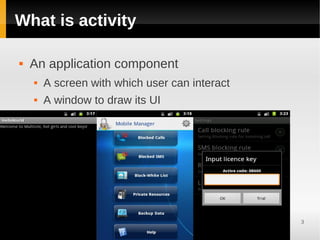
What is activity

   An application component
       A screen with which user can interact
       A window to draw its UI


                                                3
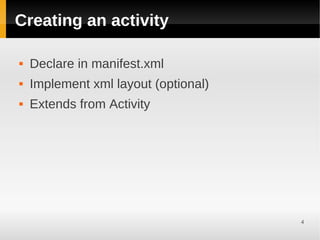
Creating an activity

   Declare in manifest.xml
   Implement xml layout (optional)
   Extends from Activity


                                      4
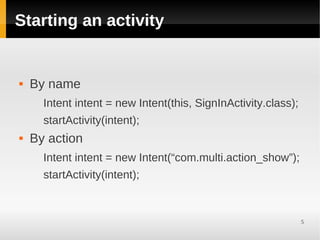
Starting an activity


   By name
      Intent intent = new Intent(this, SignInActivity.class);
      startActivity(intent);
   By action
      Intent intent = new Intent(“com.multi.action_show”);
      startActivity(intent);


                                                                5
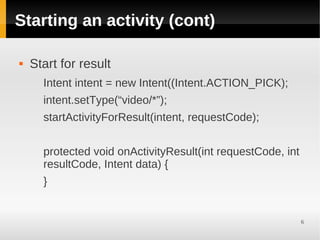
Starting an activity (cont)

   Start for result
      Intent intent = new Intent((Intent.ACTION_PICK);
      intent.setType(“video/*”);
      startActivityForResult(intent, requestCode);


      protected void onActivityResult(int requestCode, int
      resultCode, Intent data) {
      }


                                                             6
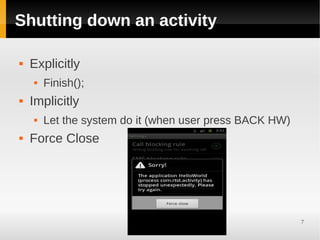
Shutting down an activity

   Explicitly
       Finish();
   Implicitly
       Let the system do it (when user press BACK HW)
   Force Close


                                                         7
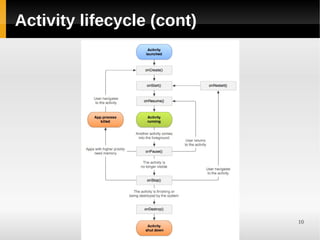
Activity lifecycle

   onCreate(Bundle savedInstanceState)
       initialize the essential components
       setContentView();
   onResume()
       just before the activity starts interacting with the
        user (foreground)
   OnPause()
       Another activity is in the foreground + focus, but this
        one is still visible => completely alive
       partially transparent or doesn't cover the entire      8
        screen
Activity lifecycle (cont)

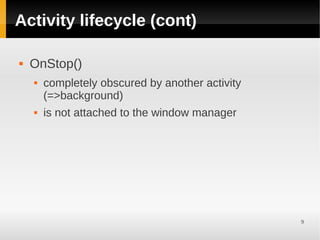
   OnStop()
       completely obscured by another activity
        (=>background)
       is not attached to the window manager


                                                  9
Activity lifecycle (cont)


                            10
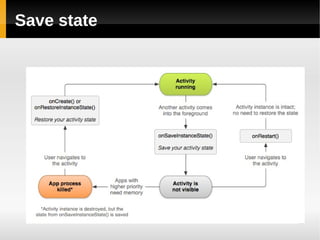
Save state


             11
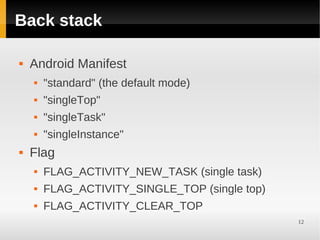
Back stack

   Android Manifest
       "standard" (the default mode)
       "singleTop"
       "singleTask"
       "singleInstance"
   Flag
       FLAG_ACTIVITY_NEW_TASK (single task)
       FLAG_ACTIVITY_SINGLE_TOP (single top)
       FLAG_ACTIVITY_CLEAR_TOP
                                                12
Configuration change

   Screen orientation, change language...
       Call onDestroy and onCreate()
       Avoid ?
        <activity android:name=".CustomGalleryActivity"
           android:configChanges="keyboardHidden|
        orientation"/>


                                                          13
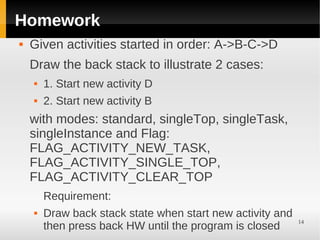
Homework
   Given activities started in order: A->B-C->D
    Draw the back stack to illustrate 2 cases:
       1. Start new activity D
       2. Start new activity B
    with modes: standard, singleTop, singleTask,
    singleInstance and Flag:
    FLAG_ACTIVITY_NEW_TASK,
    FLAG_ACTIVITY_SINGLE_TOP,
    FLAG_ACTIVITY_CLEAR_TOP
        Requirement:
       Draw back stack state when start new activity and
                                                            14
        then press back HW until the program is closed
Tips


       15
Reference

   http://developer.android.com/guide/topics/funda
    mentals/activities.html


                                                  16

Android platform activity

  • 1.
    Android platform Activity Cao Minh Vu 1 cmv.ict@gmail.com
  • 2.
    Outline  What is activity  Starting activity  Shutting down activity  Activity lifecycle  Save state  Back stack  Tips 2
  • 3.
    What is activity  An application component  A screen with which user can interact  A window to draw its UI 3
  • 4.
    Creating an activity  Declare in manifest.xml  Implement xml layout (optional)  Extends from Activity 4
  • 5.
    Starting an activity  By name Intent intent = new Intent(this, SignInActivity.class); startActivity(intent);  By action Intent intent = new Intent(“com.multi.action_show”); startActivity(intent); 5
  • 6.
    Starting an activity(cont)  Start for result Intent intent = new Intent((Intent.ACTION_PICK); intent.setType(“video/*”); startActivityForResult(intent, requestCode); protected void onActivityResult(int requestCode, int resultCode, Intent data) { } 6
  • 7.
    Shutting down anactivity  Explicitly  Finish();  Implicitly  Let the system do it (when user press BACK HW)  Force Close 7
  • 8.
    Activity lifecycle  onCreate(Bundle savedInstanceState)  initialize the essential components  setContentView();  onResume()  just before the activity starts interacting with the user (foreground)  OnPause()  Another activity is in the foreground + focus, but this one is still visible => completely alive  partially transparent or doesn't cover the entire 8 screen
  • 9.
    Activity lifecycle (cont)  OnStop()  completely obscured by another activity (=>background)  is not attached to the window manager 9
  • 10.
  • 11.
  • 12.
    Back stack  Android Manifest  "standard" (the default mode)  "singleTop"  "singleTask"  "singleInstance"  Flag  FLAG_ACTIVITY_NEW_TASK (single task)  FLAG_ACTIVITY_SINGLE_TOP (single top)  FLAG_ACTIVITY_CLEAR_TOP 12
  • 13.
    Configuration change  Screen orientation, change language...  Call onDestroy and onCreate()  Avoid ? <activity android:name=".CustomGalleryActivity" android:configChanges="keyboardHidden| orientation"/> 13
  • 14.
    Homework  Given activities started in order: A->B-C->D Draw the back stack to illustrate 2 cases:  1. Start new activity D  2. Start new activity B with modes: standard, singleTop, singleTask, singleInstance and Flag: FLAG_ACTIVITY_NEW_TASK, FLAG_ACTIVITY_SINGLE_TOP, FLAG_ACTIVITY_CLEAR_TOP Requirement:  Draw back stack state when start new activity and 14 then press back HW until the program is closed
  • 15.
  • 16.
    Reference  http://developer.android.com/guide/topics/funda mentals/activities.html 16