Network
Optimization
Agenda
Optimize network requests for:
Slow connections and offline state.
Reducing battery consumption by the app.
Battery drainage
Cell Radio Hardware is the biggest culprit of battery drain.
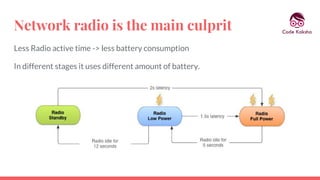
Network radio is the main culprit
Less Radio active time -> less battery consumption
In different stages it uses different amount of battery.
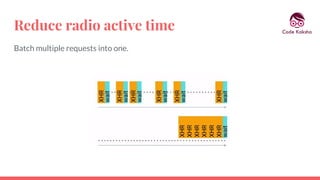
Reduce radio active time
Batch multiple requests into one.
Reduce radio active time
Prefetch data.
Reduce radio active time
Use “push” instead of “poll”.
For slow connections
Serve WebP files over network instead of PNG or JPEG.
For slow connections
Get only the required size of images from network.
For slow connections
Use Glide or Picasso for images.
● Fetch images
● Use caching to store fetched images
● Show placeholders until the image is fetched
● Avoid de-duplication of requests
For slow connections
Detect network quality and take decisions:
● ConnectivityManager. isActiveNetworkMetered()
● ConnectivityManager. getActiveNetworkInfo()
● ConnectivityManager.getNetworkCapabilities(Network)
Make app usable offline
Download data for offline use
Use cache or database for storing data
Batch network requests to be fired up later
Bandwidth
Prioritize bandwidth
Detect network changes
Take care of offline situations
Prepare app for worst network condition
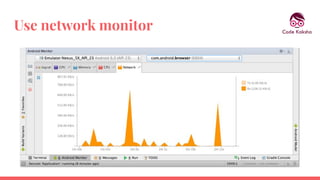
Use network monitor
References
“Building for Billions”
“Android Performance Patterns”
Colt Mcanlis
Thank you!
Paramvir Singh
Email: paramvir.singh88@gmail.com
Twitter: @param_vir88

Android: Network optimization by Paramvir Singh