INDUSTRIAL TRAINING
ON
ANDROID APPDEVELOPMENT
Presented by: Submitted to:
Name: Mahesh kumar Dr .Rajkumar
Class: B .Tech 3rd
Sem IndustrialTraining
Roll no. : 23EGECS027 Coordinator
Branch: Computer Science
and Engineering
What is android
Androidis the name of the mobile operating
system owned by American company, Google. It
most commonly comes installed on a variety of
smart phones and tablets from a host of
manufacturers offering users access to Google’s
own services like Search,YouTube, Maps, Gmail
and more.
5.
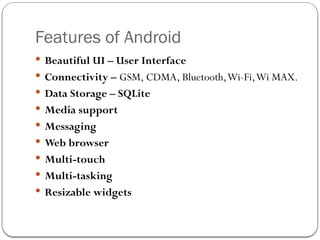
Features of Android
Beautiful UI – User Interface
Connectivity – GSM, CDMA, Bluetooth,Wi-Fi,Wi MAX.
Data Storage – SQLite
Media support
Messaging
Web browser
Multi-touch
Multi-tasking
Resizable widgets
API Levels
API Levelis an integer value that uniquely identifies the
framework
API revision offered by a version of the Android platform.
8.
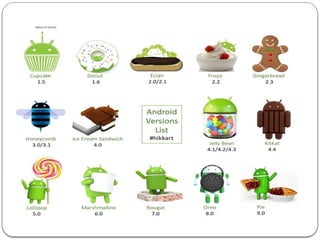
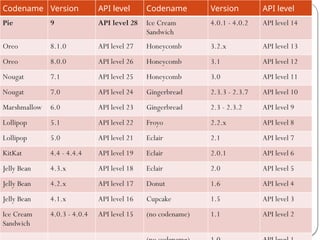
Codename Version APIlevel Codename Version API level
Pie 9 API level 28 Ice Cream
Sandwich
4.0.1 - 4.0.2 API level 14
Oreo 8.1.0 API level 27 Honeycomb 3.2.x API level 13
Oreo 8.0.0 API level 26 Honeycomb 3.1 API level 12
Nougat 7.1 API level 25 Honeycomb 3.0 API level 11
Nougat 7.0 API level 24 Gingerbread 2.3.3 - 2.3.7 API level 10
Marshmallow 6.0 API level 23 Gingerbread 2.3 - 2.3.2 API level 9
Lollipop 5.1 API level 22 Froyo 2.2.x API level 8
Lollipop 5.0 API level 21 Eclair 2.1 API level 7
KitKat 4.4 - 4.4.4 API level 19 Eclair 2.0.1 API level 6
Jelly Bean 4.3.x API level 18 Eclair 2.0 API level 5
Jelly Bean 4.2.x API level 17 Donut 1.6 API level 4
Jelly Bean 4.1.x API level 16 Cupcake 1.5 API level 3
Ice Cream
Sandwich
4.0.3 - 4.0.4 API level 15 (no codename) 1.1 API level 2
OS
• Androidapplication development on either of the following operating
systems:
MicrosoftWindows.
Mac OS X 10.5.8 or later version with Intel chip.
Linux including GNU C Library 2.7 or later.
Tools
• All the required tools to developAndroid applications are freely available
and can be downloaded from theWeb. Following is the list of software's
you will need before you start yourAndroid application programming.
1. Java JDK5 or later version
2. Android Studio /Android SDK and Eclipse IDE for Java Developers
(optional) andAndroid DevelopmentTools (ADT) Eclipse Plug-in
(optional)
Requirements for Android
11.
Download AndroidStudio
• From http://developer.android.com/sdk/installing/index.html
System Requirements forWindows
• Microsoft®Windows® 8/7/Vista (32 or 64-bit)
• 2 GB RAM minimum, 4 GB RAM recommended
• 400 MB hard disk space
• At least 1 GB for Android SDK, emulator system images, and caches
• 1280 x 800 minimum screen resolution
• Java Development Kit (JDK) 7
• Optional for accelerated emulator: Intel® processor with support for
Intel®VT-x, Intel® EM64T (Intel® 64), and Execute Disable (XD) Bit
functionality
Requirements for Android
• The AndroidSDK includes a mobile device emulator — a virtual
mobile device that runs on your computer. The emulator lets you
develop and testAndroid applications without using a physical device.
Limitations
• No support for placing or receiving actual phone calls.You can simulate
phone calls (placed and received) through the emulator console,
however.
• No support for USB connections
• No support for device-attached headphones
• No support for determining network connected state
• No support for determining SD card insert/eject
• No support for Bluetooth
Android Emulator
18.
Core Libraries
SystemC library, the standard C system library, tuned for embedded
Linux-based devices
Media Libraries, support playback and recording of many popular audio
and video formats, as well as image files, including MPEG4, H.264, MP3,
AAC,AMR, JPG, and PNG
Surface Manager, manages access to the display subsystem and seamlessly
composites 2D and 3D graphic layers from multiple applications
WebKit, a modern web browser engine which powers both the Android
browser and an embeddable web view
SGL, the underlying 2D graphics engine
3D libraries, an implementation based on OpenGL ES 1.0 APIs
FreeType , bitmap and vector font rendering
SQLite , a powerful and lightweight relational database engine
19.
Andoid Runtime
Thecore of Android platform
DalvikVirtual Machine
Register-based
Executes files in the Dalvik Executable (.dex) format
Java core Libraries
Provides most of the functionality of the Java programming
language.
20.
Dalvik Virtual Machine
Android custom implementation virtual machine
Provides application portability and runtime consistency
Runs optimized file format (.dex) and Dalvik bytecode
Java .class / .jar files converted to .dex at build time
Designed for embedded environment
Supports multiple virtual machine processes per device
Highly CPU-optimized bytecode interpreter
Efficiently Using runtime memory
Core Libraries
Core APIs for Java language provide a powerful, yet simple and
familiar development platform
21.
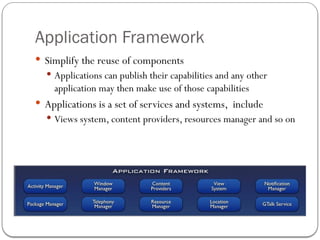
Application Framework
Simplifythe reuse of components
Applications can publish their capabilities and any other
application may then make use of those capabilities
Applications is a set of services and systems, include
Views system, content providers, resources manager and so on
22.
Activity Manager,manages the lifecycle of applications
and provides a common navigation backstack
Notification Manager, enables all applications to display
custom alerts in the status bar
Resource Manager, providing access to non-code
resources such as localized strings, graphics, and layout files
Content Providers, access data from other applications
(such as Contacts), or to share their own data
Views, used to build an application, including lists, grids,
text boxes, buttons, and even an embeddable web browser
Android Layout
An Androidlayout is a class that handles arranging the way its children appear
on the screen. Anything that is a View (or inherits from View) can be a
child of a layout
Anything that is aView (or inherits fromView) can be a child of a layout.
Android supports the following View Groups:
Linear Layout
Absolute Layout
Table Layout
Relative Layout
Frame Layout
ScrollView
25.
Liner Layout
Linerlayout : all children aligned in single direction
horizontally or vertically
The Linear Layout arranges views in a single column or
single row. Child views can either be arranged vertically
or horizontally.
26.
Relative Layout
TheRelative Layout is very flexible layout
used in android for custom layout designing.
It gives us the flexibility to position our
component/view based on the relative or
sibling component’s position. Just because it
allows us to position the component
anywhere we want so it is considered as
most flexible layout.
27.
Future Scope
lot’sof large companies like, Flipkart,Amazon, Snapdeal, Paytm and others are doing businesses
with millions of transactions and they always need a large team to manage and adding additional
features in their apps.
Digital India work in Smart phones application.
Android apps development growth is, initially telecommunication companies likeAirtel,
Vodafone and Idea and others was depend on third part sites like Paytm, Free Recharge and
MobikWik after increase the demand of mobile recharge through these apps every company
release their own Android Apps.
So build your future with Android App development is good choice, because it’s growing
industry and in nearby area it will capture all the industry .
After good skills of Android app development you may also release your own app which attract
lots of users and make your businesses idea into action through android app development.