Develop on Android
Android Lab Test
www.AndroidLabTest.com
Youku
By Bruno Delb
www.weibo.com/brunodelb
i.youku.com/brunodelb | www.weibo.com/brunodelb | blog.delb.cn
http://i.youku.com/brunoparis
Weibo
Officialsite
Lesson : Installation of an application
Installation of an application
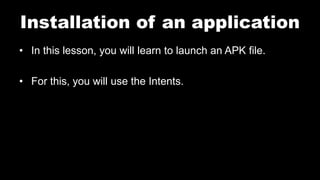
• In this lesson, you will learn to launch an APK file.
• For this, you will use the Intents.
Installation of an application
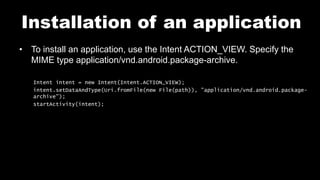
• To install an application, use the Intent ACTION_VIEW. Specify the
MIME type application/vnd.android.package-archive.
Intent intent = new Intent(Intent.ACTION_VIEW);
intent.setDataAndType(Uri.fromFile(new File(path)), "application/vnd.android.package-
archive");
startActivity(intent);
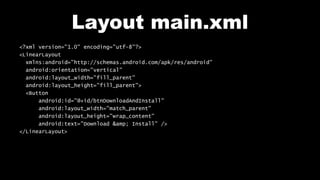
Layout main.xml
<?xml version="1.0" encoding="utf-8"?>
<LinearLayout
xmlns:android="http://schemas.android.com/apk/res/android"
android:orientation="vertical"
android:layout_width="fill_parent"
android:layout_height="fill_parent">
<Button
android:id="@+id/btnDownloadAndInstall"
android:layout_width="match_parent"
android:layout_height="wrap_content"
android:text="Download &amp; Install" />
</LinearLayout>
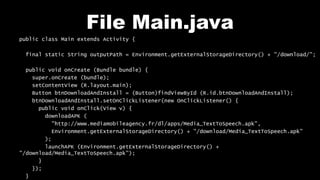
File Main.java
public class Main extends Activity {
final static String outputPath = Environment.getExternalStorageDirectory() + "/download/";
public void onCreate (Bundle bundle) {
super.onCreate (bundle);
setContentView (R.layout.main);
Button btnDownloadAndInstall = (Button)findViewById (R.id.btnDownloadAndInstall);
btnDownloadAndInstall.setOnClickListener(new OnClickListener() {
public void onClick(View v) {
downloadAPK (
"http://www.mediamobileagency.fr/dl/apps/Media_TextToSpeech.apk",
Environment.getExternalStorageDirectory() + "/download/Media_TextToSpeech.apk"
);
launchAPK (Environment.getExternalStorageDirectory() +
"/download/Media_TextToSpeech.apk");
}
});
}
File Main.java
private void downloadAPK (String theUrl, String path) {
try {
URL url = new URL(theUrl);
HttpURLConnection httpURLConnection = (HttpURLConnection) url.openConnection();
httpURLConnection.setRequestMethod("GET");
httpURLConnection.setDoOutput(true);
httpURLConnection.connect();
File file = new File(path);
file.mkdirs();
File outputFile = new File(path);
FileOutputStream fileOutputStream = new FileOutputStream(outputFile);
InputStream inputStream = httpURLConnection.getInputStream();
byte[] buffer = new byte[1024];
int len1 = 0;
while ((len1 = inputStream.read(buffer)) != -1) {
fileOutputStream.write(buffer, 0, len1);
}
fileOutputStream.close();
inputStream.close();
} catch (IOException e) {
}
}
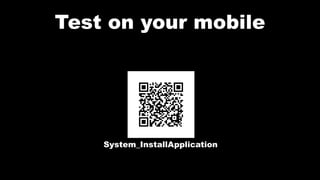
Test on your mobile
System_InstallApplication
Follow me on my channel PengYooTV …
On my Youku channel
http://i.youku.com/brunoparis
Who am I ?
Bruno Delb (www.delb.cn),
Author of the first french book of development of Java mobile application (2002),
Consultant, project manager and developer of social & mobile applications,
let’s talk about your needs ...
And on Weibo :
http://www.weibo.com/brunodelb

Android Lab Test : Installation of application in Java (english)

  • 1.
    Develop on Android AndroidLab Test www.AndroidLabTest.com Youku By Bruno Delb www.weibo.com/brunodelb i.youku.com/brunodelb | www.weibo.com/brunodelb | blog.delb.cn http://i.youku.com/brunoparis Weibo Officialsite Lesson : Installation of an application
  • 2.
    Installation of anapplication • In this lesson, you will learn to launch an APK file. • For this, you will use the Intents.
  • 3.
    Installation of anapplication • To install an application, use the Intent ACTION_VIEW. Specify the MIME type application/vnd.android.package-archive. Intent intent = new Intent(Intent.ACTION_VIEW); intent.setDataAndType(Uri.fromFile(new File(path)), "application/vnd.android.package- archive"); startActivity(intent);
  • 4.
    Layout main.xml <?xml version="1.0"encoding="utf-8"?> <LinearLayout xmlns:android="http://schemas.android.com/apk/res/android" android:orientation="vertical" android:layout_width="fill_parent" android:layout_height="fill_parent"> <Button android:id="@+id/btnDownloadAndInstall" android:layout_width="match_parent" android:layout_height="wrap_content" android:text="Download &amp; Install" /> </LinearLayout>
  • 5.
    File Main.java public classMain extends Activity { final static String outputPath = Environment.getExternalStorageDirectory() + "/download/"; public void onCreate (Bundle bundle) { super.onCreate (bundle); setContentView (R.layout.main); Button btnDownloadAndInstall = (Button)findViewById (R.id.btnDownloadAndInstall); btnDownloadAndInstall.setOnClickListener(new OnClickListener() { public void onClick(View v) { downloadAPK ( "http://www.mediamobileagency.fr/dl/apps/Media_TextToSpeech.apk", Environment.getExternalStorageDirectory() + "/download/Media_TextToSpeech.apk" ); launchAPK (Environment.getExternalStorageDirectory() + "/download/Media_TextToSpeech.apk"); } }); }
  • 6.
    File Main.java private voiddownloadAPK (String theUrl, String path) { try { URL url = new URL(theUrl); HttpURLConnection httpURLConnection = (HttpURLConnection) url.openConnection(); httpURLConnection.setRequestMethod("GET"); httpURLConnection.setDoOutput(true); httpURLConnection.connect(); File file = new File(path); file.mkdirs(); File outputFile = new File(path); FileOutputStream fileOutputStream = new FileOutputStream(outputFile); InputStream inputStream = httpURLConnection.getInputStream(); byte[] buffer = new byte[1024]; int len1 = 0; while ((len1 = inputStream.read(buffer)) != -1) { fileOutputStream.write(buffer, 0, len1); } fileOutputStream.close(); inputStream.close(); } catch (IOException e) { } }
  • 7.
    Test on yourmobile System_InstallApplication
  • 8.
    Follow me onmy channel PengYooTV … On my Youku channel http://i.youku.com/brunoparis Who am I ? Bruno Delb (www.delb.cn), Author of the first french book of development of Java mobile application (2002), Consultant, project manager and developer of social & mobile applications, let’s talk about your needs ... And on Weibo : http://www.weibo.com/brunodelb