Android App with Radio button group – NITHIYAPRIYA PASAVARAJ
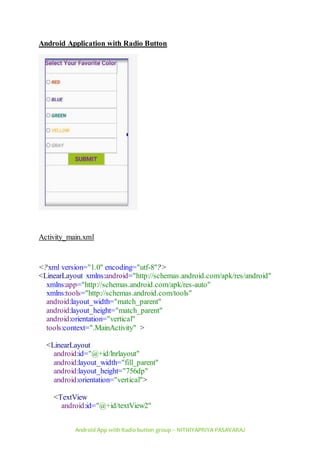
Android Application with Radio Button
Activity_main.xml
<?xml version="1.0" encoding="utf-8"?>
<LinearLayout xmlns:android="http://schemas.android.com/apk/res/android"
xmlns:app="http://schemas.android.com/apk/res-auto"
xmlns:tools="http://schemas.android.com/tools"
android:layout_width="match_parent"
android:layout_height="match_parent"
android:orientation="vertical"
tools:context=".MainActivity" >
<LinearLayout
android:id="@+id/lnrlayout"
android:layout_width="fill_parent"
android:layout_height="756dp"
android:orientation="vertical">
<TextView
android:id="@+id/textView2"
Android App with Radio button group – NITHIYAPRIYA PASAVARAJ
android:layout_width="wrap_content"
android:layout_height="72dp"
android:text="Select Your Favorite Color"
android:textColor="#7B1FA2"
android:textSize="30sp"
android:textStyle="bold"
tools:layout_conversion_absoluteHeight="61dp"
tools:layout_conversion_absoluteWidth="388dp"
tools:layout_editor_absoluteX="0dp"
tools:layout_editor_absoluteY="0dp" />
<RadioGroup
android:layout_width="355dp"
android:layout_height="397dp">
<RadioButton
android:id="@+id/clrred"
android:layout_width="match_parent"
android:layout_height="47dp"
android:layout_weight="1"
android:checked="false"
android:text="Red"
android:textAllCaps="true"
android:textColor="#E64A19"
android:textSize="24sp"
android:textStyle="bold|italic" />
<RadioButton
android:id="@+id/clrblue"
android:layout_width="match_parent"
android:layout_height="43dp"
android:layout_weight="1"
android:checked="false"
android:text="Blue"
android:textAllCaps="true"
android:textColor="#512DA8"
android:textSize="24sp"
android:textStyle="bold|italic" />
<RadioButton
android:id="@+id/clrgreen"
android:layout_width="match_parent"
android:layout_height="wrap_content"
Android App with Radio button group – NITHIYAPRIYA PASAVARAJ
android:layout_weight="1"
android:text="Green"
android:textAllCaps="true"
android:textColor="#00796B"
android:textSize="24sp"
android:textStyle="bold|italic" />
<RadioButton
android:id="@+id/clryellow"
android:layout_width="match_parent"
android:layout_height="wrap_content"
android:layout_weight="1"
android:text="Yellow"
android:textAllCaps="true"
android:textColor="#FBC02D"
android:textSize="24sp"
android:textStyle="bold|italic" />
<RadioButton
android:id="@+id/clrorange"
android:layout_width="match_parent"
android:layout_height="wrap_content"
android:layout_weight="1"
android:text="Gray"
android:textAllCaps="true"
android:textColor="#A3A39F"
android:textSize="24sp"
android:textStyle="bold|italic" />
</RadioGroup>
<Button
android:id="@+id/btnsubmit"
android:layout_width="180dp"
android:layout_height="60dp"
android:layout_gravity="center"
android:background="#9DC218"
android:text="Submit"
android:textAllCaps="true"
android:textColor="#7B1FA2"
android:textSize="30sp"
android:textStyle="bold" />
Android App with Radio button group – NITHIYAPRIYA PASAVARAJ
<TextView
android:id="@+id/txtview"
android:layout_width="match_parent"
android:layout_height="132dp"
android:textSize="30sp"
android:textStyle="bold" />
</LinearLayout>
</LinearLayout>
Mainactivity.java
package com.example.radiobtngrp;
import androidx.appcompat.app.AppCompatActivity;
import android.graphics.Color;
import android.os.Bundle;
import android.view.View;
import android.widget.Button;
import android.widget.LinearLayout;
import android.widget.RadioButton;
import android.widget.TextView;
public class MainActivity extends AppCompatActivity {
RadioButton red,blue,green,yellow,orange;
Button btnsubmit;
TextView txtview;
LinearLayout lnrlayout;
@Override
protected void onCreate(Bundle savedInstanceState) {
super.onCreate(savedInstanceState);
setContentView(R.layout.activity_main);
red=(RadioButton )findViewById(R.id.clrred);
blue = (RadioButton)findViewById(R.id.clrblue);
green = (RadioButton)findViewById(R.id.clrgreen);
orange = (RadioButton)findViewById(R.id.clrorange);
yellow = (RadioButton)findViewById(R.id.clryellow);
btnsubmit = (Button)findViewById(R.id.btnsubmit);
txtview = (TextView)findViewById(R.id.txtview) ;
lnrlayout = (LinearLayout) findViewById(R.id.lnrlayout);
btnsubmit.setOnClickListener(new View.OnClickListener() {
@Override
Android App with Radio button group – NITHIYAPRIYA PASAVARAJ
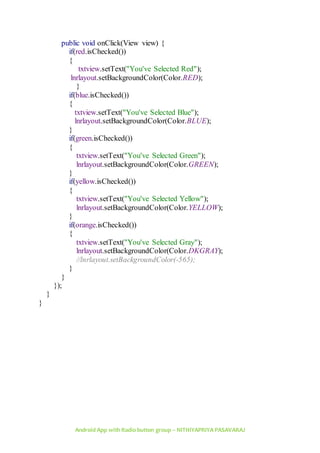
public void onClick(View view) {
if(red.isChecked())
{
txtview.setText("You've Selected Red");
lnrlayout.setBackgroundColor(Color.RED);
}
if(blue.isChecked())
{
txtview.setText("You've Selected Blue");
lnrlayout.setBackgroundColor(Color.BLUE);
}
if(green.isChecked())
{
txtview.setText("You've Selected Green");
lnrlayout.setBackgroundColor(Color.GREEN);
}
if(yellow.isChecked())
{
txtview.setText("You've Selected Yellow");
lnrlayout.setBackgroundColor(Color.YELLOW);
}
if(orange.isChecked())
{
txtview.setText("You've Selected Gray");
lnrlayout.setBackgroundColor(Color.DKGRAY);
//lnrlayout.setBackgroundColor(-565);
}
}
});
}
}

Android LAb - Creating an android app with Radio button

  • 1.
    Android App withRadio button group – NITHIYAPRIYA PASAVARAJ Android Application with Radio Button Activity_main.xml <?xml version="1.0" encoding="utf-8"?> <LinearLayout xmlns:android="http://schemas.android.com/apk/res/android" xmlns:app="http://schemas.android.com/apk/res-auto" xmlns:tools="http://schemas.android.com/tools" android:layout_width="match_parent" android:layout_height="match_parent" android:orientation="vertical" tools:context=".MainActivity" > <LinearLayout android:id="@+id/lnrlayout" android:layout_width="fill_parent" android:layout_height="756dp" android:orientation="vertical"> <TextView android:id="@+id/textView2"
  • 2.
    Android App withRadio button group – NITHIYAPRIYA PASAVARAJ android:layout_width="wrap_content" android:layout_height="72dp" android:text="Select Your Favorite Color" android:textColor="#7B1FA2" android:textSize="30sp" android:textStyle="bold" tools:layout_conversion_absoluteHeight="61dp" tools:layout_conversion_absoluteWidth="388dp" tools:layout_editor_absoluteX="0dp" tools:layout_editor_absoluteY="0dp" /> <RadioGroup android:layout_width="355dp" android:layout_height="397dp"> <RadioButton android:id="@+id/clrred" android:layout_width="match_parent" android:layout_height="47dp" android:layout_weight="1" android:checked="false" android:text="Red" android:textAllCaps="true" android:textColor="#E64A19" android:textSize="24sp" android:textStyle="bold|italic" /> <RadioButton android:id="@+id/clrblue" android:layout_width="match_parent" android:layout_height="43dp" android:layout_weight="1" android:checked="false" android:text="Blue" android:textAllCaps="true" android:textColor="#512DA8" android:textSize="24sp" android:textStyle="bold|italic" /> <RadioButton android:id="@+id/clrgreen" android:layout_width="match_parent" android:layout_height="wrap_content"
  • 3.
    Android App withRadio button group – NITHIYAPRIYA PASAVARAJ android:layout_weight="1" android:text="Green" android:textAllCaps="true" android:textColor="#00796B" android:textSize="24sp" android:textStyle="bold|italic" /> <RadioButton android:id="@+id/clryellow" android:layout_width="match_parent" android:layout_height="wrap_content" android:layout_weight="1" android:text="Yellow" android:textAllCaps="true" android:textColor="#FBC02D" android:textSize="24sp" android:textStyle="bold|italic" /> <RadioButton android:id="@+id/clrorange" android:layout_width="match_parent" android:layout_height="wrap_content" android:layout_weight="1" android:text="Gray" android:textAllCaps="true" android:textColor="#A3A39F" android:textSize="24sp" android:textStyle="bold|italic" /> </RadioGroup> <Button android:id="@+id/btnsubmit" android:layout_width="180dp" android:layout_height="60dp" android:layout_gravity="center" android:background="#9DC218" android:text="Submit" android:textAllCaps="true" android:textColor="#7B1FA2" android:textSize="30sp" android:textStyle="bold" />
  • 4.
    Android App withRadio button group – NITHIYAPRIYA PASAVARAJ <TextView android:id="@+id/txtview" android:layout_width="match_parent" android:layout_height="132dp" android:textSize="30sp" android:textStyle="bold" /> </LinearLayout> </LinearLayout> Mainactivity.java package com.example.radiobtngrp; import androidx.appcompat.app.AppCompatActivity; import android.graphics.Color; import android.os.Bundle; import android.view.View; import android.widget.Button; import android.widget.LinearLayout; import android.widget.RadioButton; import android.widget.TextView; public class MainActivity extends AppCompatActivity { RadioButton red,blue,green,yellow,orange; Button btnsubmit; TextView txtview; LinearLayout lnrlayout; @Override protected void onCreate(Bundle savedInstanceState) { super.onCreate(savedInstanceState); setContentView(R.layout.activity_main); red=(RadioButton )findViewById(R.id.clrred); blue = (RadioButton)findViewById(R.id.clrblue); green = (RadioButton)findViewById(R.id.clrgreen); orange = (RadioButton)findViewById(R.id.clrorange); yellow = (RadioButton)findViewById(R.id.clryellow); btnsubmit = (Button)findViewById(R.id.btnsubmit); txtview = (TextView)findViewById(R.id.txtview) ; lnrlayout = (LinearLayout) findViewById(R.id.lnrlayout); btnsubmit.setOnClickListener(new View.OnClickListener() { @Override
  • 5.
    Android App withRadio button group – NITHIYAPRIYA PASAVARAJ public void onClick(View view) { if(red.isChecked()) { txtview.setText("You've Selected Red"); lnrlayout.setBackgroundColor(Color.RED); } if(blue.isChecked()) { txtview.setText("You've Selected Blue"); lnrlayout.setBackgroundColor(Color.BLUE); } if(green.isChecked()) { txtview.setText("You've Selected Green"); lnrlayout.setBackgroundColor(Color.GREEN); } if(yellow.isChecked()) { txtview.setText("You've Selected Yellow"); lnrlayout.setBackgroundColor(Color.YELLOW); } if(orange.isChecked()) { txtview.setText("You've Selected Gray"); lnrlayout.setBackgroundColor(Color.DKGRAY); //lnrlayout.setBackgroundColor(-565); } } }); } }