














 Introduction to Xamarin
 Xamarin history
 How is Xamarin Working?
 Installing Xamarin
 What is Xamarin. Forms?
 More information related to Xamarin
Introduction to Xamarin
Xamarin is a San Francisco, California based software company
created in May 2011 by the engineers that created Mono,
MonoTouch and Mono for Android .
With a C# shared codebase, developers can use Xamarin to write
native iOS, Android, and Windows apps with native user interface
and share code across multiple platforms.
Xamarin has over 505,000 developers in more than 120 countries
around the world as of February 2014.
Nat Friedman is the CEO and Co-founder.
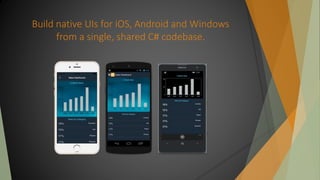
Build native UIs for iOS, Android and Windows
from a single, shared C# codebase.
Xamarin History
Xamarin History
 The Mono open source project was launched on July 19, 2001. Ximian
was bought by Novell on August 4, 2003, which was then acquired
by Attachmate in April 2011.
 In December 2012, Xamarin released Xamarin.Mac.
 Xamarin 2.0 was released in February 2013 . Xamarin.iOS and
Xamarin.Android make it possible to do native iOS, Android and
Windows development in C#, with either Xamarin Studio or Visual
Studio.
 Introduced in Xamarin 3 on May 28, 2014 and allows one to use
portable controls subsets that are mapped to native controls of
Android, iOS and Windows Phone.
Xamarin History
 In 2014 Xamarin introduced Xamarin. Forms
 A common UI for mobile platforms
 A way of reusing ~90% of the code for all mobile platforms
 Contains a Xamarin XAML that is much like the MS XAML
Supports data-binding, dependency and attached
properties
 It all compiles to native code
How does Xamarin works?
 The apps created with Xamarin are compiled into native-code
 For iOS and OS X, Xamarin translates all the .NET code into
Objective-C and C code
This must happen on a MAC machine
 For Android it creates a set of bridges that are installed on the
Android device
Something like a CLR inside an Android device
 For Windows Phone, it just compiles to a Windows Phone app
Xamarin Installation
 Installing Xamarin for all OSes is pretty easy:
 Just download Xamarin Platform Latest:
http://xamarin.com/platform
 This will set up almost everything needed to create apps
Downloads the necessary JRE, JDK and ADK for Android
Installs Xamarin Studio and Plugins for Visual Studio, if
missing
Xamarin Installation
 For Windows Phone and iOS there are some additional things to
do:
 Install Windows Phone SDK on Windows
Windows Phone apps can be created only with Visual
Studio
 Install Xcode on OS X
iOS apps can be created only on MAC machine
 For easier work with Android, install Xamarin Android Player
 Works with VirtualBox
Xamarin. Forms
Xamarin. Forms
 Xamarin. Forms is the common UI of Xamarin
 Share ~90% of the code base for each platform
Only the rest 10% are concrete for the platform
 How to create and run a Xamarin. Forms app?
 Create a new project, located at:
C# -> Mobile Apps -> Blank App
 Write code, select the wanted project as "Startup project"
 Run in the simulator
How does Xamarin.Forms fit in?
For software developers, the optimum strategy is to target more
than just one of these platforms. But that’s not easy. There are
three big obstacles:
 Problem 1: Different development environments
 For iOS development, XCode on the Mac.
 For Android development, Eclipse on a variety of platforms.
 For Windows Phone development, Visual Studio on the PC.
 Problem 2: Different programming interfaces:-For example, all
three platforms have something that lets the user toggle between two states:
 On the iPhone, it’s a “view” called UISwitch.
 On Android devices, it’s a “widget” called Switch.
 On Windows Phone, one possibility is a “control” called
ToggleSwitchButton from the Windows Phone Toolkit NuGet package.
 Problem 3: Different programming languages:-Developers have
some flexibility in choosing a programming language for each of these three
platforms
 Objective-C for the iPhone
 Java for Android devices
 C# for Windows Phone
Xamarin. Forms Pages
Xamarin. Forms Pages represent cross-platform mobile app screens.
Types of Page:-
 ContentPage
 MasterDetailPage
 NavigationPage
 TabbedPage
 CarouselPage
ContentPage
 A Content Page displays a single View, often a container such as
a StackLayout or a ScrollView
MasterDetailPage
The Master Detail Page displays two pages-one master and one
detail.
It is usually used to display menus or list of items.
NavigationPage
 A Page that manages the navigation and user-experience of a
stack of other pages.
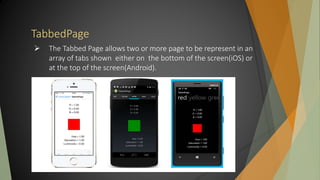
TabbedPage
 The Tabbed Page allows two or more page to be represent in an
array of tabs shown either on the bottom of the screen(iOS) or
at the top of the screen(Android).
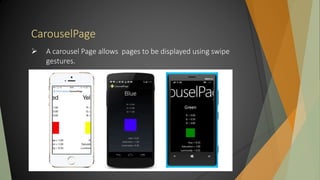
CarouselPage
 A carousel Page allows pages to be displayed using swipe
gestures.
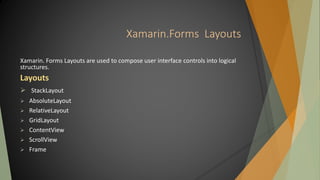
Xamarin.Forms Layouts
Xamarin. Forms Layouts are used to compose user interface controls into logical
structures.
Layouts
 StackLayout
 AbsoluteLayout
 RelativeLayout
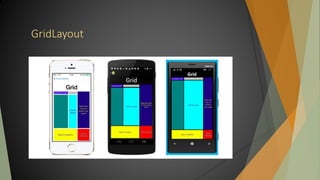
 GridLayout
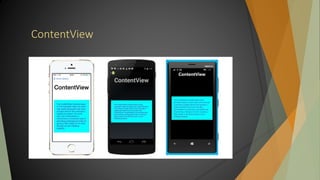
 ContentView
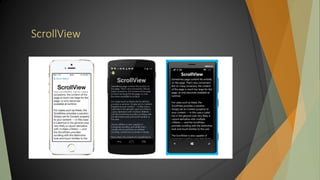
 ScrollView
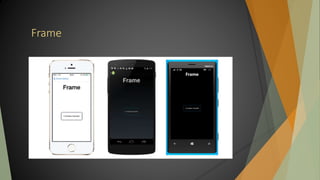
 Frame
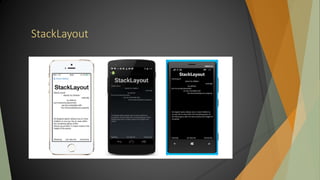
StackLayout
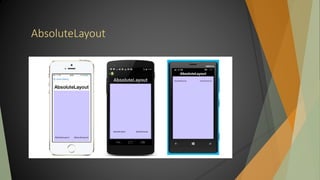
AbsoluteLayout
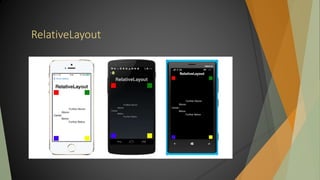
RelativeLayout
GridLayout
ContentView
ScrollView
Frame
More information related to Xamarin
Xamarin.Forms
Questions?
An introduction to Xamarin

An introduction to Xamarin

  • 2.
     Introduction toXamarin  Xamarin history  How is Xamarin Working?  Installing Xamarin  What is Xamarin. Forms?  More information related to Xamarin
  • 3.
  • 4.
    Introduction to Xamarin Xamarinis a San Francisco, California based software company created in May 2011 by the engineers that created Mono, MonoTouch and Mono for Android . With a C# shared codebase, developers can use Xamarin to write native iOS, Android, and Windows apps with native user interface and share code across multiple platforms. Xamarin has over 505,000 developers in more than 120 countries around the world as of February 2014. Nat Friedman is the CEO and Co-founder.
  • 5.
    Build native UIsfor iOS, Android and Windows from a single, shared C# codebase.
  • 6.
  • 7.
    Xamarin History  TheMono open source project was launched on July 19, 2001. Ximian was bought by Novell on August 4, 2003, which was then acquired by Attachmate in April 2011.  In December 2012, Xamarin released Xamarin.Mac.  Xamarin 2.0 was released in February 2013 . Xamarin.iOS and Xamarin.Android make it possible to do native iOS, Android and Windows development in C#, with either Xamarin Studio or Visual Studio.  Introduced in Xamarin 3 on May 28, 2014 and allows one to use portable controls subsets that are mapped to native controls of Android, iOS and Windows Phone.
  • 8.
    Xamarin History  In2014 Xamarin introduced Xamarin. Forms  A common UI for mobile platforms  A way of reusing ~90% of the code for all mobile platforms  Contains a Xamarin XAML that is much like the MS XAML Supports data-binding, dependency and attached properties  It all compiles to native code
  • 9.
  • 10.
    How does Xamarinworks?  The apps created with Xamarin are compiled into native-code  For iOS and OS X, Xamarin translates all the .NET code into Objective-C and C code This must happen on a MAC machine  For Android it creates a set of bridges that are installed on the Android device Something like a CLR inside an Android device  For Windows Phone, it just compiles to a Windows Phone app
  • 11.
  • 12.
    Xamarin Installation  InstallingXamarin for all OSes is pretty easy:  Just download Xamarin Platform Latest: http://xamarin.com/platform  This will set up almost everything needed to create apps Downloads the necessary JRE, JDK and ADK for Android Installs Xamarin Studio and Plugins for Visual Studio, if missing
  • 13.
    Xamarin Installation  ForWindows Phone and iOS there are some additional things to do:  Install Windows Phone SDK on Windows Windows Phone apps can be created only with Visual Studio  Install Xcode on OS X iOS apps can be created only on MAC machine  For easier work with Android, install Xamarin Android Player  Works with VirtualBox
  • 14.
  • 15.
    Xamarin. Forms  Xamarin.Forms is the common UI of Xamarin  Share ~90% of the code base for each platform Only the rest 10% are concrete for the platform  How to create and run a Xamarin. Forms app?  Create a new project, located at: C# -> Mobile Apps -> Blank App  Write code, select the wanted project as "Startup project"  Run in the simulator
  • 16.
    How does Xamarin.Formsfit in? For software developers, the optimum strategy is to target more than just one of these platforms. But that’s not easy. There are three big obstacles:  Problem 1: Different development environments  For iOS development, XCode on the Mac.  For Android development, Eclipse on a variety of platforms.  For Windows Phone development, Visual Studio on the PC.
  • 17.
     Problem 2:Different programming interfaces:-For example, all three platforms have something that lets the user toggle between two states:  On the iPhone, it’s a “view” called UISwitch.  On Android devices, it’s a “widget” called Switch.  On Windows Phone, one possibility is a “control” called ToggleSwitchButton from the Windows Phone Toolkit NuGet package.  Problem 3: Different programming languages:-Developers have some flexibility in choosing a programming language for each of these three platforms  Objective-C for the iPhone  Java for Android devices  C# for Windows Phone
  • 18.
    Xamarin. Forms Pages Xamarin.Forms Pages represent cross-platform mobile app screens. Types of Page:-  ContentPage  MasterDetailPage  NavigationPage  TabbedPage  CarouselPage
  • 19.
    ContentPage  A ContentPage displays a single View, often a container such as a StackLayout or a ScrollView
  • 20.
    MasterDetailPage The Master DetailPage displays two pages-one master and one detail. It is usually used to display menus or list of items.
  • 21.
    NavigationPage  A Pagethat manages the navigation and user-experience of a stack of other pages.
  • 22.
    TabbedPage  The TabbedPage allows two or more page to be represent in an array of tabs shown either on the bottom of the screen(iOS) or at the top of the screen(Android).
  • 23.
    CarouselPage  A carouselPage allows pages to be displayed using swipe gestures.
  • 24.
    Xamarin.Forms Layouts Xamarin. FormsLayouts are used to compose user interface controls into logical structures. Layouts  StackLayout  AbsoluteLayout  RelativeLayout  GridLayout  ContentView  ScrollView  Frame
  • 25.
  • 26.
  • 27.
  • 28.
  • 29.
  • 30.
  • 31.
  • 32.
  • 33.
  • 34.