

GRPC	in	Android
Huỳnh	Quang	Thảo	
Silicon	Straits	Saigon	
Google	Developer	Expert	on	Android
SOAP
SOAP
- Simple	Object	Access	Protocol.
SOAP
- Simple	Object	Access	Protocol.	
- Use	XML	Data	format.
SOAP
- Simple	Object	Access	Protocol.	
- Use	XML	Data	format.		
- Human	readable	and	editable.
XML	DTD
- XML	Document	Type	DeKinition
XML	DTD
- XML	Document	Type	DeKinition
XML	DTD
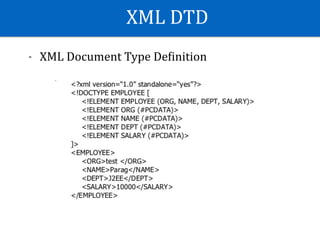
- XML	Document	Type	DeKinition.
XML	DTD
- XML	Document	Type	DeKinition.	
- Useful	for	validation	document.
XML	DTD
- XML	Document	Type	DeKinition.	
- Useful	for	validation	document.	
- Useful	for	service	discovery,	convert	schema	
to	objects	(ie:	Student,	Person	…)
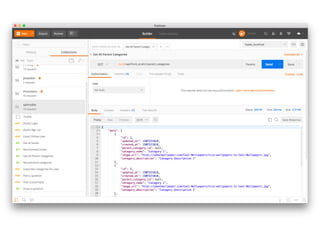
Restful	Service
Restful	Service
- Using	JSON	Format.
Restful	Service
- Using	JSON	Format.	
- Human	readable	and	editable.
Restful	Service
- Using	JSON	Format.	
- Human	readable	and	editable.	
- There	are	many	libraries	supporting	Restful	Service
Restful	Service
- Using	JSON	Format.	
- Human	readable	and	editable.	
- There	are	many	libraries	supporting	Restful	Service	
-	There	are	many	tools	supporting	Restful	Service.
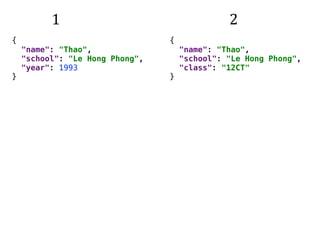
{

"name": "Thao",

"school": "Le Hong Phong",

"year": 1993

}
{

"name": "Thao",

"school": "Le Hong Phong",

"class": "12CT"

}
1 2
{

"name": "Thao",

"school": "Le Hong Phong",

"year": 1993

}
{

"name": "Thao",

"school": "Le Hong Phong",

"class": "12CT"

}
1 2
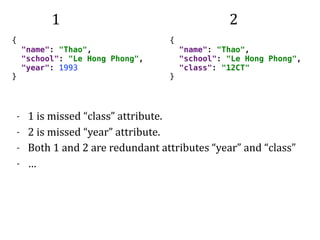
- 1	is	missed	“class”	attribute.	
- 2	is	missed	“year”	attribute.	
- Both	1	and	2	are	redundant	attributes	“year”	and	“class”	
- …
Restful	Service	vs	SOAP
Advantages	
- More	supporting	tools	and	libraries.
Restful	Service	vs	SOAP
Advantages	
- More	supporting	tools	and	libraries.	
- Easy	to	integrated	to	some	languages	(Javascript,		Ruby)
Restful	Service	vs	SOAP
Advantages	
- More	supporting	tools	and	libraries.	
- Easy	to	integrated	to	some	languages	(Javascript,		Ruby)	
Disadvantages	
- Cannot	validate	data.
Restful	Service	vs	SOAP
Advantages	
- More	supporting	tools	and	libraries.	
- Easy	to	integrated	to	some	languages	(Javascript,		Ruby)	
Disadvantages	
- Cannot	validate	data.	
- Cannot	use	for	service	discovery,	transform	schema	to	
methods.
RPC
RPC
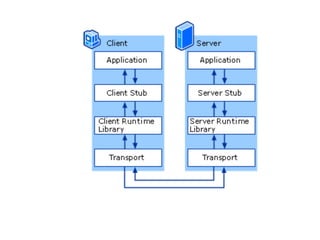
- Remote	Procedure	Call.
RPC
- Remote	Procedure	Call.	
- When	a	computer	program	causes	a	procedure	to	
execute	in	a	different	address	space	(commonly	on	
another	computer	on	a	shared	network),	which	is	
coded	as	if	it	were	a	local	procedure	call.
RPC
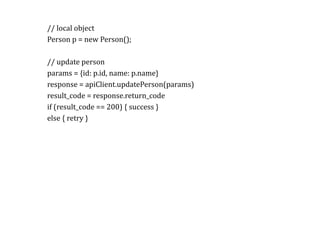
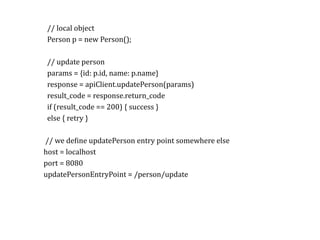
RPC//	local	object	
Person	p	=	new	Person();	
//	update	person	
params	=	{id:	p.id,	name:	p.name}	
response	=	apiClient.updatePerson(params)	
result_code	=	response.return_code	
if	(result_code	==	200)	{	success	}	
else	{	retry	}
RPC//	local	object	
Person	p	=	new	Person();	
//	update	person	
params	=	{id:	p.id,	name:	p.name}	
response	=	apiClient.updatePerson(params)	
result_code	=	response.return_code	
if	(result_code	==	200)	{	success	}	
else	{	retry	}	
		//	we	deKine	updatePerson	entry	point	somewhere	else	
	host	=	localhost	
	port	=	8080	
	updatePersonEntryPoint	=	/person/update
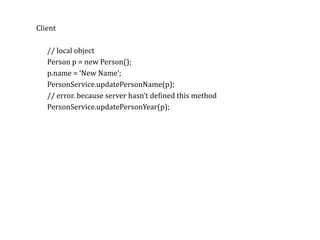
RPCClient	
//	local	object	
Person	p	=	new	Person();	
p.name	=	‘New	Name’;	
PersonService.updatePersonName(p);	
//	error.	because	server	hasn’t	deKined	this	method	
PersonService.updatePersonYear(p);
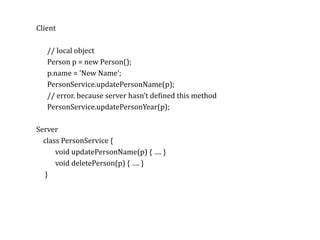
RPCClient	
//	local	object	
Person	p	=	new	Person();	
p.name	=	‘New	Name’;	
PersonService.updatePersonName(p);	
//	error.	because	server	hasn’t	deKined	this	method	
PersonService.updatePersonYear(p);	
Server	
				class	PersonService	{	
											void	updatePersonName(p)	{	….	}	
											void	deletePerson(p)	{	….	}	
					}
Protobuf
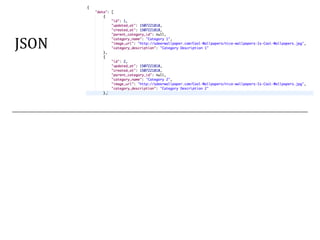
JSON
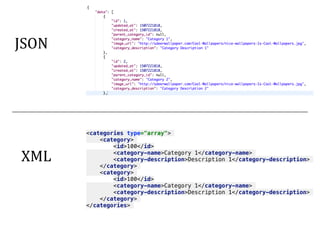
JSON	
<categories type="array">
<category>
<id>100</id>
<category-name>Category 1</category-name>
<category-description>Description 1</category-description>
</category>
<category>
<id>100</id>
<category-name>Category 1</category-name>
<category-description>Description 1</category-description>
</category>
</categories>
XML
100,Category 1,Description 1
200,Category 2,Description 2
[id],[category	name],	[category	description]		
[id],[category	name],	[category	description]
CSV	
100,Category 1,Description 1
200,Category 2,Description 2
[id],[category	name],	[category	description]		
[id],[category	name],	[category	description]
CSV	
100,Category 1,Description 1
200,Category 2,Description 2
[id],[category	name],	[category	description]		
[id],[category	name],	[category	description]		
- JSON,	XML	are	human-readable/editable	format.
CSV	
100,Category 1,Description 1
200,Category 2,Description 2
[id],[category	name],	[category	description]		
[id],[category	name],	[category	description]		
- JSON,	XML	are	human-readable/editable	format.	
- Output	footprint	is	large.	
- Not	efKicient	for	transferring	data.
Protobuf
- Google's	language-neutral,	platform-neutral,	extensible	
mechanism	for	serializing	structured	dataOutput	
footprint	is	large.
Protobuf
- Google's	language-neutral,	platform-neutral,	extensible	
mechanism	for	serializing	structured	dataOutput	
footprint	is	large.	
- Binary	format.
Protobuf
- Google's	language-neutral,	platform-neutral,	extensible	
mechanism	for	serializing	structured	dataOutput	
footprint	is	large.	
- Binary	format.	
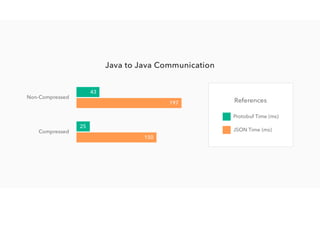
- EfKicient	for	transferring	data.
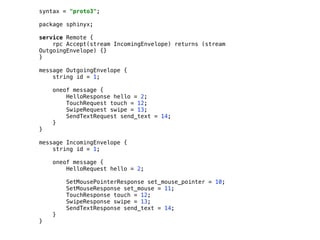
syntax = "proto3";


package sphinyx;


service Remote {

rpc Accept(stream IncomingEnvelope) returns (stream
OutgoingEnvelope) {}

}


message OutgoingEnvelope {

string id = 1;


oneof message {

HelloResponse hello = 2;

TouchRequest touch = 12;

SwipeRequest swipe = 13;

SendTextRequest send_text = 14;

}

}


message IncomingEnvelope {

string id = 1;


oneof message {

HelloRequest hello = 2;


SetMousePointerResponse set_mouse_pointer = 10;

SetMouseResponse set_mouse = 11;

TouchResponse touch = 12;

SwipeResponse swipe = 13;

SendTextResponse send_text = 14;

}

}
GRPC
GRPC
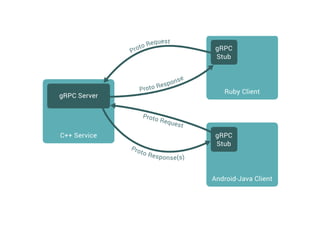
GRPC	=	Protobuf	+	RPC	made	by	Google
GRPC
GRPC	=	Protobuf	+	RPC	made	by	Google	
- is	a	RPC	Protocol
GRPC
GRPC	=	Protobuf	+	RPC	made	by	Google	
- is	a	RPC	Protocol	
- Transfer	data	using	Protobuf	format
GRPC
GRPC	=	Protobuf	+	RPC	made	by	Google	
- is	a	RPC	Protocol	
- Transfer	data	using	Protobuf	format	
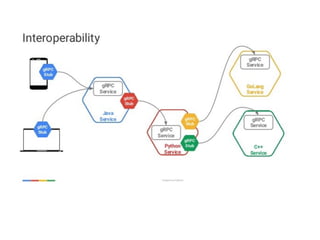
- Made	by	Google:	Support	many	languages
Step-by-Step
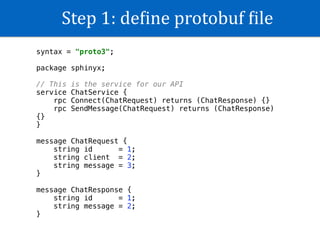
Step	1:	deKine	protobuf	Kile
syntax = "proto3";


package sphinyx;


// This is the service for our API

service ChatService {

rpc Connect(ChatRequest) returns (ChatResponse) {}

rpc SendMessage(ChatRequest) returns (ChatResponse)
{}

}


message ChatRequest {

string id = 1;

string client = 2;

string message = 3;

}


message ChatResponse {

string id = 1;

string message = 2;

}

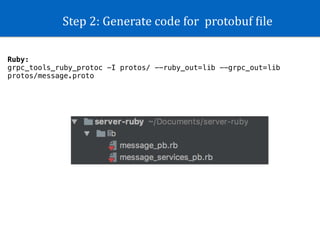
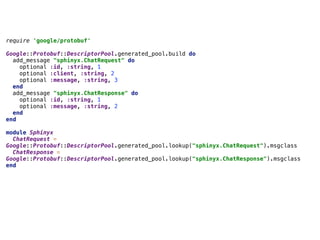
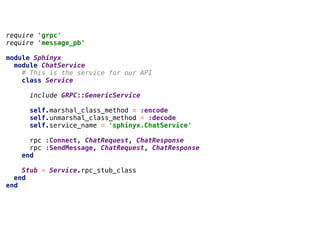
Step	2:	Generate	code	for		protobuf	Kile
Ruby:
grpc_tools_ruby_protoc -I protos/ --ruby_out=lib --grpc_out=lib
protos/message.proto
require 'google/protobuf'
Google::Protobuf::DescriptorPool.generated_pool.build do
add_message "sphinyx.ChatRequest" do
optional :id, :string, 1
optional :client, :string, 2
optional :message, :string, 3
end
add_message "sphinyx.ChatResponse" do
optional :id, :string, 1
optional :message, :string, 2
end
end
module Sphinyx
ChatRequest =
Google::Protobuf::DescriptorPool.generated_pool.lookup("sphinyx.ChatRequest").msgclass
ChatResponse =
Google::Protobuf::DescriptorPool.generated_pool.lookup("sphinyx.ChatResponse").msgclass
end
require 'grpc'
require 'message_pb'
module Sphinyx
module ChatService
# This is the service for our API
class Service
include GRPC::GenericService
self.marshal_class_method = :encode
self.unmarshal_class_method = :decode
self.service_name = 'sphinyx.ChatService'
rpc :Connect, ChatRequest, ChatResponse
rpc :SendMessage, ChatRequest, ChatResponse
end
Stub = Service.rpc_stub_class
end
end
Step	3:	Create	GRPC	from	generated	code
class GrpcChatServer < Sphinyx::ChatService::Service
@clients = []
def connect(hello_req, _unused_call)
puts "Hello Client:#{hello_req.client} with id=#{hello_req.id}"
new_id = "#{hello_req.client}-#{hello_req.id}"
Sphinyx::ChatResponse.new(id: new_id, message: "Hello #{new_id}")
end
end
def main
s = GRPC::RpcServer.new
s.add_http2_port('0.0.0.0:50051', :this_port_is_insecure)
s.handle(GrpcChatServer)
s.run_till_terminated
end
main
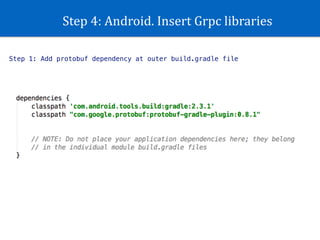
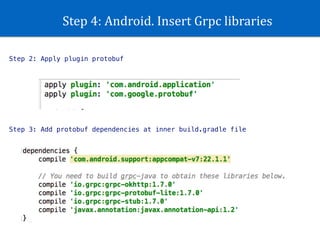
Step	4:	Android.	Insert	Grpc	libraries
Step 1: Add protobuf dependency at outer build.gradle file
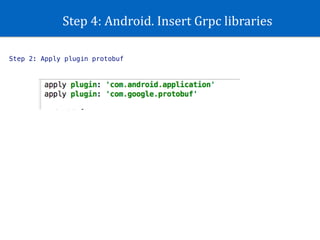
Step	4:	Android.	Insert	Grpc	libraries
Step 2: Apply plugin protobuf
Step	4:	Android.	Insert	Grpc	libraries
Step 2: Apply plugin protobuf
Step 3: Add protobuf dependencies at inner build.gradle file
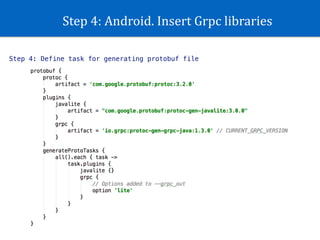
Step	4:	Android.	Insert	Grpc	libraries
Step 4: Define task for generating protobuf file
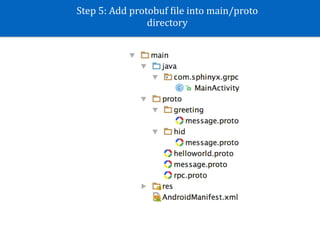
Step	5:	Add	protobuf	Kile	into	main/proto	
directory
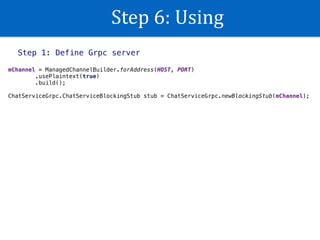
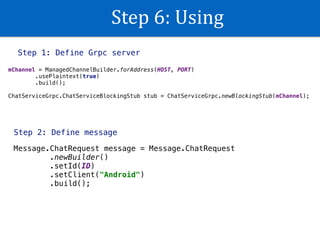
Step	6:	Using
Step 1: Define Grpc server
mChannel = ManagedChannelBuilder.forAddress(HOST, PORT)

.usePlaintext(true)

.build();


ChatServiceGrpc.ChatServiceBlockingStub stub = ChatServiceGrpc.newBlockingStub(mChannel);
Step	6:	Using
Step 1: Define Grpc server
mChannel = ManagedChannelBuilder.forAddress(HOST, PORT)

.usePlaintext(true)

.build();


ChatServiceGrpc.ChatServiceBlockingStub stub = ChatServiceGrpc.newBlockingStub(mChannel);
Step 2: Define message
Message.ChatRequest message = Message.ChatRequest

.newBuilder()

.setId(ID)

.setClient("Android")

.build();
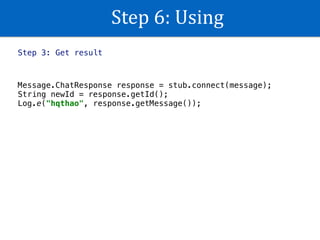
Step	6:	Using
Step 3: Get result
Message.ChatResponse response = stub.connect(message);

String newId = response.getId();

Log.e("hqthao", response.getMessage());
DEMO
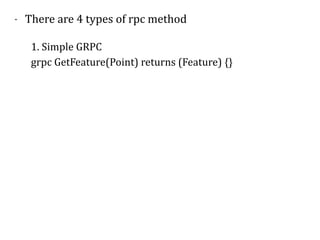
- There	are	4	types	of	rpc	method
- There	are	4	types	of	rpc	method	
1.	Simple	GRPC	
grpc	GetFeature(Point)	returns	(Feature)	{}
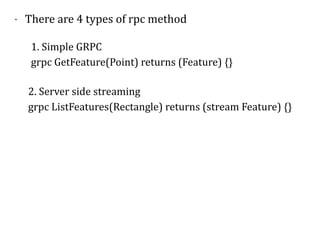
- There	are	4	types	of	rpc	method	
1.	Simple	GRPC	
grpc	GetFeature(Point)	returns	(Feature)	{}
2.	Server	side	streaming	
grpc	ListFeatures(Rectangle)	returns	(stream	Feature)	{}
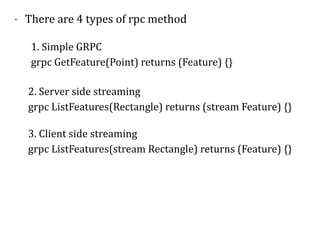
- There	are	4	types	of	rpc	method	
1.	Simple	GRPC	
grpc	GetFeature(Point)	returns	(Feature)	{}
2.	Server	side	streaming	
grpc	ListFeatures(Rectangle)	returns	(stream	Feature)	{}	
3.	Client	side	streaming	
grpc	ListFeatures(stream	Rectangle)	returns	(Feature)	{}
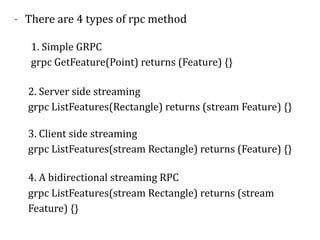
- There	are	4	types	of	rpc	method	
1.	Simple	GRPC	
grpc	GetFeature(Point)	returns	(Feature)	{}
2.	Server	side	streaming	
grpc	ListFeatures(Rectangle)	returns	(stream	Feature)	{}	
3.	Client	side	streaming	
grpc	ListFeatures(stream	Rectangle)	returns	(Feature)	{}	
4.	A	bidirectional	streaming	RPC	
grpc	ListFeatures(stream	Rectangle)	returns	(stream	
Feature)	{}
Reference
https://grpc.io/docs/quickstart/android.html
Q&A

Android GRPC