IT Management, Simplified
Real-time IT management solutions for the new speed of business
ManageEngine Analytics Plus
Product Overview
Introduction
• ManageEngine Analytics Plus is a self-service business intelligence and advanced
analytics software.
• On-premise reporting solution from ManageEngine.
• Helps you analyze large volumes of data with powerful visualizations.
• Offers key insights to help make business-critical decisions.
Integration with ServiceDesk Plus
• Integration and auto analysis in less than 5
minutes!
• Over 100+ reports and dashboards built on
80+ KPIs.
• Build custom reports without having to write
complex SQL queries.
• Populate charts from various ServiceDesk Plus
modules, all combined in a single dashboard.
• Drill down to key metrics from live dashboards.
• Periodic data synchronization.
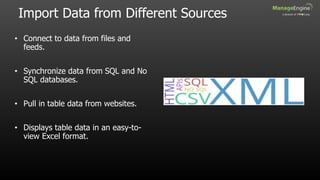
Import Data from Different Sources
• Connect to data from files and
feeds.
• Synchronize data from SQL and No
SQL databases.
• Pull in table data from websites.
• Displays table data in an easy-to-
view Excel format.
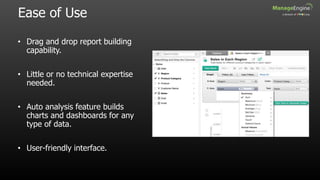
Ease of Use
• Drag and drop report building
capability.
• Little or no technical expertise
needed.
• Auto analysis feature builds
charts and dashboards for any
type of data.
• User-friendly interface.
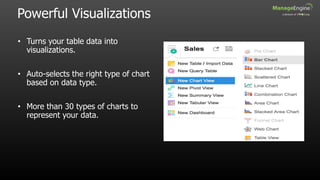
Powerful Visualizations
• Turns your table data into
visualizations.
• Auto-selects the right type of chart
based on data type.
• More than 30 types of charts to
represent your data.
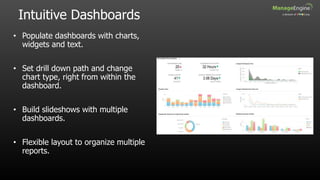
Intuitive Dashboards
• Populate dashboards with charts,
widgets and text.
• Set drill down path and change
chart type, right from within the
dashboard.
• Build slideshows with multiple
dashboards.
• Flexible layout to organize multiple
reports.
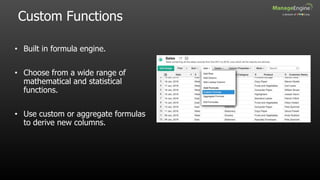
Custom Functions
• Built in formula engine.
• Choose from a wide range of
mathematical and statistical
functions.
• Use custom or aggregate formulas
to derive new columns.
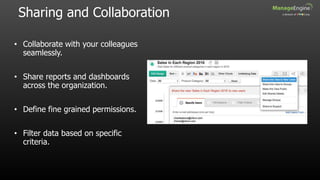
Sharing and Collaboration
• Collaborate with your colleagues
seamlessly.
• Share reports and dashboards
across the organization.
• Define fine grained permissions.
• Filter data based on specific
criteria.
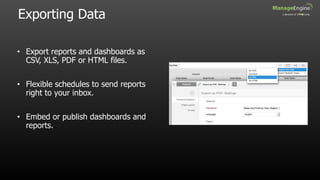
Exporting Data
• Export reports and dashboards as
CSV, XLS, PDF or HTML files.
• Flexible schedules to send reports
right to your inbox.
• Embed or publish dashboards and
reports.
Thank You

Analytics plus overview.pptx

  • 1.
    IT Management, Simplified Real-timeIT management solutions for the new speed of business
  • 2.
  • 3.
    Introduction • ManageEngine AnalyticsPlus is a self-service business intelligence and advanced analytics software. • On-premise reporting solution from ManageEngine. • Helps you analyze large volumes of data with powerful visualizations. • Offers key insights to help make business-critical decisions.
  • 4.
    Integration with ServiceDeskPlus • Integration and auto analysis in less than 5 minutes! • Over 100+ reports and dashboards built on 80+ KPIs. • Build custom reports without having to write complex SQL queries. • Populate charts from various ServiceDesk Plus modules, all combined in a single dashboard. • Drill down to key metrics from live dashboards. • Periodic data synchronization.
  • 5.
    Import Data fromDifferent Sources • Connect to data from files and feeds. • Synchronize data from SQL and No SQL databases. • Pull in table data from websites. • Displays table data in an easy-to- view Excel format.
  • 6.
    Ease of Use •Drag and drop report building capability. • Little or no technical expertise needed. • Auto analysis feature builds charts and dashboards for any type of data. • User-friendly interface.
  • 7.
    Powerful Visualizations • Turnsyour table data into visualizations. • Auto-selects the right type of chart based on data type. • More than 30 types of charts to represent your data.
  • 8.
    Intuitive Dashboards • Populatedashboards with charts, widgets and text. • Set drill down path and change chart type, right from within the dashboard. • Build slideshows with multiple dashboards. • Flexible layout to organize multiple reports.
  • 9.
    Custom Functions • Builtin formula engine. • Choose from a wide range of mathematical and statistical functions. • Use custom or aggregate formulas to derive new columns.
  • 10.
    Sharing and Collaboration •Collaborate with your colleagues seamlessly. • Share reports and dashboards across the organization. • Define fine grained permissions. • Filter data based on specific criteria.
  • 11.
    Exporting Data • Exportreports and dashboards as CSV, XLS, PDF or HTML files. • Flexible schedules to send reports right to your inbox. • Embed or publish dashboards and reports.
  • 12.