Introduction to real time operating
systems RTOS
Task 1
Task scheduling
File 1
Device drivers
Read/
Write
Resource management
General Purpose Operating System (GPOS)
Task 1
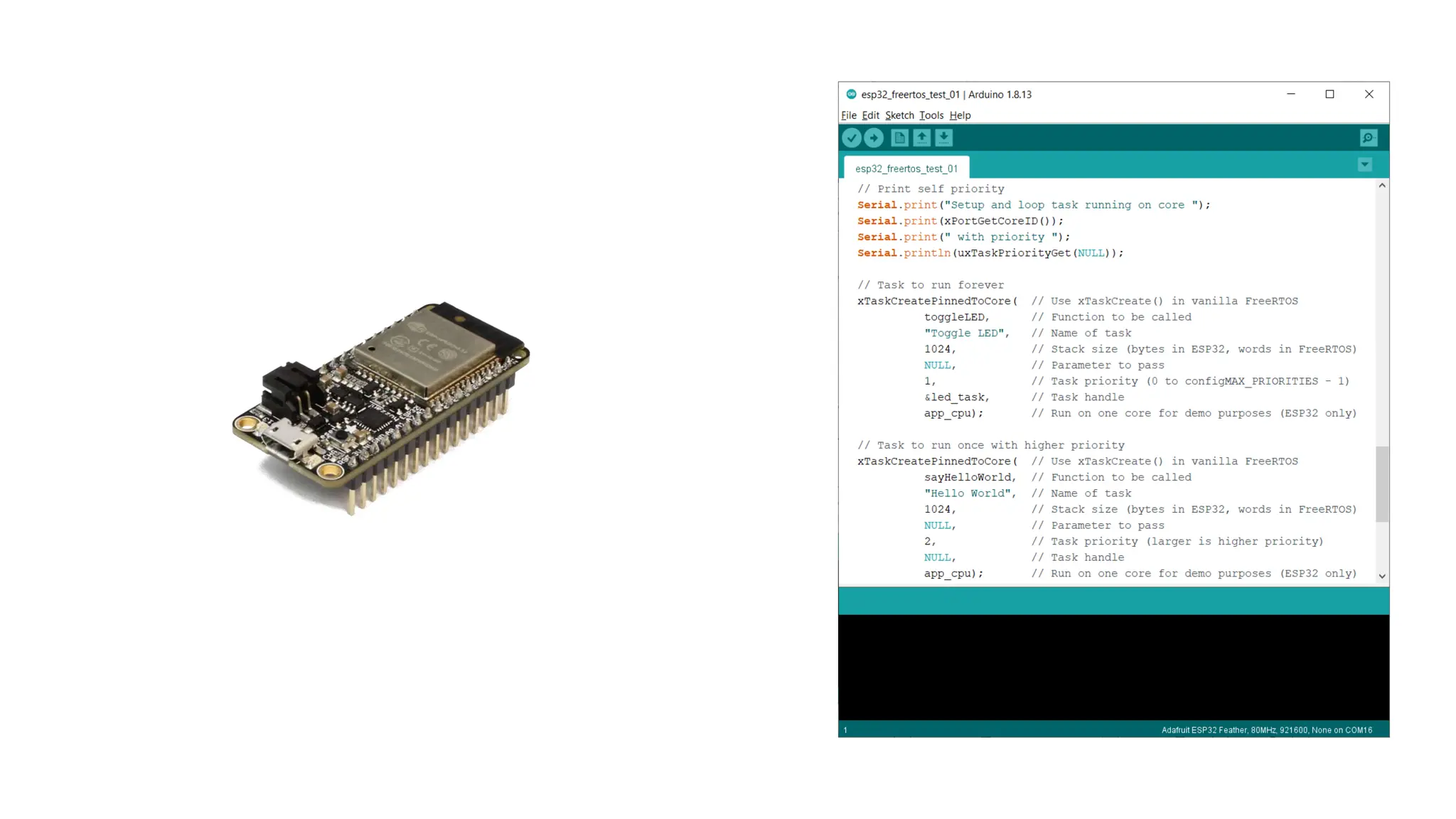
Task scheduling
File 1
Device drivers
Read/
Write
Resource management
Real-Time Operating System (RTOS)
Super Loop
Setup
Entry Point (main())
Task 1
Task 2
Task 3
Loop
Interrupt Service
Routine (ISR)
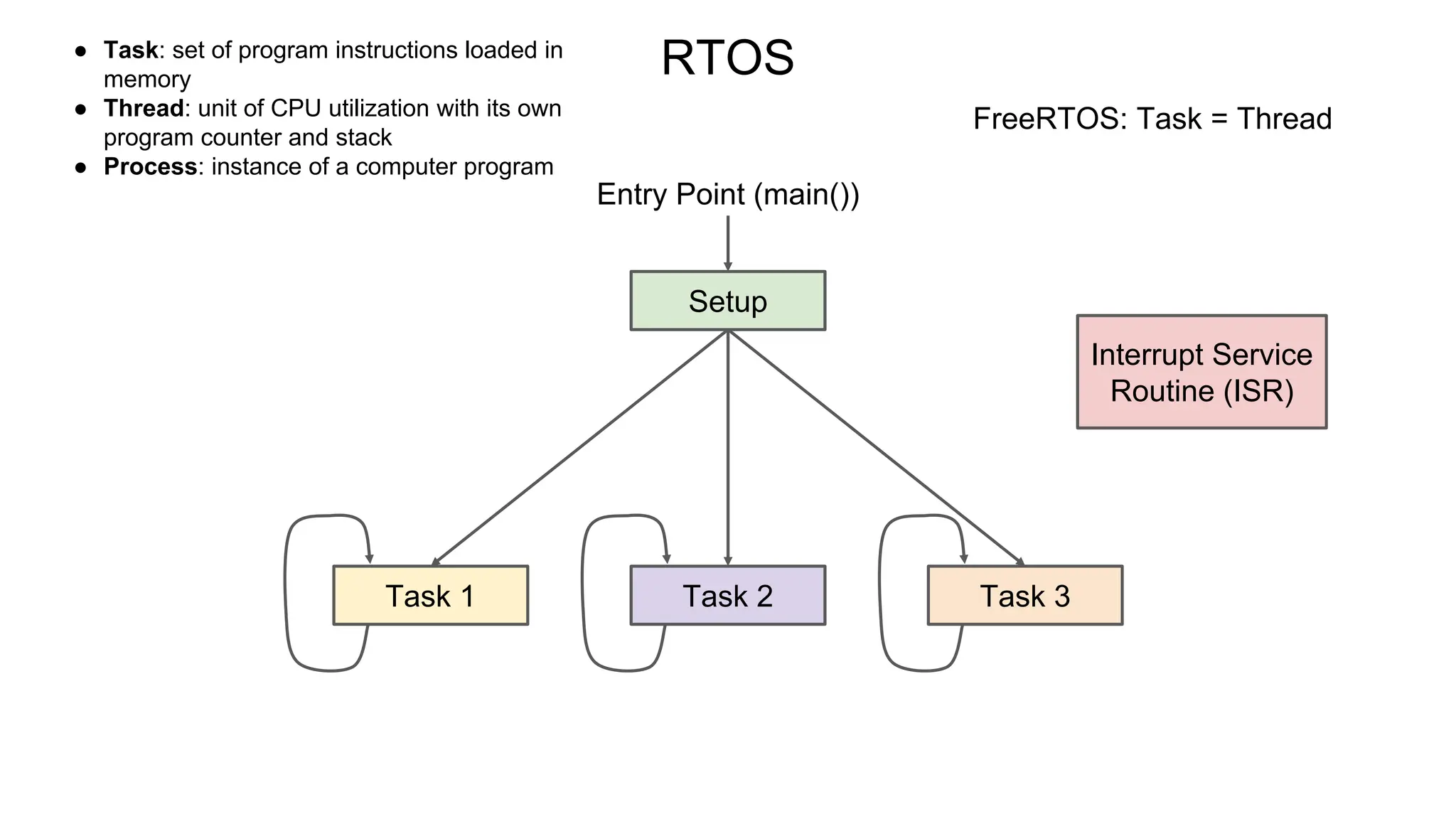
RTOS
Setup
Entry Point (main())
Task 2
Interrupt Service
Routine (ISR)
Task 1 Task 3
● Task: set of program instructions loaded in
memory
● Thread: unit of CPU utilization with its own
program counter and stack
● Process: instance of a computer program
FreeRTOS: Task = Thread
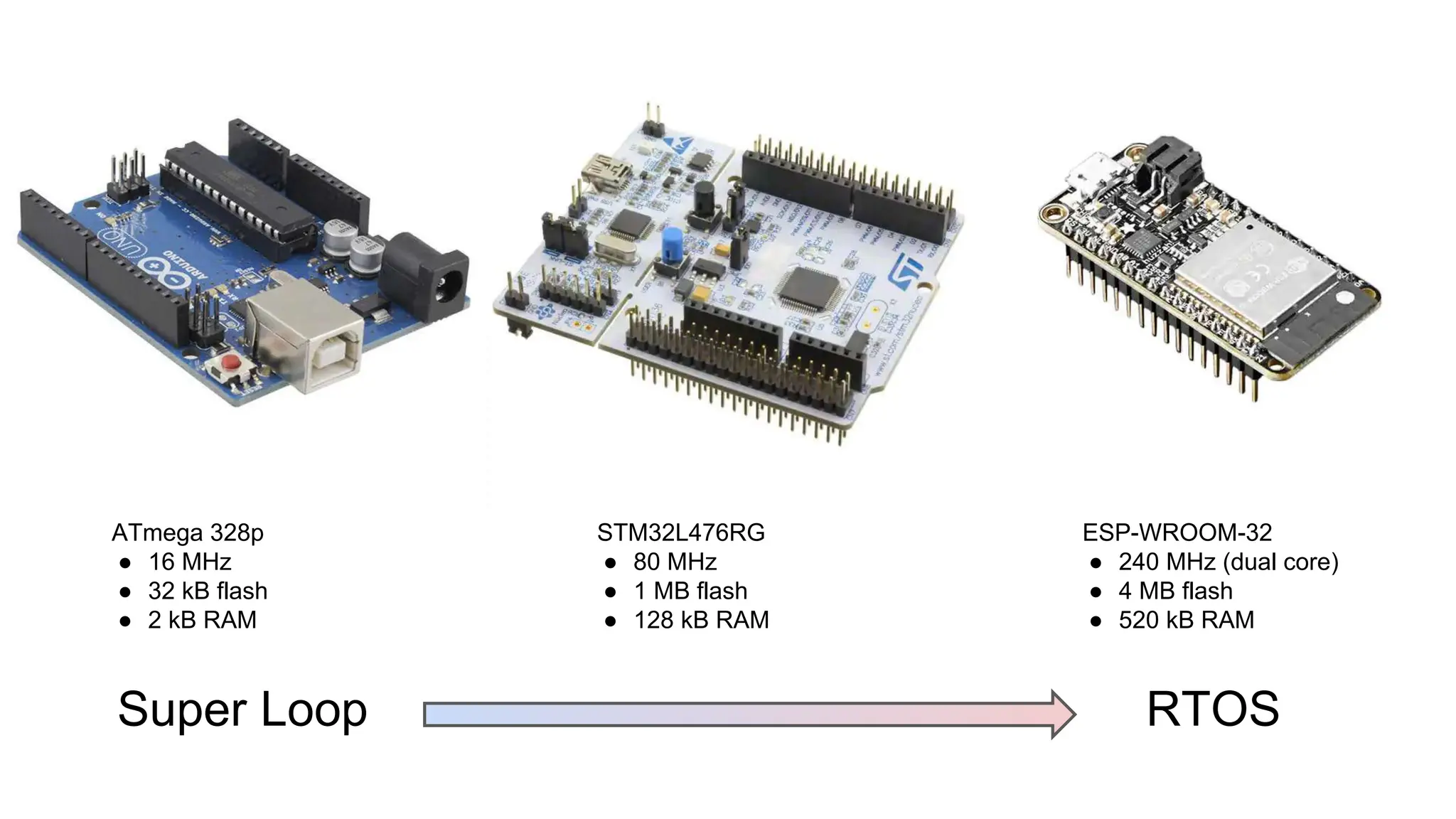
Super Loop
ATmega 328p
● 16 MHz
● 32 kB flash
● 2 kB RAM
STM32L476RG
● 80 MHz
● 1 MB flash
● 128 kB RAM
ESP-WROOM-32
● 240 MHz (dual core)
● 4 MB flash
● 520 kB RAM
RTOS
an introduction lecture to real time operating system

an introduction lecture to real time operating system

  • 1.
    Introduction to realtime operating systems RTOS
  • 2.
    Task 1 Task scheduling File1 Device drivers Read/ Write Resource management General Purpose Operating System (GPOS)
  • 3.
    Task 1 Task scheduling File1 Device drivers Read/ Write Resource management Real-Time Operating System (RTOS)
  • 4.
    Super Loop Setup Entry Point(main()) Task 1 Task 2 Task 3 Loop Interrupt Service Routine (ISR)
  • 5.
    RTOS Setup Entry Point (main()) Task2 Interrupt Service Routine (ISR) Task 1 Task 3 ● Task: set of program instructions loaded in memory ● Thread: unit of CPU utilization with its own program counter and stack ● Process: instance of a computer program FreeRTOS: Task = Thread
  • 6.
    Super Loop ATmega 328p ●16 MHz ● 32 kB flash ● 2 kB RAM STM32L476RG ● 80 MHz ● 1 MB flash ● 128 kB RAM ESP-WROOM-32 ● 240 MHz (dual core) ● 4 MB flash ● 520 kB RAM RTOS

Editor's Notes

  • #2  INTRODUCTION TO REAL TIME OPERATING SYSTEM RTOS Introduction : A real-time operating system or rtos is very much like any other operating system with a few important differences. Over the next lectures we'd like to present those differences and how to get started using FREE RTOS we'll give details on Tasks, threads, prioritization, memory management and inter-task communication.
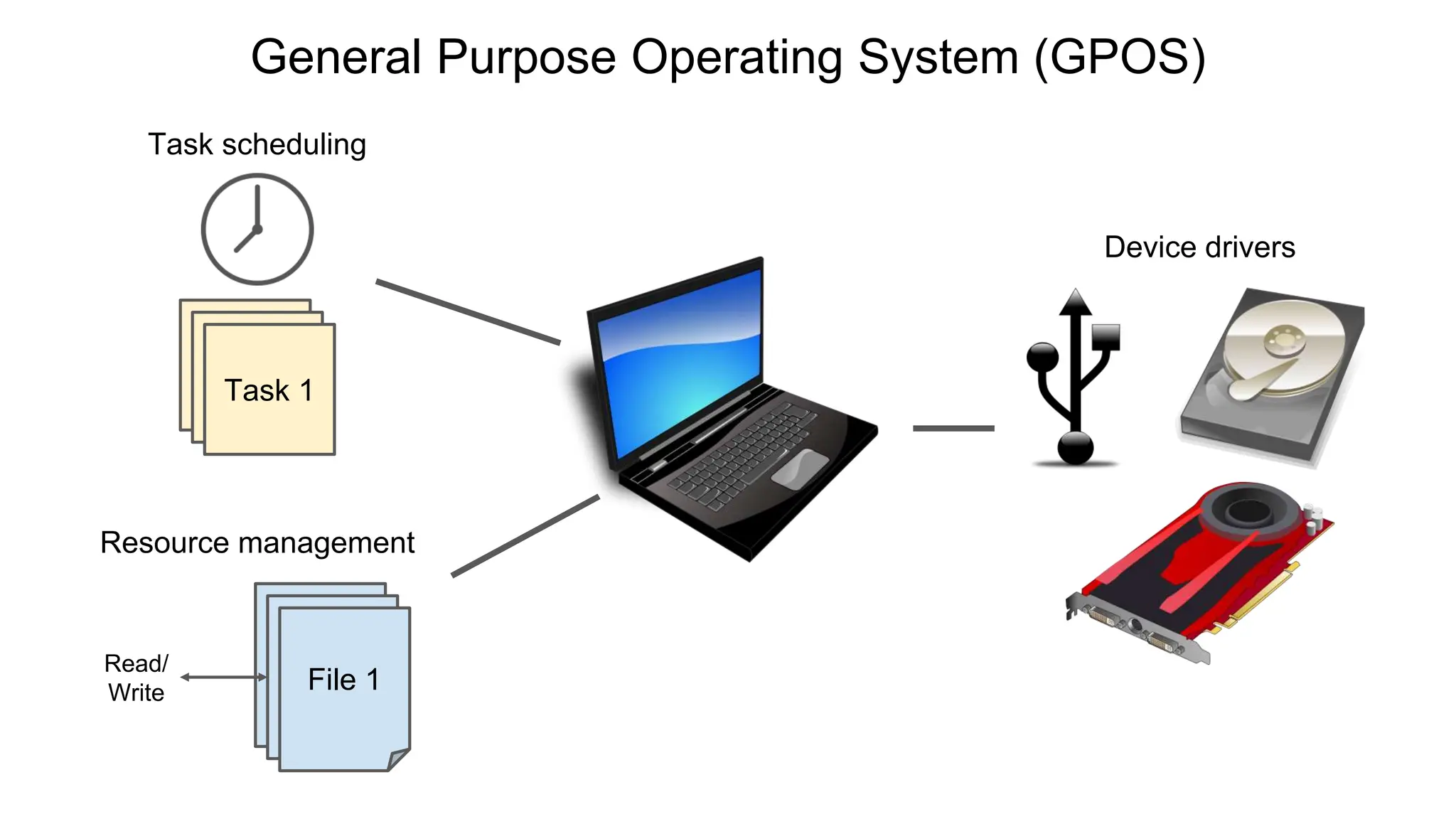
  • #3   What is an Operating System : An operating system is a piece of software that runs on a computer or microcontroller that accomplishes a number of important functions. First, it is in charge of scheduling background tasks and user applications in most operating systems dozens of background processes are executing at the same time and you probably have several applications open on your phone or computer right now the operating system figures out how to give slices of time to each of these processes so that everything appears to be happening concurrently. Second, it manages a number of virtual resources like files libraries and folders allowing applications and processes to access them when needed. Third, they can manage or provide device drivers for your system these drivers allow the system to read and write from an external disk respond to keyboard and mouse input or draw graphics on your monitor. You're probably familiar with general purpose operating systems like windows mac os and linux ios and android also fall into this category. Most general purpose operating systems are designed with human interaction as the most important feature so the scheduler is designed to prioritize such tasks that may mean some timing deadlines can be missed or pushed back and a little lag in responsiveness especially if it's not really noticed by a human is acceptable additionally the scheduler is often non-deterministic which means we can't know exactly which task will execute when and for how long if you're making something that requires an os and strict timing deadlines like a medical device or engine controller missing a deadline to say fire a spark plug would be catastrophic
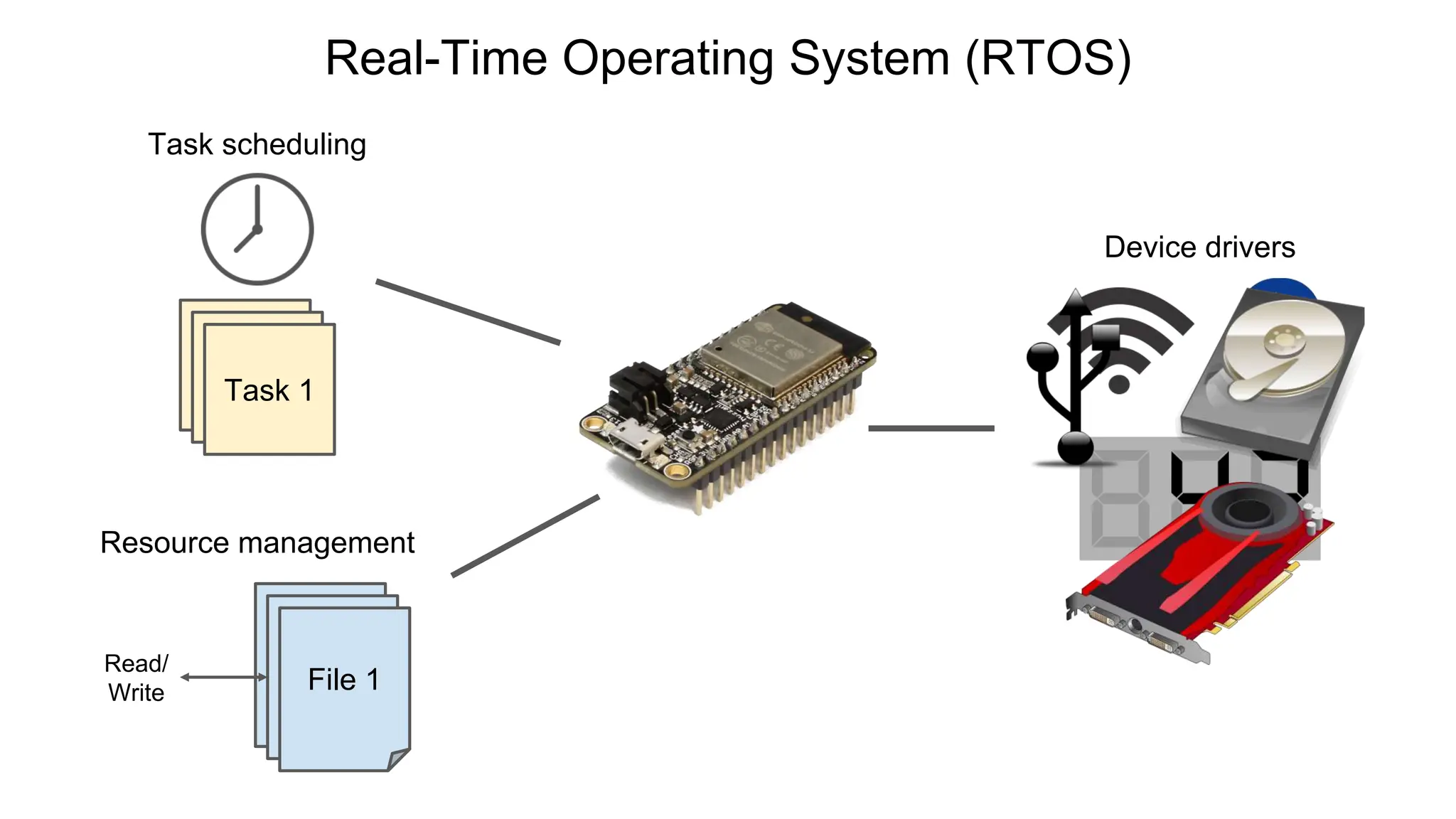
  • #4  This is where a real-time operating system or rtos can save the day most r tos systems offer many of the same functions as general purpose operating systems but they are designed so that the scheduler can guarantee meeting timing deadlines on the tasks while some r-tos systems might provide high-level device drivers You'll usually see things intended for microcontrollers like wi-fi and bluetooth stacks or simple lcd drivers you can also find bare bones r tosses that provide just a scheduler with these you'll need to import or write your own file systems and device drivers note that while most r tosses provide methods for meeting timing deadlines that's not the only reason to use an rtos in your project the ability to run multiple tasks concurrently can be a lifesaver as we'll see in a moment if you've written programs for microcontrollers including arduino you're probably familiar with.
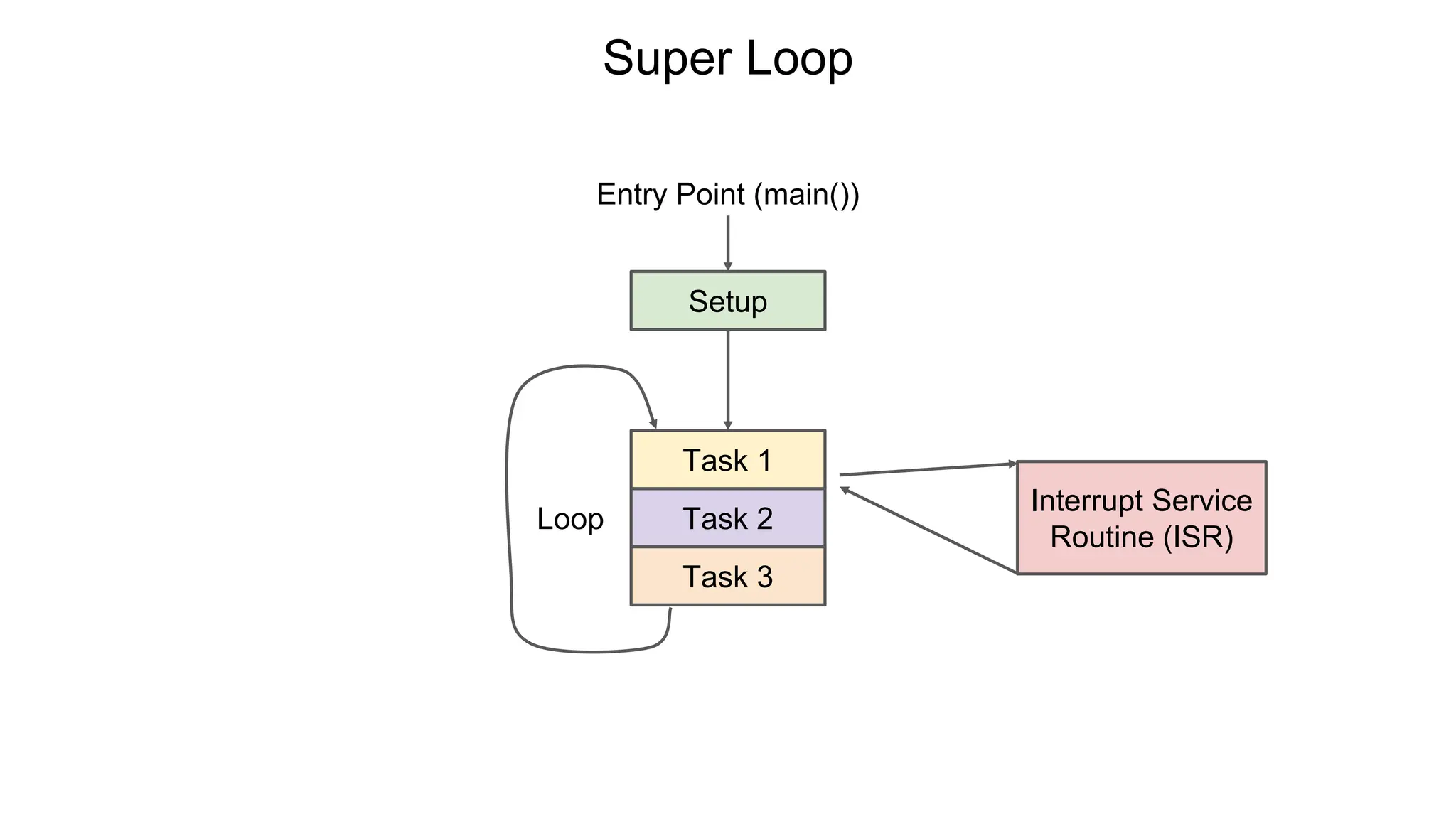
  • #5 if you've written programs for microcontrollers including arduino you're probably familiar with Superloop Architecture Superloop Architecture This kind of structure when your program starts it performs some setup functions and then it executes your tasks in a round robin fashion inside a while forever loop. These tasks might read from sensors, perform some calculations based on those readings and then say display something on a gorgeous led display. This type of simple programming architecture is known as a super loop. It's incredibly easy to implement and it has very little overhead and it is great when you only need to accomplish a handful of tasks on your microcontroller. In fact there's nothing wrong with the super loop for the vast majority of simple microcontroller projects you're usually better off with this type of program flow as it saves on cpu cycles and memory and it's much easier to debug than using an rtos. You might even have created a couple of interrupts to break the flow of execution to handle an external event like a button push or perform some action at specific timed intervals if you need to meet strict timing deadlines for one or two tasks you might be better off using just interrupt service routines to accomplish those tasks with precise timing in my experience if you need to meet a timing deadline of less than about one millisecond your best bet is an interrupt anyway if you're trying to do something with an interval of less than a few hundred nanoseconds you either need an incredibly fast processor or it's time to start looking at custom hardware like an fpga. Now the unfortunate thing about this super loop architecture is that you cannot execute tasks concurrently if task 2 starts taking a long time and task 3 is your update display task you'll start to experience some lag similarly if you're polling for user input like from a serial terminal or reading a sensor you might miss data if other tasks take too long to fix that we can use the concept of running multiple tasks at the same
  • #6 Multitasking and Task Priority To fix that we can use the concept of running multiple tasks at the same time on a multi-core processor this is actually physically possible however since many microcontrollers only have one core the cpu time needs to be split up among the tasks. We can also give higher priority to some tasks so that they happen sooner or take more cpu time for example if we prioritize the user input task users will likely experience less lag but it might mean background tasks take longer to execute we'll talk more about time slicing and prioritization in a future lectures. The terminology used here: A task is any piece of work we want to get done in code. A thread is a unit of cpu utilization with its own program counter and set of memory. A process is an instance of a computer program that's being executed usually a process will have one or more threads used to accomplish tasks threads within a process will often share resources like heap memory and can pass resources to each other you'll often find that an rtos is capable of handling only one process but a general purpose os can run many processes. Note that in free rtos the term task is used to mean something closer to a thread and you'll often see these terms used interchangeably because of this we will use the term task when referring to units of cpu utilization so that it makes sense within the free rtos ecosystem. Interrupts still work within an rtos so long as they have a higher priority than any of the tasks they will stop code execution for all tasks run your interrupt service routine and return execution to where it left off you can have more than one interrupt but we won't get into handling nested interrupts which can get nasty if you're writing code for a simple 8 or 16-bit
  • #7 Superloops for embedded MCU apps : if you're writing code for a simple 8 or 16-bit microcontroller with 2 kilobytes of ram you're probably best sticking with the super loop approach. And using the inexpensive controller to do only a handful of tasks while you can get a simple scheduler to run on such a device the memory and cpu overhead of switching tasks would not leave you with many resources left for your actual program people have ported free rtos to the arduino uno it's definitely a good way to tinker around with it but i don't know how ultimately useful it is as you move into more and more powerful microcontrollers it becomes much more viable to run in rtos as you've got clock cycles and memory to spare for things like a scheduler while you can still run a bare metal super loop on something like an esp32.
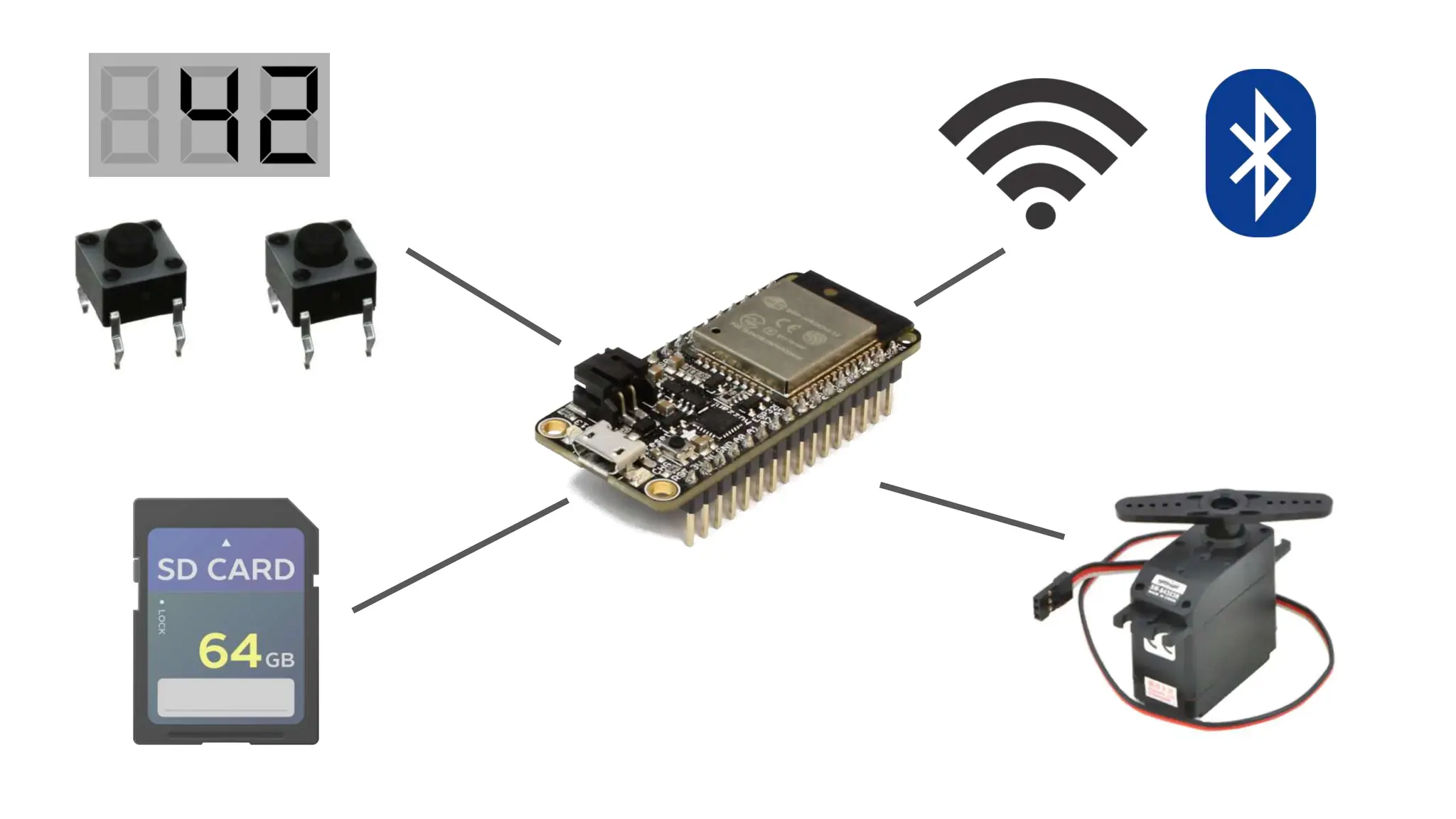
  • #8 Wireless Stack I usually find that the whole reason i bought something with that much computing power is to run several concurrent tasks which brings me to the ultimate question of why would you want an rtos . There are a number of reasons but the best one that comes to mind is for when you need to do several things concurrently an esp32 is capable of handling user input reading and writing to an sd card controlling hardware and crunching numbers all at the same time. The big one for something like this is the wireless stack these libraries require large amounts of ram and processing power they also need to respond to events from the network in a short amount of time which means using an rtos can be a massive help in this case it can help you divide up these different features into individual tasks.  
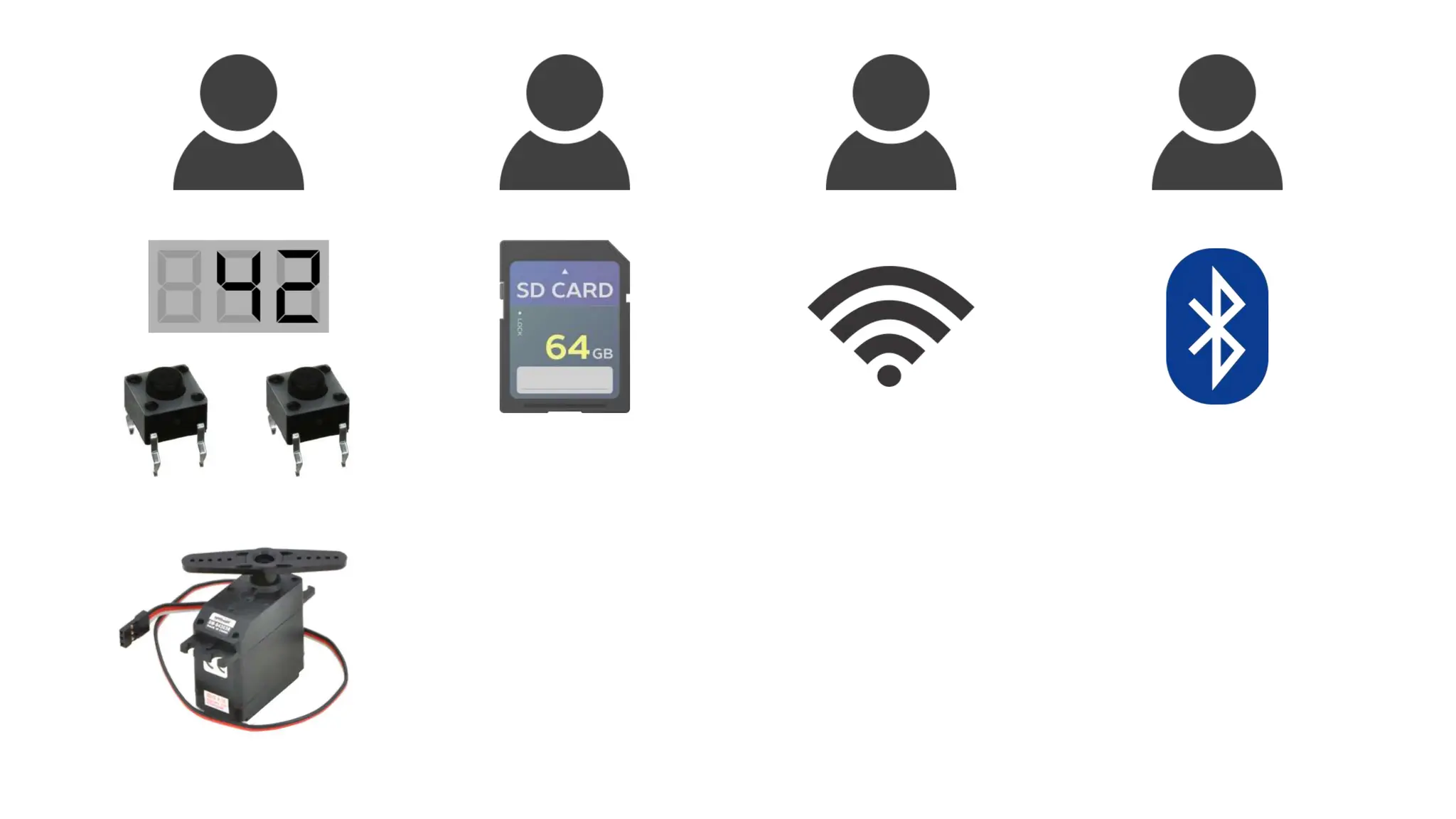
  • #9 RTOS benefits : An rtos can be great if you're part of a team working on a larger project you can divide up the tasks among the team members knowing that each one will run concurrently there will be some overhead and debugging to make sure everything works together though over the next few lectures we'll go over important rtos concepts like prioritization and resource management we'll practice these concepts by implementing small demo projects in free rtos on the esp32
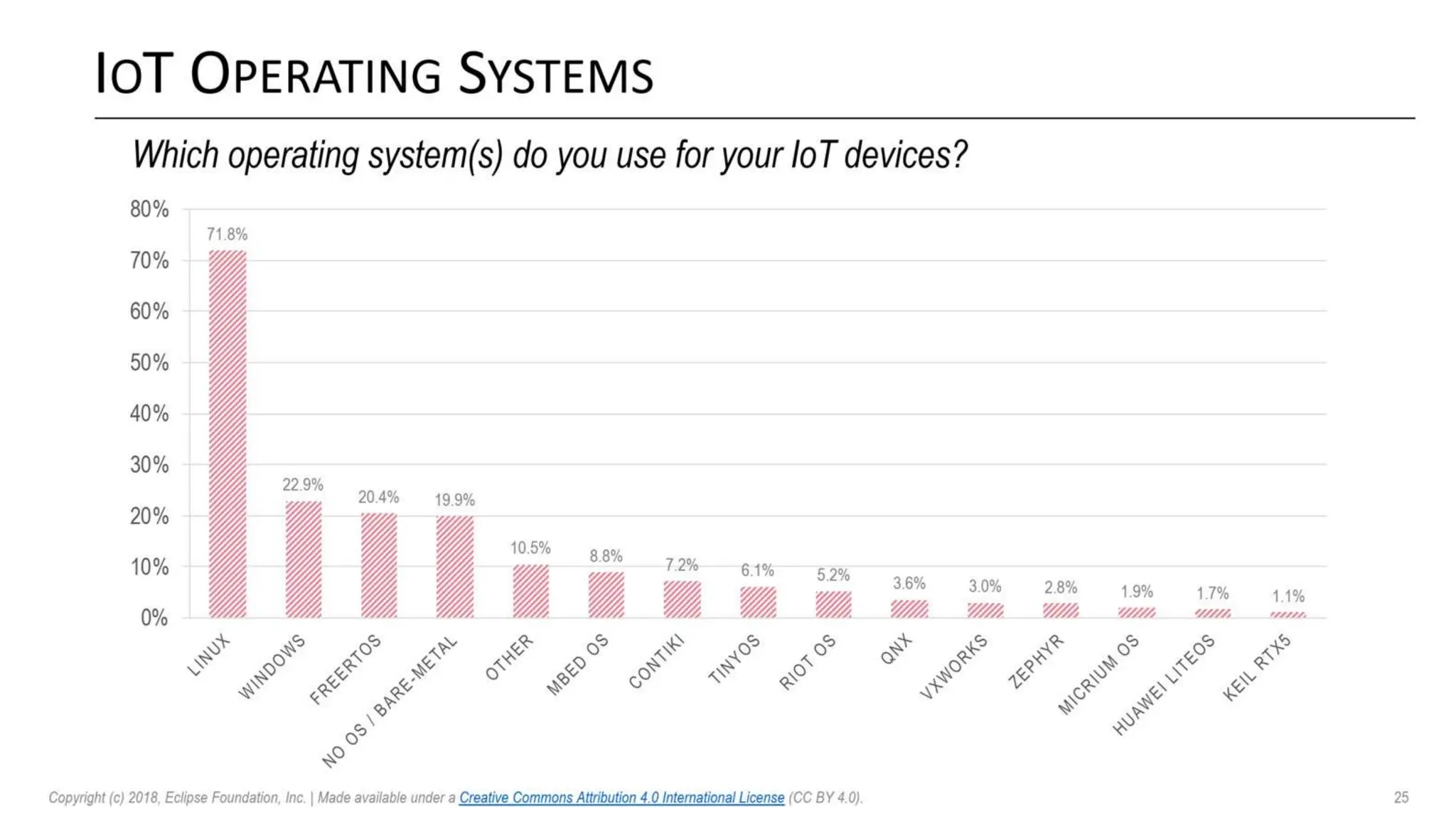
  • #10 Fee RTOS popularity : The reason we chose freertos for this courses is because it's currently the most popular real-time operating system for iot devices as shown by this 2018 survey from the eclipse foundation while linux still reigns supreme for most of these devices it and windows are general purpose operating systems with the exception of rt linux you can see that the bare metal super loop architecture is still quite popular and an acceptable solution to many problems free rtos is also free and open source making it easy for you to try out note that as of 2017 amazon has taken over maintenance of the freertos project i also recommend keeping an eye on the zephyr project as it's a relative newcomer to the field backed by the linux
  • #11 The esp32 Arduino The esp32 Arduino is a powerful iot microcontroller that's packed with features also you can find inexpensive esp32 development boards any of them should work for this series as long as they have an associated Arduino package . Some of you will balk at the idea of using arduino IDE for our coding but I think that most embedded programmers and electronics tinkerers will have some experience with Arduino and if not it's easy to learn because of that it creates a level playing field for anyone wanting to try out rtos concepts i don't need to teach a vendor tool or chip specific libraries on top of trying to teach free rtos because the esp32 runs a modified version of free rtos out of the box there is hardly any setup involved in creating tasks in arduino almost every code example you see including task management, semaphores, mutexes and so on can easily be ported to your own build system.   Conclusion An RTOS may not be the right answer to every firmware problem you run across but sometimes it is the right tool for the job especially when you need to do things like run concurrent tasks and meet timing deadlines, at the end of most of these lectures we'll issue you a homework and i encourage you to try it out on your own esp32 or whatever device you're running free rtos; in the next lecture i'll show you how to get started with free rtos and create your own task to blink an led .