IS Directory On-Call Scheduling


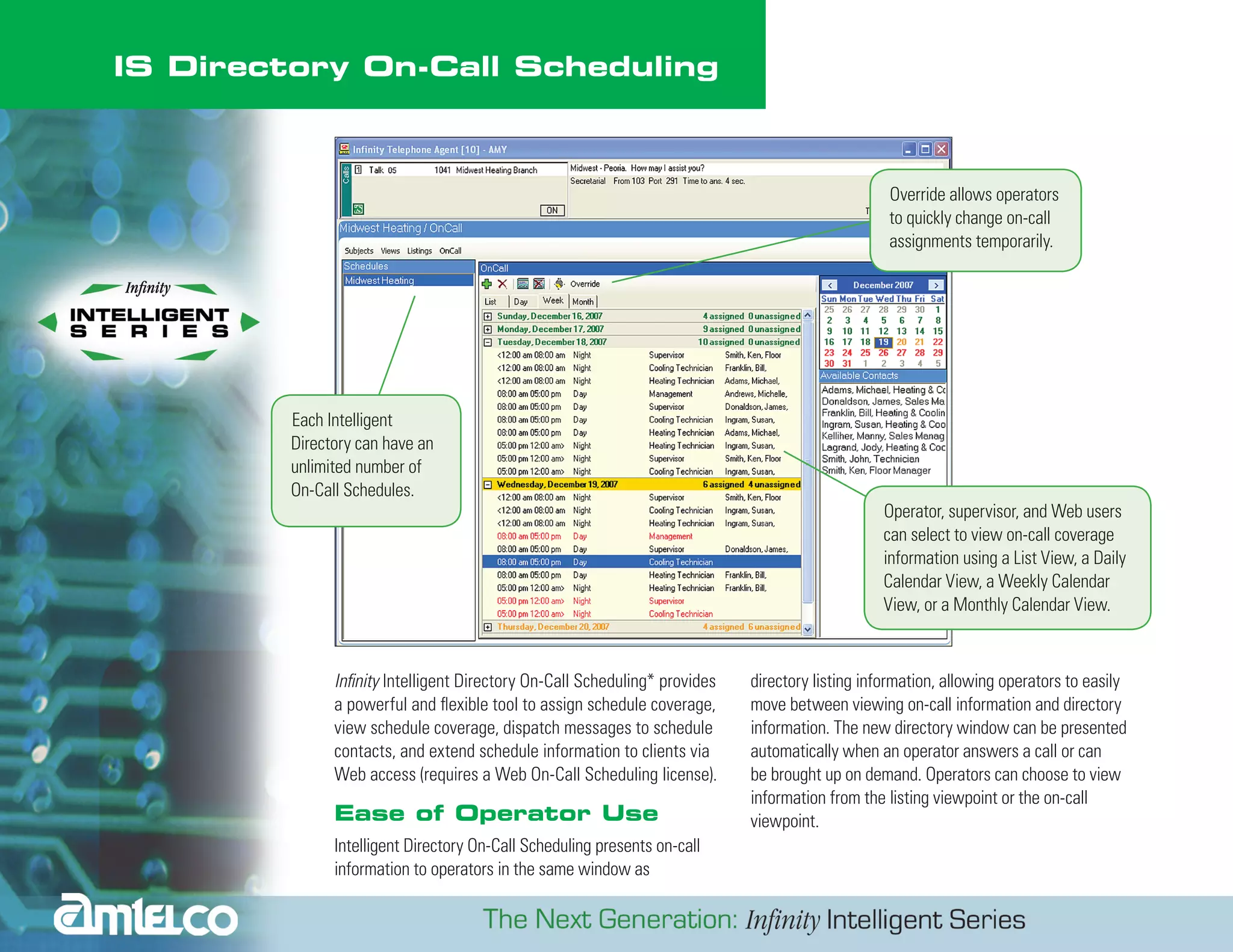
                                                                                                  Override allows operators
                                                                                                  to quickly change on-call
                                                                                                  assignments temporarily.


         Each Intelligent
         Directory can have an
         unlimited number of
         On-Call Schedules.
                                                                                                 Operator, supervisor, and Web users
                                                                                                 can select to view on-call coverage
                                                                                                 information using a List View, a Daily
                                                                                                 Calendar View, a Weekly Calendar
                                                                                                 View, or a Monthly Calendar View.


               Infinity Intelligent Directory On-Call Scheduling* provides   directory listing information, allowing operators to easily
               a powerful and flexible tool to assign schedule coverage,     move between viewing on-call information and directory
               view schedule coverage, dispatch messages to schedule         information. The new directory window can be presented
               contacts, and extend schedule information to clients via      automatically when an operator answers a call or can
               Web access (requires a Web On-Call Scheduling license).       be brought up on demand. Operators can choose to view
                                                                             information from the listing viewpoint or the on-call
               Ease of Operator Use                                          viewpoint.
               Intelligent Directory On-Call Scheduling presents on-call
               information to operators in the same window as
2


                                                                                                            Operators viewing an Intelligent Directory
                                                                                                            Listing can see the detailed information
                                                                                                            about the Listing, including the Contact
                                                                                                            Description, Contact Details, available
                                                                                                            Contact Methods and any On-Call
                                                                                                            assignments.


    Each Intelligent Directory Listing
    can have a Status Schedule.
    Operators can temporarily
    override the Status Schedule at
    any time.


                       On-Call Scheduling Contacts*                                        Contacts with Roles matching the requirements for an
                                                                                           On-Call Shift are then available to be scheduled for the Shift.
                       Infinity Intelligent Directory Listings can be defined as On-Call
                       Schedule Contacts. Each On-Call Schedule Contact can be             Operators viewing an On-Call Schedule can see the coverage
                       assigned to specific Contact Roles to cover the scheduling          assignments for each On-Call Shift. Coverage assignments
                       requirements for On-Call Schedules. The Contact Roles               display the Contacts covering the Shift and the Roles they
                       define the type of resource the contact is, such as a nurse,        are filling. Operators can select to view details about the
                       a pediatric resident, a trauma physician, an IT network             Contacts, including the Contact Listings, Contact Details,
                       engineer, an installation technician or any custom-                 and Contact Methods.
                       designed Role.
3


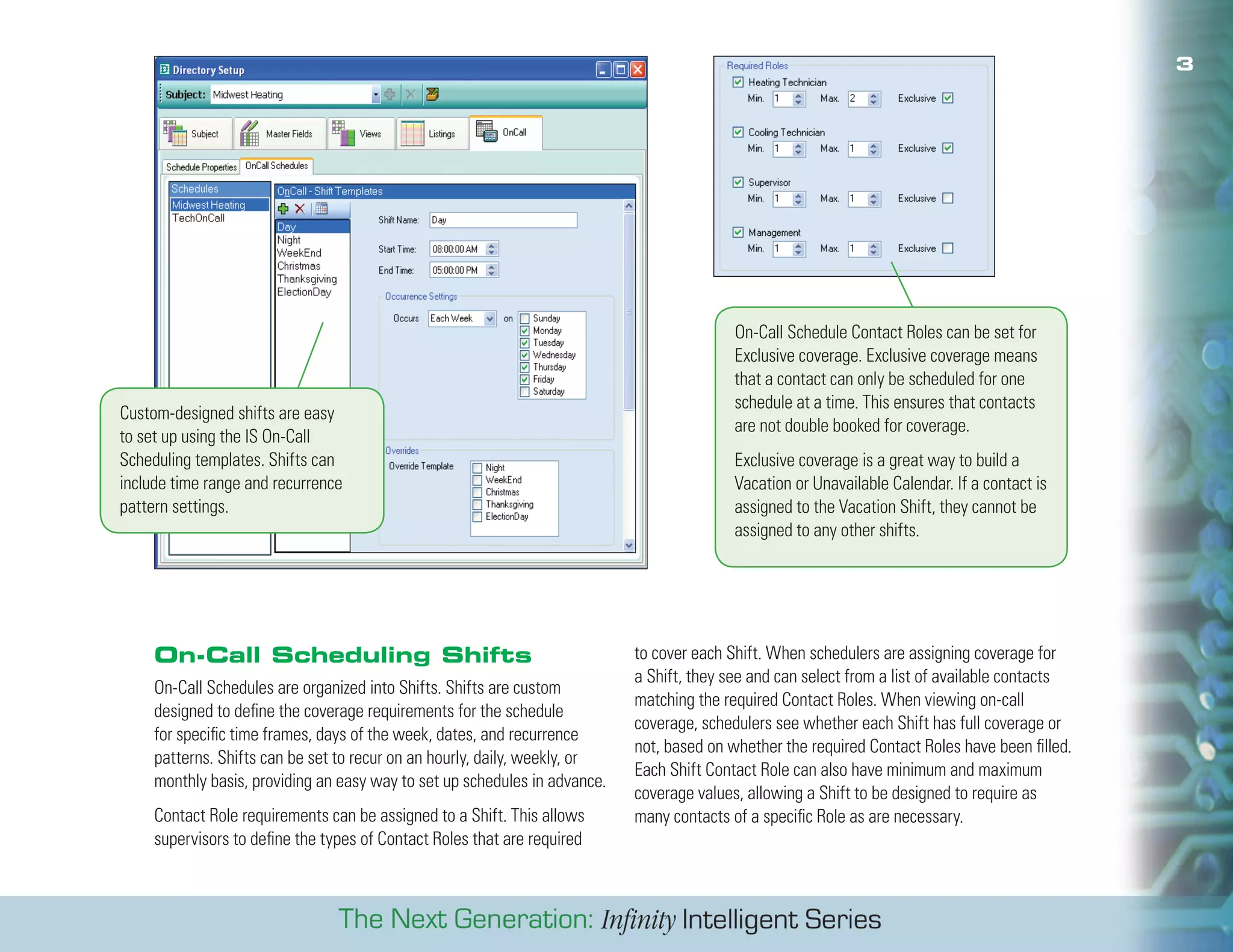
                                                                                           On-Call Schedule Contact Roles can be set for
                                                                                           Exclusive coverage. Exclusive coverage means
                                                                                           that a contact can only be scheduled for one
                                                                                           schedule at a time. This ensures that contacts
Custom-designed shifts are easy
                                                                                           are not double booked for coverage.
to set up using the IS On-Call
Scheduling templates. Shifts can                                                           Exclusive coverage is a great way to build a
include time range and recurrence                                                          Vacation or Unavailable Calendar. If a contact is
pattern settings.                                                                          assigned to the Vacation Shift, they cannot be
                                                                                           assigned to any other shifts.


     On-Call Scheduling Shifts                                              to cover each Shift. When schedulers are assigning coverage for
                                                                            a Shift, they see and can select from a list of available contacts
     On-Call Schedules are organized into Shifts. Shifts are custom
                                                                            matching the required Contact Roles. When viewing on-call
     designed to define the coverage requirements for the schedule
                                                                            coverage, schedulers see whether each Shift has full coverage or
     for specific time frames, days of the week, dates, and recurrence
                                                                            not, based on whether the required Contact Roles have been filled.
     patterns. Shifts can be set to recur on an hourly, daily, weekly, or
                                                                            Each Shift Contact Role can also have minimum and maximum
     monthly basis, providing an easy way to set up schedules in advance.
                                                                            coverage values, allowing a Shift to be designed to require as
     Contact Role requirements can be assigned to a Shift. This allows      many contacts of a specific Role as are necessary.
     supervisors to define the types of Contact Roles that are required
Features:                                          Benefits:
Integral Component of Intelligent Directory*       Use Intelligent Directory Listings as contacts for
                                                   On-Call Scheduling

Single Point of Access For Directory and On-Call   One point of entry and access for all
Information                                        information related to Intelligent Directories and
                                                   On-Call Schedules

Unlimited Number of On-Call Schedules Per          Enter a Directory Contact into one Directory
Directory Subject                                  Subject and use it for many On-Call Schedules

Unlimited Number of On-Call Schedule               Use Contact Roles to ensure all coverage
Assignments                                        requirements are filled for each shift

On-Call Shifts With Contact Role Requirements      Enter schedules months in advance using the
and Recurrences                                    unlimited number of assignments

On-Call Coverage Temporary Overrides               Handle temporary changes to schedule
                                                   coverage with overrides

Flexible Schedule Views Using Calendar Tools       View schedules with user friendly calendar
                                                   views

On-Call Shift Minimum, Maximum, Exclusive          Ensure proper number of resources are
Settings                                           covering. Exclusive settings can be used for
                                                   vacation calendars.

                                * esefeaturesareavailableforanadditionalcharge.
                                 Th
                                 Somefeaturesmayalsorequireadditionalhardwareorsoftware.


                                                                                                  01.08

AMTELCO Infinity IS On Call Scheduling Directory

  • 1.
    IS Directory On-CallScheduling Override allows operators to quickly change on-call assignments temporarily. Each Intelligent Directory can have an unlimited number of On-Call Schedules. Operator, supervisor, and Web users can select to view on-call coverage information using a List View, a Daily Calendar View, a Weekly Calendar View, or a Monthly Calendar View. Infinity Intelligent Directory On-Call Scheduling* provides directory listing information, allowing operators to easily a powerful and flexible tool to assign schedule coverage, move between viewing on-call information and directory view schedule coverage, dispatch messages to schedule information. The new directory window can be presented contacts, and extend schedule information to clients via automatically when an operator answers a call or can Web access (requires a Web On-Call Scheduling license). be brought up on demand. Operators can choose to view information from the listing viewpoint or the on-call Ease of Operator Use viewpoint. Intelligent Directory On-Call Scheduling presents on-call information to operators in the same window as
  • 2.
    2 Operators viewing an Intelligent Directory Listing can see the detailed information about the Listing, including the Contact Description, Contact Details, available Contact Methods and any On-Call assignments. Each Intelligent Directory Listing can have a Status Schedule. Operators can temporarily override the Status Schedule at any time. On-Call Scheduling Contacts* Contacts with Roles matching the requirements for an On-Call Shift are then available to be scheduled for the Shift. Infinity Intelligent Directory Listings can be defined as On-Call Schedule Contacts. Each On-Call Schedule Contact can be Operators viewing an On-Call Schedule can see the coverage assigned to specific Contact Roles to cover the scheduling assignments for each On-Call Shift. Coverage assignments requirements for On-Call Schedules. The Contact Roles display the Contacts covering the Shift and the Roles they define the type of resource the contact is, such as a nurse, are filling. Operators can select to view details about the a pediatric resident, a trauma physician, an IT network Contacts, including the Contact Listings, Contact Details, engineer, an installation technician or any custom- and Contact Methods. designed Role.
  • 3.
    3 On-Call Schedule Contact Roles can be set for Exclusive coverage. Exclusive coverage means that a contact can only be scheduled for one schedule at a time. This ensures that contacts Custom-designed shifts are easy are not double booked for coverage. to set up using the IS On-Call Scheduling templates. Shifts can Exclusive coverage is a great way to build a include time range and recurrence Vacation or Unavailable Calendar. If a contact is pattern settings. assigned to the Vacation Shift, they cannot be assigned to any other shifts. On-Call Scheduling Shifts to cover each Shift. When schedulers are assigning coverage for a Shift, they see and can select from a list of available contacts On-Call Schedules are organized into Shifts. Shifts are custom matching the required Contact Roles. When viewing on-call designed to define the coverage requirements for the schedule coverage, schedulers see whether each Shift has full coverage or for specific time frames, days of the week, dates, and recurrence not, based on whether the required Contact Roles have been filled. patterns. Shifts can be set to recur on an hourly, daily, weekly, or Each Shift Contact Role can also have minimum and maximum monthly basis, providing an easy way to set up schedules in advance. coverage values, allowing a Shift to be designed to require as Contact Role requirements can be assigned to a Shift. This allows many contacts of a specific Role as are necessary. supervisors to define the types of Contact Roles that are required
  • 4.
    Features: Benefits: Integral Component of Intelligent Directory* Use Intelligent Directory Listings as contacts for On-Call Scheduling Single Point of Access For Directory and On-Call One point of entry and access for all Information information related to Intelligent Directories and On-Call Schedules Unlimited Number of On-Call Schedules Per Enter a Directory Contact into one Directory Directory Subject Subject and use it for many On-Call Schedules Unlimited Number of On-Call Schedule Use Contact Roles to ensure all coverage Assignments requirements are filled for each shift On-Call Shifts With Contact Role Requirements Enter schedules months in advance using the and Recurrences unlimited number of assignments On-Call Coverage Temporary Overrides Handle temporary changes to schedule coverage with overrides Flexible Schedule Views Using Calendar Tools View schedules with user friendly calendar views On-Call Shift Minimum, Maximum, Exclusive Ensure proper number of resources are Settings covering. Exclusive settings can be used for vacation calendars. * esefeaturesareavailableforanadditionalcharge. Th Somefeaturesmayalsorequireadditionalhardwareorsoftware. 01.08