Copyright IBM 2015
MQ Light, Bluemix, and MQ
WebSphere Integration
User Group July 2015
Matt Whitehead
MQ/MQ Light Dev Team
© Copyright IBM 2015
Please Note:
• IBM’s statements regarding its plans, directions, and intent are subject to change or
withdrawal without notice at IBM’s sole discretion.
• Information regarding potential future products is intended to outline our general product direction
and it should not be relied on in making a purchasing decision.
• The information mentioned regarding potential future products is not a commitment, promise, or
legal obligation to deliver any material, code or functionality. Information about potential future
products may not be incorporated into any contract.
• The development, release, and timing of any future features or functionality described for our
products remains at our sole discretion.
Performance is based on measurements and projections using standard IBM benchmarks in a
controlled environment. The actual throughput or performance that any user will experience will
vary depending upon many factors, including considerations such as the amount of
multiprogramming in the user’s job stream, the I/O configuration, the storage configuration, and the
workload processed. Therefore, no assurance can be given that an individual user will achieve
results similar to those stated here.
© Copyright IBM 2015
Agenda
• An overview of MQ Light
• How MQ Light works in Bluemix
• Running MQ Light applications in your MQ environment
© Copyright IBM 2015
Agenda
• An overview of MQ Light
• How MQ Light works in Bluemix
• Running MQ Light applications in your MQ environment
© Copyright IBM 2015
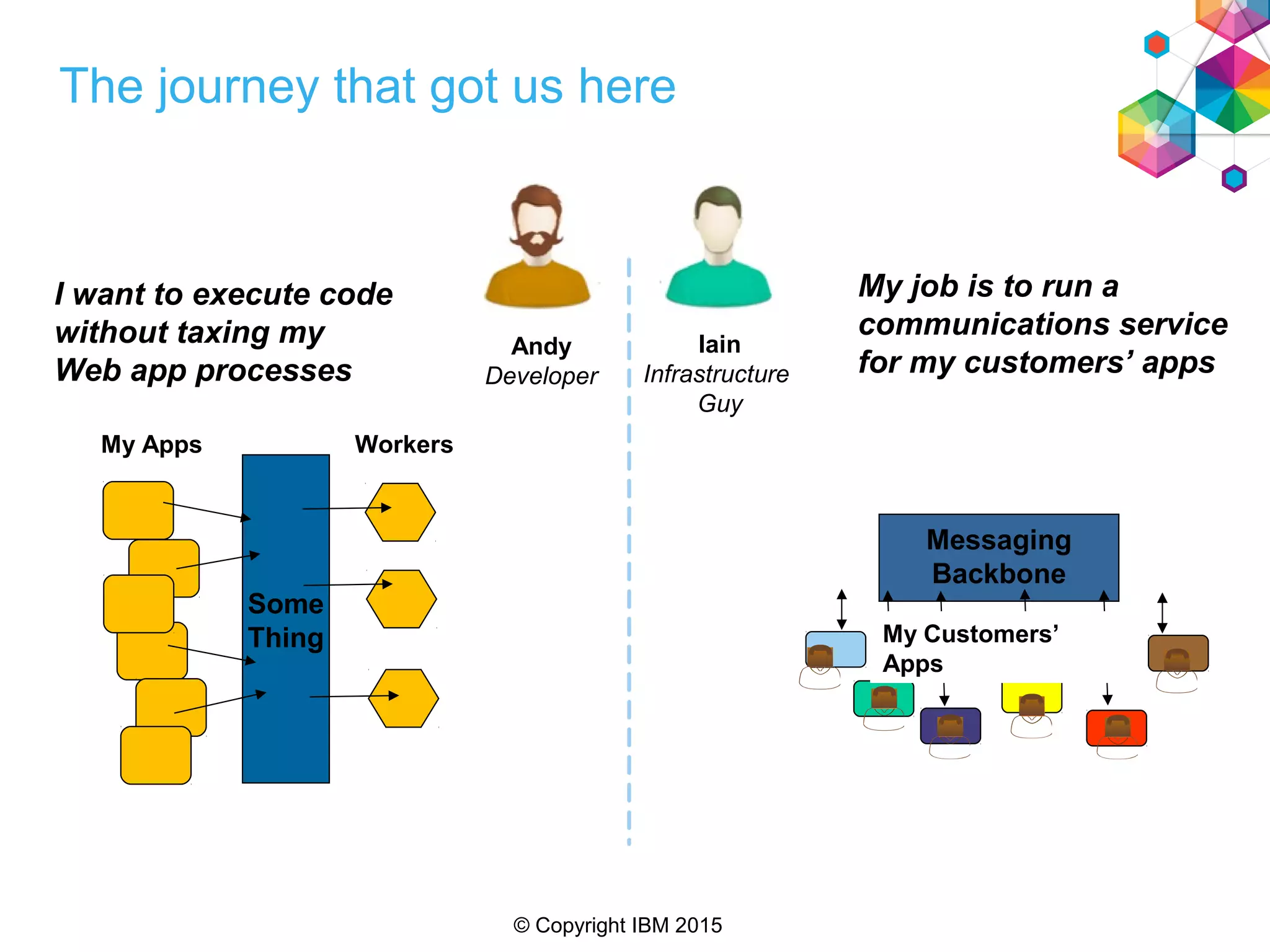
The journey that got us here
Andy
Developer
Iain
Infrastructure
Guy
I want to execute code
without taxing my
Web app processes
My job is to run a
communications service
for my customers’ apps
Some
Thing
My Apps Workers
Messaging
Backbone
My Customers’
Apps
© Copyright IBM 2015
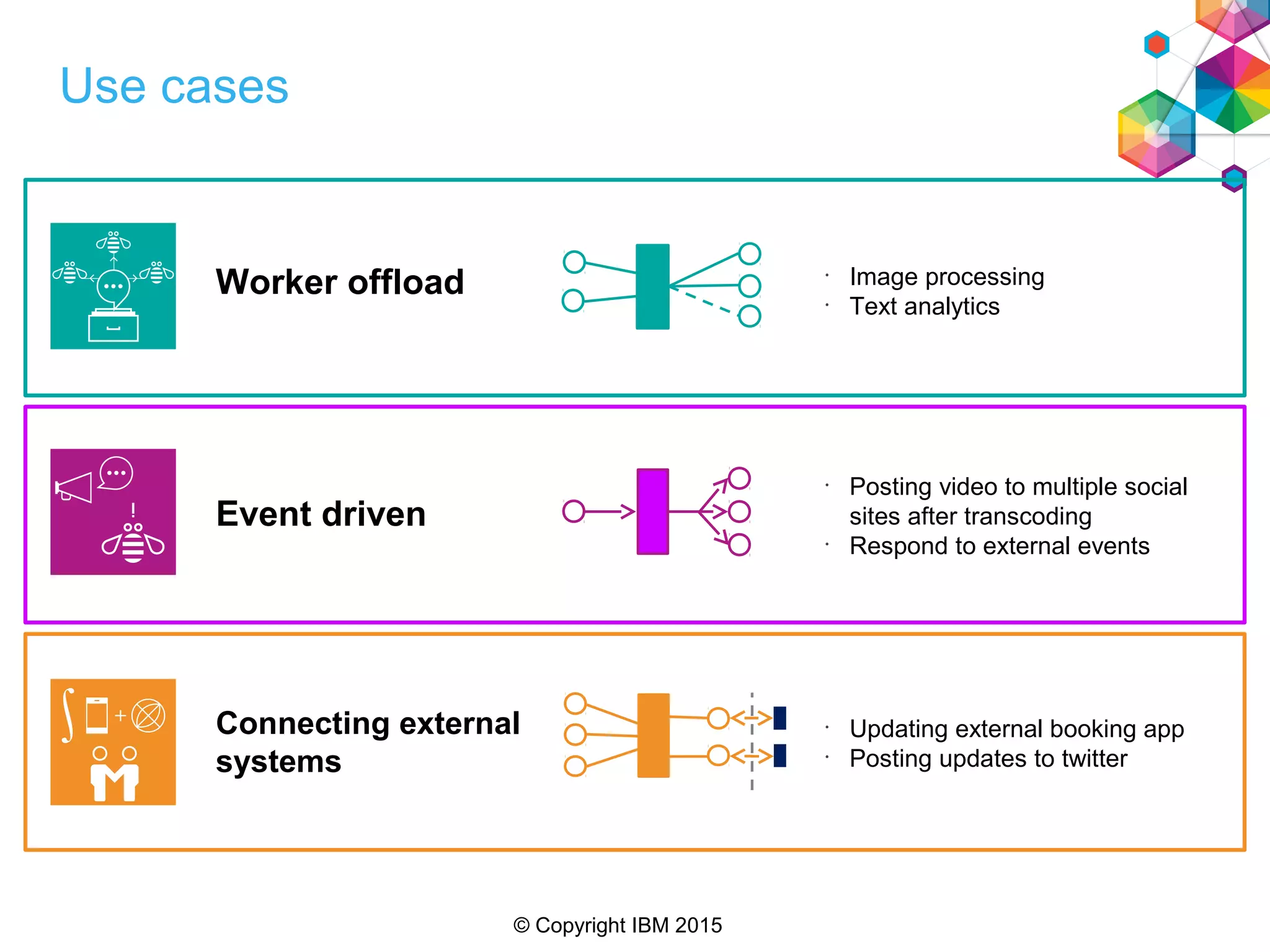
Use cases
Connecting external
systems
Event driven
Worker offload
•
Posting video to multiple social
sites after transcoding
•
Respond to external events
•
Updating external booking app
•
Posting updates to twitter
•
Image processing
•
Text analytics
© Copyright IBM 2015
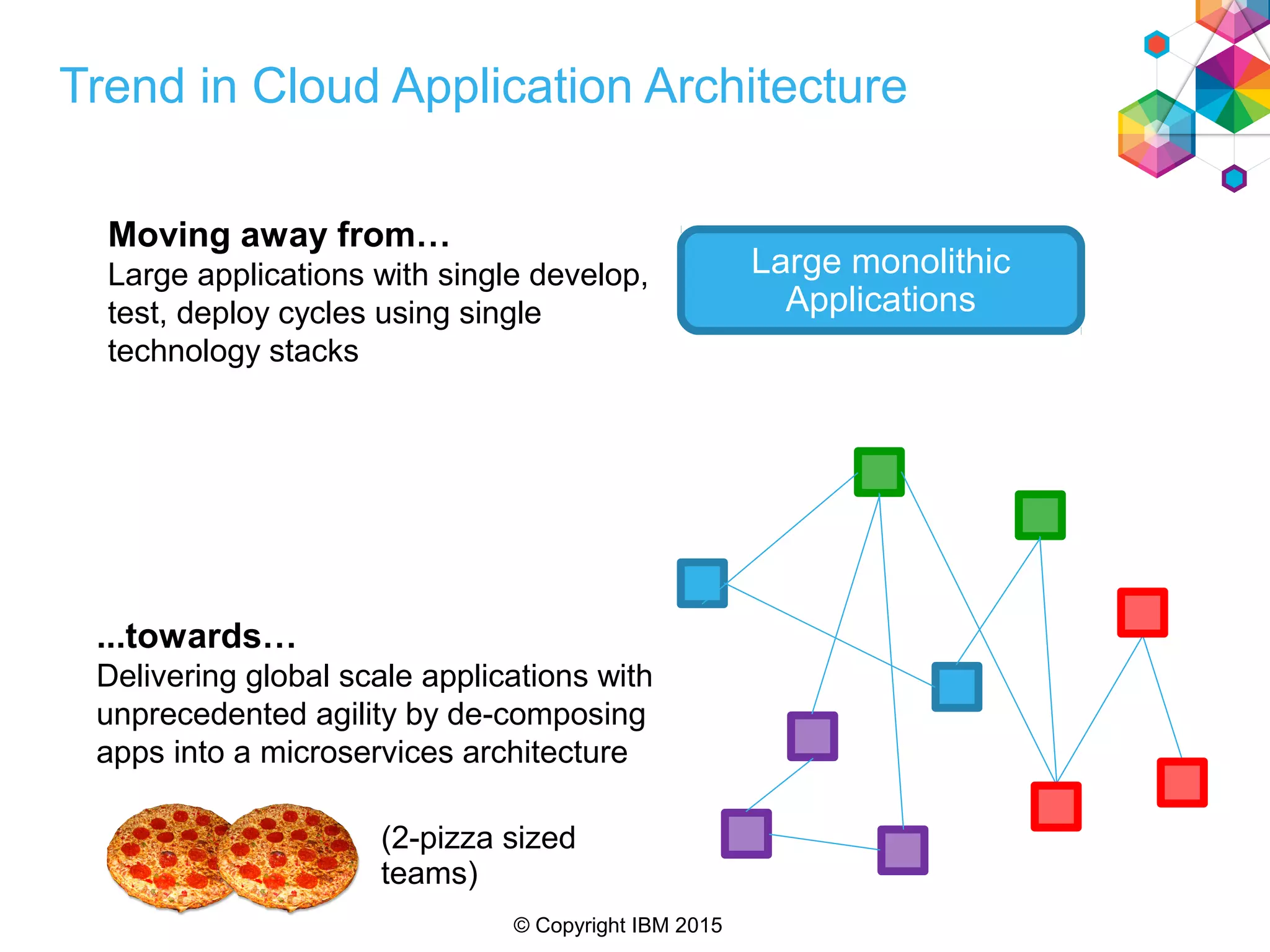
Trend in Cloud Application Architecture
...towards…
Delivering global scale applications with
unprecedented agility by de-composing
apps into a microservices architecture
Large monolithic
Applications
Moving away from…
Large applications with single develop,
test, deploy cycles using single
technology stacks
(2-pizza sized
teams)
© Copyright IBM 2015
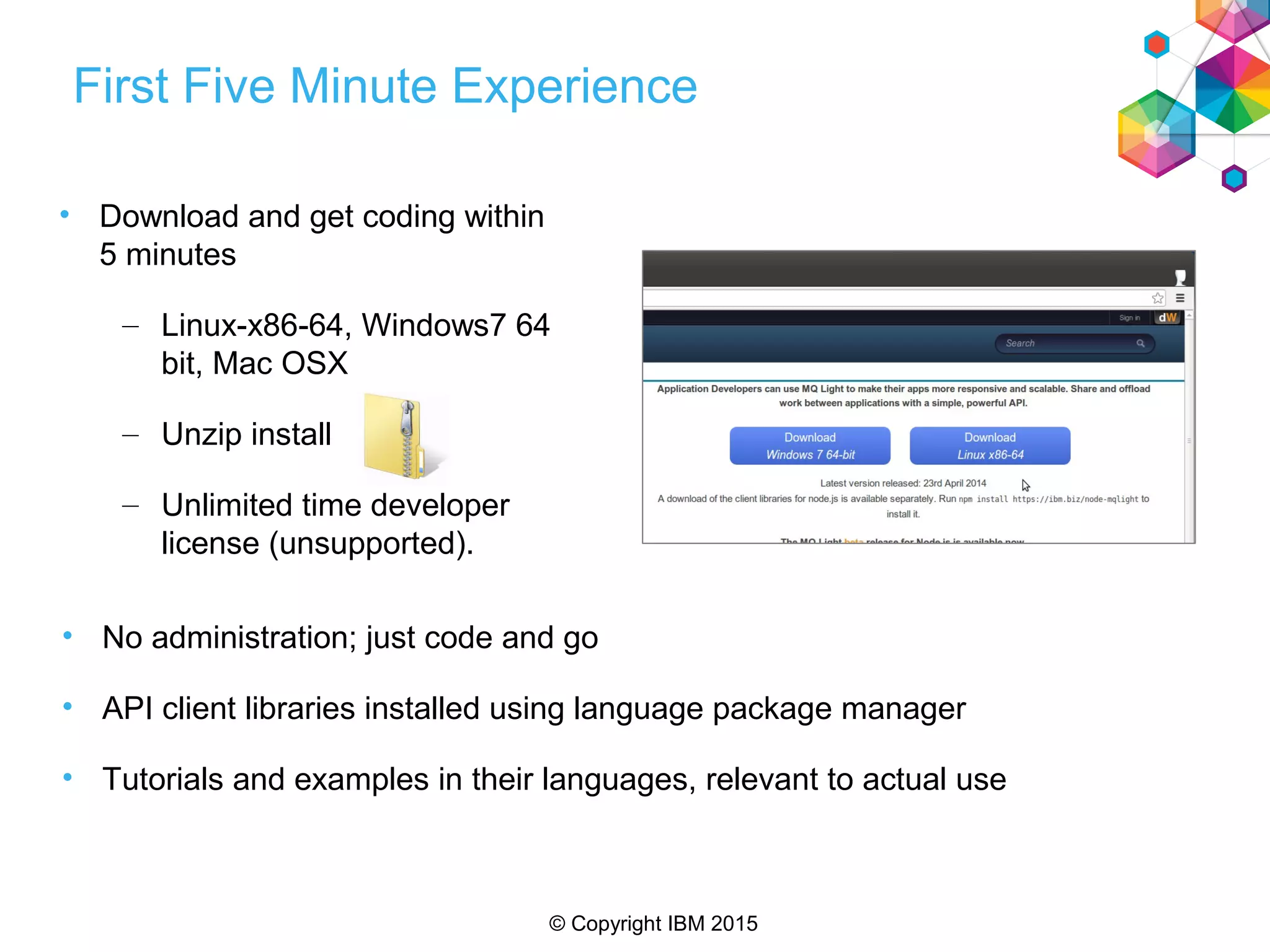
First Five Minute Experience
• Download and get coding within
5 minutes
– Linux-x86-64, Windows7 64
bit, Mac OSX
– Unzip install
– Unlimited time developer
license (unsupported).
• No administration; just code and go
• API client libraries installed using language package manager
• Tutorials and examples in their languages, relevant to actual use
© Copyright IBM 2015
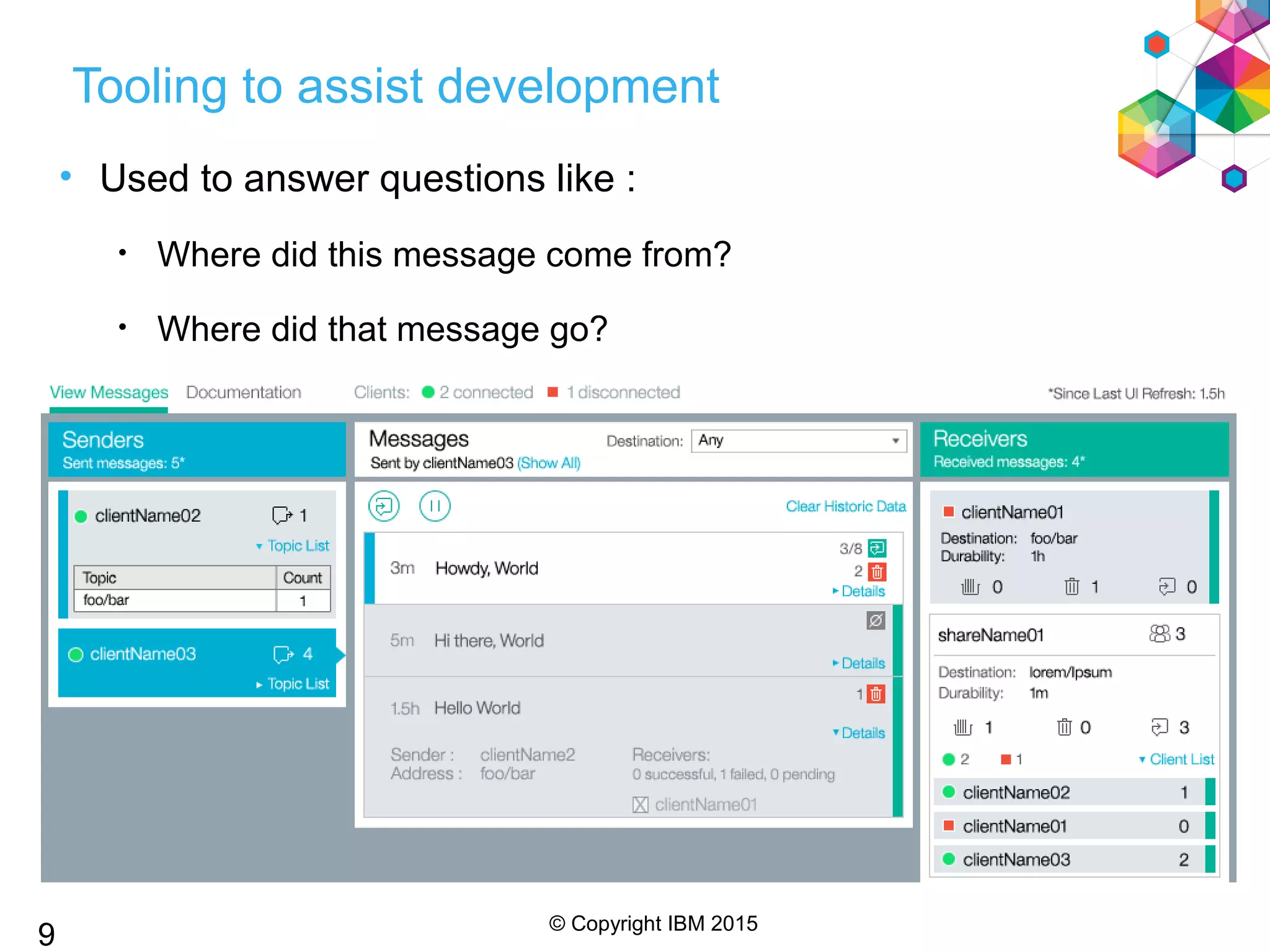
Tooling to assist development
• Used to answer questions like :
• Where did this message come from?
• Where did that message go?
• What messages has my app consumed?
9
© Copyright IBM 2015
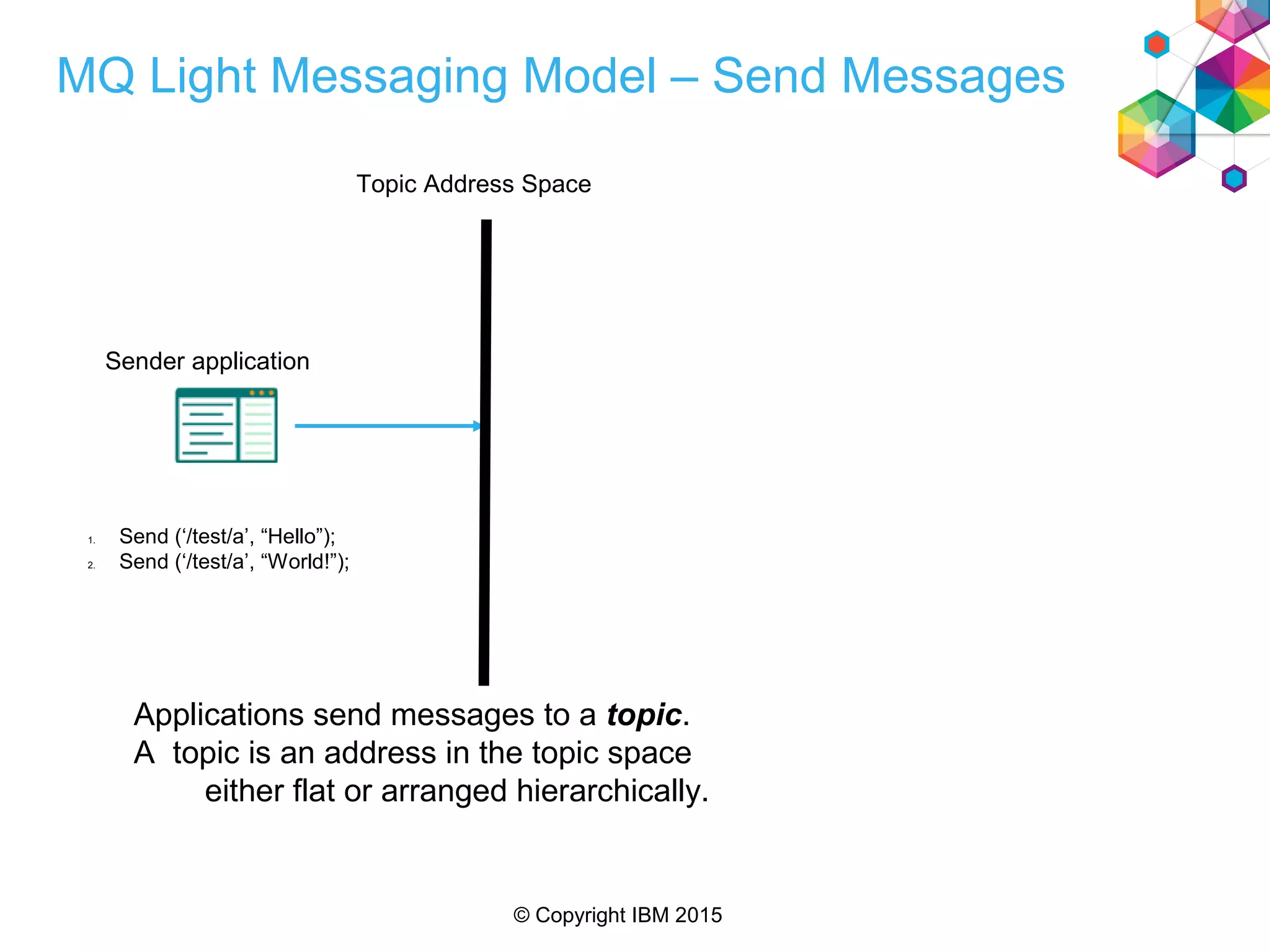
MQ Light Messaging Model – Send Messages
Applications send messages to a topic.
A topic is an address in the topic space
either flat or arranged hierarchically.
1. Send (‘/test/a’, “Hello”);
2. Send (‘/test/a’, “World!”);
Topic Address Space
Sender application
© Copyright IBM 2015
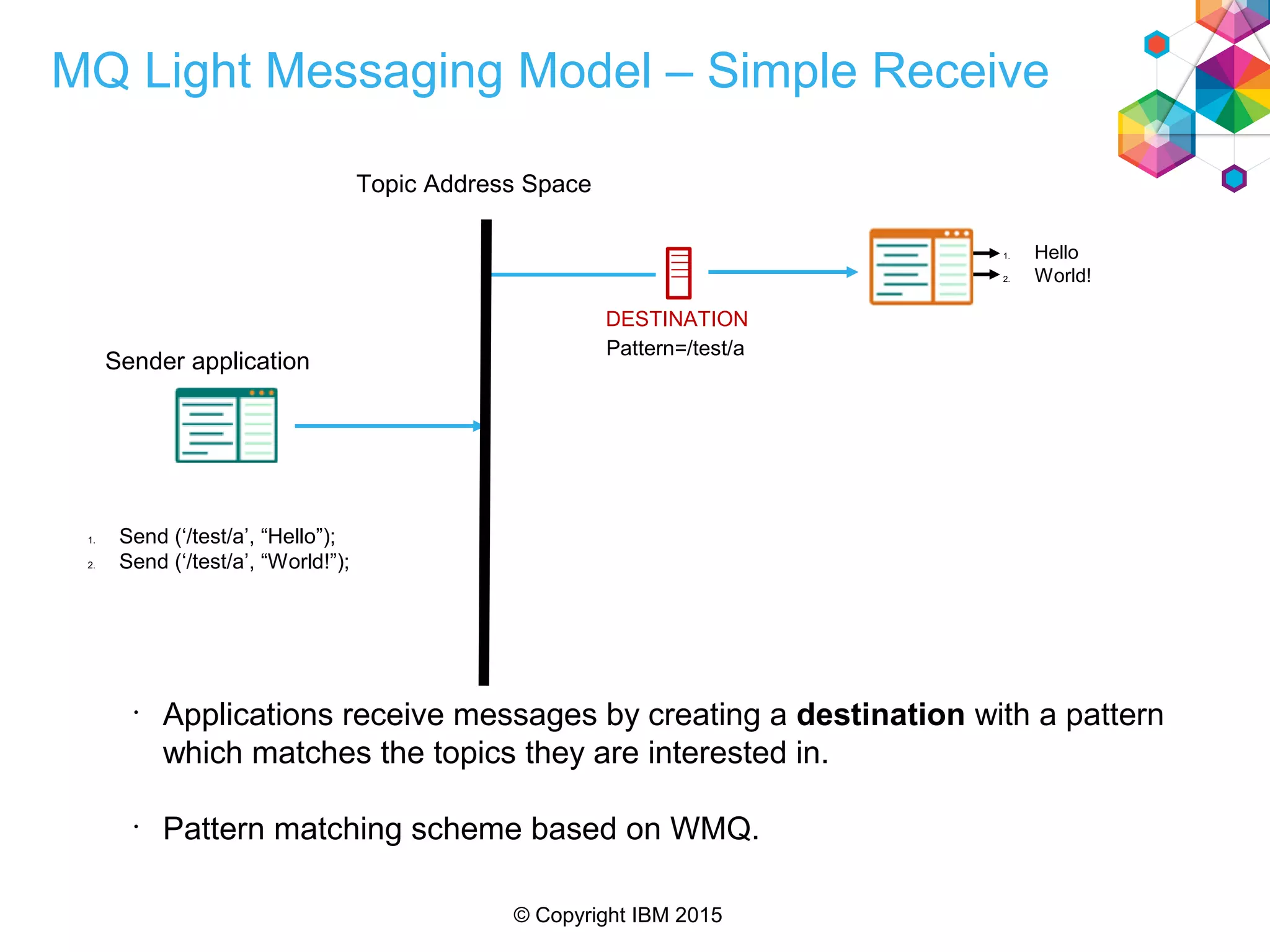
MQ Light Messaging Model – Simple Receive
•
Applications receive messages by creating a destination with a pattern
which matches the topics they are interested in.
•
Pattern matching scheme based on WMQ.
1. Send (‘/test/a’, “Hello”);
2. Send (‘/test/a’, “World!”);
1. Hello
2. World!
Topic Address Space
Sender application
DESTINATION
Pattern=/test/a
© Copyright IBM 2015
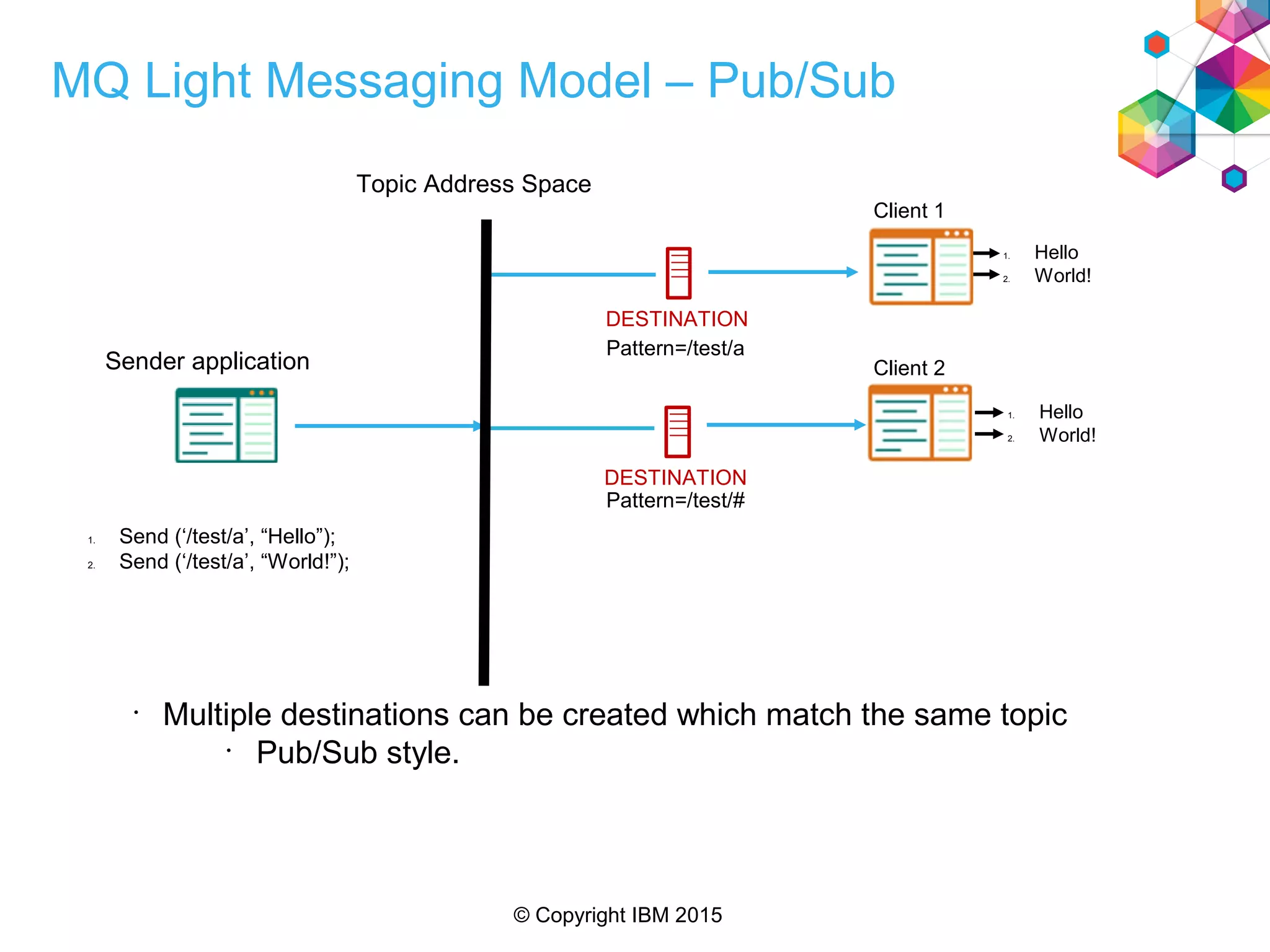
MQ Light Messaging Model – Pub/Sub
•
Multiple destinations can be created which match the same topic
•
Pub/Sub style.
DESTINATION
1. Send (‘/test/a’, “Hello”);
2. Send (‘/test/a’, “World!”);
1. Hello
2. World!
1. Hello
2. World!
Topic Address Space
Sender application
DESTINATION
Pattern=/test/a
Pattern=/test/#
Client 1
Client 2
© Copyright IBM 2015
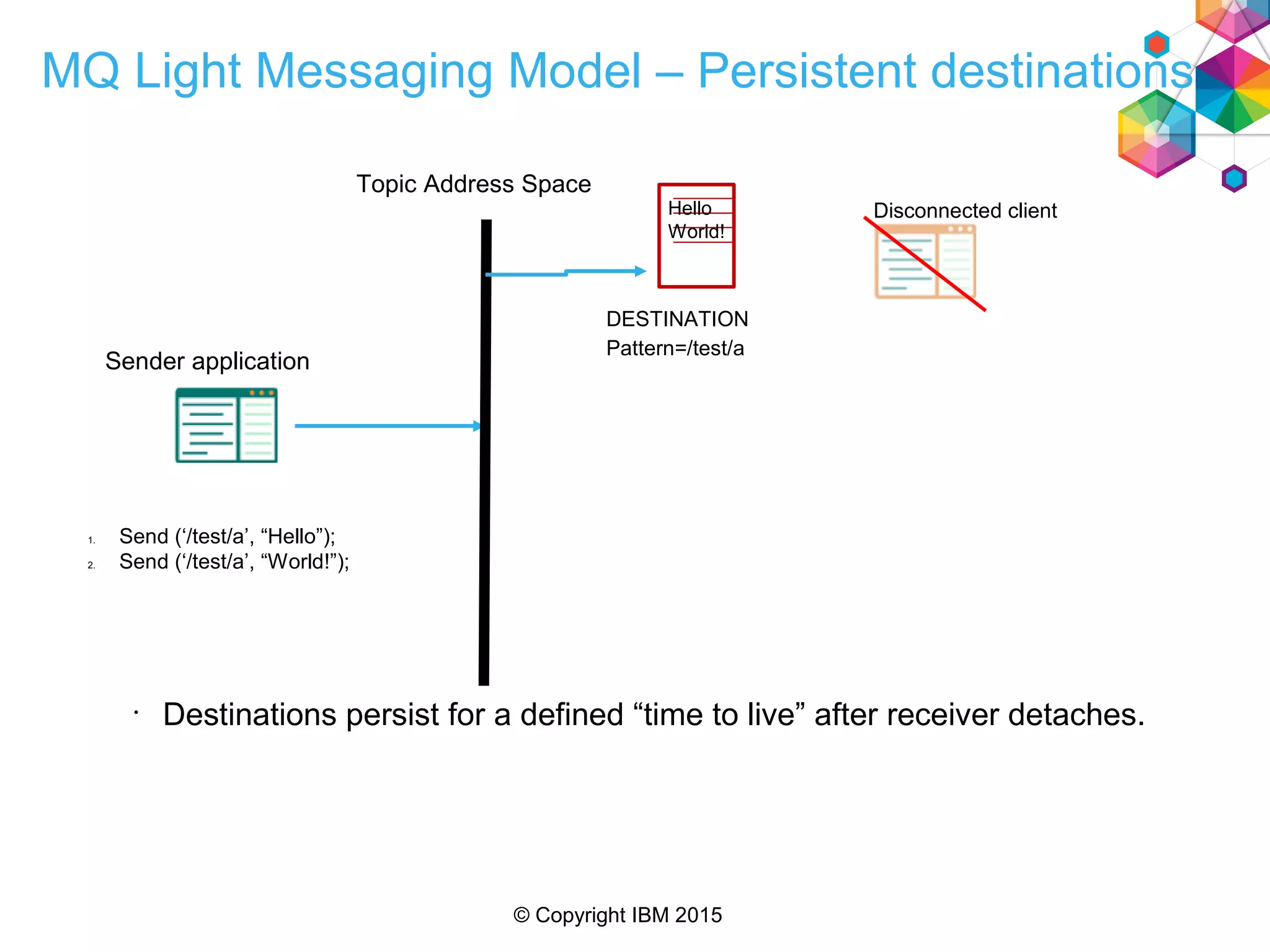
MQ Light Messaging Model – Persistent destinations
•
Destinations persist for a defined “time to live” after receiver detaches.
1. Send (‘/test/a’, “Hello”);
2. Send (‘/test/a’, “World!”);
Topic Address Space
Sender application
Hello
World!
DESTINATION
Pattern=/test/a
Disconnected client
© Copyright IBM 2015
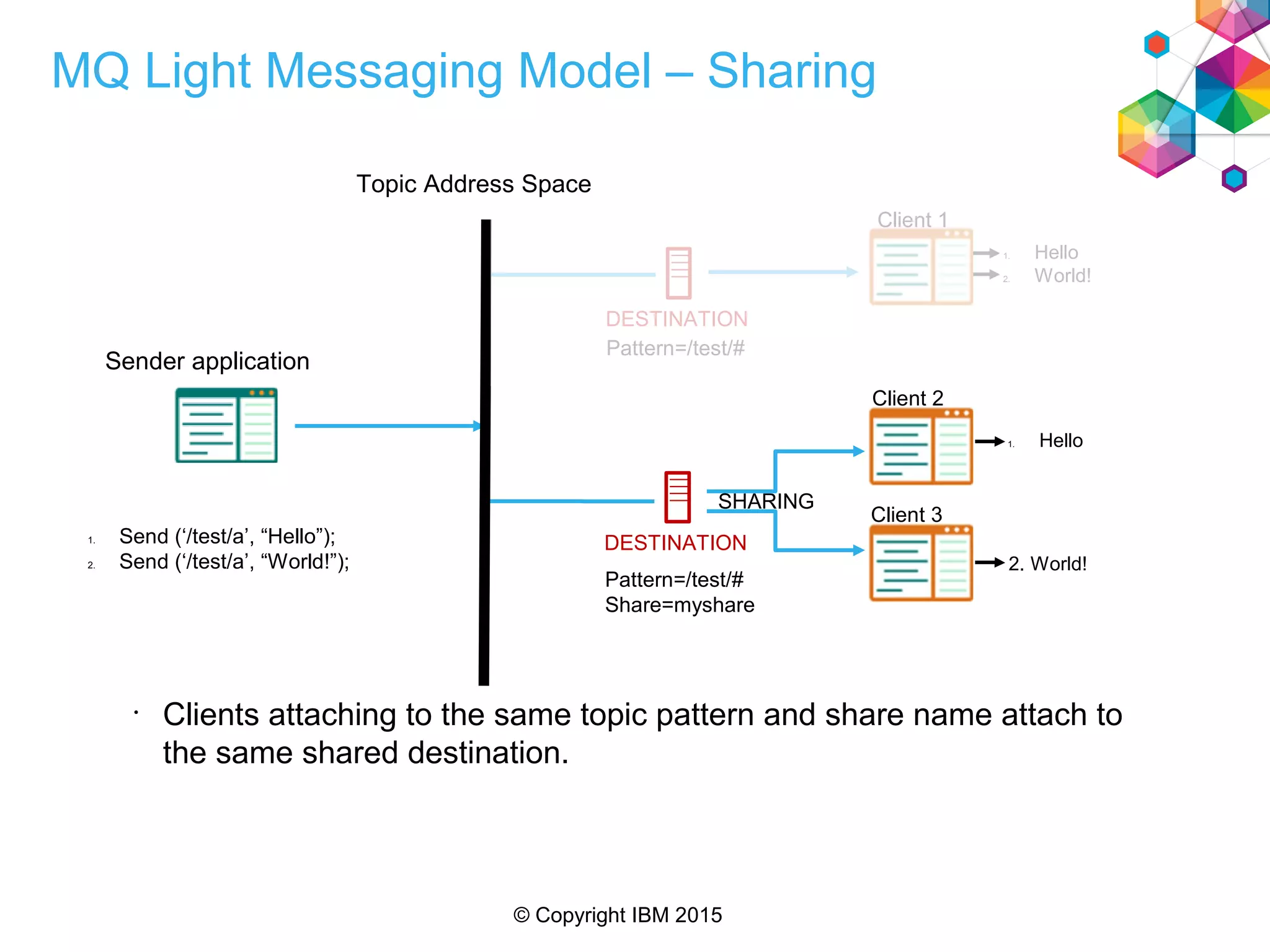
MQ Light Messaging Model – Sharing
•
Clients attaching to the same topic pattern and share name attach to
the same shared destination.
DESTINATION1. Send (‘/test/a’, “Hello”);
2. Send (‘/test/a’, “World!”);
1. Hello
2. World!
1. Hello
2. World!
SHARING
Topic Address Space
Sender application
DESTINATION
Pattern=/test/#
Pattern=/test/#
Share=myshare
Client 1
Client 2
Client 3
© Copyright IBM 2015
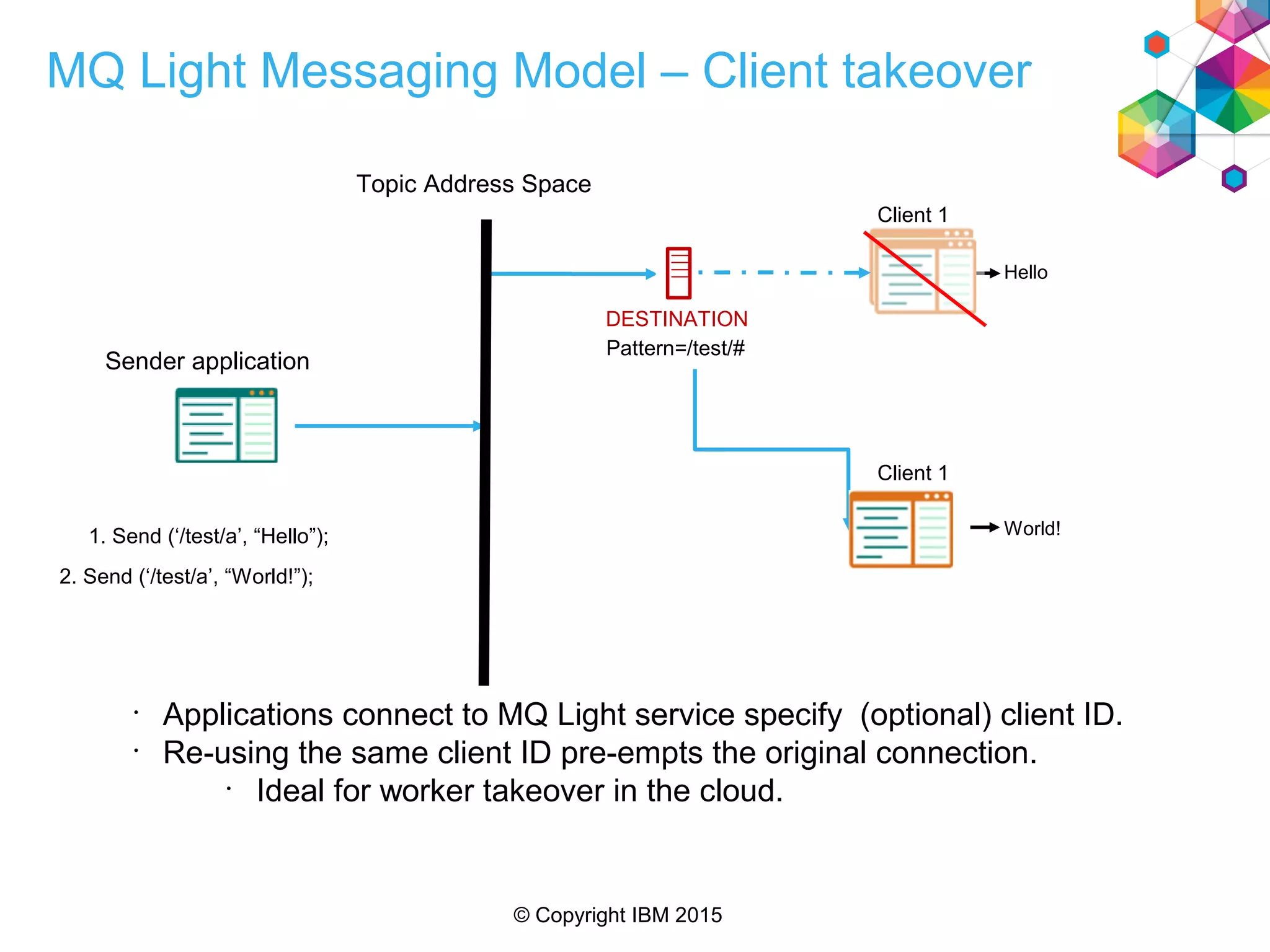
MQ Light Messaging Model – Client takeover
1. Send (‘/test/a’, “Hello”);
Hello
Topic Address Space
Sender application
DESTINATION
Pattern=/test/#
Client 1
World!
Client 1
2. Send (‘/test/a’, “World!”);
•
Applications connect to MQ Light service specify (optional) client ID.
•
Re-using the same client ID pre-empts the original connection.
•
Ideal for worker takeover in the cloud.
© Copyright IBM 2015
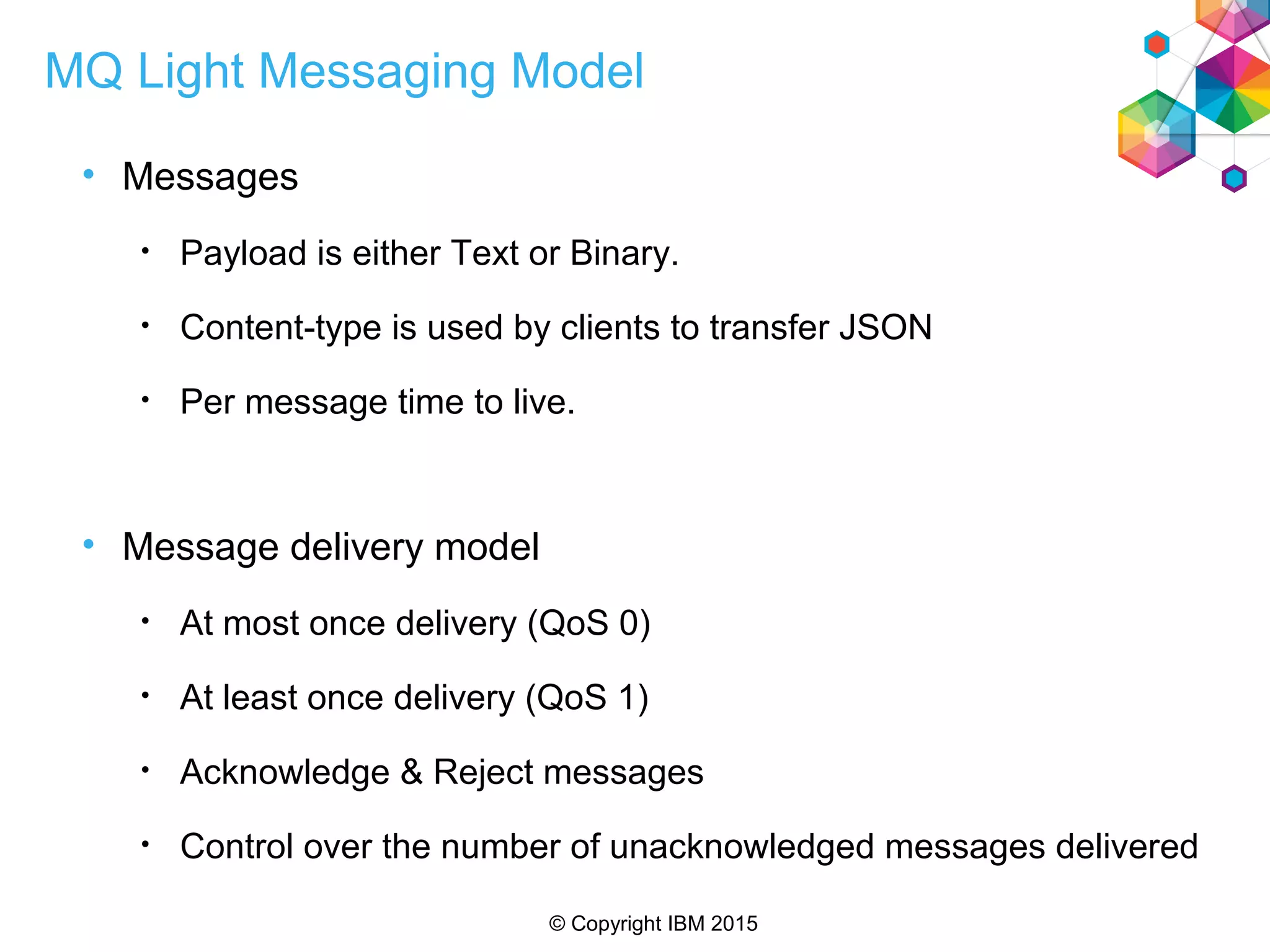
MQ Light Messaging Model
• Messages
• Payload is either Text or Binary.
• Content-type is used by clients to transfer JSON
• Per message time to live.
• Message delivery model
• At most once delivery (QoS 0)
• At least once delivery (QoS 1)
• Acknowledge & Reject messages
• Control over the number of unacknowledged messages delivered
© Copyright IBM 2015
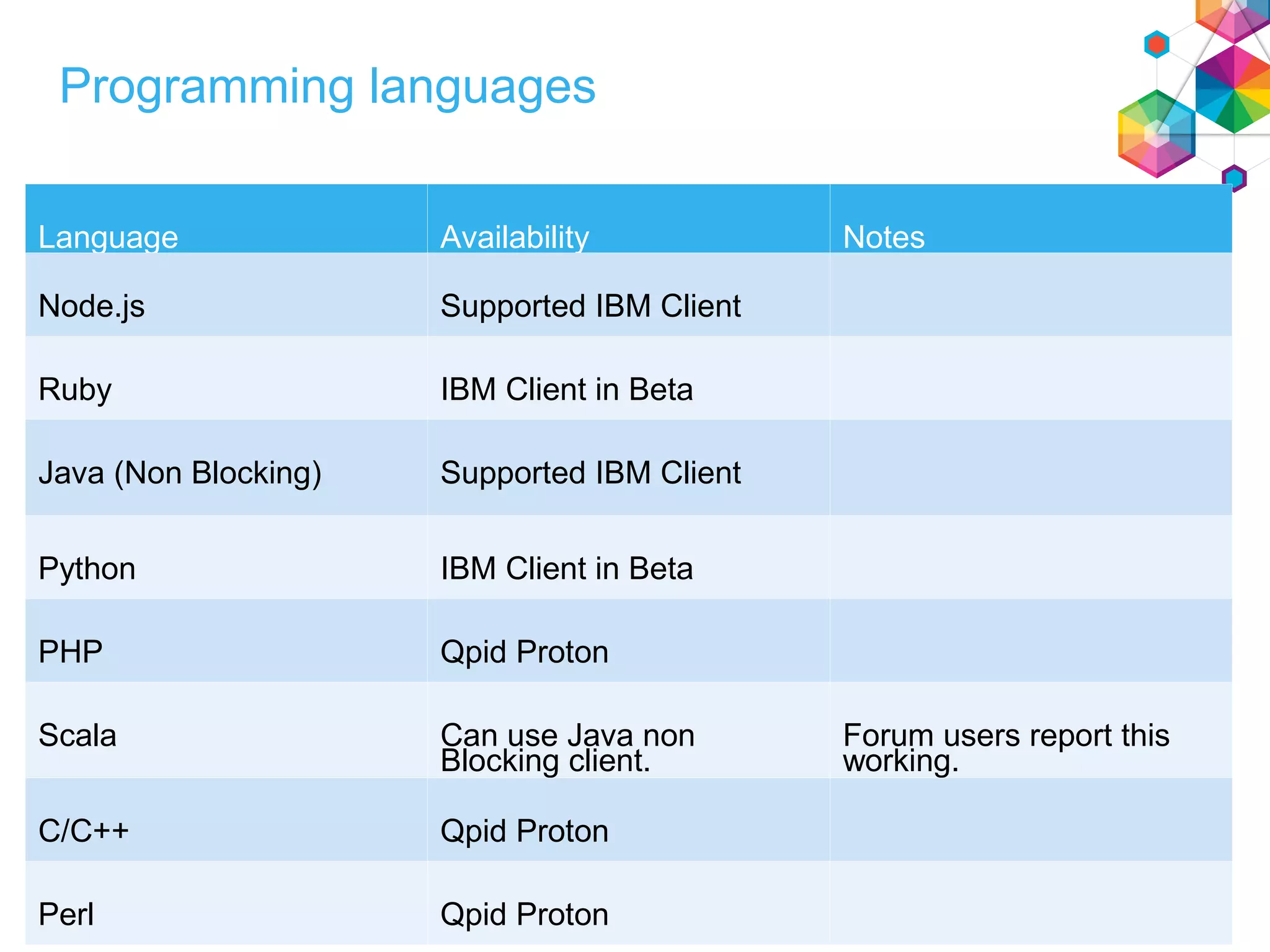
Programming languages
Language Availability Notes
Node.js Supported IBM Client
Ruby IBM Client in Beta
Java (Non Blocking) Supported IBM Client
Python IBM Client in Beta
PHP Qpid Proton
Scala Can use Java non
Blocking client.
Forum users report this
working.
C/C++ Qpid Proton
Perl Qpid Proton
© Copyright IBM 2015
Deployment Options
MQ Light Service
for Bluemix
IBM MQ
[open Beta]
MQ Light
© Copyright IBM 2015
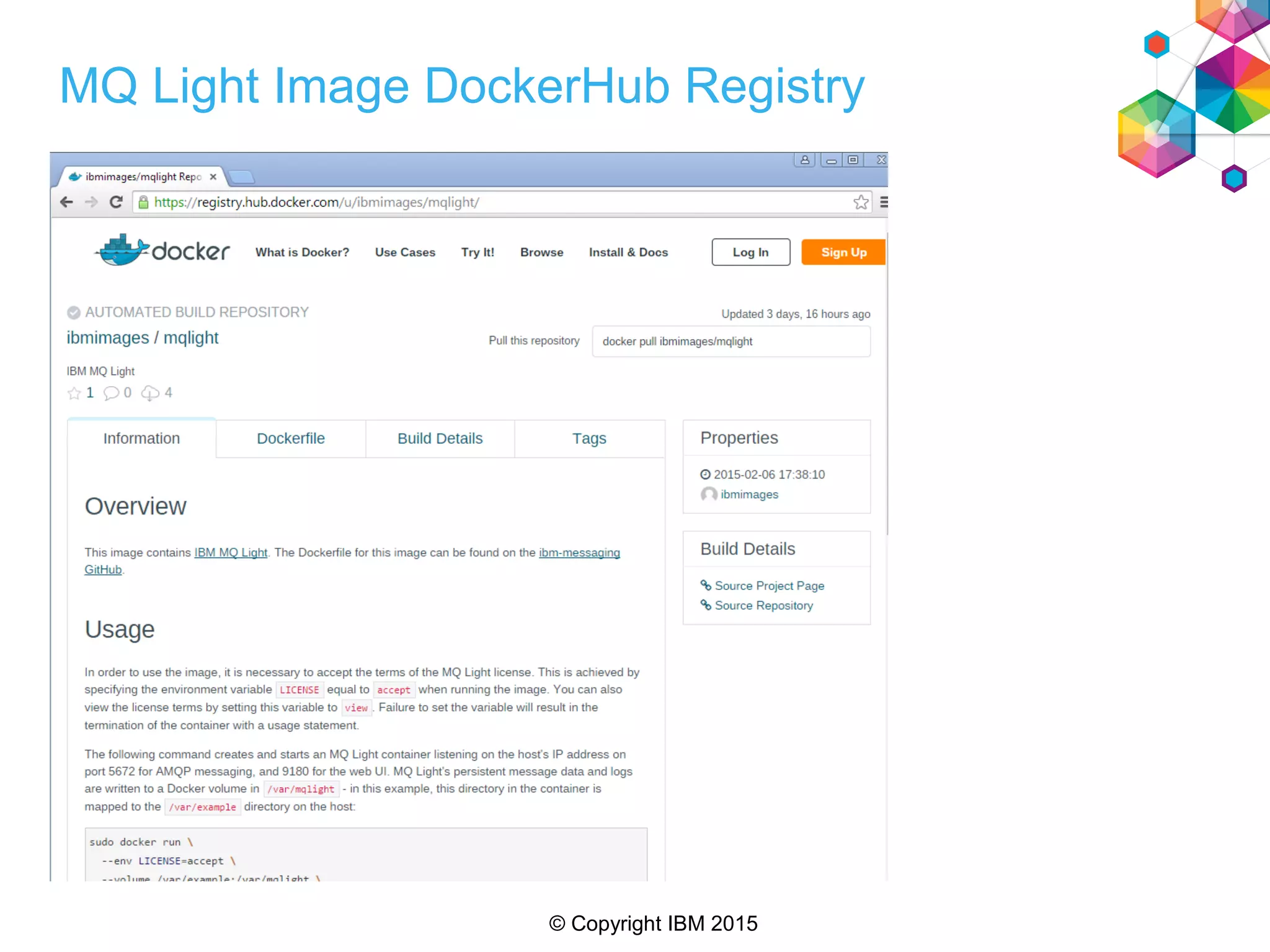
MQ Light Image DockerHub Registry
© Copyright IBM 2015
Agenda
• An overview of MQ Light
• How MQ Light works in Bluemix
• Running MQ Light applications in your MQ environment
© Copyright IBM 2015
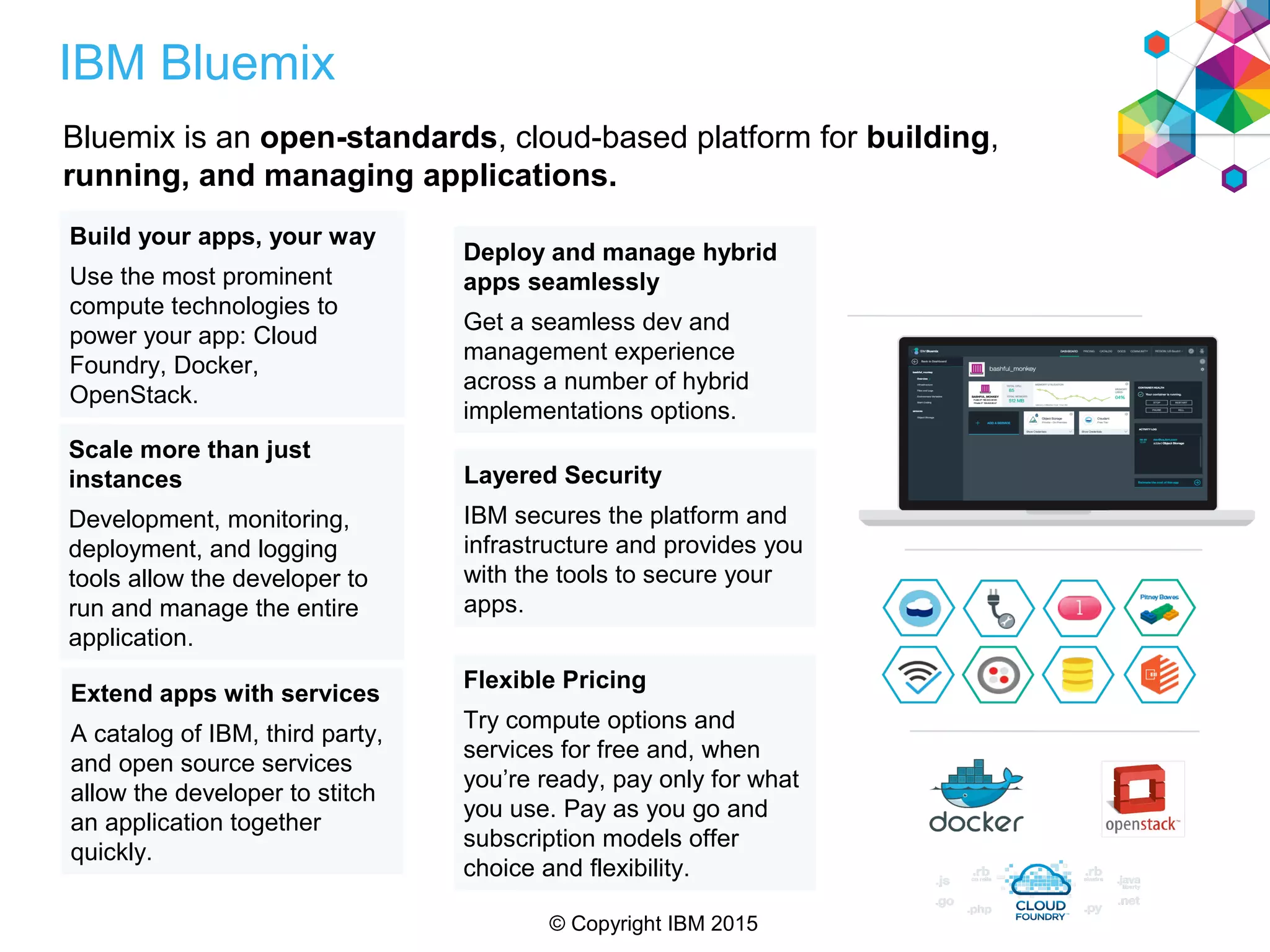
IBM Bluemix
Bluemix is an open-standards, cloud-based platform for building,
running, and managing applications.
Build your apps, your way
Use the most prominent
compute technologies to
power your app: Cloud
Foundry, Docker,
OpenStack.
Extend apps with services
A catalog of IBM, third party,
and open source services
allow the developer to stitch
an application together
quickly.
Scale more than just
instances
Development, monitoring,
deployment, and logging
tools allow the developer to
run and manage the entire
application.
Layered Security
IBM secures the platform and
infrastructure and provides you
with the tools to secure your
apps.
Deploy and manage hybrid
apps seamlessly
Get a seamless dev and
management experience
across a number of hybrid
implementations options.
Flexible Pricing
Try compute options and
services for free and, when
you’re ready, pay only for what
you use. Pay as you go and
subscription models offer
choice and flexibility.
© Copyright IBM 2015
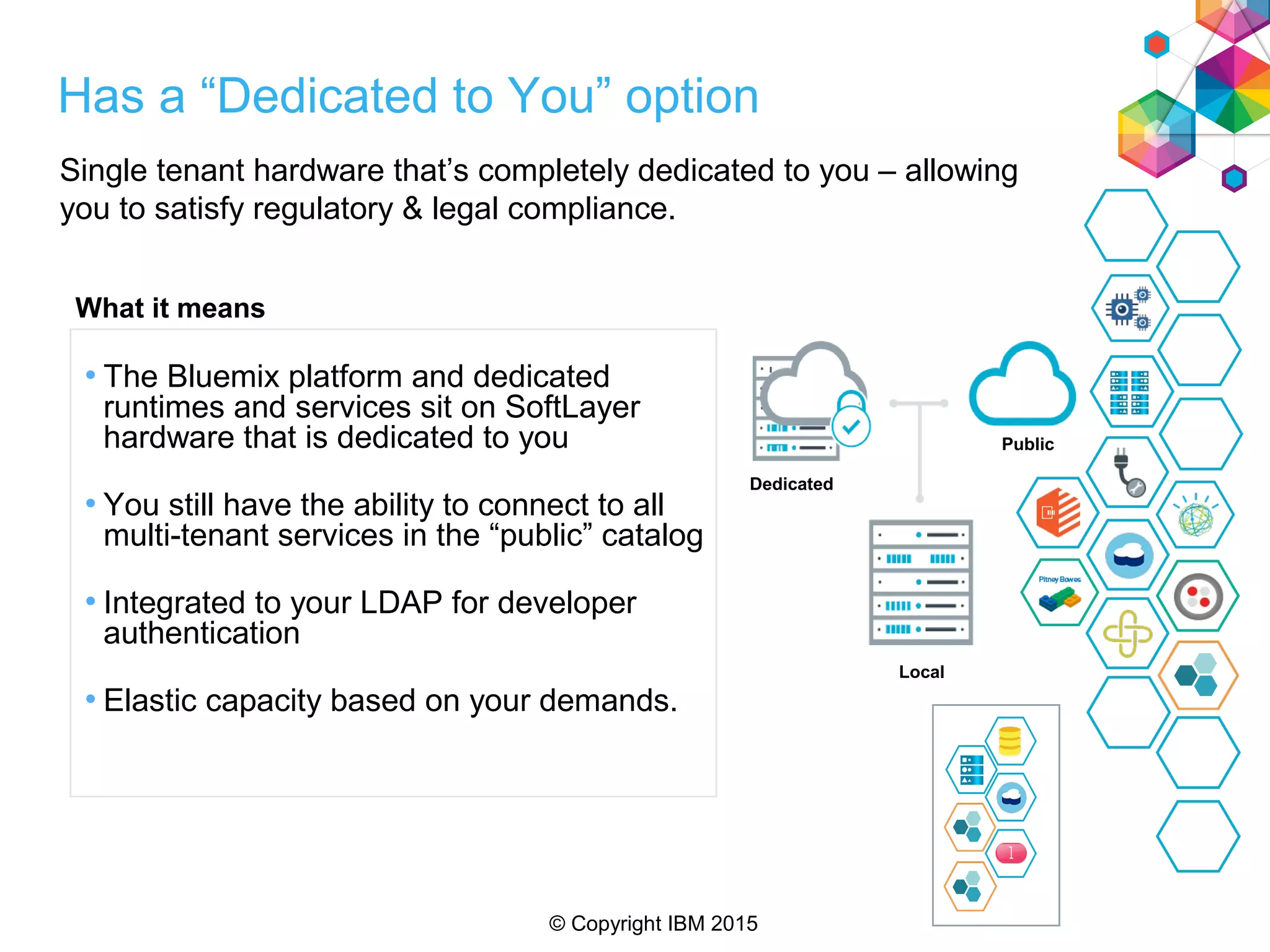
Single tenant hardware that’s completely dedicated to you – allowing
you to satisfy regulatory & legal compliance.
Dedicated
Public
Local
• The Bluemix platform and dedicated
runtimes and services sit on SoftLayer
hardware that is dedicated to you
• You still have the ability to connect to all
multi-tenant services in the “public” catalog
• Integrated to your LDAP for developer
authentication
• Elastic capacity based on your demands.
What it means
Has a “Dedicated to You” option
© Copyright IBM 2015
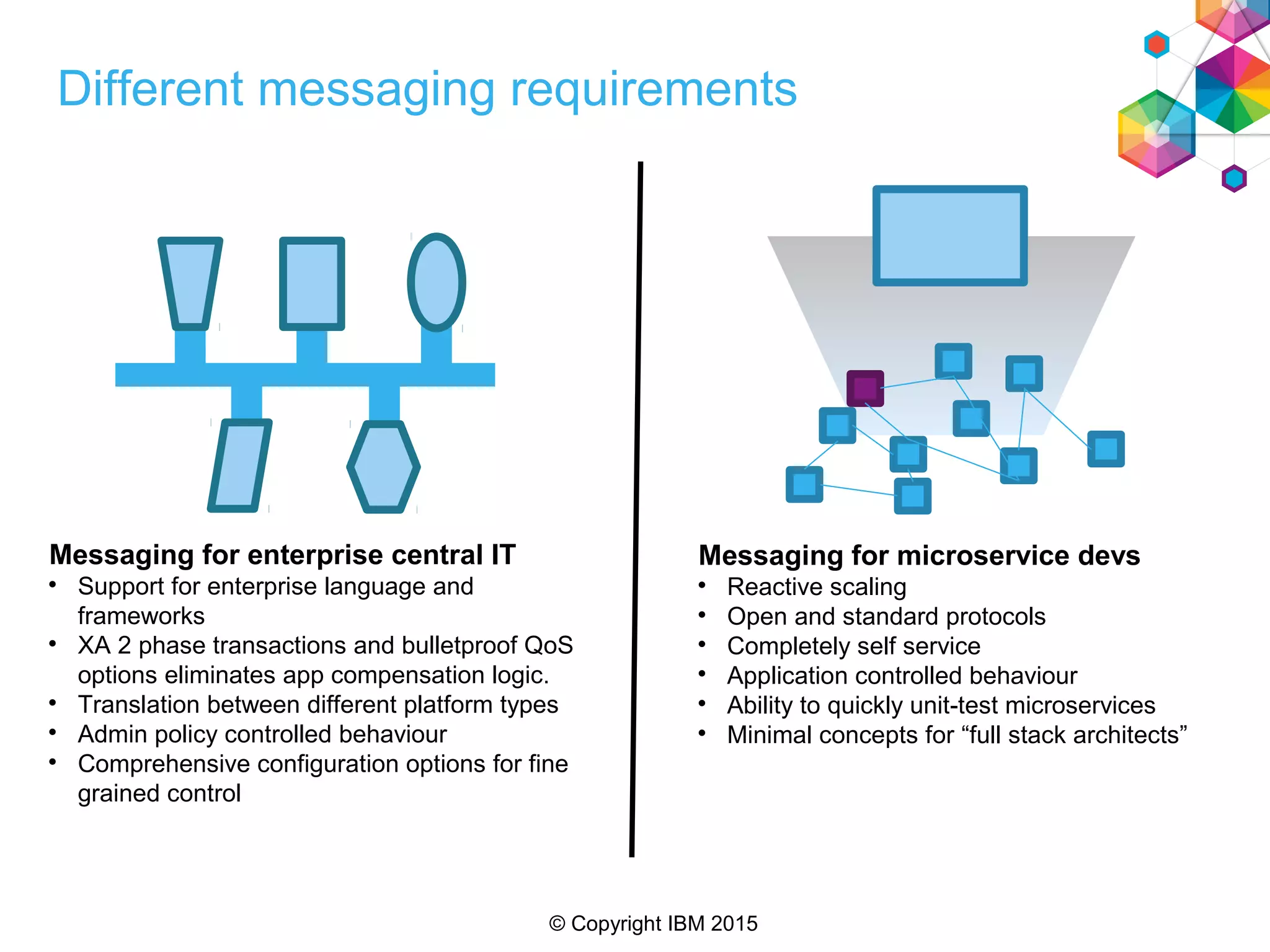
Different messaging requirements
Messaging for enterprise central IT

Support for enterprise language and
frameworks

XA 2 phase transactions and bulletproof QoS
options eliminates app compensation logic.

Translation between different platform types

Admin policy controlled behaviour

Comprehensive configuration options for fine
grained control
Messaging for microservice devs

Reactive scaling

Open and standard protocols

Completely self service

Application controlled behaviour

Ability to quickly unit-test microservices

Minimal concepts for “full stack architects”
© Copyright IBM 2015
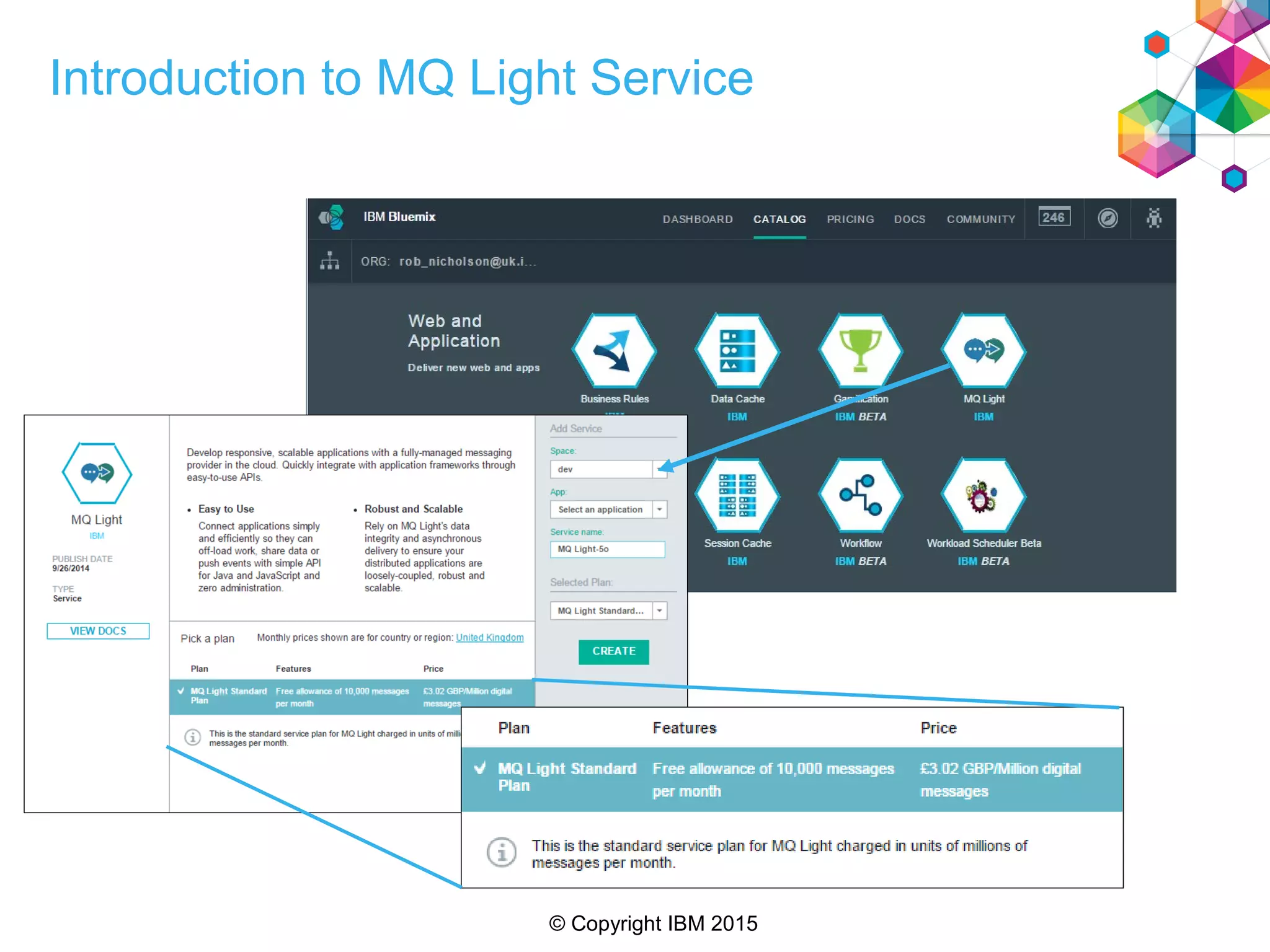
Introduction to MQ Light Service
© Copyright IBM 2015
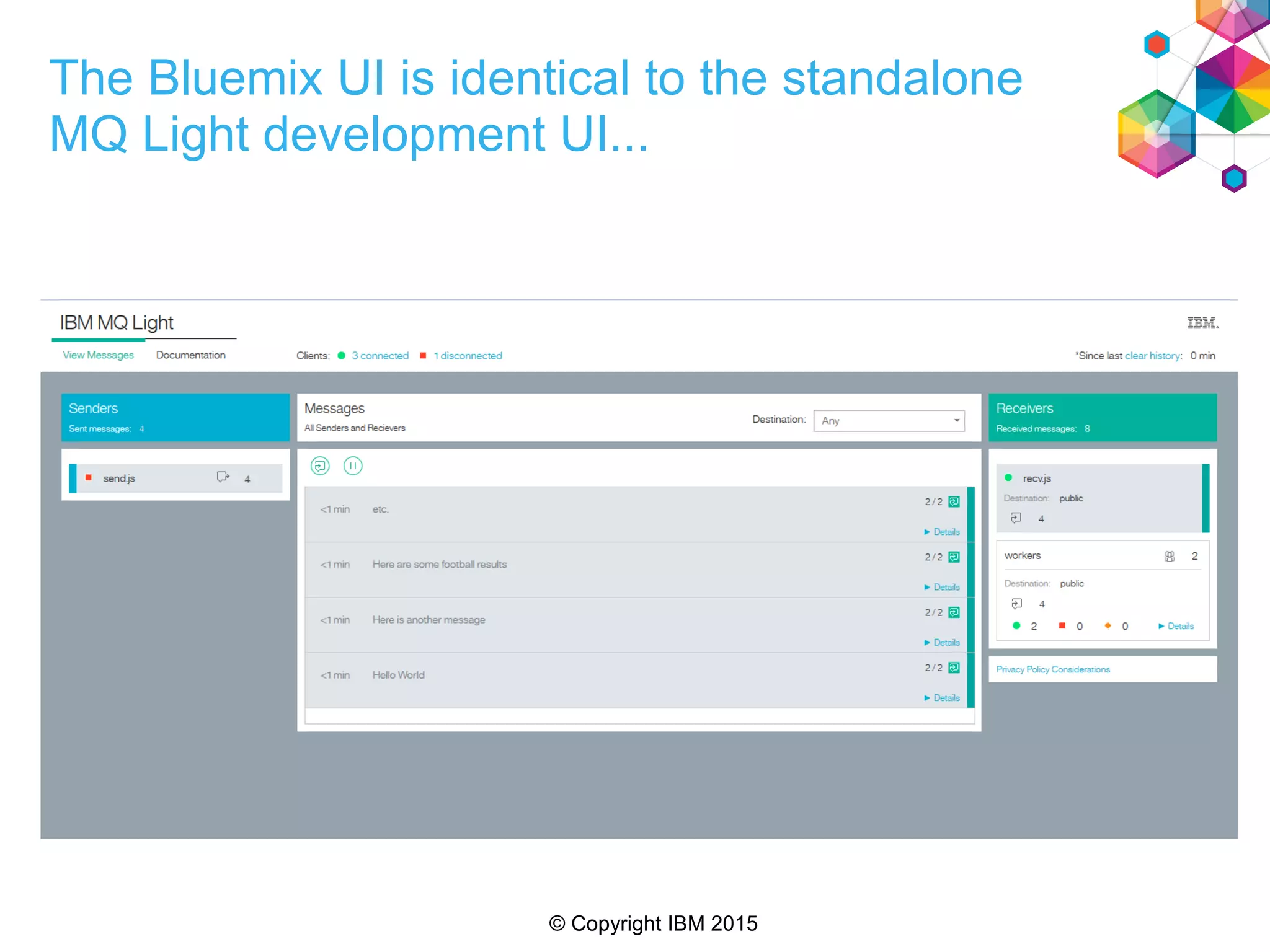
The Bluemix UI is identical to the standalone
MQ Light development UI...
© Copyright IBM 2015
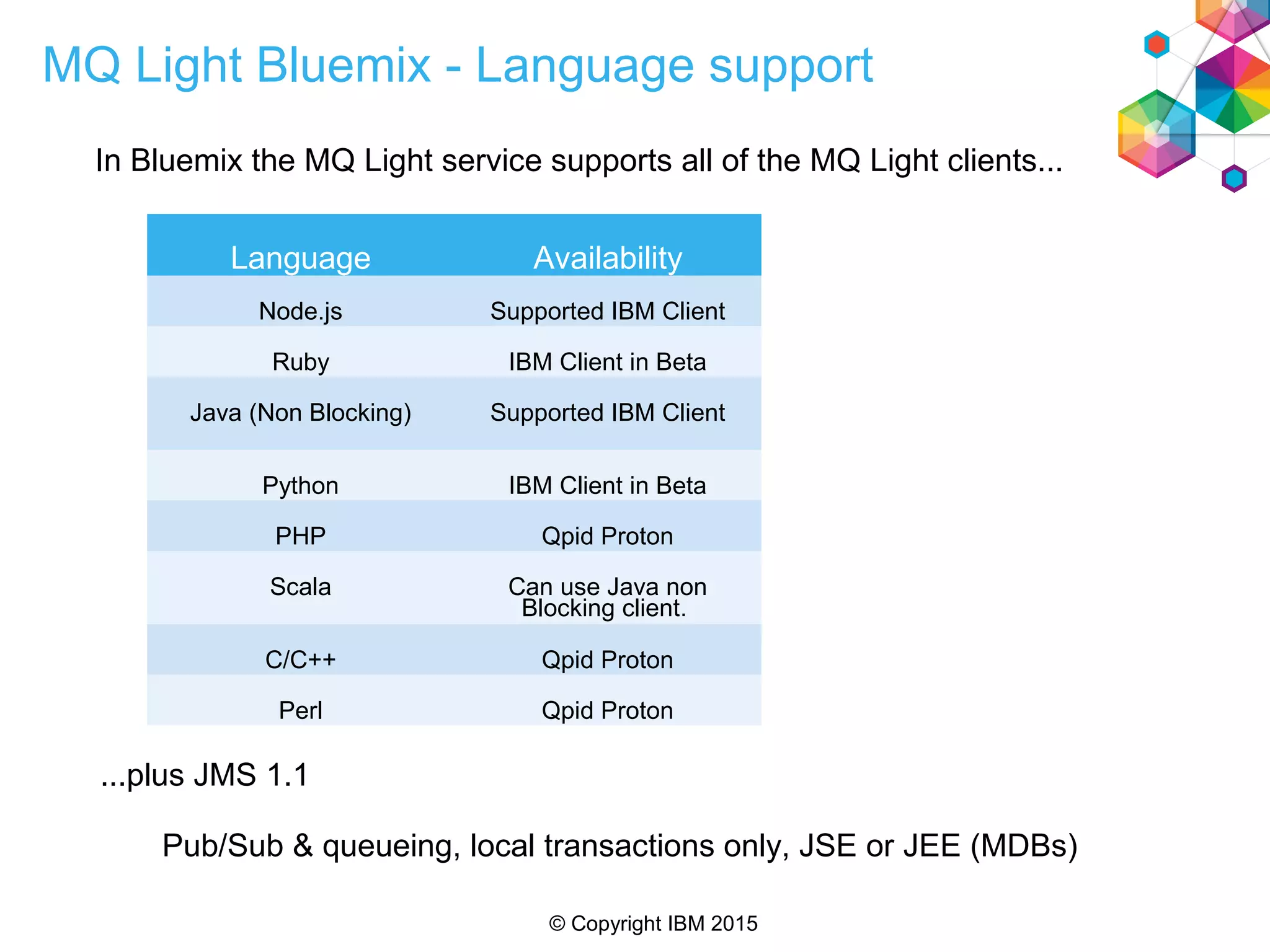
MQ Light Bluemix - Language support
In Bluemix the MQ Light service supports all of the MQ Light clients...
...plus JMS 1.1
Pub/Sub & queueing, local transactions only, JSE or JEE (MDBs)
Language Availability
Node.js Supported IBM Client
Ruby IBM Client in Beta
Java (Non Blocking) Supported IBM Client
Python IBM Client in Beta
PHP Qpid Proton
Scala Can use Java non
Blocking client.
C/C++ Qpid Proton
Perl Qpid Proton
© Copyright IBM 2015
Agenda
• An overview of MQ Light
• How MQ Light works in Bluemix
• Running MQ Light applications in your MQ environment
© Copyright IBM 2015
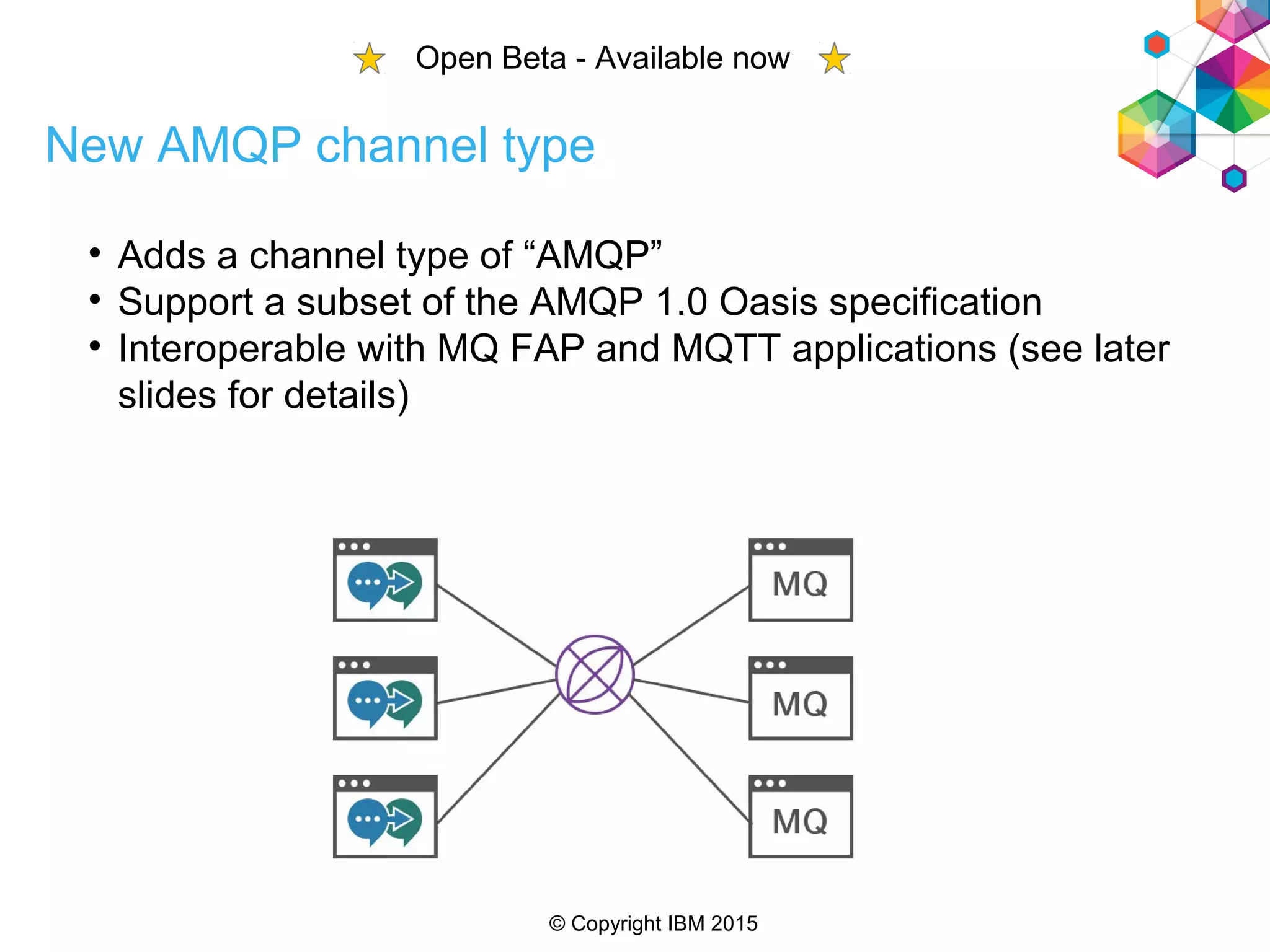
New AMQP channel type

Adds a channel type of “AMQP”

Support a subset of the AMQP 1.0 Oasis specification

Interoperable with MQ FAP and MQTT applications (see later
slides for details)
Open Beta - Available now
© Copyright IBM 2015
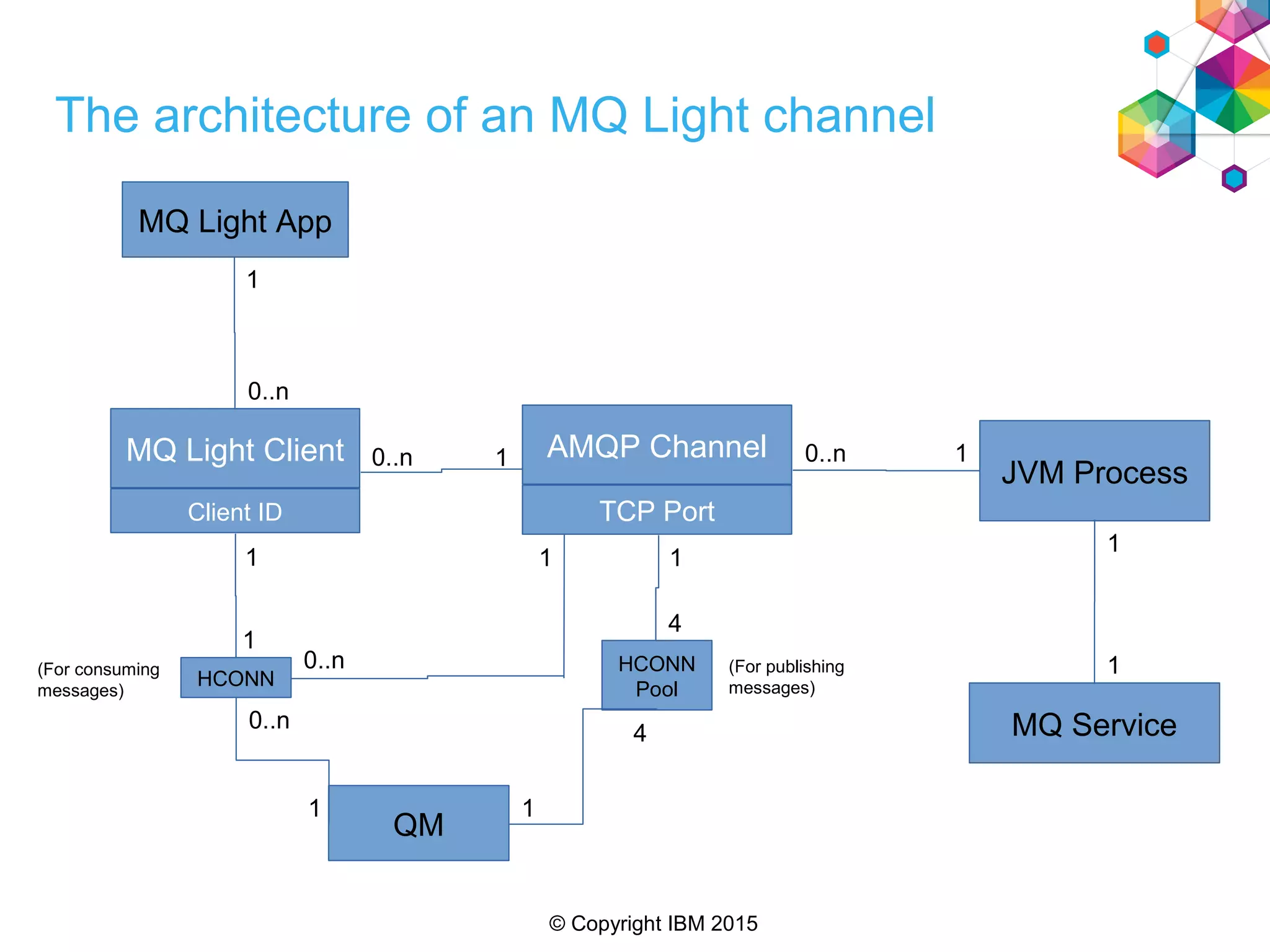
JVM Process
AMQP Channel
TCP Port
MQ Service
MQ Light Client
Client ID
QM
HCONN
0..n 1
1
1
0..n
1
1
MQ Light App
1
0..n
0..n
10..n
1
1(For consuming
messages)
HCONN
Pool
(For publishing
messages)
1
4
4
1
The architecture of an MQ Light channel
© Copyright IBM 2015
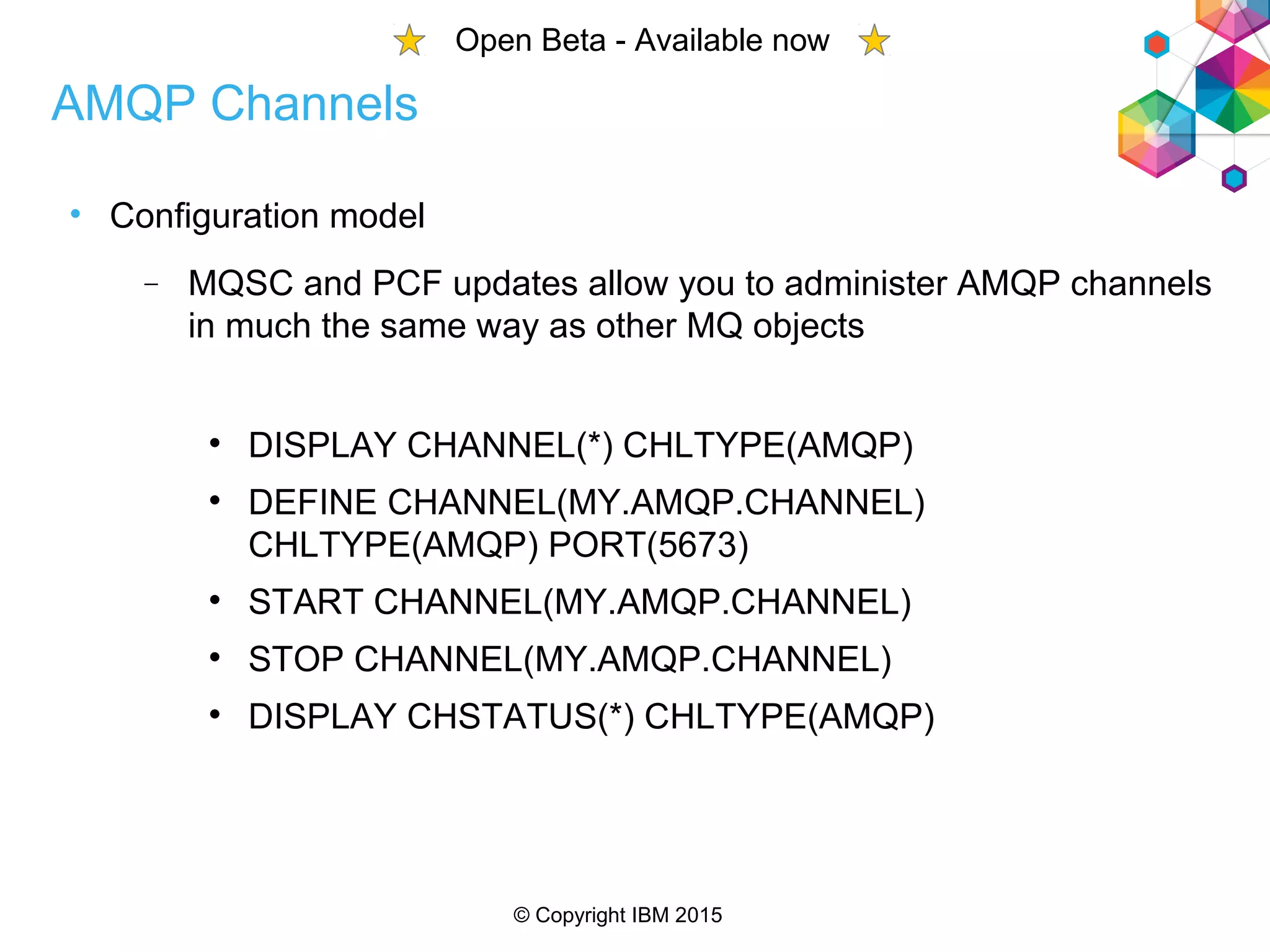
• Configuration model
 MQSC and PCF updates allow you to administer AMQP channels
in much the same way as other MQ objects

DISPLAY CHANNEL(*) CHLTYPE(AMQP)

DEFINE CHANNEL(MY.AMQP.CHANNEL)
CHLTYPE(AMQP) PORT(5673)

START CHANNEL(MY.AMQP.CHANNEL)

STOP CHANNEL(MY.AMQP.CHANNEL)

DISPLAY CHSTATUS(*) CHLTYPE(AMQP)
AMQP Channels
Open Beta - Available now
© Copyright IBM 2015
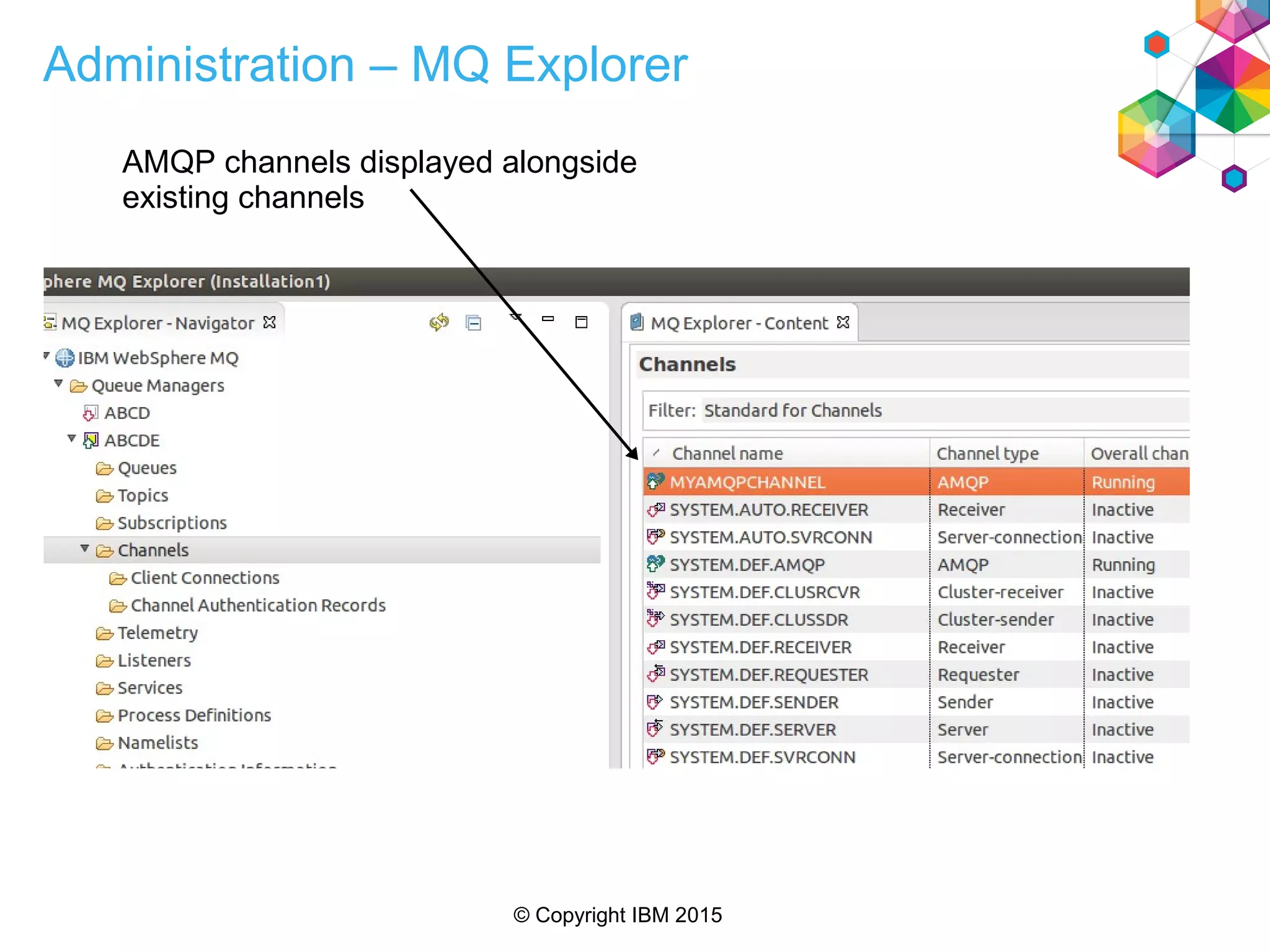
Administration – MQ Explorer
AMQP channels displayed alongside
existing channels
© Copyright IBM 2015
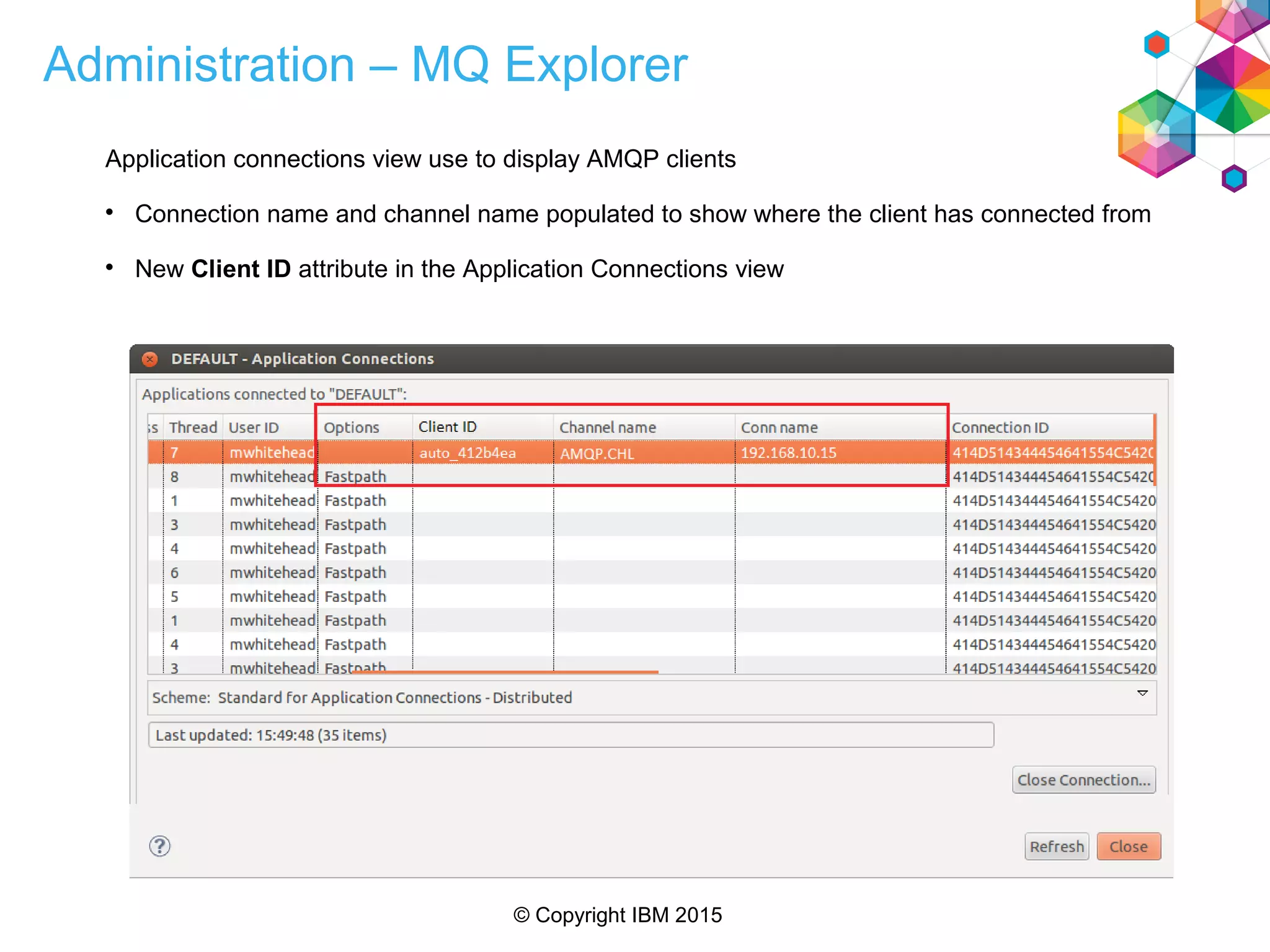
Administration – MQ Explorer
Application connections view use to display AMQP clients

Connection name and channel name populated to show where the client has connected from

New Client ID attribute in the Application Connections view
© Copyright IBM 2015
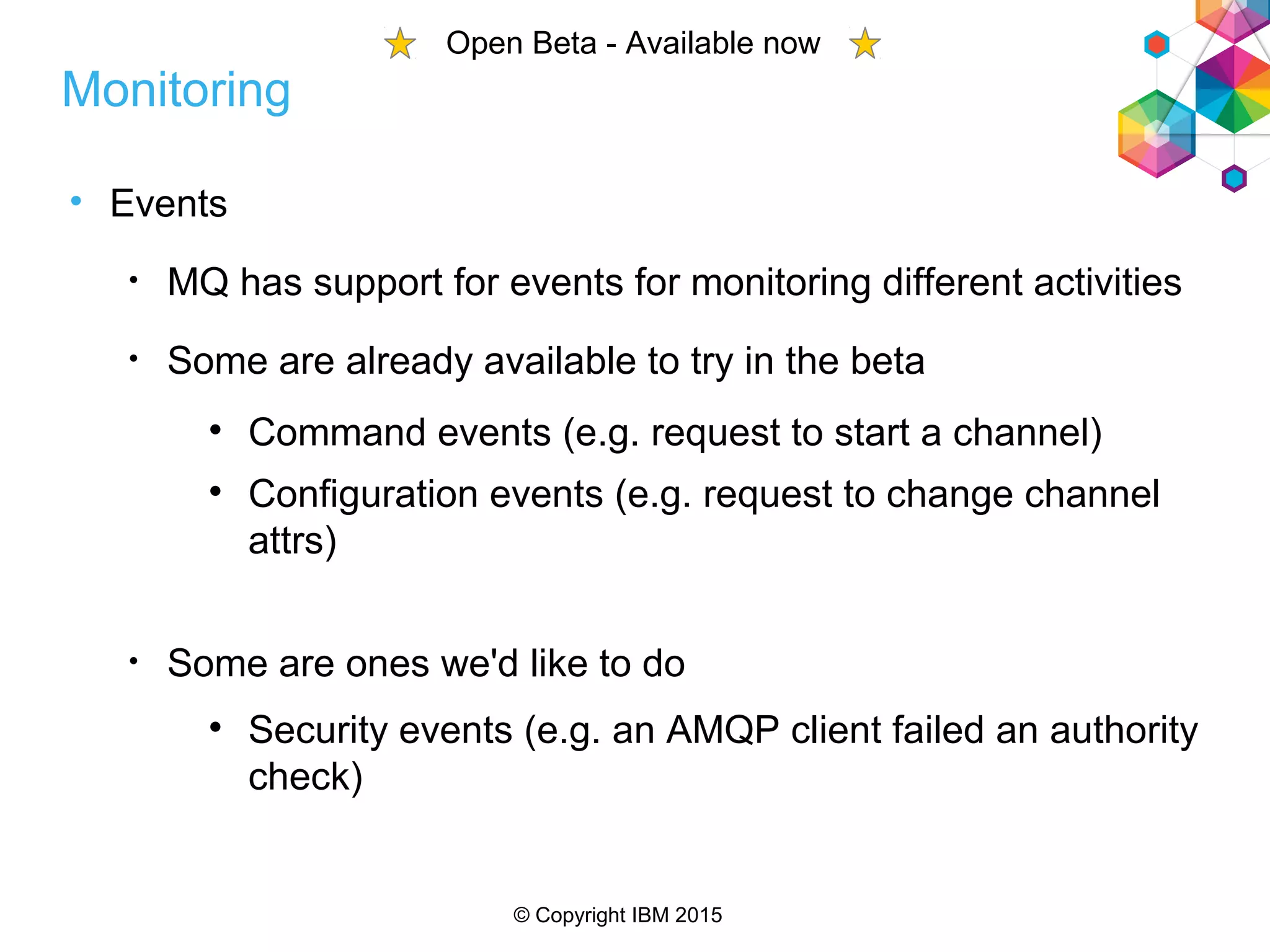
• Events
• MQ has support for events for monitoring different activities
• Some are already available to try in the beta

Command events (e.g. request to start a channel)

Configuration events (e.g. request to change channel
attrs)
• Some are ones we'd like to do

Security events (e.g. an AMQP client failed an authority
check)
Monitoring
Open Beta - Available now
© Copyright IBM 2015
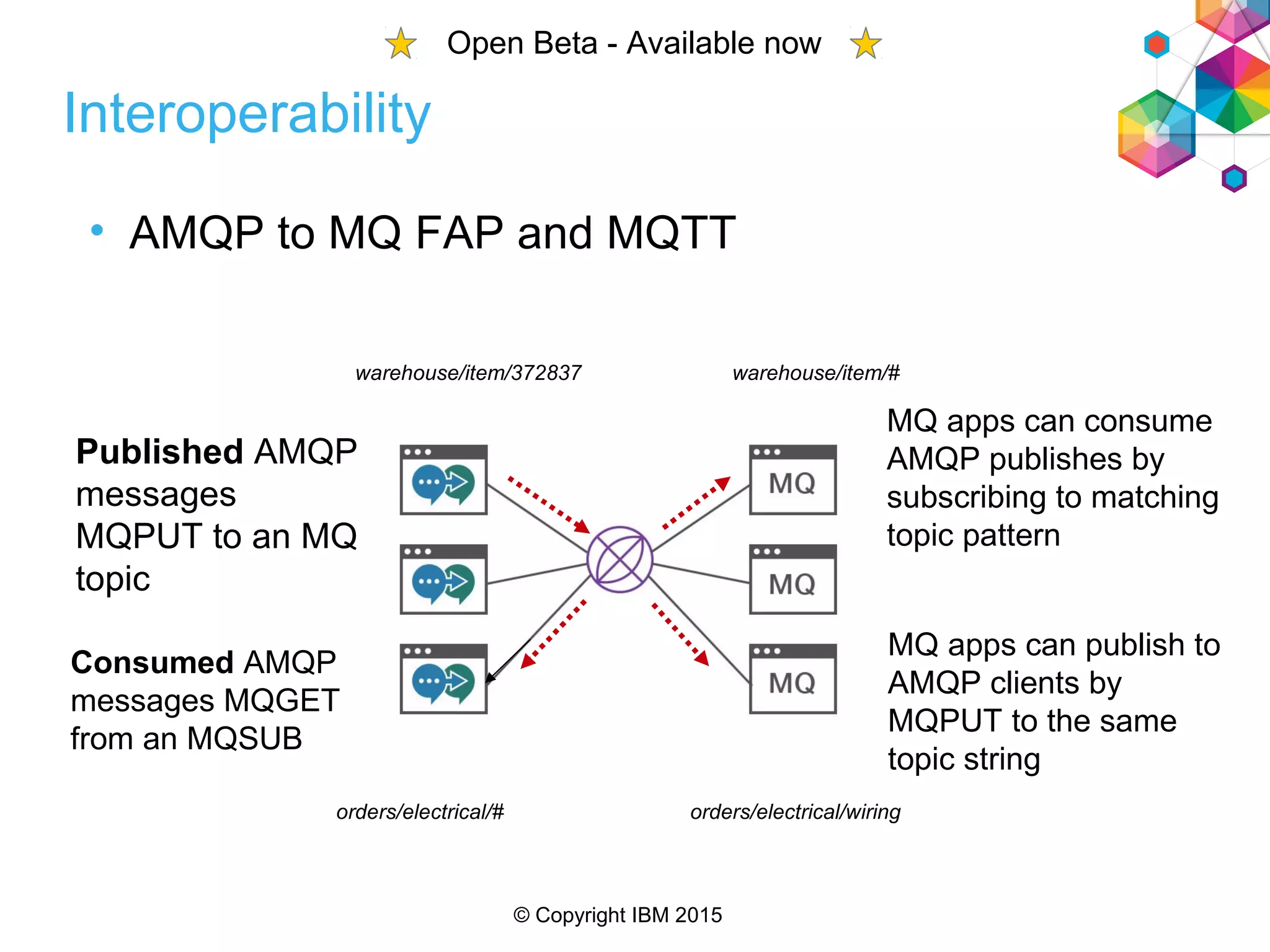
• AMQP to MQ FAP and MQTT
Published AMQP
messages
MQPUT to an MQ
topic
Consumed AMQP
messages MQGET
from an MQSUB
MQ apps can publish to
AMQP clients by
MQPUT to the same
topic string
MQ apps can consume
AMQP publishes by
subscribing to matching
topic pattern
warehouse/item/372837 warehouse/item/#
orders/electrical/# orders/electrical/wiring
Interoperability
Open Beta - Available now
© Copyright IBM 2015
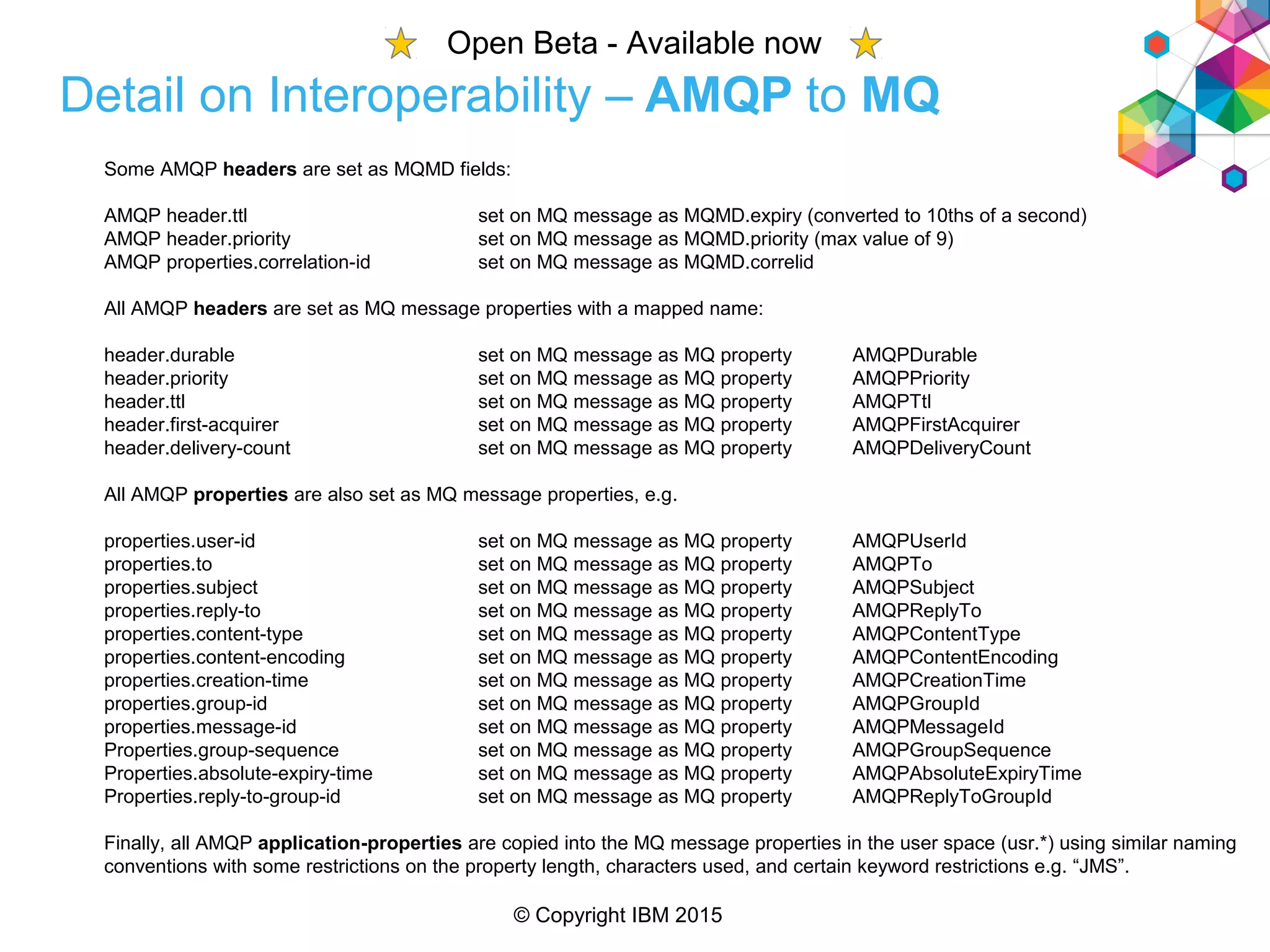
Detail on Interoperability – AMQP to MQ
Some AMQP headers are set as MQMD fields:
AMQP header.ttl set on MQ message as MQMD.expiry (converted to 10ths of a second)
AMQP header.priority set on MQ message as MQMD.priority (max value of 9)
AMQP properties.correlation-id set on MQ message as MQMD.correlid
All AMQP headers are set as MQ message properties with a mapped name:
header.durable set on MQ message as MQ property AMQPDurable
header.priority set on MQ message as MQ property AMQPPriority
header.ttl set on MQ message as MQ property AMQPTtl
header.first-acquirer set on MQ message as MQ property AMQPFirstAcquirer
header.delivery-count set on MQ message as MQ property AMQPDeliveryCount
All AMQP properties are also set as MQ message properties, e.g.
properties.user-id set on MQ message as MQ property AMQPUserId
properties.to set on MQ message as MQ property AMQPTo
properties.subject set on MQ message as MQ property AMQPSubject
properties.reply-to set on MQ message as MQ property AMQPReplyTo
properties.content-type set on MQ message as MQ property AMQPContentType
properties.content-encoding set on MQ message as MQ property AMQPContentEncoding
properties.creation-time set on MQ message as MQ property AMQPCreationTime
properties.group-id set on MQ message as MQ property AMQPGroupId
properties.message-id set on MQ message as MQ property AMQPMessageId
Properties.group-sequence set on MQ message as MQ property AMQPGroupSequence
Properties.absolute-expiry-time set on MQ message as MQ property AMQPAbsoluteExpiryTime
Properties.reply-to-group-id set on MQ message as MQ property AMQPReplyToGroupId
Finally, all AMQP application-properties are copied into the MQ message properties in the user space (usr.*) using similar naming
conventions with some restrictions on the property length, characters used, and certain keyword restrictions e.g. “JMS”.
Open Beta - Available now
© Copyright IBM 2015
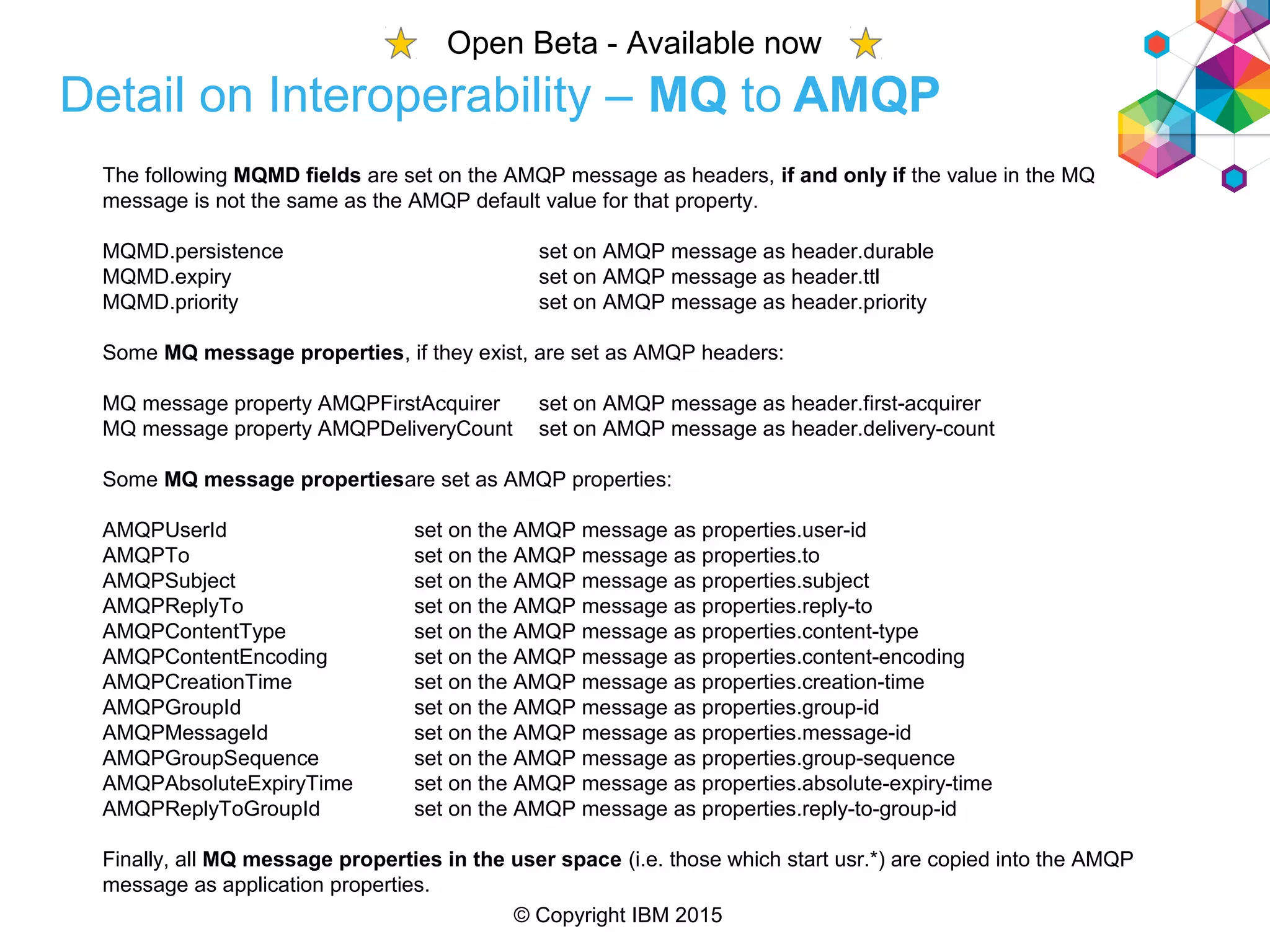
Detail on Interoperability – MQ to AMQP
The following MQMD fields are set on the AMQP message as headers, if and only if the value in the MQ
message is not the same as the AMQP default value for that property.
MQMD.persistence set on AMQP message as header.durable
MQMD.expiry set on AMQP message as header.ttl
MQMD.priority set on AMQP message as header.priority
Some MQ message properties, if they exist, are set as AMQP headers:
MQ message property AMQPFirstAcquirer set on AMQP message as header.first-acquirer
MQ message property AMQPDeliveryCount set on AMQP message as header.delivery-count
Some MQ message propertiesare set as AMQP properties:
AMQPUserId set on the AMQP message as properties.user-id
AMQPTo set on the AMQP message as properties.to
AMQPSubject set on the AMQP message as properties.subject
AMQPReplyTo set on the AMQP message as properties.reply-to
AMQPContentType set on the AMQP message as properties.content-type
AMQPContentEncoding set on the AMQP message as properties.content-encoding
AMQPCreationTime set on the AMQP message as properties.creation-time
AMQPGroupId set on the AMQP message as properties.group-id
AMQPMessageId set on the AMQP message as properties.message-id
AMQPGroupSequence set on the AMQP message as properties.group-sequence
AMQPAbsoluteExpiryTime set on the AMQP message as properties.absolute-expiry-time
AMQPReplyToGroupId set on the AMQP message as properties.reply-to-group-id
Finally, all MQ message properties in the user space (i.e. those which start usr.*) are copied into the AMQP
message as application properties.
Open Beta - Available now
© Copyright IBM 2015
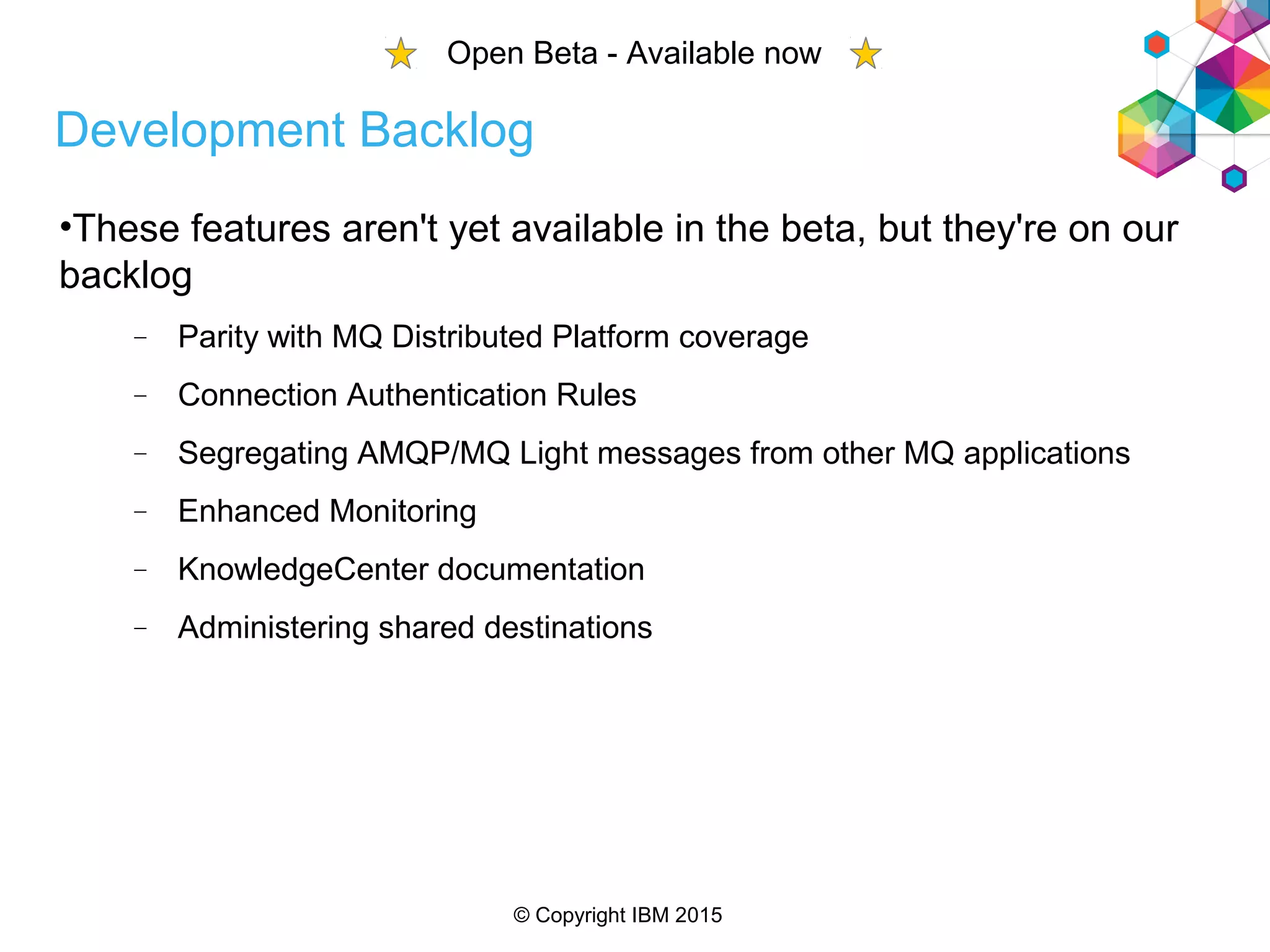
Development Backlog
•These features aren't yet available in the beta, but they're on our
backlog
 Parity with MQ Distributed Platform coverage
 Connection Authentication Rules
 Segregating AMQP/MQ Light messages from other MQ applications
 Enhanced Monitoring
 KnowledgeCenter documentation
 Administering shared destinations
Open Beta - Available now
© Copyright IBM 2015
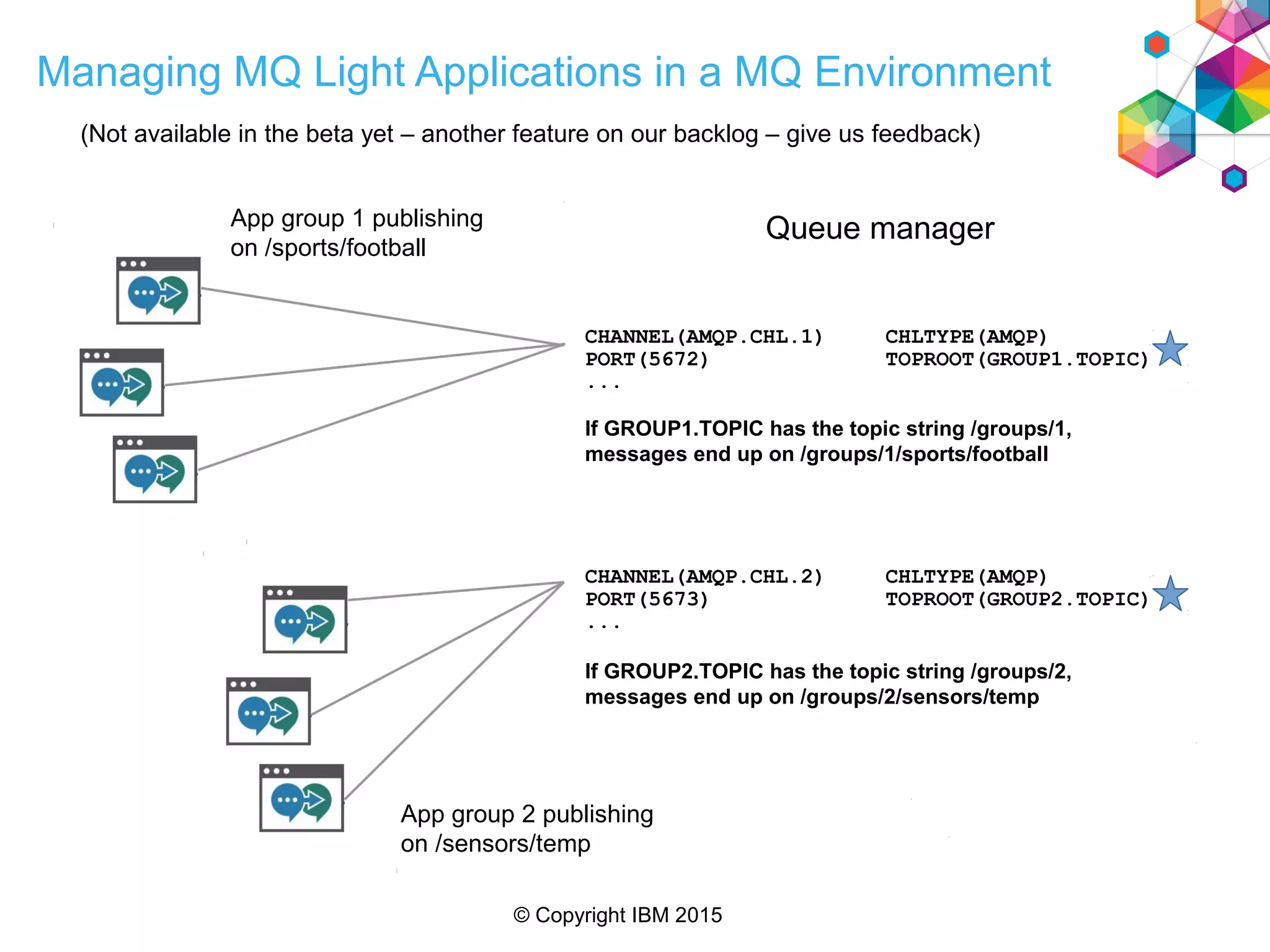
Managing MQ Light Applications in a MQ Environment
Queue managerApp group 1 publishing
on /sports/football
CHANNEL(AMQP.CHL.1) CHLTYPE(AMQP)
PORT(5672) TOPROOT(GROUP1.TOPIC)
...
If GROUP1.TOPIC has the topic string /groups/1,
messages end up on /groups/1/sports/football
App group 2 publishing
on /sensors/temp
CHANNEL(AMQP.CHL.2) CHLTYPE(AMQP)
PORT(5673) TOPROOT(GROUP2.TOPIC)
...
If GROUP2.TOPIC has the topic string /groups/2,
messages end up on /groups/2/sensors/temp
(Not available in the beta yet – another feature on our backlog – give us feedback)
Copyright IBM 2015
Thank You
Questions?
MQ Light website
developer.ibm.com/messaging/
mq-light
IBM Bluemix website
bluemix.net
MQ beta for MQ Light (AMQP channel)
www.ibm.com/developerworks/community/
blogs/messaging
Watch the demo - Google “MQ Light Walk Through You Tube”

Mq light, mq, and bluemix web sphere user group july 2015

  • 1.
    Copyright IBM 2015 MQLight, Bluemix, and MQ WebSphere Integration User Group July 2015 Matt Whitehead MQ/MQ Light Dev Team
  • 2.
    © Copyright IBM2015 Please Note: • IBM’s statements regarding its plans, directions, and intent are subject to change or withdrawal without notice at IBM’s sole discretion. • Information regarding potential future products is intended to outline our general product direction and it should not be relied on in making a purchasing decision. • The information mentioned regarding potential future products is not a commitment, promise, or legal obligation to deliver any material, code or functionality. Information about potential future products may not be incorporated into any contract. • The development, release, and timing of any future features or functionality described for our products remains at our sole discretion. Performance is based on measurements and projections using standard IBM benchmarks in a controlled environment. The actual throughput or performance that any user will experience will vary depending upon many factors, including considerations such as the amount of multiprogramming in the user’s job stream, the I/O configuration, the storage configuration, and the workload processed. Therefore, no assurance can be given that an individual user will achieve results similar to those stated here.
  • 3.
    © Copyright IBM2015 Agenda • An overview of MQ Light • How MQ Light works in Bluemix • Running MQ Light applications in your MQ environment
  • 4.
    © Copyright IBM2015 Agenda • An overview of MQ Light • How MQ Light works in Bluemix • Running MQ Light applications in your MQ environment
  • 5.
    © Copyright IBM2015 The journey that got us here Andy Developer Iain Infrastructure Guy I want to execute code without taxing my Web app processes My job is to run a communications service for my customers’ apps Some Thing My Apps Workers Messaging Backbone My Customers’ Apps
  • 6.
    © Copyright IBM2015 Use cases Connecting external systems Event driven Worker offload • Posting video to multiple social sites after transcoding • Respond to external events • Updating external booking app • Posting updates to twitter • Image processing • Text analytics
  • 7.
    © Copyright IBM2015 Trend in Cloud Application Architecture ...towards… Delivering global scale applications with unprecedented agility by de-composing apps into a microservices architecture Large monolithic Applications Moving away from… Large applications with single develop, test, deploy cycles using single technology stacks (2-pizza sized teams)
  • 8.
    © Copyright IBM2015 First Five Minute Experience • Download and get coding within 5 minutes – Linux-x86-64, Windows7 64 bit, Mac OSX – Unzip install – Unlimited time developer license (unsupported). • No administration; just code and go • API client libraries installed using language package manager • Tutorials and examples in their languages, relevant to actual use
  • 9.
    © Copyright IBM2015 Tooling to assist development • Used to answer questions like : • Where did this message come from? • Where did that message go? • What messages has my app consumed? 9
  • 10.
    © Copyright IBM2015 MQ Light Messaging Model – Send Messages Applications send messages to a topic. A topic is an address in the topic space either flat or arranged hierarchically. 1. Send (‘/test/a’, “Hello”); 2. Send (‘/test/a’, “World!”); Topic Address Space Sender application
  • 11.
    © Copyright IBM2015 MQ Light Messaging Model – Simple Receive • Applications receive messages by creating a destination with a pattern which matches the topics they are interested in. • Pattern matching scheme based on WMQ. 1. Send (‘/test/a’, “Hello”); 2. Send (‘/test/a’, “World!”); 1. Hello 2. World! Topic Address Space Sender application DESTINATION Pattern=/test/a
  • 12.
    © Copyright IBM2015 MQ Light Messaging Model – Pub/Sub • Multiple destinations can be created which match the same topic • Pub/Sub style. DESTINATION 1. Send (‘/test/a’, “Hello”); 2. Send (‘/test/a’, “World!”); 1. Hello 2. World! 1. Hello 2. World! Topic Address Space Sender application DESTINATION Pattern=/test/a Pattern=/test/# Client 1 Client 2
  • 13.
    © Copyright IBM2015 MQ Light Messaging Model – Persistent destinations • Destinations persist for a defined “time to live” after receiver detaches. 1. Send (‘/test/a’, “Hello”); 2. Send (‘/test/a’, “World!”); Topic Address Space Sender application Hello World! DESTINATION Pattern=/test/a Disconnected client
  • 14.
    © Copyright IBM2015 MQ Light Messaging Model – Sharing • Clients attaching to the same topic pattern and share name attach to the same shared destination. DESTINATION1. Send (‘/test/a’, “Hello”); 2. Send (‘/test/a’, “World!”); 1. Hello 2. World! 1. Hello 2. World! SHARING Topic Address Space Sender application DESTINATION Pattern=/test/# Pattern=/test/# Share=myshare Client 1 Client 2 Client 3
  • 15.
    © Copyright IBM2015 MQ Light Messaging Model – Client takeover 1. Send (‘/test/a’, “Hello”); Hello Topic Address Space Sender application DESTINATION Pattern=/test/# Client 1 World! Client 1 2. Send (‘/test/a’, “World!”); • Applications connect to MQ Light service specify (optional) client ID. • Re-using the same client ID pre-empts the original connection. • Ideal for worker takeover in the cloud.
  • 16.
    © Copyright IBM2015 MQ Light Messaging Model • Messages • Payload is either Text or Binary. • Content-type is used by clients to transfer JSON • Per message time to live. • Message delivery model • At most once delivery (QoS 0) • At least once delivery (QoS 1) • Acknowledge & Reject messages • Control over the number of unacknowledged messages delivered
  • 17.
    © Copyright IBM2015 Programming languages Language Availability Notes Node.js Supported IBM Client Ruby IBM Client in Beta Java (Non Blocking) Supported IBM Client Python IBM Client in Beta PHP Qpid Proton Scala Can use Java non Blocking client. Forum users report this working. C/C++ Qpid Proton Perl Qpid Proton
  • 18.
    © Copyright IBM2015 Deployment Options MQ Light Service for Bluemix IBM MQ [open Beta] MQ Light
  • 19.
    © Copyright IBM2015 MQ Light Image DockerHub Registry
  • 20.
    © Copyright IBM2015 Agenda • An overview of MQ Light • How MQ Light works in Bluemix • Running MQ Light applications in your MQ environment
  • 21.
    © Copyright IBM2015 IBM Bluemix Bluemix is an open-standards, cloud-based platform for building, running, and managing applications. Build your apps, your way Use the most prominent compute technologies to power your app: Cloud Foundry, Docker, OpenStack. Extend apps with services A catalog of IBM, third party, and open source services allow the developer to stitch an application together quickly. Scale more than just instances Development, monitoring, deployment, and logging tools allow the developer to run and manage the entire application. Layered Security IBM secures the platform and infrastructure and provides you with the tools to secure your apps. Deploy and manage hybrid apps seamlessly Get a seamless dev and management experience across a number of hybrid implementations options. Flexible Pricing Try compute options and services for free and, when you’re ready, pay only for what you use. Pay as you go and subscription models offer choice and flexibility.
  • 22.
    © Copyright IBM2015 Single tenant hardware that’s completely dedicated to you – allowing you to satisfy regulatory & legal compliance. Dedicated Public Local • The Bluemix platform and dedicated runtimes and services sit on SoftLayer hardware that is dedicated to you • You still have the ability to connect to all multi-tenant services in the “public” catalog • Integrated to your LDAP for developer authentication • Elastic capacity based on your demands. What it means Has a “Dedicated to You” option
  • 23.
    © Copyright IBM2015 Different messaging requirements Messaging for enterprise central IT  Support for enterprise language and frameworks  XA 2 phase transactions and bulletproof QoS options eliminates app compensation logic.  Translation between different platform types  Admin policy controlled behaviour  Comprehensive configuration options for fine grained control Messaging for microservice devs  Reactive scaling  Open and standard protocols  Completely self service  Application controlled behaviour  Ability to quickly unit-test microservices  Minimal concepts for “full stack architects”
  • 24.
    © Copyright IBM2015 Introduction to MQ Light Service
  • 25.
    © Copyright IBM2015 The Bluemix UI is identical to the standalone MQ Light development UI...
  • 26.
    © Copyright IBM2015 MQ Light Bluemix - Language support In Bluemix the MQ Light service supports all of the MQ Light clients... ...plus JMS 1.1 Pub/Sub & queueing, local transactions only, JSE or JEE (MDBs) Language Availability Node.js Supported IBM Client Ruby IBM Client in Beta Java (Non Blocking) Supported IBM Client Python IBM Client in Beta PHP Qpid Proton Scala Can use Java non Blocking client. C/C++ Qpid Proton Perl Qpid Proton
  • 27.
    © Copyright IBM2015 Agenda • An overview of MQ Light • How MQ Light works in Bluemix • Running MQ Light applications in your MQ environment
  • 28.
    © Copyright IBM2015 New AMQP channel type  Adds a channel type of “AMQP”  Support a subset of the AMQP 1.0 Oasis specification  Interoperable with MQ FAP and MQTT applications (see later slides for details) Open Beta - Available now
  • 29.
    © Copyright IBM2015 JVM Process AMQP Channel TCP Port MQ Service MQ Light Client Client ID QM HCONN 0..n 1 1 1 0..n 1 1 MQ Light App 1 0..n 0..n 10..n 1 1(For consuming messages) HCONN Pool (For publishing messages) 1 4 4 1 The architecture of an MQ Light channel
  • 30.
    © Copyright IBM2015 • Configuration model  MQSC and PCF updates allow you to administer AMQP channels in much the same way as other MQ objects  DISPLAY CHANNEL(*) CHLTYPE(AMQP)  DEFINE CHANNEL(MY.AMQP.CHANNEL) CHLTYPE(AMQP) PORT(5673)  START CHANNEL(MY.AMQP.CHANNEL)  STOP CHANNEL(MY.AMQP.CHANNEL)  DISPLAY CHSTATUS(*) CHLTYPE(AMQP) AMQP Channels Open Beta - Available now
  • 31.
    © Copyright IBM2015 Administration – MQ Explorer AMQP channels displayed alongside existing channels
  • 32.
    © Copyright IBM2015 Administration – MQ Explorer Application connections view use to display AMQP clients  Connection name and channel name populated to show where the client has connected from  New Client ID attribute in the Application Connections view
  • 33.
    © Copyright IBM2015 • Events • MQ has support for events for monitoring different activities • Some are already available to try in the beta  Command events (e.g. request to start a channel)  Configuration events (e.g. request to change channel attrs) • Some are ones we'd like to do  Security events (e.g. an AMQP client failed an authority check) Monitoring Open Beta - Available now
  • 34.
    © Copyright IBM2015 • AMQP to MQ FAP and MQTT Published AMQP messages MQPUT to an MQ topic Consumed AMQP messages MQGET from an MQSUB MQ apps can publish to AMQP clients by MQPUT to the same topic string MQ apps can consume AMQP publishes by subscribing to matching topic pattern warehouse/item/372837 warehouse/item/# orders/electrical/# orders/electrical/wiring Interoperability Open Beta - Available now
  • 35.
    © Copyright IBM2015 Detail on Interoperability – AMQP to MQ Some AMQP headers are set as MQMD fields: AMQP header.ttl set on MQ message as MQMD.expiry (converted to 10ths of a second) AMQP header.priority set on MQ message as MQMD.priority (max value of 9) AMQP properties.correlation-id set on MQ message as MQMD.correlid All AMQP headers are set as MQ message properties with a mapped name: header.durable set on MQ message as MQ property AMQPDurable header.priority set on MQ message as MQ property AMQPPriority header.ttl set on MQ message as MQ property AMQPTtl header.first-acquirer set on MQ message as MQ property AMQPFirstAcquirer header.delivery-count set on MQ message as MQ property AMQPDeliveryCount All AMQP properties are also set as MQ message properties, e.g. properties.user-id set on MQ message as MQ property AMQPUserId properties.to set on MQ message as MQ property AMQPTo properties.subject set on MQ message as MQ property AMQPSubject properties.reply-to set on MQ message as MQ property AMQPReplyTo properties.content-type set on MQ message as MQ property AMQPContentType properties.content-encoding set on MQ message as MQ property AMQPContentEncoding properties.creation-time set on MQ message as MQ property AMQPCreationTime properties.group-id set on MQ message as MQ property AMQPGroupId properties.message-id set on MQ message as MQ property AMQPMessageId Properties.group-sequence set on MQ message as MQ property AMQPGroupSequence Properties.absolute-expiry-time set on MQ message as MQ property AMQPAbsoluteExpiryTime Properties.reply-to-group-id set on MQ message as MQ property AMQPReplyToGroupId Finally, all AMQP application-properties are copied into the MQ message properties in the user space (usr.*) using similar naming conventions with some restrictions on the property length, characters used, and certain keyword restrictions e.g. “JMS”. Open Beta - Available now
  • 36.
    © Copyright IBM2015 Detail on Interoperability – MQ to AMQP The following MQMD fields are set on the AMQP message as headers, if and only if the value in the MQ message is not the same as the AMQP default value for that property. MQMD.persistence set on AMQP message as header.durable MQMD.expiry set on AMQP message as header.ttl MQMD.priority set on AMQP message as header.priority Some MQ message properties, if they exist, are set as AMQP headers: MQ message property AMQPFirstAcquirer set on AMQP message as header.first-acquirer MQ message property AMQPDeliveryCount set on AMQP message as header.delivery-count Some MQ message propertiesare set as AMQP properties: AMQPUserId set on the AMQP message as properties.user-id AMQPTo set on the AMQP message as properties.to AMQPSubject set on the AMQP message as properties.subject AMQPReplyTo set on the AMQP message as properties.reply-to AMQPContentType set on the AMQP message as properties.content-type AMQPContentEncoding set on the AMQP message as properties.content-encoding AMQPCreationTime set on the AMQP message as properties.creation-time AMQPGroupId set on the AMQP message as properties.group-id AMQPMessageId set on the AMQP message as properties.message-id AMQPGroupSequence set on the AMQP message as properties.group-sequence AMQPAbsoluteExpiryTime set on the AMQP message as properties.absolute-expiry-time AMQPReplyToGroupId set on the AMQP message as properties.reply-to-group-id Finally, all MQ message properties in the user space (i.e. those which start usr.*) are copied into the AMQP message as application properties. Open Beta - Available now
  • 37.
    © Copyright IBM2015 Development Backlog •These features aren't yet available in the beta, but they're on our backlog  Parity with MQ Distributed Platform coverage  Connection Authentication Rules  Segregating AMQP/MQ Light messages from other MQ applications  Enhanced Monitoring  KnowledgeCenter documentation  Administering shared destinations Open Beta - Available now
  • 38.
    © Copyright IBM2015 Managing MQ Light Applications in a MQ Environment Queue managerApp group 1 publishing on /sports/football CHANNEL(AMQP.CHL.1) CHLTYPE(AMQP) PORT(5672) TOPROOT(GROUP1.TOPIC) ... If GROUP1.TOPIC has the topic string /groups/1, messages end up on /groups/1/sports/football App group 2 publishing on /sensors/temp CHANNEL(AMQP.CHL.2) CHLTYPE(AMQP) PORT(5673) TOPROOT(GROUP2.TOPIC) ... If GROUP2.TOPIC has the topic string /groups/2, messages end up on /groups/2/sensors/temp (Not available in the beta yet – another feature on our backlog – give us feedback)
  • 39.
    Copyright IBM 2015 ThankYou Questions? MQ Light website developer.ibm.com/messaging/ mq-light IBM Bluemix website bluemix.net MQ beta for MQ Light (AMQP channel) www.ibm.com/developerworks/community/ blogs/messaging Watch the demo - Google “MQ Light Walk Through You Tube”